
このテンプレートを使用してください
Every change lands differently on different people. A new ERP might change almost nothing for the sales team, transform the work of accounts payable, and quietly add approval steps for every manager. If you plan communication and training without knowing that, you either overload people who aren't affected or underprepare the ones who are. A change impact assessment template shows exactly who is affected, how much and in what way, so the rest of your change plan is aimed at the right people.
This free change impact assessment template covers the change description, stakeholder groups, impact across ten dimensions, an impact rating scale, a heatmap, readiness, risks and the actions each impact needs. It comes with a filled-in example and an interactive change impact scorer on this page, so you can rate a change in two minutes and sign up for the full results. Copy the structure below, or open it in Trupeer and customize it.
What is a change impact assessment template?
A change impact assessment template is a structured document for identifying how a change, such as a new system, process, policy or organisation design, will affect each group of people. For every stakeholder group, it records the current state, the future state, the nature and size of the difference across dimensions such as process, systems, roles, skills and behaviours, and the actions needed to prepare them.
The assessment feeds the rest of your change work: communication, training, support and readiness. For the overall plan it sits within, use the change management plan template.
Why do a change impact assessment?
Focus effort where the change hits hardest, instead of treating every group the same.
Plan training precisely, based on the tasks and skills that really change.
Tailor communication to what each group needs to know.
Spot risks early, such as overloaded teams or roles that disappear.
Set realistic timelines, because high-impact groups need more time and support.
Give leaders a clear view of the human side of the change.
Who uses a change impact assessment template?
Change managers and change leads running the people side of a programme.
ERP, CRM and HCM programme teams preparing users for a new system.
HR and organisation design teams planning restructures.
Process owners and business leads whose teams are affected.
Training and communication leads who act on the results.
Transformation offices tracking readiness across several projects.
Score your change impact in two minutes
Use the interactive change impact scorer on this page to rate your change across six key dimensions. You'll see an overall impact level straight away, and you can sign up to get the full results: a dimension-by-dimension breakdown, recommended actions and the full template pre-filled with your answers.
Preview the change impact assessment template
The template opens with a change summary: what's changing, why, when and who's leading it. A stakeholder register lists every affected group with size and location. The core is the impact assessment table, where each group is rated across ten dimensions, from process and systems to behaviours and location. A heatmap summarises the ratings, followed by readiness, risks and the actions each impact requires. Every section is editable, so you can add groups, dimensions or rating levels.
How to customize this template in Trupeer
Step 1: Open the Templates Section
Go to the Templates section from the main navigation.

Step 2: Select and Open a Template
Click on any template you want to work with to open it.
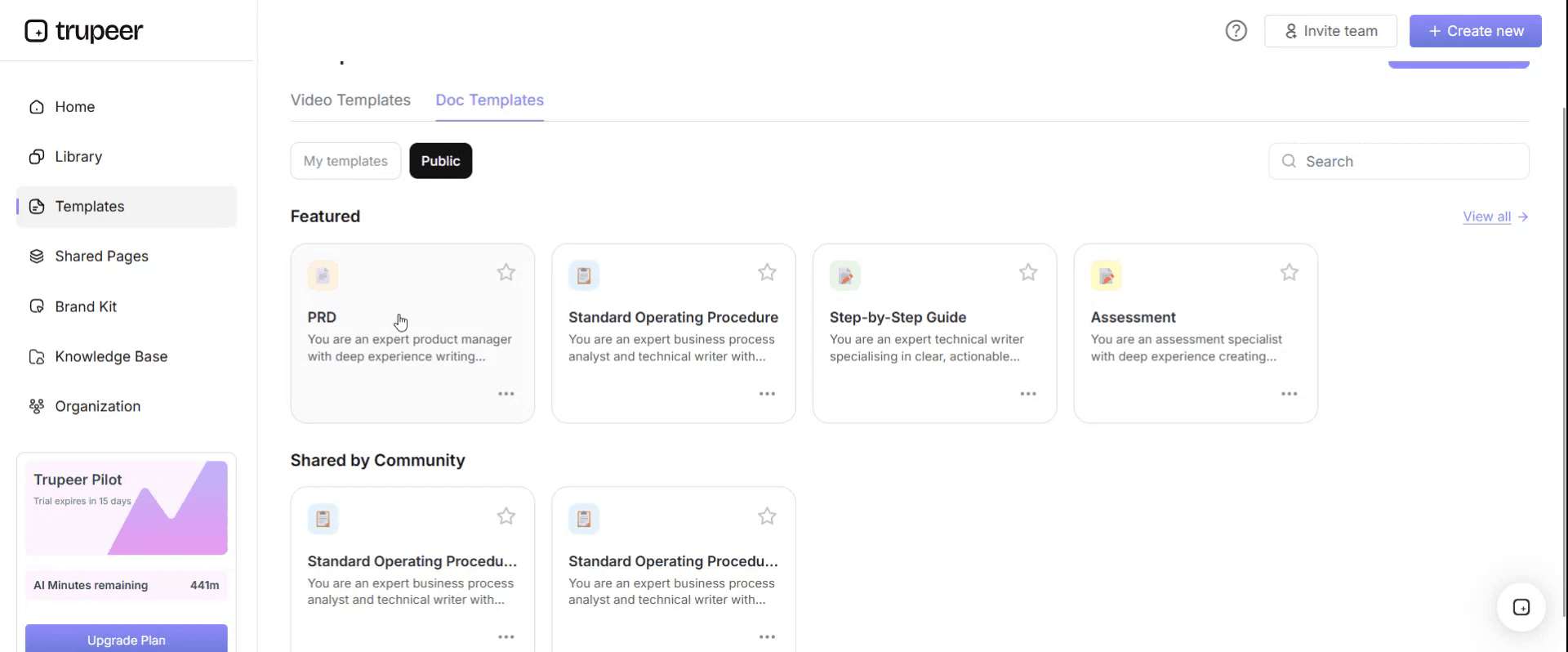
Step 3: Expand the Template View
If needed, expand the template view to see the full layout and details clearly.

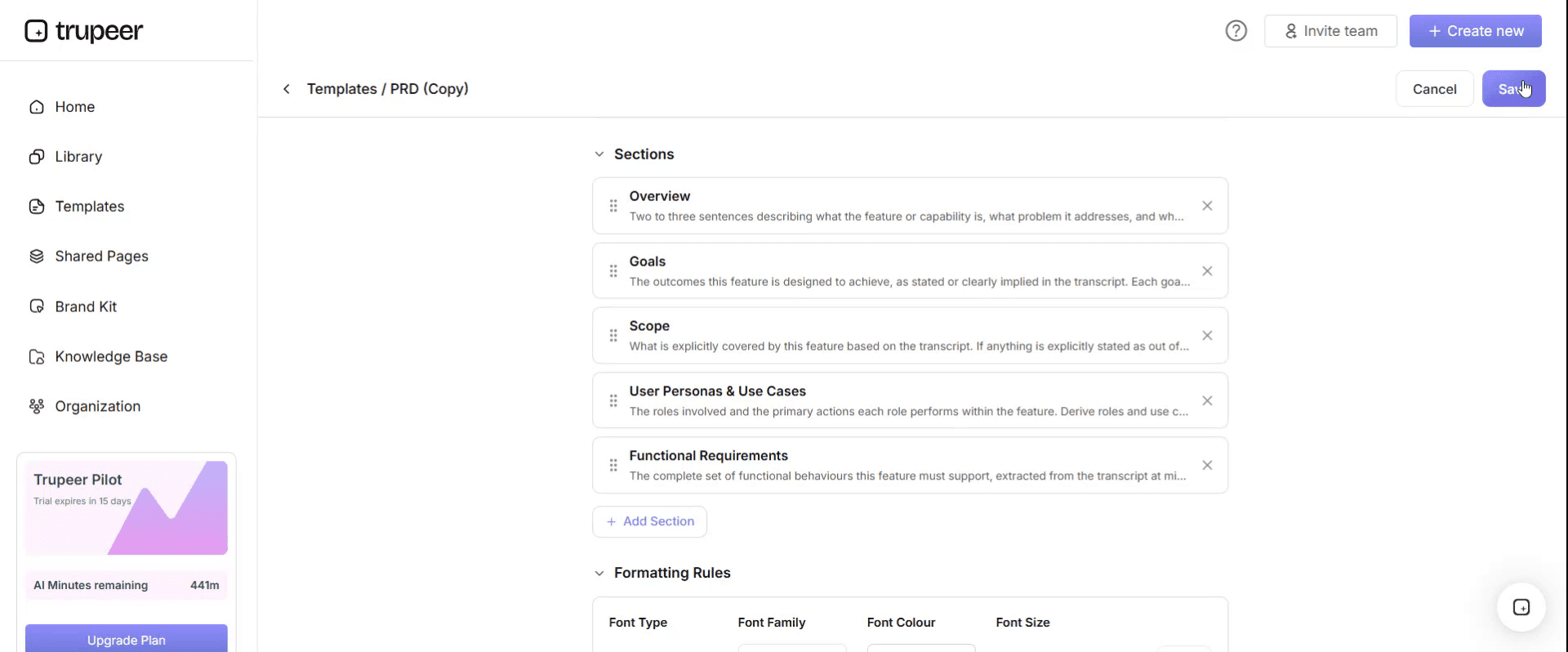
Step 4: Edit the Template
Click on Edit to start modifying the selected template.

Within the editor, you can:
Add new sections
Define or update formatting rules
Add a logo and adjust its position and related settings
Step 5: Save Your Customized Template
After making all necessary changes, click Save to store the updated template as your own.
Step 6: Preview and Fine-Tune the Template
When you want to see how your customized template looks, open the Preview.

From the preview screen, you can continue to make adjustments directly if needed, ensuring the template appears exactly as you want.
With a change impact assessment template you can:
See who's affected and how much, in one view.
Rate impacts consistently with a shared scale.
Turn impacts into actions for communication, training and support.
Prioritise high-impact groups for extra time and help.
Track readiness as the change approaches.
The ten dimensions of change impact
Dimension | Questions to ask |
|---|---|
Processes | Which steps, sequences or handoffs change? |
Systems and tools | Which systems, screens or tools are new or different? |
Roles and responsibilities | Who does what differently? Are roles added, removed or merged? |
Skills and knowledge | What do people need to learn? |
Behaviours and ways of working | What habits, decisions or collaboration patterns change? |
Organisation structure | Do reporting lines, teams or spans of control change? |
Location and working pattern | Do people move, or change hours, shifts or remote working? |
Policies and controls | Which rules, approvals or compliance steps change? |
Performance measures | Which KPIs, targets or incentives change? |
Customers and partners | How are customers, suppliers or partners affected? |
Change impact rating scale
Rating | Level | What it means |
|---|---|---|
0 | None | No change for this group in this dimension |
1 | Low | Minor change; awareness communication is enough |
2 | Medium | Noticeable change; needs training or guidance and some support |
3 | High | Significant change to how people work; needs structured training, practice, close support and leadership attention |
Add the ratings for each group to see where the change hits hardest, but always read the detail: one high rating, such as a role disappearing, can matter more than several medium ones.
Free change impact assessment template: the structure to copy
Copy the structure below into your own document or spreadsheet, or open it in Trupeer and customize it.
1. Change summary. Change: [what's changing]. Reason: [why]. Timeline: [key dates]. Sponsor: [name]. Change lead: [name].
2. Stakeholder register.
Group | Size | Locations | Leader | Notes |
|---|---|---|---|---|
[Group] | [Number of people] | [Sites] | [Name] | [Context] |
3. Impact assessment. For each group and dimension, describe the current state, the future state and the impact rating.
Group | Dimension | Current state | Future state | Impact (0–3) |
|---|---|---|---|---|
[Group] | [Dimension] | [How it works today] | [How it will work] | [Rating] |
4. Impact heatmap.
Group | Process | Systems | Roles | Skills | Behaviours | Structure | Location | Policies | Measures | Customers | Total |
|---|---|---|---|---|---|---|---|---|---|---|---|
[Group] | [0–3] | [0–3] | [0–3] | [0–3] | [0–3] | [0–3] | [0–3] | [0–3] | [0–3] | [0–3] | [Sum] |
5. Readiness. For each group: awareness, willingness, capability and current workload, rated low, medium or high.
6. Risks. Risks arising from the impacts, such as resistance, capacity or knowledge loss, with mitigation and owner.
7. Actions.
Group | Impact | Action | Type | Owner | Due |
|---|---|---|---|---|---|
[Group] | [Impact] | [Action] | [Communication, training, support, process, policy] | [Owner] | [Date] |
8. Sign-off. Sponsor, change lead and business leaders for each group.
Change impact assessment example: finance ERP rollout
Here's part of a heatmap for a finance ERP rollout. The ratings are illustrative.
Group | Process | Systems | Roles | Skills | Behaviours | Policies | Total | Key impacts |
|---|---|---|---|---|---|---|---|---|
Accounts payable clerks | 3 | 3 | 2 | 3 | 2 | 2 | 15 | New invoice workflow, automated matching, exception handling replaces data entry |
Budget holders and approvers | 2 | 2 | 1 | 1 | 2 | 2 | 10 | Approvals move from email to the ERP, new approval limits |
Procurement buyers | 2 | 3 | 1 | 2 | 1 | 1 | 10 | New PO creation and supplier screens |
Financial controllers | 2 | 2 | 1 | 2 | 1 | 1 | 9 | New close and reporting steps |
Sales team | 0 | 1 | 0 | 0 | 0 | 0 | 1 | View-only access to customer credit status |
What it tells the team. AP clerks need the most support: role-based training, hands-on practice and super users on site at go-live. Approvers need short videos and a clear message that email approvals stop on a set date. Sales needs only an awareness message.
Change impact assessment vs other change documents
Document | What it answers |
|---|---|
Change impact assessment | Who is affected, how much and in what way? |
Stakeholder analysis | Who has influence, and how do they feel about the change? |
Training needs analysis | What does each role need to learn? |
Communication plan | What will we tell each group, when and through which channel? |
Change readiness assessment | Is each group ready to go live? |
Change management plan | How will we manage the people side of the change overall? |
The impact assessment comes first, because it tells you where to focus the others.
How to do a change impact assessment step by step
Describe the change clearly, including what's in and out of scope.
List every stakeholder group, splitting groups whose work changes differently.
Capture the current state for each group, ideally from recordings of how they work today; see the as-is process documentation template.
Describe the future state from the design, configuration or policy.
Rate each impact using the scale, with process owners and group leaders.
Build the heatmap and review it with the sponsor.
Assess readiness and risks for the most affected groups.
Agree actions for communication, training and support, with owners and dates.
Revisit the assessment as the design changes and go-live approaches.
How to turn impacts into communication and training
Impact level | Communication | Training and support |
|---|---|---|
Low | Awareness message: what's changing and when | Short guide or two-minute video if needed |
Medium | Targeted messages through managers, with what changes for this group | Role-based guides and videos, Q&A sessions |
High | Early, repeated communication from leaders, with time for questions | Structured training, hands-on practice, super users, floor support and follow-up |
Use the impacts on skills and processes to build the training needs analysis; see the training needs assessment template.
For the communication side, see how to communicate new tools and ways of working.
Change impact assessment for ERP and system implementations
On system projects, the biggest impacts usually sit in a few roles that use the system all day, plus approvers and managers who use it occasionally but face new controls. Base the assessment on the fit-gap and design decisions: every partial fit or process change is a likely impact. Link each high-impact role to its learning path in the ERP end user training plan template, and revisit the assessment after each design change.
How to measure whether impacts were managed well
Readiness before go-live: training completion and confidence for high-impact groups.
Adoption after go-live: active use and process compliance by group.
Support demand: tickets and questions by group.
Time to proficiency for high-impact roles.
Sentiment: short pulse surveys by group.
For the full set of measures, see end user adoption metrics that matter.
Best practices for change impact assessments
Split groups by how their work changes, not just by department.
Base current state on evidence, such as recordings, not assumptions.
Rate with the people who know the work, including group leaders.
Read the detail behind the scores, not just the totals.
Update the assessment whenever the design changes.
Make every high impact lead to an action with an owner.
Common mistakes to avoid
Assessing impact only by department, missing roles that change differently.
Rating impacts without understanding the current state.
Doing the assessment once and never updating it.
Ignoring managers and approvers, who often face new controls.
Treating the heatmap as the output instead of the actions it should drive.
Change impact assessment checklist
The change, scope and timeline are clearly described.
Every affected group is listed with size and location.
Current and future states are described for each group.
Impacts are rated across all relevant dimensions.
A heatmap highlights the most affected groups.
Readiness and risks are assessed for high-impact groups.
Every significant impact has an action, owner and date.
The assessment is reviewed as the change progresses.
How Trupeer helps you act on change impacts
Change impact challenge | How Trupeer helps |
|---|---|
The current state isn't documented | Record how each group works today, and Trupeer turns the recordings into step-by-step documents |
High-impact groups need a lot of training | Record each new task once in the configured system and turn it into role-based guides and videos |
Low-impact groups need quick awareness | Create two-minute videos that show exactly what changes for them |
Groups work in different languages | Translate guides and videos into 65+ languages from one source |
The design changes late | Update videos by editing the script, and replace a single step instead of re-recording |
See how Trupeer supports change management from impact assessment to adoption.
Genpact used this recording-first approach for a company-wide Workday rollout, turning recorded process sessions and SME walkthroughs into more than 500 training collaterals across 20 workstreams in five languages, for 140,000 employees in 40 countries, in 3 months instead of 12. Read the Genpact customer story.
Download the free change impact assessment template
Sign up to get your full scorer results and the editable change impact assessment template, add your stakeholder groups and share it with your change team. Get the free change impact assessment template.
Related templates
Process standardization template
Fit-gap analysis template
Frequently Asked Questions
What is a change impact assessment template?
It's a structured document for identifying how a change affects each stakeholder group, covering current and future states, impact ratings across dimensions such as process, systems, roles and skills, a heatmap, readiness, risks and actions.
What should a change impact assessment include?
A change summary, stakeholder register, impact assessment by group and dimension, an impact rating scale, a heatmap, readiness, risks, actions with owners and dates, and sign-off.
How do you rate change impact?
Use a simple scale, such as 0 for none, 1 for low, 2 for medium and 3 for high, for each group and dimension, and read the detail behind the scores as well as the totals.
When should you do a change impact assessment?
Once the future state is designed well enough to compare with today, and again whenever the design changes and before go-live.
Who should complete the change impact assessment?
The change manager leads it, working with process owners, group leaders and the project team, and the sponsor reviews the results.
What's the difference between a change impact assessment and a stakeholder analysis?
A stakeholder analysis looks at people's influence and attitude toward the change. A change impact assessment looks at how much and in what way the change affects their work.
How do you use the results of a change impact assessment?
Use them to plan communication, training and support by group, to set readiness criteria, to manage risks and to decide where leaders need to spend time.
Is there a change impact assessment template in Excel?
Yes. The impact table and heatmap work well in Excel. Sign up to get the editable template, or copy the structure above into Excel.
Is there a change impact assessment template in Word or PDF?
Yes. Use Word for the summary, readiness, risks and actions, and export a PDF for sign-off.
Is the change impact assessment template free?
Yes. Use the scorer on this page for free and sign up to get the full results and the editable template.
How does the change impact scorer work?
You rate your change across six dimensions, see an overall impact level straight away, and can sign up to get a full breakdown, recommended actions and the template pre-filled with your answers.
Can recordings help with a change impact assessment?
Yes. Recordings of how each group works today give an accurate current state, and the same approach produces the training and guides that high-impact groups need.


