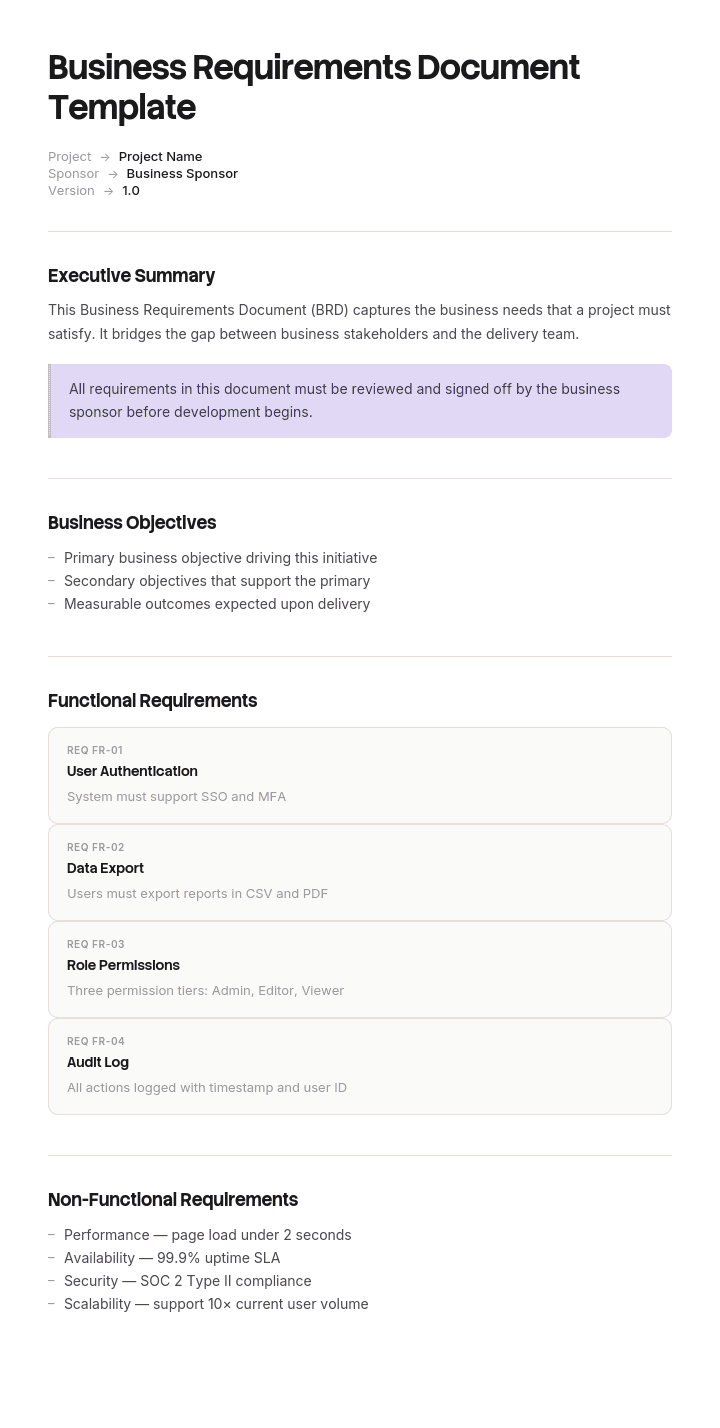
このテンプレートを使用してください
ビジネス要件定義書(BRD)は、ビジネスの関係者と技術チームをつなぐ架け橋です。ビジネスが必要としていることを整理し、それを、開発者が実装できる要件へと翻訳します。Trupeerなら、無料のビジネス要件定義書テンプレートから始めて、ブランドガイドラインでカスタマイズし、長いBRDを誰もが実際に視聴できる動画ウォークスルーに変えることで、BRD作成にかかる時間を何時間も節約できます。
プロジェクトが失敗するのは、誰も要件を書かなかったからではありません。書かれた内容が、反論できないほど曖昧だったからです。誰もが「ユーザーフレンドリーで速い」べきだと書かれた文書に署名し、4か月後に、実は3つも別の意味だったと判明します。
ビジネス要件定義書は、ビルド開始後ではなく開始前に、意見の相違が可能になるときにこそ価値があります。このテンプレートはそのために作られています。すべての要件に番号と優先度を付け、今すぐ議論できるほど具体的な受け入れ基準を明記しています。
ビジネス要件定義書テンプレートをダウンロード
形式 | おすすめの用途 |
|---|---|
Word (.docx) | BRDそのもの。無料でダウンロード可能、サインアップ不要。ほとんどのチームが文書作成・共有に使う形式です |
Google Docs | 関係者との共同レビュー。コメントやバージョン履歴が重要な場面に |
署名済み・承認済みのベースライン | |
Excel (.xlsx) | 要件テーブルとトレーサビリティマトリクス。フィルタや並べ替えが役立ちます |
.doc | 古い文書システムやレガシーライブラリ |
無料、編集可能、透かしなし。多くのチームでは、文書はWord、要件テーブルはExcelを使います(件数が約30を超えたあたりから)。
ビジネス要件定義書とは?
ビジネス要件定義書(BRD)は、誰もが「どう作るか」を決める前に、プロジェクトにおいてビジネスが何を必要としているのか、そしてその理由を明確にします。課題、スコープ、関係者、要件そのもの、そして成果物がどの基準で評価されるかを定義します。
本当の役割は「合意」です。BRDは、全員が同じ理解をしていることを確認するために署名する成果物です。そのため、BRDの有用性を測るのは「読みやすいかどうか」ではなく、「誰かが異議を唱えられるほど十分に具体的かどうか」です。
Trupeerでこのテンプレートをカスタマイズする方法
ステップ1:テンプレートセクションを開く
メインナビゲーションから「テンプレート」セクションへ移動します。

ステップ2:テンプレートを選択して開く
作業したいテンプレートをクリックして開きます。

ステップ3:テンプレート表示を展開する
必要に応じて、テンプレート表示を展開し、レイアウトと詳細をはっきり確認します。

ステップ4:テンプレートを編集する
「編集」をクリックして、選択したテンプレートの変更を開始します。

エディター内で、次のことができます:
新しいセクションを追加
書式ルールを定義または更新
ロゴを追加し、位置や関連設定を調整
ステップ5:カスタマイズしたテンプレートを保存する
必要な変更をすべて行ったら、「保存」をクリックして、更新されたテンプレートを自分のものとして保存します。

ステップ6:プレビューしてテンプレートを微調整する
カスタマイズしたテンプレートがどのように表示されるか確認したいときは、「プレビュー」を開きます。

プレビュー画面から、必要に応じてそのまま調整を続けることができ、テンプレートが希望どおりに表示されることを確認できます。
ビジネス要件定義書テンプレートを使うと、次のことができます:
作成時間を節約:経験豊富なBAやPMが使う構造で、空白のページをスキップできます。
ビジネスと技術を揃える:ビルトインのセクションが、ビジネス目標を機能要件へとつなぎます。
ブランドを維持:Trupeerのブランドキットで、ロゴ・フォント・カラーを適用できます。
明確に伝える:密度の高いBRDを、関係者レビュー向けの動画ウォークスルーに変換します。
プロジェクト間で標準化:すべての取り組みに同じBRDテンプレートを使用します。
グローバルチームに対応:1クリックでBRDを65+言語に翻訳できます。
ビジネス要件定義書が必要な理由
スコープは「覚えるもの」ではなく「指し示せるもの」になります。スコープの揉め事の多くは、悪意ではなくドキュメントの不備です。
要件には優先度が付くため、時間が足りなくなったときに、残りを何でも切るのではなく、意図的に削れます。
前提条件が書き留められるので、間違っていることに誰かが気づけます。
受け入れ基準はビルド前に存在するため、「完了」は最後に声が大きい人が決めるものではありません。
引き継ぎは人が入れ替わっても生き残ります。途中でビジネスアナリストを失うプロジェクトこそ、BRDがその場で費用対効果を回収できるケースです。
ベンダーは、実在する内容に基づいて見積もりできます。曖昧なBRDは幅広い見積もりを生み、変更依頼が多いプロジェクトにつながります。
ビジネス要件定義書に含まれるもの
文書管理:バージョン、作成者、日付、配布先、承認ステータス。
エグゼクティブサマリー:プロジェクトが何で、なぜ必要なのかを1段落で。
ビジネス目標:活動ではなく、測定可能な成果として表現。
背景と課題の説明:いま何が起きていて、どれくらいのコストがかかっているのか。
スコープ:含むもの、そして明確に含まないもの。
関係者:誰が影響を受け、誰が決定し、誰が署名するのか。
現状:実際にどうなっているか。
ビジネス要件:番号付き・優先度付きで、各要件に受け入れ基準。
前提条件、制約、依存関係。
リスク:担当者(オーナー)付き。
コストと便益の要約、および期待されるリターン。
タイムラインと主要マイルストーン。
プロジェクト全体の成功基準。
用語集:読み方が2通りあり得る用語はここで整理します。
署名(サインオフ)ブロック。
付録:プロセスマップ、データ、画面、補足分析。
テンプレートの構成
セクション | 内容 | 分量 |
|---|---|---|
文書管理 | バージョン、作成者、承認者、改訂履歴 | 半ページ |
エグゼクティブサマリー | プロジェクトを1段落で(最後に書く) | 半ページ |
ビジネス目標 | 2〜5つの測定可能な成果 | 半ページ |
課題の説明 | 現状とそのコスト | 1ページ |
スコープ | 含む/含まない、明確に | 1ページ |
関係者 | 役割、関心、決定権 | 半ページ |
現状 | 現在の仕組み | 1〜2ページ |
要件 | 番号付きのテーブル | 2〜6ページ |
前提条件と制約 | 平易に記載 | 半ページ |
リスク | 担当者と対策 | 半ページ |
コストと便益 | 投資と期待されるリターン | 1ページ |
タイムライン | マイルストーンと依存関係 | 半ページ |
成功基準 | プロジェクトがどう評価されるか | 半ページ |
用語集 | 2通りに読める可能性のあるすべての用語 | 必要に応じて |
署名(サインオフ) | 氏名、役割、日付 | 半ページ |
中規模プロジェクトなら、10〜20ページが一般的です。30ページを超えると、要件テーブルには通常、別の場所にあるべき機能仕様の設計判断が吸収されていることが多くなります。
レビューに耐える要件の書き方
これがスキルの全てです。反対する2人が、読んだだけで「自分たちは反対している」と分かるように書けていれば、その要件は適切に書かれています。
弱い: システムはユーザーフレンドリーであるべき。
より良い: 新しいユーザーがトレーニングなしでクレームを提出できること。8/10のテストユーザーが、補助なしで3分以内に3行の提出を完了することで測定。
弱い: レポートは素早く読み込まれるべき。
より良い: 月次サマリーレポートは、最大50,000行のデータセットで4秒以内にレンダリングされること。
弱い: 管理者は承認状況を把握する必要がある。
より良い: 管理者は、提出日順に並べ替えたうえで、フィルタなしの1画面で、自分の承認待ちのすべてのクレームを確認できること。
弱い: システムは会計と連携すべき。
より良い: 承認済みのクレームは、コストセンターとVATコードを含め、15分以内に会計システムへ投稿されること。失敗はログに記録され、自動的に再試行されること。
改善のあらゆるパターンは同じです。必要としている人を名指しし、具体的に何を、そして「達成したと合意できる条件」を書きます。自分の下書きで疑うべき言葉:ユーザーフレンドリー、堅牢、シームレス、直感的、速い、柔軟、スケーラブル、簡単。これらはすべて、あなたがいない後の誰かが下す判断を隠しています。
MoSCoWで要件に優先度を付ける
優先度のない要件はすべてデフォルトで必須になり、そして最初のスケジュールの圧力が、恣意的な削減を強制します。
優先度 | 意味 | テスト |
|---|---|---|
Must have | これがないとリリースできない | これのために本番公開を遅らせますか?「いいえ」ならMustではありません |
Should have | 重要で、欠けると痛いが、なくても成立する | 回避策はある(たとえ見た目が悪くても) |
Could have | キャパが許せば望ましい | 1週目に欠けていても誰も気づかない |
Won't have this time | このリリースでは明確に対象外 | 記録されているので、再度持ち出されなくなる |
MoSCoWを機能させるための規律:Must haveは要件全体の約60%以内に抑えるべきです。すべてがMustなら、優先度列付きのウィッシュリストになってしまいます。そしてWon't-haveリストが最も価値が高いのは、それが「意識的に延期したもの」の記録であり、「忘れたもの」ではないからです。
要件テーブル
ID | 要件 | 優先度 | 出典 | 受け入れ基準 | 担当者 |
|---|---|---|---|---|---|
BR-01 | Must | ||||
BR-02 | Should |
要件には必ずIDが必要です。なぜなら「報告要件」は、2つある瞬間に曖昧になるからです。出典も重要です。4か月目に「誰がこれを求めたのか」が聞かれるからで、「ビジネス」は答えになりません。
トレーサビリティマトリクス
何もこっそり落とされていないこと、そして理由のないものが作られていないことを確認するためのチェックです。
要件ID | ビジネス目標 | 機能仕様の参照 | テストケース | ステータス |
|---|---|---|---|---|
BR-01 | OBJ-1 | FS-3.2 | TC-14 | Verified |
BR-02 | OBJ-1 | FS-3.5 | TC-18 | In test |
BR-03 | OBJ-2 | Not yet specified | None | Gap |
失敗はすぐに2つ見つかります。テストケースがない要件は検証されません。また、要件に紐づかない機能仕様の項目は、誰も求めていないものを作っている状態です。どちらもよくあることで、この方法なら安価に見つけられます。
ビジネス要件定義書のサンプル
具体性のレベルが分かるように、短縮した実例です。
プロジェクト: 経費精算システムの置き換え。 バージョン: 1.2。 作成者: ビジネスアナリスト。 承認者: 財務ディレクター、ITディレクター、HRディレクター。
ビジネス目標。 平均の精算返金までの期間を24営業日から10営業日に短縮する。財務チームが精算処理に費やす時間を50%削減(現在は週14時間)。提出された精算に対するポリシー遵守率を95%にする(現在は71%)。
課題の説明。 精算はスプレッドシートで提出され、メールで送付されます。承認ルーティングは手作業で、領収書は別途届きます。そして、支払い前に見つからないまま、精算の29%がポリシーに違反しています。財務は追跡に週あたり約14時間を費やし、返金の平均は、社内ハンドブックにある10日間の約束に対して24営業日です。
スコープ内。 精算の提出、領収書の取り込み、ポリシーの妥当性確認、承認ルーティング、会計システムへの投稿、従業員への通知。
スコープ外。 法人カードの照合、走行距離のレート設定、給与計算との連携、12か月を超える過去精算の移行。
要件。
ID | 要件 | 優先度 | 出典 | 受け入れ基準 |
|---|---|---|---|---|
BR-01 | 従業員は、領収書を撮影して含めた状態でモバイル端末から精算を提出しなければならない | Must | スタッフ調査、2026 | 8/10のテストユーザーが、モバイル上で領収書付きの3行精算を、補助なしで4分以内に完了する |
BR-02 | システムは、提出時に各行をポリシーの上限に照らして検証しなければならない | Must | 財務ディレクター | 上限を超えている精算は、フラグ付きの正当化理由フィールドが完了しない限り「提出済み」ステータスに到達できない |
BR-03 | 精算は、報告ラインに基づいて正しい承認者へルーティングされなければならない | Must | HRディレクター | 12の組織構造シナリオ(欠員を含む)すべてで、テスト精算の100%が正しくルーティングされる |
BR-04 | £500を超える精算は、2回目の承認を必要としなければならない | Must | 委任権限マトリクス | £500を超える精算が、単一の承認のみで「承認済み」になることはない(単一承認の記録が残らない) |
BR-05 | 承認済みの精算は、コストセンターとVATコードを含めて会計システムへ投稿されなければならない | Must | 財務マネージャー | 承認済み精算の100%が、15分以内に正しいコードで表示される(失敗はログに記録され、再試行される) |
BR-06 | 承認者は、自分宛ての承認待ち精算を1画面で、古いものから順にすべて確認できなければならない | Should | 承認者インタビュー | 承認待ち精算が20件あるマネージャーは、ページ送りやフィルタなしで20件すべてを確認できる |
BR-07 | 従業員は、提出時・承認時・支払い時に通知を受け取らなければならない | Should | スタッフ調査 | 各ステータス変更から5分以内に通知が配信される |
BR-08 | 財務は、コストセンター別に月次の精算レポートをエクスポートしなければならない | Should | 財務マネージャー | 5,000件の精算で、レポートが30秒以内に生成される |
BR-09 | システムは、不在時の委任承認をサポートしなければならない | Could | 承認者インタビュー | 承認者は、日付範囲を指定して代理人を指名できる |
BR-10 | 複数通貨の精算 | Won't, this release | 地域マネージャー | フェーズ2に延期し、ロードマップに記録する |
前提条件。 HRシステム内の現行組織構造は正確で、維持されている。会計システムはサポートされたAPIを公開している。ポリシーの上限は実装期間中に変更されない。
制約。 予算£85,000。新しい会計年度の開始前に本番稼働しなければならない。追加の財務人員は不要。
リスク。 HRの報告ラインデータが信頼できないことが判明。担当はHRディレクター。ビルド前に監査で軽減する。承認者の導入が遅い。担当は財務ディレクター。マネージャートレーニングと2週間の並行運用で軽減する。
成功基準。 本番稼働から1四半期以内に、平均の返金が10営業日以下。財務の処理時間が週あたり7時間以下。ポリシー遵守率が95%以上。
ビジネス要件定義書 vs 機能要件 vs 技術要件
このトピックで最もよくある混乱の原因であり、多くのBRDが、実際には誤ったタイトルを付けられた仕様書になってしまう理由です。
ビジネス要件 | 機能要件 | 技術要件 | |
|---|---|---|---|
答え | ビジネスは何を必要としていて、なぜ必要なのか | システムは何をしなければならないか | どのように作るのか |
作成者 | ビジネスアナリスト(関係者とともに) | ビジネスアナリストまたはプロダクトオーナー | ソリューションアーキテクトまたはエンジニア |
対象者 | スポンサー、関係者、ベンダー | デザイナー、開発者、テスター | エンジニア |
例 | 精算は10営業日以内に返金されなければならない | システムは、HRの報告ラインで指定された承認者へ精算をルーティングする | 承認ルーティングはHR APIを呼び出し、24時間キャッシュし、最終的に把握しているマネージャーへフォールバックする |
変わるタイミング | ビジネスのニーズが変わる | ソリューション設計が変わる | アーキテクチャが変わる |
置き場所 | BRD | FRDまたは機能仕様 | 技術設計ドキュメント |
テスト:要件に画面、項目、ボタン、またはシステムコンポーネントが言及されている場合、それは機能領域へとずれているサインです。ビジネス要件は、ソリューションの完全な変更にも耐えるべきです。ベンダーを切り替えたらBRDの半分が無効になったなら、その半分はそもそもビジネス要件ではありません。
ビジネス要件定義書は誰が作成し、誰が署名するのか
ビジネスアナリストが作成します。もしくは、アナリストがいない場合はプロダクトオーナーまたはプロジェクトマネージャーが作成します。関係者のために書くのではなく、関係者と一緒に書くべきです。なぜなら、単独で作られたBRDは読まれないまま署名されてしまい、そもそもBRDがない場合よりも悪いからです。
それに拘束され得る人が署名します。ビジネススポンサー、予算保有者、そして作業が変わるあらゆる機能のリードです。さらにITまたはデリバリーリードを追加し、要件が「実現可能かどうか」ではなく「理解されているかどうか」を確認します。
最も重要な署名は、4か月目に「これで合意したのか?」と聞かれることになる人物からのものです。
ビジネス要件定義書の書き方
最初に、数値としてビジネス目標を定めます。測定可能な成果を誰も言えない場合、要件の収集は文書ではなく機能リストを生み出してしまいます。
何かを収集する前に、関係者と決定権を特定します。誰が「はい」と言えるのかを知ることが、後からの取り消しの大半を防ぎます。
回避策(ワークアラウンド)を含め、現状を正直に文書化します。ここに本当の要件が隠れています。
ワークショップだけでなく、インタビューと観察を通じて要件を集めます。ワークショップは人が「必要だと言うもの」を表面化します。観察は人が「実際にやっていること」を表面化します。
各要件は、受け入れ基準を付けて同じタイミングで書きます。後から基準を追加すると、記憶に頼って書くことになります。
MoSCoWで優先度を付け、Must-haveの割合に線を引きます。
前提条件、制約、依存関係を明確に記録します。書かれていない前提条件は、揉め事になります。
最後にまとめて作るのではなく、進めながらトレーサビリティマトリクスを構築します。
締切と、セクションごとの指名レビュー担当者を設定してレビュー用に回覧します。「コメントはありますか?」を配布リストに送ると、沈黙が返ってきます。
署名を求める前に、セッションで関係者を案内します。その後、バージョンをベースライン化し、そこから先は正式に変更管理します。
ビジネス要件定義書テンプレートのバリエーション
バリエーション | こんなときに使う | 何が変わる |
|---|---|---|
Simple BRD | 小規模プロジェクト、単一チーム | 目標、スコープ、要件テーブル、署名のみ |
Agile BRD | 反復型のデリバリー | 要件をエピックとユーザーストーリーとして扱い、スプリントごとに優先度を見直し、ベースラインは軽めに |
Software development BRD | ソフトウェアを作る/買う | 統合、データ、非機能要件をより重視 |
IT BRD | インフラとシステムの変更 | セキュリティ、アクセス、可用性、移行、カットオーバー |
Technical BRD | 対象がエンジニアの場合 | 明確な非機能要件、インターフェース、標準 |
Business analysis BRD | 正式なBAの実務 | 完全なトレーサビリティ、関係者分析、As-is/To-beのプロセスモデル |
Project management BRD | BRDがプロジェクト計画に反映される場合 | マイルストーン、依存関係、リソースへの影響 |
Requirements checklist | 署名前にBRDを確認する | 内容というより網羅性のチェック |
Agile版に関する補足:BRDとバックログは競合しません。BRDは、なぜ必要で、ビジネスが何を求めているかを捉えるもので、変化はゆっくりです。バックログは、次に何を作るかを捉えるもので、変化は常にあります。BRDを完全に捨ててしまうチームは、「なぜ」を見失いがちで、後から議論の材料として再発見することになります。
ベストプラクティス
誰かが拒否できるような要件を書く。曖昧さは合意に見え、後で揉め事を生みます。
1行につき1要件。「and」を含むものは、おそらく2つです。
受け入れ基準はすぐに添付し、後回しにしない。
すべてに番号を振り、番号は変更しない。IDは廃止して置き換えます。
各要件の出典を記録する。
解決策を入れない。画面や項目に名前を付けた瞬間に、設計を始めてしまっています。
用語集で、あいまいな用語をすべて定義する。「claim」「user」「approved」のような言葉は、部署によって意味が異なります。
署名時点でバージョンをベースライン化し、その後は正式に変更管理する。
スコープ外リストを見える状態に保つ。他のどのセクションよりも、スコープの膨張を防ぎます。
よくあるミス
検証不能な要件。「直感的」「堅牢」はテストできないため、最も近い人がビルド時に解釈してしまいます。
優先度がないため、締切が恣意的な削減を強制するまで、すべてが必須になります。
要件に偽装した解決策。誰も選択肢を評価する前に、設計を制約してしまいます。
受け入れ基準がないため、「完了」が交渉になります。
スコープ外セクションが欠けている。スコープ膨張を防ぐための最も安価な手段です。
関係者と一緒ではなく、関係者のために書いている。読まれないまま署名されます。
前提条件が書かれていない。すべてのプロジェクトには前提条件があり、記録されていないものが破綻の原因になります。
署名後に更新されない。要件は変わります。メンテされていないベースラインは、誰もが信頼できる参照にならなくなります。
トレーサビリティがないため、ユーザー受け入れテストで静かに落とされたことが発覚します。
記録して現状を捉える
Trupeer AIでテンプレートを開き、ブランドキットを適用してBRDを他のプロジェクト文書と揃え、各セクションを直接編集します。セットアップはテンプレートガイドにあります。
現状セクションは、BRDの中でも最も弱くなりがちです。というのも、「いまどう動いているか」を書き下すには、誰もが見積もりに入れている時間より長くかかり、しかも常に回避策(ワークアラウンド)を見落とすからです。既存のプロセスを一度だけ記録すれば、Trupeer AIが、スクリーンショットを自動で取り込みながら、書面の現状ドキュメントを生成します。さらに、付録として添付できるナレーション付きの動画ウォークスルーも作成できます。ベンダーがあなたのBRDに基づいて見積もりを出す場合、4ページの文章よりも、2分の記録のほうが理解が早いのです。
記録する。文書化する。翻訳することで、オフショアのデリバリーチーム向けに65+言語に対応。あなたのナレッジベースに保存。Trupeer it。
よくある質問
Wordで無料のビジネス要件定義書テンプレートはありますか?
はい。Wordが主要な形式で、各セクションにはガイダンスノートが付いています。書きながら不要なノートは削除できます。さらに、要件テーブルと署名ブロックはあらかじめ用意されています。無料でダウンロード可能、サインアップ不要、透かしなし。
無料でWordのビジネス要件定義書テンプレートをダウンロードできますか?
はい。すべての形式が、アカウント不要で無料ダウンロードできます。必要なだけ、複数のプロジェクトで活用してください。
Wordの.doc形式のビジネス要件定義書テンプレートはありますか?
はい。古い文書システムや、.docxをきれいに扱えないライブラリ向けに、.doc版も含まれています。
PDFで無料のビジネス要件定義書テンプレートはありますか?
はい。PDFは読み取り専用のベースライン形式です。署名後に配布するため、承認済みバージョンが誤って編集されることを防げます。
PDFでビジネス要件定義書のサンプルはありますか?
はい。上記の「経費精算システム」の実例を、10の要件、受け入れ基準、MoSCoWの優先度、前提条件、リスクを含む完成版のPDFサンプルとして収録しています。完成したBRDを読むのが、自分のBRDにどれくらいの具体性が必要かを最も早く調整する方法です。
Wordで要件定義書テンプレートはどこからダウンロードできますか?
このページで、Word、.doc、Google Docs、Excel、PDFに対応しています。すべて無料です。ビジネス要件ではなく機能仕様が必要な場合、それは別の文書であり、その違いは上で説明しています。
BRDとは何ですか?
ビジネス要件定義書です。プロジェクトの「どう作るか」を決める前に、ビジネスがプロジェクトから何を必要としていて、なぜ必要なのかを示し、関係者が署名して共通理解を確認するための成果物として機能します。
ビジネス要件定義書には何を含めるべきですか?
文書管理、エグゼクティブサマリー、測定可能なビジネス目標、課題の説明、明確な除外を含むスコープ、関係者、現状、優先度と受け入れ基準付きの番号付き要件、前提条件、制約、依存関係、リスク、コストと便益、タイムライン、成功基準、用語集、署名(サインオフ)です。
ビジネス要件と機能要件の違いは何ですか?
ビジネス要件は、ソリューションに依存せず、ビジネスが何を必要としていて、なぜ必要なのかを示します。機能要件は、それらを満たすためにシステムが何をしなければならないかを示します。「精算は10営業日以内に返金されなければならない」はビジネス要件です。「システムは、HRの報告ラインで指定された承認者へ精算をルーティングする」は機能要件です。ビジネス要件は、ベンダーが変わっても耐えるべきです。
ビジネス要件定義書はどれくらいの長さが必要ですか?
中規模プロジェクトなら10〜20ページです。小規模なら5ページで済みます。30ページを超えると、要件セクションには通常、別の場所にあるべき機能設計が吸収されていることが多くなります。
ビジネス要件定義書は誰が書きますか?
ビジネスアナリスト、またはアナリストがいない場合はプロダクトオーナーやプロジェクトマネージャーです。BRDは単独で作られると読まれないまま署名されてしまうため、関係者と一緒に書くべきです。
BRDの承認(サインオフ)は誰が行いますか?
ビジネススポンサー、予算保有者、作業が変わるあらゆる機能のリードに加えて、デリバリーまたはITリードが要件が理解されていることを確認します。サインオフは配布メールではなく、ウォークスルーのセッションの後に行うべきです。
BRDには何件の要件が必要ですか?
スコープが本当に必要とする数だけで構いません。ただし80を超えている場合は、機能の詳細が入り込んでいないか確認してください。役立つサインはMust-haveの割合です。おおよそ60%を超えると、優先度付けが適切に行われていない可能性があります。
トレーサビリティマトリクスとは何ですか?
各要件が、それを満たすビジネス目標、対応する機能仕様、そしてそれを検証するテストケースと結びついていることを示す表です。テストされることのない要件や、要件に紐づかないまま作られてしまう作業を見つけられます。
このビジネス要件定義書テンプレートをカスタマイズできますか?
はい。すべてのバージョンは完全に編集可能です。空の見出しを残すのではなく、適用しないセクションは削除してください。MoSCoWを使わない場合は、要件テーブルを自分たちの優先度ルールに合わせて調整できます。Trupeer AIでは、ブランドキットも適用できるため、BRDを他のプロジェクト文書と揃えられます。

