
Use this template
Choosing SOP software usually starts with a long list of vendors that all promise "AI-powered SOPs in minutes". The demos look similar, the feature lists overlap, and the real differences only show up months later, when your team is trying to keep hundreds of procedures current, translate them for other sites or prove to an auditor which version was in force. Clear SOP software RFP evaluation criteria fix that by deciding what matters before the demos begin.
This free SOP software RFP evaluation criteria checklist gives you weighted criteria in nine categories, the questions to ask every vendor, a scorecard to copy, a demo script that tests real work, and the red flags to watch for. Use it to run a fair, structured selection, then sign up to get the full scorecard as an editable template.
What are SOP software RFP evaluation criteria?
SOP software RFP evaluation criteria are the requirements and scoring rules you use to compare SOP and process documentation tools in a request for proposal. They cover how quickly the tool creates SOPs, the quality and formats of the output, how easily procedures are kept current, how people find and use them, security and administration, integrations, analytics and the vendor itself. Each criterion gets a weight, and each vendor gets a score, so the decision rests on evidence rather than the best demo. Our enterprise documentation management platform is built to be assessed against exactly these criteria.
For an overview of the market before you write the RFP, see our guide to the best SOP creation software.
Why use a structured checklist for SOP software selection?
Demos are designed to impress. A checklist makes every vendor prove the same things on your processes.
Maintenance is where tools differ most. Creating the first SOP is easy; keeping five hundred current is not, and a checklist forces that question early.
Many people have a stake. Operations, IT, security, compliance, training and procurement all need their requirements covered.
Weights reflect your priorities. A regulated manufacturer and a fast-growing BPO need different things from the same category of tool.
Procurement needs an audit trail. A scored, documented evaluation explains why a vendor was chosen.
Who should use this SOP software RFP checklist?
Operations and process excellence leaders replacing manual SOP writing.
Shared services, GBS and BPO leaders standardising procedures across sites and clients; see SOP software for large teams and BPO operations.
Training and enablement teams who need SOPs and training videos from the same source.
IT and security teams assessing data protection, access control and integrations.
Quality and compliance teams who need version control, approvals and audit evidence.
Procurement teams running the formal RFP process.
Preview the SOP software RFP evaluation criteria checklist
The template opens with an RFP summary: scope, timeline, evaluation team and how scores are weighted. Nine criteria categories follow, each with requirements, questions for vendors and a 1 to 5 scoring guide. A weighted scorecard compares up to four vendors side by side, and a demo script lists the tasks every vendor must perform live. The template closes with commercial questions, reference checks and a decision record. Every section is editable, so you can change weights, add requirements or remove categories that don't apply.
How to customize this template in Trupeer
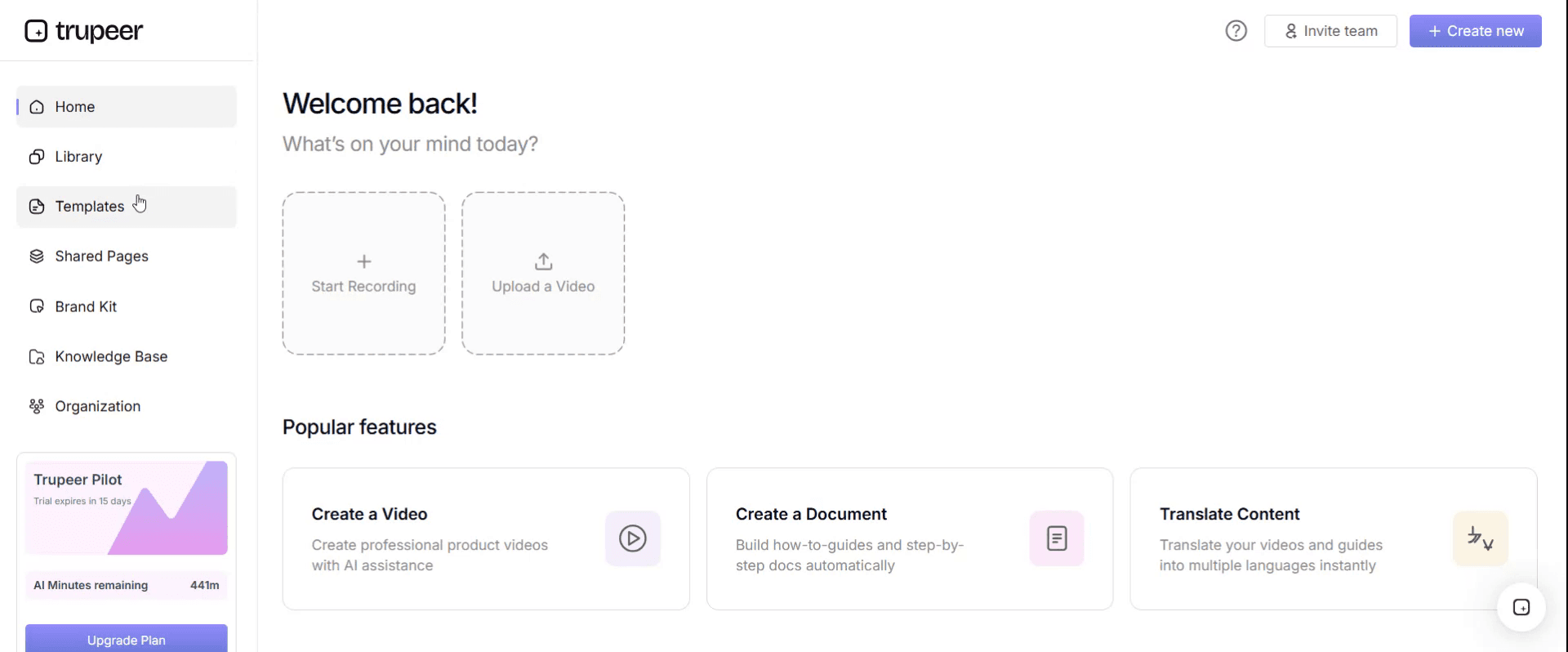
Step 1: Open the Templates Section
Go to the Templates section from the main navigation.
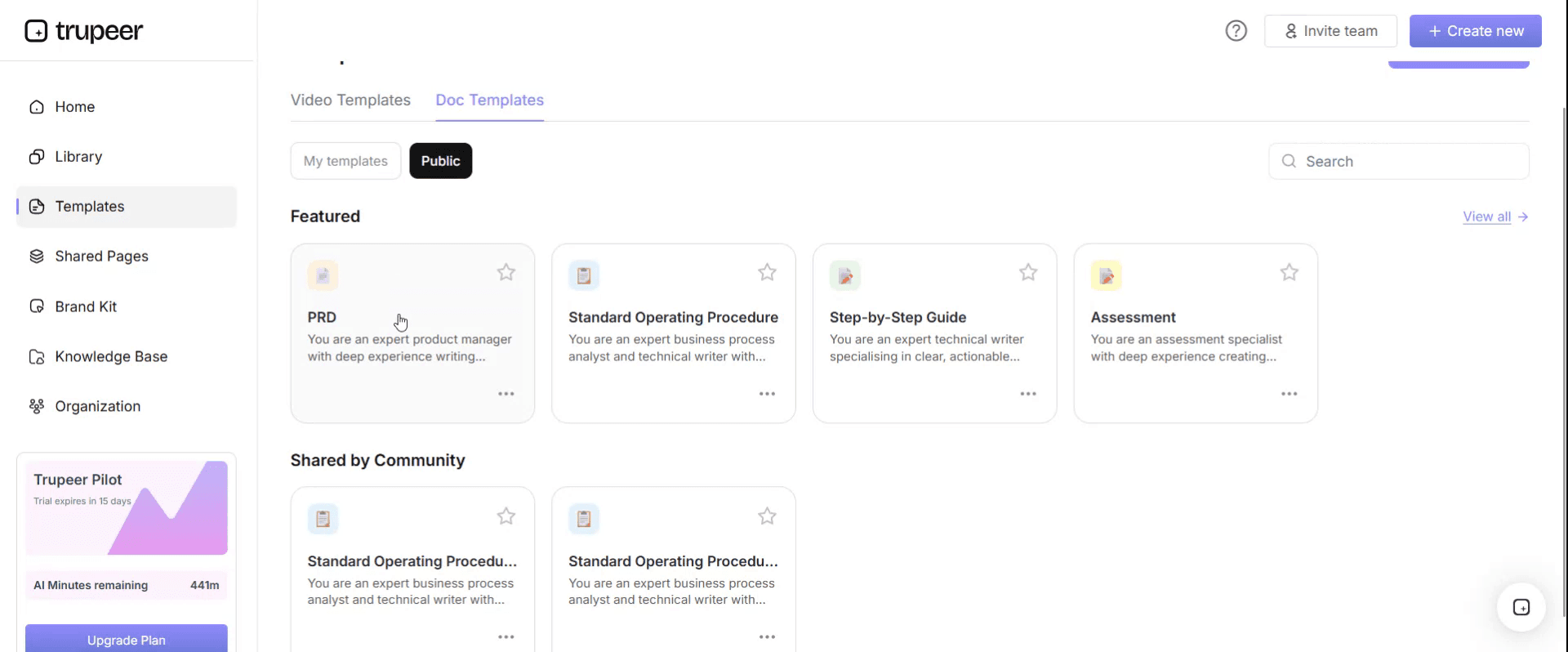
Step 2: Select and Open a Template
Click on any template you want to work with to open it.
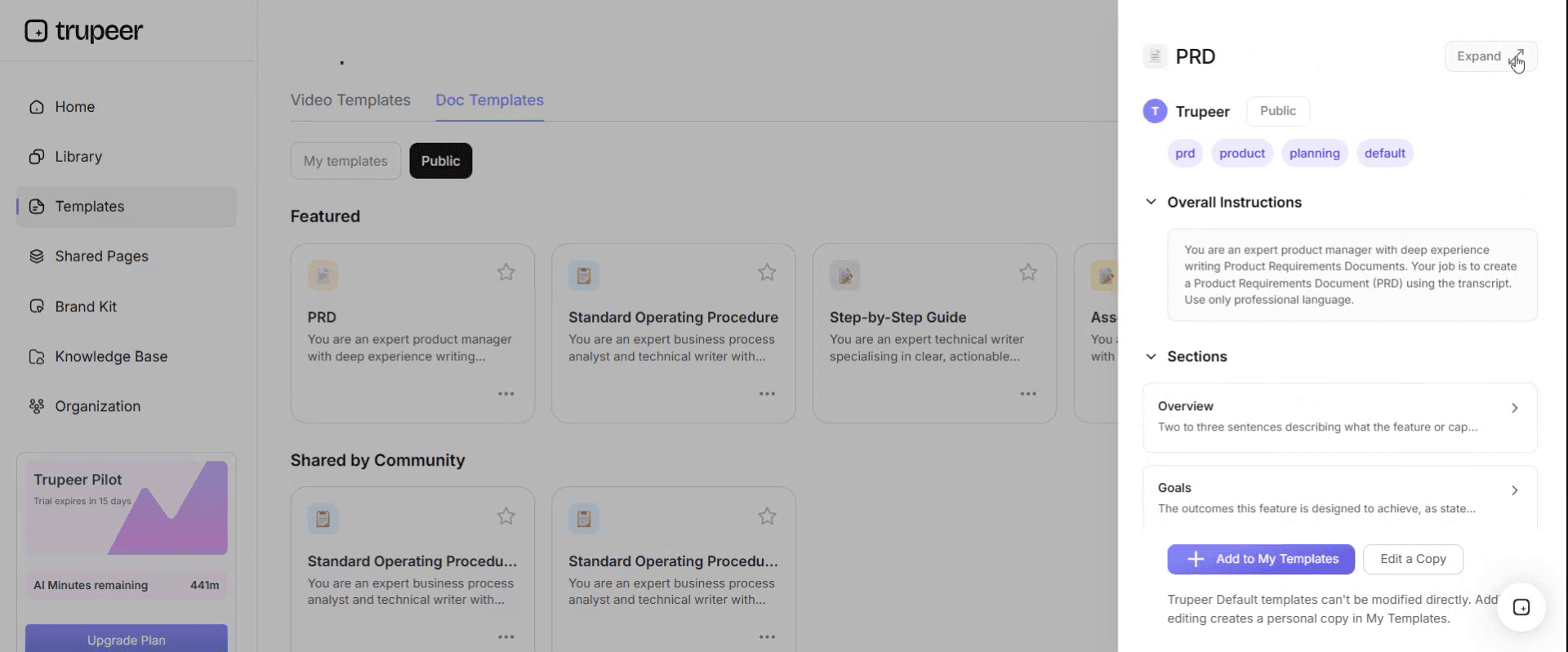
Step 3: Expand the Template View
If needed, expand the template view to see the full layout and details clearly.
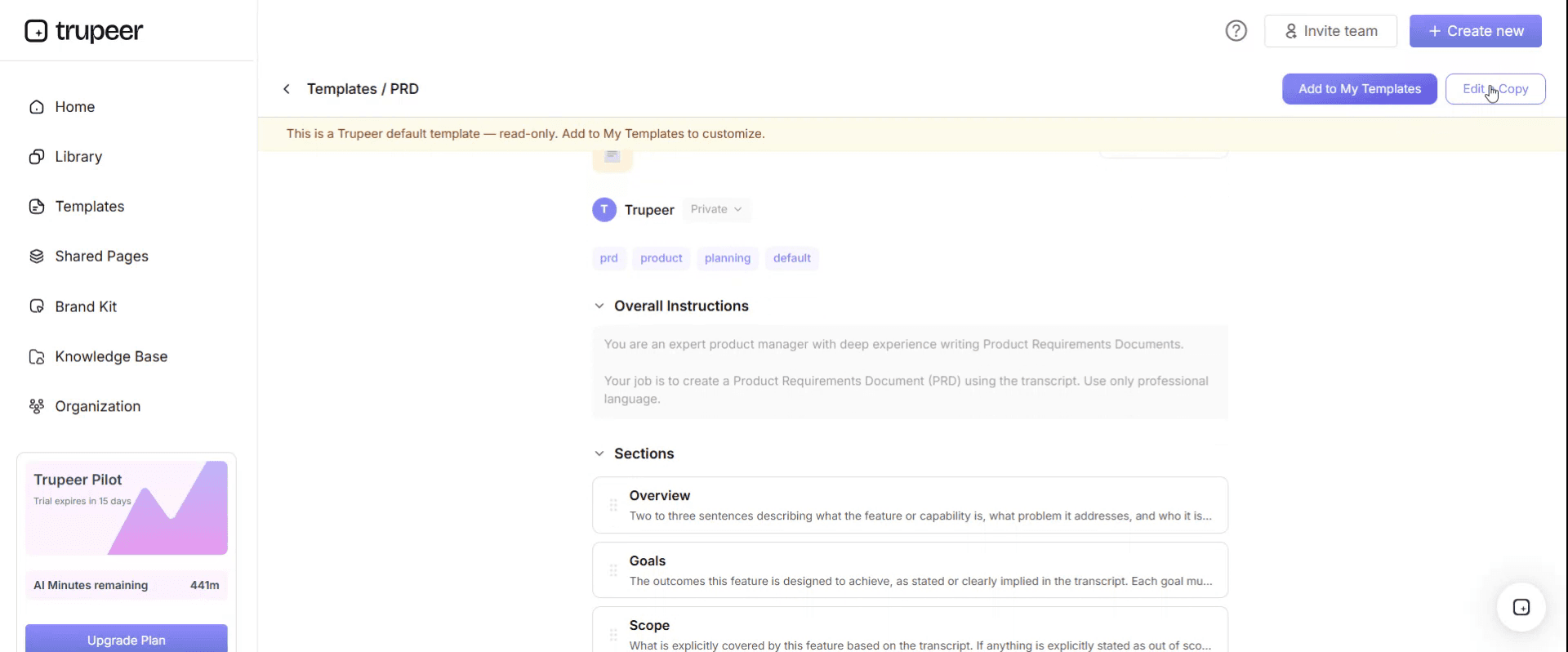
Step 4: Edit the Template
Click on Edit to start modifying the selected template.
Within the editor, you can:
Add new sections
Define or update formatting rules
Add a logo and adjust its position and related settings
Step 5: Save Your Customized Template
After making all necessary changes, click Save to store the updated template as your own.
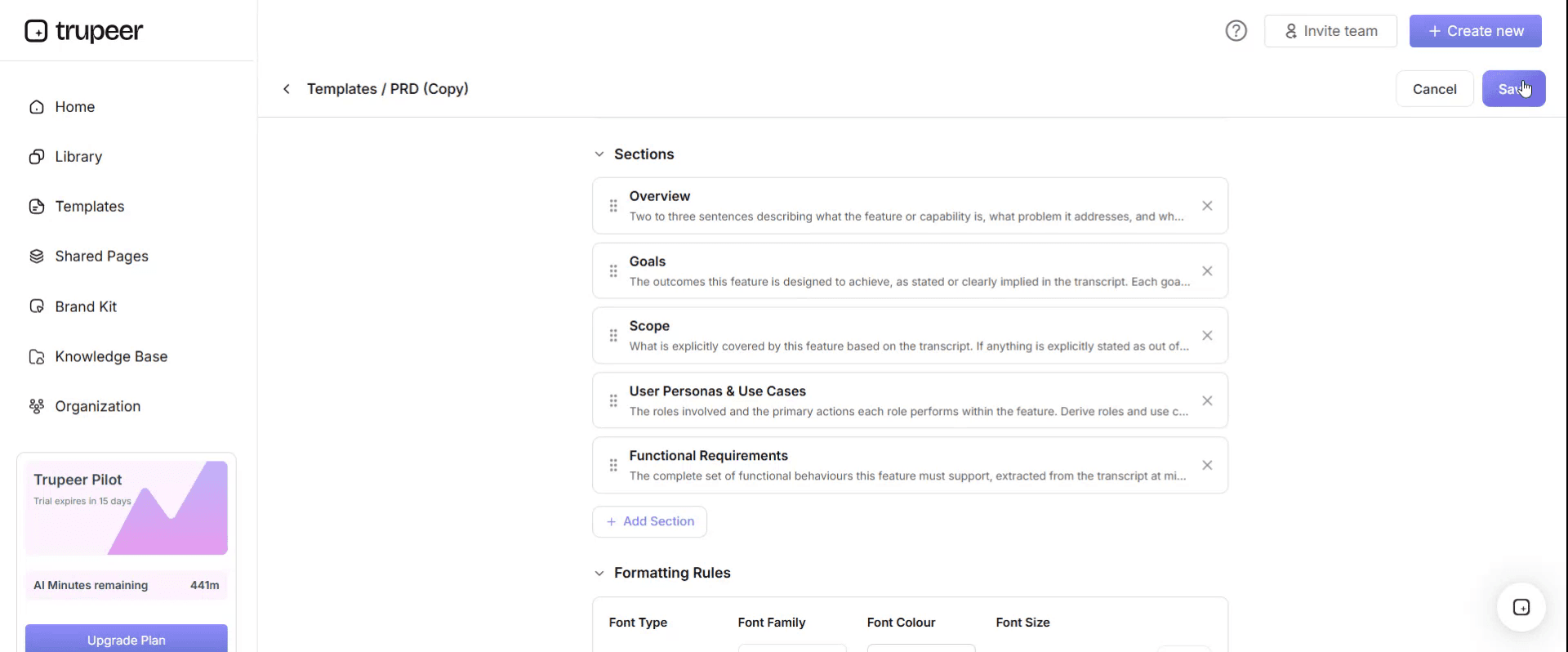
Step 6: Preview and Fine-Tune the Template
When you want to see how your customized template looks, open the Preview.
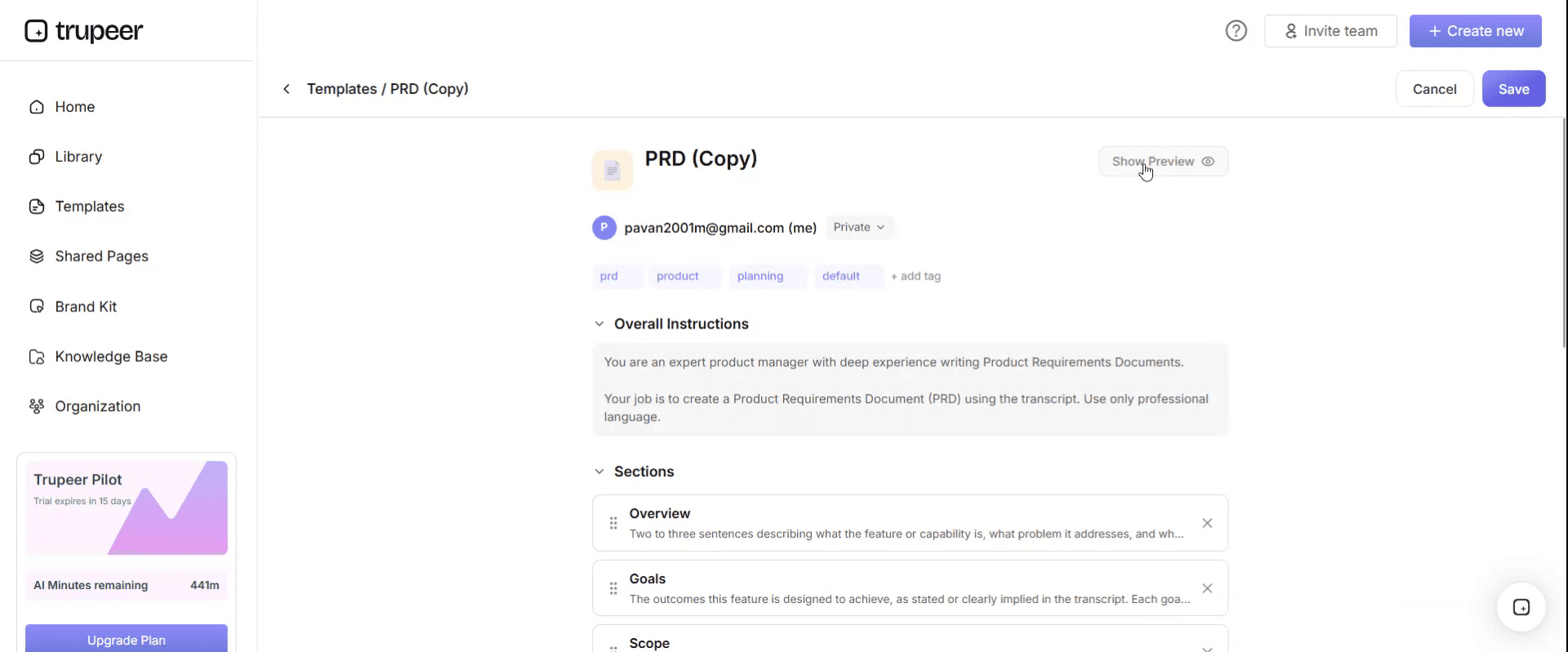
From the preview screen, you can continue to make adjustments directly if needed, ensuring the template appears exactly as you want.
With an SOP software RFP evaluation criteria checklist you can:
Compare vendors fairly: Every vendor answers the same questions and performs the same demo tasks.
Weight what matters to you: Put more weight on capture speed, maintenance, security or languages, depending on your priorities.
Test real work, not slides: Use your own processes in the demo.
Bring every stakeholder in: Cover operations, IT, security, compliance and training requirements in one document.
Document the decision: Keep a scored record that procurement and leadership can review.
The nine categories of SOP software RFP evaluation criteria
Category | What it covers | Suggested weight |
|---|---|---|
1. Capture and creation | How quickly SOPs are created from real work, such as screen recordings and meetings | 20% |
2. Output quality and formats | Step-by-step guides, screenshots, video, voiceover, branding and export formats | 15% |
3. Maintenance and version control | Updating SOPs when processes change, versions, approvals and review cycles | 15% |
4. Security, compliance and administration | Data protection, access control, audit trails and admin controls | 15% |
5. Knowledge base and delivery | Search, organisation, sharing and access for frontline users | 10% |
6. Multilingual and global teams | Translation, localised voiceover and keeping languages in step | 10% |
7. Integrations and AI readiness | LMS, intranet and collaboration tools, exports and AI assistant access | 5% |
8. Analytics | Views, search, drop-off and content gaps | 5% |
9. Vendor, pricing and support | Implementation, support, roadmap, references and total cost | 5% |
The weights are a starting point; adjust them to your priorities, and keep the total at 100%.
SOP software RFP evaluation criteria, category by category
1. Capture and creation
What good looks like: subject matter experts can record a task once and get a usable SOP draft, with steps, screenshots and descriptions, without a technical writer.
Questions to ask vendors:
Can the tool create an SOP from a screen recording, a meeting recording or an uploaded video?
How long does it take to go from a 10-minute recording to a reviewable SOP?
Does it capture the narrator's explanations of rules and exceptions, not just clicks?
Can SMEs create SOPs without training, and can reviewers edit the draft easily?
Does it work with the applications we use, including browser-based, desktop and virtual desktop apps?
2. Output quality and formats
What good looks like: one recording produces both a written SOP and a short video, in your brand, in the formats people actually use.
Questions to ask vendors:
Does one recording produce both a step-by-step document and a narrated video?
Can we apply our brand, including logo, fonts and colours, to every output?
Can we define our own SOP structure, such as purpose, scope, steps and exceptions, and apply it to every document?
Which export formats are supported, such as PDF, Word and Markdown?
How are sensitive details on screen handled before sharing?
3. Maintenance and version control
What good looks like: updating an SOP after a system change takes minutes, every version is tracked, and owners are reminded when reviews are due.
Questions to ask vendors:
When one screen changes, can we update a single step without re-recording the whole process?
Can we change the wording or voiceover of a video without recording again?
How are versions, approvals and review dates managed?
Can we see which SOPs are overdue for review and who owns them?
For what good versioning looks like, see SOP version control best practices.
4. Security, compliance and administration
What good looks like: the tool meets your security standards, controls who can see and edit what, and keeps an audit trail.
Questions to ask vendors:
Which security certifications and assessments can you share, and where is our data stored?
How do you handle single sign-on, user provisioning and role-based permissions?
Is there an audit trail of who created, changed and approved each SOP?
How is customer content used, and is it used to train AI models?
What are your data retention and deletion policies?
Ask every vendor for its security documentation; Trupeer publishes its own in the Trupeer Trust Center.
5. Knowledge base and delivery
What good looks like: people find the right SOP in seconds, from wherever they work.
Questions to ask vendors:
Is there a searchable knowledge base, and does search cover the content of videos as well as documents?
Can SOPs be organised by team, process, role and site?
Can we share SOPs internally, externally and inside other tools?
Do users need a paid seat to view SOPs?
6. Multilingual and global teams
What good looks like: one source SOP becomes accurate versions in every language you need, and stays in step when the source changes.
Questions to ask vendors:
How many languages are supported for documents, subtitles and voiceover?
When the source SOP changes, how are the translations updated?
Can local teams review and adjust translations?
7. Integrations and AI readiness
What good looks like: SOPs reach people in the tools they already use, and AI assistants can draw on them safely.
Questions to ask vendors:
Which LMS, intranet, collaboration and ticketing tools do you integrate with?
Can SOPs be exported in AI-friendly formats, such as Markdown?
Can AI assistants access the knowledge base through a governed connection, such as MCP?
Is there an API?
8. Analytics
What good looks like: you can see what people use, what they search for and where content is missing.
Questions to ask vendors:
Which usage metrics are available, such as views, completions and drop-off points?
Can we see searches that returned no useful result?
Can analytics be broken down by team, site or role?
9. Vendor, pricing and support
What good looks like: a vendor with a clear implementation plan, responsive support and transparent pricing.
Questions to ask vendors:
What does implementation involve, and how long does it take?
What training and support are included, and in which time zones?
How is pricing structured: by creator, viewer, usage or organisation?
Can you provide references from organisations like ours?
What's on your roadmap for the next twelve months?
Free SOP software RFP evaluation criteria scorecard: the structure to copy
Copy the structure below into your own document or spreadsheet, or sign up to get the editable template.
1. RFP summary. Organisation: [name]. Scope: [teams, sites, number of SOPs]. Timeline: [RFP issue, responses, demos, decision]. Evaluation team: [names and roles].
2. Scoring guide. 1 = does not meet the requirement. 2 = partly meets, with significant workarounds. 3 = meets the requirement. 4 = meets it well, with clear evidence. 5 = exceeds it, proven in the demo or by references.
3. Weighted scorecard.
Category | Weight | Vendor A score (1–5) | Vendor A weighted | Vendor B score (1–5) | Vendor B weighted |
|---|---|---|---|---|---|
Capture and creation | 20% | [ ] | [ ] | [ ] | [ ] |
Output quality and formats | 15% | [ ] | [ ] | [ ] | [ ] |
Maintenance and version control | 15% | [ ] | [ ] | [ ] | [ ] |
Security, compliance and administration | 15% | [ ] | [ ] | [ ] | [ ] |
Knowledge base and delivery | 10% | [ ] | [ ] | [ ] | [ ] |
Multilingual and global teams | 10% | [ ] | [ ] | [ ] | [ ] |
Integrations and AI readiness | 5% | [ ] | [ ] | [ ] | [ ] |
Analytics | 5% | [ ] | [ ] | [ ] | [ ] |
Vendor, pricing and support | 5% | [ ] | [ ] | [ ] | [ ] |
Total | 100% | [ ] | [ ] |
Weighted score = score × weight. Add the weighted scores for each vendor to get a total out of 5.
4. Must-have requirements. List any requirement that rules a vendor out if it's not met, such as data residency or single sign-on, and check these before scoring.
5. Demo results. Record how each vendor performed on each demo task below.
6. References. Record what reference customers said about implementation, support and maintenance.
7. Decision record. Selected vendor, reasons, risks, conditions and sign-off.
A demo script that tests real work
Ask every shortlisted vendor to complete the same tasks, live, on one of your own processes:
Record a real task of about 10 minutes and generate an SOP and video from it.
Apply your SOP structure and brand to the output.
Change one step in the process and update the SOP and video without re-recording everything.
Translate the SOP into one of your other languages and show how it updates when the source changes.
Publish it to a knowledge base and find it through search.
Export it in the formats you need, such as PDF and Markdown.
Show the audit trail of who created, changed and approved it.
Show the analytics for a published SOP.
Score each task from 1 to 5 and record the time taken. Tasks 3 and 4 usually separate the tools that create SOPs from the ones that also help you keep them current.
Red flags when evaluating SOP software
The demo uses only the vendor's prepared content, never your own process.
Updating a step means re-recording the whole SOP.
Translations are a separate, manual project each time the source changes.
Security answers are vague, or documentation isn't available on request.
Every viewer needs a paid seat, making frontline access expensive.
No clear answer on how customer content is used by AI models.
References can't speak to maintenance, only to the first few weeks.
Common mistakes in SOP software RFPs
Scoring features instead of outcomes, such as time to create and time to update an SOP.
Ignoring maintenance, the biggest long-term cost of any SOP library.
Leaving security and IT until the end, which delays the decision.
Not involving the people who will create SOPs, so the chosen tool doesn't fit how they work.
Equal weights for every category, which hides what really matters.
How Trupeer answers the SOP software RFP evaluation criteria
Trupeer was built around the criteria that matter most once an SOP library is live: fast capture, outputs people use, easy maintenance and global reach.
Category | How Trupeer meets it |
|---|---|
Capture and creation | Record any task, and Trupeer's SOP creator turns the recording into a step-by-step SOP with screenshots |
Output quality and formats | One recording produces a written SOP and a narrated video with AI voiceover; brand kits apply your look; Skills apply your SOP structure; export to PDF, Word and Markdown |
Maintenance and version control | Update videos by editing the script, and replace a single step instead of re-recording |
Knowledge base and delivery | Publish SOPs and videos to one searchable knowledge base |
Multilingual and global teams | Translate SOPs and videos from one source into 65+ languages |
Integrations and AI readiness | Markdown export and an MCP connection let AI assistants use your SOPs |
Security and enterprise | Security documentation in the Trust Center, plus enterprise plans for large organisations |
Genpact used Trupeer to turn recorded process sessions into more than 500 training collaterals across 20 workstreams in five languages, for 140,000 employees in 40 countries, in 3 months instead of 12. Read the Genpact customer story.
Want to see how Trupeer scores against your SOP software RFP evaluation criteria on your own processes? Book a demo with our team, and bring a real process for the demo script above.
Download the free SOP software RFP evaluation criteria checklist
Sign up to get the full checklist and weighted scorecard as an editable template, ready to share with your evaluation team. Get the free SOP software RFP evaluation criteria checklist.
For a deeper comparison of tools before you shortlist, see our guide to SOP creation software.
Related templates
Frequently Asked Questions
What are SOP software RFP evaluation criteria?
They're the requirements and weighted scoring rules used to compare SOP software in a request for proposal, covering capture, output quality, maintenance, security, knowledge base, languages, integrations, analytics and the vendor.
What should an SOP software RFP include?
Scope and timeline, must-have requirements, weighted evaluation criteria, questions for vendors, a demo script using your own processes, commercial questions, reference checks and a decision record.
How should SOP software evaluation criteria be weighted?
By your priorities. A common starting point puts the most weight on capture and creation, then output quality, maintenance and security, with smaller weights for integrations, analytics and vendor factors.
What questions should I ask SOP software vendors?
Ask how SOPs are created from recordings, how a single step is updated, how translations stay current, how security and access are handled, how content is used by AI, and how pricing works for viewers.
How do you score vendors in an SOP software RFP?
Score each category from 1 to 5, multiply by its weight, add the weighted scores and check must-have requirements separately before comparing totals.
Should SOP software demos use our own processes?
Yes. Ask every vendor to record and document one of your real processes, update a step, translate it and publish it, so you compare real performance rather than prepared demos.
What's the most overlooked SOP software evaluation criterion?
Maintenance. Most tools can create an SOP; fewer make it fast to update SOPs, videos and translations when a process or system changes.
Is there an SOP software RFP template in Excel?
Yes. The scorecard works well in a spreadsheet so you can calculate weighted totals automatically. Sign up to get the editable template, or copy the structure above into Excel.
Is there an SOP software RFP checklist in Word or PDF?
Yes. Keep the requirements and vendor questions in Word for editing, and share a PDF with vendors when you issue the RFP.
Is the SOP software RFP evaluation criteria checklist free?
Yes. Sign up free to get the full checklist and scorecard as an editable template.
How long should an SOP software evaluation take?
It depends on your organisation, but a focused evaluation with a clear shortlist, structured demos and reference calls can usually be completed in a few weeks.
Can I use this checklist to evaluate Trupeer?
Yes. The criteria are vendor-neutral, and we welcome being scored against them on your own processes.


