4.8/5
Free Meeting Recording to SOP
Turn Any Meeting Recording into an SOP Automatically with AI
Turn Your Recording into an SOP

Trupeer's meeting recording to SOP tool lets you turn meeting recording into SOP documents automatically, so the knowledge shared in a call doesn't disappear once the meeting ends. Instead of asking someone to rewatch an hour-long recording and write up the process by hand, you upload the recording and let AI turn the meeting recording into a clear, step-by-step standard operating procedure. This solves a problem every operations, IT, and onboarding team knows: walkthroughs and process discussions happen live in meetings, but that knowledge rarely makes it into documentation. With Trupeer's AI screen recorder and video upload, the recording becomes the source, and the SOP is generated for you.
When you turn a meeting recording into an SOP with Trupeer, the platform analyzes the recording, identifies the key steps and decisions, captures relevant screenshots from any shared screen, and writes structured instructions to match. You can upload recordings from Zoom, Microsoft Teams, Google Meet, or any tool that exports a video file, then publish a finished SOP in minutes. The same recording can also produce a polished video and supporting documentation, so a single meeting becomes a reusable knowledge asset. For teams that run frequent process and training calls, this is the fastest way to turn meeting recording into SOP content without adding documentation work to anyone's plate.
How to Turn Meeting Recording into SOP with Trupeer
The process to turn meeting recording into SOP is designed to take just a few minutes of your time. Trupeer's screen recorder and upload flow handle the capture, and the AI does the structuring, writing, and formatting.
Step 1: Upload Your Meeting Recording
Export the recording from Zoom, Teams, Google Meet, or your meeting tool of choice, and upload it to Trupeer. If you'd rather capture a fresh walkthrough, you can record one directly. This upload is the only manual step needed to turn meeting recording into SOP content.

Step 2: AI Turns the Meeting Recording into an SOP
Trupeer's AI processes the recording automatically. It removes filler and dead air, identifies the sequence of steps, captures screenshots from any shared screen, and writes descriptive instructions, converting the meeting into a structured SOP with ordered steps and supporting visuals.

Step 3: Edit, Brand, and Share
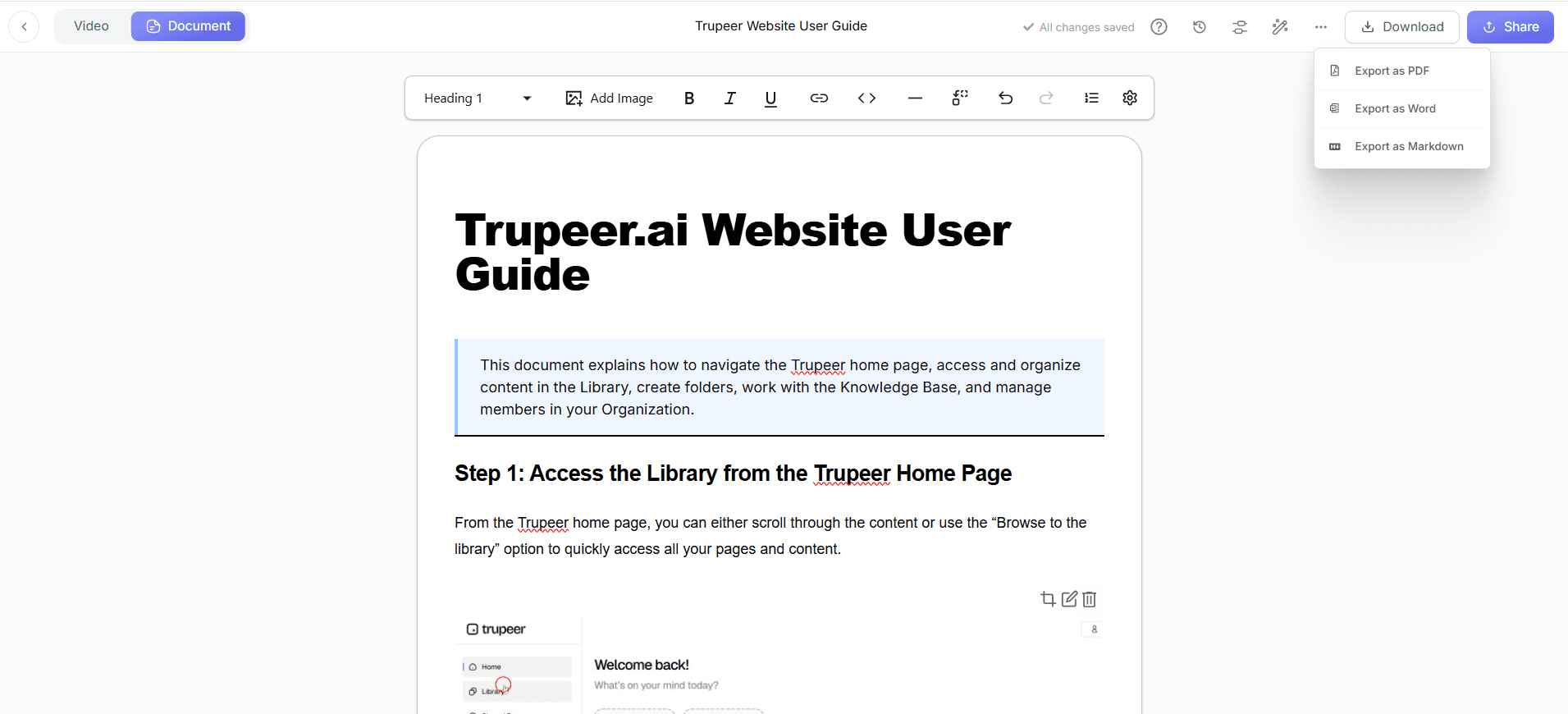
The generated SOP is fully editable, so you can refine the wording, add or replace images, and reorder steps until it matches your standards. Apply your brand kit for consistent logos and formatting, translate it into other languages if needed, then export the SOP or host it in a searchable knowledge base your whole team can access.
Key Features to Turn Meeting Recording into SOP
The tool to turn meeting recording into SOP brings capture, AI writing, and publishing into one platform, so the work shared in a meeting becomes documentation your team can actually use, with the control enterprise teams need.
Works With Any Recording: Upload recordings from Zoom, Microsoft Teams, Google Meet, or any tool that produces a video file, so you can turn meeting recording into SOP content no matter where the call happened.
Automatic Step Detection: The AI breaks the recording into clear, ordered steps, so you don't have to scrub through the footage deciding where one instruction ends and the next begins.
Auto-Captured Screenshots: When a meeting includes a screen share or walkthrough, relevant screenshots are pulled from the recording and placed beside the matching step, giving the SOP the visual detail readers need.
Document and Video From One Recording: A single meeting recording can produce both a written SOP and a narrated video, so you can turn meeting recording into SOP and training video assets at once.
Multi-Language Support: Publish each SOP in multiple languages so distributed and global teams can follow the same process in their own language.
Enterprise Workspaces and Roles: Organization workspaces, user roles, and shared-page visibility controls let large teams turn meeting recording into SOP content securely and keep sensitive procedures restricted to the right people.
Why Turn Meeting Recording into SOP with AI?
Process knowledge shared in meetings is easily lost, and writing it up manually pulls experienced staff away from higher-value work. Choosing to turn meeting recording into SOP with AI captures that knowledge instantly while improving documentation quality and consistency.
Capture Knowledge Before It's Lost: Walkthroughs and decisions from a call are turned into permanent documentation, so know-how doesn't leave when the meeting ends or a team member moves on.
Huge Time Savings: A complete SOP is generated from a recording in minutes, instead of someone spending hours rewatching and transcribing the meeting into a procedure.
Higher Accuracy: Because the SOP is built from the actual recording, the documented steps reflect what was really shown and said, reducing the errors common in memory-based write-ups.
Consistency Across Teams: When everyone uses the same tool to turn meeting recording into SOP, all documentation follows the same structure, tone, and branding regardless of who created it.
Faster Onboarding: New hires learn from clear, visual SOPs drawn from real working sessions, instead of sitting through long recordings to find the parts that matter.
Audit and Compliance Readiness: Detailed, current SOPs with clear steps support strong internal controls and make audits smoother for regulated teams.
Who Should Turn Meeting Recording into SOP?
The ability to turn meeting recording into SOP is valuable for any team that works through processes in live calls, from small teams capturing tribal knowledge to enterprises standardizing procedures across divisions.
Operations Teams: Convert process review and hand-off meetings into SOPs so workflows stay documented and repeatable as the team changes.
IT and System Administrators: Turn troubleshooting and configuration calls into SOP libraries and technical documentation that reduce repeat questions.
Customer Success and Support: Capture onboarding and resolution walkthroughs from client calls and turn meeting recording into SOP content agents and customers can follow.
HR and Onboarding Teams: Record training sessions once and convert them into reusable onboarding SOPs instead of repeating the same live walkthrough for every new hire.
Enterprise and Compliance Leaders: Standardize procedures across the organization with secure workspaces and controlled sharing, making it safe to turn meeting recording into SOP content at scale. Learn more on the enterprise page.
Founders and Small Teams: Capture how the business runs from everyday working calls, so processes are documented without setting aside dedicated writing time.
Best Practices to Turn Meeting Recording into SOP
A little structure in the meeting itself makes the SOP far stronger. These practices help the AI produce a cleaner first draft when you turn meeting recording into SOP.
Share Your Screen During the Walkthrough: The AI captures the best screenshots from shared screens, so demonstrating the process on screen produces a far more detailed SOP than audio alone.
Narrate the Steps Clearly: Explain what you're doing and why as you go. The AI uses that narration to write richer, more useful instructions.
Keep Meetings Focused: Cover one process per recording where possible. A focused call becomes a focused SOP that's easier to follow and update.
Review With a Fresh Reader: Have someone who wasn't in the meeting follow the generated SOP. Their questions reveal gaps that are obvious to attendees but not to a new user.
Standardize With Templates and Brand Kits: Use consistent templates and your brand kit so every SOP looks and reads the same across your library.
Explore Related Tools
Why Choose Trupeer to Turn Meeting Recording into SOP
Works With Any Recording
Upload recordings from Zoom, Microsoft Teams, Google Meet, or any tool that exports a video file, no special format required
AI-Built SOP Structure
The AI breaks the recording into ordered steps and captures screenshots from shared screens to build a complete, structured SOP
Enterprise-Ready Controls
Organization workspaces, user roles, and shared-page security let large teams turn meeting recording into SOP content safely at scale
How to Turn a Meeting Recording into an SOP
步骤 1
Upload your meeting recording
第 2 步
AI turns the recording into an SOP
步骤 3
Edit, brand, and share instantly
常见问题
How do I turn a meeting recording into an SOP?
Upload your meeting recording to Trupeer and the AI automatically turns the meeting recording into a step-by-step SOP, detecting the sequence of steps, capturing screenshots from any shared screen, and writing the instructions. You then review, edit, and publish it, the whole process takes minutes.
Which meeting platforms does it work with?
It works with recordings from Zoom, Microsoft Teams, Google Meet, and any tool that exports a standard video file. Simply download the recording from your meeting platform and upload it to Trupeer to turn the meeting recording into an SOP.
Does the meeting need to include a screen share?
For the most detailed SOP, yes, a screen share or walkthrough lets the AI capture screenshots and document the exact steps. Meetings without a screen share can still be turned into a written procedure from the spoken content, but screen-share recordings produce the richest, most visual SOPs.
Can I edit the SOP after it's generated?
Yes. The generated SOP is fully editable, so you can adjust the text, add or replace images, reorder steps, and apply your brand kit. The AI gives you a complete first draft that you refine to match your standards.
Is the meeting recording to SOP tool suitable for enterprise teams?
Yes. Trupeer offers organization workspaces, user roles, and shared-page visibility controls, so enterprise teams can turn meeting recording into SOP content while keeping sensitive procedures restricted and standardized across divisions.


