4.8/5
Gratis snelle referentiegids-generator
Zet elke schermopname om in professionele beknopte naslaggidsen
Maak nu je gids

De snelle referentiegids-generator van Trupeer zorgt voor een revolutie in hoe teams documentatie maken door schermafbeeldingen op te nemen en automatisch om te zetten in uitgebreide, geschreven handleidingen. In tegenstelling tot traditionele documentatietools die handmatig schrijven en opmaak vereisen, legt het AI-gestuurde systeem van Trupeer je echte workflow vast via een schermopname en zet het die om in stapsgewijze referentiematerialen die je team direct kan gebruiken. Het platform pakt een kritieke uitdaging aan waarmee bedrijven wereldwijd te maken hebben: het tijdrovende proces van het maken en bijhouden van up-to-date documentatie.
Wat Trupeer onderscheidt van traditionele documentatietools, is de aanpak met twee outputs. Wanneer je je scherm opneemt of een bestaande opname uploadt, maakt de AI niet alleen een video-tutorial. Tegelijkertijd genereert het geschreven documentatie, compleet met screenshots, stapsgewijze instructies en professionele opmaak.
Hoe werkt de snelle referentiegids-generator?
De snelle referentiegids-generator van Trupeer volgt een gestroomlijnd vijfstappenproces dat je schermactiviteit binnen enkele minuten omzet in professionele documentatie. Het systeem is ontworpen om te werken met zowel nieuwe opnames als bestaande videobestanden, zodat je maximale flexibiliteit hebt in hoe je je referentiematerialen maakt.
Stap 1: Neem je content op of upload deze
Begin door óf de ingebouwde AI Screen Recorder van Trupeer te gebruiken om je workflow in realtime vast te leggen, óf een bestaande schermopname te uploaden die het proces laat zien dat je wilt documenteren. Het platform ondersteunt meerdere videoformaten en kan opnames verwerken van verschillende tools voor schermopname, waardoor het eenvoudig is om te werken met content die je mogelijk al hebt gemaakt.

Stap 2: AI-analyse en verwerking
Zodra je opname is geüpload, analyseert de AI-engine van Trupeer elk frame en identificeert het elementen van de gebruikersinterface, volgt het muisbewegingen en herkent het tekst in de schermopname. Het systeem maakt een gedetailleerde kaart van je workflow en begrijpt de volgorde van acties, de betrokken applicaties en de specifieke stappen die nodig zijn om de taak te voltooien.

Stap 3: Automatische documentatiegeneratie
De AI zet de visuele informatie uit je opname om in geschreven instructies en genereert automatisch stapsgewijze handleidingen met bijbehorende screenshots. Het systeem maakt duidelijke, bruikbare beschrijvingen voor elk onderdeel van je workflow, zodat iemand die de handleiding volgt je proces exact kan nadoen.

Stap 4: Toepassing van templates en personalisatie
Je gegenereerde content wordt opgemaakt met de documentatiesjablonen van Trupeer, die zorgen voor consistente styling, een correcte hiërarchie van koppen en een professionele presentatie. Je kunt deze sjablonen aanpassen aan je merkrichtlijnen, zodat al je referentiematerialen een samenhangende uitstraling krijgen die aansluit op de visuele identiteit van je organisatie.
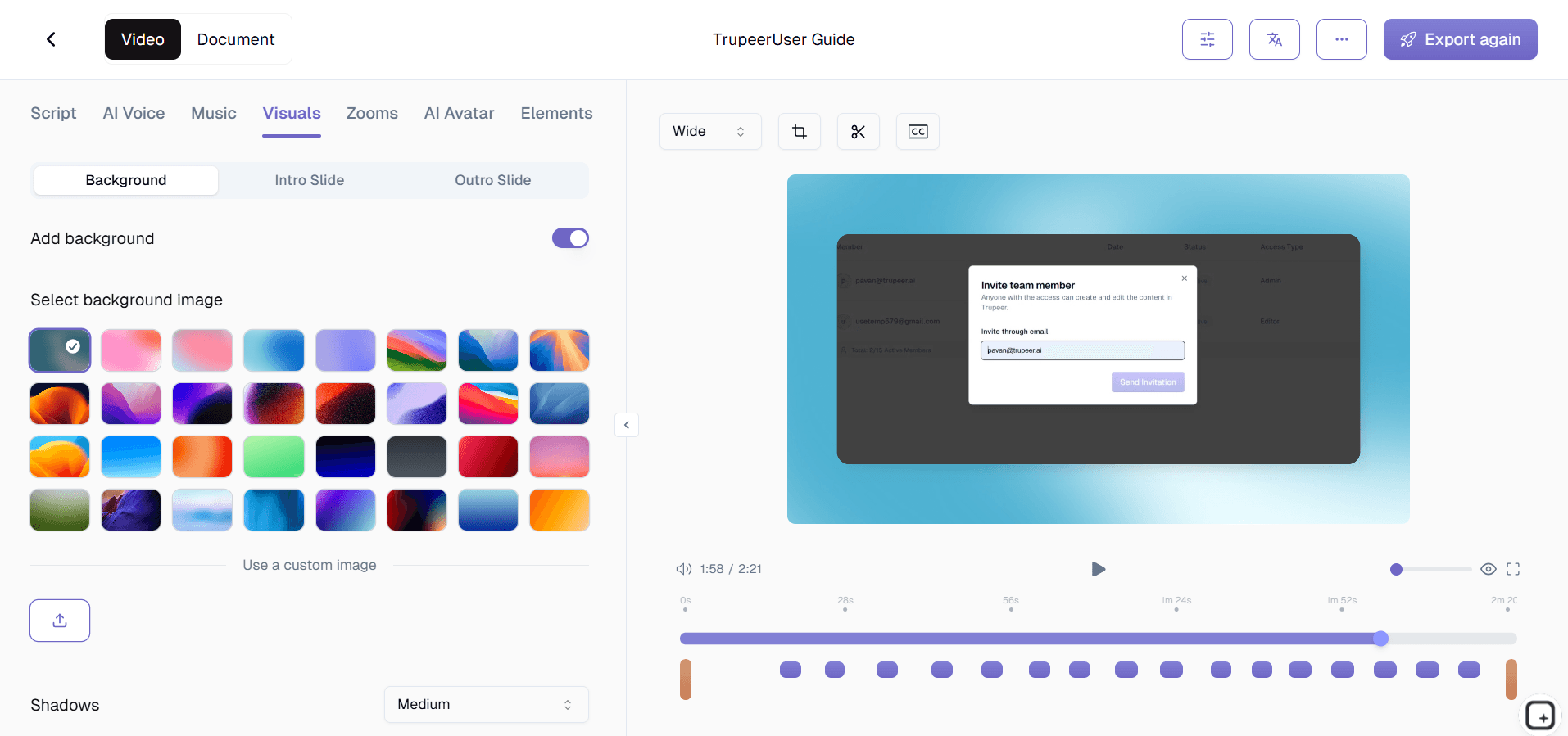
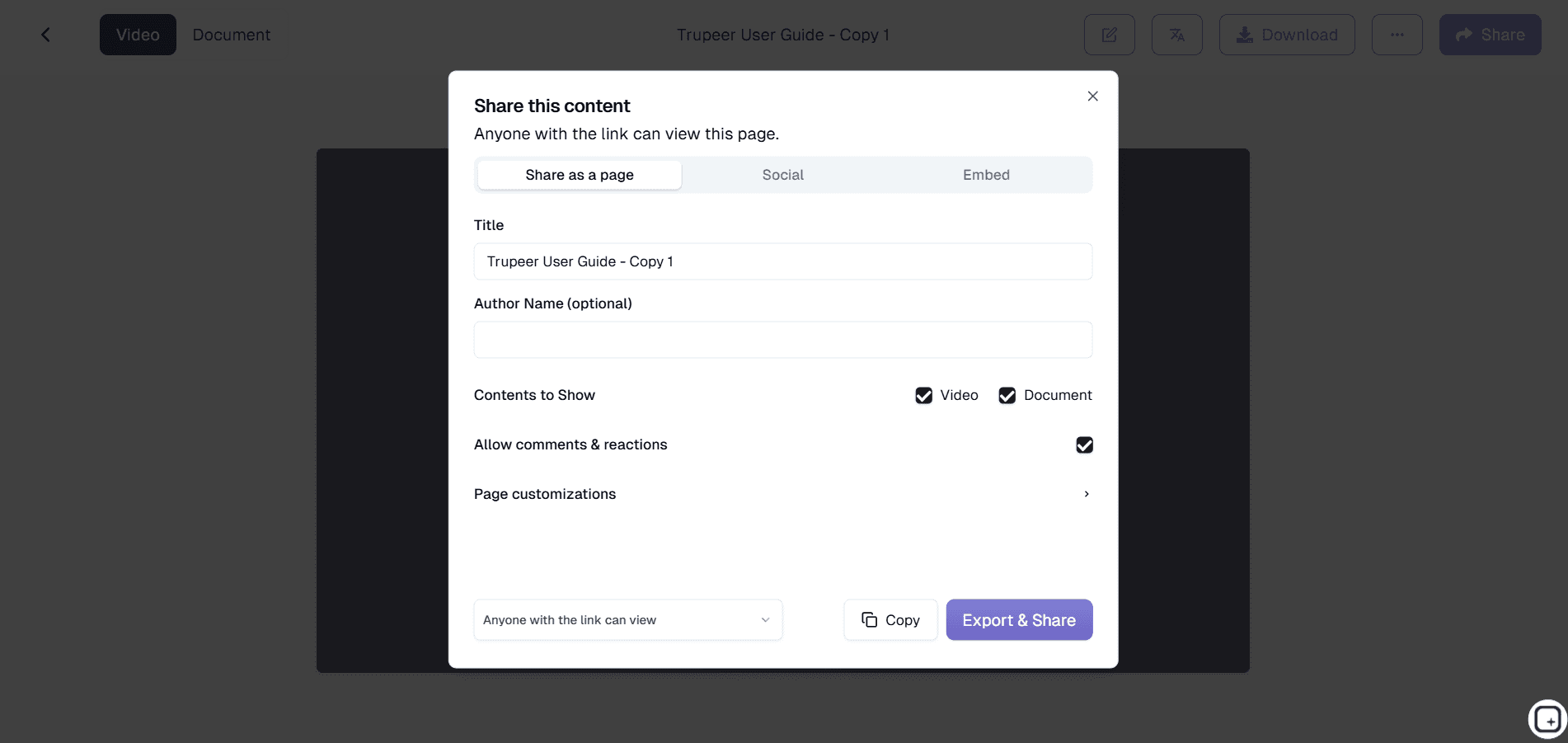
Stap 5: Review, branding en delen
De laatste stap bestaat uit het toepassen van je brand kits voor consistente branding, het controleren van de gegenereerde content op juistheid en het delen van je voltooide referentiegids via directe links, ingesloten widgets of geëxporteerde bestanden. Het systeem ondersteunt ook vertaling naar meerdere talen, zodat je gidsen toegankelijk zijn voor wereldwijde teams.
Belangrijkste functies en mogelijkheden
De snelle referentiegids-generator van Trupeer biedt uitgebreide functies die zijn ontworpen om je documentatieworkflow te stroomlijnen, terwijl de professionele kwaliteitsstandaarden behouden blijven. Deze mogelijkheden werken samen om een naadloze ervaring te creëren van opname tot en met de uiteindelijke publicatie.
AI-gestuurde contentherkenning: Het systeem gebruikt geavanceerde computer vision om elementen van de gebruikersinterface te identificeren en te beschrijven, en genereert automatisch nauwkeurige beschrijvingen van knoppen, menu’s en schermgebieden. Dit elimineert de noodzaak voor handmatige annotatie van screenshots en zorgt ervoor dat je gidsen precieze, bruikbare instructies bevatten die lezers eenvoudig kunnen volgen.
Generatie met twee outputs: Elke opname levert zowel videomateriaal als geschreven documentatie tegelijk op. Deze aanpak maximaliseert de waarde van je tijdsinvestering en geeft je meerdere contentformaten die aansluiten op verschillende leerbehoeften binnen je team of bij je klanten.
Opmaak op basis van templates: Professionele documentatiesjablonen zorgen voor een consistente structuur en styling in al je referentiegidsen. Deze sjablonen volgen best practices voor documentatie en kunnen worden aangepast aan je merkvereisten, wat resulteert in een professionele uitstraling die de kwaliteitsstandaarden van je organisatie weerspiegelt.
Merkintegratie: Pas moeiteloos je visuele identiteit toe via brand kits met logo’s, kleurenschema’s en stylingvoorkeuren. Zo behouden al je referentiegidsen merkconsistentie terwijl ze er verzorgd en professioneel uitzien.
Ondersteuning voor meerdere talen: Met ingebouwde vertaling-mogelijkheden kun je referentiegidsen in meerdere talen maken op basis van één opname. Deze functie is vooral waardevol voor organisaties met wereldwijde teams of internationale klantgroepen die documentatie in hun eigen taal nodig hebben.
Export die klaar is voor integratie: Gegeneerde gidsen kunnen in verschillende formaten worden geëxporteerd of worden gedeeld via directe links en insluitbare widgets. Deze flexibiliteit zorgt ervoor dat je referentiematerialen kunnen worden geïntegreerd in bestaande kennisbanken, learning management systems of portals voor klantenservice, zonder technische complicaties.
Waarom zou je de snelle referentiegids-generator van Trupeer gebruiken?
De snelle referentiegids-generator van Trupeer levert aanzienlijke tijdwinst en kwaliteitsverbeteringen op ten opzichte van traditionele documentatiemethoden. Organisaties zien doorgaans een reductie van 75% in de tijd die nodig is om documentatie te maken, terwijl ze tegelijkertijd de nauwkeurigheid en bruikbaarheid van hun referentiematerialen verbeteren.
Grote tijdwinst: Het handmatig maken van uitgebreide referentiegidsen kan uren of zelfs dagen duren, zeker wanneer je rekening houdt met het vastleggen van screenshots, bewerken, schrijven en opmaken. Trupeer reduceert dit proces tot minuten door de meest tijdrovende aspecten van het maken van documentatie te automatiseren. Teams kunnen zich richten op strategisch werk in plaats van repetitieve documentatietaken.
Consistente kwaliteitsstandaarden: Handmatige documentatie heeft vaak te maken met inconsistente opmaak, ontbrekende stappen of onduidelijke instructies. De AI van Trupeer zorgt ervoor dat elke gids dezelfde hoogwaardige structuur volgt en alle benodigde details bevat. Het systeem slaat geen stappen over en doet geen aannames, waardoor je grondige documentatie krijgt die gebruikers daadwerkelijk helpt om taken succesvol uit te voeren.
Minder documentatieschuld: Veel organisaties worstelen met verouderde of onvolledige documentatie, omdat het handmatig bijwerken van gidsen te tijdrovend is. Met het gestroomlijnde proces van Trupeer wordt het bijhouden van referentiematerialen haalbaar, waardoor de documentatieschuld wordt verminderd die vaak oploopt in organisaties die snel veranderen.
Verbeterde gebruikerservaring: De gidsen die door Trupeer worden gegenereerd, zijn ontworpen voor gebruiksgemak, met duidelijke stapsgewijze instructies, relevante screenshots en een logische flow. Dit verbetert de ervaring voor iedereen die je documentatie gebruikt, of het nu gaat om interne teamleden of externe klanten. Dat leidt tot hogere percentages voor het succesvol afronden van taken en minder verzoeken om ondersteuning.
Schaalbaar zonder extra middelen: Naarmate je organisatie groeit, vermenigvuldigen de documentatiebehoeften zich exponentieel. Traditionele aanpakken vereisen een evenredige toename van schrijfcapaciteit, maar het geautomatiseerde systeem van Trupeer schaalt efficiënt. Je kunt uitgebreide documentatiebibliotheken opbouwen zonder grote documentatieteams te hoeven samenstellen, waardoor het praktisch is om elk belangrijk proces grondig te documenteren.
Voor wie is de snelle referentiegids-generator van Trupeer geschikt?
De snelle referentiegids-generator van Trupeer is bedoeld voor diverse doelgroepen in verschillende sectoren en organisatieonderdelen. Door de veelzijdigheid is het waardevol voor iedereen die snel en efficiënt duidelijke, professionele documentatie wil maken.
Contentmakers en technische schrijvers: Professionele contentmakers gebruiken Trupeer om hun documentatieworkflows te stroomlijnen en consistentie te behouden in grote projecten. Het platform stelt hen in staat zich te richten op contentstrategie en gebruikerservaring, terwijl de mechanische aspecten van het maken van gidsen worden geautomatiseerd. Veel technische schrijvers melden aanzienlijke productiviteitswinsten bij het gebruik van Trupeer voor routinematige documentatietaken.
Marketingteams en productmanagers: Marketingprofessionals gebruiken het platform om Documentation Generator en bijbehorende referentiegidsen te maken voor sales enablement en onboarding van klanten. Met de mogelijkheid om zowel video- als geschreven content te genereren vanuit één opname, is het eenvoudiger om marketingassetbibliotheken bij te houden en de boodschap consistent te houden over alle kanalen.
Docenten en corporate trainers: Onderwijsprofessionals gebruiken Trupeer om uitgebreide Training Manual Generator te maken, gekoppeld aan referentiematerialen die studenten opnieuw kunnen raadplegen. Het templatesysteem van het platform zorgt ervoor dat educatieve content de beste pedagogische praktijken volgt, terwijl ondersteuning voor meerdere talen helpt om diverse groepen leerlingen effectief te bereiken.
Productteams en softwareontwikkelaars: Ontwikkelteams vertrouwen op Trupeer voor het maken van technische documentatie die synchroon blijft met productwijzigingen. Het platform maakt het praktisch om elke functie te documenteren en gidsen bij te werken zodra de software zich ontwikkelt. Zo wordt de ondersteuningslast verminderd en wordt de adoptie door gebruikers verbeterd.
Salesprofessionals en customer success-teams: Sales teams gebruiken het platform voor AI Screen Recorder-materialen en gepersonaliseerde klantdemonstraties. Professionals in customer success maken referentiegidsen die klanten helpen om de productwaarde te maximaliseren, waardoor supporttickets afnemen en klanttevredenheidsscores verbeteren.
Eigenaren van kleine bedrijven en ondernemers: Kleine bedrijven met beperkte middelen waarderen de efficiëntie van Trupeer bij het maken van professionele documentatie zonder dat er dedicated schrijvers nodig zijn. Het platform stelt kleine teams in staat om qua kwaliteit en volledigheid van documentatie boven hun gewicht te presteren. Dit ondersteunt betere klantervaringen en efficiëntere operations.
Best practices voor het gebruik van de snelle referentiegids-generator van Trupeer
Om de waarde van de snelle referentiegids-generator van Trupeer te maximaliseren, moet je begrijpen hoe je je opnameproces optimaliseert en de geavanceerde functies van het platform effectief inzet. Deze best practices zorgen ervoor dat je gegenereerde gidsen voldoen aan professionele standaarden en goed aansluiten op je beoogde doelgroep.
Plan je opnamesessie: Voordat je op opnemen drukt, schets je het proces dat je wilt documenteren en oefen je de workflow om een soepele uitvoering te garanderen. Duidelijke, bewuste acties tijdens de opname leiden tot betere AI-analyse en nauwkeurigere geschreven instructies. Neem de tijd voor elke stap en vermijd onnodige muisbewegingen die het proces van het genereren van documentatie kunnen verwarren.
Maak gebruik van template-personalisatie: Investeer tijd in het instellen van documentatiesjablonen die passen bij de stijlrichtlijnen van je organisatie en de behoeften van gebruikers. Goed ontworpen sjablonen verbeteren de consistentie en professionele uitstraling van al je referentiegidsen en verminderen de handmatige bewerking die nodig is na de generatie.
Optimaliseer voor je doelgroep: Denk na over wie je referentiegidsen gaat gebruiken en pas je opnamestijl daarop aan. Voor technische doelgroepen kun je processen sneller doorlopen, terwijl gidsen voor algemene gebruikers profiteren van langzamere, meer bewuste demonstraties van elke stap.
Gebruik geavanceerde functies: Verken de tutorials van Trupeer om te leren over geavanceerde functies zoals generatie in meerdere talen, integratie met brand kits en exportopties. Deze mogelijkheden kunnen de waarde en het bereik van je documentatie-inspanningen aanzienlijk vergroten wanneer je ze strategisch inzet.
Ontdek gerelateerde tools
Waarom kiezen voor Trupeer's generator voor snelle referentiegidsen
Automatische generatie
Transformeer schermopnames direct in professionele geschreven handleidingen met geavanceerde AI
Dubbele inhoudsweergave
Krijg zowel videotutorials als referentiedocumentatie van elke opname
Merkconsistentie
Pas aangepaste sjablonen en merkkits toe voor professionele, consistente documentatiestijl
Hoe u de Quick Reference Guide Generator van Trupeer gebruikt
Stap 1
Neem je scherm op of upload het
Stap 2
Laat AI documentatie genereren
Stap 3
Pas sjablonen en branding toe
Veelgestelde vragen
Welke soorten schermopnames zijn het meest geschikt voor het maken van snelle naslaggidsen?
Elke schermopname die een duidelijke workflow of proces laat zien, werkt goed. De AI presteert het best met opnamen die doelbewuste, stapsgewijze acties laten zien in plaats van snelle, grillige bewegingen.
Kan ik de gegenereerde referentiegidsen bewerken nadat ze zijn aangemaakt?
Ja, u kunt alle gegenereerde inhoud bekijken en bewerken. Trupeer biedt de basis, en u kunt de documentatie verfijnen zodat deze aansluit bij uw specifieke vereisten en stijlvoorkeuren.
Hoe nauwkeurig zijn de automatisch gegenereerde referentiegidsen?
De AI van Trupeer bereikt een hoge nauwkeurigheid door schermelementen en gebruikersacties systematisch te analyseren. De gegenereerde handleidingen vereisen doorgaans minimale bewerking, vooral bij het werken met duidelijke, goed gestructureerde opnames.
Kan ik naslaggidsen in meerdere talen maken van één opname?
Absoluut. Met Trupeer's vertaalfuncties kun je referentiegidsen in meerdere talen genereren vanuit één opname, waardoor je eenvoudig internationale teams en klanten kunt bedienen.
Wat is het verschil tussen de aanpak van Trupeer en traditionele documentatietools?
Traditionele tools vereisen handmatig schrijven en beheer van schermafbeeldingen. Trupeer extraheert automatisch zowel visuele als procedurele informatie uit opnames, en maakt uitgebreide handleidingen met minimale handmatige inspanning.
Meer tools


