The last documentation tool you'll ever need
Neem je scherm op, upload je merkregels en ontvang binnen enkele minuten een afgewerkt, stapsgewijs handboek.
Probeer het uit
Book a demo
Preparing Figma Files for Developer Handoff
Purpose
Use this aid before sharing a design file with the Engineering team to reduce back-and-forth communication and ensure asset accuracy.
Before You Start
Permissions
->
Ensure you have "Can Edit" access to the Figma file.
Organization
->
All main components should be published to the Team Library.
Naming
->
Use camelCase or kebab-case for layers that represent code variables.
Step 1: Organizing the Handoff Page
Create a dedicated page in your Figma file titled "Handoff". Move only the final, approved frames to this page. Avoid leaving "work-in-progress" iterations or loose sticky notes near the final frames, as this confuses the developer regarding which version is current.


As a new hire, your first priority is to "claim" a lead by changing the Lead Owner to yourself. This prevents duplicate outreach and ensures clear ownership of the prospect relationship from day one.
Step 2: Conducting Initial Discovery and Updating Status
Open a lead record and review the "Company" and "Website" fields. Once you have made your first outreach (call or email), update the Lead Status from "New" to "Working - Contacted."
The "Status" bar is a visual indicator for the entire team. Keeping this updated is vital because our automated marketing journeys will stop sending "introductory" emails once the status changes to "Working."
Preparing Figma Files for Developer Handoff
Purpose
Use this aid before sharing a design file with the Engineering team to reduce back-and-forth communication and ensure asset accuracy.
Before You Start
Permissions
->
Ensure you have "Can Edit" access to the Figma file.
Organization
->
All main components should be published to the Team Library.
Naming
->
Use camelCase or kebab-case for layers that represent code variables.
Step 1: Organizing the Handoff Page
Create a dedicated page in your Figma file titled "Handoff". Move only the final, approved frames to this page. Avoid leaving "work-in-progress" iterations or loose sticky notes near the final frames, as this confuses the developer regarding which version is current.

As a new hire, your first priority is to "claim" a lead by changing the Lead Owner to yourself. This prevents duplicate outreach and ensures clear ownership of the prospect relationship from day one.
Step 2: Conducting Initial Discovery and Updating Status
Open a lead record and review the "Company" and "Website" fields. Once you have made your first outreach (call or email), update the Lead Status from "New" to "Working - Contacted."
The "Status" bar is a visual indicator for the entire team. Keeping this updated is vital because our automated marketing journeys will stop sending "introductory" emails once the status changes to "Working."
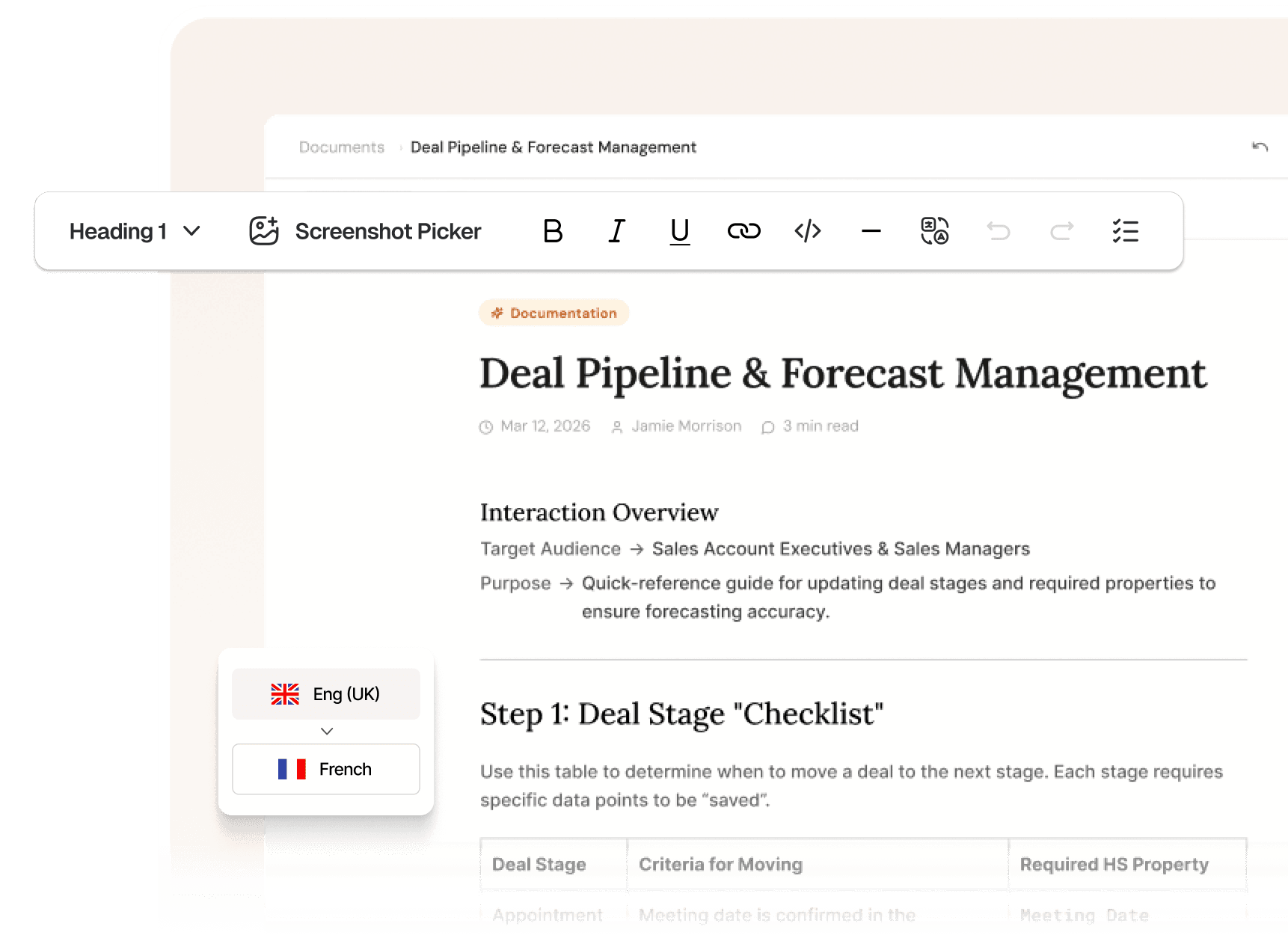
Deal Pipeline & Forecast Management
Interaction Overview
->
Sales Account Executive & Sales Managers
Purpose
->
Quick-reference guide for updating deal stages and required properties to ensure forecasting accuracy.
Step 1: Deal Stage "Checklist"
Use this table to determine when to move a deal to the next stage. Each stage requires specific data points to be "saved".
Step 1: Deal Stage "Checklist"
Use this table to determine when to move a deal to the next stage. Each stage requires specific data points to be "saved".
Deal Pipeline & Forecast Management
Interaction Overview
->
Sales Account Executive & Sales Managers
Purpose
->
Quick-reference guide for updating deal stages and required properties to ensure forecasting accuracy.
Step 1: Deal Stage "Checklist"
Use this table to determine when to move a deal to the next stage. Each stage requires specific data points to be "saved".
Step 1: Deal Stage "Checklist"
Use this table to determine when to move a deal to the next stage. Each stage requires specific data points to be "saved".
Deal Pipeline & Forecast Management
Interaction Overview
->
Sales Account Executive & Sales Managers
Purpose
->
Quick-reference guide for updating deal stages and required properties to ensure forecasting accuracy.
Step 1: Deal Stage "Checklist"
Use this table to determine when to move a deal to the next stage. Each stage requires specific data points to be "saved".
Step 1: Deal Stage "Checklist"
Use this table to determine when to move a deal to the next stage. Each stage requires specific data points to be "saved".
Deal Pipeline & Forecast Management
Interaction Overview
->
Sales Account Executive & Sales Managers
Purpose
->
Quick-reference guide for updating deal stages and required properties to ensure forecasting accuracy.
Step 1: Deal Stage "Checklist"
Use this table to determine when to move a deal to the next stage. Each stage requires specific data points to be "saved".
Step 1: Deal Stage "Checklist"
Use this table to determine when to move a deal to the next stage. Each stage requires specific data points to be "saved".
Trusted by 30,000+ teams globally
Proces
Built for every team that ships knowledge
Assist Customers
Job Aids
Technical Documentation
Create SOPs
Implement Software
Onboard New Hires
Use this procedure when a customer requests to move from a "Standard" to a "Professional" or "Enterprise" plan via support channels.
Processing Customer Subscription Upgrades

Prerequisites
Module Access:
You must have "Write" permissions for the Accounts, Deals, and Quotes modules.
Verification:
Confirm the customer is the "Primary Contact" or an "Authorized Admin" before making billing changes.
Step 1: Verifying Current Subscription Status
Locate the customer's profile by searching their email or organization name in the global search bar. Once in the Accounts module, scroll down to the "Subscription Details" section to verify their current plan, seat count, and renewal date.

As a new hire, your first priority is to "claim" a lead by changing the Lead Owner to yourself. This prevents duplicate outreach and ensures clear ownership of the prospect relationship from day one.
Step 2: Conducting Initial Discovery and Updating Status
Use this table to determine when to move a deal to the next stage. Each stage requires specific data points to be "saved".
Proces
Built for every team that ships knowledge
Assist Customers
Job Aids
Technical Documentation
Create SOPs
Implement Software
Onboard New Hires
Use this procedure when a customer requests to move from a "Standard" to a "Professional" or "Enterprise" plan via support channels.
Processing Customer Subscription Upgrades

Prerequisites
Module Access:
You must have "Write" permissions for the Accounts, Deals, and Quotes modules.
Verification:
Confirm the customer is the "Primary Contact" or an "Authorized Admin" before making billing changes.
Step 1: Verifying Current Subscription Status
Locate the customer's profile by searching their email or organization name in the global search bar. Once in the Accounts module, scroll down to the "Subscription Details" section to verify their current plan, seat count, and renewal date.

As a new hire, your first priority is to "claim" a lead by changing the Lead Owner to yourself. This prevents duplicate outreach and ensures clear ownership of the prospect relationship from day one.
Step 2: Conducting Initial Discovery and Updating Status
Use this table to determine when to move a deal to the next stage. Each stage requires specific data points to be "saved".
Proces
Built for every team that ships knowledge
Assist Customers
Job Aids
Technical Documentation
Create SOPs
Implement Software
Onboard New Hires
Use this procedure when a customer requests to move from a "Standard" to a "Professional" or "Enterprise" plan via support channels.
Processing Customer Subscription Upgrades

Prerequisites
Module Access:
You must have "Write" permissions for the Accounts, Deals, and Quotes modules.
Verification:
Confirm the customer is the "Primary Contact" or an "Authorized Admin" before making billing changes.
Step 1: Verifying Current Subscription Status
Locate the customer's profile by searching their email or organization name in the global search bar. Once in the Accounts module, scroll down to the "Subscription Details" section to verify their current plan, seat count, and renewal date.

As a new hire, your first priority is to "claim" a lead by changing the Lead Owner to yourself. This prevents duplicate outreach and ensures clear ownership of the prospect relationship from day one.
Step 2: Conducting Initial Discovery and Updating Status
Use this table to determine when to move a deal to the next stage. Each stage requires specific data points to be "saved".
Process
Detailed product guides in less than 10 minutes
01

REC

REC

REC
Neem je scherm op, upload je merkregels en ontvang binnen enkele minuten een afgewerkt, stapsgewijs handboek.
Record with the Trupeer extension or upload any existing video
02


AI generates a full document
Get a fully formatted, 100% complete document with relevant screenshots, structured sections and contextual steps
03


Review and ship
Review and make any edits like adding external screenshots, translating into multiple languages and share with clients and internal teams
features
Finally, the most intelligent documentation writer that you wish existed

DOC
Documentation generated
DOC
MP4
Meeting Recording
Uploaded
AI Documentation Writer
Upload a screen recording. Trupeer understands the context and delivers a complete document in minutes.
Logo
h1
Document title
in two lines
section
Section
step
Step One
section body
Body content in a few more lines that should take up the rest of the space here and it should have some tags on the side to indicate which type of content all these are, sort of like syntax tags.

Mirror your brand rules
Upload an existing company document. Trupeer learns your structure, fonts, colors, and layout and applies it to every new guide.

step 2
context
Detect action from any recording
Upload any recording. Trupeer uses vision-based analysis to accurately detect actions, decide what matters, and turn it into clear step-by-step documentation.

DOC
Documentation generated
DOC
MP4
Meeting Recording
Uploaded
AI Documentation Writer
Upload a screen recording. Trupeer understands the context and delivers a complete document in minutes.
Logo
h1
Document title
in two lines
section
Section
step
Step One
section body
Body content in a few more lines that should take up the rest of the space here and it should have some tags on the side to indicate which type of content all these are, sort of like syntax tags.

Mirror your brand rules
Upload an existing company document. Trupeer learns your structure, fonts, colors, and layout and applies it to every new guide.

step 2
context
Detect action from any recording
Upload any recording. Trupeer uses vision-based analysis to accurately detect actions, decide what matters, and turn it into clear step-by-step documentation.

DOC
Documentation generated
DOC
MP4
Meeting Recording
Uploaded
AI Documentation Writer
Upload a screen recording. Trupeer understands the context and delivers a complete document in minutes.
Logo
h1
Document title
in two lines
section
Section
step
Step One
section body
Body content in a few more lines that should take up the rest of the space here and it should have some tags on the side to indicate which type of content all these are, sort of like syntax tags.

Mirror your brand rules
Upload an existing company document. Trupeer learns your structure, fonts, colors, and layout and applies it to every new guide.

step 2
context
Detect action from any recording
Upload any recording. Trupeer uses vision-based analysis to accurately detect actions, decide what matters, and turn it into clear step-by-step documentation.

Testimonials
What our customers say about us
"Trupeer lets us scale product education fast with minimal onboarding. Our SEs & CS teams create polished content in minutes & reuse it instantly for prospects & customers."

Sandhya Simhan
Head of Content
"Transformed how we train and support 1Mn+ SMBs across Latin America. We’ve rapidly created educational videos in diverse Spanish accents tailored to each market."

Libia Rodriguez
Director, Customer Experience
"Trupeer has been a game changer for us in creating content for Zuora University. What usually took 5-6 hours is now down to 3-4 mins - the features are incredible."

Eszter Voros
Director, Product Education
"Trupeer is the voice of LambdaTest. Multiple teams now uses it within the company - sales, marketing, CRM training, everything else"

Jay Singh
Co-founder
"Saved us $125k.
Trupeer helped us pull off our smoothest ever IT migration across 100s of employees. The best part - we were able to do it all by ourselves in weeks."

Jeremy DeHart
IT Director

Testimonials
What our customers say about us
"Trupeer lets us scale product education fast with minimal onboarding. Our SEs & CS teams create polished content in minutes & reuse it instantly for prospects & customers."

Sandhya Simhan
Head of Content
"Transformed how we train and support 1Mn+ SMBs across Latin America. We’ve rapidly created educational videos in diverse Spanish accents tailored to each market."

Libia Rodriguez
Director, Customer Experience
"Trupeer has been a game changer for us in creating content for Zuora University. What usually took 5-6 hours is now down to 3-4 mins - the features are incredible."

Eszter Voros
Director, Product Education
"Trupeer is the voice of LambdaTest. Multiple teams now uses it within the company - sales, marketing, CRM training, everything else"

Jay Singh
Co-founder
"Saved us $125k.
Trupeer helped us pull off our smoothest ever IT migration across 100s of employees. The best part - we were able to do it all by ourselves in weeks."

Jeremy DeHart
IT Director

Testimonials
What our customers say about us
"Trupeer lets us scale product education fast with minimal onboarding. Our SEs & CS teams create polished content in minutes & reuse it instantly for prospects & customers."

Sandhya Simhan
Head of Content
"Transformed how we train and support 1Mn+ SMBs across Latin America. We’ve rapidly created educational videos in diverse Spanish accents tailored to each market."

Libia Rodriguez
Director, Customer Experience
"Trupeer has been a game changer for us in creating content for Zuora University. What usually took 5-6 hours is now down to 3-4 mins - the features are incredible."

Eszter Voros
Director, Product Education
"Trupeer is the voice of LambdaTest. Multiple teams now uses it within the company - sales, marketing, CRM training, everything else"

Jay Singh
Co-founder
"Saved us $125k.
Trupeer helped us pull off our smoothest ever IT migration across 100s of employees. The best part - we were able to do it all by ourselves in weeks."

Jeremy DeHart
IT Director
FAQ
Your questions, answered
Do I have to create a template first?
No. We don't use templates in the traditional sense. You just upload a PDF or a document you already like, and we reverse-engineer the layout to match it.
How accurate is the AI at writing the steps?
Highly. We don't just guess based on the image; we analyze the metadata of your clicks and the context of the screen transitions to describe exactly what is happening.
Can I edit the guide after it's generated?
Yes. You have full control. You can tweak the text, swap screenshots, or adjust the branding at any time before you ship.
Does this work with my existing Help Center?
Yes, You can export guides as branded PDFs, or embed them directly into platforms like Zendesk, Intercom, or Notion.
What if my product UI changes?
You don't have to start from scratch. You can update specific steps by recordong a quick 10-second clip of the new UI, and we'll swap it into your existing guide.
Is my data secure?
Always. We don't use your private product recordongs to train public models. Your brand assets and product data remain yours alone.
Do I have to create a template first?
No. We don't use templates in the traditional sense. You just upload a PDF or a document you already like, and we reverse-engineer the layout to match it.
How accurate is the AI at writing the steps?
Highly. We don't just guess based on the image; we analyze the metadata of your clicks and the context of the screen transitions to describe exactly what is happening.
Can I edit the guide after it's generated?
Yes. You have full control. You can tweak the text, swap screenshots, or adjust the branding at any time before you ship.
Does this work with my existing Help Center?
Yes, You can export guides as branded PDFs, or embed them directly into platforms like Zendesk, Intercom, or Notion.
What if my product UI changes?
You don't have to start from scratch. You can update specific steps by recordong a quick 10-second clip of the new UI, and we'll swap it into your existing guide.
Is my data secure?
Always. We don't use your private product recordongs to train public models. Your brand assets and product data remain yours alone.
Do I have to create a template first?
No. We don't use templates in the traditional sense. You just upload a PDF or a document you already like, and we reverse-engineer the layout to match it.
How accurate is the AI at writing the steps?
Highly. We don't just guess based on the image; we analyze the metadata of your clicks and the context of the screen transitions to describe exactly what is happening.
Can I edit the guide after it's generated?
Yes. You have full control. You can tweak the text, swap screenshots, or adjust the branding at any time before you ship.
Does this work with my existing Help Center?
Yes, You can export guides as branded PDFs, or embed them directly into platforms like Zendesk, Intercom, or Notion.
What if my product UI changes?
You don't have to start from scratch. You can update specific steps by recordong a quick 10-second clip of the new UI, and we'll swap it into your existing guide.
Is my data secure?
Always. We don't use your private product recordongs to train public models. Your brand assets and product data remain yours alone.