4.8/5
Gratis workflowgenerator
Transformeer uw processen direct in professionele documentatie
Genereer uw workflow gratis

Trupeer's gratis workflowgenerator zorgt voor een revolutie in hoe teams procesdocumentatie maken door eenvoudige schermopnames om te zetten in verzorgde, professionele workflowgidsen. In tegenstelling tot traditionele documentatietools die handmatig schrijven en opmaak vereisen, legt ons AI-gestuurde platform je echte workflow vast terwijl die wordt uitgevoerd en genereert het automatisch zowel videohandleidingen als schriftelijke documentatie op basis van één opnamesessie. De kernuitdaging waarmee de meeste teams te maken krijgen, is de tijdrovende aard van het maken van uitgebreide workflowdocumentatie. Het handmatig schrijven van stapsgewijze handleidingen kan uren duren en het actueel houden ervan wordt een voortdurende strijd.
Wat onze gratis workflowgenerator onderscheidt, is de intelligente automatisering die achter de schermen plaatsvindt. Wanneer je je workflow opneemt of een bestaande opname uploadt, identificeert onze AI automatisch de belangrijkste stappen, verwijdert onnodige pauzes en stopwoorden, voegt professionele zoomeffecten toe om belangrijke acties te benadrukken en genereert schone schriftelijke documentatie die perfect aansluit op je opname. Dit is niet alleen schermopname – het is intelligente workflowdocumentatie die context begrijpt en professionele output oplevert zonder handmatige tussenkomst. Dit maakt het ongelooflijk waardevol voor trainingsvideo's, standaard werkinstructies en artikelen voor de kennisbank. We hebben deze tool gebouwd omdat teams worstelden met de documentatielast die gepaard gaat met moderne softwareworkflows. Elke software-update, proceswijziging of onboarding van een nieuw teamlid leverde uren documentatiewerk op.
Hoe Werkt de Gratis Workflowgenerator?
Het workflowgeneratieproces van Trupeer is ontworpen voor eenvoud, met professionele resultaten. Het volledige systeem werkt naadloos, of je nu nieuwe opnames maakt of bestaande beelden die je al hebt, verbetert.
Stap 1: Leg Je Workflow Vast
Begin door óf je scherm op te nemen met Trupeer's ingebouwde schermrecorder, óf door een bestaande opname te uploaden die je al hebt gemaakt. Het opnameproces is intuïtief: selecteer eenvoudig het deel van je scherm dat je wilt vastleggen en begin je workflow op een natuurlijke manier te demonstreren. Je hoeft je geen zorgen te maken over een perfecte presentatie of het vermijden van fouten, omdat onze AI de opname automatisch opschoont. Het systeem legt alles vast wat je op het scherm doet, samen met eventuele audiotoelichting die je geeft.

Stap 2: AI-verwerking en -verbetering
Zodra je opname is voltooid of geüpload, begint Trupeer's AI direct met het verwerken van de beelden. Het systeem verwijdert automatisch achtergrondruis, elimineert stopwoorden en ongemakkelijke pauzes en voegt professionele zoomeffecten toe om belangrijke cursorbewegingen en schermacties te benadrukken. Deze verbetering gebeurt zonder input van jou en verandert ruwe schermopname in een verzorgde, professioneel ogende video die eruitziet alsof die door een expert is bewerkt.

Stap 3: Automatische generatie van documentatie
Terwijl je video wordt verbeterd, analyseert de AI tegelijkertijd je workflow en genereert het uitgebreide documentatie. Dit omvat stapsgewijze instructies, screenshots van belangrijke momenten en beschrijvende tekst die uitlegt wat er in elke fase gebeurt. De schriftelijke handleiding vormt een perfecte aanvulling op je video en geeft gebruikers meerdere manieren om je workflowinformatie te bekijken en te raadplegen.

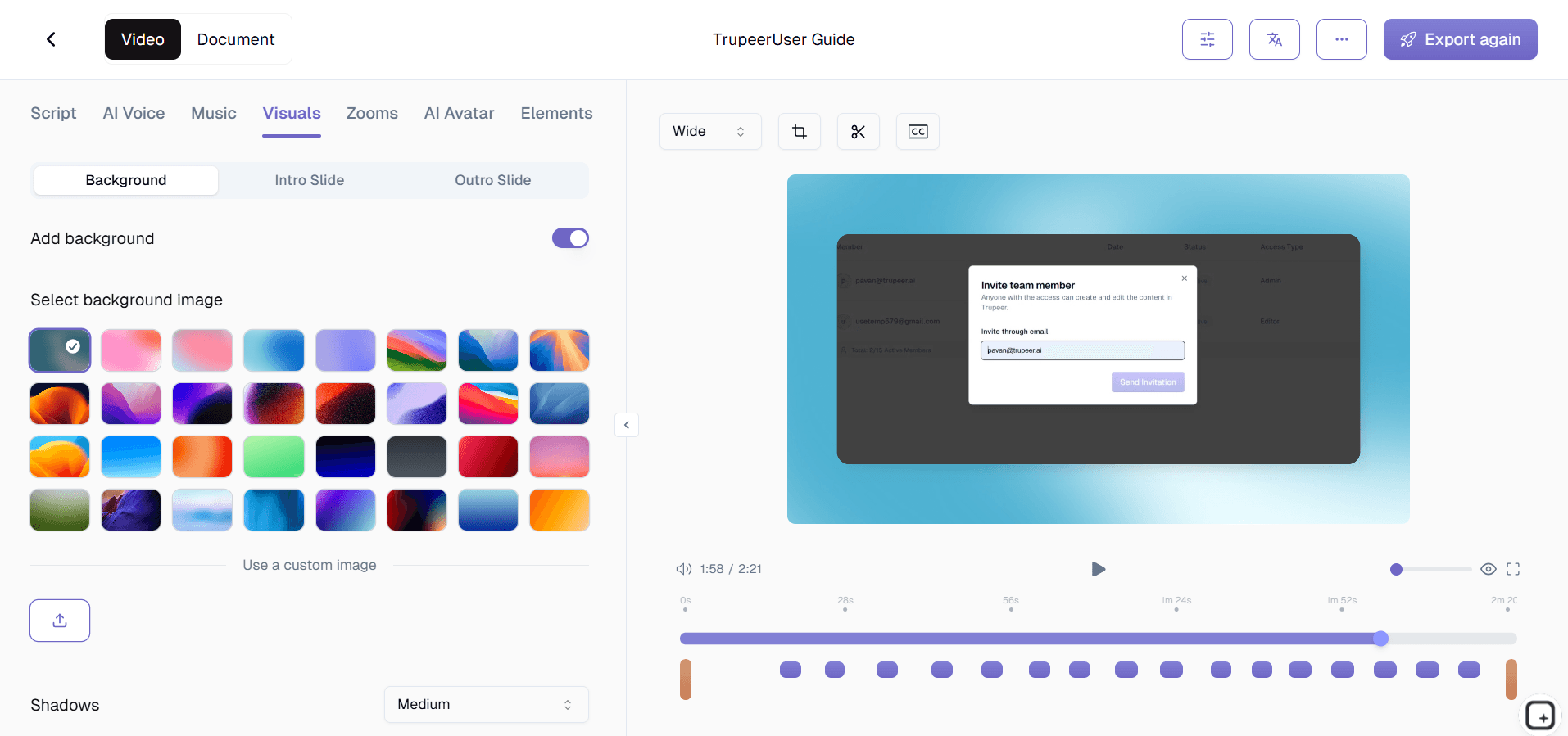
Stap 4: Aanpassing en branding
Pas je brand kits toe om een consistente visuele identiteit te waarborgen in al je workflowdocumentatie. Voeg je bedrijfs-kleuren, logo's, intro- en outro-sequenties toe en behoud professionele uitstraling. Je kunt ook het documentatieformaat aanpassen met herbruikbare templates die consistente styling en structuur behouden in al je workflowgidsen.
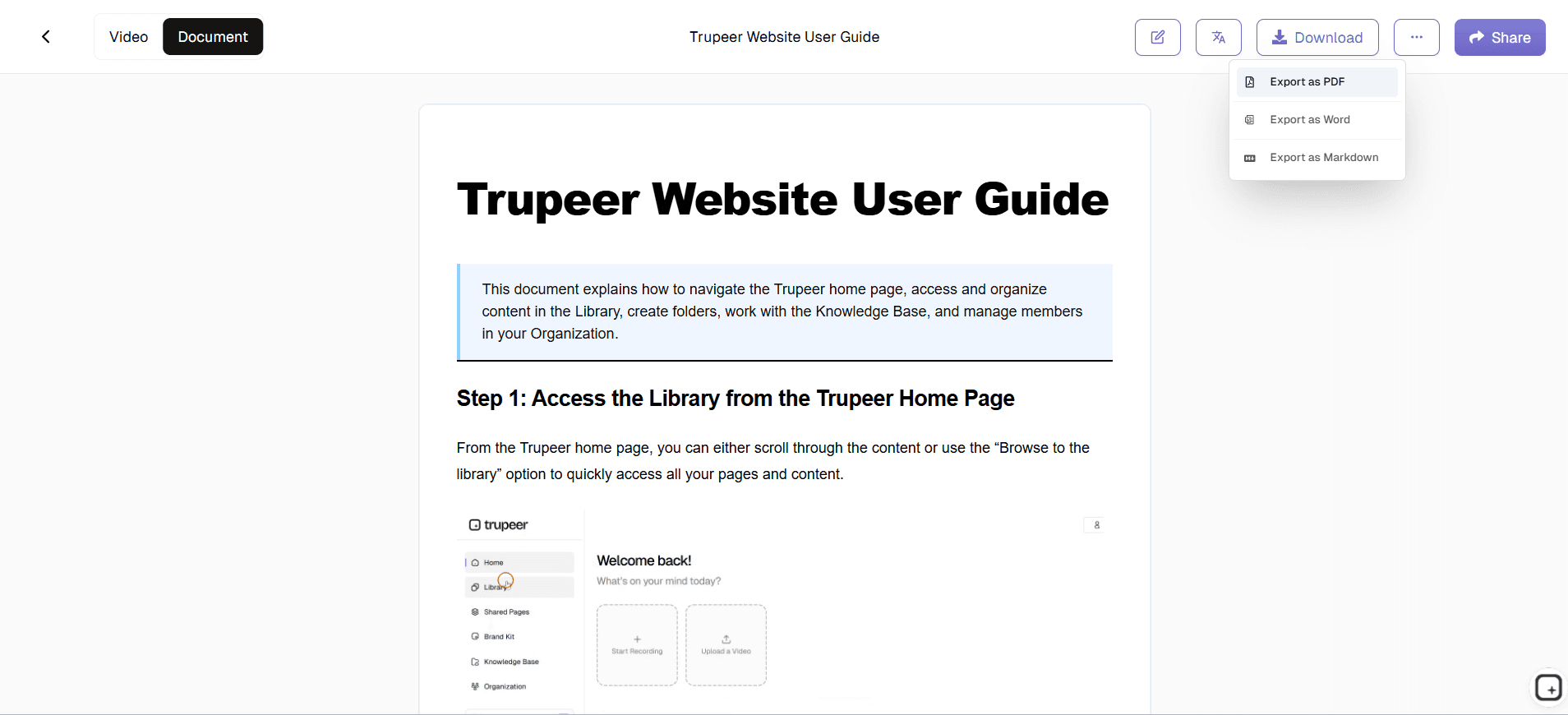
Stap 5: Export in meerdere formaten en delen
Exporteer je voltooide workflowdocumentatie in meerdere formaten om verschillende use cases te ondersteunen. Deel verzorgde videoversies voor visuele leerlingen, verspreid schriftelijke gidsen voor snelle referentie of embed beide formaten direct in je website, learning management system of interne wiki. De deelopties zijn flexibel, zodat je je doelgroep kunt bereiken via de kanalen die zij het liefst gebruiken.
Belangrijkste functies en mogelijkheden
De gratis workflowgenerator van Trupeer bevat krachtige functies die het volledige proces van het maken van documentatie stroomlijnen en tegelijkertijd elke keer professionele resultaten garanderen.
AI-gestuurde schermopname: Ons intelligente opnamesysteem legt niet alleen vast wat je ziet, maar begrijpt ook de context van je acties. De AI-videobewerker verbetert je opname automatisch met ruisverwijdering, het elimineren van stopwoorden en strategische zoomeffecten die belangrijke interface-elementen en cursorbewegingen benadrukken. Dat betekent dat zelfs spontane opnames er professioneel bewerkt uitzien.
Automatische documentatiesjablonen: Bespaar tijd met vooraf gebouwde documentatieformaten die je workflowgidsen consequent structureren. Deze templates kunnen worden aangepast met je gewenste opmaak, styling en organisatorische structuur en vervolgens opnieuw worden gebruikt in meerdere projecten voor workflowdocumentatie. Zo behouden alle procesgidsen van je team een consistente, professionele uitstraling en wordt de opzettijd voor nieuwe documentatie verkort.
Vertaling in meerdere talen: Bereik wereldwijde teams en doelgroepen door je workflowvideo's en documentatie automatisch te vertalen naar meerdere talen. Deze functie is vooral waardevol voor internationale bedrijven of teams die processen over verschillende regio's moeten delen. De vertaalmogelijkheden behouden de context en technische nauwkeurigheid van je workflow-instructies, terwijl ze toegankelijk worden voor mensen die geen Engels spreken.
Uploaden en bestaande opnames verbeteren: Begin niet vanaf nul als je al workflowopnames hebt. Upload je bestaande screenshots en laat Trupeer's AI ze omzetten in verzorgde, professionele documentatie. Deze functie is perfect voor teams die al ruwe trainingsbeelden of schermopnames hebben verzameld, maar niet de tijd of expertise hebben om ze correct te bewerken.
Geïntegreerd beheer van branding: Behoud een consistente visuele identiteit in al je workflowdocumentatie met uitgebreide brandingtools. Voeg je bedrijfslogo toe, pas brand colors toe, voeg standaard intro- en outro-sequenties toe en zorg ervoor dat elk stuk documentatie de professionele standaarden van je organisatie weerspiegelt. Dit creëert samenhangende leermiddelen die je merk versterken terwijl ze waardevolle informatie leveren.
Slimme exportopties: Genereer meerdere outputformaten vanuit één opnamesessie. Maak videohandleidingen voor visuele leerlingen, schriftelijke stapsgewijze gidsen voor snelle referentie en ingesloten content voor je website of interne systemen. Door deze veelzijdigheid kan je workflowdocumentatie meerdere doelen dienen en verschillende leervoorkeuren binnen je doelgroep bereiken.
Waarom zou je de gratis workflowgenerator van Trupeer gebruiken?
De voordelen van het gebruik van de workflowgenerator van Trupeer reiken veel verder dan alleen tijd besparen, hoewel de efficiëntiewinst aanzienlijk is. Traditionele workflowdocumentatie kan 3-5 uur per proces kosten wanneer je het handmatig doet, terwijl ons systeem dit terugbrengt tot minder dan 30 minuten, inclusief opnametijd.
Elimineer documentatieknelpunten: Stop ermee dat documentatie achterblijft bij je daadwerkelijke processen. Wanneer software-updates worden doorgevoerd, procedures veranderen of nieuwe workflows worden geïmplementeerd, kun je je documentatie direct bijwerken door het nieuwe proces één keer op te nemen. Zo blijft je team werken met actuele informatie en wordt verwarring door verouderde gidsen verminderd. Door de snelheid van het maken van documentatie gebeuren updates in real-time in plaats van weken later.
Garandeer consistentie tussen teams: Standaardiseer hoe workflows binnen je organisatie worden gedocumenteerd. Wanneer iedereen hetzelfde systeem en dezelfde templates gebruikt, wordt kennisdeling effectiever en kunnen nieuwe teamleden sneller onboarden. Het consistente format helpt teams om informatie snel te vinden en verlaagt de leercurve voor het raadplegen van institutionele kennis.
Maak meerdere leerformaten: Mensen leren op verschillende manieren en je workflowdocumentatie moet verschillende leerstijlen ondersteunen. Visuele leerlingen profiteren van de verbeterde videohandleidingen, terwijl anderen de voorkeur geven aan schriftelijke stapsgewijze gidsen die ze snel kunnen raadplegen. Door beide formaten automatisch aan te bieden, zorg je voor een complete kennisoverdracht die voor je hele team werkt.
Professionele kwaliteit zonder expertise: Maak documentatie die eruitziet alsof die is gemaakt door professionele instructieontwerpers, zelfs als je geen ervaring hebt met videobewerking of technische schrijfvaardigheid. De AI regelt al het complexe bewerken, formatteren en presenteren, zodat jij je kunt richten op het demonstreren van de daadwerkelijke workflow. Zo wordt het maken van documentatie gedemocratiseerd binnen je organisatie.
Schaal je documentatie-inspanningen: Maak uitgebreide workflowbibliotheken zonder fulltime middelen te besteden aan documentatie. Teams kunnen bijdragen met hun expertise door processen op te nemen die ze goed kennen, en het systeem verzorgt het productiewerk. Deze gedistribueerde aanpak voor het maken van documentatie bouwt kennisbanken sneller op, terwijl subject matter experts de content creëren.
Wie kan de gratis workflowgenerator van Trupeer gebruiken?
De workflowgenerator van Trupeer is geschikt voor een breed scala aan gebruikers en use cases, waardoor het waardevol is voor vrijwel elke organisatie die proceskennis effectief wil delen.
Content creators en docenten: Bouw uitgebreide cursusmaterialen en tutorials door je creatieve of educatieve processen één keer op te nemen en meerdere contentformaten te genereren. Of je nu softwarevaardigheden, creatieve technieken of academische onderwerpen doceert, de workflowgenerator maakt professionele leermiddelen die studenten boeien en duidelijke begeleiding bieden. De mogelijkheid om zowel video- als schriftelijke materialen uit één opnamesessie te maken, verhoogt je contentoutput aanzienlijk terwijl je kwaliteitsstandaarden behoudt.
Marketing- en productteams: Maak overtuigende AI-schermopnames en gebruikershandleidingen die je software of services effectief presenteren. Marketingteams kunnen klantgerichte documentatie genereren die complexe functies eenvoudig uitlegt, terwijl productteams interne workflowgidsen kunnen maken voor feature development en testprocessen. De professionele outputkwaliteit maakt deze materialen geschikt voor extern gebruik met klanten en prospects.
Afdelingen voor corporate training: Ontwikkel uitgebreide trainingsprogramma's door standaard werkinstructies, complianceprocessen en workflows per functie te documenteren. De consistentie en professionele kwaliteit van de gegenereerde materialen zorgen ervoor dat trainingsstandaarden hoog blijven, terwijl de tijdsinvestering van subject matter experts wordt verminderd. Integratie met bestaande training video-systemen maakt de uitrol naadloos.
Sales- en customer success-teams: Maak gepersonaliseerde workflowdemonstraties voor prospects en klanten door aangepaste proceswalkthroughs op te nemen. AI Video Editor wordt effectiever wanneer teams snel relevante demonstraties kunnen maken die inspelen op specifieke klantbehoeften. Customer success-teams kunnen helpmaterialen genereren die het aantal supporttickets verminderen terwijl de klanttevredenheid toeneemt.
Teams voor technische documentatie: Zet complexe technische processen om in toegankelijke documentatie die zowel interne teams als externe gebruikers dient. Of je nu API-gebruik documenteert, procedures voor software-installatie of troubleshooting-workflows, de generator maakt materialen die zowel technische als niet-technische doelgroepen kunnen begrijpen. De mogelijkheid om technische documentatie actueel te houden met snelle ontwikkelcycli is bijzonder waardevol.
Eigenaren van kleine bedrijven en consultants: Documenteer je expertise en interne processen zonder te investeren in dure productiemiddelen. Maak klantdeliverables, interne trainingsmaterialen en kennisbanken die je bedrijf professioneel positioneren, terwijl je institutionele kennis vastlegt die niet afhankelijk is van je persoonlijke beschikbaarheid. Door de schaalbaarheid van het maken van documentatie kunnen kleine bedrijven concurreren met grotere organisaties op het gebied van professionele presentatie.
Best practices voor het gebruik van de gratis workflowgenerator
Maximaliseer de waarde van je workflowdocumentatie door bewezen strategieën te volgen die zowel het creatieproces als de uiteindelijke outputkwaliteit verbeteren.
Plan je opnamesessie: Voordat je begint met opnemen, schets je de belangrijkste stappen die je wilt demonstreren en bereid je eventuele benodigde bestanden of browser-tabs voor. Deze voorbereiding zorgt ervoor dat je opname soepel verloopt en alle essentiële informatie dekt zonder onnodig terug te hoeven gaan. Ruim je desktop op en sluit irrelevante applicaties om focus te houden op de workflow die je documenteert.
Spreek duidelijk tijdens de opname: Geef een duidelijke toelichting terwijl je elke stap demonstreert en leg niet alleen uit wat je doet, maar ook waarom je het doet. Deze context helpt kijkers de reden achter elke actie te begrijpen en maakt de gegenereerde documentatie uitgebreider. De AI kan de audiokwaliteit verbeteren, maar beginnen met duidelijke spraak levert betere resultaten op.
Gebruik consistente terminologie: Houd je aan standaardtermen voor interface-elementen, processen en uitkomsten gedurende je opname. Deze consistentie doorloopt de gegenereerde documentatie en maakt het makkelijker voor gebruikers om je te volgen. Vermijd jargon, tenzij je documentatie maakt die specifiek is voor technische doelgroepen die de terminologie begrijpen.
Maak gebruik van templates: Stel documentatiesjablonen in die passen bij de stijlrichtlijnen van je organisatie en je informatiearchitectuur. Zodra ze zijn geconfigureerd, zorgen deze templates ervoor dat alle workflowdocumentatie consistente opmaak en structuur behoudt, waardoor je kennisbank professioneler wordt en makkelijker te navigeren is. Bekijk templates regelmatig en werk ze bij om ze in lijn te houden met je veranderende behoeften.
Benut geavanceerde functies: Ontdek de AI-schermrecorder voor het maken van gestructureerde toelichting vóór je opneemt en gebruik de vertaalfuncties om meertalige documentatiesets te maken. Deze geavanceerde mogelijkheden kunnen het bereik en de effectiviteit van je workflowdocumentatie aanzienlijk vergroten zonder de tijdsinvestering evenredig te verhogen.
Ontdek gerelateerde tools
Waarom kiezen voor Trupeer's workflowgenerator
AI-gestuurde verbetering
Verwijdert automatisch ruis, stopwoorden en voegt professionele zoomeffecten toe
Uitvoer in twee formaten
Maakt zowel gepolijste video's als schriftelijke documentatie vanuit één opname
Merkconsistentie
Pas aangepaste huisstijl toe met sjablonen voor professionele, consistente documentatie
Ga aan de slag met Trupeer's gratis workflowgenerator
Stap 1
Workflow opnemen of uploaden
Stap 2
AI verbetert automatisch
Stap 3
Exporteer en deel documentatie
Veelgestelde vragen
Wat maakt Trupeer's gratis workflowgenerator anders dan andere schermopnametools?
In tegenstelling tot eenvoudige schermrecorders genereert Trupeer automatisch zowel verbeterde video's als schriftelijke documentatie op basis van je opnames. Onze AI verwijdert stopwoorden, voegt zoom-effecten toe en maakt professionele handleidingen zonder handmatige bewerking.
Kan ik de workflowgenerator gebruiken met bestaande opnamen die ik al heb?
Ja, u kunt bestaande schermopnames uploaden en Trupeer's AI zal deze verbeteren met ruisverwijdering, professionele bewerking en automatische documentatiegeneratie. Dit werkt met de meeste gangbare videoformaten.
Is de workflowgenerator echt gratis te gebruiken?
Trupeer biedt gratis toegang tot de kernfuncties voor het genereren van workflows, waaronder schermopname, AI-verbetering en het maken van basisdocumentatie. Premiumfuncties zoals geavanceerde branding en vertaling vereisen een betaald abonnement.
Hoe lang duurt het om workflowdocumentatie te genereren?
De AI-verwerking duurt doorgaans 2-5 minuten voor de meeste opnames. Je hebt de verbeterde video en de schriftelijke documentatie bijna direct klaar nadat je opnamesessie is afgelopen.
Welke soorten workflows werken het beste met deze tool?
Elk proces dat op een scherm plaatsvindt, werkt uitstekend, waaronder softwarehandleidingen, bedrijfsprocedures, trainingsmateriaal en productdemonstraties. De AI is bijzonder effectief bij stapsgewijze processen en interacties met de interface.
Meer tools


