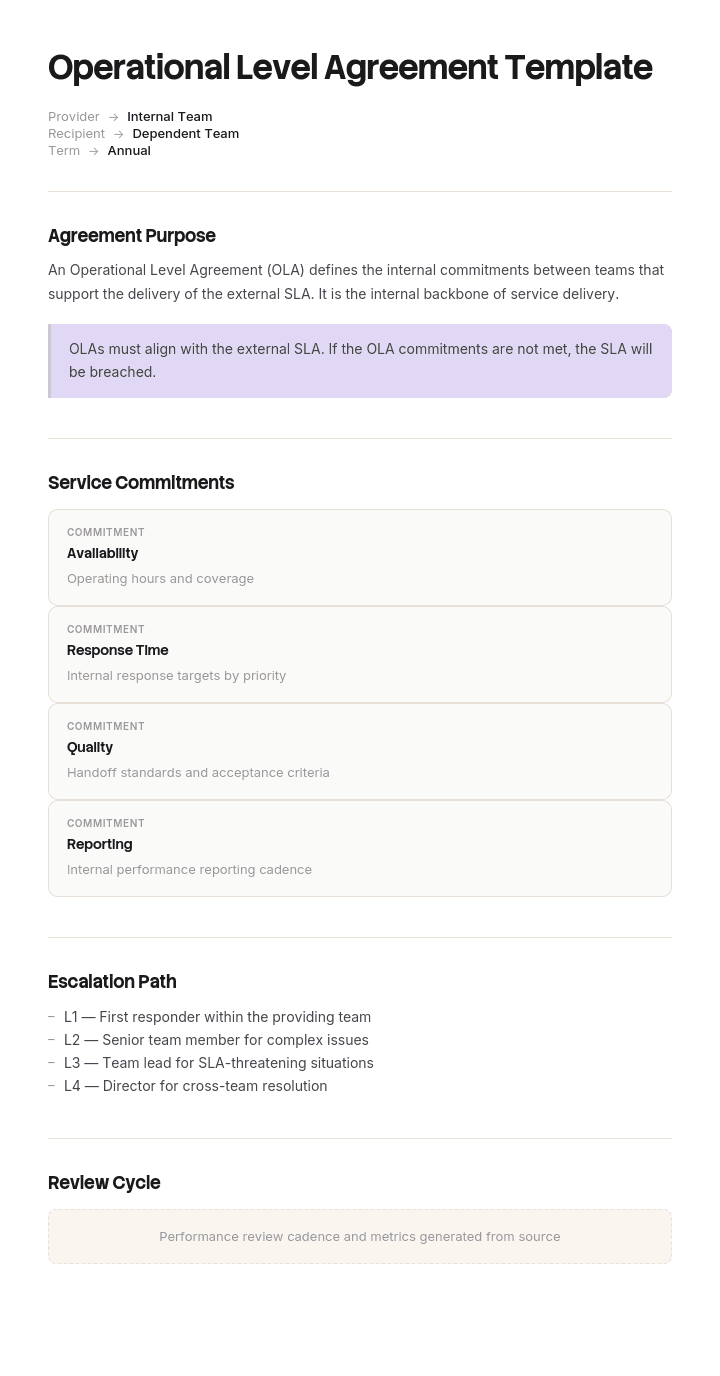
Use this template
SLAs make promises to customers - OLAs make sure your internal teams can keep them. With Trupeer, you can save hours on OLA writing by starting with a free operational level agreement template, customizing it with your brand guidelines, and turning the OLA into a video walkthrough that aligns every internal team behind shared service standards.
What is an operational level agreement template?
An operational level agreement, or OLA, is an internal agreement between teams in the same organisation that underpins a commitment made to someone outside it. The service desk promises the business a four hour resolution on major incidents. That promise only holds if the network team, the applications team and whoever else sits in the chain each play their part within a known time.
The OLA is where those internal parts are written down. It is not a contract, nobody is paying anybody, and the enforcement is entirely managerial, which is both its weakness and the reason it can be honest in ways a contract cannot.
An operational level agreement template is the reusable structure: the parties, the services covered, the commitments, the measures and the review arrangements. Templates for this are easy to find. Most of them will let you write an OLA that is fully complied with and still fails, which is what the rest of this page is about.
OLA vs SLA: what each one actually commits to
Three documents sit in this family and mixing them up causes real problems.
A service level agreement is the commitment to the customer or the business. It is written in the customer's terms, usually end to end, and it is what gets reported to people outside the delivery chain.
An operational level agreement is internal, between teams that both report into the same organisation. It exists solely to make the SLA achievable and it should never contain a commitment the SLA does not need.
An underpinning contract is the commercial agreement with a third party, a vendor or an outsourced provider, that supports the same chain. It has legal force, which the OLA does not, and it usually has the least flexibility of the three, so it should be agreed before the SLA rather than after.
The practical consequence is a sequencing rule. Agree the underpinning contracts, then the SLA against what those contracts allow, then the OLAs that fill the remainder. Organisations that do it in the other order routinely promise the business something no vendor has agreed to deliver.
How to customize this template in Trupeer
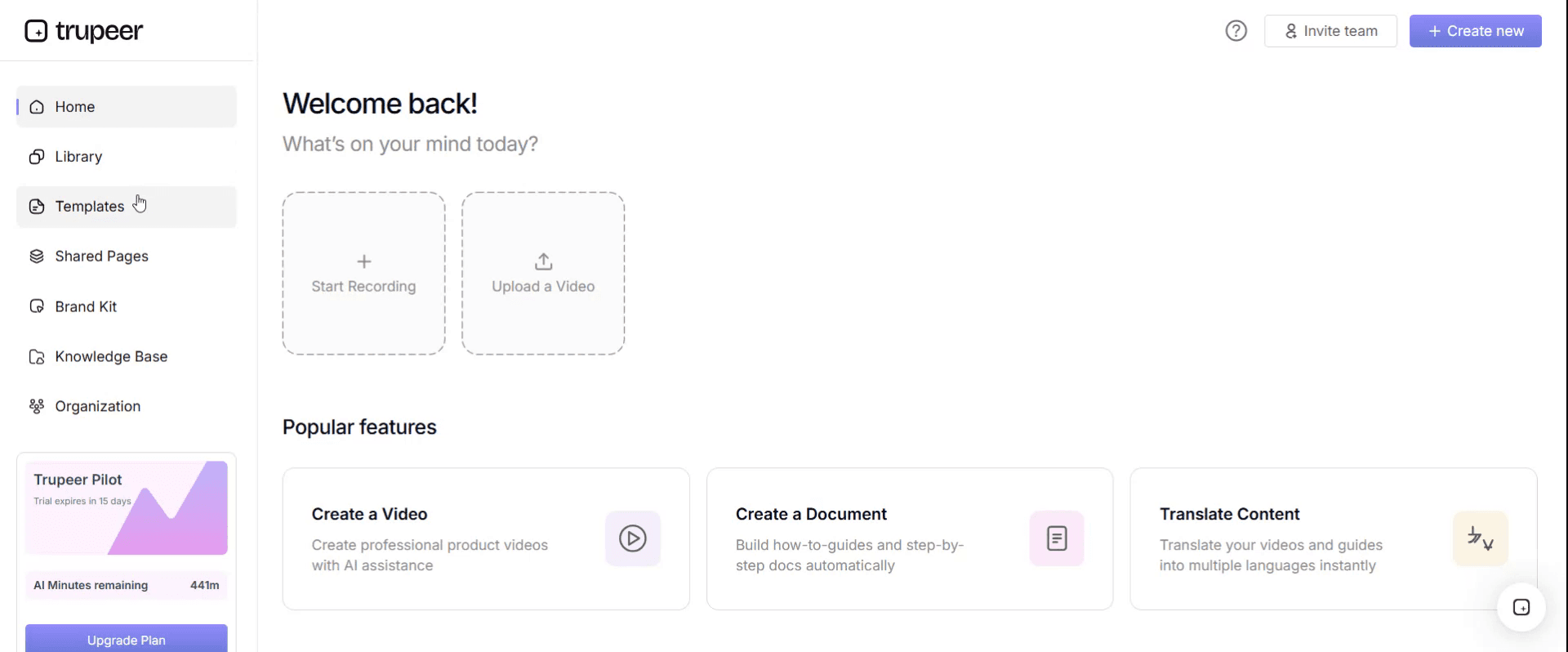
Step 1: Open the Templates Section
Go to the Templates section from the main navigation.
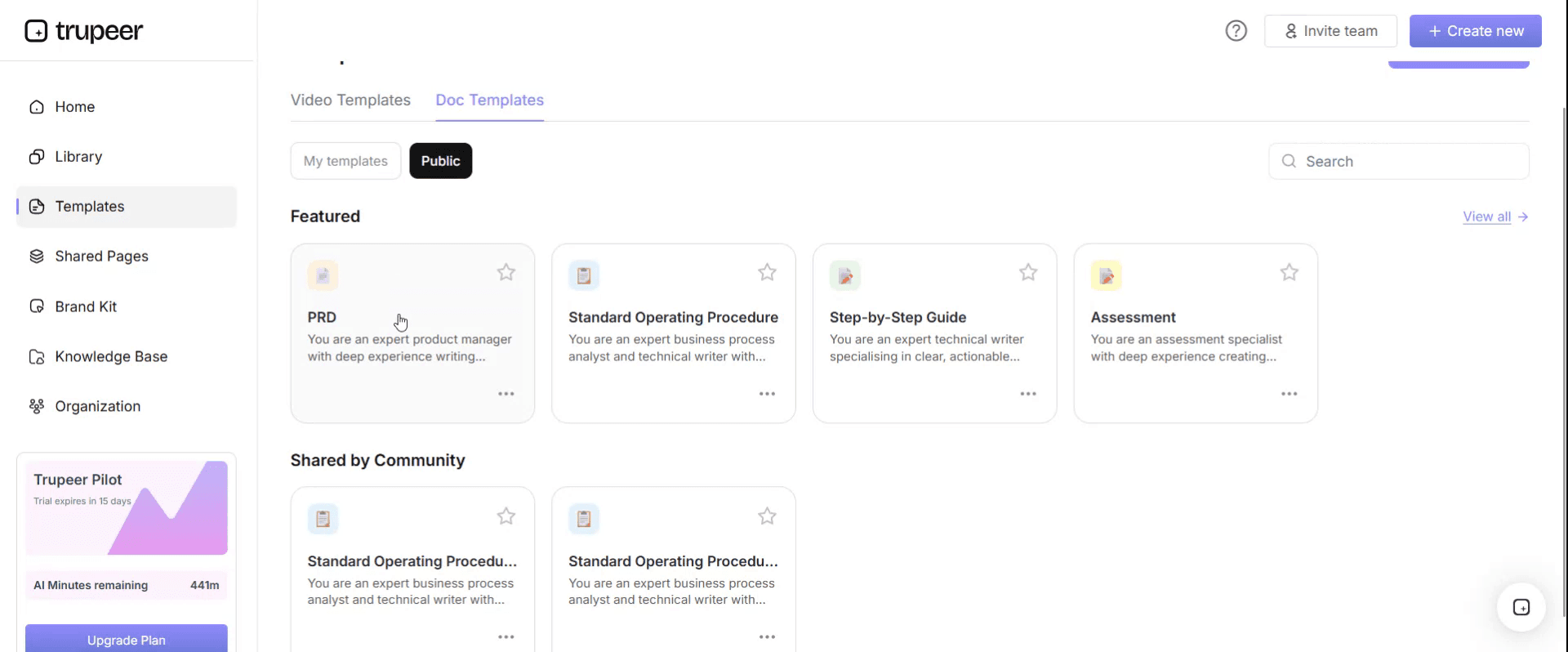
Step 2: Select and Open a Template
Click on any template you want to work with to open it.
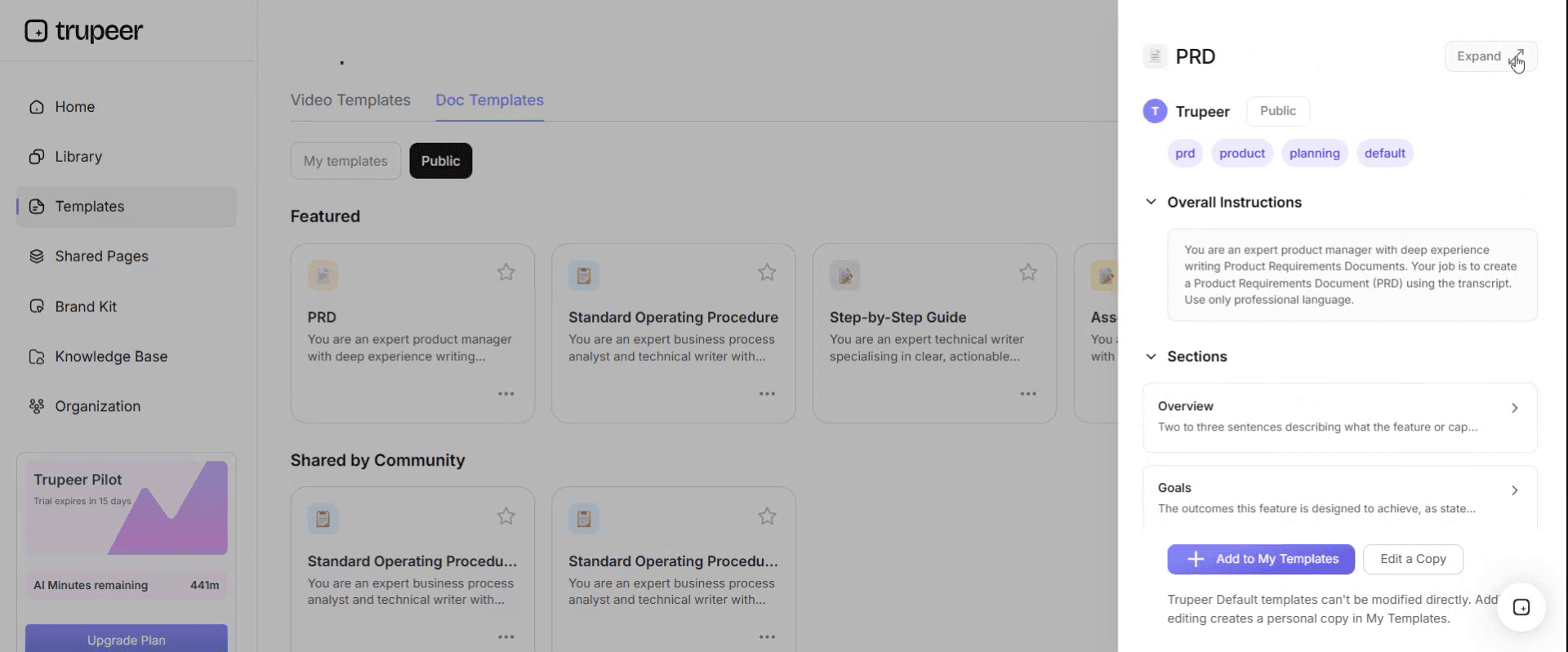
Step 3: Expand the Template View
If needed, expand the template view to see the full layout and details clearly.
Step 4: Edit the Template
Click on Edit to start modifying the selected template.
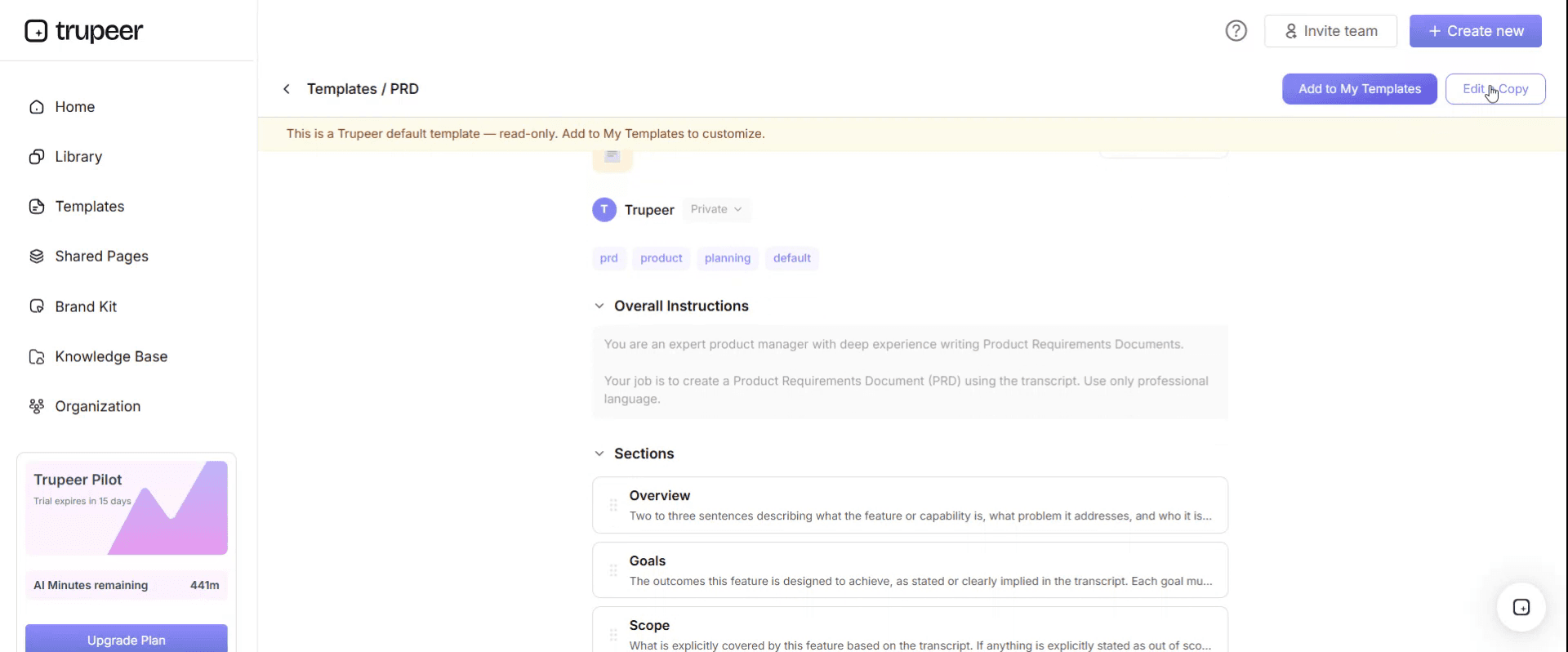
Within the editor, you can:
Add new sections
Define or update formatting rules
Add a logo and adjust its position and related settings
Step 5: Save Your Customized Template
After making all necessary changes, click Save to store the updated template as your own.
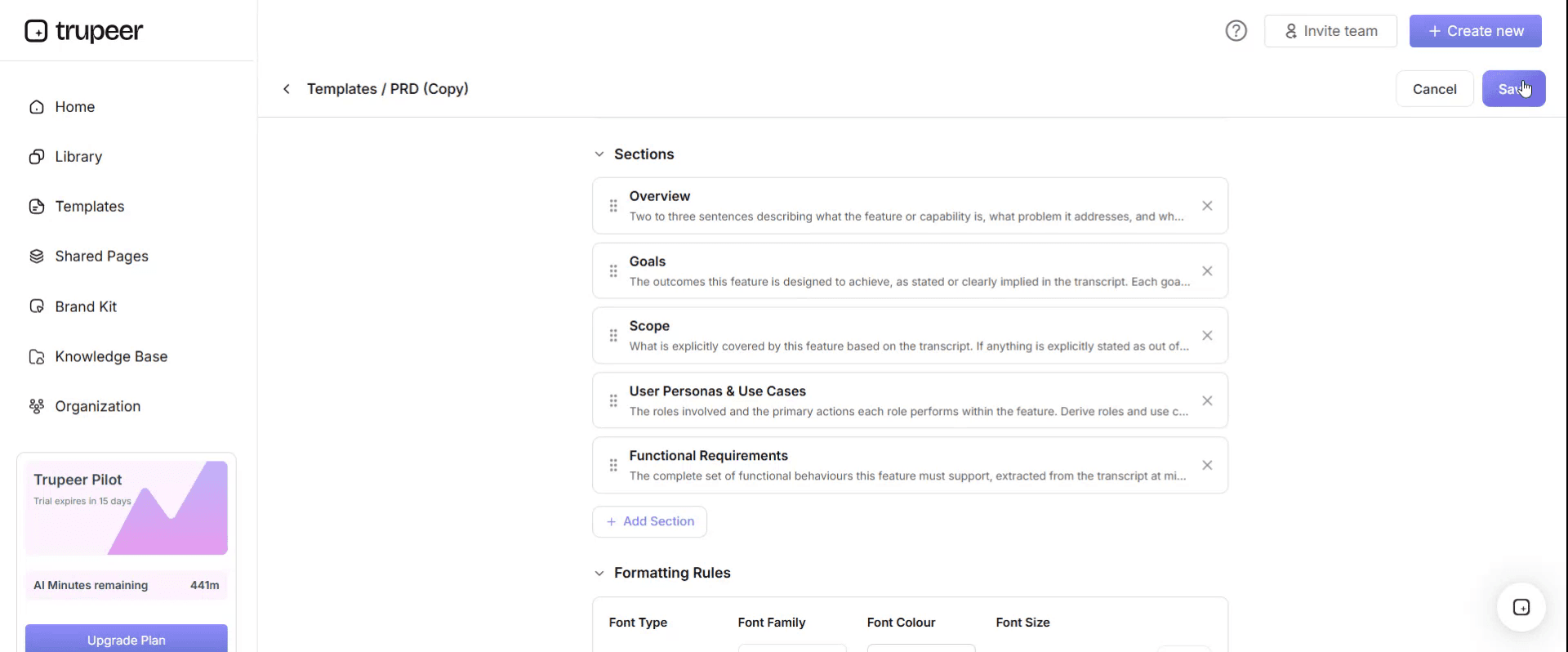
Step 6: Preview and Fine-Tune the Template
When you want to see how your customized template looks, open the Preview.
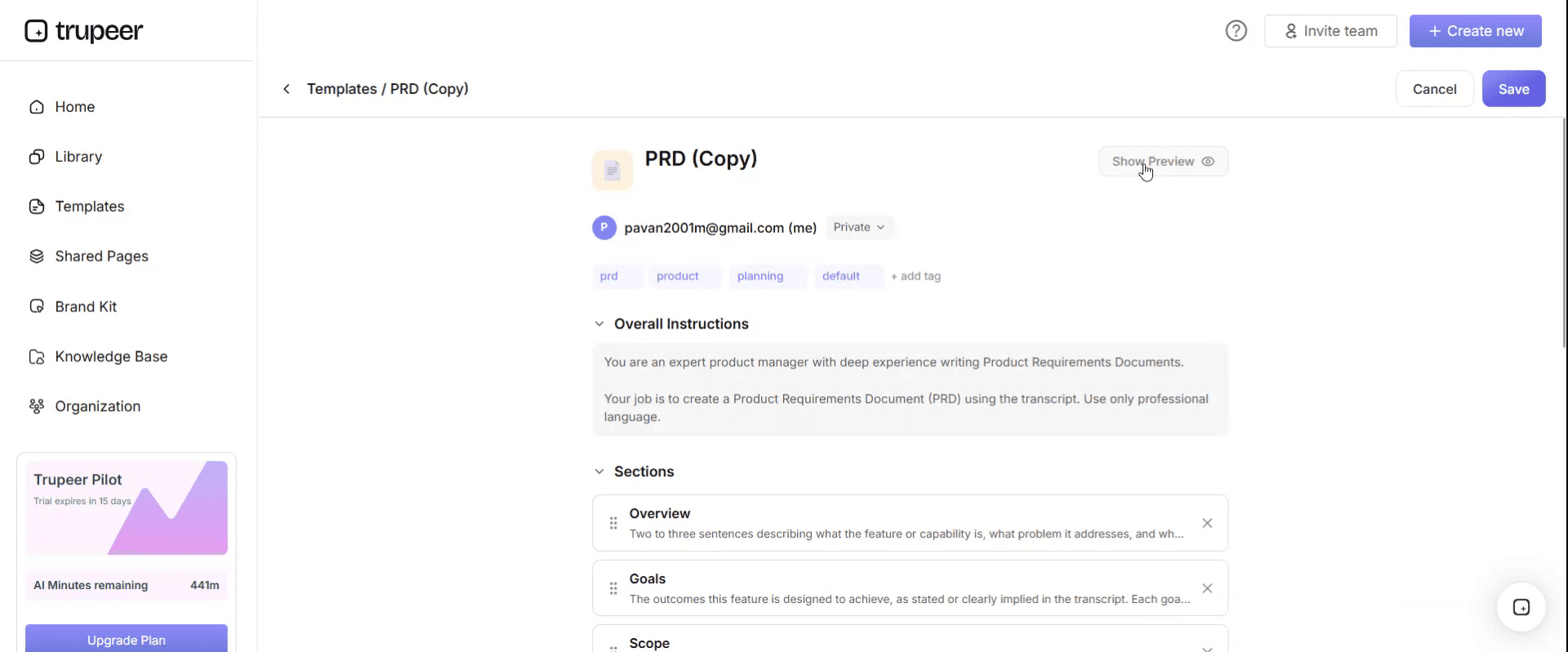
From the preview screen, you can continue to make adjustments directly if needed, ensuring the template appears exactly as you want.
With an operational level agreement template you can:
Save hours on writing: Skip the blank page with a structure built for OLAs.
Align internal teams: Built-in fields ensure every team knows their responsibility.
Stay on-brand: Apply your logo, fonts and colors using Trupeer's brand kit.
Protect customer SLAs: Strong OLAs prevent internal handoffs from breaking external promises.
Standardize across services: Use the same OLA template for every internal agreement.
Reach global teams: Translate OLAs into 65+ languages with one click.
Why every team hits its OLA and the SLA still breaches
This is the most common pattern in service management and it looks like a contradiction.
Every team reports green. Network responds inside its hour. Applications resolves inside its two. The service desk triages within thirty minutes. The monthly OLA compliance report is comfortable reading. And the customer SLA breaches on a third of major incidents.
The explanation is that the OLAs measure time inside teams, and the SLA measures time end to end. The difference between those two numbers is transit: the ticket sitting in a queue after reassignment, waiting to be picked up, or bounced back for more information.
That time belongs to nobody. It is not in anyone's OLA, it is not reported anywhere, and it is frequently larger than all the working time combined.
Which means the failure is structural rather than a performance problem. Adding pressure on teams to hit their existing numbers will not help, because they are already hitting them.
The OLA governs the handoff, not the work
The reframe that fixes this is small and it changes what the document is for.
An OLA written the usual way commits a team to how long its own work takes. That is the part the team controls, so it is the part they are willing to sign, and it is the least useful thing to agree because it was never the variable.
An OLA written well commits teams to the interface between them. What has to be in a ticket before it is passed. How long the receiving team has to pick it up. What happens when the ticket is incomplete. Who owns the ticket during the gap.
Once the handoff is the subject, the two missing fields become obvious. Entry criteria, meaning what must be true before the receiving team's clock starts. And an explicit allocation of the transit time itself, so that the gap between teams is somebody's number rather than nobody's.
Everything else in an OLA template is administration. These two are the document.
Entry criteria: what must be true before the clock starts
The single most destructive behaviour in a multi-team chain is bouncing: a ticket arrives without enough information, the receiving team returns it, and their clock resets.
Bouncing is entirely rational from the receiving team's point of view. They cannot work the ticket and their compliance is measured on their own resolution time, so returning it protects both. It is also where a large share of elapsed time goes, and it is invisible in every report that measures teams separately.
Entry criteria fix it by moving the obligation upstream. Each OLA row lists the specific fields that must be populated for that team to accept the work. For a network handoff that might be device name, site code, exact error text, time first observed and whether other users are affected. For an application handoff it might be the user, the transaction reference, the steps to reproduce and a screenshot.
Then the sending team's commitment changes wording. Not "triage within thirty minutes" but "pass a ticket meeting entry criteria within thirty minutes". Same clock, different obligation, and the incentive now sits with the team that can actually gather the information.
The receiving team keeps the right to reject, and it should be a narrow right: rejection is only valid where a named entry criterion is genuinely missing, and every rejection is logged with the reason. Logging is what turns bouncing from an invisible habit into a number somebody has to explain.
Free operational level agreement template: the structure to copy
Copy from here. Fields marked with an asterisk are the ones standard templates omit.
Header. OLA reference and version. Parties, meaning the two teams by name. The SLA or service this supports. Effective date, review date, and the named owner on each side.
Scope. Which services, systems or request types this covers, and explicitly what it does not.
Service hours. Coverage for each party, including out of hours arrangements and how they differ. Mismatched hours between two teams in the same chain is a common and quietly fatal gap.
Commitments table. One row per request type or priority, with: the trigger, the entry criteria, response time, resolution or handback time, the allocated transit time, and the escalation point.
Escalation. Who is contacted at each stage, by what route, and after how long. Include the out of hours path.
Dependencies. What this team needs from others, including any underpinning contract with a third party, with its own times noted so the arithmetic can be checked.
Measurement. What is measured, from which system, by whom, and how often it is reported. Include bounce rate alongside response and resolution, since it is the metric that reveals whether entry criteria are working.
Exceptions. Agreed circumstances where the commitments do not apply, such as during a declared major incident or a change freeze.
Review. Dates, and what triggers an out of cycle review.
Copy to here. Keep it to two or three pages. An OLA long enough to require reading twice will not be consulted during an incident, and during an incident is when it matters.
How to check the OLAs actually add up to the SLA
Before signing anything, do the arithmetic. It takes fifteen minutes and it is skipped almost universally, because the OLAs are negotiated one at a time with different teams on different days.
Element | Time allowed | Running total |
|---|---|---|
Customer SLA, P2 resolution | 4h 00m | Target |
Service desk triage and dispatch | 30m | 30m |
Transit to receiving team | 15m | 45m |
Network team investigation | 1h 30m | 2h 15m |
Transit to applications team | 15m | 2h 30m |
Applications team resolution | 1h 00m | 3h 30m |
Confirmation and closure | 15m | 3h 45m |
Headroom | 15m | 4h 00m |
Two rules make this useful. Transit time must appear as its own line, because that is the whole point. And every chain needs headroom, because a chain that sums exactly to the SLA breaches whenever anything at all goes slightly wrong. Ten to fifteen percent is a reasonable margin.
If the sum exceeds the SLA, you have three honest options: renegotiate the SLA, reduce a team's time with something that makes it possible, or remove a handoff. What you cannot do is sign OLAs that guarantee a breach and then manage performance against them, which is the position a surprising number of service desks are in.
The retailer whose transit time was longer than its work
Rendlesham Group runs several retail brands with about six thousand staff and an internal IT service desk supporting stores and head office.
Its P2 incident SLA to the business was four hours to resolution. The breach rate on P2 had sat around thirty eight percent for two years. Every team's OLA compliance was reported monthly and every team was green.
Someone finally timestamped every state change on a hundred and twenty breached P2 incidents.
Median total elapsed time was six hours fifty one minutes. Of that, three hours twelve minutes was time inside a team actively working the ticket. Three hours thirty nine minutes was transit: sitting in a queue after reassignment, waiting to be picked up, or bounced back.
More than half of the elapsed time on a breached incident was owned by nobody and reported nowhere.
The largest single contributor was bouncing. Forty one of the hundred and twenty tickets had been returned at least once by a receiving team for insufficient information, and each bounce added a median of one hour twenty minutes as well as resetting that team's clock. The two most common reasons were no error text or screenshot attached, and no confirmation of which store the incident affected.
The changes were narrow. Entry criteria were written into every OLA row. The service desk's commitment was rewritten from triage within thirty minutes to pass a ticket meeting entry criteria within thirty minutes. Fifteen minutes of transit was allocated per handoff and counted against the receiving team once entry criteria were met. And every bounce was logged with a reason.
Over the following two quarters, bounce rate fell from thirty four percent of P2s to nine. Median transit time fell from three hours thirty nine minutes to one hour six. The P2 breach rate fell from thirty eight percent to eleven.
No team's internal resolution time changed materially. Nobody worked faster. The time that had belonged to nobody was simply given to somebody.
How to draft an operational level agreement, step by step
Start from the SLA, not from a template. Write down what the customer has been promised, end to end, with its clock definition.
Map the chain. Every team that touches a request of that type, in order, including any third party. Draw the handoffs as their own steps rather than as arrows.
For each handoff, ask the receiving team one question: what do you need in the ticket to start work without coming back to us. That answer, written down, is your entry criteria. Teams answer this readily and precisely, and most have never been asked.
Now agree times, working within the arithmetic above rather than team by team. Doing it as a single conversation with everyone present takes an hour and prevents the sum problem entirely.
Allocate transit explicitly and decide who owns it. Fifteen minutes per handoff is a reasonable starting point and it should be counted against the receiving team.
Agree the measurement, including bounce rate, and where it comes from. If your tooling cannot produce it, that is worth knowing before you sign rather than at the first review.
Then run it for a quarter before formalising. First versions are usually wrong in one or two places and it is easier to fix them before signatures exist.
Common OLA mistakes and what each one costs
Measuring teams and not the chain. Everyone is green and the SLA breaches. The commonest failure and the subject of this page.
No entry criteria. Bouncing becomes the receiving team's rational defence, and elapsed time balloons invisibly.
Times that do not sum. The OLA set guarantees a breach and nobody has ever added it up.
Mismatched service hours. One team covers until six, the next until five. Everything arriving after five sits overnight, which no report shows because both teams are inside their hours.
Copying SLA language into an OLA. Penalties, credits and legal wording do not belong here, and importing them makes teams negotiate defensively instead of honestly.
Writing an OLA with a third party. If money changes hands it is an underpinning contract and needs procurement and legal involvement, not a template. Our IT procurement policy template covers the approval path.
Signing and filing. An OLA nobody reviews describes a service chain that no longer exists within about a year.
How to manage and review OLAs once they exist
Report the chain, not the components. One number matters, which is end to end performance against the SLA, and the OLA metrics exist to explain it rather than to stand alone.
Review quarterly, with all parties in the room together. Bilateral reviews reproduce the original problem, because the gaps live between the parties who are never in the same conversation.
Watch three things. Bounce rate by handoff, which tells you where entry criteria need work. Transit time by handoff, which tells you where queues are forming. And the proportion of incidents that took a path the OLA does not describe, which tells you the document has drifted from reality.
Trigger an out of cycle review when a team reorganises, when a system moves between teams, when a new third party enters the chain, or when the SLA changes. All four happen more often than the annual review cycle assumes.
OLA, SLA or underpinning contract: which do you need?
If the commitment is to someone outside your delivery organisation, whether an external customer or an internal business unit being served, it is an SLA.
If it is between two teams inside the same organisation with no money changing hands, it is an OLA.
If it is with a supplier under a commercial arrangement, it is an underpinning contract and it needs legal and procurement rather than this template.
The awkward case is the shared service centre or an internal team with a chargeback model, which sits between an OLA and an SLA. The practical answer is to write it as an OLA and drop any language about penalties, because internal penalty regimes reliably produce defensive behaviour and worse service.
For the customer-facing definitions and response wording that sit on top of all this, our help desk response template and ticket and resolution template cover the layer the end user actually sees.
Can I get an OLA template in Word or Excel?
Word for the agreement, because the scope, exceptions and review sections are prose and the document gets circulated for sign-off.
Excel for two parts specifically. The commitments table, where you want the entry criteria, times and transit allocation in columns you can sort and check. And the arithmetic sheet, where each chain sums against its SLA and flags anything without headroom. That second sheet is the one worth building first, since it often changes what you were about to agree.
PDF for the signed version, exported from the source. Keep the working version editable, because the entry criteria will need adjusting after the first quarter of real bounces.
How to keep the OLA and the reality in step
An OLA describes a chain of work that changes constantly. Teams reorganise, systems move, tools change, and the document is the last thing anybody updates.
The part that goes stale fastest is the entry criteria, because they describe what a ticket must contain, and what a ticket must contain depends on how the current tooling and the current process actually work.
Trupeer AI helps by making the underlying procedures cheap to keep current. Record the triage or handoff process once and you get a written procedure with the steps and screens captured, which the service desk can follow and which shows plainly what information is being gathered. When the tooling changes, re-record rather than rewrite.
Record it. Brand it. Translate it. Trupeer it.
The SOP creator covers the procedures the OLA depends on, and our IT SOP template covers how to decide which of them are worth maintaining. Documentation keeps the agreements and the procedures together, and setup instructions are in the document template setup guide.
Frequently Asked Questions
Is there a free operational level agreement template in Word?
The structure above pastes straight into Word or Google Docs, including the entry criteria and transit allocation fields that standard templates omit. There is no gated download and no form. Keep the commitments table in a spreadsheet and reference it, because that part needs sorting and summing.
Is there a free operational level agreement template in PDF?
Export the signed version to PDF once the parties have agreed it, and keep the working copy editable. Entry criteria almost always need adjusting after the first quarter, once you can see what tickets are actually being bounced for.
Is there a free operational level agreement template in Excel?
Excel is the right home for the commitments table and for the arithmetic check. One sheet with a row per handoff and a running total against the SLA, flagging any chain with less than ten percent headroom. Building that sheet before you negotiate tends to change what gets negotiated.
Where can I find an operational level agreement PDF example?
Several ITSM vendors and government bodies publish OLA and SLA templates as documents, and they are reasonable for structure. Read them for the sections rather than the content, since the commitments in any published example are somebody else's chain, and the times are meaningless outside the SLA they were built to support.
Who signs an operational level agreement?
The named owner on each side, which should be the manager accountable for that team's delivery rather than a service management function. An OLA signed only by service management is an aspiration, because the person who has to resource it was not in the room.
How many OLAs does a service desk need?
Fewer than most teams expect. One per team pair that regularly exchanges work, covering all request types in a single commitments table, rather than one per service. Beyond about a dozen, maintenance becomes the constraint and the documents drift out of date faster than they are reviewed.
Should an operational level agreement have penalties?
No. There is no legal relationship to enforce and internal penalty regimes reliably produce defensive behaviour: teams reject work, argue about clock starts and optimise for their own number rather than the outcome. Report the chain end to end instead, which makes the shared consequence visible without anyone being fined.
How often should OLAs be reviewed?
Quarterly with all parties present, plus an out of cycle review whenever a team reorganises, a system moves between teams, a third party enters the chain, or the underlying SLA changes. The quarterly cadence catches drift and the triggers catch the changes that make the document wrong overnight.


