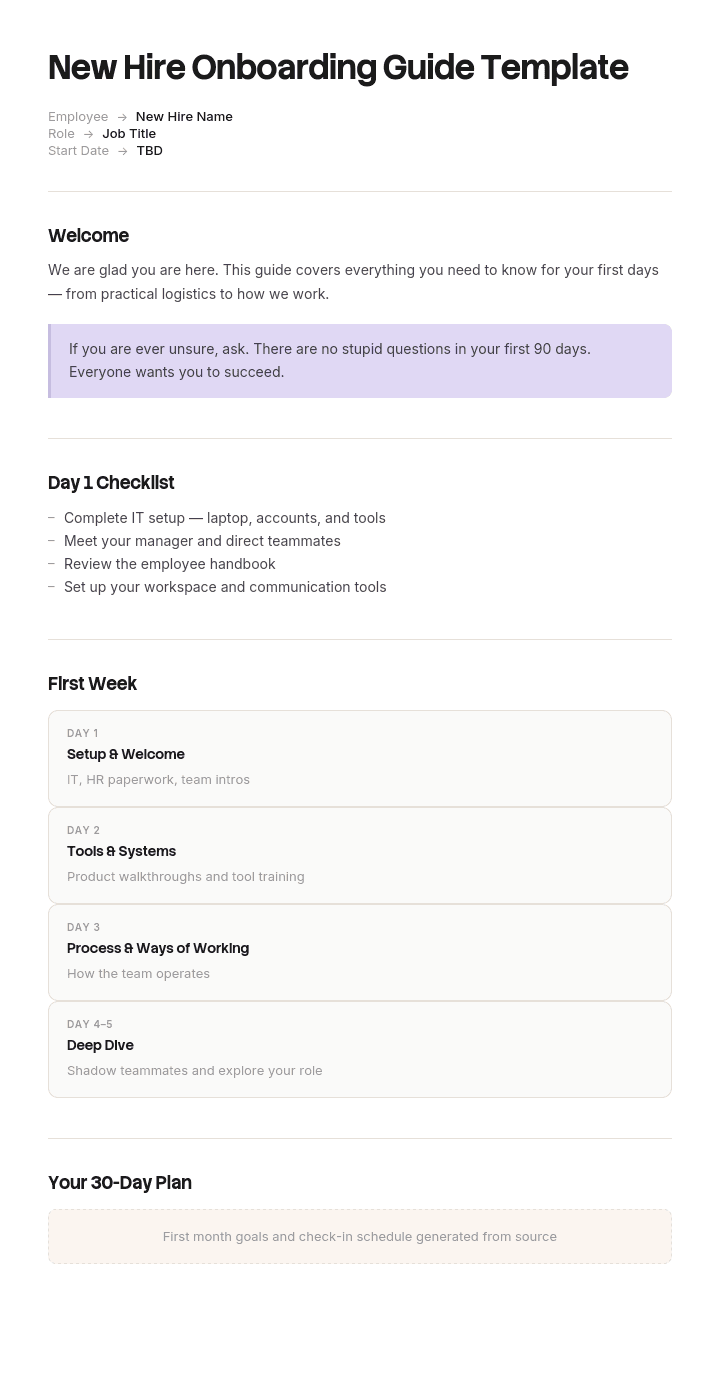
Use this template
The first 30 days of a new hire's tenure shape everything that follows. With Trupeer, you can save hours on onboarding design by starting with a free new hire onboarding guide template, customizing it with your brand guidelines, and turning the guide into engaging video modules new hires actually finish.
What is a new hire onboarding guide template for?
A new hire onboarding guide is the document the person starting actually reads. Not the checklist HR works through, not the plan their manager fills in, not the tracker showing where the cohort has got to. The thing that arrives in their inbox and answers the question they are actually asking, which is what do I do now.
That distinction sounds pedantic and it is the whole point. Search for onboarding templates and you will find checklists, schedules, trackers, forms and matrices, almost all of which exist so the employer can see that onboarding happened. Very few of them are readable by the person being onboarded.
The guide is the missing document, and it is the one that changes how quickly somebody becomes useful.
Why most onboarding templates are written for HR, not the hire
Look at what the top result for this search offers: sixteen templates, including a tracking template, an HR checklist, a manager's checklist, a form and a schedule. All of those are legitimate documents. Fifteen of the sixteen are things the new starter never sees.
There is a reason for this. Onboarding is measured by completion, because completion is easy to measure. Did the laptop arrive, was the contract signed, did the buddy get assigned, was the day thirty check-in held. A checklist is the natural instrument for that and it does its job well.
What completion does not measure is whether the person can do anything yet. Those are different variables and they come apart routinely: an organisation can complete forty two onboarding tasks on schedule while the new hire sits at their desk for a fortnight not knowing whether they are allowed to push a change.
So the guide is not a nicer version of the checklist. It answers a different question for a different reader, and if you only build one, build this one, because the checklist mostly manages your own risk.
How to customize this template in Trupeer
Step 1: Open the Templates Section
Go to the Templates section from the main navigation.

Step 2: Select and Open a Template
Click on any template you want to work with to open it.

Step 3: Expand the Template View
If needed, expand the template view to see the full layout and details clearly.

Step 4: Edit the Template
Click on Edit to start modifying the selected template.

Within the editor, you can:
Add new sections
Define or update formatting rules
Add a logo and adjust its position and related settings
Step 5: Save Your Customized Template
After making all necessary changes, click Save to store the updated template as your own.

Step 6: Preview and Fine-Tune the Template
When you want to see how your customized template looks, open the Preview.

From the preview screen, you can continue to make adjustments directly if needed, ensuring the template appears exactly as you want.
With a new hire onboarding guide template you can:
Save hours on design: Skip the blank page with a comprehensive onboarding structure.
Ramp new hires faster: Clear onboarding cuts time-to-productivity significantly.
Stay on-brand: Apply your logo, fonts and colors using Trupeer's brand kit.
Engage from day one: Convert dense onboarding docs into video modules new hires actually watch.
Standardize across hires: Use the same template for every new hire and every role.
Reach global hires: Translate onboarding guides into 65+ languages with one click.
The guide's job is removing hesitation, not transferring information
New starters are not short of information. On day one they typically receive a handbook, an org chart, a benefits summary, links to a dozen systems and an invitation to ask anything.
What slows them down is hesitation. They do not book time with the person they need, do not ask the question that would unblock them, do not push the button, because they cannot tell whether they are allowed to and cannot judge what asking will make them look like.
That hesitation is expensive and almost entirely invisible, because it produces no ticket, no complaint and no survey response. It shows up only as a long ramp, which then gets attributed to the difficulty of the role.
The content that removes it is not more information. It is permission and norms: what you can do without asking, what is normal here, who to ask about what, and what you are not expected to understand yet. Almost no onboarding pack contains any of the four, and they are cheap to write because everyone already knows the answers.
The four onboarding questions a new starter will not ask
The question | What it sounds like in their head | What the guide should contain |
|---|---|---|
Am I allowed to? | Can I book time with someone senior, decline this meeting, push to the shared branch, spend money on this | An explicit list of things you can do without asking anyone |
Who do I ask about this? | I do not want to bother the wrong person or look like I cannot find things | A routing table by topic, not an org chart |
Is this normal? | The build takes forty minutes, nobody replied to me for two days, is that broken or is that here | Plain statements of what normal looks like |
Should I know this by now? | Everyone is using acronyms I have never heard | What you are not expected to know for the first three months |
The pattern across all four is the same. Each is a question with a social cost attached, which means people sit on them rather than ask, and the sitting is the cost.
Writing them down removes the social cost entirely, because a sentence in a document is not a favour anyone had to grant.
Free new hire onboarding guide template: the structure to copy
Copy from here. Written in second person, addressed to the new starter.
Before you start. What arrives and when, what you need to bring or complete, who will meet you, what time and where, and what to do if something has not arrived.
Your first day. A short ordered list of what will happen, with an end state: by the end of today you will have your accounts, met your team, and know who your buddy is. Include what you do not need to do today.
What you can do without asking. The permissions list. This is the section that does the most work and the one nobody writes.
Who to ask about what. A routing table by topic with a name and a channel.
What normal looks like here. Response times, meeting culture, working hours reality, how decisions get made, what people do when they disagree.
Your first week. Three or four outcomes rather than a timetable, and the name of the first small piece of real work.
Your first month. What you should be able to do unsupervised by the end of it, so they can measure themselves against something.
What you are not expected to know yet. Explicitly, with a timescale. This section prevents more anxiety than the rest of the document combined.
Words and acronyms we use. Twenty entries maximum, chosen from what people actually say in meetings rather than from the product documentation.
If you are stuck. What to do, in order, with a named human at the end of it.
Copy to here. Aim for three to five pages. The instinct is to include everything the new starter will eventually need, and that instinct produces a document nobody finishes.
What can I do without asking? The permissions list
This is the section worth building first, and it takes about forty minutes with a manager and someone who joined in the last six months.
Ask the recent joiner what they hesitated over. Ask the manager what they wish people would just do. The overlap is your list.
A typical engineering version runs to twelve or fifteen items: book time with anyone including leadership, decline a meeting where you are not needed and say why, push to a feature branch, open a draft pull request before it is finished, ask a question in the team channel rather than a direct message, spend up to a stated amount on tools without approval, say in a standup that you do not understand something, work from home on a day you need to, take an hour to read documentation, close a ticket you cannot reproduce.
Two rules make it credible. Every item must be genuinely true, because one item that turns out to need approval discredits the whole list. And it must be signed by the person who could overrule it, meaning the manager rather than HR.
Where something genuinely does need approval, say so plainly and name who gives it. The list works because it is honest about both directions.
Who to ask about what: the onboarding routing table
New starters are given an org chart, which tells them who reports to whom and nothing about who to ask.
Replace it with a routing table by topic. Laptop broken. Cannot access a system. Question about pay. Question about the product. Stuck on a technical problem. Need something bought. Think you have found a bug. Not sure whether something is a priority. Personal issue affecting work.
Each row gets a name, a channel, and where the answer is genuinely a team rather than a person, the channel alone.
Add one row that most tables miss: what to do when you do not know which row applies. That is the most common situation in week one and it deserves a named default.
The onboarding pack with a perfect checklist and a 19 day ramp
Ashgrove Analytics, a B2B software company of about two hundred and forty people, hired roughly sixty a year. Its onboarding was well regarded internally. A forty two item checklist, consistently completed on time, and a day thirty satisfaction survey averaging four point three out of five.
The number that did not match was ramp. Median time from an engineer's start date to their first merged change was nineteen days. Senior hires who had joined from competitors said four or five was normal where they came from.
Someone asked the last twelve engineering hires to log every question they asked and every time they were blocked during their first four weeks. Two hundred and fourteen entries came back, around eighteen per person.
Sorted, thirty one percent were access and tooling, which the checklist largely covered. Twenty two percent were who do I ask about this. Nineteen percent were permission questions: can I book time with the CTO, can I push to main, can I decline this meeting, can I say in standup that I do not understand. Sixteen percent were is this normal, mostly about build times and response times. Twelve percent were genuinely technical.
So forty one percent of everything a new engineer got stuck on was permission or norms, and the onboarding pack contained not one word about either. It had a checklist, an org chart, a benefits summary and thirty four links.
The worse number was delay. Median time between a permission question arising and being asked was two and a half days. Two of the twelve had gone more than a week without pushing anything to a shared branch, because nobody had told them whether that was allowed. One had assumed there was a review process he had not been told about and had been quietly waiting to be told.
They rewrote the guide from the question log. A permissions list of fourteen items. A routing table by topic. A page on what normal looks like, including that the build genuinely does take forty minutes and that two days for a review is slow but not unusual. And a section on what you are not expected to know until month three.
Across the next fifteen hires, median time to first merged change fell from nineteen days to eight. Questions logged fell from about eighteen per person to eleven, and the permission share of them fell from nineteen percent to six.
Nothing was added to the checklist. It was already doing its job.
Onboarding guide, checklist, plan or handbook: which do you need?
Four documents, four readers, and conflating them is why onboarding packs get long and unread.
The checklist is for HR and the manager. It tracks tasks with owners and dates, covers compliance and equipment, and its measure is completion. The new starter should never be handed it.
The plan is for the manager and the hire together. It sets what the person will be able to do by thirty, sixty and ninety days, and our 30-60-90 day template covers it. It starts roughly where this guide finishes.
The handbook is the reference. Policies, benefits, rules, the things you look up rather than read. It is maintained by HR, approved by legal, and nobody reads it front to back.
The guide, this document, is for the new starter in their first month. It is read once, in order, and then dipped into. It is the only one of the four written in second person.
Build all four if you can. If you can only build one well, build this one, because the other three exist in some form in almost every organisation already.
How the onboarding guide differs by department and role
The structure holds across roles. Three sections change substantially.
The permissions list is the most role-specific part of the document and should be written per team rather than centrally. An engineer's list is about code, access and meetings. A salesperson's is about discounting, which prospects they can approach and what they can commit to. A support agent's is about refunds, escalation and when to hand off.
What normal looks like changes too, because the rhythms differ. Sales has a monthly cycle that shapes everything. Engineering has a release cadence. Support has a daily queue.
And the first piece of real work differs entirely, which matters because naming it specifically is what turns week one from orientation into work.
Everything else, the routing table, the glossary, the first day sequence, is company-wide. The practical arrangement is a company guide with a short team appendix, written by the team lead, kept to one page.
Onboarding guides for remote and hybrid starters
Remote onboarding fails in the same place as in-person onboarding, only harder, because hesitation has no corridor to be resolved in. A new starter in an office overhears the answer to half their questions. A remote starter does not, and asking has a higher social cost when it means interrupting someone in writing.
Three additions to the guide are worth making for remote starters. Be explicit that asking in a shared channel is preferred over direct messages, and say why, since most people default to the more private option out of politeness. State response time norms plainly, because silence reads as disapproval when you cannot see that the person is in meetings. And schedule the first real task for day two rather than day four, since a remote starter with nothing to do disengages faster than one sitting in an office.
Where the work involves systems the person has never seen, a short recorded walkthrough beats a written guide, and that is the one place video genuinely outperforms text in onboarding.
Can I get a new hire onboarding guide template in Word or Excel?
Word or Google Docs is right for the guide itself, and the structure above pastes in directly. Keep it as a document rather than a slide deck, because it needs to be read rather than presented, and keep the team appendix in the same file so the new starter has one thing to open.
Excel suits the checklist and the tracker, which are the employer-side documents. If you are searching for an onboarding template in Excel, that is almost certainly what you actually want: task, owner, due date, status, one row per item, one tab per cohort.
PDF suits the version sent before day one, which is the moment the guide is most valuable and most often not yet ready. Send the first three sections, before you start, your first day and what you can do without asking, a week ahead of the start date.
How to build an onboarding guide from a recording
The section of the guide that dates fastest is anything describing a system, and the section people most want is a walkthrough of the tools they will use daily. Writing those is slow, which is why they are usually the thing the guide links out to rather than contains.
Trupeer AI closes that gap. Whoever does the job records themselves doing it once, and the output is a written guide with the steps and screens captured, plus a video for the starters who would rather watch. Two hours of recording covers the tool walkthroughs most guides never get around to.
Record it. Brand it. Translate it. Trupeer it.
The same source produces documents for your knowledge base in consistent branding, which matters more than it sounds for a first impression. Guides and training videos cover the wider onboarding programme, and where a starter is replacing someone who has left, our knowledge transfer SOP covers the handover that should precede it. Setup instructions are in the document template setup guide.
Frequently Asked Questions
Is there a free new hire onboarding guide template in Word?
The structure above pastes straight into Word or Google Docs and is written to be filled in as-is. There is no gated download and no form. Write the permissions list first, because it is the section that requires a real decision and the rest is description.
Is there a free new hire onboarding guide template in Excel?
Excel is the right tool for the onboarding checklist and tracker rather than the guide. Columns for task, owner, due date and status, one row per item and one tab per starter or cohort. The guide itself is prose and belongs in a document, since nobody reads a welcome message in a cell.
Is there a free new hire onboarding guide template in PDF?
Export the pre-start sections to PDF and send them a week before day one, which is when a new starter is most anxious and least informed. Keep the working version editable, because the permissions list and the glossary need updating every few months as teams change.
Where can I find an onboarding checklist template in PDF?
That is the employer-side document rather than this one, covering equipment, accounts, contracts, right to work and compliance tasks with owners and dates. Keep it separate from the guide. Mixing the two produces a document that is both an internal tracker and a welcome letter, and it works as neither.
How long should a new hire onboarding guide be?
Three to five pages. Long enough to cover permissions, routing and norms properly, short enough that somebody reads it on their first evening. If it is running past eight pages, the usual cause is that reference material has crept in, and reference material belongs in the handbook.
Who should write the onboarding guide?
HR owns the company-wide sections and the team lead owns the appendix, but the most useful contributor is somebody who joined in the last six months. They are the only person who still remembers what was confusing, and that memory disappears within about a year.
How long should onboarding last?
The guide covers the first month. The plan covers ninety days. Full ramp for a technical or client-facing role is usually three to six months, and pretending otherwise in the guide is counterproductive, because a starter who expects to be effective in two weeks and is not will conclude something is wrong with them.
What should a new hire receive before their first day?
Practical logistics, meaning where and when and who will meet them, plus the permissions list and anything they need to complete in advance. Sending it a week ahead removes most first-day anxiety at no cost. Do not send the full pack, because reading forty pages of policy the weekend before starting is nobody's idea of a welcome.


