
Use this template
The month-end close is where small gaps become big delays. A reconciliation nobody owned, an accrual someone forgot, a journal waiting for approval while the reviewer is on leave. Most finance teams don't need more effort at month end; they need everyone working from the same list, in the same order, with clear owners and deadlines. A month-end close checklist template gives you that list, and the SOP behind it tells the team how to run it.
This free month-end close checklist template lists every close task by working day, with owners, deadlines, status and sign-off, plus a short SOP for running the close and the extra tasks for quarter-end and year-end. Copy the checklist below, adapt it to your entities and systems, or sign up to export it as an editable template.
What is a month-end close checklist template?
A month-end close checklist template is a ready-made list of the tasks a finance team completes to close the books at the end of each month. It groups tasks by working day, from pre-close preparation to final review, and records who owns each task, when it's due, its status and who signed it off. A good month-end close checklist template also comes with a short SOP explaining how the close is run: who coordinates it, how delays are escalated and how the close is signed off.
The checklist tells people what to do and when; the SOP behind each task tells them how. For the full record to report procedure, see the record to report SOP template.
Why use a month-end close checklist?
Nothing gets missed. Every recurring task is listed, every month.
Ownership is clear. Each task has a named owner and a deadline.
Delays show up early. A shared status view makes late tasks visible on the day, not at the end.
The close gets faster. Teams stop rediscovering the order of tasks each month.
Audits are easier. A completed, signed-off checklist is evidence that the close was performed and reviewed.
Cover is simpler. When someone is away, a colleague can see exactly what's outstanding.
Who uses a month-end close checklist template?
Financial controllers and close managers who coordinate the close.
General ledger and staff accountants who post journals and reconcile accounts.
AP, AR, payroll and fixed asset teams who close their sub-ledgers.
CFOs and finance directors who review and sign off results.
Small business owners and bookkeepers closing the books for a single entity.
Shared services and outsourced accounting teams closing multiple entities or clients.
Auditors reviewing close controls.
Preview the month-end close checklist template
The template opens with a close summary: period, entities, close calendar, close manager and sign-off. The checklist follows, grouped by working day from pre-close to final review, with columns for task, owner, due day, status, reviewer and notes. A short SOP explains how the close is run, how delays and exceptions are handled and how the close is signed off. Separate sections list the extra tasks for quarter-end and year-end, and a KPI section tracks how the close is improving. Every section is editable, so you can add tasks, change days or create one tab per entity.
How to customize this template in Trupeer
Step 1: Open the Templates Section
Go to the Templates section from the main navigation.

Step 2: Select and Open a Template
Click on any template you want to work with to open it.
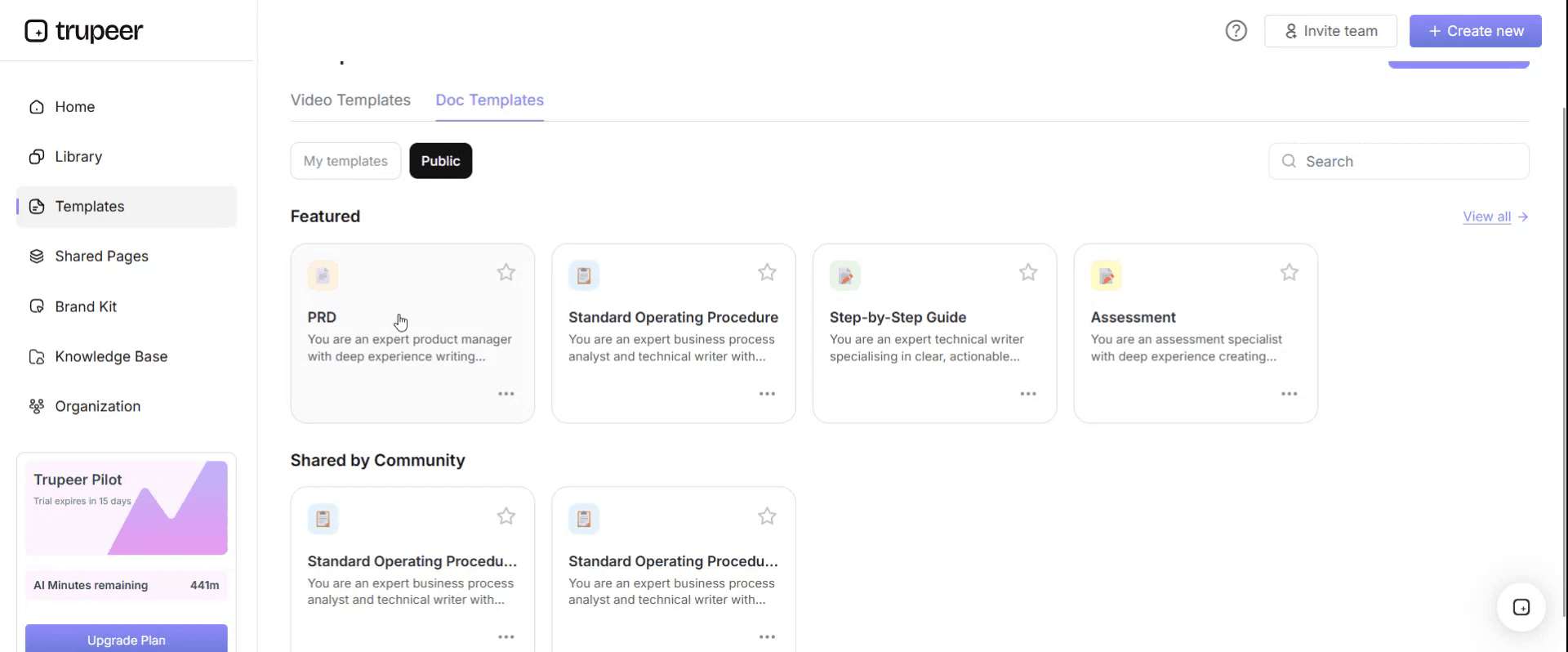
Step 3: Expand the Template View
If needed, expand the template view to see the full layout and details clearly.

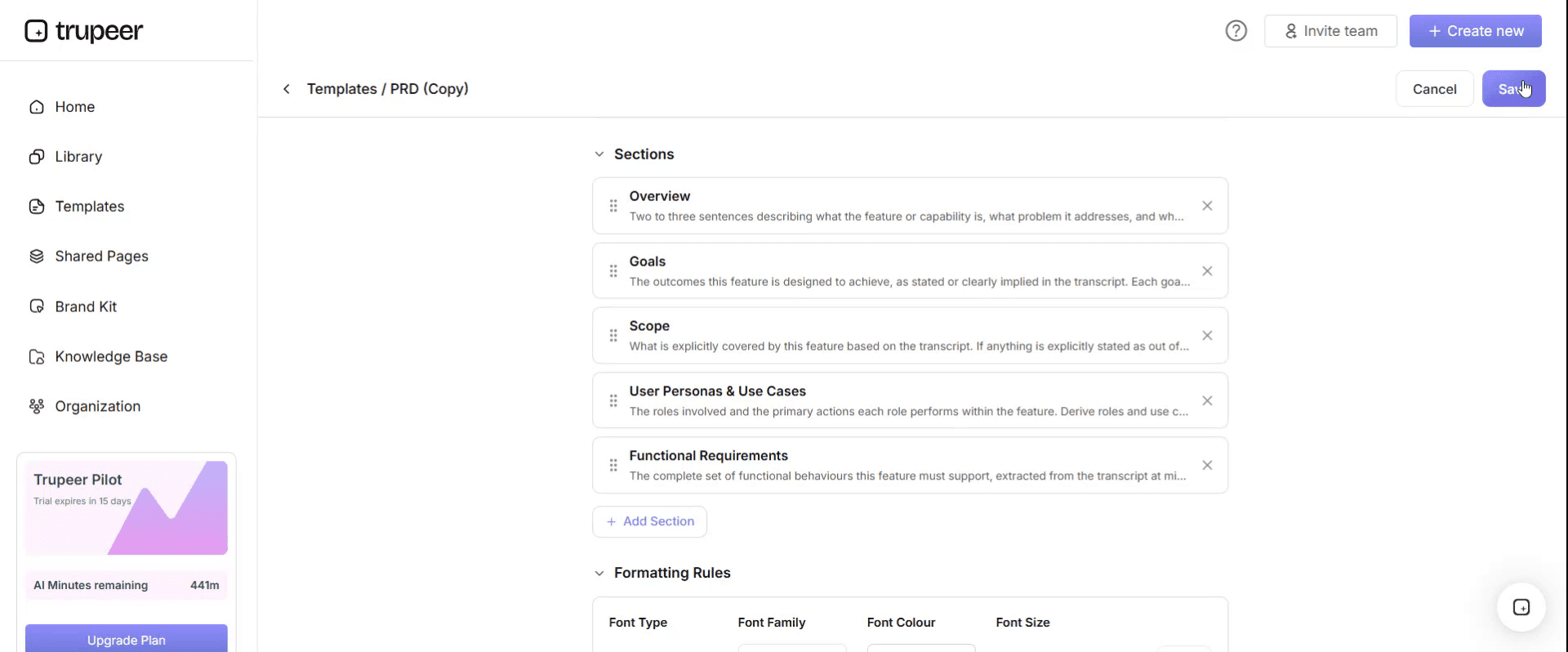
Step 4: Edit the Template
Click on Edit to start modifying the selected template.

Within the editor, you can:
Add new sections
Define or update formatting rules
Add a logo and adjust its position and related settings
Step 5: Save Your Customized Template
After making all necessary changes, click Save to store the updated template as your own.
Step 6: Preview and Fine-Tune the Template
When you want to see how your customized template looks, open the Preview.

From the preview screen, you can continue to make adjustments directly if needed, ensuring the template appears exactly as you want.
With a month-end close checklist template you can:
Close the same way every month: One list, one order and clear owners.
See status at a glance: Know which tasks are done, late or blocked.
Shorten the close: Remove waiting time and rework between tasks.
Show auditors a reviewed close: Keep sign-offs and notes for every task.
Train new team members faster: Link each task to its SOP and a short video.
What a month-end close checklist template must contain
Section | What it covers |
|---|---|
Close summary | Period, entities, close manager, close calendar and final sign-off |
Pre-close tasks | Cut-offs, recurring journals and preparation before period-end |
Sub-ledger close | AP, AR, payroll, inventory and fixed assets closed and posted |
Accruals and prepayments | Period-end entries and reversals |
Reconciliations | Bank, balance sheet and intercompany reconciliations with review |
Review and adjustments | Trial balance review, flux analysis and approved adjustments |
Reporting | Financial statements, management reports and distribution |
Task columns | Owner, due day, status, reviewer, date completed and notes |
Close SOP | How the close is run, escalated and signed off |
Quarter-end and year-end tasks | Extra tasks for longer periods |
KPIs | Days to close, late tasks, post-close adjustments |
Free month-end close checklist template: the checklist to copy
Copy the checklist below into a spreadsheet or document, or sign up to export it as an editable template. Days are working days relative to period-end; adjust them to your calendar.
Close summary. Period: [month and year]. Entities: [list]. Close manager: [name]. Target close day: [working day]. Final sign-off: [Financial controller].
Pre-close (day -3 to day 0)
Task | Owner | Due | Status | Reviewer |
|---|---|---|---|---|
Send close calendar and cut-off reminders | Close manager | Day -3 | [ ] | – |
Confirm cut-off times with AP, AR, payroll and inventory | Close manager | Day -2 | [ ] | – |
Post recurring journals | GL accountant | Day -1 | [ ] | Reviewer |
Freeze master data changes | GL accountant | Day 0 | [ ] | – |
Day 1: Sub-ledgers
Task | Owner | Due | Status | Reviewer |
|---|---|---|---|---|
Close AP; post all approved invoices for the period | AP lead | Day 1 | [ ] | Close manager |
Close AR; post all invoices and cash received | AR lead | Day 1 | [ ] | Close manager |
Post payroll journals | Payroll | Day 1 | [ ] | GL accountant |
Run depreciation and confirm fixed asset postings | Fixed asset accountant | Day 1 | [ ] | GL accountant |
Post inventory adjustments and cost of sales | Inventory accountant | Day 1 | [ ] | GL accountant |
Day 2: Accruals and intercompany
Task | Owner | Due | Status | Reviewer |
|---|---|---|---|---|
Post accruals for goods and services received but not invoiced | GL accountant | Day 2 | [ ] | Reviewer |
Amortise prepayments | GL accountant | Day 2 | [ ] | Reviewer |
Post revenue deferrals or accruals | Revenue accountant | Day 2 | [ ] | Reviewer |
Match intercompany balances with counterparties | Intercompany accountant | Day 2 | [ ] | Close manager |
Day 3: Reconciliations
Task | Owner | Due | Status | Reviewer |
|---|---|---|---|---|
Reconcile all bank accounts | GL accountant | Day 3 | [ ] | Reviewer |
Reconcile AP and AR sub-ledgers to the general ledger | GL accountant | Day 3 | [ ] | Reviewer |
Reconcile balance sheet accounts in scope | GL accountants | Day 3 | [ ] | Reviewer |
Agree and post intercompany adjustments | Intercompany accountant | Day 3 | [ ] | Close manager |
Day 4: Review and adjustments
Task | Owner | Due | Status | Reviewer |
|---|---|---|---|---|
Review the trial balance | Close manager | Day 4 | [ ] | Financial controller |
Perform flux analysis on key accounts and explain variances | GL accountants | Day 4 | [ ] | Financial controller |
Post approved adjustments | GL accountant | Day 4 | [ ] | Reviewer |
Translate foreign currency balances and consolidate entities | Consolidation accountant | Day 4 | [ ] | Financial controller |
Lock the period | Close manager | Day 4 | [ ] | Financial controller |
Day 5: Reporting and sign-off
Task | Owner | Due | Status | Reviewer |
|---|---|---|---|---|
Prepare financial statements | Reporting accountant | Day 5 | [ ] | Financial controller |
Prepare management reports and commentary | FP&A or reporting | Day 5 | [ ] | Financial controller |
Review results with the CFO | Financial controller | Day 5 | [ ] | CFO |
Sign off the close and archive the checklist | Financial controller | Day 5 | [ ] | – |
After the close
Task | Owner | Due | Status | Reviewer |
|---|---|---|---|---|
Hold a short close retrospective | Close manager | Day 6 | [ ] | – |
Update the checklist and SOPs for any changes | Close manager | Day 7 | [ ] | – |
The month-end close SOP: how to run the checklist
The checklist works best with a short SOP that explains how the close is run.
1. Roles. The close manager owns the checklist, tracks status and escalates delays. Task owners complete their tasks by the due day and mark them done. Reviewers check and sign off. The financial controller approves the final close.
2. Before the close. The close manager publishes the close calendar and reminds sub-ledger owners of cut-off times three working days before period-end.
3. During the close. Task owners update status daily: not started, in progress, done or blocked. The close manager holds a short daily check-in from day 1 to day 5 to review late and blocked tasks.
4. Reviews. Every reconciliation and manual journal is reviewed by someone other than the preparer before it's marked done.
5. Exceptions and escalation. Late or blocked tasks follow the exception rules below. Anything that threatens the close date is escalated to the financial controller the same day.
6. Sign-off. When every task is done and reviewed, the financial controller signs off the close and the checklist is archived with its evidence.
7. Continuous improvement. After each close, the team notes what slowed the close down and updates the checklist and SOPs.
Month-end close exceptions
Exception | How to recognise it | Action | Decision owner | Escalate to |
|---|---|---|---|---|
Task late | Not done by its due day | Owner gives a new time; close manager checks the impact on later tasks | Close manager | Financial controller if the close date is at risk |
Sub-ledger not closed | AP, AR or payroll still open after day 1 | Escalate; agree an estimate or extended cut-off | Close manager | Financial controller |
Reconciliation difference | Unexplained difference above threshold | Investigate; correct or document before sign-off | GL accountant | Close manager |
Intercompany mismatch | Balances don't agree with the counterparty | Agree and post the adjustment | Intercompany accountant | Financial controller |
Adjustment after lock | Error found after the period is locked | Assess materiality; correct in the next period or reopen with approval | Financial controller | CFO |
Reviewer unavailable | Assigned reviewer away | Use the named backup reviewer | Close manager | Financial controller |
Quarter-end and year-end additions
Add these tasks to the checklist at quarter-end and year-end:
Period | Additional tasks |
|---|---|
Quarter-end | Inventory counts or reviews, bad debt and provision reviews, tax provision updates, quarterly reporting and board packs |
Year-end | Physical inventory count, fixed asset verification, full provision review, tax calculations, audit preparation and schedules, annual financial statements |
Month-end close checklist for small businesses
Small businesses and single-entity companies can use a shorter version of the month-end close checklist template. Keep the same order, but combine tasks:
Before month end: send reminders for outstanding invoices and expense claims.
Day 1 to 2: record all sales and supplier invoices, run payroll entries and reconcile bank and credit card accounts.
Day 3: post accruals and prepayments, review receivables and payables ageing, and check the trial balance.
Day 4 to 5: review the profit and loss and balance sheet against last month and budget, then sign off.
Even with one or two people doing the close, a checklist and a short SOP for each task make it easier to hand over to an accountant, bookkeeper or new hire.
Month-end close KPIs
Days to close: working days from period-end to sign-off.
Tasks completed on time: share of checklist tasks done by their due day.
Blocked tasks: number of tasks waiting on another task or team.
Post-close adjustments: changes needed after sign-off.
Reconciliations with aged items: reconciliations carrying unexplained items from earlier months.
Set your own targets and baseline them before you change the process.
How to close faster with your month-end close checklist
Move work before period-end. Post recurring journals and prepare reconciliations early.
Remove waiting time. Look for tasks that sit blocked on another team and agree earlier handoffs.
Standardise every task with an SOP and video, so anyone can do it the same way.
Automate repetitive tasks, such as recurring journals and bank matching; see how to identify automation opportunities in documented processes.
Review the checklist after every close and remove tasks that no longer add value.
How to build your close SOPs from recordings
Pick the tasks that cause the most delays or errors, such as accruals, bank reconciliations or consolidation.
Record the accountant who does each task best, during a real close, narrating each step and judgement.
Generate the SOP and video with Trupeer, then add your thresholds and deadlines.
Link each SOP from its checklist task, so people can open the instructions in one click.
Update the SOPs whenever the system or process changes; see SOP version control.
Formats for a month-end close checklist
Spreadsheet is the most common format, with one tab per entity and columns for owner, due day, status and sign-off.
Document with checklist tables suits smaller teams and pairs naturally with the close SOP.
Close management or project tool suits larger teams that need dependencies, reminders and dashboards.
Whichever format you use, link each task to its SOP and keep the completed checklist as evidence.
Best practices for month-end close checklists
Give every task one owner and one reviewer.
Use working days, not dates, so the checklist works every month.
Name a backup reviewer for every review task.
Hold a short daily check-in during the close.
Keep the checklist and SOPs together, with each task linked to its instructions.
Run a short retrospective after every close.
Common mistakes to avoid
Tasks without owners, so nobody notices when they slip.
No reviewer, so errors go straight into the reports.
A checklist that never changes, even when the business does.
Status tracked only in people's heads instead of on the checklist.
No SOPs behind the tasks, so the close depends on a few experienced people.
How Trupeer helps you run a faster, cleaner close
Close challenge | How Trupeer helps |
|---|---|
Close tasks are known by one or two people | Record them during a real close, and Trupeer's SOP creator turns each recording into a step-by-step SOP and video |
New accountants take months to learn the close | Link each checklist task to a short video and guide they can follow |
Different entities and centres work in different languages | Translate SOPs and videos from one source into 65+ languages |
The ERP or close process changes | Update videos by editing the script, and replace a single step instead of re-recording |
Instructions are scattered across folders | Publish every close SOP in one searchable knowledge base |
Genpact used this recording-first approach for a company-wide Workday rollout, turning recorded process sessions into more than 500 training collaterals across 20 workstreams in five languages, for 140,000 employees in 40 countries, in 3 months instead of 12. Read the Genpact customer story.
If you're improving the close as part of a wider programme, see the finance transformation roadmap.
Download the free month-end close checklist template
Sign up to export the full month-end close checklist and SOP as an editable template, add your entities, owners and deadlines, and share it with your finance team. Get the free month-end close checklist template.
Related templates
Payroll SOP template
Frequently Asked Questions
What is a month-end close checklist template?
It's a ready-made list of the tasks needed to close the books each month, grouped by working day, with owners, due days, status, reviewers and sign-off, plus a short SOP for running the close.
What should a month-end close checklist include?
Pre-close tasks, sub-ledger close, accruals and prepayments, intercompany, reconciliations, trial balance review and adjustments, reporting and sign-off, with an owner, due day, status and reviewer for every task.
What are the steps in the month-end close?
Prepare and set cut-offs, close the sub-ledgers, post accruals and prepayments, reconcile intercompany and balance sheet accounts, review and adjust the trial balance, lock the period, report and sign off.
How long should the month-end close take?
It depends on the size and complexity of the business, the number of entities and how much is automated. Track your days to close and use the checklist to reduce it over time.
What's the difference between a close checklist and a close SOP?
The checklist lists what must be done, by whom and when. The SOP explains how each task is done and how the close is run, escalated and signed off.
Is there a month-end close checklist template in Excel?
Yes. A spreadsheet works well for the checklist, with one tab per entity and columns for owner, due day, status and sign-off. Sign up to export the template, or copy the structure above into Excel.
Is there a month-end close checklist template in Word or PDF?
Yes. Keep the SOP and checklist in a document for smaller teams, and export a PDF of the signed-off checklist as close evidence.
Is the month-end close checklist template free?
Yes. Sign up free to export the checklist and SOP as an editable template.
What should be added at quarter-end and year-end?
Quarter-end adds reviews such as provisions, tax and quarterly reporting. Year-end adds physical counts, asset verification, tax calculations, audit schedules and annual financial statements.
How do you shorten the month-end close?
Move work before period-end, remove waiting time between teams, standardise tasks with SOPs and videos, automate repetitive tasks and review the checklist after every close.
Who should own the month-end close checklist?
A close manager or financial controller, who keeps the checklist current, tracks status during the close and signs it off.
Can I create close SOPs from screen recordings?
Yes. Record accountants doing close tasks in your ERP, and Trupeer turns the recordings into step-by-step SOPs and videos you can link from each checklist task.


