Use this template
Great account management is what turns one-time customers into long-term revenue. With Trupeer, you can save hours on account management documentation by starting with a free account management SOP template, customizing it with your brand guidelines, and using our AI SOP creator to turn each procedure into a clear video walkthrough.
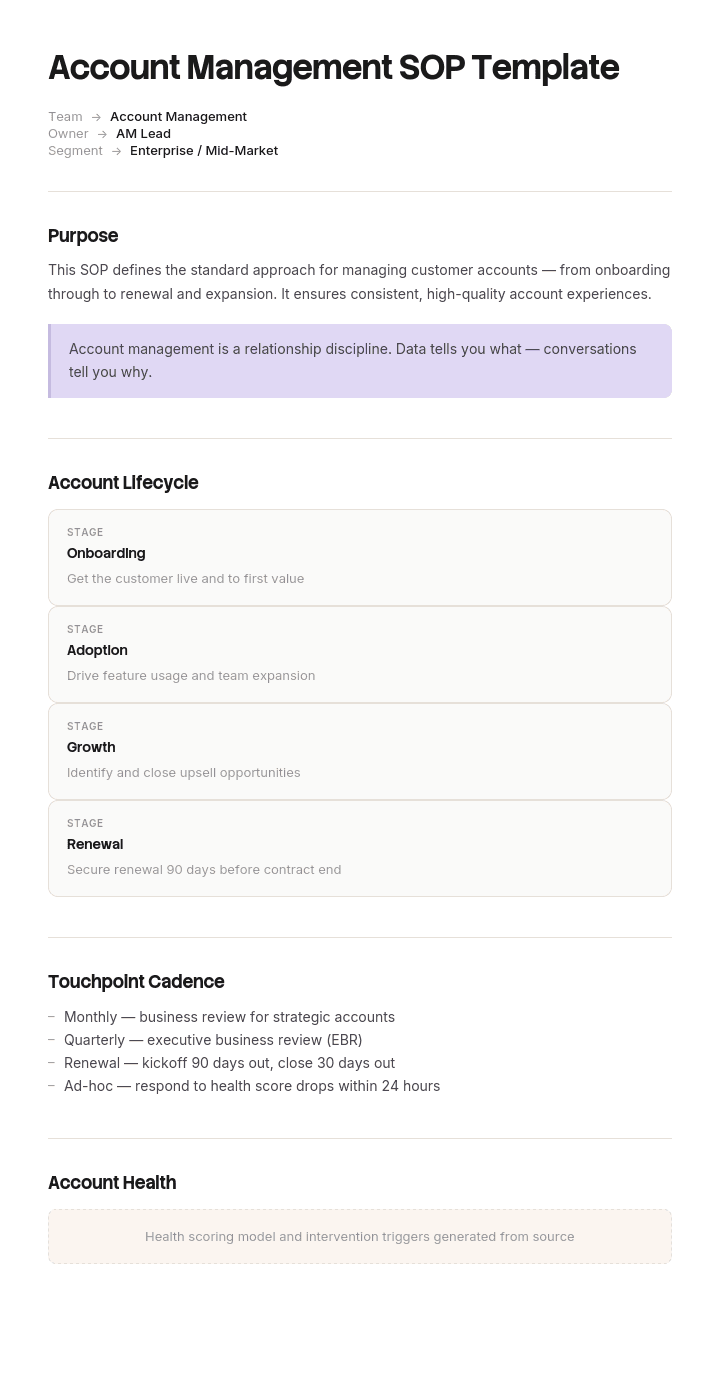
This account management SOP template provides a structured framework to capture account review cadence, health scoring, expansion plays, renewal process, escalation paths and KPIs - useful for B2B SaaS, agencies, MSPs and professional services firms. Pair it with our SOP creator for related procedures, generate AI video walkthroughs, and translate into 65+ languages for global account teams.
What is an account management SOP template?
An account management SOP template is a pre-structured document for writing down the repeatable procedures your client-facing team follows. It gives you the sections already built: purpose, scope, roles, trigger, step-by-step instructions, tools, and the definition of done.
The distinction between an SOP and a policy is worth being clear about. A policy says renewals must be discussed 90 days before contract end. The SOP says who pulls the renewal list, on what day, what they send, what happens if the client doesn't reply, and who gets escalated to. Policies set the rule. SOPs make it happen.
Why you need an account management SOP
Consistency across the team. Every client gets the same standard of service, regardless of who owns the account.
Faster onboarding for new account managers. A new hire with documented SOPs is productive in weeks rather than months.
Nothing falls through the cracks. Renewals, check-ins and escalations happen on a trigger, not when someone remembers.
Knowledge survives turnover. When an account manager leaves, the process stays even if the relationship has to be rebuilt.
A basis for improvement. You can only improve a process you've written down. Undocumented work can't be measured or fixed.
How to customize this template in Trupeer
Step 1: Open the Templates Section
Go to the Templates section from the main navigation.

Step 2: Select and Open a Template
Click on any template you want to work with to open it.

Step 3: Expand the Template View
If needed, expand the template view to see the full layout and details clearly.

Step 4: Edit the Template
Click on Edit to start modifying the selected template.

Within the editor, you can:
Add new sections
Define or update formatting rules
Add a logo and adjust its position and related settings
Step 5: Save Your Customized Template
After making all necessary changes, click Save to store the updated template as your own.

Step 6: Preview and Fine-Tune the Template
When you want to see how your customized template looks, open the Preview.

From the preview screen, you can continue to make adjustments directly if needed, ensuring the template appears exactly as you want.
When to use a standard operating procedure template
You have more than two people doing client-facing work and their approaches differ.
You're hiring into the account management or customer success team.
A client has had a bad experience that a defined process would have caught.
Renewals or QBRs are getting missed.
Someone is leaving and their accounts need transferring.
You're being audited, or a client is asking how you'll manage their account.
Who should use this SOP template?
Account managers and client managers documenting their own workflow.
Customer success teams standardising onboarding, health checks and renewals.
Heads of account management setting a consistent standard across a team.
Sales teams defining the handoff from closed-won to account management.
Operations and enablement teams building the internal playbook.
Founders at the point where client work stops fitting in one person's head.
Key components of an account management SOP template
SOP title and ID: Something searchable, plus a reference number if you keep a document register.
Purpose: One sentence on what this procedure achieves.
Scope: Which accounts, tiers or situations it applies to, and which it doesn't.
Roles and responsibilities: Who performs it, who approves, who gets informed.
Trigger: The event that starts the process. A date, a signature, a support ticket, a health score change.
Procedure steps: Numbered, in order, one action per step.
Tools and systems: The CRM, the email template, the shared folder.
Definition of done: What must be true for the procedure to be complete.
Escalation path: Who to go to when the standard path doesn't work.
Review cadence and owner: Who keeps it current, and how often.
Version and date: So people know whether they're reading the current one.
Preview the account management SOP template
Field | What to enter |
|---|---|
SOP title | Client onboarding procedure |
SOP ID / version | AM-001, v1.2 |
Purpose | Get a new client live and confident within 30 days of signature |
Scope | All new accounts above the standard tier |
Owner | Account manager |
Approver | Head of account management |
Trigger | Contract signed and countersigned |
Tools | CRM, onboarding email sequence, shared drive, kickoff deck |
Steps | Numbered procedure, one action each |
Definition of done | Kickoff held, success criteria agreed in writing, first value milestone hit |
Escalation | Head of account management within 2 business days |
Review cadence | Quarterly |
Last reviewed | Date and reviewer name |
The five account management SOPs worth writing first
Most teams try to document everything and finish nothing. Write these five, in this order.
1. Client onboarding SOP
The highest-leverage one, because first impressions set the tone for the whole relationship. Trigger is contract signature. Covers internal handoff from sales, kickoff call, success criteria agreed in writing, access and setup, training, and the first value milestone. Done when the client has achieved something real, not when the paperwork is filed.
2. Regular check-in and QBR SOP
Trigger is a calendar cadence rather than an event. Defines how often each account tier is contacted, what gets reviewed, what data is pulled beforehand, and what leaves the meeting. The most common failure here is a check-in with no agenda and no output, which trains the client to treat your calls as optional.
3. Escalation SOP
Trigger is a complaint, a missed commitment, or a support issue passing a threshold. Defines severity levels, who owns each level, response times, who informs the client, and when leadership gets pulled in. Write this before you need it. Escalations invented under pressure are always slower and more expensive.
4. Renewal SOP
Trigger is a date, typically 90 days before contract end. Covers pulling the renewal list, reviewing account health and value delivered, the internal go or no-go, the client conversation, and the commercial approval path. Renewals missed because nobody was watching the calendar are the most avoidable revenue loss in account management.
5. Account handover SOP
Trigger is a change of owner, whether planned or not. Covers the account brief, relationship history, open commitments, live issues, the introduction to the client, and a shadow period. This is the SOP most teams skip and the one that hurts most. Every departure without it means a client re-explaining their own history to a stranger.
Two more worth adding once those five are running: an expansion or upsell SOP, and an offboarding SOP for clients who leave. The second one matters more than it looks, because a clean exit is the difference between a churned client and a bad reference.
Account management SOP example
A completed example for the client onboarding procedure, so you can see the level of specificity to aim for.
Purpose: Get a new client live and confident within 30 days of signature.
Scope: All new accounts above the standard tier.
Owner: Assigned account manager. Approver: Head of account management.
Trigger: Contract fully countersigned in the CRM.
Sales completes the handoff form in the CRM within one business day of signature.
Account manager reviews the sales notes, recorded calls and stated success criteria.
Account manager holds a 30 minute internal handoff with the sales owner.
Send the welcome email from the saved template within two business days.
Book the kickoff call within five business days of signature.
Hold the kickoff. Confirm success criteria, timeline, stakeholders and communication preferences.
Send written recap with agreed success criteria within 24 hours of kickoff.
Provision accounts and access. Confirm the client can log in.
Deliver or schedule training for all named users.
Check in at day 14 against the agreed criteria.
Confirm the first value milestone at day 30 and log it in the CRM.
Definition of done: Kickoff held, success criteria agreed in writing, all users have access, first value milestone logged.
Escalation: If any step slips more than three business days, notify the head of account management.
Every step has an actor and a timeframe. That's what separates a usable SOP from a description of good intentions.
How to write an account management SOP
1. Pick one process and finish it. Onboarding first. A finished SOP beats six half-written ones.
2. Watch the process being done before you write it. The documented version and the real version are rarely the same, and the real one is usually better.
3. Write one action per step. If a step contains "and", it's probably two steps.
4. Name a role, not a person. "Account manager", not "Priya". People change roles.
5. Define the trigger precisely. "When the client is ready" isn't a trigger. "Contract countersigned in the CRM" is.
6. Write the definition of done. Without it, people stop at different points.
7. Have someone else follow it. Any step they have to ask about is a step that needs rewriting.
8. Assign an owner and a review date. An SOP with no owner is out of date within two quarters.
How to use this free SOP template
Download or copy it in the format that suits you. Word and Google Docs for narrative procedures, Excel and Google Sheets when you want a step register with owners and status.
Duplicate it once per procedure. One SOP per document, not five in one file.
Fill in purpose, scope and trigger before touching the steps. They constrain everything below.
Delete the fields you don't need. A five-person team doesn't need SOP ID numbers.
Store them where the team already works, not in a folder they have to be reminded about.
Set a review date on every one before you publish it.
Best practices for writing account management SOPs
Write for the newest person on the team. Assume no context. Institutional knowledge is exactly what you're trying to capture.
Show, don't only tell. Screenshots and recordings remove ambiguity that prose can't.
Keep each SOP to one process. Sprawling documents get skimmed and then ignored.
Use consistent structure across all of them. Same fields, same order, every time. Familiarity makes them faster to use.
Version and date everything. People need to know if they're reading the current process.
Let the people doing the work write them. SOPs written by managers who don't do the task describe the process as imagined, not as performed.
Link, don't duplicate. When two SOPs share a step, reference it once. Duplicated steps drift apart.
Customizing the template for different processes
The same shell adapts to most client-facing work, with the emphasis shifting:
Process | What to emphasise | Trigger type |
|---|---|---|
Client onboarding | Timeline, success criteria, access setup | Event: contract signed |
Check-in and QBR | Agenda, data prepared in advance, outputs | Calendar cadence |
Escalation | Severity levels, response times, ownership | Event: complaint or breach |
Renewal | Dates, health review, approval path | Date: 90 days pre-expiry |
Handover | Completeness of the brief, shadow period | Event: owner change |
Expansion | Qualification, timing, who leads the conversation | Signal: usage or health |
Offboarding | Data return, exit interview, clean close | Event: notice given |
You can also vary depth by account tier. Enterprise accounts might need a full ten-step onboarding SOP where smaller accounts need four steps and a checklist.
Common challenges in SOP documentation and how to overcome them
"We don't have time to document." Write one SOP, not twenty. Onboarding first. The time comes back with the next hire.
Nobody follows them. Usually a sign they were written by someone who doesn't do the work. Have the practitioner write the draft.
They go stale. Every SOP needs a named owner and a review date. Without both, assume it's wrong within six months.
They're too long to read. If it doesn't fit on two pages, it's more than one procedure.
Nobody can find them. Store them where the work happens, not in a separate wiki people forget exists.
Text-only procedures get misread. This is where recordings help most. A two minute walkthrough removes ambiguity that no amount of rewriting fixes.
Download the free account management SOP template
Every version is free and editable. Word and Google Docs suit narrative procedures, Excel and Google Sheets work better as a step register with owners and status columns, and the PDF prints cleanly for training sessions.
Account management SOP template, Word (.docx)
Account management SOP template, Excel (.xlsx)
Account management SOP template, Google Docs
Account management SOP template, Google Sheets
Account management SOP template, printable PDF
Customize it in Trupeer and turn it into a video
Open the template in Trupeer, apply your brand kit so every SOP matches your company's fonts, colors and logo, and edit any section directly. Walkthrough in the template setup guide.
Written SOPs describe a process. Recorded ones show it. Record the workflow once and Trupeer turns it into a documented procedure and a narrated AI video walkthrough together, which is the difference between a new account manager reading step seven and watching it. Store the set in your knowledge base, translate them into 65+ languages for distributed teams, and use them as onboarding training videos for every new hire.
With an account management SOP template you can:
Save hours on writing: Skip the blank page with a structure built for AM teams.
Standardize account work: Built-in cadences and plays ensure consistent execution.
Stay on-brand: Apply your logo, fonts and colors using Trupeer's brand kit.
Drive expansion and retention: Built-in plays for upsell, cross-sell and renewals.
Onboard AMs faster: Pair SOPs with video walkthroughs to ramp new account managers.
Reach global teams: Translate AM SOPs into 65+ languages with one click.
A great account management SOP turns ad-hoc account work into a predictable revenue engine. Use this template to capture every AM procedure clearly and on-brand.
Frequently Asked Questions
What is an account management SOP?
An account management SOP is a documented procedure that defines how account managers handle a specific aspect of customer relationships - like quarterly business reviews, account health monitoring, expansion conversations or renewal processes. SOPs ensure consistency across the AM team.
What account management SOPs should every team have?
Common SOPs include account onboarding handoff, account review cadence (QBR), account health scoring, expansion and upsell plays, churn risk identification and intervention, renewal process, executive escalation and at-risk account playbook.
What should an account management SOP include?
A complete AM SOP includes the trigger or scenario, step-by-step procedure, required data and tools (CRM fields, dashboards), escalation paths, key conversation guides or scripts, success metrics and links to related plays or templates.
How do you write an account management SOP?
Identify a recurring AM activity. Document the steps your best account managers take. Add data points (CRM fields), conversation guides and decision criteria. Set success metrics. Test with new AMs. Refine based on feedback and outcomes. Publish and review quarterly.
How is account management different from customer success?
Account management traditionally focuses on commercial outcomes - renewals, expansion, account growth. Customer success focuses on customer outcomes - adoption, value realization, satisfaction. Many companies blend the two roles - and the best AM teams own both commercial and value outcomes together.
What does a modern process-documentation workflow look like?
Modern teams record the process once and let AI produce a written guide, a video, and a knowledge base entry in parallel. With Trupeer's SOP creation software, you record the process once and AI writes the steps, screenshots, and summary.

