Trupeer Blog
Summarise

In a large organization, onboarding new employees is a critical task that goes well beyond simple HR orientation. When your company uses complex ERP systems like Workday or SAP, the stakes are even higher. Employees need to understand not just the software, but also how it integrates into their daily tasks and contributes to broader business goals. Here's where video-based onboarding can make a huge difference. According to a study, companies that use video onboarding report a 33% faster time-to-productivity for new hires compared to those relying solely on traditional methods.
For organizations that have adopted ERP systems, the challenge lies in effectively communicating complex workflows and features. These systems are often intricate, and new hires can feel overwhelmed. Creating video content specifically tailored to these platforms can help bridge knowledge gaps quickly. Video is engaging, repeatable, and can be accessed on-demand, which makes it an invaluable tool in your onboarding toolkit. If you want to explore the top video-based employee onboarding solutions, check out some of the top video-based employee onboarding resources available today.
Why does creating employee onboarding videos for ERP and enterprise software matter?
Employee onboarding videos for ERP and enterprise software are crucial for several reasons. First, these systems are often the backbone of daily operations, and any misunderstanding can lead to inefficiencies. For example, if an employee isn’t fully aware of how to use Workday for time tracking, it could result in inaccurate payroll processing, which affects the entire company. Second, ERP systems like SAP or Workday are designed to simplify complex operations by integrating different business functions, which means a deep understanding is necessary to fully use their capabilities. A well-designed onboarding video can simplify this complexity, offering a step-by-step guide that employees can follow at their own pace.
Also, employees who are not adequately trained may take longer to become productive, impacting overall business performance. A comprehensive onboarding video can help mitigate this risk by providing consistent and easily digestible training material. Also, with the high turnover rate in some industries, it's crucial to have a scalable onboarding solution. Video content can be reused, updated, and distributed effortlessly, ensuring that every new hire receives the same level of training. For businesses aiming to enhance their employee onboarding workflow, video-based training offers a scalable and effective solution.
What are the benefits of creating employee onboarding videos for ERP and enterprise software?
Creating onboarding videos for ERP and enterprise software offers numerous advantages that can significantly improve the onboarding process for both the employer and the new employee.
Consistency in Training. With video content, every employee receives identical training, eliminating the risk of miscommunication or missed information. This consistency ensures that all employees start with the same foundational knowledge, reducing onboarding time by up to 20%.
Scalable Training Solution. Video content is easily scalable. As the number of new hires grows, the same video modules can be used, saving time and resources. Companies using AI video platforms have found their training efforts scale without additional costs.
Engaging Learning Experience. Videos can incorporate animations, real-life scenarios, and interactive elements, making the learning process more engaging. Engaged employees are 87% less likely to leave their jobs within the first year.
On-Demand Access. Employees can access training videos anytime and anywhere, allowing them to learn at their own pace. This flexibility is particularly beneficial for global teams operating across different time zones.
Reduced Training Costs. Once produced, videos cut down on the recurring costs associated with traditional training methods, such as hiring trainers or organizing workshops. This can lead to a 50% reduction in training expenses over time.
Enhanced Retention and Understanding. Employees retain 95% of information presented in video form as opposed to only 10% when reading text-based content. This results in better comprehension of complex ERP systems.
Which Trupeer features help you create employee onboarding videos for ERP and enterprise software?
Trupeer offers a range of features specifically designed to enhance the creation of employee onboarding videos for ERP and enterprise software. These capabilities simplify the video production process and ensure high-quality, consistent outcomes.
AI screen recording with auto-zoom and click detection
This feature allows you to capture screen activities with precision, highlighting key clicks and actions automatically. The auto-zoom functionality focuses on important areas of the screen, ensuring that viewers can easily follow along with the workflow being demonstrated. This is particularly useful when explaining complex ERP processes where multiple steps occur on different parts of the screen. The click detection feature also helps in providing clear guidance, making the learning process intuitive and straightforward.
AI voiceover in 65+ natural voices, adjustable pace and tone
Trupeer's AI voiceover capability allows for the creation of professional-quality narrations without the need for hiring voice actors. You can choose from over 65+ natural voices, adjusting the pace and tone to match the content's mood and audience. This flexibility ensures that the narration complements the video content and maintains viewer engagement throughout. It's an essential feature for creating polished onboarding videos that convey information clearly and effectively.
Automatic SOP generation from any recording
Once a training video is created, Trupeer can automatically generate a Standard Operating Procedure (SOP) document from the recording. This feature ensures that your video content is complemented by written documentation, which can be invaluable for employees who prefer text-based instructions. The SOPs are editable and exportable in multiple formats, making them a versatile addition to your training resources. This auto-generated documentation capability enhances the overall learning experience by providing multiple ways to access the information.
AI translation into 40+ languages with lip-sync
Trupeer's translation capabilities allow you to create onboarding videos that are accessible to a global workforce. The AI translation feature can translate your videos into over 40 languages, complete with lip-sync, ensuring that the content is culturally relevant and easy to understand. This feature is crucial for companies with operations in multiple countries, as it ensures that all employees receive the same quality of training, regardless of their native language. By using AI-searchable knowledge base, employees can find translated content with ease.
Viewer engagement analytics, drop-off, and heatmaps
Understanding how employees interact with your training videos is essential for continuous improvement. Trupeer offers detailed analytics that show viewer engagement, drop-off rates, and heatmaps, providing insights into which parts of the video are most effective or where viewers may lose interest. This data allows you to refine and optimize your content, ensuring that it remains effective and engaging. By using employee training video software, you can continuously enhance your onboarding process.
How do you create employee onboarding videos for ERP and enterprise software step by step with Trupeer?
Step 1: Set Up Your Recording
Begin by launching the Trupeer browser-based recorder, which requires no installation, making it simple to get started quickly. Choose the "AI screen recording with auto-zoom and click detection" feature. This will automatically focus on key screen areas and detect clicks during the recording process. As you navigate through the ERP system, Trupeer will highlight essential actions, providing a clear and focused tutorial for your viewers. This setup ensures that even the most complex ERP workflows are captured effectively, reducing confusion and enhancing understanding. Teams weighing tools often start with a Loom alternatives comparison before standardizing on a workflow.

Step 2: Record Your Narration
Once your screen recording is complete, use Trupeer's "Silent screen recording with automatic AI narration" to add voiceover. This feature generates high-quality narration that matches the pace and tone of your video. Simply select from over 65+ natural voices and adjust the settings to suit the content. The AI will create a smooth, professional narration that eliminates the need for manual recording, saving time and ensuring consistency. This step typically takes a few minutes, depending on the length of your video, and can be adjusted to suit specific audience needs.

Step 3: Enhance the Video
Next, enhance your video using Trupeer’s "Automatic filler-word removal" capability. This feature automatically edits out any unnecessary pauses or filler words like "um" and "ah," resulting in a more polished final product. also, you can use the "Brand kits and branded templates" to maintain a consistent visual style across all your training videos. Simply select a template, and Trupeer will apply your brand elements uniformly, ensuring a professional look. This process takes only a few minutes and significantly boosts the video's quality.
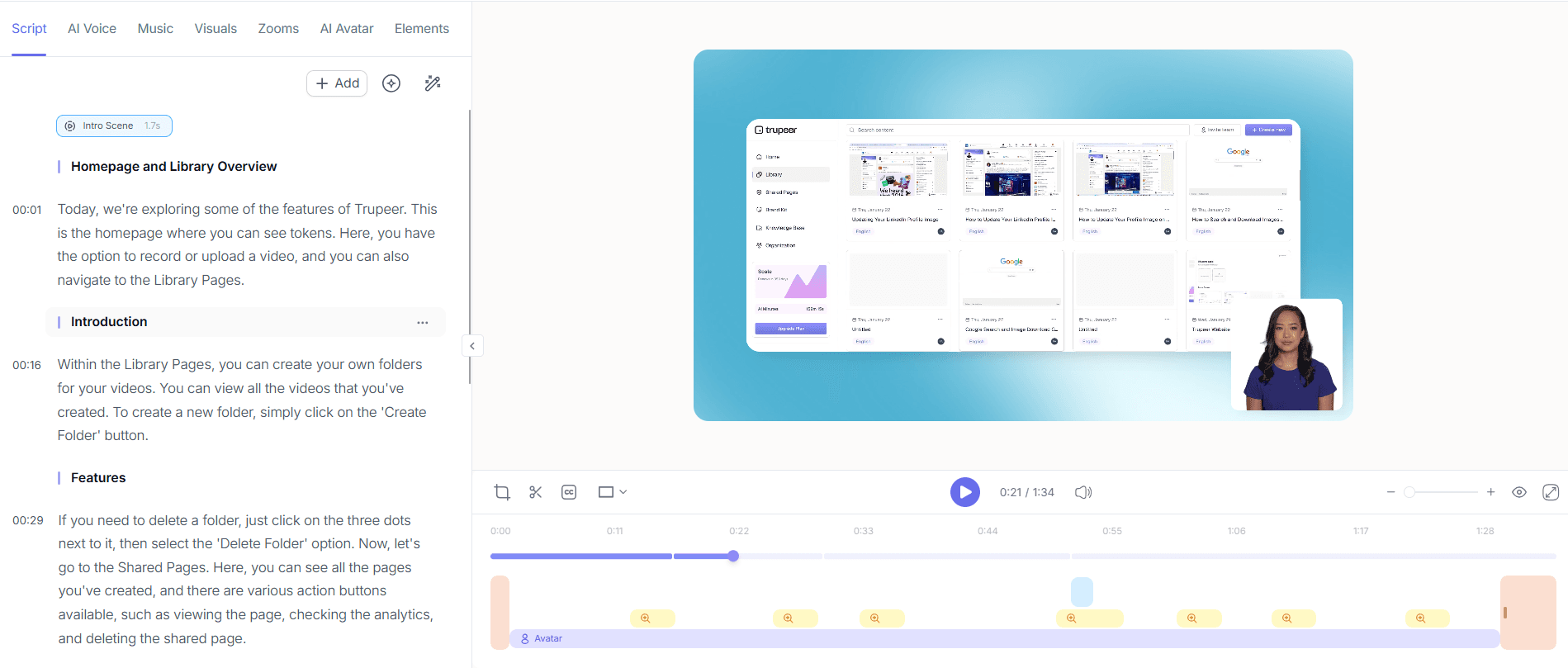
Step 4: Generate Supporting Documentation
After editing, use Trupeer's "Automatic SOP generation" to create a written guide that complements your video. This feature extracts key steps and processes from your recording to produce an editable SOP document. The document is exportable in formats like PDF and HTML, making it easy to distribute alongside your video. This dual-format approach enhances learning by catering to different preferences, ensuring that all employees, whether visual or textual learners, have access to the information they need.

Step 5: Translate for Global Teams
For global organizations, translating your video content is essential. use Trupeer's "AI translation into 40+ languages with lip-sync" to make your onboarding materials accessible worldwide. This feature automatically translates the video and synchronizes the lip movements, ensuring a smooth experience for non-English speakers. Simply select the desired languages, and Trupeer will handle the rest. This capability allows you to reach a broader audience without the need for separate production efforts for each language, making it both efficient and cost-effective.

Step 6: Analyze Viewer Engagement
Finally, use Trupeer's "Viewer engagement analytics, drop-off, and heatmaps" to evaluate how well your video is performing. Access detailed data on which parts of the video keep viewers engaged and where they might lose interest. This information is crucial for refining future content and ensuring that your onboarding videos remain effective. By analyzing these metrics, you can make data-driven decisions to enhance the quality and impact of your training materials continuously. This step ensures that your video content evolves to meet the changing needs of your workforce.

What tips help you create employee onboarding videos for ERP and enterprise software?
Creating effective onboarding videos for ERP and enterprise software requires thoughtful planning and execution. Here are several tips to ensure your training videos are engaging and informative.
Focus on Key Processes. Prioritize recording the most critical processes that new employees need to learn immediately, improving immediate productivity.
Keep It Concise. Aim for short, focused videos to maintain viewer attention. A series of 5-minute videos can be more effective than a single, lengthy one.
Use Visual Aids. Incorporate diagrams and annotations to clarify complex steps, which can improve understanding by up to 40%.
Include Real-World Scenarios. Show examples of how the ERP system is used in everyday tasks, enhancing relevance and retention.
Regularly Update Content. Ensure your videos are always current by revisiting and updating them quarterly, especially after software updates.
Encourage Feedback. Solicit viewer feedback to identify areas for improvement. This can lead to a 20% increase in content effectiveness.
use AI Tools. use Scribe alternatives for SOPs to simplify the creation of supporting documents, ensuring consistency and accuracy.
Frequently asked questions
How do you ensure the quality of onboarding videos?
Quality assurance in onboarding videos involves multiple steps, including thorough planning, scripting, and post-production editing. Start by clearly outlining the objectives and key points of each video. Use Trupeer's "Automatic filler-word removal" to enhance clarity and flow. Post-production should focus on reviewing the video for any errors or areas that need improvement. Conducting a pilot viewing with a small group of employees can provide valuable feedback. also, metrics from viewer engagement analytics can help identify areas for future enhancement.
What equipment is needed to create onboarding videos?
Creating onboarding videos doesn't require high-end equipment. A basic setup can include a computer with a reliable internet connection, a quality microphone for clear audio, and screen recording software like Trupeer. For those who prefer not to use their own voice, Trupeer's "AI voiceover in 65+ natural voices" offers a convenient alternative. If you choose to incorporate live footage, a basic HD webcam will suffice. Lighting should be considered if recording in a dimly lit environment to ensure video clarity.
Why should we use AI for video translation?
Using AI for video translation offers accuracy, efficiency, and cost-effectiveness. Trupeer’s "AI translation into 40+ languages with lip-sync" enables smooth language transitions, preserving the original video's quality and engagement. AI handles translations swiftly, which is crucial for timely onboarding processes. It eliminates the need for hiring multiple translators, significantly reducing costs. also, AI ensures consistency in terminology and style across all translated materials, which is critical for maintaining the integrity of ERP-related content. For more on this, explore our video translation platform.
Can onboarding videos be customized for different departments?
Yes, onboarding videos can and should be customized for different departments to address specific needs and workflows. Trupeer's features, such as "Brand kits and branded templates," allow you to tailor content visually for each department. also, using department-specific examples and scenarios within the videos can make the training more relevant and impactful. Customization ensures that each department receives training that aligns with its unique processes, which enhances the learning experience and accelerates the onboarding process.
Does Trupeer support integration with existing LMS platforms?
Trupeer supports integration with various Learning Management Systems (LMS) to simplify the onboarding process. This integration allows you to manage and track the progress of your onboarding videos directly within your existing LMS. Trupeer's multi-format export options, including SCORM, enable smooth import into most LMS platforms, ensuring that your video content is accessible and trackable. This capability not only enhances the learning experience but also simplifies administrative tasks, making the overall process more efficient.
Related Blogs


