4.8/5
Gratis generator voor technische ontwerpdocumenten
Zet schermopnames om in professionele technische ontwerpdocumenten
Genereer nu technische documentatie

De technische ontwerpdokumentgenerator van Trupeer zorgt voor een revolutie in de manier waarop teams uitgebreide technische documentatie maken. In plaats van vanaf nul te beginnen met lege documenten, kun je je scherm opnemen terwijl je een proces, systeem of workflow demonstreert, en onze AI zet die opname automatisch om in een gestructureerd technisch ontwerpdokument. Deze innovatieve aanpak zorgt ervoor dat je documentatie elk detail van je daadwerkelijke implementatie vastlegt, waardoor het nauwkeuriger en nuttiger is dan traditionele documentatie die uit het geheugen wordt geschreven.
Onze technische ontwerpdokumentgenerator onderscheidt zich doordat hij werkt met zowel live-opnames als bestaande beelden. Of je nu een nieuwe demonstratie van je systeemarchitectuur wilt opnemen of een bestaande schermopname wilt uploaden van een ontwerpbijeenkomst, de AI van Trupeer verwerkt de visuele en audio-inhoud om gestructureerde technische documentatie te maken. Het systeem herkent technische processen, identificeert belangrijke beslismomenten en organiseert informatie in logische documentsecties die aansluiten op gangbare indeling voor technische documentatie in de industrie.
Hoe Werkt het Genereren van Technische Ontwerpdokumenten?
Het proces voor het genereren van technische ontwerpdokumenten zet je visuele demonstraties om in gestructureerde, schriftelijke documentatie via een geavanceerde AI-gestuurde workflow. In tegenstelling tot traditionele documentatietools die handmatig schrijven vereisen, haalt ons systeem technische informatie direct uit je schermopnames om uitgebreide ontwerpdokumenten te maken.
Stap 1: Leg je Technische Proces Vast
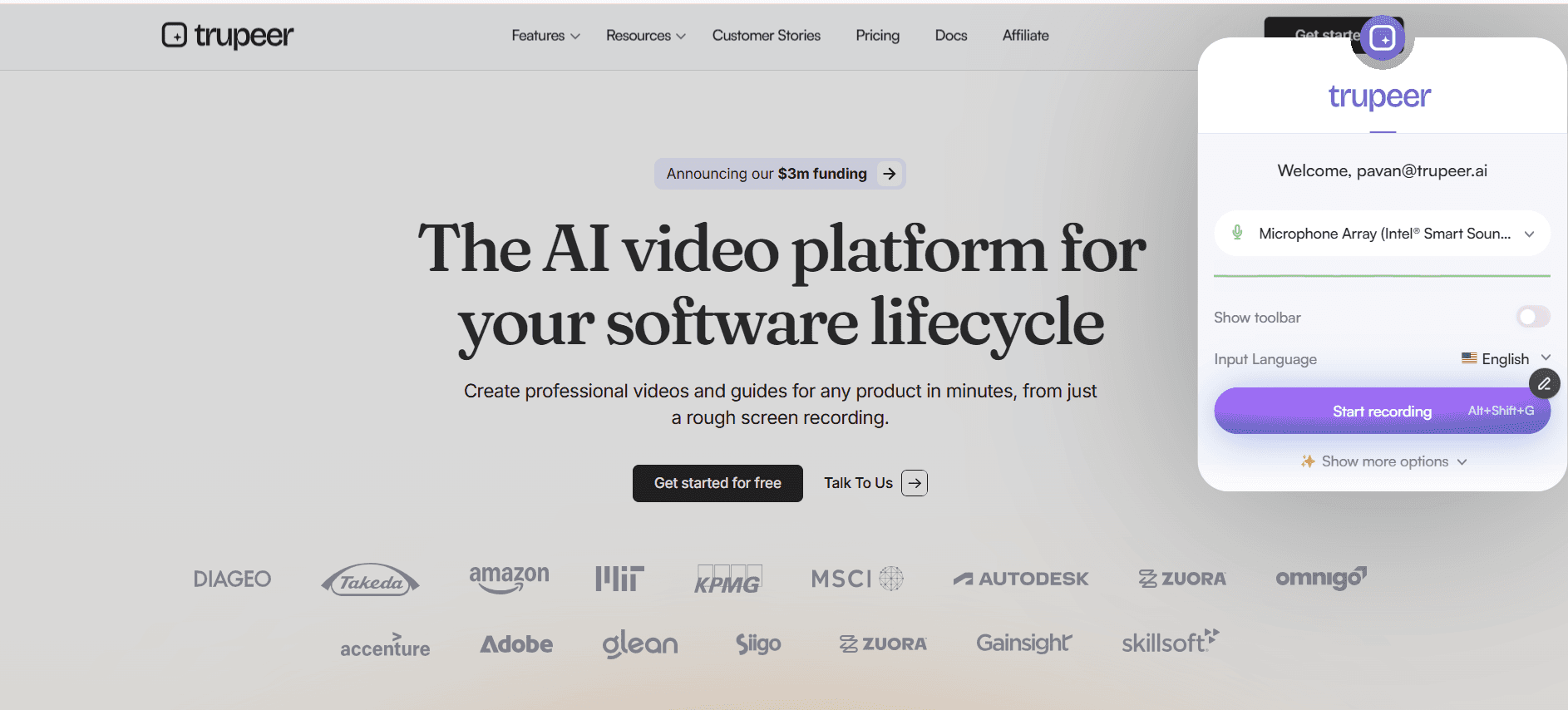
Begin met het opnemen van je scherm terwijl je je technische ontwerp, systeemarchitectuur of implementatieproces demonstreert. Je kunt de ingebouwde schermrecorder van Trupeer gebruiken om alles vast te leggen, van code walkthroughs tot presentaties over systeemontwerp. Je kunt ook een bestaande opname uploaden van ontwerpbijeenkomsten, code reviews of technische presentaties.
Stap 2: AI-analyse en inhoudsextractie
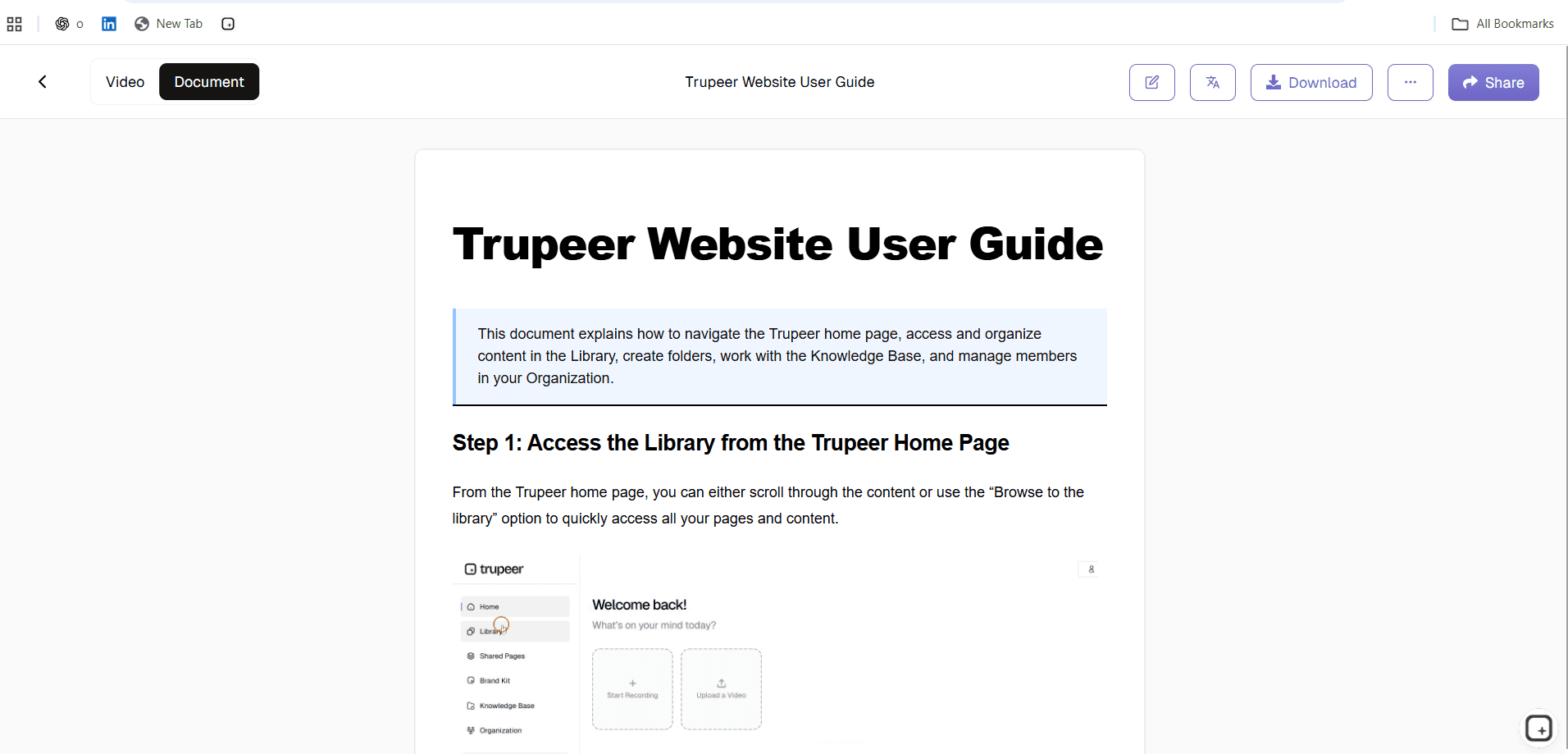
Zodra je opname is geüpload, analyseert onze AI elk frame om technische elementen te identificeren, zoals codefragmenten, architectuurdiagrammen, mockups van de gebruikersinterface en sequenties van workflows. Het systeem zet eventuele gesproken uitleg om in tekst en koppelt die aan de visuele inhoud om context en technische beslissingen te begrijpen.

Stap 3: Genereren van documentstructuur
De AI organiseert de geëxtraheerde informatie in een logische structuur voor een technisch document, volgens de standaarden voor technische ontwerpdokumentatie in de industrie. Dit omvat secties zoals een systeemoverzicht, architectuurkeuzes, implementatiedetails, afhankelijkheden en technische specificaties. Het systeem herkent verschillende typen technische inhoud en plaatst informatie in de juiste secties, terwijl het zorgt voor een samenhangende flow en technische nauwkeurigheid.
Stap 4: Inhoud verbeteren en formatteren
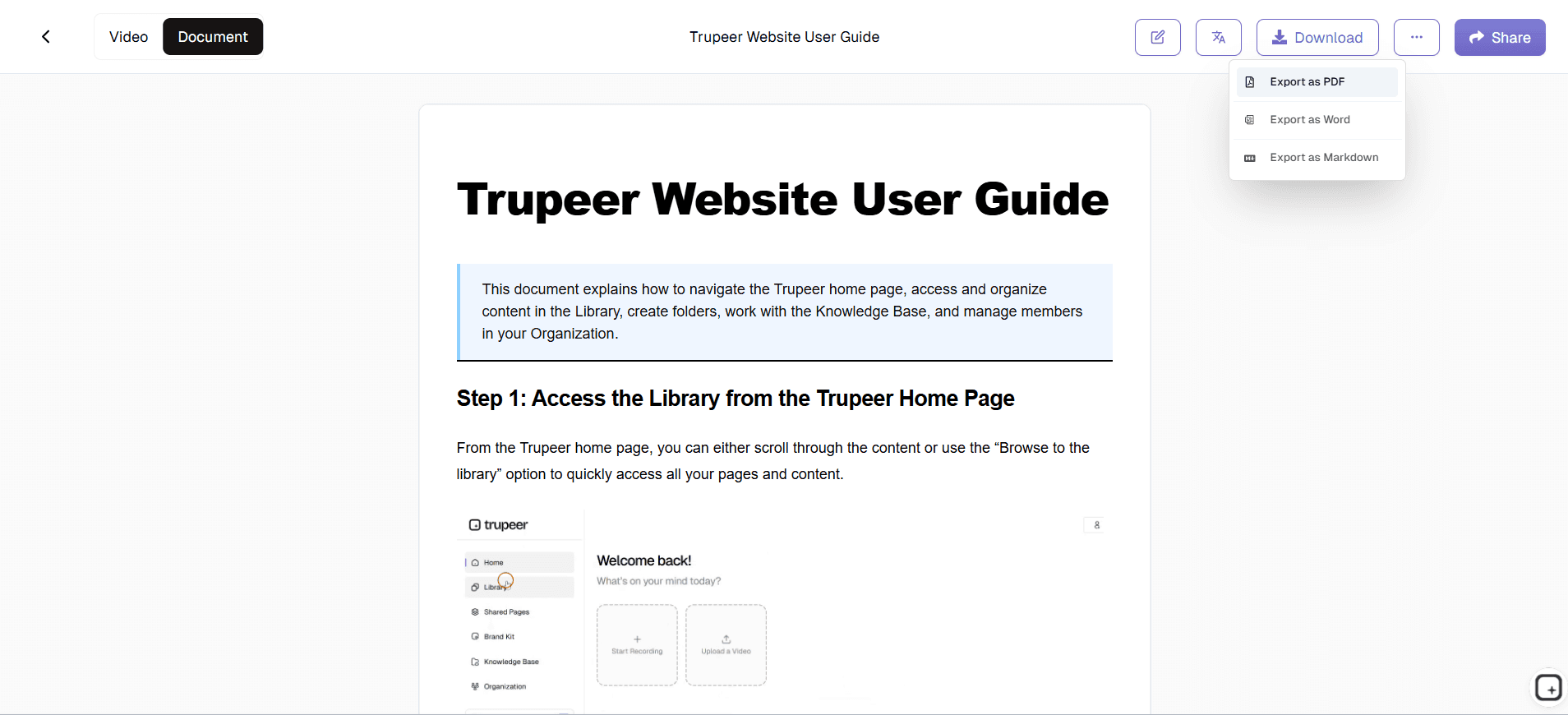
Nadat de initiële documentstructuur is gegenereerd, verbetert de AI de inhoud met gedetailleerde uitleg, technische context en duidelijke beschrijvingen van de processen die in de opname worden getoond. Het systeem voegt technische terminologie toe waar dat passend is, maakt genummerde stappen voor procedures en genereert duidelijke koppen en subkoppen, zodat de documentatie eenvoudig te doorzoeken is.
Stap 5: Aanpassen en branding
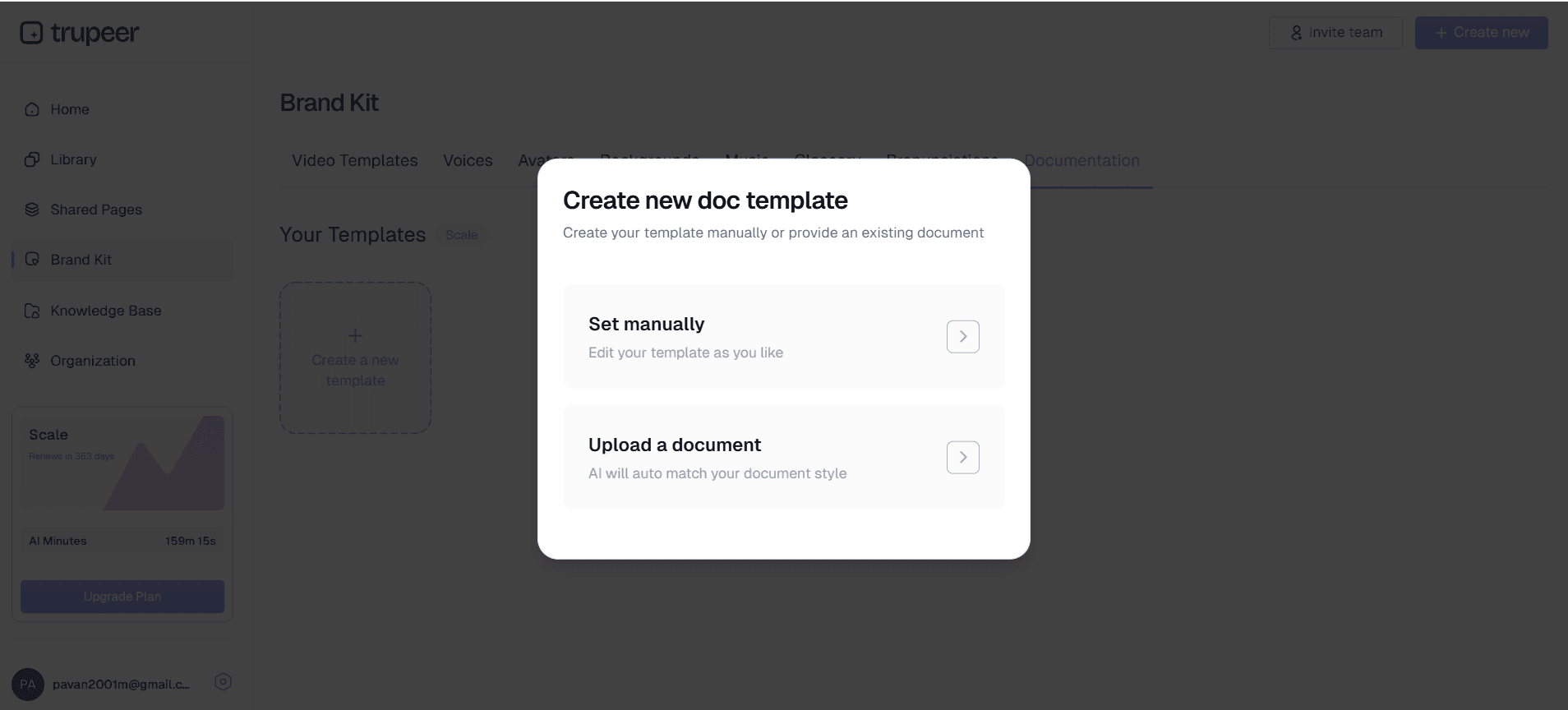
Pas de documentatiesjablonen van je organisatie toe om consistente opmaak en branding te garanderen in alle technische documenten. Je kunt secties aanpassen, het niveau van technische details wijzigen en vereisten voor opmaak specifiek voor je bedrijf toevoegen. Het systeem behoudt je gewenste documentatiestijl, terwijl het ervoor zorgt dat alle technische inhoud accuraat en volledig blijft.
Belangrijkste functies en mogelijkheden
Onze technische ontwerpdokumentgenerator bevat krachtige functies die speciaal zijn ontworpen voor technische teams die nauwkeurige, uitgebreide documentatie nodig hebben zonder de traditionele tijdsinvestering. Deze mogelijkheden zorgen ervoor dat je technische documentatie overeenkomt met je daadwerkelijke implementatie, terwijl je professionele standaarden en consistentie binnen de organisatie behoudt.
AI-gestuurde herkenning van inhoud: Het systeem identificeert en verwerkt technische elementen, waaronder codefragmenten, architectuurdiagrammen, API-eindpunten, databaseschema's en systeemworkflows. Onze AI-video-editortechnologie herkent technische inhoud in verschillende programmeertalen, frameworks en ontwerptools, zodat je verzekerd bent van een uitgebreide dekking, ongeacht je technologiestack.
Flexibele invoeropties: Neem nieuwe demonstraties van je technische processen op of upload bestaande opnames van ontwerpbijeenkomsten, code reviews of systeemwalkthroughs. De generator verwerkt opnames uit verschillende bronnen, waaronder schermafbeeldingen, opnames van meetings en presentat video's, zodat je maximale flexibiliteit hebt in hoe je documentatie maakt.
Gestructureerde document-sjablonen: Genereer documenten die aansluiten op gangbare indelingen voor technische documentatie, waaronder systeemontwerpdokumenten, API-documentatie, registraties van architectuurkeuzes en technische specificaties. Sjablonen kunnen worden aangepast aan de specifieke vereisten van je organisatie, terwijl de structuur en opmaak consistent blijven in alle technische documentatie.
Ondersteuning voor code in meerdere talen: De AI herkent en formatteert code correct in meerdere programmeertalen, zodat syntax highlighting, correcte inspringing en nauwkeurige technische terminologie worden gegarandeerd. Of je nu Python API's, JavaScript-frameworks of databasequery's documenteert, het systeem behoudt technische nauwkeurigheid en leesbaarheid.
Collaboratieve documentatieworkflow: Door de AI gegenereerde documenten integreren met je bestaande documentatieworkflow, zodat teamleden de AI-gegenereerde inhoud kunnen beoordelen, bewerken en verbeteren. Het systeem legt een solide basis die technische schrijvers en experts uit het vakgebied kunnen verfijnen en uitbreiden waar nodig.
Integratie met versiebeheer: Volg wijzigingen in je technische documentatie terwijl je systemen zich ontwikkelen, met de mogelijkheid om bijgewerkte documentatie opnieuw te genereren op basis van nieuwe opnames wanneer implementaties veranderen. Zo blijft je technische documentatie actueel met de daadwerkelijke systeemimplementaties, in plaats van verouderde artefacten te worden.
Waarom zou je technische ontwerpdokumentgeneratie gebruiken?
Technische ontwerpdokumentgeneratie pakt de hardnekkige uitdaging aan om nauwkeurige, uitgebreide technische documentatie te maken zonder engineeringcapaciteit af te leiden van ontwikkelwerk. Traditionele documentatieaanpakken leiden vaak tot onvolledige of verouderde documenten die niet overeenkomen met de daadwerkelijke implementaties, wat leidt tot verwarring en inefficiëntie binnen technische teams.
Elimineer documentatieschuld: Stop met het opbouwen van documentatieschuld door uitgebreide technische documenten te maken terwijl je systemen bouwt en ontwerpt. Door je implementatieproces op te nemen en tegelijkertijd documentatie te genereren, leg je technische beslissingen, architectuurkeuzes en implementatiedetails vast terwijl ze nog vers en accuraat zijn. Deze aanpak voorkomt het veelvoorkomende scenario waarin teams producten lanceren met minimale documentatie en later moeite hebben om de oorspronkelijke technische context maanden later opnieuw te reconstrueren.
Verbeter technische communicatie: Overbrug het gat tussen technische implementatie en begrip bij stakeholders met duidelijke, gedetailleerde documentatie die uitlegt wat er is gebouwd en waarom specifieke technische beslissingen zijn genomen. Door de AI gegenereerde documenten bevatten context uit je vertelling en visuele demonstraties, waardoor ze uitgebreide resources vormen voor trainingsvideo's en technische onboardingprogramma's.
Versnel onboarding van teams: Nieuwe teamleden kunnen complexe systemen snel begrijpen met documentatie die visuele context en gedetailleerde uitleg van technische processen bevat. In plaats van onvolledige schriftelijke specificaties te moeten ontcijferen, kunnen nieuwe engineers uitgebreide documenten bekijken die de daadwerkelijke implementaties tonen en uitleggen waarom architectuurkeuzes zijn gemaakt.
Behoud technische nauwkeurigheid: Door de AI gegenereerde documentatie weerspiegelt daadwerkelijke implementaties in plaats van theoretische ontwerpen, waardoor er minder discrepanties ontstaan tussen documentatie en de werkelijkheid. Wanneer je echte systeemdemonstraties opneemt, legt de resulterende documentatie edge cases, implementatiedetails en praktische overwegingen vast die in traditionele documentatieaanpakken vaak worden over het hoofd gezien.
Schaal je documentatie-inspanningen: Maak efficiënt meerdere technische documenten door verschillende aspecten van je systeem op te nemen en gerichte documentatie te genereren voor specifieke doelgroepen. Genereer API-documentatie op basis van demonstraties van eindpunten, maak systeemarchitectuurdocumenten op basis van ontwerppresentaties en produceer handleidingen voor probleemoplossing op basis van sessies waarin problemen werden opgelost—alles met dezelfde gestroomlijnde opname-naar-documentatieworkflow.
Wie kan technische ontwerpdokumentgeneratie gebruiken?
De technische ontwerpdokumentgenerator ondersteunt diverse rollen binnen organisaties in de technologiesector, van individuele ontwikkelaars die persoonlijke projecten documenteren tot enterprise-teams die complexe gedistribueerde systemen beheren. Elk type gebruiker profiteert van de mogelijkheid om demonstraties om te zetten in uitgebreide technische documentatie zonder de traditionele overhead van handmatig schrijven.
Software engineers en ontwikkelaars: Documenteer code-architectuur, API-implementaties en systeemintegraties door walkthroughs van je ontwikkelwerk op te nemen. Maak uitgebreide technische specificaties voor AI Screen Recorder en genereer gedetailleerde implementatiehandleidingen die andere ontwikkelaars helpen om complexe codebases te begrijpen. Of je nu microservices bouwt, databaseschema's ontwerpt of third-party integraties implementeert, schermopnames van je ontwikkelproces worden gestructureerde technische documentatie.
Systeemarchitecten en technische leads: Zet architectuurpresentaties en sessies over systeemontwerp om in gedetailleerde technische specificaties waar teams gedurende de ontwikkelcycli naar kunnen verwijzen. Neem ontwerpbeslissingen, systeemafwegingen en architectuurpatronen op en genereer vervolgens documentatie die zowel technische details als strategische overwegingen vastlegt. Zo wordt architectuurkennis effectief bewaard en gedeeld binnen technische teams.
DevOps- en infrastructuurengineers: Documenteer deploymentprocessen, infrastructuurconfiguraties en operationele procedures door echte taken voor systeembeheer op te nemen. Maak uitgebreide runbooks en handleidingen voor probleemoplossing op basis van echte sessies waarin problemen werden opgelost, zodat operationele kennis wordt vastgelegd en gedeeld. Genereer documentatie voor infrastructuur-as-code-implementaties, monitoringconfiguraties en procedures voor disaster recovery.
Technische productmanagers: Overbrug het gat tussen technische implementatie en zakelijke vereisten met documentatie die uitlegt hoe technische beslissingen productdoelen ondersteunen. Neem technische review meetings op en genereer documenten die stakeholders helpen om systeemcapaciteiten, beperkingen en ontwikkelafwegingen te begrijpen. Maak technische specificaties die bijdragen aan de inspanningen voor AI Video Editor en aan klantcommunicatie.
QA-engineers en technische schrijvers: Genereer testdocumentatie en technische handleidingen door testprocedures, stappen voor het reproduceren van bugs en processen voor kwaliteitsborging op te nemen. Zet opgenomen testsessies om in uitgebreide testdocumentatie en maak technische handleidingen die gebruikers helpen om complexe systeemgedragingen en procedures voor probleemoplossing te begrijpen.
Best practices voor het gebruik van technische ontwerpdokumentgeneratie
Maximaliseer de effectiviteit van je technische ontwerpdokumentgeneratie door bewezen werkwijzen te volgen die zorgen voor uitgebreide, nauwkeurige en bruikbare documentatie. Deze aanpak helpt je professionele technische documenten te maken die zowel voldoen aan de directe projectbehoeften als aan het beheer van organisatorische kennis op de lange termijn.
Plan je opname-structuur: Schets vóór je begint met opnemen welke kernonderwerpen je wilt behandelen en organiseer ze in een logische volgorde. Begin met een systeemoverzicht en high-level architectuur en ga vervolgens dieper in op specifieke implementatiedetails. Deze gestructureerde aanpak zorgt ervoor dat je gegenereerde documentatie een duidelijk verhaal volgt dat lezers eenvoudig kunnen volgen en begrijpen.
Voeg context en redenering toe: Leg tijdens het demonstreren van technische implementaties uit waarom bepaalde ontwerpbeslissingen zijn genomen, welke afwegingen zijn overwogen en welke alternatieve aanpakken zijn geëvalueerd. Deze contextuele informatie wordt waardevolle inhoud in de gegenereerde documentatie en helpt toekomstige lezers te begrijpen wat er is gebouwd, maar ook waarom specifieke technische keuzes zijn gemaakt.
Gebruik meerdere opnamesessies: Maak gerichte opnames voor verschillende aspecten van je technische systeem in plaats van te proberen alles in één sessie te behandelen. Genereer gerichte documentatie voor API-eindpunten, databasesontwerp, frontend-architectuur en deploymentprocedures afzonderlijk en combineer ze vervolgens tot uitgebreide suites met technische documentatie.
Gebruik consistente technische terminologie: Houd je woordenschat en naamgevingsconventies consistent door je opnames heen, zodat de gegenereerde documentatie gestandaardiseerde terminologie gebruikt. Deze consistentie verbetert de kwaliteit van documenten en maakt het makkelijker voor teams om technische documentatie over verschillende systeemonderdelen te begrijpen en te onderhouden.
Beoordeel en verbeter de gegenereerde inhoud: Hoewel door AI gegenereerde documentatie een uitstekende basis biedt, is het belangrijk om de output te beoordelen om extra technische details toe te voegen, eventuele misinterpretaties te corrigeren en secties te verbeteren die meer diepgang nodig hebben. Gebruik onze technische documentatiesjablonen om consistente opmaak te behouden en ervoor te zorgen dat alle gegenereerde documenten voldoen aan de standaarden van je organisatie.
Maak documenthiërarchieën: Genereer verschillende niveaus van technische documentatie voor verschillende doelgroepen door de diepte en focus van je opnames te variëren. Maak documenten op high-level niveau voor stakeholders, gedetailleerde implementatiehandleidingen voor ontwikkelaars en resources voor probleemoplossing voor supportteams—alles op basis van gerichte opnames van hetzelfde technische systeem.
Ontdek gerelateerde tools
Waarom kiezen voor het genereren van technische ontwerpdocumenten
AI-inhoudsherkenning
Identificeert automatisch code, diagrammen en technische elementen uit opnames
Gestructureerde sjablonen
Genereert industriestandaard technische documentatieformaten en indelingen
Meertalige ondersteuning
Verwerkt technische inhoud over programmeertalen en frameworks
Hoe u de technische ontwerpdocumentgenerator van Trupeer gebruikt
Stap 1
Neem het scherm op of upload een video
Stap 2
AI verwerkt technische inhoud
Stap 3
Download gestructureerde documentatie
Veelgestelde vragen
Welke soorten technische inhoud kan de generator documenteren?
De generator verwerkt code-walkthroughs, presentaties over systeemarchitectuur, API-demo's, databaseontwerpen en elk technisch proces dat u op het scherm kunt opnemen. Het herkent meerdere programmeertalen en technische frameworks.
Kan ik bestaande opnames uploaden in plaats van nieuwe content op te nemen?
Ja, je kunt bestaande schermopnames, vergaderopnames of presentatievideo's uploaden. De AI verwerkt alle videoinhoud die technische processen of systeemdemonstraties laat zien.
Hoe nauwkeurig is de gegenereerde technische documentatie?
De AI genereert zeer nauwkeurige documentatie door zowel visuele inhoud als audiovertelling uit uw opnames te analyseren. U kunt de gegenereerde inhoud beoordelen en bewerken om ervoor te zorgen dat deze aan uw specifieke technische vereisten voldoet.
Kan ik de opmaak en structuur van de documentatie aanpassen?
Ja, u kunt aanpasbare sjablonen gebruiken die aansluiten bij de documentatiestandaarden van uw organisatie. Het systeem ondersteunt diverse technische documentformaten en kan worden afgestemd op uw specifieke vereisten.
Werkt de generator met verschillende programmeertalen?
De AI herkent en formatteert code op de juiste manier in meerdere programmeertalen, waaronder Python, JavaScript, Java, C++ en vele andere. Het behoudt syntaxhighlighting en technische nauwkeurigheid in verschillende technologiestacks.
Meer tools


