4.8/5
Gratis browser-schermrecorder
Deel direct ingesproken schermopnames met AI-avatars en ondertitels, zonder downloads.
Ga gratis aan de slag

De browser-screencorder van Trupeer legt browser-tabs, applicaties of volledige schermen direct vast in Chrome, Firefox en moderne browsers via een lichtgewicht extensie. Deze tool neemt workflows, demo's en tutorials op met AI-gestuurde verbeteringen, waaronder automatische ondertiteling, annotaties en clouddeling zonder installatie van desktopsoftware.
Waarom is Browser Screen Recorder vereist?
Gebruikers verspillen tijd aan het downloaden van zware desktop-apps die machtigingen vereisen en systemen vertragen. Op browser gebaseerde workflows worden onderbroken doordat je tussen tabs en externe recorders moet schakelen. Ruwe opnames missen de professionele afwerking die nodig is voor tutorials, supporttickets en demo's. Dezelfde demo kan direct worden gebruikt voor de gratis screen recorder, zodat je het niet apart hoeft samen te stellen.
Teams hebben moeite met een consistente opnamekwaliteit over apparaten en browsers heen. Handmatige bewerking na de opname verdubbelt de workload voor customer support en trainingscontent. Het delen van grote videobestanden zorgt voor opslag- en compatibiliteitsproblemen zonder directe cloudlinks.
Wat deze Browser Screen Recorder doet
De recorder van Trupeer legt browseractiviteit vast met systeemaudio, microfoon of een overlay van de webcam en past vervolgens AI-verbeteringen toe, zoals automatisch bijsnijden van stiltes, slimme ondertiteling, het markeren van klikken en basisannotaties. Video's worden automatisch geüpload naar cloudopslag met directe deel-links, waardoor postproductie voor de meeste use cases overbodig wordt.
Belangrijkste mogelijkheden
Neem browser-tabs, vensters of volledige schermen naadloos op
Leg systeemaudio, microfoon en webcam tegelijkertijd vast
AI auto-bewerkt met ondertiteling en klikanimaties
Directe clouddeling met opties voor privé-/publieke link
Zo werkt Trupeer’s Browser Screen Recorder
Stap 1: Open Trupeer
Klik op het extensie-icoon om het opnamegebied te selecteren (tab/venster/scherm).
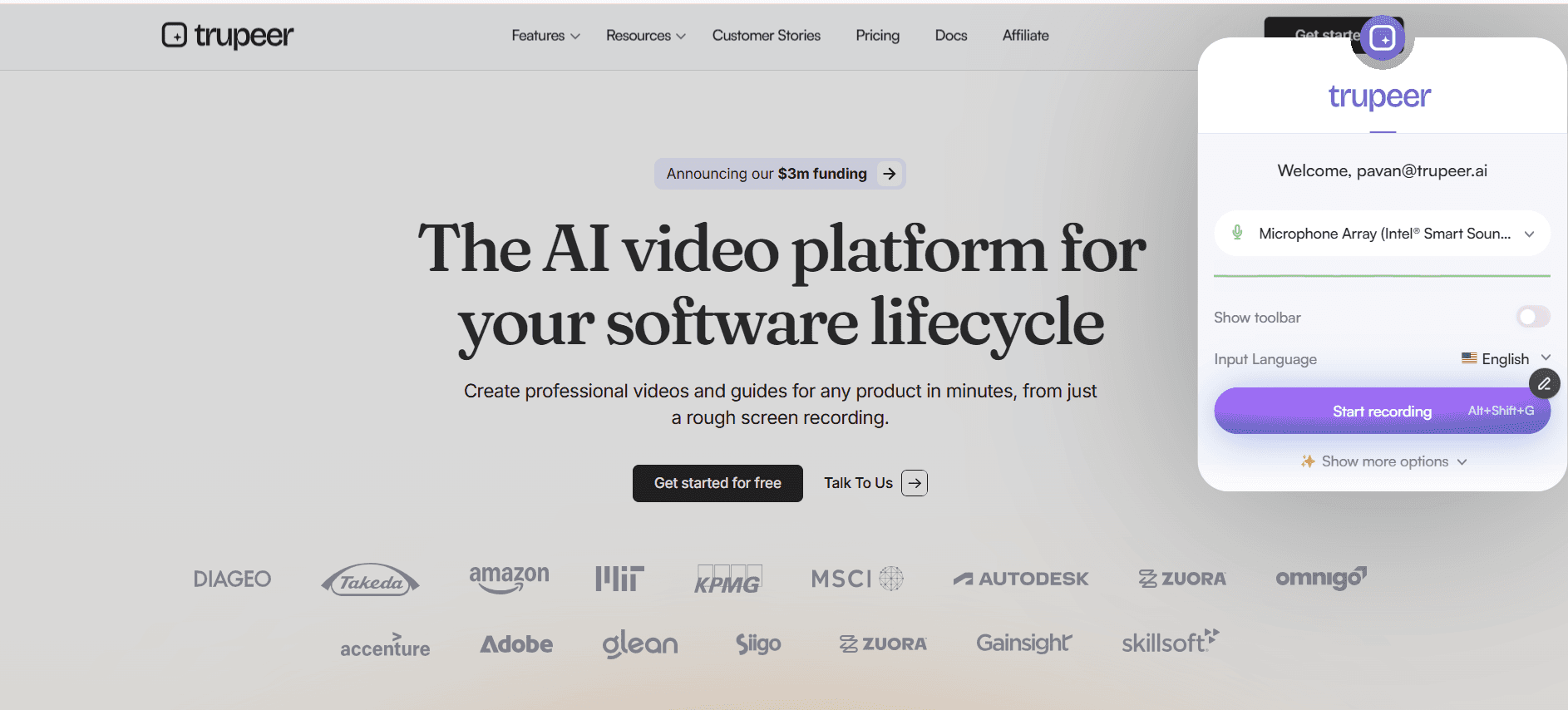
Stap 2: Neem je scherm op
Start de opname met audio-/webcamopties; AI volgt klikken automatisch.
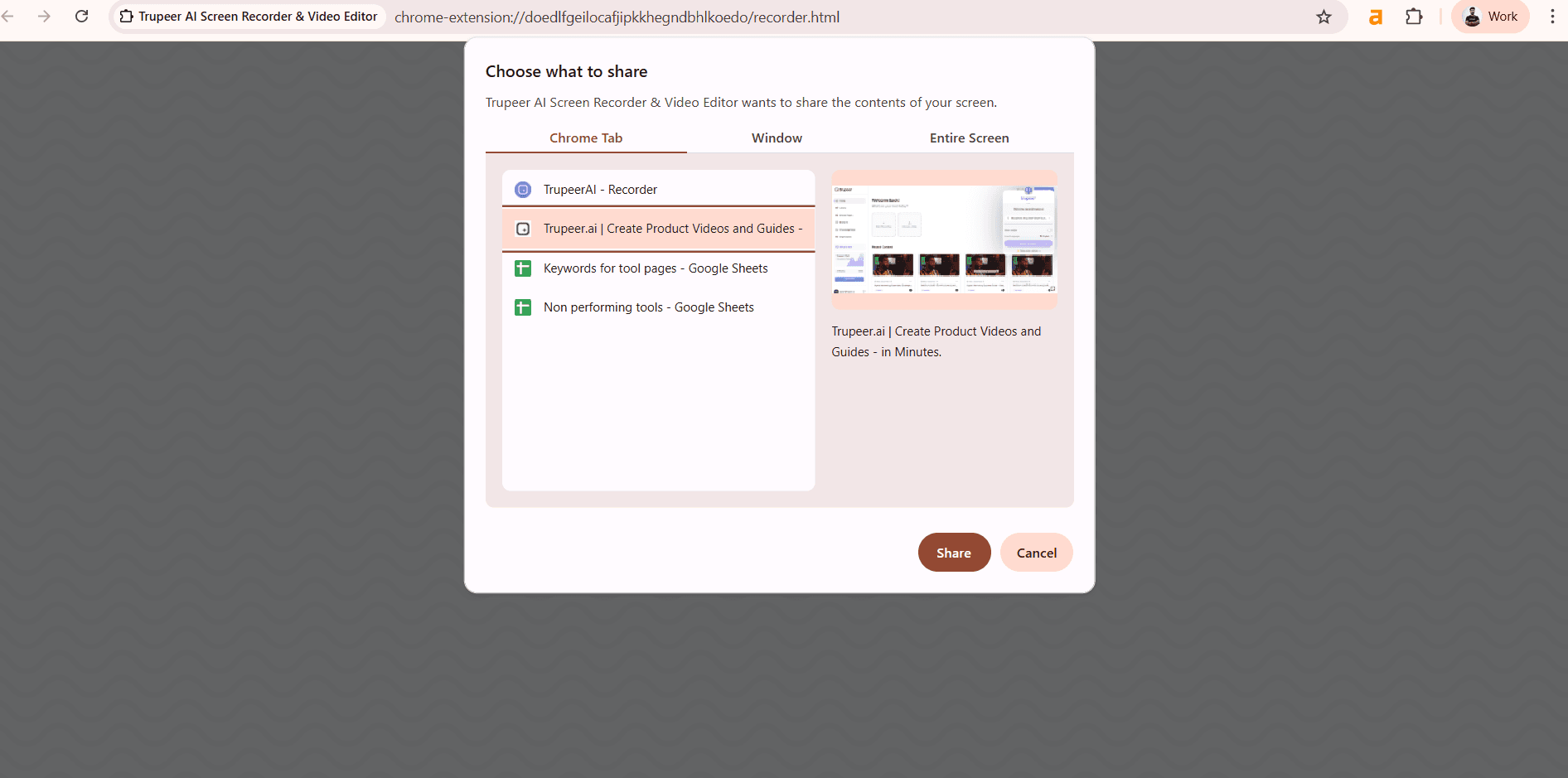
Stap 3: Verbeter & deel
AI verwerkt de video met ondertiteling en levert vervolgens direct deel-links op.
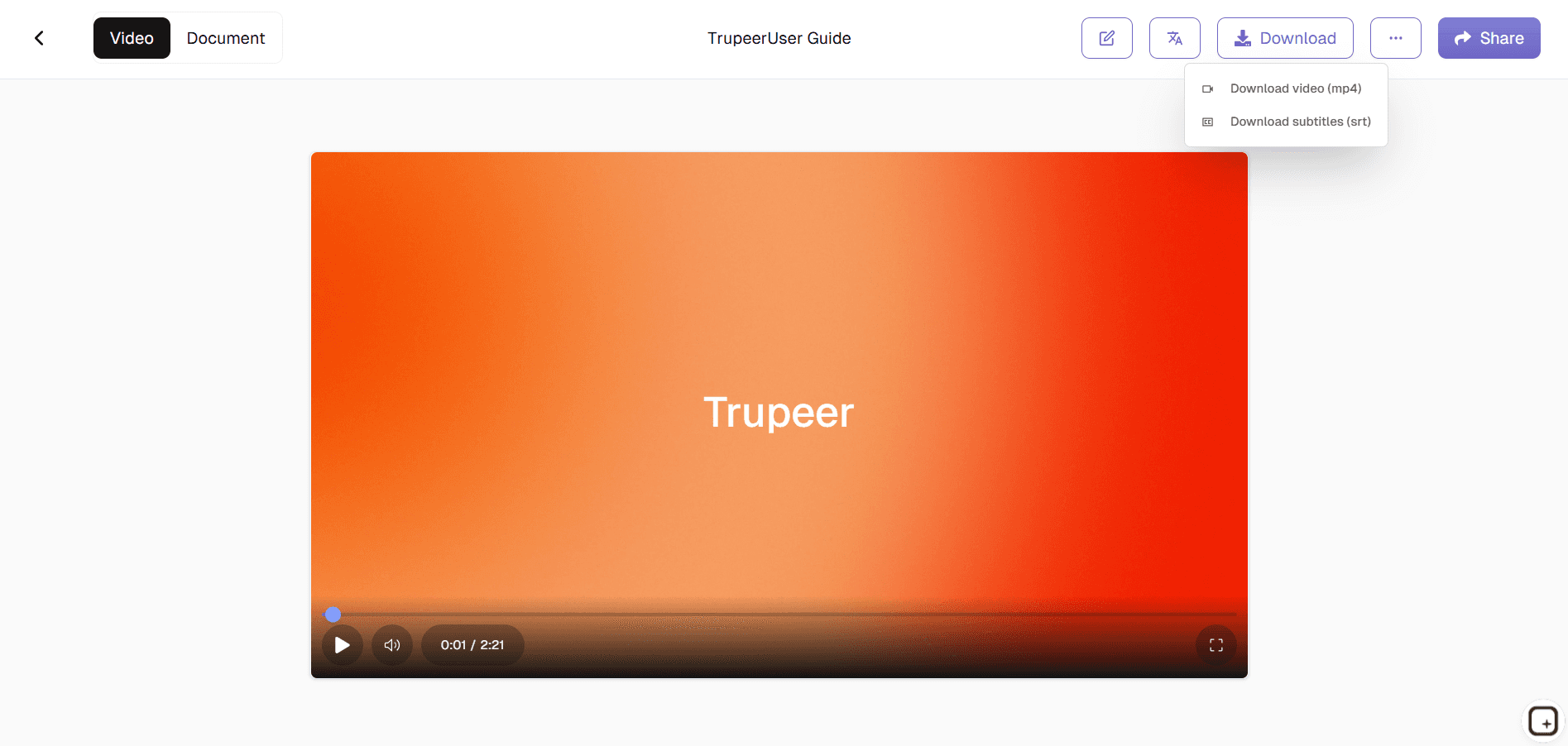
Voor wie is deze Browser Screen Recorder van Trupeer
Essentieel voor professionals die direct vanuit browsers screen capture-content maken, zonder complexe setups.
Specialisten Customer Support:
Neem troubleshooting-sessies op met duidelijke klikroutes en annotaties, zodat je geen problemen krijgt met "Ik kan niet zien waar je op klikt" en tickets sneller kunt oplossenTechnische trainers & docenten:
Leg tutorials op basis van browsers vast met automatische stapmarkeringen en ondertiteling, perfect voor het maken van herhaalbare trainingscontent zonder te bewerkenSoftwareontwikkelaars:
Documenteer stappen voor het reproduceren van bugs of geef feature-demos met nauwkeurige interactie-opnames, zodat je direct kunt delen met QA-teams of stakeholdersContent creators & YouTubers:
Genereer snelle tutorialvideo's met AI-verbeterde visuals en directe cloudpublicatie, zodat je dagelijkse contentworkflows worden gestroomlijndRemote teams & managers:
Maak workflow-walkthroughs en procesdocumentatie tijdens live browsersessies, zodat je visuele consistentie behoudt binnen verspreide teams
Belangrijkste functies van Trupeer’s Browser Screen Recorder
Professionele screenopnames, verbeterd met AI, zonder downloads of bewerkingssoftware.
Multi-browser compatibiliteit:
Werkt naadloos in Chrome, Firefox, Safari en Edge met identieke kwaliteit en interface, zodat je consistente opname-mogelijkheden hebt, ongeacht de browservoorkeuren van je teamAI klik- & actie-markering:
Detecteert automatisch en benadrukt muisbewegingen, klikken en toetsenbordinvoer met subtiele animaties, zodat tutorials zichzelf uitleggen zonder handmatig annotatiewerkIntelligente audiobehandeling:
Scheidt en verbetert microfoon van systeemaudio terwijl achtergrondruis wordt verwijderd, voor studiokwaliteit geluid vanuit standaard microfoons van laptopsAutomatische ondertitelingsgeneratie:
AI zet spraak om met 95%+ nauwkeurigheid en synchroniseert ondertitels met de videotijdlijn, zodat content toegankelijker wordt en kijkers het beter begrijpen zonder ondertitel-editorsDirecte cloudworkflow:
Video's worden automatisch verwerkt en geüpload met privédeel-links die volgens planning verlopen, waardoor handmatige bestandsoverdracht en opslagbeheer worden geëlimineerd
Deze chrome-extensie voor screen recording is gebouwd op Screenity, oorspronkelijk gemaakt door Alyssa X en gelicentieerd onder de GNU GPLv3, met verbeteringen ontwikkeld door het Trupeer-team. Broncode beschikbaar via: https://github.com/trupeer-ai/trupeer-chrome-capture.
Ontdek gerelateerde tools
Voordelen van het gebruik van Trupeer’s browser-schermrecorder
Geen downloads vereist
Begin direct met opnemen vanuit uw browser, snel, eenvoudig en veilig.
AI-gestuurde verbeteringen
Voeg avatars, ondertitels en automatisch gegenereerde scripts toe om opnames professioneel te maken.
Multifunctionele uitvoer
Zet opnames in enkele minuten om in tutorials, productdemo's of documentatie.
Neem je scherm op in de browser met Trupeer
Stap 1
Open Trupeer
Stap 2
Neem uw scherm op
Stap 3
Verbeteren & Delen
Veelgestelde vragen
Is deze Browser Screen Recorder gratis?
Ja, onbeperkte browseropname met kern-AI-verbeteringen beschikbaar zonder kosten.
Welke browsers ondersteunt Browser Screen Recorder?
Chrome, Firefox, Safari, Edge en alle moderne browsers met dezelfde functies.
Welke formaten kan Browser Screen Recorder exporteren?
MP4, WebM met directe cloudlinks of directe downloads, geoptimaliseerd voor het web.
Neemt Browser Screen Recorder de webcam op?
Ja, picture-in-picture-webcamoverlay met perfecte audiosynchronisatie.
Kan ik de uitvoer van Browser Screen Recorder bewerken?
Ja. Na het opnemen kun je je video delen via een link, insluiten op je website of exporteren in HD-indelingen. Trupeer integreert ook met tools voor teamsamenwerking voor snellere verspreiding van opnames.
Meer tools


