4.8/5
無料のトレーニング動画作成ソフト(編集不要)
フィラーワードの削除、ズーム効果、ブランドキットの適用を自動で行うトレーニング動画作成ソフトです。チームに動画編集者がいなくても、誰でも洗練されたトレーニング動画を作成できます。
トレーニング動画を無料で作成

Trupeer AIは、制作ワークフローから編集者を取り除くトレーニング動画作成ソフトウェアです。フィラー(つなぎ言葉)は自動でカットされます。カーソルの微細な揺れは滑らかに補正されます。ズーム効果やカーソルのハイライトは、受講者が見ておくべきタイミングで自動的に適用されます。ブランドキットのイントロ/アウトロスライドも自動で反映されます。Camtasiaを一度も開いたことがないL&Dスペシャリストでも、画面ウォークスルーを録画して「生成」を押すだけで、30分後には完成度の高いトレーニング動画と、それに対応する書面ガイドを納品できます。ほとんどのトレーニング動画制作は、「共有できる専門性があるか」ではなく、「動画編集ソフトを操作できるか」で門前払いになりがちです。そして、多くのトレーニングチームにいる動画編集者は、過労気味の1人で、カレンダーは2か月先まで埋まっています。
動画編集スキル不要。フィラー除去、オートズーム、カーソル効果、ブランド適用はすべて自動で実行されます。
画面ウォークスルーを録画するか、入力したスクリプトでAIアバターを使用します。どちらのルートも、「録画して自分で編集する」サイクルを省略します。
出力はMP4動画とPDFまたはWordドキュメントをセットで納品。LMSにアップロードするか、ヘルプセンターに投稿するだけで準備完了です。
グローバルチーム向けに65以上の言語へ翻訳。動画のボイスオーバーと書面ガイドの両方に適用されます。
変更したステップを録り直して、既存のトレーニング動画を更新します。AIは変更されたセグメントのみを処理します。
「編集不要」が本当に意味すること
トレーニング動画作成には、従来2つの制作段階があります。1つ目は、元データをキャプチャすること(画面の録画、プレゼンター、またはデモの記録)。2つ目は、元データを公開可能な形に編集すること(フィラーのカット、タイミング調整、ズーム効果の追加、イントロ/アウトロのグラフィック適用、ボイスオーバーの同期、必要なら色補正)。1つ目の段階は、ワークフローを1回実行するのにかかる時間だけで済みます。2つ目の段階は、出力の完成度に応じて、録画時間の2倍〜8倍かかることがあります。多くのトレーニングチームは2つ目の段階で制作の上限にぶつかります。編集作業が、チームのボトルネックになる1人に任されるか、完成動画1本あたり3,000ドル以上の費用で外部の制作会社に委託されるためです。
Trupeer AIは2つ目の段階を自動で処理します。フィラー(「えーと」「あの」「ちょっと探します」「どこに保存したっけ」など)は検出されて削除されます。カーソルの微細な揺れは滑らかに補正され、マウスが画面上でガタつきません。受講者が特定のUI要素に集中する必要があるタイミングで、ズーム効果が自動的に適用されます。カーソルのハイライトがクリック位置を示します。背景ノイズも除去されます。ブランドキットのイントロ/アウトロスライドも自動で適用されます(ロゴ、カラー、フォント、イントロ/アウトログラフィック)。TrupeerでL&Dスペシャリストが得られる成果は、CamtasiaまたはPremiereで4〜8時間作業した編集者が作るものと同等でありながら、4〜8時間の作業時間も編集者を用意する必要もありません。
トレーニング動画作成ソフトが3ステップで動く仕組み
3つのステップで全体の流れをカバーし、ステップ2(編集)はあなたがやらなくても進みます。誰もCamtasia、Premiere、Final Cutを学ぶ必要なく、チームは完成度の高いトレーニング動画を納品できます。
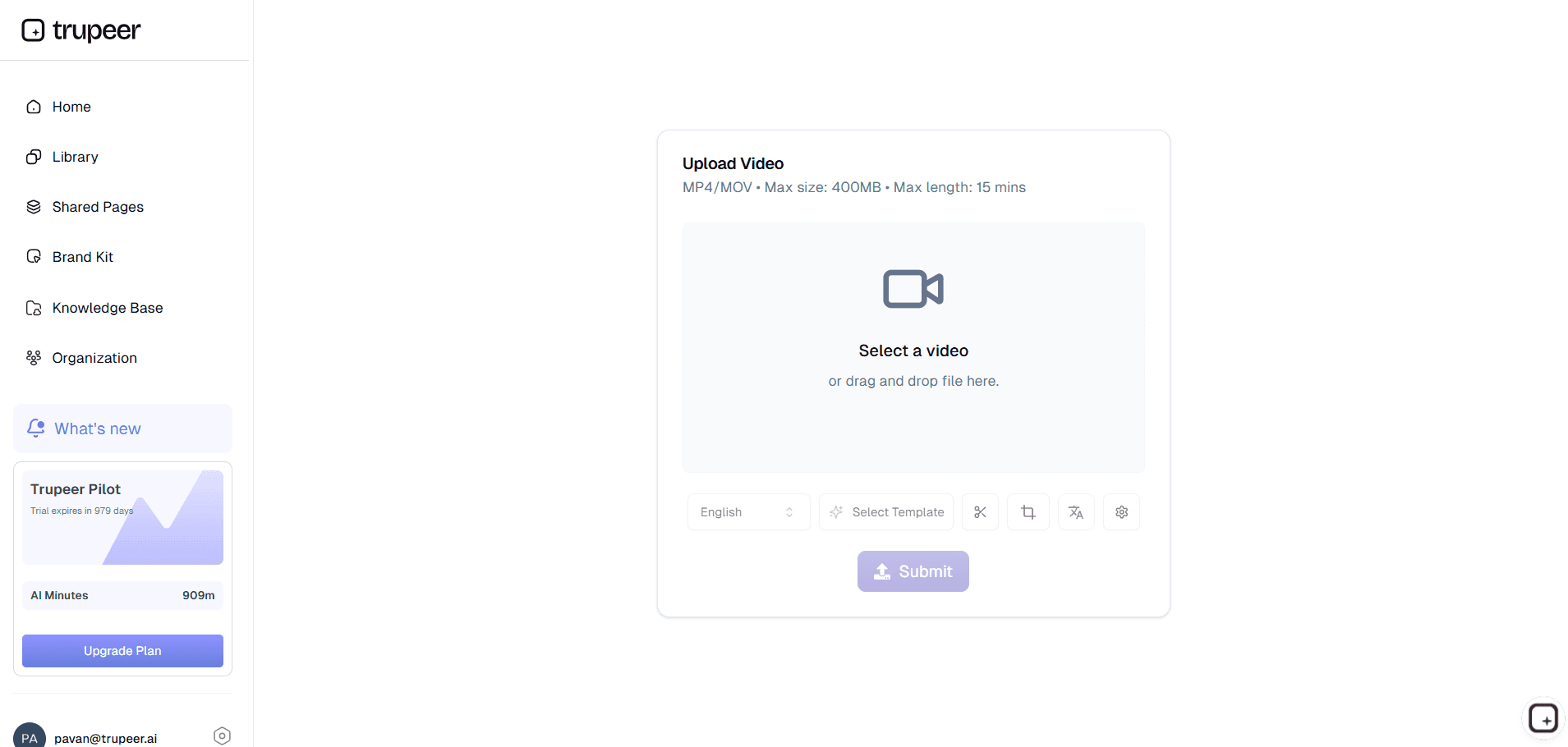
ステップ1:ウォークスルーを録画するか、AIアバターを使う
2つのルートがあります。ルート1:ブラウザで画面録画を開始します。受講者が学ぶ必要のあるシステム、プロセス、またはワークフローを順に説明します。必ず口にしてしまうフィラー言葉のために、録り直しは不要です。ルート2:スクリプトを入力し、カタログからAIアバターを選んで、トレーニングを「話す人(トーキングヘッド)」の動画として届けます。カメラもマイクも、録画セッションも不要です。このアバタールートは、カメラに映ることを拒む対象分野の専門家や、動画撮影をスケジュールに組み込めない役員に特に向いています。
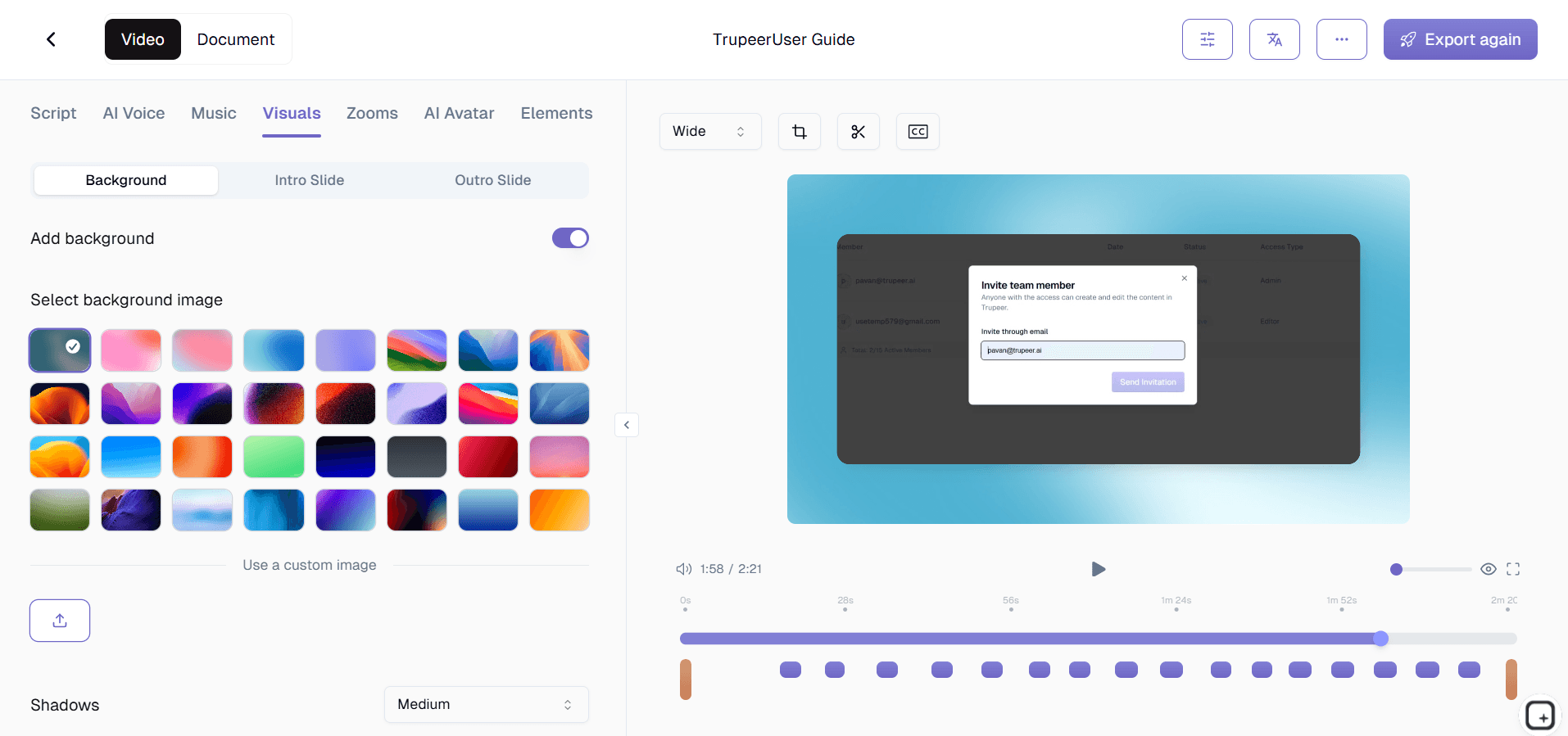
ステップ2:Trupeer AIが編集を行います
ここが消えるステップです。フィラーの削除、カーソルの滑らか補正、ズーム効果、カーソルのハイライト、背景ノイズの低減、ブランドキットの適用はすべて自動で実行されます。下書きのトレーニング動画と、下書きの書面ガイドが同時に編集画面に届きます。カスタム用語集が、AIが本来うまく綴れない可能性のある社内のシステム名、製品名、略語をキャッチします。
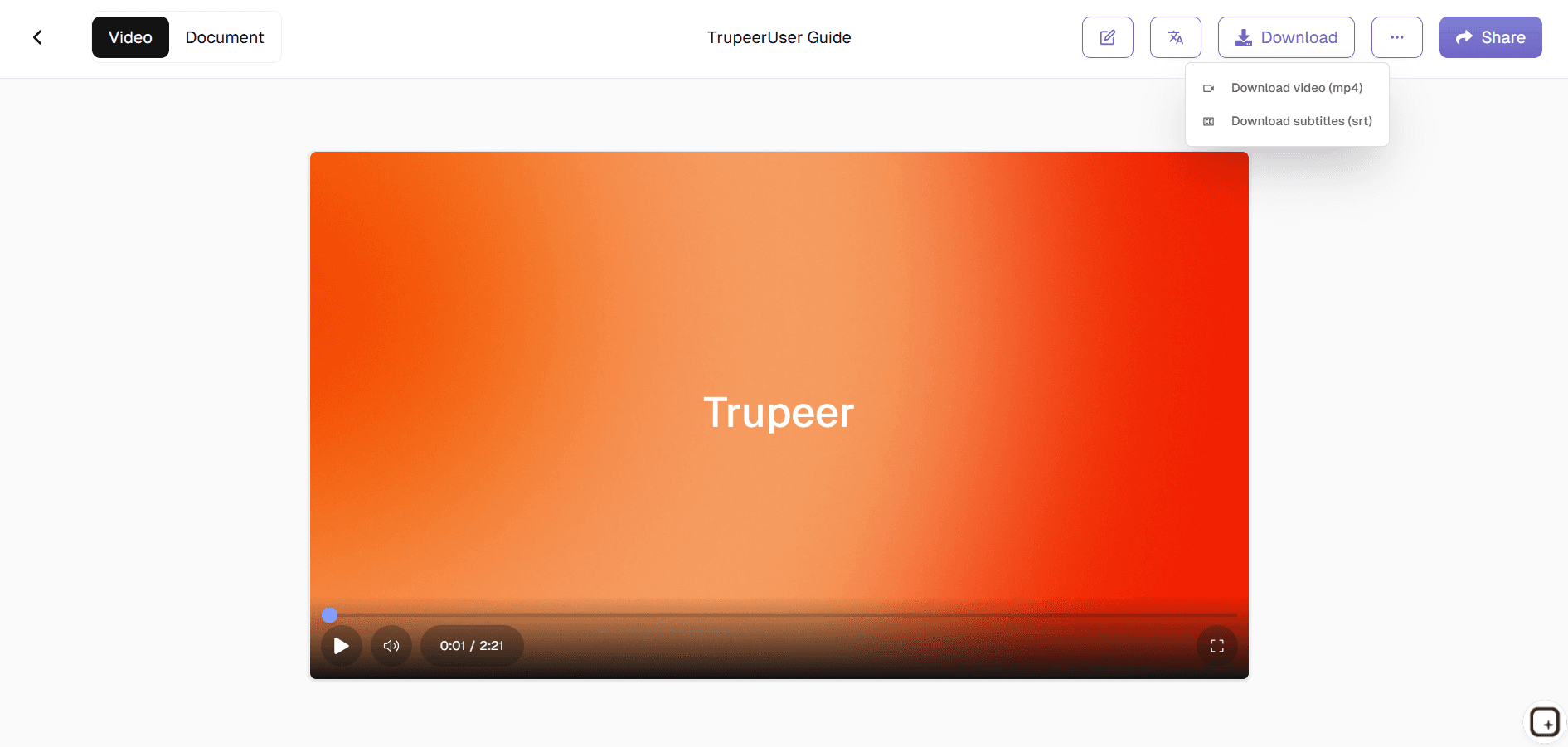
ステップ3:(必要なら)微調整して納品
出力はデフォルトで納品可能な状態です。編集者ビューでは、必要に応じて変更できます。イントロをさらに短くする、保持するセクションを調整する、クリップの順序を入れ替える、AIボイスオーバーを別のものに差し替える、書面ガイド内のスクリーンショットを差し替えるなどです。これらのために動画編集スキルは不要で、タイムライン編集ではなく、ドラッグ&ドロップでの微調整です。あとはMP4をLMSに送信し、PDFをヘルプセンターに投稿するか、Shared Pageリンク経由で共有するだけです。
実際に「編集者が社内にいない」状態でトレーニング動画ソフトを使うのは誰か
このツールを開く人は、通常L&Dスペシャリスト、HRのビジネスパートナー、部門責任者、プロダクトトレーナー、カスタマーエデュケーションのリード、または対象分野の専門家で、「ワークフローを実際に理解しているのは自分だけ」だからという理由でトレーニング動画制作に巻き込まれた人です。これらの人たちは、いずれも動画編集者ではありません。多くは、動画のタイムラインの前に座ることを含まない別の本業を持っています。従来のルート(Loomで録画→マーケティング動画チームに送る→3週間待つ→整っているが今となっては役に立たないバージョンが戻ってくる)は、彼らが避けようとしているものです。
その周りでは、個々のトレーニング機能が同じワークスペースを使います。HRチームは新入社員向けのオンボーディングモジュールを作成します。ITチームは新しいプラットフォーム向けのシステム展開動画を作成します(新しいHRIS、新しいSSOフロー、新しいチケット管理システムへの移行)。営業イネーブルメントはプロダクト知識のアップデートを作成します。カスタマーサクセスは社内ツールのトレーニングを作成します。カスタマーエデュケーションは顧客向けのハウツー動画を作成します。プロダクトエデュケーションは、アプリストアやヘルプセンターに配信される機能ウォークスルーを作成します。これらの機能には、専任の動画編集者が社内にいるわけではありません。それでも、どれも結局はトレーニング動画コンテンツを納品します。
「編集不要」が意味しないこと
正直な範囲:「編集不要」とは、ポストプロダクション作業(フィラー除去、ズーム効果、ブランドキット、色補正)が自動で実行されることを意味します。何も編集できないという意味ではありません。Trupeerの編集画面では、セクションのトリミング、コンテンツの並べ替え、ボイスオーバーの差し替え、スクリーンショットの差し替え、動画と一緒に提供される書面ガイドの編集も引き続き可能です。ポイントは、希望すればその作業ができないのではなく、チームがその作業を一切行わなくても納品できる、ということです。多くのトレーニング動画は、自動生成された下書きのまま出荷されます。中には10分程度のレビューを経て、出荷前に少しだけ調整されるものもあります。ごく一部は、役員向けのプレゼン品質にするために、より踏み込んだ編集が行われます。
Trupeerがやらないこと:アニメーション、モーショングラフィックス、複雑なマルチカメラ編集、放送品質のカラーレイグレーディング、カスタム音楽ライブラリを使ったサウンドデザイン、複数のカメラアングル間でカットを入れる脚本付きのナラティブ動画です。Camtasia(TechSmith Audiate付き)や、Adobe PremiereとAdobe Captivate、Final Cut Proのような制作スタジオが、その作業を担当します。Trupeerは、フォーマットが「対象分野の専門家が画面を説明し、やっていることをナレーションして納品する」タイプである、社内のトレーニング動画制作の大部分をカバーします。ここが、企業のトレーニング動画にかかる時間の大半が費やされる領域です。同じフォーマットは、ほとんどのインストラクショナル動画作業と、多くのL&Dチームが維持する必要のある幅広いトレーニング資料ライブラリにも適用できます。
Camtasia、Loom、ScreenPal、Synthesiaの横でTrupeerはどこに位置づくか
Camtasia、ScreenPal、Adobe Captivateは、チームに編集者がいる、または編集者になる意思があることを前提としたトレーニング動画作成ツールです。Trupeer AIは、彼らが終わるところから始まります。LoomとVidyardは画面録画ツールで、そもそも自動編集を行いません。そのため、録画したものがそのまま出荷物になります。フィラーも含めてそのままです。Trupeer AIは、Loomがスキップする自動編集レイヤーを担当します。Synthesiaは、画面録画なしのAIアバターツールです(台本に沿ってアバターがコンテンツを届けるだけ)。Trupeer AIは両方を提供します。チームが必要とするならアバター、チームが必要とするなら画面録画で、どちらの場合でも同じポストプロダクションのパイプラインで処理します。
CamtasiaまたはPremiereでトレーニング動画制作を行っているチームの場合、Trupeerのワークフローでは、動画1本あたりの編集時間が4〜8時間から、レビューに必要な約5〜15分程度まで短縮されます。Loomを使っているチームでも、Loomで作った録画データが未整備の生動画になるのと同じ録画を使って、Trupeerでは編集が録画後に自動で行われるため、完成度の高いトレーニング動画が作れます。いずれの場合も、同じトレーニングコンテンツを4〜10倍のスピードで納品でき、動画編集者を採用したり、制作会社の予算を組んだりする必要はありません。自動動画編集パイプラインがエンドツーエンドで動き始めると、別のトレーニング動画メーカーやトレーニング動画ジェネレーターを探すのをやめるチームがほとんどです。AIによる動画編集アプローチが、これまで3〜4個のツールをつなぎ合わせていたワークフロー全体をカバーするためです。複数のモジュールやカリキュラム設計にまたがる、より広範なトレーニングプログラム作業については、AI powered training program generatorとenterprise training video platformが、そのワークフローの形に対応します。
アップデート、翻訳、そしてグローバルなトレーニングチーム
トレーニング動画の制作は、最初の公開で終わりません。システムは四半期ごとに変わり、手順は更新され、UIは刷新され、6か月前に出荷したトレーニング動画は、受講者が画面で見る内容と一致しなくなります。従来の更新ルート(動画全体を録り直し、再編集し、再出荷)は高額なため、多くのトレーニングライブラリは黙って動画が古くなるのを放置しがちです。Trupeer AIは、変更されたセグメントだけを録り直して更新します。AIはその部分のみを再処理し、動画と書面ガイドの両方がその場で更新され、新しいバージョンは現在の改訂版としてLMSにアップロードされます。
グローバルなトレーニング運用では、翻訳が同じ作業の一部として実行されます。1つのソース録画、1つのリリースサイクルで、同じトレーニング動画がマドリードのスペイン語話者、ムンバイのヒンディー語話者、サンパウロのポルトガル語話者、ベルリンのドイツ語話者に届きます。翻訳は、動画のボイスオーバー(設定時にボイスクローンを使用)と書面ガイドの両方に適用され、ブランドキットと画面上のテキストもそのまま引き継がれます。この編集不要のトレーニング動画作成ソフトウェアと、Trupeer AI SOP builderを組み合わせれば、トレーニング動画と、その下にあるSOPの両方をカバーできます。
編集者がいないのに、トレーニングチームがTrupeer AIを使う理由
自動編集がフィラーワード、ズーム、ブランドキットを処理
フィラーワードの削除、カーソルの微振動のスムージング、ズームとカーソル効果、背景ノイズの除去、ブランドキットのイントロ/アウトロの適用はすべて自動で実行されます。タイムライン編集は不要で、チームに編集者も不要です。
完成したトレーニング動画までの2つのルート
画面のウォークスルーを録画するか、台本を入力してAIアバターを選択します。どちらのルートでも、同じように洗練されたMP4と書面ガイドが作成されます。対象の専門家と、その瞬間に合う方を選んでください。
出力は任意のLMSまたはヘルプセンターへ
動画はMP4、ドキュメントはPDFまたはWordで、Cornerstone、Docebo、TalentLMS、Workday Learning、またはMP4を受け付ける任意のLMSにアップロードする準備が整っています。LMS外のすべてには共有ページのリンクを使用します。
編集なしで3ステップでトレーニング動画を作成
ステップ 1
ウォークスルーを録画するか、AIアバター用の台本を入力
ステップ 2
Trupeer AIが自動で編集します(フィラーワード、ズーム、ブランドキット)
ステップ 3
必要なら調整してから、LMSまたは共有ページに送信
よくある質問
トレーニング動画作成ソフトウェアは本当に無料で使えますか?
いいえ、コアのフローは無料です。ウォークスルーを録画するか、AIアバターを使用して、自動編集された動画と書面ガイドを生成し、支払いなしで共有ページのリンク経由で共有できます。有料プランでは、ブランドキット、カスタム音声クローン、フルカタログからのAIアバター、チームのワークスペース、65+言語での翻訳、ナレッジベースの表示コントロール、さらに長い録画時間が追加されます。料金の詳細は料金ページをご覧ください。
「編集不要」とは実際にどういう意味ですか?
録画が処理されると、ポストプロダクション作業(フィラーワードの削除、カーソルの微振動のスムージング、ズームとカーソル効果、背景ノイズの除去、ブランドキットのイントロ/アウトロの適用)が自動で実行されるということです。出力の下書きはそのまま出荷可能です。Trupeerのエディターでは、変更したい場合にトリミング、並べ替え、スクリーンショットの差し替え、またはボイスオーバーの置き換えもできますが、自動生成された下書きをエディターに触れずにそのまま出荷できます。多くのチームは、トレーニング動画の大半で自動生成された下書きをそのまま出荷しています。
録画を完全にスキップしてAIアバターを使えますか?
はい。台本を入力して、カタログからAIアバターを選択します。アバターが、トレーニングを“話す人”の動画として届けます。カメラも、マイクも、録画セッションも不要です。特定の人物の容姿に合わせて学習したカスタムアバターは、HeyGenの連携経由で利用でき、会社がトレーニングライブラリ全体で一貫したプレゼンターの顔を望む場合に役立ちます。
Camtasia、Loom、ScreenPal、Synthesiaと比べてどう違いますか?
CamtasiaとScreenPalは、チームに動画編集者がいる、または編集者になる意思があることを前提としたトレーニング動画作成ツールです。Trupeer AIは、彼らが終わるところから始めて、編集を自動で引き受けます。LoomとVidyardは画面を録画しますが自動編集はしないため、記録したものがそのまま出荷物になります。Trupeer AIは、Loomが省略する自動編集のレイヤーを担当します。SynthesiaはAIアバターのみです(画面録画なし)。Trupeer AIは、同じ自動編集パイプラインで画面録画とAIアバターの両方に対応します。
自動編集者はマルチカメラ、アニメーション、モーショングラフィックスの作業に対応できますか?
いいえ。Trupeer AIは、複雑なマルチカメラの編集、モーショングラフィックス、カスタムアニメーション、放送グレードのカラ―グレーディング、またはカスタム音楽ライブラリを使ったサウンドデザインには対応しません。Adobe Premiere、Final Cut Pro、DaVinci Resolveのような制作ツールがその作業を担当します。Trupeer AIは、社内のトレーニング動画制作で大半が使うフォーマット(対象の専門家が画面を説明し、実施内容をナレーションして、出荷する)をカバーします。



