4.8/5
ITドキュメント作成ソフトウェア
AIでITドキュメント作成プロセスを効率化
ITドキュメントの作成を無料で始める

TrupeerのITドキュメンテーションソフトウェアは、画面録画を洗練された動画と詳細な文書ガイドに変換することで、ITプロフェッショナルが包括的なドキュメントを作成する方法を革新します。従来のドキュメント作成ツールでは手作業での執筆や書式設定が必要でしたが、当社のAI搭載プラットフォームは画面録画を通じて実際の作業フローを記録し、チームがすぐに利用できる視覚的ドキュメントと文書ドキュメントの両方を自動生成します。
当社の技術ドキュメンテーションプラットフォームが際立っているのは、2つの出力を同時に生成できる点です。文書ドキュメントだけ、または動画コンテンツだけを得るのではありません。代わりに、すべての画面録画から、ノイズ除去や自動ズーム効果などのAI強化を施した洗練された動画と、プロセスのすべての手順を捉えた包括的な文書ガイドの両方が生成されます。つまり、動画で視覚的に学ぶ人に対応しつつ、すばやく参照できる検索可能なテキストベースの資料も提供できるということです。 当社のAI技術はITワークフローを理解し、実績のあるテンプレートを用いてドキュメントを自動的に構成します。ソフトウェア導入手順を文書化する場合でも、ユーザー向けオンボーディング資料を作成する場合でも、プラットフォームは一般的なパターンを認識して適切な書式を適用し、手作業なしでプロフェッショナルな見た目のドキュメントを実現します。
ITドキュメンテーションソフトウェアはどのように機能するのか?
TrupeerでITドキュメントを作成するプロセスは、既存のワークフローを包括的なリソースへと変換する、効率化された流れに沿って進みます。当社のシステムの魅力はその柔軟性にあり、新しい内容を録画することも、会議、トレーニングセッション、トラブルシューティングの通話中にすでに取得した既存の録画をアップロードすることもできます。
ステップ1: プロセスを記録する
まずは当社の画面録画ツールを使って、ITワークフローをリアルタイムで記録するか、既存の未加工録画をアップロードします。当社の無料画面録画ツールはMacとPCの両方でシームレスに動作し、画面全体、特定のアプリケーション、または選択した領域をキャプチャできます。多くのITプロフェッショナルは、サポート通話やトレーニングセッションの録画をすでに持っており、それらをすぐに処理できます。

ステップ2: AIによる強化と処理
録画が取得またはアップロードされると、TrupeerのAIが自動的にコンテンツの強化を開始します。システムは背景ノイズを除去し、「えー」や「あー」といったフィラーワードを取り除き、画面の重要な箇所を強調するためにインテリジェントなズーム効果を追加します。この処理は自動で行われるため、プロ品質のコンテンツを作成するのに動画編集スキルは必要ありません。

ステップ3: 自動ドキュメント生成
AIが動画を強化している間に、同時に録画を分析して包括的な文書ドキュメントを生成します。システムは重要な手順を特定し、重要な詳細を抽出し、実際のワークフローに沿った論理的なセクションへとコンテンツを構成します。この文書ドキュメントには、画面上で示した内容をそのまま反映するステップバイステップの手順が含まれます。

ステップ4: テンプレートの適用とカスタマイズ
生成されたドキュメントには、プロジェクト間で保存して再利用できるカスタマイズ可能なテンプレートが自動的に適用されます。これらのテンプレートには、好みの書式、スタイル、構造要素が含まれており、すべてのITドキュメントで一貫性が保たれます。ユーザーガイド、SOP、トラブルシューティング手順など、さまざまな種類のドキュメント向けに、異なるテンプレートセットを作成できます。
ステップ5: ブランド適用と最終出力
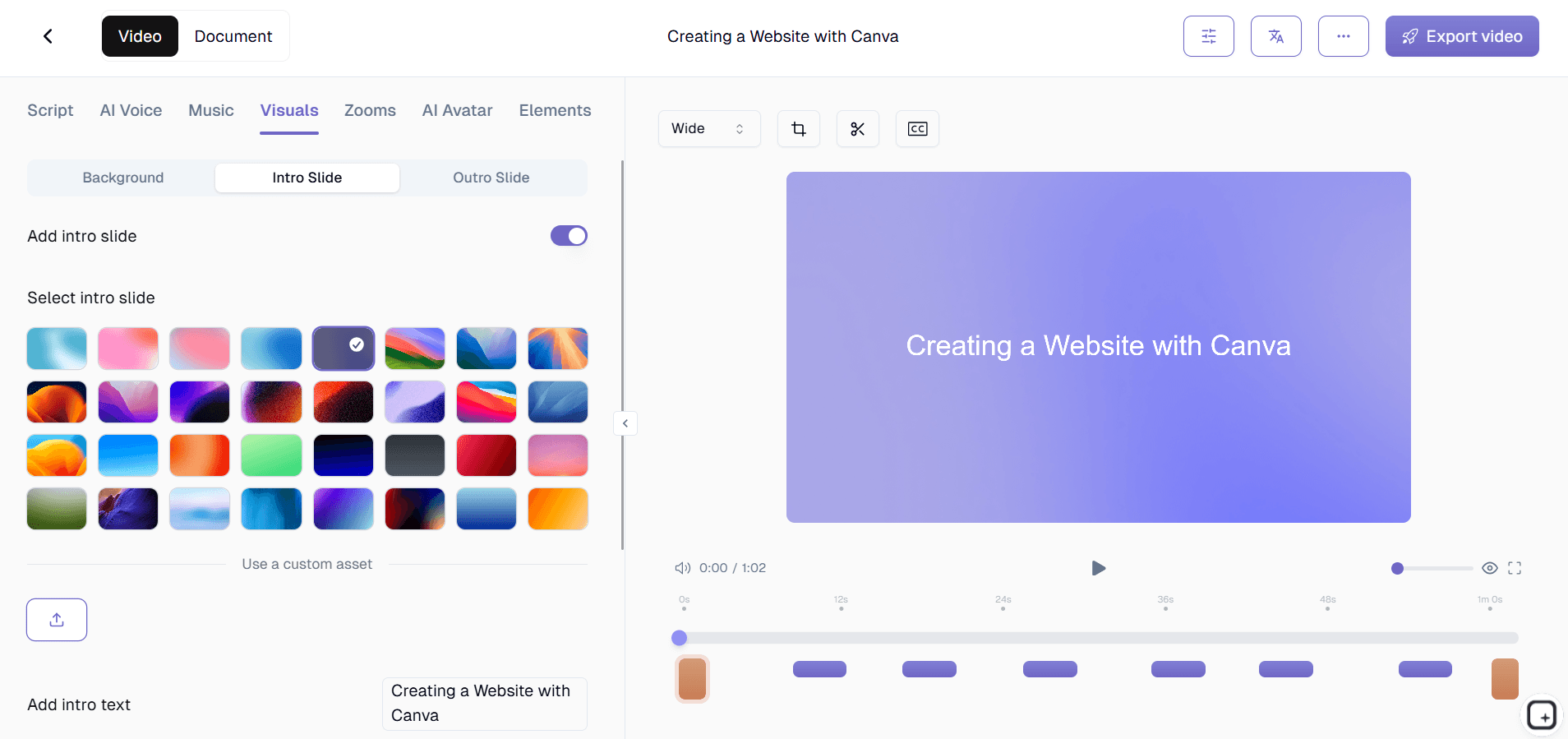
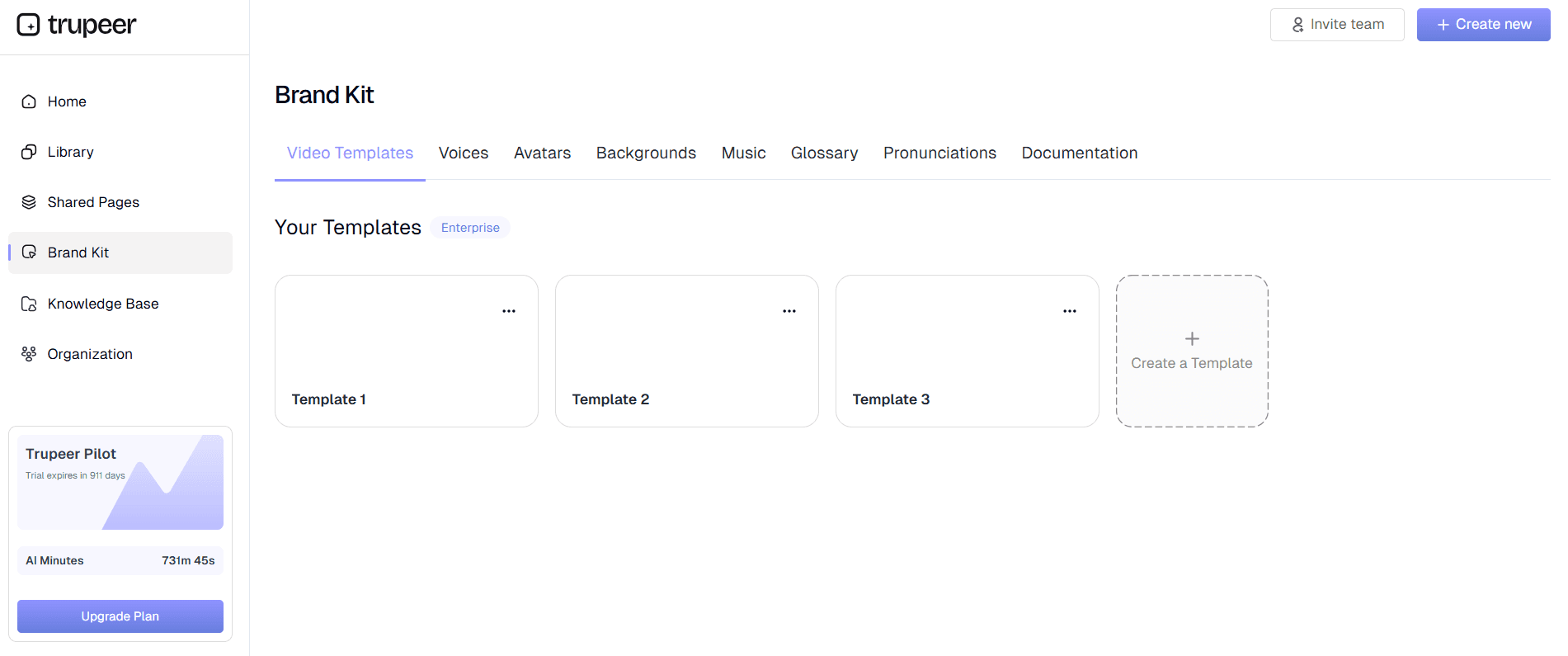
組織のブランドキットを適用して、すべてのドキュメントで一貫した視覚的アイデンティティを維持します。会社のロゴ、カラー、標準のイントロやアウトロを、動画と文書コンテンツの両方に追加できます。最終出力として、洗練された動画コンテンツと、チームにすぐ配布できる包括的な文書ガイドの両方が得られます。
主な機能と能力
TrupeerのITドキュメンテーションソフトウェアには、迅速かつ効率的に包括的でアクセスしやすいドキュメントを作成する必要があるITプロフェッショナル向けに特化して設計された強力な機能が含まれています。
AI搭載の画面録画: 当社のインテリジェントな録画システムは、自動強化機能付きでワークフローをキャプチャします。基本的な画面録画ツールとは異なり、当社のAI画面録画ツールはリアルタイムの最適化を行い、自動ドキュメント生成のための準備を整えます。システムはITワークフローを認識し、最大限の明瞭さを得られるよう録画設定を最適化します。
デュアルコンテンツ生成: すべての録画から、強化された動画コンテンツと詳細な文書ドキュメントが同時に生成されます。これにより、動画チュートリアルとテキストベースのガイドのどちらかを選ぶ必要がなくなり、1回の録画セッションから複数の学習形式をチームに提供できます。文書ドキュメントには、動画で示されたすべての手順が正確に記録されます。
カスタマイズ可能なドキュメントテンプレート: 組織のドキュメント基準や好みを反映したテンプレートを作成し、保存できます。これらのテンプレートは、セクション見出し、スタイル、構造要素を含め、指定どおりにAI生成コンテンツを自動で整形します。テンプレートのカスタマイズにより、すべてのSOP作成と技術ドキュメントの一貫性が確保されます。
多言語翻訳: 自動動画翻訳機能で、ドキュメントの到達範囲を広げます。動画コンテンツと文書ドキュメントの両方を複数の言語に翻訳し、言語ごとに別々の録画セッションを必要とせずに、グローバルチームや多様なユーザー層がITリソースにアクセスできるようにします。
高度なブランド統合: すべてのドキュメントに一貫した視覚的アイデンティティを持たせる包括的なブランドキットを適用します。会社のロゴ、配色、標準のイントロとアウトロ、組織のブランド基準に沿ったプロフェッショナルな見た目を実現するカスタムスタイル要素を含められます。
柔軟なエクスポートと共有オプション: さまざまな配布ニーズに合わせて、複数の形式でドキュメントをエクスポートできます。直接リンクで共有したり、社内サイトやナレッジベースに動画を埋め込んだり、文書ガイドを単独のドキュメントとしてダウンロードしたりできます。この柔軟性により、既存のITインフラやコミュニケーションチャネルとシームレスに統合できます。
なぜITドキュメンテーションソフトウェアを使うべきなのか?
TrupeerのITドキュメンテーションソフトウェアを導入すると、ITチームのドキュメント作成と管理の進め方が大きく変わり、時間を節約しながらドキュメントの品質とアクセシビリティを向上させる重要な利点が得られます。
劇的な時間削減: 従来のITドキュメント作成には、1プロセスあたり数時間、あるいは数日かかることがあります。当社のプラットフォームでは、画面を1回録画するだけで、動画と文書ドキュメントの両方が自動的に得られます。この方法により、ドキュメント作成時間を最大90%削減でき、ITプロフェッショナルは手作業のドキュメント作成に長時間を費やすことなく、主要な技術業務に集中できます。
ドキュメントの正確性向上: 画面録画ベースのドキュメントは、実際のITプロセスで何が起きているかを正確に捉えるため、記憶だけを頼りに手順を再現する際に生じる推測やミスを排除します。トレーニング動画と文書ガイドは実際のデモンストレーションから生成されるため、チームが実際に遭遇するユーザーインターフェース、ボタンの位置、ワークフローの流れをそのまま反映します。
チームのオンボーディングとトレーニングの強化: 新しいITチームメンバーは、自社環境でプロセスがどのように機能するかを正確に示す視覚的リソースと文書リソースの両方を活用できます。動画デモと詳細な手順の組み合わせは、さまざまな学習スタイルに対応し、トレーニング時間を短縮し知識の定着を高める包括的なオンボーディングソフトウェア機能を提供します。
一貫したドキュメント基準: テンプレートベースの生成により、すべてのITドキュメントが同じ構成、書式、品質基準に従います。この一貫性により、チームメンバーは情報をすばやく見つけやすくなり、異なるシステムやプロセス間で不統一なドキュメント作成方法によって生じる混乱を減らせます。
スケーラブルなドキュメント作成: ITインフラが成長し進化するにつれて、ニーズに応じて拡張できるドキュメントが必要になります。当社のプラットフォームは、専任のドキュメント担当者や技術チームメンバーによる大規模な手作業を必要とせず、新しいシステム、プロセス、手順のドキュメントを迅速に作成できます。
誰がITドキュメンテーションソフトウェアを使えるのか?
TrupeerのITドキュメンテーションソフトウェアは、社内運用と外部ユーザーのニーズの両方を支える効率的で包括的なドキュメントソリューションを必要とする、多様なITプロフェッショナルや組織に対応します。
ITサポートおよびヘルプデスクチーム: サポート担当者は、このプラットフォームを使ってトラブルシューティングガイド、ユーザー支援動画、ステップバイステップの解決手順を作成します。繰り返し発生する問題に対応する際、解決プロセスを一度録画するだけで、チームメンバーとエンドユーザーの両方が参照できる包括的なAI Screen Recorderリソースを生成できます。この方法により、繰り返しのサポート依頼が大幅に減り、初回解決率が向上します。
システム管理者およびDevOpsチーム: 技術管理者は、このプラットフォームを活用して、システム構成、デプロイ手順、保守プロセスを文書化します。複雑な技術手順を録画し、詳細な文書ガイドを自動生成できるため、重要な組織知を確実に記録し、チームメンバーがアクセスできるようになります。これは、サーバー構成、ネットワーク設定、自動デプロイプロセスの文書化に特に有用です。
ソフトウェア開発チーム: 開発チームは、このプラットフォームを使ってAPIドキュメント、機能デモ、社内ツールや顧客向けアプリケーションのユーザーガイドを作成します。新機能やツールをリリースする際、開発者はAI Screen Recorderをすばやく録画し、それに付随する文書ドキュメントを生成して、社内関係者とエンドユーザーの両方が機能や実装を理解しやすくできます。
ITトレーニングおよび教育の専門家: 企業研修担当者やIT教育者は、視覚的なデモンストレーションと詳細な文書リソースを組み合わせた包括的な研修資料の作成にこのプラットフォームを活用します。デュアル出力機能により、1回の録画セッションから完全な学習モジュールを作成でき、すべての研修資料の一貫性を保ちながら、さまざまな学習嗜好に対応できます。
MSPおよびITコンサルタント: マネージドサービスプロバイダーやITコンサルタントは、クライアントごとにカスタマイズ可能でありながら一貫した品質と構成を維持できる標準化されたドキュメントの作成によって恩恵を受けます。テンプレートシステムにより、さまざまなクライアント環境に迅速に適応できるドキュメントフレームワークを開発しつつ、プロフェッショナルな見た目と包括的な内容を確保できます。
エンタープライズIT部門: 複雑なITインフラを持つ大規模組織は、このプラットフォームを使って、異なるチームや拠点間でドキュメントを標準化します。ブランドキット機能により、すべてのドキュメントが企業基準を維持し、テンプレートシステムにより、異なるIT領域や専門分野にわたって一貫した書式を実現します。
ITドキュメンテーションソフトウェアを使うためのベストプラクティス
ITドキュメンテーションソフトウェアの効果を最大化するには、プラットフォームの機能を活用しながら、ドキュメントが意図した目的を効果的に果たせるようにする戦略的なアプローチが必要です。
録画セッションを計画する: 録画する前に、文書化したい主要な手順と成果を整理しておきます。AIがコンテンツを強化し構成できますが、明確な計画から始めることで、包括的なカバーと論理的な流れが確保されます。対象者の技術レベルを考慮し、画面録画だけでは分かりにくい関連コンテキストや背景情報を含めるようにしましょう。
テンプレートのカスタマイズを活用する: 組織の基準やユーザーニーズを反映した包括的なドキュメントテンプレートの作成に時間を投資します。よく設計されたテンプレートは、AI生成後の手作業による書式調整を減らしながら、すべてのドキュメントの一貫性を確保します。ユーザーガイド、技術手順、トラブルシューティング資料など、異なる種類のドキュメント向けにテンプレートセットを作成しましょう。
複数形式の出力を活用する: 動画と文書ドキュメントの両方を活用して、異なる用途やユーザーの好みに対応します。動画コンテンツは初期トレーニングや視覚的に学ぶ人に適しており、文書ドキュメントはクイックリファレンス資料として機能し、検索可能なナレッジベースを支えます。
ドキュメントの鮮度を維持する: システムやプロセスの変化に合わせて、ドキュメントが正確であり続けるよう定期的なレビューサイクルを確立します。このプラットフォームの効率性により、変更されたプロセスを再録画してコンテンツを再生成することで、定期的な更新を実践しやすくなり、資料を最新かつ価値あるものに保てます。
関連ツールを探す
TrupeerのITドキュメント作成ソフトウェアを選ぶ理由
即時ドキュメント作成
画面録画を、プロフェッショナルな動画と書面のガイドに自動変換します
AIによる強化
自動ノイズ除去、フィラーワードの削除、そしてインテリジェントなズーム効果
カスタマイズ可能なテンプレート
一貫したドキュメント標準のために書式設定の設定を保存して再利用する
TrupeerのITドキュメント作成ソフトウェアの使い方
ステップ 1
画面を録画するか、動画をアップロード
ステップ 2
AIはコンテンツを強化し、処理します
ステップ 3
ドキュメントをダウンロードして共有する
よくある質問
ITドキュメント作成ソフトウェアは、通常の画面録画ソフトと何が違うのですか?
ITドキュメント作成ソフトウェアは、画面録画とAIを活用したコンテンツ生成を組み合わせ、強化された動画と包括的な文書ドキュメントの両方を自動的に作成します。単に映像を記録するだけの基本的なスクリーンレコーダーとは異なり、当社のプラットフォームは、すぐに利用できる構造化されたプロフェッショナルなドキュメントを生成します。
既存の録音をITドキュメント作成ソフトウェアで使用できますか?
はい、既存の未加工の録画をアップロードして、AI によって洗練された動画や文書化された資料に処理させることができます。この機能は、以前のトレーニングセッション、サポート通話、またはデモ録画を、包括的なドキュメント資料に変換するのに最適です。
AI生成のドキュメントはどのようにして正確性を確保しますか?
私たちのAIは、実際の画面録画を分析してドキュメントを生成し、一般的な内容を作るのではなく、あなたが実演した内容をそのまま正確に記録します。このアプローチにより、ドキュメントはあなた固有のシステム、インターフェース、ワークフローを高い精度で反映します。
このソフトウェアはどのような種類のITドキュメントを作成できますか?
このプラットフォームは、ユーザーガイド、SOP、トラブルシューティング手順、システム構成ガイド、トレーニング資料、技術マニュアルなど、さまざまなITドキュメントを作成します。テンプレートは、異なる文書スタイルや組織の要件に合わせてカスタマイズできます。
ドキュメントテンプレートはどのように機能しますか?
テンプレートを使うと、好みの書式、スタイル、構造要素を保存でき、新しいドキュメントに自動的に適用されます。さまざまなドキュメント種類向けに異なるテンプレートを作成でき、手動での書式設定にかかる時間を節約しながら、IT リソース全体で一貫性を確保できます。


