
このテンプレートを使用してください
Every ERP implementation reaches the same question: how much of the business can run on the standard system, and what has to change? The answer shapes scope, cost, timeline and how much custom code you'll maintain for years. Yet many fit-gap analyses are built on workshop memory, where people describe how they think they work, miss the exceptions and argue about requirements nobody can evidence. A fit-gap analysis template gives that decision a clear structure, and recordings of how work really happens give it evidence.
This free fit-gap analysis template for ERP implementations covers scope, requirements, the as-is evidence, the standard capability, the fit or gap rating, the gap type, the resolution option, effort, priority and the decision. It includes a filled-in example, a guide to resolving gaps without unnecessary customisation, and a way to start from recorded as-is processes instead of memory. Copy the structure below, or open it in Trupeer and customize it for your programme.
What is a fit-gap analysis template?
A fit-gap analysis template is a structured table for comparing your business requirements with what a standard system, such as an ERP, can do. For each requirement, it records how the process works today, what the standard system offers, whether it's a fit, a partial fit or a gap, and how each gap will be resolved: by configuration, a process change, an extension, a workaround or leaving it out of scope.
In SAP S/4HANA programmes, this work happens in fit-to-standard workshops during the Explore phase of SAP Activate, where teams compare their processes with SAP best practices. The same template works for Oracle, Workday, Microsoft Dynamics 365, NetSuite and other ERPs.
Why use a fit-gap analysis template?
Scope decisions need evidence. A structured template shows exactly what fits, what doesn't and why.
Every gap has a cost. Custom code adds build effort, testing and long-term maintenance.
It drives a cleaner system. Recording a reason for every deviation from standard keeps customisation to what's genuinely needed.
It connects requirements to the rest of the project, from design and build to testing and training.
It gives business leaders a clear view of where their processes will change.
It keeps decisions traceable, so nobody reopens settled questions months later.
Who uses a fit-gap analysis template?
ERP programme managers and solution architects who own scope and design.
Functional consultants who run fit-to-standard workshops.
Process owners and subject matter experts who explain how work is done today.
Business analysts who capture requirements and evidence.
Change and training leads, who need to know where processes will change.
Implementation partners delivering the programme.
Preview the fit-gap analysis template
The template opens with a summary: system, scope, workstreams and decision owners. The main fit-gap table follows, with one row per requirement: process, requirement, as-is evidence, standard capability, rating, gap type, resolution option, effort, priority, decision and owner. Supporting sections cover gap resolution guidance, the decision log, open questions and a summary dashboard showing fits and gaps by process. Every column is editable, so you can add your own ratings, effort scales or approval steps.
How to customize this template in Trupeer
Step 1: Open the Templates Section
Go to the Templates section from the main navigation.

Step 2: Select and Open a Template
Click on any template you want to work with to open it.
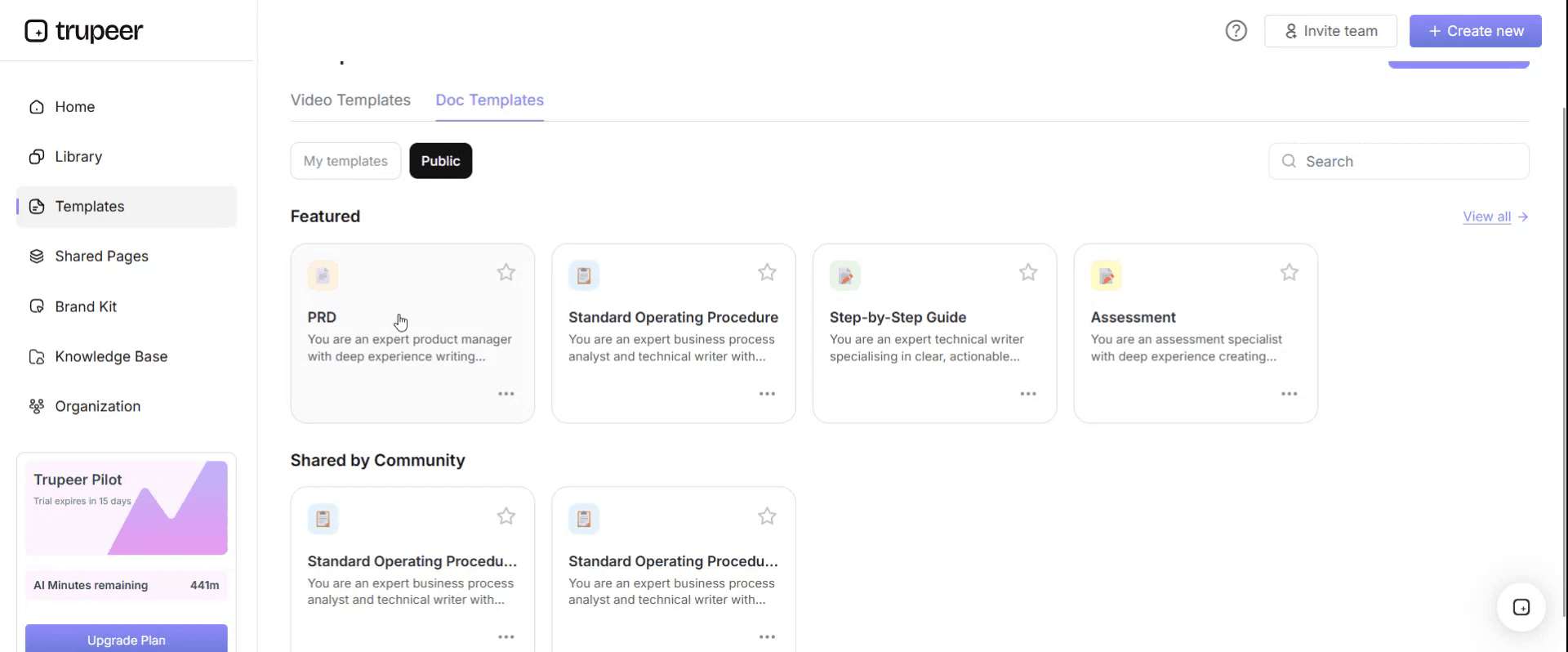
Step 3: Expand the Template View
If needed, expand the template view to see the full layout and details clearly.

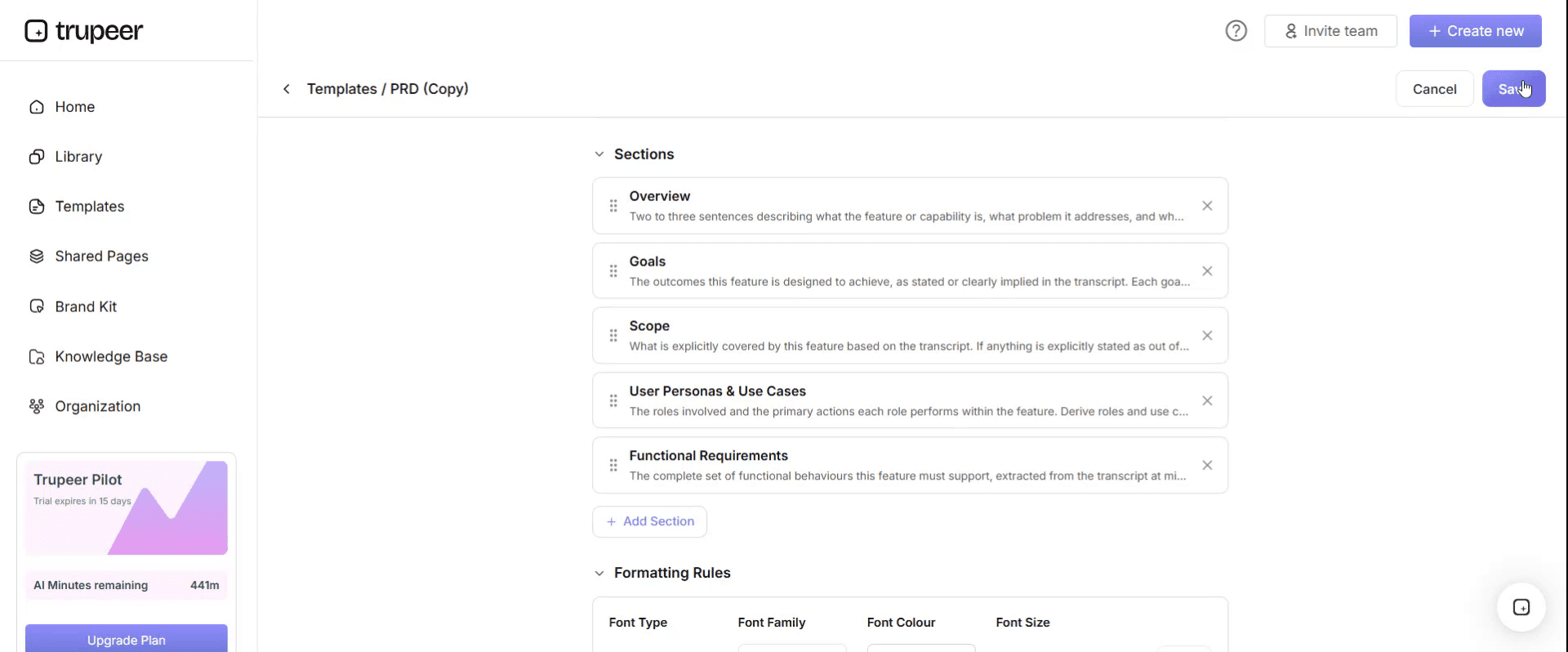
Step 4: Edit the Template
Click on Edit to start modifying the selected template.

Within the editor, you can:
Add new sections
Define or update formatting rules
Add a logo and adjust its position and related settings
Step 5: Save Your Customized Template
After making all necessary changes, click Save to store the updated template as your own.
Step 6: Preview and Fine-Tune the Template
When you want to see how your customized template looks, open the Preview.

From the preview screen, you can continue to make adjustments directly if needed, ensuring the template appears exactly as you want.
With a fit-gap analysis template you can:
Start from evidence, not memory: Link each requirement to a recording of how the process runs today.
Rate every requirement consistently: Fit, partial fit or gap, with a clear definition of each.
Resolve gaps the right way: Prefer configuration and process change over custom code.
Make scope decisions visible: Show leaders what changes and what it costs.
Feed design, testing and training: Reuse the same rows throughout the project.
What a fit-gap analysis template must contain
Column | What to record |
|---|---|
ID | A unique reference for each requirement |
End-to-end process | Such as procure to pay, order to cash or record to report |
Process step | The specific step, such as invoice matching |
Requirement | What the business needs to do, in plain language |
As-is evidence | Link to the recording or document showing how it works today |
Standard capability | What the standard ERP process or best practice offers |
Rating | Fit, partial fit or gap |
Gap type | Configuration, process change, extension, report, interface, data or out of scope |
Resolution option | How the gap will be closed |
Effort | Estimated effort, such as low, medium or high |
Priority | Must have, should have or could have |
Business impact | What happens if the gap isn't closed |
Decision and owner | Agreed resolution, who decided and when |
Status | Open, agreed, in build, tested or closed |
Free fit-gap analysis template: the structure to copy
Copy the structure below into your own spreadsheet or document, or open it in Trupeer and customize it.
1. Summary. System: [ERP and release]. Scope: [entities, processes]. Workstreams: [finance, procurement, sales, HR]. Decision owners: [design authority, process owners]. Date: [date].
2. Rating definitions.
Rating | Definition |
|---|---|
Fit | The standard system meets the requirement with configuration only |
Partial fit | The standard meets most of the requirement; a small process change or configuration closes the rest |
Gap | The standard doesn't meet the requirement; a decision is needed on how to resolve it |
3. Fit-gap table.
ID | Process | Requirement | As-is evidence | Standard capability | Rating | Gap type | Resolution | Effort | Priority | Decision and owner | Status |
|---|---|---|---|---|---|---|---|---|---|---|---|
[FG-001] | [Process] | [Requirement] | [Recording link] | [Standard process] | [Fit / partial / gap] | [Type] | [Option] | [L/M/H] | [Must / should / could] | [Decision, owner, date] | [Status] |
4. Decision log. Every gap decision with the options considered, the reason for the choice, who approved it and the date.
5. Open questions. Questions to resolve, with owners and due dates.
6. Summary dashboard. Number of fits, partial fits and gaps by process, and gaps by type and resolution.
Fit-gap analysis example: procure to pay
Here's how part of a fit-gap analysis might look for procure to pay. The details are illustrative.
ID | Requirement | As-is evidence | Standard capability | Rating | Gap type | Resolution | Priority |
|---|---|---|---|---|---|---|---|
FG-014 | Three-way match for goods invoices | Recording of AP clerk matching invoices | Standard three-way match with tolerances | Fit | Configuration | Configure tolerances | Must have |
FG-015 | Approve non-PO invoices by cost centre owner | Recording of current email approvals | Standard approval workflow | Partial fit | Configuration and process change | Use standard workflow; retire email approvals | Must have |
FG-016 | Custom supplier scorecard report | Spreadsheet and recording of monthly review | Standard supplier evaluation analytics | Partial fit | Process change | Adopt standard analytics; drop two legacy measures | Should have |
FG-017 | Pay one supplier group by local payment method | Recording of manual payment workaround | Not supported in the standard payment formats in scope | Gap | Extension or interface | Assess a payment provider interface | Must have |
FG-018 | Monthly manual accrual spreadsheet | Recording of accrual preparation | Standard accrual capabilities | Partial fit | Process change | Move to standard accruals | Should have |
Each "as-is evidence" link points to a short recording of the real process, so the design team can see exactly what's done today, including exceptions.
Gap types and how to resolve them
Gap type | What it means | Preferred resolution |
|---|---|---|
Configuration | The standard can do it with settings | Configure; it's a fit, not really a gap |
Process change | The business can adopt the standard way of working | Change the process and train people; usually the best long-term option |
Report | Information isn't available in standard reports | Use standard analytics first; build only if essential |
Interface | Data must flow to or from another system | Use standard integration options before custom ones |
Data | Data structures or migration need changes | Address in data migration design |
Extension | The standard can't support a genuine business need | Build as a separate, upgrade-safe extension where possible |
Out of scope | The requirement isn't needed or is handled elsewhere | Record the decision and the reason |
Ask three questions for every gap before agreeing to build: is the requirement a real business need or a habit, can the business adopt the standard process, and what will the extension cost to maintain through future upgrades? In SAP programmes, teams often group development objects as RICEFW (reports, interfaces, conversions, enhancements, forms and workflows) to estimate build effort.
How to run a fit-gap analysis step by step
Define scope and the process list, using end-to-end processes and their steps.
Capture the as-is with evidence. Record subject matter experts doing their real work, including exceptions, before the workshops; see SAP S/4HANA transformation: document as-is processes first.
Write requirements from the recordings, each linked to its evidence; see ERP requirements gathering from process recordings.
Demonstrate the standard process in fit-to-standard workshops.
Rate each requirement as fit, partial fit or gap, using the definitions.
Classify each gap by type and agree the resolution option.
Estimate effort and priority, and assess business impact.
Get decisions approved by the design authority and record them in the decision log.
Feed the results into design, build, test scripts, change impact and training.
How to run a fit-to-standard workshop
A good workshop is short, focused on one process area and built on evidence gathered beforehand. A typical agenda:
Recap the as-is for the process, using the recordings and documents captured beforehand.
Demonstrate the standard process in the ERP, end to end, with realistic data.
Walk through each requirement in the fit-gap template and rate it together.
Discuss each gap: is it a real need, can the business adopt the standard, and what would an extension cost to maintain?
Agree actions and owners for open questions, and confirm which decisions need the design authority.
Send the fit-gap rows to participants in advance, keep each workshop to one process area, and update the template live so everyone sees the same result at the end.
Fit-gap analysis in greenfield and brownfield programmes
In a greenfield implementation, fit-gap analysis covers every process, because the design starts from the new system's standard. In a brownfield conversion, it focuses on what changes: simplification items, retired transactions and custom code that may no longer be needed, as well as any new processes. In both cases, the as-is evidence matters, because it shows which existing workarounds and customisations people actually rely on. For more on the two approaches, see S/4HANA greenfield vs brownfield.
Why start fit-gap from recordings?
Workshops rely on people describing their work from memory. They remember the happy path, forget the month-end exception and describe the process as it's supposed to work rather than as it does. Recordings fix that:
Exceptions and workarounds are visible, including the spreadsheets people use outside the system.
Requirements can be checked, because every row links to evidence.
Workshops move faster, because the team has already seen how the work is done.
Fewer surprises appear in testing, because the real process was captured up front.
The same recordings feed training, showing users what changes from today.
How fit-gap results feed the rest of the programme
Programme activity | How it uses the fit-gap analysis |
|---|---|
Design | Agreed fits and resolutions define the to-be process |
Build | Approved extensions and interfaces become development items |
Testing | Each requirement becomes one or more test cases |
Change management | Partial fits and process changes show where people's work changes |
Training | Each change becomes training content for the affected roles |
Benefits tracking | Process changes link to the business case |
For how changes in processes are measured afterwards, see process benchmarking with SAP Activate and Six Sigma.
Best practices for ERP fit-gap analysis
Lead with the standard, and ask the business to justify each deviation.
Link every requirement to evidence, ideally a recording of the real process.
Separate needs from habits, especially reports and approvals that exist only because the old system worked that way.
Agree rating definitions up front, so every workstream rates the same way.
Record every decision and its reason in a decision log.
Involve change and training leads early, since partial fits usually mean process change.
Common mistakes to avoid
Running workshops from memory with no as-is evidence.
Treating every difference as a gap that needs custom code.
No owner for decisions, so gaps stay open until build.
Ignoring exceptions, which then appear as defects in testing.
Losing the link between requirements, design, tests and training.
Fit-gap analysis checklist
Scope and the process list are agreed.
The as-is is captured with recordings, including exceptions.
Every requirement has an ID, an owner and linked evidence.
Rating definitions are agreed and applied consistently.
Every gap has a type, a resolution option, effort and priority.
Decisions are approved and recorded with reasons.
Results are linked to design, build, testing and training.
How Trupeer helps your fit-gap analysis start from evidence
Fit-gap challenge | How Trupeer helps |
|---|---|
Workshops rely on memory | SMEs record their real processes, and Trupeer turns each recording into a step-by-step as-is document with screenshots |
Exceptions are missed | Recordings capture the workarounds and spreadsheets people use outside the system |
Requirements can't be traced | Each fit-gap row links to the recording and document it came from |
Teams in different countries need the same evidence | Translate as-is documents and videos into 65+ languages |
Training starts late | The same recording approach produces training on the new system once it's configured |
For SAP programmes, see how Trupeer creates SAP training from recordings with the SAP training video generator.
Genpact used this recording-first approach for a company-wide Workday rollout, turning recorded process sessions and SME walkthroughs into more than 500 training collaterals across 20 workstreams in five languages, for 140,000 employees in 40 countries, in 3 months instead of 12. Read the Genpact customer story.
Download the free fit-gap analysis template
Open the template in Trupeer, add your processes and requirements, link your as-is recordings and share it with your programme team. Get the free fit-gap analysis template.
Related templates
ERP end user training plan template
Frequently Asked Questions
What is a fit-gap analysis template?
It's a structured table for comparing business requirements with what a standard system offers, recording for each requirement the as-is process, the standard capability, a fit or gap rating, the gap type, the resolution, effort, priority and the decision.
What's the difference between fit-gap analysis and fit-to-standard?
Fit-to-standard starts from the standard system and asks the business to justify deviations, as in SAP Activate's Explore phase. Fit-gap analysis is the record of the results: what fits, what doesn't and how each gap is resolved.
What should a fit-gap analysis include?
A summary, rating definitions, a fit-gap table with requirements, as-is evidence, standard capability, rating, gap type, resolution, effort, priority, decision and status, plus a decision log, open questions and a summary dashboard.
How do you resolve gaps in an ERP implementation?
Prefer configuration and process change first, then standard reports and integrations, and build extensions only for genuine business needs, ideally in an upgrade-safe way.
Why should fit-gap analysis start from recordings?
Recordings show how work is really done, including exceptions and workarounds, so requirements are based on evidence rather than memory and fewer surprises appear in testing.
Does this template work for SAP, Oracle and Workday?
Yes. The structure works for any ERP. For SAP S/4HANA it fits the fit-to-standard workshops in the Explore phase of SAP Activate.
Is there a fit-gap analysis template in Excel?
Yes. The fit-gap table works well in Excel so you can filter by process, rating and gap type. Open the template in Trupeer, customize it and export it, or copy the structure into Excel.
Is there a fit-gap analysis template in Word or PDF?
Yes. Use Word for the summary, decision log and approvals, and export a PDF of the approved fit-gap analysis for sign-off records.
Is the fit-gap analysis template free?
Yes. Sign up free to open the template in Trupeer, customize it and export it.
Who should own the fit-gap analysis?
The solution architect or programme design lead owns the template, process owners own the requirements and decisions in their areas, and the design authority approves gap resolutions.
How long does a fit-gap analysis take?
It depends on scope. Capturing the as-is with recordings before workshops usually shortens the workshops and reduces follow-up sessions.
What is RICEFW in a fit-gap analysis?
RICEFW stands for reports, interfaces, conversions, enhancements, forms and workflows. SAP teams use it to categorise development objects that come out of fit-gap decisions.


