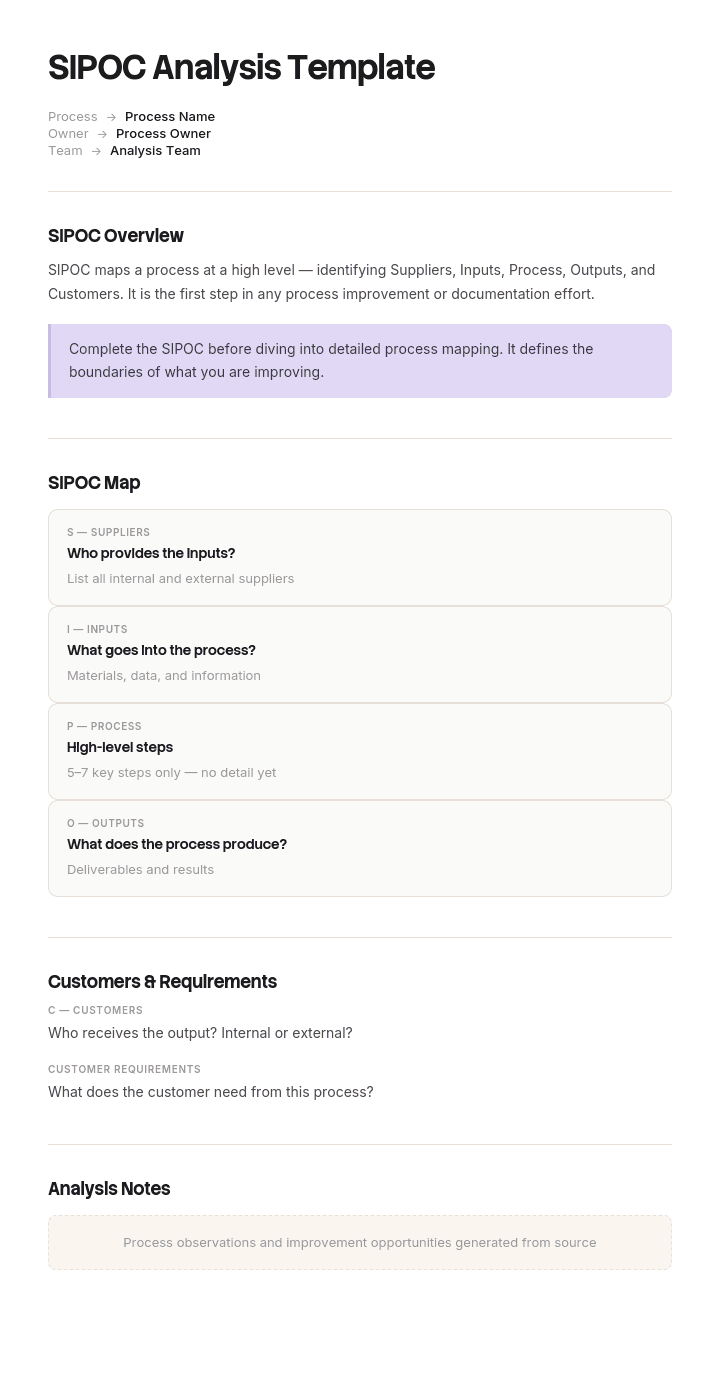
Use this template
SIPOC is one of the most useful tools in the Lean and Six Sigma toolkit - it scopes a process clearly before deep mapping begins. With Trupeer, you can save hours on SIPOC analysis by starting with a free SIPOC template, customizing it with your brand guidelines, and turning the analysis into video summaries that align stakeholders.
What is a free SIPOC analysis template?
A free SIPOC analysis template is a reusable one page structure for describing a process at a high level: its suppliers, its inputs, the process itself in a handful of steps, its outputs, and its customers.
It comes from the Six Sigma tradition and belongs at the very start of an improvement project, before anybody maps in detail or collects data. Its purpose is agreement rather than analysis. Everyone who will work on the process looks at one page and finds out whether they were thinking about the same thing, which they usually were not.
The template is not the analysis. Five columns take two minutes to draw, and most published templates are exactly that. What decides whether the exercise is worth anything is a part of the document that many templates omit entirely, covered below.
Format follows use. A free SIPOC analysis template PPT layout suits the workshop where it gets built, because it goes on a screen in front of a group. A free SIPOC analysis template Excel version suits the version you keep and edit afterwards. A free SIPOC analysis template Word file suits a SIPOC embedded in a project charter or a report.
What does SIPOC stand for?
Five words, read left to right.
Suppliers. Who provides the inputs. Internal teams, external vendors, customers themselves, or systems.
Inputs. What those suppliers provide. Information, materials, approvals, data, requests.
Process. The process itself, in five to seven steps. Not a detailed map, a high level summary that a stranger could follow.
Outputs. What the process produces. Documents, products, decisions, services.
Customers. Who receives those outputs. The next process, another team, or an actual paying customer.
The name is the reason it gets filled in badly, which is the subject of two sections further down. Reading order and completion order are not the same thing.
How to customize this template in Trupeer
Step 1: Open the Templates Section
Go to the Templates section from the main navigation.

Step 2: Select and Open a Template
Click on any template you want to work with to open it.

Step 3: Expand the Template View
If needed, expand the template view to see the full layout and details clearly.

Step 4: Edit the Template
Click on Edit to start modifying the selected template.

Within the editor, you can:
Add new sections
Define or update formatting rules
Add a logo and adjust its position and related settings
Step 5: Save Your Customized Template
After making all necessary changes, click Save to store the updated template as your own.

Step 6: Preview and Fine-Tune the Template
When you want to see how your customized template looks, open the Preview.

From the preview screen, you can continue to make adjustments directly if needed, ensuring the template appears exactly as you want.
With a SIPOC analysis template you can:
Save hours on scoping: Skip the blank page with a proven SIPOC structure.
Align stakeholders fast: Built-in SIPOC sections capture every key element.
Stay on-brand: Apply your logo, fonts and colors using Trupeer's brand kit.
Scope process work clearly: SIPOC is the foundation for downstream process mapping.
Standardize across projects: Use the same template for every Lean Six Sigma initiative.
Reach global teams: Translate SIPOC analyses into 65+ languages with one click.
The two boxes nobody fills in
Here is what a SIPOC is genuinely for, and it is not the five columns.
Every improvement project needs an agreed answer to two questions before anybody does anything else. Where does this process start, and where does it stop.
Those two answers determine what is in the project and what is somebody else's problem. They determine what gets measured. They determine, entirely, whether the team is looking at the same thing. And in most organisations, if you ask five people on a project team separately, you will get three or four different answers.
That divergence is invisible in normal conversation, because everyone uses the same words. "The quotation process" sounds unambiguous until you discover that one person's version begins when a customer emails and another's begins when a technically complete enquiry lands on their desk, with several days of chasing in between that only one of them can see.
A SIPOC forces the question into the open, provided the template has somewhere to put the answer. Many do not. They give you five columns and no boundary declaration, so the boundary stays assumed.
Put two boxes at the top of the page. Almost no free SIPOC analysis template free download includes them, which is why the boundary usually stays assumed.
Process starts when: a single trigger event, stated in observable terms. Not "when the customer needs a quote" but "when an enquiry arrives in any channel".
Process ends when: a single completion event. Not "when the customer is satisfied" but "when the quote is sent".
Then run the test. Ask each team member separately, before the workshop, to write down their own answer to both. Bring the answers to the session. The gap between them is the most useful information the exercise will produce, and it takes ten minutes to collect.
What a SIPOC template must contain
Seven components. Two of them are the boundary boxes above.
Component | What it does |
|---|---|
Process name | The name people actually use, not a formal one nobody says aloud. |
Process starts when | A single observable trigger. |
Process ends when | A single observable completion event. |
The five columns | Suppliers, inputs, process, outputs, customers. |
Requirements against inputs and outputs | What good looks like for each. The step from a diagram to something useful. |
Owner and date | Who owns the process, and when this version was agreed. |
Known disputes | Anything the group could not agree, recorded rather than smoothed over. |
The requirements row is what separates a SIPOC that informs an improvement project from one that decorates a charter. An input listed as "customer drawings" tells you nothing. An input listed as "customer drawings, in a readable format, with tolerances specified" tells you what to measure and where the process is likely failing.
The known disputes row is unusual and worth keeping. Workshops produce consensus under time pressure, and the item somebody conceded at four in the afternoon is frequently the item the project later turns on.
Free SIPOC analysis template: the structure to copy
Filled with a real example rather than placeholders. The process is producing a customer quotation in a components manufacturer.
Copy from here.
Process name. Quotation. Known internally as quoting.
Process starts when: an enquiry arrives from a customer, by any channel including phone, email and the web form.
Process ends when: the quotation is sent to the customer.
Owner. Sales Operations Manager. Version 2, agreed 14 April by the full project team.
The five columns.
Suppliers | Inputs | Process | Outputs | Customers |
|---|---|---|---|---|
Customer | Enquiry with part description | 1. Log enquiry and assign reference | Quotation document | Customer |
Customer | Drawings and specifications | 2. Check technical completeness | Quote reference and log entry | Sales team |
Sales team | Commercial terms and volumes | 3. Chase any missing information | Cost breakdown | Estimating records |
Estimating | Standard cost data | 4. Produce cost estimate | Lead time commitment | Production planning |
Production planning | Current capacity and lead times | 5. Apply margin and approve | Finance, for pipeline | |
Engineering | Manufacturability assessment | 6. Produce and send quotation |
Requirements against inputs.
Drawings must be legible, dimensioned and include tolerances. Volumes must state annual quantity and call off pattern. Capacity data must be no more than five working days old.
Requirements against outputs.
Quotation must be sent within three working days of a technically complete enquiry. Must state validity period and lead time. Cost breakdown must be retrievable for twelve months.
Known disputes. Recorded rather than resolved.
Two members of the group consider step three to be part of the sales process rather than the quotation process. Recorded as a disagreement. For the purposes of this project it is included, because the delay occurs there.
Copy to here.
That last entry is the most valuable line on the page, and the reason for it is the example below.
SIPOC example: fourteen weeks optimising the wrong five days
Halverton Components, a manufacturer of about four hundred and fifty people, ran an improvement project on its quotation process. Quotes were taking eleven working days on average against an internal target of three, and the sales director could point at lost enquiries.
The team had seven people, drawn from sales, estimating, engineering and production planning. They ran for fourteen weeks. They collected data properly, mapped the process, and trialled two changes to the estimating stage.
The average moved from eleven days to ten and a half.
The reason took another month to find. The team had never agreed where the process started.
Estimating, engineering and production planning all understood the quotation process to begin when a technically complete enquiry arrived: drawings legible, tolerances specified, volumes stated. That is a reasonable definition and it is the point at which their work becomes possible.
Sales understood it to begin when the customer first made contact.
Between those two points sat an average of six days, spent chasing customers for drawings that were unreadable, specifications that omitted tolerances, and volumes nobody had stated. Four of the seven team members had no visibility of that period at all, because in their model of the process it had not started yet.
So fourteen weeks of effort went into the five days everybody could see, and the six days containing the largest delay were outside everybody's map.
Someone eventually drew a SIPOC and, before the session, asked the seven team members individually to write down where the process started and where it ended.
They got four different answers.
The redefined boundary put the start at an enquiry arriving by any channel and the end at the quote being sent. Remapped on that basis, the chase period became the obvious target. The fixes were unglamorous: a single intake point instead of three, and a completeness checklist applied at first contact rather than at estimating.
Eleven days became four, over nine weeks, having achieved almost nothing in the previous fourteen.
Nobody had been wrong about the process. Four people had been right about four different processes.
How to create a SIPOC diagram in seven steps
Ask each participant separately where the process starts and ends. Before the session, in writing. This is step one for a reason.
Open the workshop with those answers. Do not resolve them yet. Let the group see the spread, because that is the moment the exercise becomes worth attending.
Agree the two boundary statements. Observable events, not intentions. Everything else follows from this and nothing before it matters.
Write the process steps. Five to seven, high level, in the order they happen. If you need more than seven, your boundary is too wide.
Work outward to outputs and customers. Covered in the next section.
Then inputs and suppliers. For each input, name the supplier and what good looks like.
Record what you could not agree. Do not smooth it over to finish on time.
Steps one and two are where most of the value sits and are the two most commonly skipped, because they take place before the meeting and no template prompts them.
Fill it in from the right
The five columns are read left to right and are best completed right to left: customers, then outputs, then process, then inputs, then suppliers.
The reason is that starting from suppliers defines a process by whatever currently feeds it, which builds today's arrangement into the description before anyone has questioned it. Starting from customers defines it by what it is for, which is the only stable reference point.
It also produces better entries. A team that starts with customers has to name them specifically, and vagueness here is diagnostic. If the customer column says "the business" or "internal stakeholders", nobody has thought about who this process serves, and an improvement project on a process with no identified customer will struggle to say what better means.
Work outward in both directions from the process steps and the columns tend to fill themselves, because each step obviously requires something and obviously produces something.
When to use SIPOC analysis
At the start, and specifically at three moments.
Defining an improvement project. The classic use, in the define phase of a DMAIC project, before mapping or measurement. Its function is to agree scope, and a project that skips it usually rediscovers the boundary question in week six.
Onboarding people to a process. A SIPOC is the fastest way to give somebody the shape of a process before they see any detail. Considerably more useful for this than a detailed map, which is unreadable to a newcomer.
Before a handover between teams. Two teams describing the same process on one page will discover their disagreements in an hour rather than during the transition.
When not to bother. If the process is genuinely well understood and uncontested, a SIPOC will produce a page everybody agrees with and nothing will change. It earns its place where there is ambiguity, and the honest signal is whether anybody in the room is surprised by anything on it.
SIPOC template variants
The variants differ in detail and in medium rather than in substance.
Basic SIPOC. Five columns, five to seven process steps, one page. Correct for most purposes.
Detailed or expanded SIPOC. Adds requirements against inputs and outputs, and sometimes measures. Worth the extra effort, because requirements are what make the diagram actionable.
Swimlane SIPOC. Adds who does each step, either horizontally or vertically. Useful where a process crosses several functions, which is where boundary disagreements live, so this variant pairs naturally with a contested process.
SIPOC slide. The same content laid out for presentation, which is what most searches for a SIPOC template PPT free download are after. Produce it from the working version rather than maintaining it separately, and note that a free SIPOC analysis template PowerPoint file and a PPT one are the same thing.
SIPOC map. Closer to a process map with SIPOC columns attached. At this point you are usually better served by a proper process map with the SIPOC kept as the one page summary.
The best free SIPOC analysis template is therefore the simplest variant that surfaces the disagreement. Detail added before the boundary is agreed is detail you will redo.
SIPOC, process map or value stream map?
Three tools at different resolutions, frequently confused and complementary rather than competing.
A SIPOC is one page and answers what this process is, where it starts and stops, and who it serves. Built in an hour, by a group, to reach agreement.
A process map shows every step, decision and handoff in sequence. Built over days, usually by walking the process, and used to find where work waits or gets redone.
A value stream map adds time and volume to a process map, distinguishing time spent working from time spent waiting. Built over weeks and used where flow rather than any individual step is the problem.
The sequence runs in that order and skipping the first is what produced the Halverton result. A process map drawn without an agreed boundary is a detailed picture of a disputed subject.
What a free SIPOC analysis template cannot fix
A boundary the organisation genuinely disputes. Sometimes the disagreement about where a process starts reflects a real disagreement about who owns it. The SIPOC surfaces that and cannot settle it, and pretending otherwise wastes a workshop.
A process nobody can describe. If the group cannot produce five steps, the problem is not the template. Either the process varies so much that there is no single version, which is itself the finding, or nobody in the room actually performs it.
Vague customers. No SIPOC template Excel free download will stop you writing "the business" in the customer column. Only someone in the room asking who specifically will.
Consensus reached by attrition. Workshops finish on time by conceding. Record the concessions, because the item conceded at four in the afternoon has a habit of returning.
Show the process rather than describing it
A SIPOC gives you the process in five to seven steps, which is exactly the right resolution for agreeing scope and exactly the wrong resolution for improving anything.
The next question is always what actually happens inside step four, and the answer is usually different from what anybody believes. That gap between the described process and the performed process is where improvement projects find their material, and it is expensive to close by interviewing people, because people describe what they intend to do.
Trupeer AI closes it directly. Have somebody perform the step once while recording, and the output is a written walkthrough with screenshots already captured and placed, alongside a video, in your own branding. What you get is the process as performed, including the workaround nobody mentions in a workshop because they no longer notice it.
Record it. Brand it. Translate it. Trupeer it.
Two things follow that matter for improvement work. Recording several people performing the same step reveals variation immediately, and variation is frequently the thing worth fixing rather than the step itself. And once the process is improved, the same recording becomes the documentation for the new way, so the improvement is captured rather than depending on whoever was in the project.
The material sits in your knowledge base and doubles as training for the people who have to work the new process. Step level detail belongs in the work instructions underneath the SIPOC. Consistency across your documents is a matter of setting the brand kit once, and setup is covered in the document template setup guide.
Frequently Asked Questions
Is there a free SIPOC analysis template PPT version?
Slides are the natural home for the workshop itself, because a SIPOC is built by a group looking at one screen. A free SIPOC analysis template PPT layout with five columns and two boundary boxes above them is all you need.
Put the process starts and process ends boxes at the top where they are unavoidable. On most published slide templates they do not exist, and adding them is the single change that makes the session work.
Where can I get a SIPOC template PPT free download?
Plenty are available and they are almost interchangeable, because five columns on a slide is not a design problem. A SIPOC template PPT free download will give you the layout in seconds.
Check one thing before using it in a session. Does it have somewhere to write where the process starts and stops? If not, add two text boxes. That takes thirty seconds and is worth more than the rest of the template combined.
Is there a free SIPOC analysis template PowerPoint version?
Yes, and a free SIPOC analysis template PowerPoint file is the same thing as a PPT one. Use it for the workshop and for the version that goes into a project charter or a steering pack.
Keep the working copy elsewhere. Slides are hard to edit repeatedly and a SIPOC gets revised as the project's understanding improves, so a spreadsheet or document version usually becomes the master after the first session.
Is there a free SIPOC analysis template Excel version?
Excel suits the version you keep. A free SIPOC analysis template Excel file handles the five columns as five columns, lets you add requirements against each input and output, and is easy to revise when the boundary changes.
It is less good in the workshop itself, where a slide or a whiteboard works better because people are pointing at things. Build it in the room, transfer it afterwards.
Where can I get a SIPOC template Excel free download?
Widely available, and the structure is simple enough that building your own takes about five minutes. A SIPOC template Excel free download saves you those five minutes and imports whatever assumptions its author made.
The two additions worth making to any of them are the boundary statements and a requirements column against inputs and outputs. Neither appears in most published templates and both are what turn a diagram into something a project can use.
Is there a free SIPOC analysis template Word version?
Word suits a SIPOC that lives inside a larger document, such as a project charter, a business case or an improvement report. A free SIPOC analysis template Word file with the five columns as a table works well for that.
Keep the table to one page. A SIPOC spilling onto a second page has stopped being a summary, which is its only job.
Is there a free SIPOC analysis template free download worth using?
The layout takes five minutes to build, so a free SIPOC analysis template free download saves very little and most of them omit the boundary boxes entirely.
If you use one, judge it on a single question. Does it prompt you to state where the process starts and ends? Everything else on a SIPOC template is five columns, which nobody needs help with.
What is the best free SIPOC analysis template?
The best free SIPOC analysis template is whichever one has the boundary statements on it, because that is the part that produces the argument worth having.
If you are comparing options, ignore the styling. All SIPOC templates look broadly the same and the quality of the output depends on how the session is run rather than on the file. Ask people where the process starts before the meeting, and the plainest template will outperform the most polished one.


