Trupeer Blog
Summarise

You've invested months, maybe even years, preparing your ERP system for go-live. The stakes are high. A successful launch can simplify operations, reduce costs, and enhance productivity. However, the true success of an ERP go-live hinges on one critical aspect: training. Without effective training, your employees might struggle, leading to reduced efficiency and costly errors. According to a recent study,
companies that invest in comprehensive training prior to ERP go-live see a 43% improvement in user adoption rates.
This statistic underscores the importance of having the right training materials ready. But what exactly should this training content include? This guide is for project managers, IT leaders, and training coordinators who need to ensure their teams are fully prepared to use the new system from day one. The following sections outline why ERP go-live readiness matters, the benefits of comprehensive training, key features of Trupeer that support training efforts, and more. to the specifics! Teams weighing tools often start with a Loom alternatives comparison before standardizing on a workflow.
Why does ERP go-live training readiness matter?
An ERP system is a significant investment for any organization, often running into millions of dollars. But the real challenge isn’t just in implementing the technology; it’s in ensuring that your team can use it efficiently. When a company is not prepared for ERP go-live, it can lead to operational disruptions, frustrated employees, and a decline in productivity. This is why training videos use case are critical to prepare for this significant transition. Without proper training, employees are more likely to revert to old processes, negating the benefits of the new system. The same process can feed straight into the training manual template, so you're not putting it together separately.
Also, inadequate training can result in data errors, which can be costly and time-consuming to correct. The pressure is on CIOs and IT managers to ensure that the transition is as smooth as possible. The ability to swiftly navigate the new ERP system is essential for maintaining business continuity. It also reduces the dependency on IT support, freeing up resources for other critical tasks. Thus, effective training becomes the backbone of a successful ERP go-live, enabling your team to use the full potential of the system from the very start.
What are the benefits of ERP go-live training readiness?
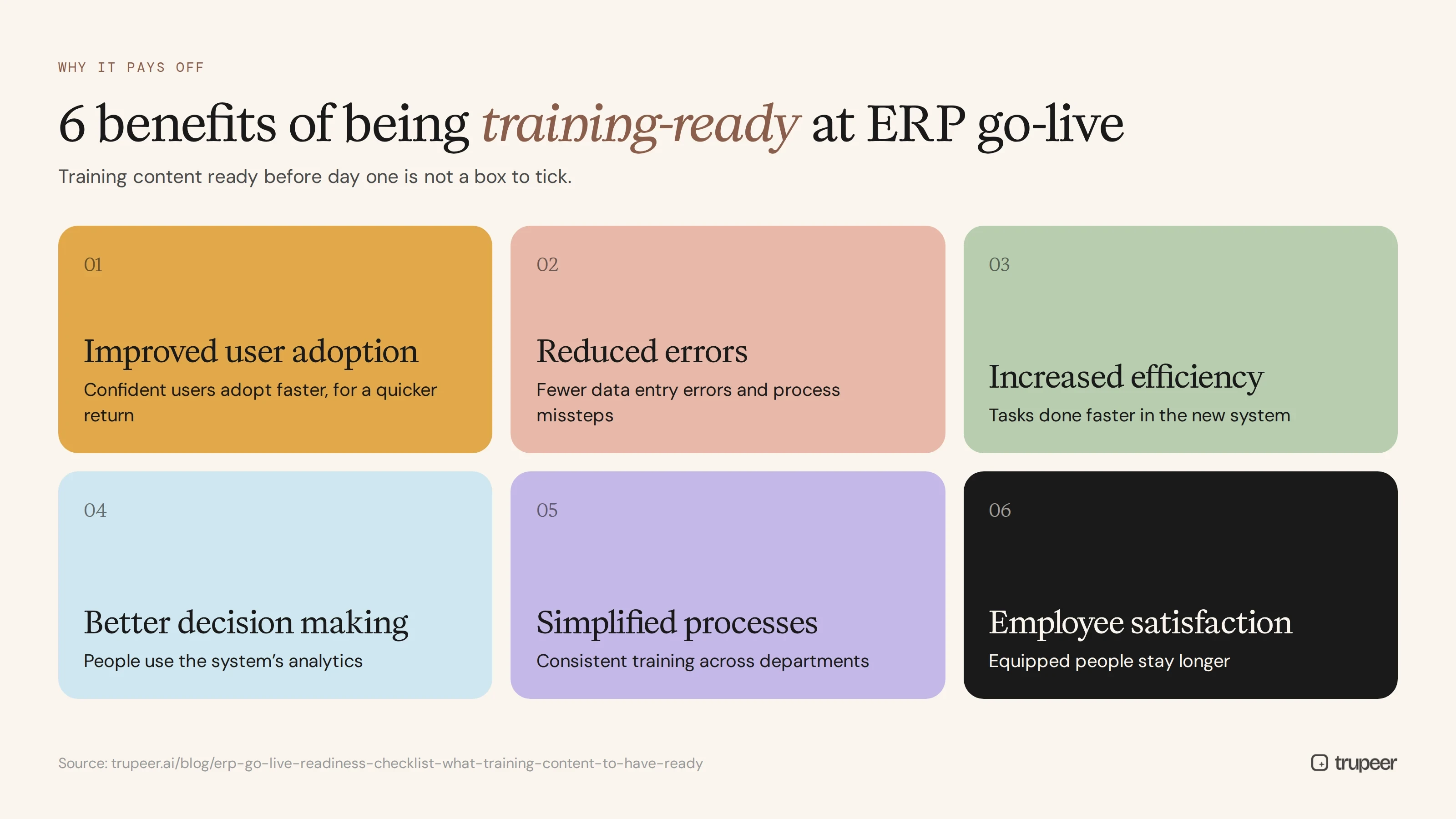
Having your training content ready for ERP go-live is not just a box to check off. It offers tangible benefits that can significantly impact your organization’s success.
Improved User Adoption. Training ensures that employees are comfortable and confident using the new system, leading to increased user adoption rates and a faster return on investment.
Reduced Errors. Well-prepared training material minimizes data entry errors and process missteps, saving your organization time and money.
Increased Efficiency. Employees who know how to use the ERP system effectively can complete their tasks more quickly, improving overall business efficiency.
Better Decision Making. Training enables employees to use the system’s analytics capabilities, leading to more informed and timely business decisions.
simplified Processes. A single AI video platform can simplify the learning process, ensuring that training is consistent and comprehensive across all departments.
Enhanced Employee Satisfaction. When employees feel equipped to use new technology, job satisfaction increases, which can lead to higher retention rates.
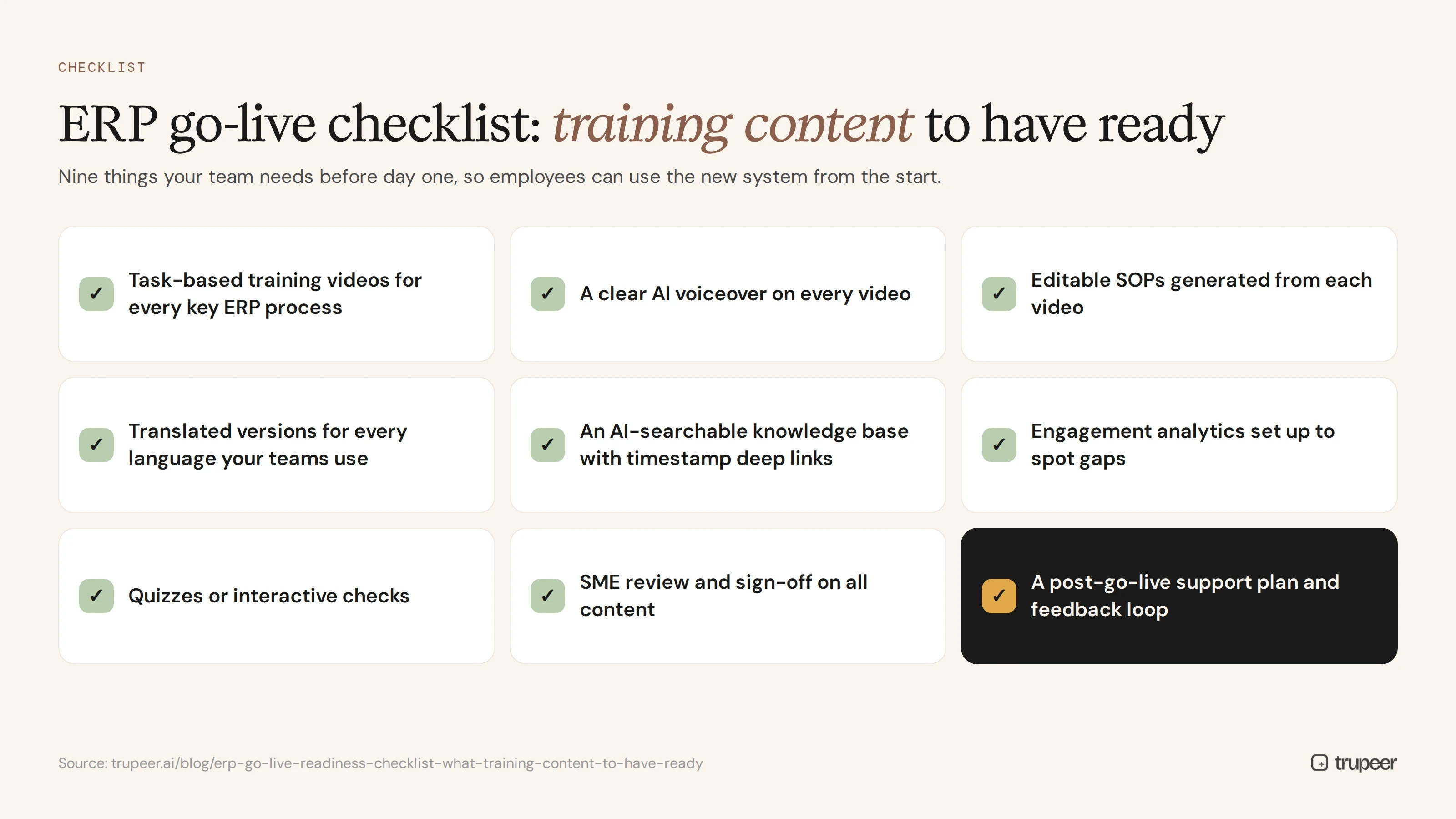
Which Trupeer features help you prepare for ERP go-live training?
Trupeer offers a suite of features designed to make your ERP go-live training as effective and smooth as possible. These tools ensure that your team is well-prepared to handle the new system with confidence.
AI screen recording with auto-zoom and click detection
This feature allows you to create detailed and engaging training videos quickly. The AI automatically detects clicks and zooms, ensuring that important details don’t go unnoticed. This is especially useful for creating AI training video sessions that replicate real-life scenarios employees will encounter. You can highlight specific steps and actions within the ERP system, making it easier for employees to follow along and understand the process.
Automatic SOP generation from any recording
Creating Standard Operating Procedures (SOPs) manually can be time-consuming. Trupeer’s automatic SOP generation feature transforms any training video into editable text documents. This allows you to provide your team with comprehensive written instructions alongside video content. These auto-generated documentation are easy to update and export, ensuring that all employees have access to the latest procedures at all times.
AI translation into 40+ languages with lip-sync
Trupeer’s AI translation feature ensures your training content is accessible to a global workforce. By translating videos into over 40 languages, you can cater to non-English speaking employees, ensuring they receive the same quality of training. The lip-sync technology aligns translated audio with the speaker’s lip movements, providing a natural viewing experience. This is crucial for multinational companies aiming to maintain consistent training standards across regions.
AI-searchable knowledge base with timestamp deep-links
Trupeer’s AI-searchable knowledge base allows employees to find the information they need quickly. Each training video is indexed with timestamp-level deep links, enabling users to jump directly to the relevant section. This feature saves time and reduces frustration, as employees don’t have to search through entire videos to find specific content. It also supports continuous learning by allowing easy access to all training resources.
Viewer engagement analytics, drop-off, and heatmaps
Understanding how your team engages with training materials is vital for improving content and identifying knowledge gaps. Trupeer’s analytics feature provides insights into which parts of the videos are watched or skipped. Heatmaps show where viewers drop off, allowing you to refine your training videos to keep employees engaged. These insights are invaluable for optimizing your training strategy and ensuring that your team gets the most out of the content provided.
How do you prepare for ERP go-live training step by step with Trupeer?

Step 1: Record the Training Session
Begin by using Trupeer’s AI screen recording with auto-zoom and click detection. This tool is accessible via a browser-based recorder, requiring no installation, or through the desktop app. Start the recording session by clicking the "Record" button, and let the AI automatically zoom in on important details and detect clicks, ensuring that your viewers won't miss critical steps. This process typically takes as long as the actual training session, but the AI enhancements ensure clarity and focus on key actions, making it an efficient way to capture training content directly from your ERP system.

Step 2: Enhance the Recording with AI Voiceover
Once your recording is complete, use Trupeer’s AI voiceover feature, which offers over 65+ natural voices. You can adjust the pace and tone to match your training style. Select the "Voiceover" option and choose a voice that best suits your audience. The AI will automatically sync the narration with the video content, providing a professional and polished training resource. This enhancement, which can be completed in a matter of minutes, ensures that your training video is engaging and easy to understand, regardless of the viewer's learning style.

Step 3: Generate SOPs from the Video
Transform your training video into a comprehensive Standard Operating Procedure (SOP) with Trupeer’s automatic SOP generation feature. After recording, simply click "Generate SOP" to create an editable document that complements your video content. This document is exportable in various formats like PDF and HTML, making it accessible for all team members. The automatic SOP feature allows you to provide text-based instructions alongside the video, catering to different learning preferences and reinforcing key processes for your ERP go-live.

Step 4: Translate the Content for a Global Audience
For multinational teams, translating your training content is essential. Use Trupeer’s AI translation into 40+ languages with lip-sync feature. Select "Translate" and choose the desired languages. The AI ensures that translated audio aligns with the speaker's lip movements, providing a natural and coherent viewing experience. This step can take a bit longer, depending on the length of the video, but it guarantees that all employees, regardless of language, receive the same quality training.

Step 5: Create an AI-Searchable Knowledge Base
Store your training videos in Trupeer’s AI-searchable knowledge base. Upload your video and take advantage of timestamp deep-links, which make specific content easy to find. This feature allows employees to search for particular topics or steps and jump directly to those sections within the video. It simplifies the learning process and is invaluable for ongoing reference, reducing the need for repeated explanations and ensuring that the entire team can access crucial training information efficiently.

Step 6: Analyze Viewer Engagement and Feedback
Finally, use Trupeer’s viewer engagement analytics to assess how your training content is received. Access the analytics dashboard to review heatmaps, drop-off rates, and engagement metrics. Identify parts of the video that may need refinement or additional clarity. This data-driven approach ensures continuous improvement of your training materials, optimizing them for future sessions. Understanding engagement levels enables you to make informed decisions about your training strategy, ensuring it meets your team's needs effectively.

What tips help you prepare for ERP go-live training?
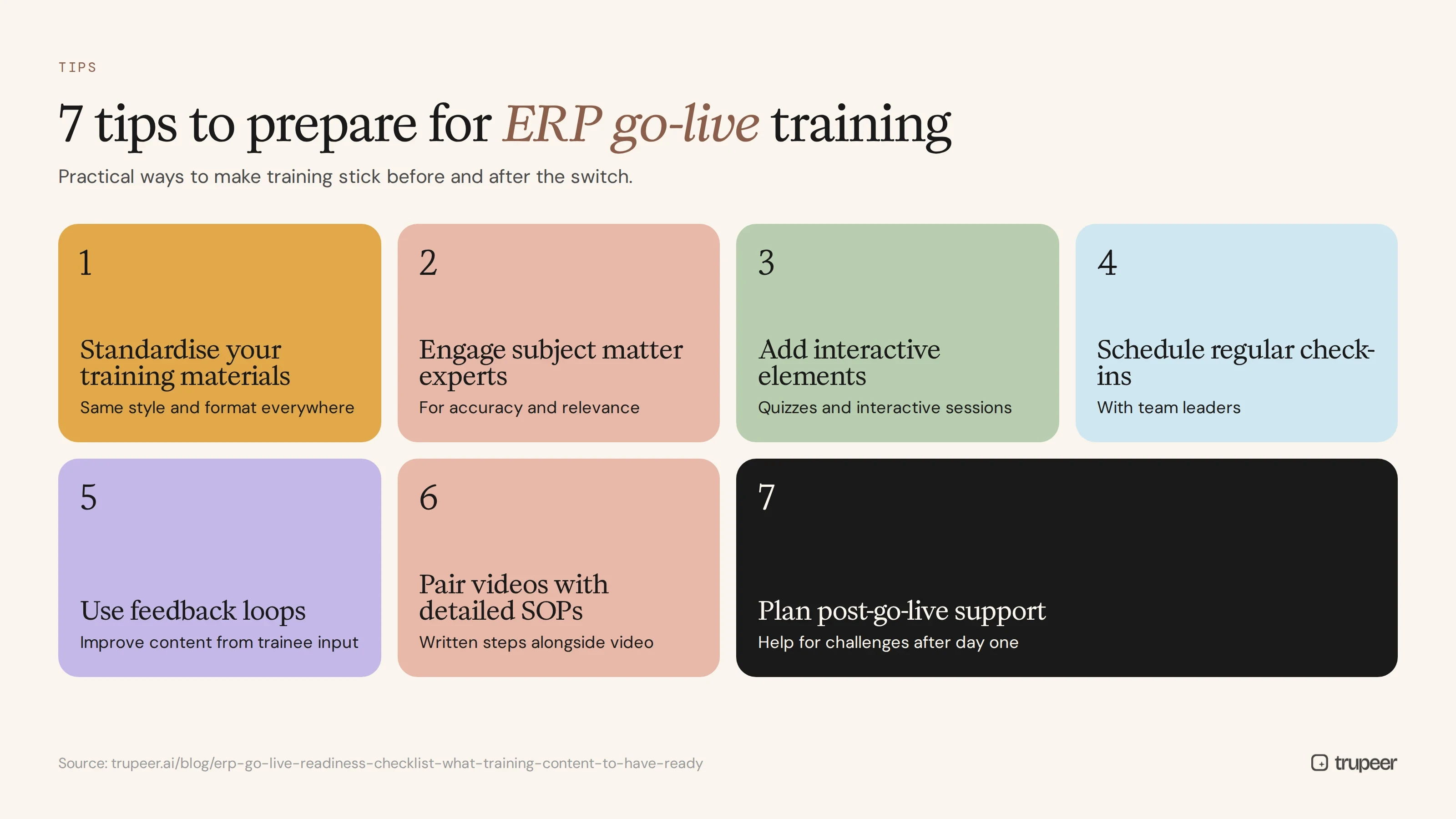
Preparing for ERP go-live training requires strategic planning and attention to detail. Here are some practical tips to enhance your training process and ensure a smooth transition.
Standardize Your Training Materials. Use a training video generator tool to maintain consistency in style and format across all training content.
Engage Subject Matter Experts. Involve key stakeholders in the training development process to ensure accuracy and relevance.
Incorporate Interactive Elements. Use quizzes or interactive sessions within your training to enhance engagement and retention.
Schedule Regular Check-ins. Set up periodic reviews with team leaders to address any training-related issues promptly.
use Feedback Loops. Implement a system for collecting feedback from trainees to continuously improve the training material.
use a Scribe Alternative. Consider a Scribe alternative comparison for creating detailed SOPs that align with your video content.
Plan for Post-Go-Live Support. Establish a support system to assist employees with any challenges they face after the go-live date.
Frequently asked questions
How do I ensure my training content is effective for ERP go-live?
Effectiveness can be gauged through a combination of pre-go-live testing and post-launch feedback. Conduct pilot sessions to gather initial feedback and make necessary adjustments. After the go-live, monitor user engagement metrics and collect feedback to identify areas for improvement. Trupeer’s analytics tools provide insights into viewer behavior, helping you refine your training content to better meet your team’s needs.
What are the common challenges of ERP go-live training?
Common challenges include resistance to change, inadequate user adoption, and lack of engagement. These can be mitigated by involving end-users early in the training process and tailoring content to address their specific concerns. also, using multiple content formats, such as video, written SOPs, and interactive elements, can cater to diverse learning preferences, improving overall effectiveness and adoption rates.
Can Trupeer's AI tools assist in multilingual training?
Yes, Trupeer’s AI translation feature supports multilingual training by translating content into over 40 languages, complete with lip-sync technology. This ensures that all employees, regardless of their primary language, receive the same quality of training. This capability is particularly useful for global companies aiming to maintain consistent training standards across different regions.
Does Trupeer offer solutions for post-go-live support?
Trupeer provides a solid support framework through its AI-searchable knowledge base, where training content can be easily accessed and referenced. This feature allows employees to revisit training materials and quickly find answers to their questions, reducing dependency on IT support and facilitating smoother post-go-live operations. Regular updates and additions to the knowledge base ensure it remains a valuable resource.
What role does feedback play in optimizing ERP go-live training?
Feedback is crucial for continuous improvement. It provides insights into what works and what doesn’t, allowing you to adjust your training strategy accordingly. Encourage trainees to share their experiences and suggestions. Analyze this feedback alongside engagement analytics to identify patterns and areas for enhancement. This iterative process helps create training content that is both effective and responsive to user needs. For global audiences, adding AI video translation extends the same workflow across 40+ languages with lip-sync.



