4.8/5
صانع فيديوهات تعليمية بالذكاء الاصطناعي
أنشئ دروسًا تعليمية في دقائق باستخدام صور رمزية بالذكاء الاصطناعي، وتعليقات صوتية، وأدلة خطوة بخطوة.

تبدو مقاطع الفيديو التعليمية الجيدة، على نحوٍ غريب، غير مرئية. لا يعلّق عليها أحد. لا يحجز أحد مكالمات تدريب إضافية بسببها. لا يرسل أحد رسالة في سلاك «أنا عالق في الخطوة الرابعة» بعد مشاهدتها مرتين. الناس ببساطة يتبعون العملية ويمضون قدمًا.
أما الشروحات السيئة فتعلن عن نفسها فورًا.
يتوقف الموظف الجديد عن مشاهدة الفيديو كل ثلاثين ثانية لأن الشاشة لم تعد تطابق ما يراه. يواصل العملاء فتح تذاكر الدعم بسبب شيء شرحتْهُ تقنيةً فيديو الإعداد الأولي. يقول أحد أفراد التدريب: «لديّ يبدو مختلفًا»، لأن سير العمل تغيّر قبل إصدارين ولم يتم تحديث التسجيل أبدًا.
وهنا عادةً تصبح عملية إنشاء الشروحات مُحبِطة. ليس لأن تسجيل سير عمل صعب، بل لأن الحفاظ على فائدة محتوى الشرح يتحول سريعًا بشكلٍ مفاجئ إلى عمل متكرر.
تتحول جولة تعريفية قصيرة للإعداد الأولي إلى شرح دعم للعملاء. ويُعاد استخدام تسجيل عملية للتدريب. يطلب شخص ما إضافة تسميات لأن جزءًا من الفريق يشاهد بلا صوت. تتغير واجهة المنتج مرة أخرى مع الإصدارات. فجأة يحتاج «فيديو كيف-تفعل ذلك السريع» إلى تعديلات، وإصلاحات في السرد، وتكبيرات، وإبرازات، وتصديرات جديدة، وجولة أخرى من الشرح لأن النسخة الأصلية خرجت بهدوء عن تحديثها.
تم تصميم صانع فيديوهات الشروحات من Trupeer خصيصًا لهذا النوع من العمل. يمكن للفرق تحويل تسجيلات الشاشة أو سير العمل أو النصوص أو التعليمات الأولية إلى مقاطع فيديو تعليمية منظمة خطوة بخطوة مع السرد والتسميات التوضيحية والإبرازات البصرية والتكبيرات والتسلسل الإرشادي المدمج مسبقًا. وبهذا يبقى التركيز على مساعدة الناس على فهم شيء ما بوضوح بدلًا من إدارة جداول التحرير.
لأن معظم الأشخاص الذين ينشئون مقاطع فيديو تعليمية يحاولون التدريس. وليس أن يصبحوا محرري فيديو.
تتعطل الفيديوهات التعليمية عندما يتوقف الناس عن متابعتها
تفشل معظم الفيديوهات التعليمية أولًا بطرق صغيرة. يفوّت المشاهد نقرة واحدة، فيتوقف باقي سير العمل عن أن يصبح مفهومًا. يعيد أحدهم المقطع لأن المؤشر تحرك بسرعة كبيرة. يصل الشرح بعد خمس ثوانٍ من الشيء الذي كان من المفترض أن يلاحظه. يفترض تسجيل الشاشة معرفةً مسبقة لا يملكها أحد فعلًا.
ثم يعود السؤال نفسه إلى الدعم مرة أخرى.
تقلل الفيديوهات التعليمية الجيدة من الارتباك عبر توجيه الانتباه في اللحظة المناسبة. ينبغي أن يعرف المشاهد ما الذي تغيّر، وأين ينقر، ولماذا يهم شيء ما، وما الذي يحدث بعد ذلك دون أن يشعر بالضياع في منتصف الطريق. وهذا يعني عادةً أن الإيقاع، والتسميات التوضيحية، والتأكيد البصري، والتسلسل خطوة بخطوة، والسرد كلها تعمل معًا بهدوء في الخلفية.
ينظم Trupeer الفيديوهات التعليمية حول هذه التجربة في الفيديوهات والأدلة، بحيث يقضي المشاهدون وقتًا أقل في إعادة المقطع ووقتًا أكثر في المتابعة. ويبدو الفرق صغيرًا حتى يُكمل شخص ما سير العمل فعلًا دون طلب المساعدة.
لماذا نحتاج إلى صانع فيديوهات الشروحات؟
يتطلب إنشاء الفيديوهات التعليمية تنسيق التقاط الشاشة، وتسجيل الصوت، والتحرير، والتسميات التوضيحية، والتنسيق عبر أدوات متعددة، ما يستهلك أيامًا في أمرٍ يفترض أن يستغرق دقائق. يعيد المدربون إنشاء المحتوى نفسه مرارًا كلما تغيّرت العمليات. وتؤدي جودة الشروحات غير المتسقة إلى إرباك المتعلمين وزيادة طلبات الدعم.
تواجه الفرق صعوبة مع عروض الشرائح الثابتة أو التعليمات النصية التي تفشل في جذب المتعلمين البصريين. كما أن إضافة الملاحظات اليدوية والإبرازات يبطئ الإنتاج بشكل كبير. ويصبح توسيع محتوى الشرح للميزات الجديدة أو اللغات أو الجماهير أمرًا مستحيلًا دون فريق فيديو مخصص أو وكالات.
ما الذي يفعله صانع فيديوهات الشروحات هذا
يحلل صانع فيديوهات الشروحات من Trupeer التسجيلات أو النصوص لتنظيم المحتوى تلقائيًا إلى خطوات مرقمة مع تعليقات صوتية بالذكاء الاصطناعي، وتسميات توضيحية، وتكبيرات، وتنبيهات مرئية، وانتقالات. تحدد الأداة الإجراءات الأساسية، وتولّد سردًا توضيحيًا، وتنتج مقاطع تعليمية متكاملة محسّنة للتفاعل والاحتفاظ بالمعلومة.
القدرات الأساسية
تحويل نشاط الشاشة إلى تسلسلات تعليمية خطوة بخطوة
إنشاء تعليقات صوتية وتسميات توضيحية متزامنة تلقائيًا
إضافة إبرازات بصرية، وملاحظات، ومؤشرات تقدم
تصدير الشروحات بصيغ متعددة لأنظمة إدارة التعلم والمواقع الإلكترونية والدعم
كيف يعمل صانع فيديوهات الشروحات من Trupeer
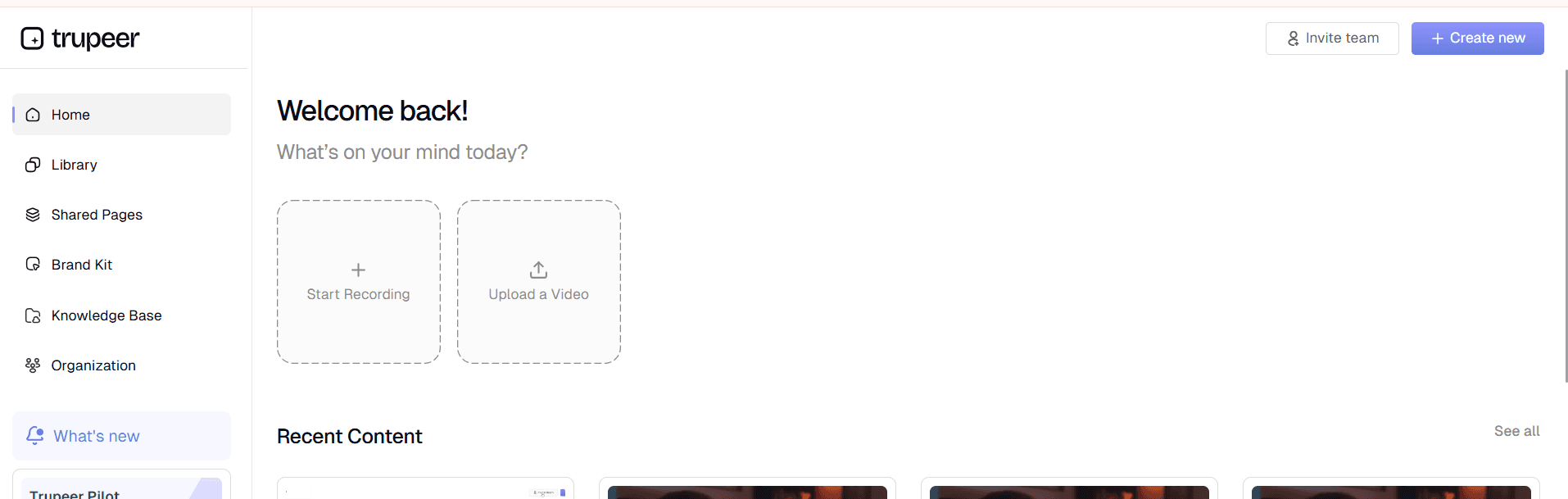
الخطوة 1: التسجيل أو الرفع
التقط سير العمل على شاشتك أو ارفع تسجيلًا/نصًا موجودًا.
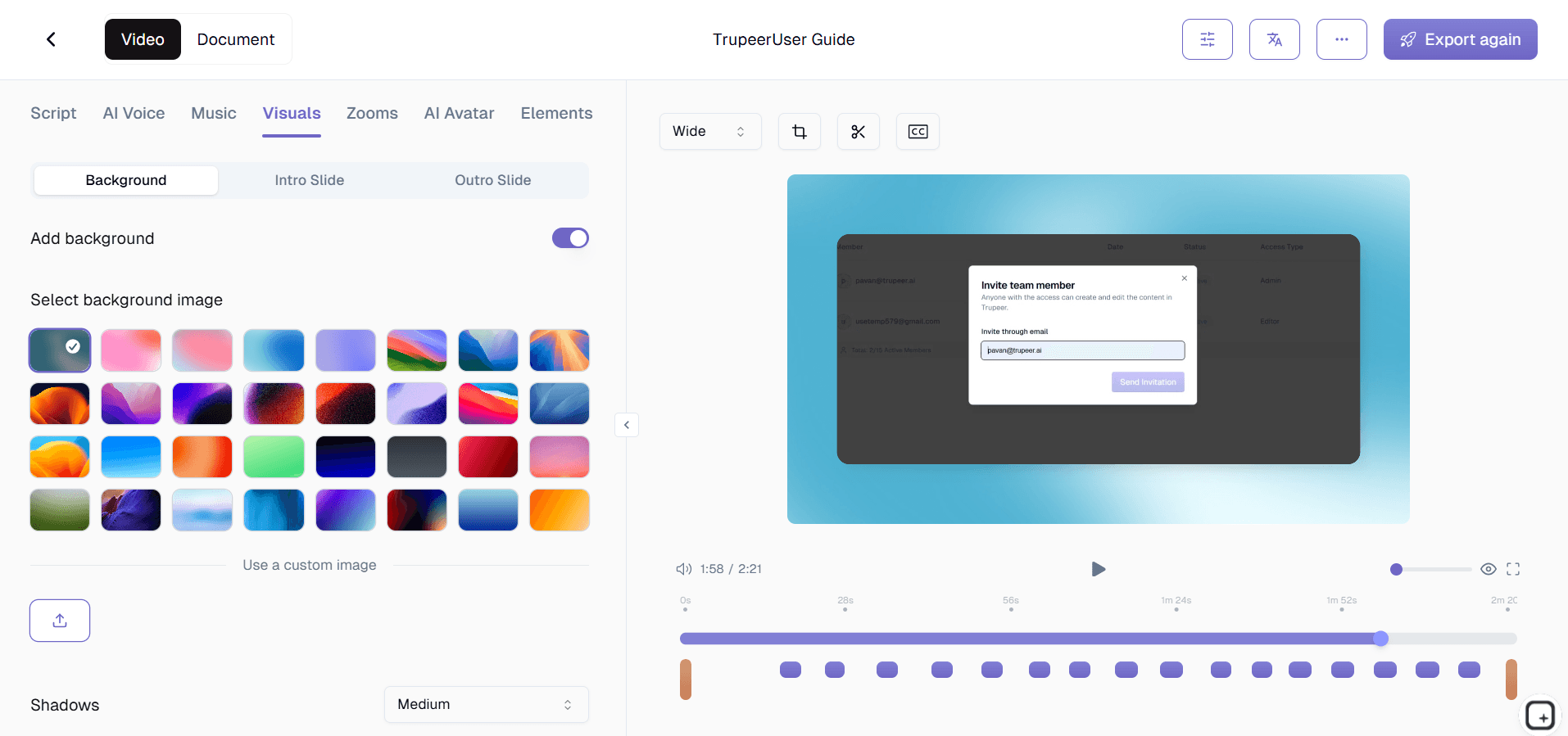
الخطوة 2: ينظم الذكاء الاصطناعي الشرح
تقوم الأداة بتقسيم المحتوى إلى خطوات مع السرد والتسميات التوضيحية والإبرازات.
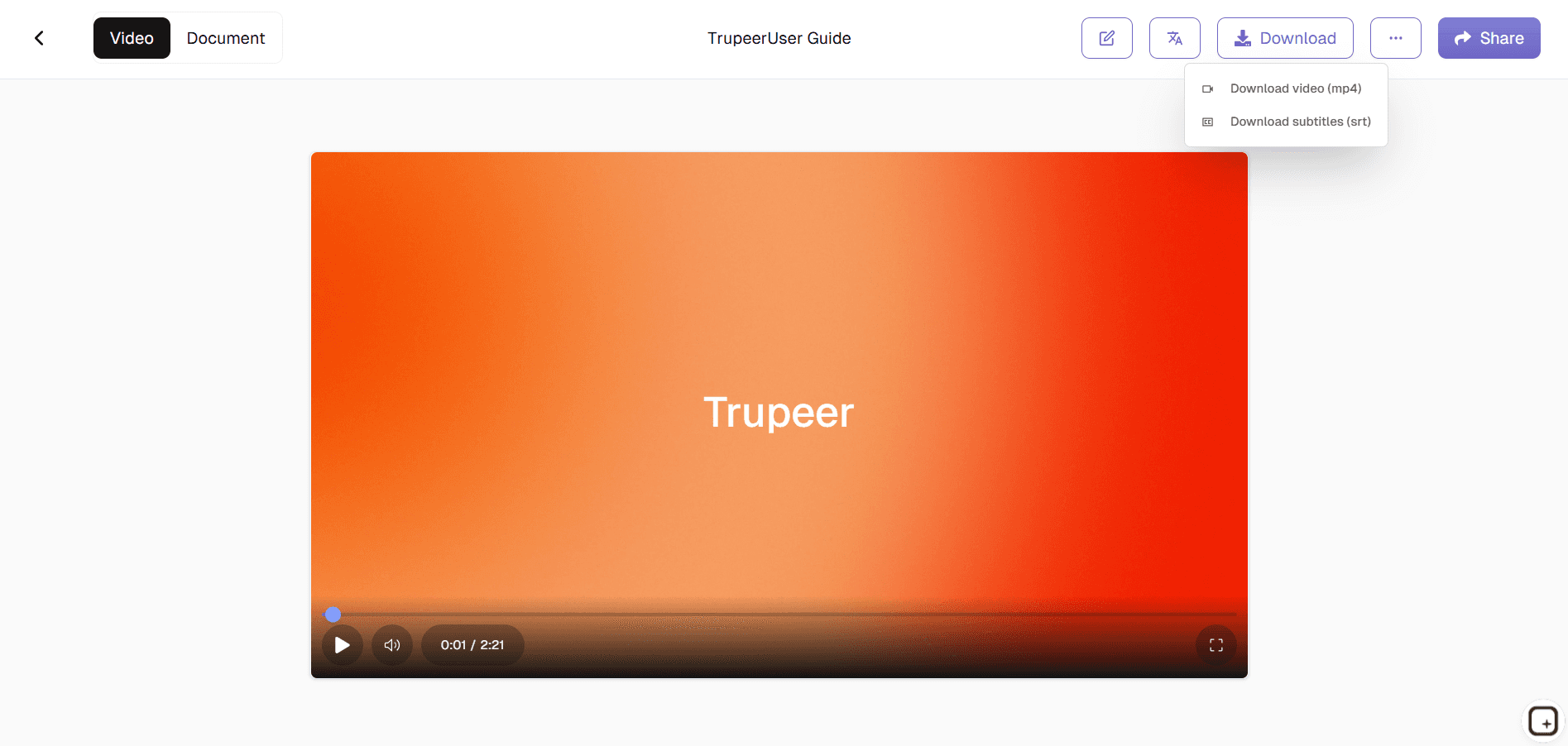
الخطوة 3: التخصيص والنشر
عدّل التوقيت والعلامة التجارية، ثم صدّر فيديو الشرح الكامل.
لمن صُمم صانع فيديوهات الشروحات من Trupeer
يخدم صانع فيديوهات الشروحات من Trupeer أي شخص ينشئ محتوى تعليميًا ويحتاج إلى نتائج احترافية دون خبرة في إنتاج الفيديو.
المدربون المؤسسيون وفرق التعلم والتطوير:
حوّل الجلسات الحية والعمليات إلى شروحات فيديو قابلة للتوسع وعند الطلب، تقلل تكاليف التدريب بنسبة 70% مع تحسين الاحتفاظ بالمعلومة عبر إرشاد بصري خطوة بخطوة يعمل عبر المناطق الزمنية والجداول المختلفة.
مديرو دعم العملاء:
أنشئ مقاطع مساعدة ذاتية تعرض مسارات التنقل الدقيقة للمشكلات الشائعة، مما يقلل حجم التذاكر عبر عرض الحلول بصريًا بدلًا من التعليمات النصية التي يتخلى عنها العملاء غالبًا في منتصف الطريق.
معلّمو منتجات SaaS:
ابنِ شروحات الميزات وتسلسلات الإعداد الأولي من تسجيلات الشاشة التي تبرز تغييرات واجهة المستخدم تلقائيًا، لضمان أن فرق الدعم والعملاء لديهم دائمًا شروحات حديثة ودقيقة دون إعادة إنشاء مستمرة.
المدربون التقنيون والخبراء المتخصصون:
حوّل سير العمل المعقد إلى وحدات فيديو سهلة الفهم مع شروحات مولّدة بالذكاء الاصطناعي وإشارات بصرية، ما يمكّن غير المتخصصين في الفيديو من إنتاج محتوى تدريبي احترافي يشاهده الناس ويطبقونه فعلًا.
منسقو التعلم عن بُعد:
أنشئ فيديوهات تعليمية متسقة للفرق الموزعة تغطي أدوات البرمجيات، والتدريب على الامتثال، وتوثيق العمليات، وتندمج بسلاسة في منصات LMS، والبوابات الداخلية، وقنوات التواصل.
الميزات الرئيسية لصانع فيديوهات الشروحات من Trupeer
يوفر صانع فيديوهات الشروحات إنتاجًا متكاملًا للفيديو التعليمي من المدخلات الخام إلى محتوى جاهز للمتعلم، مع إلغاء كل خطوات التحرير اليدوي.
اكتشاف الخطوات وترقيمها تلقائيًا:
يحلل الذكاء الاصطناعي نشاط الشاشة لتحديد نقاط التوقف المنطقية ويرقم كل خطوة تعليمية تلقائيًا مع مؤشرات التقدم والطوابع الزمنية وعلامات الفصول، بحيث يعرف المتعلمون دائمًا موقعهم ويمكنهم الانتقال إلى أقسام محددة بسهولة.
إرشاد بصري ذكي:
تضيف الأداة تكبيرات ديناميكية، وإبرازات، ومؤشرات، وتنبيهات بدقة في المواضع التي تحدث فيها الإجراءات الأساسية، فتوجه انتباه المتعلم إلى عناصر واجهة المستخدم والتفاعلات المهمة دون الحاجة إلى ملاحظات يدوية أو تعديلات على التوقيت.
سرد متعدد اللغات متزامن:
تولّد تعليقات صوتية طبيعية في أكثر من 50 لغة مع توقيت مثالي لمزامنة حركة الشفاه للجمهور العالمي، بما في ذلك التسميات التوضيحية والنصوص المولدة تلقائيًا، بحيث تعمل الشروحات عبر المناطق المختلفة واحتياجات الوصول وتفضيلات التعلم.
نظام قوالب بعلامة تجارية:
يطبق تنسيقًا موحدًا وشعارات وألوانًا وتسلسلات مقدمة/ختام على مكتبات الشروحات بالكامل بتطبيق واحد، مما يضمن أن المعرفة المؤسسية تحافظ على لمسة احترافية مهما كان من ينشئ الوحدات الفردية.
استكشف الأدوات ذات الصلة
فوائد استخدام أداة Trupeer لإنشاء فيديوهات تعليمية
إنشاء فيديو سريع
وفّر ساعات من خلال إنشاء دروس تعليمية في دقائق باستخدام أتمتة الذكاء الاصطناعي.
جودة احترافية
أضف صورًا رمزية واقعية، وأصواتًا طبيعية، ومرئيات نظيفة لبرامج تعليمية جذابة.
تخصيص سهل
حرّر النص، واضبط التوقيت، وخصّص الشروحات التعليمية لتناسب علامتك التجارية.
أنشئ فيديو تعليميًا باستخدام Trupeer
الخطوة 1
ارفع نصك أو سجله
الخطوة 2
أضف صورة رمزية بالذكاء الاصطناعي والتعليق الصوتي
الخطوة 3
تصدير ومشاركة
الأسئلة الشائعة
1. ما هو مُنشئ فيديوهات الشرح من Trupeer؟
أداة Trupeer لإنشاء فيديوهات الشروحات هي أداة مدعومة بالذكاء الاصطناعي صُممت لمساعدتك على إنشاء فيديوهات شروحات منظمة وعالية الجودة. فهي تقوم بأتمتة التحرير والتعليق الصوتي وتصميم التنسيق، مما يجعلها مثالية للمعلمين وفرق المنتجات والمدربين.
2. هل يمكنني إنشاء فيديوهات تعليمية مجانًا؟
نعم، توفر Trupeer نسخة مجانية من أداة إنشاء فيديوهات الشروحات تتيح لك تسجيل وإنشاء ومشاركة شروحات قصيرة. تتوفر الميزات المتقدمة مثل السمات المخصصة للعلامة التجارية، والقوالب المميزة، وعمليات التصدير الأطول ضمن خطط Pro.
3. كيف يعمل صانع فيديوهات الدروس التعليمية بالذكاء الاصطناعي؟
يستخدم صانع فيديوهات الدروس التعليمية بالذكاء الاصطناعي نصك أو تسجيل الشاشة لإنشاء درس إرشادي تلقائيًا. ويضيف الخطوات، والتعليقات التوضيحية، والانتقالات، والتعليق الصوتي، محولًا مدخلاتك الأولية إلى فيديو تعليمي مصقول في غضون دقائق.
4. هل Trupeer مناسب لـ SaaS وشروحات المنتجات؟
بالتأكيد. يُستخدم Trupeer على نطاق واسع من قِبل فرق SaaS لإنشاء دروس تعليمية للبرامج، وأدلة التهيئة، وعروض الميزات. تجعل قدراته الذكية في التسجيل والتحرير منه خيارًا مثاليًا لشرح مسارات العمل الرقمية.
5. كيف يمكنني تصدير مقاطع الفيديو التعليمية أو مشاركتها؟
بمجرد اكتمال فيديو الشرح، يمكنك تنزيله بصيغ MP4 أو WebM، أو إنشاء رابط قابل للمشاركة، أو تضمينه في المواقع الإلكترونية ومنصات التدريب. كما يدعم Trupeer أيضًا تصدير الفيديوهات إلى YouTube وVimeo وعمليات التكامل مع أنظمة إدارة التعلم (LMS).


