استخدم هذا القالب
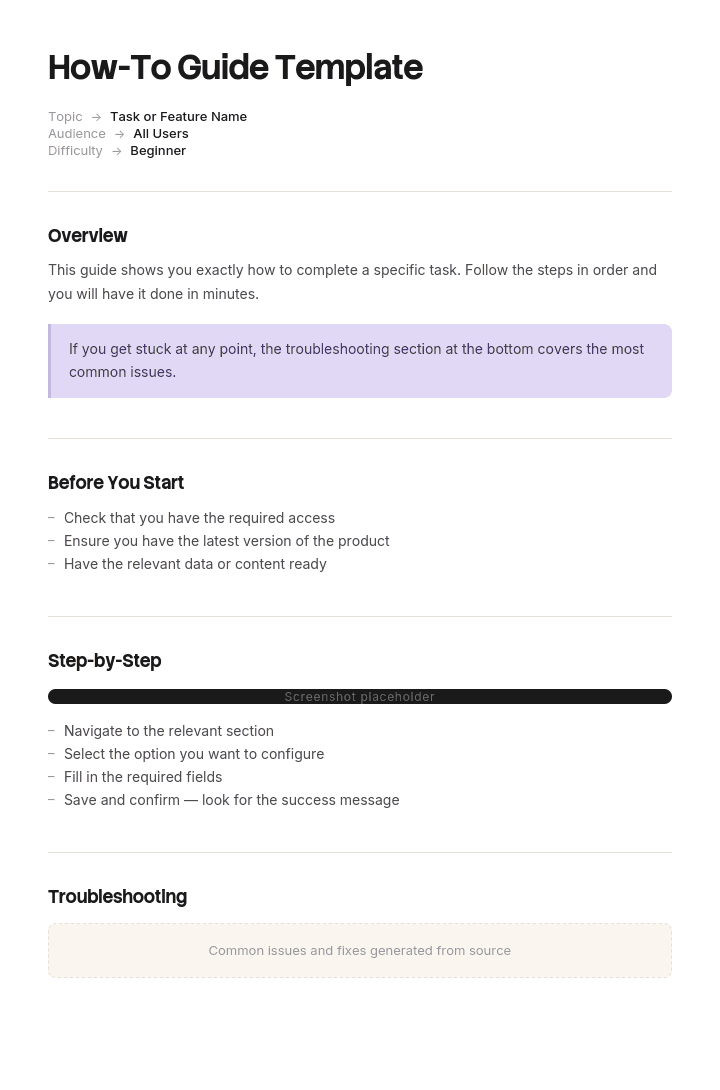
تُعد أدلة “كيفية” من أكثر أنواع المحتوى فائدةً وأكثرها بحثًا على الويب. باستخدام Trupeer، يمكنك توفير ساعات في كتابة أدلة “كيفية” من خلال البدء بقالب دليل “كيفية” مجاني، وتخصيصه باستخدام إرشادات العلامة التجارية الخاصة بك، وتحويل كل دليل إلى برنامج تعليمي فيديو جذاب.
كتابة الخطوات الفردية هي الجزء السهل من الدليل. الجزء الصعب هو تحديد ما الذي يجب أن يتضمنه، وبأي ترتيب، ومتى يتوقف.
إذا أخطأت في هذه الأمور الثلاثة، ستقع في الفشل الشائع: مستند من أربعين صفحة يغطي كل شيء، ولا يقرأه أحد، ليُستبدل خلال شهر بشخص يسأل زميلًا.
حمّل قالب دليل “كيفية”
التنسيق | الأفضل لـ |
|---|---|
Word (.docx) | الدليل نفسه، مع المحتويات والأقسام وتنسيق الخطوات |
النسخة الموزعة والطباعة وتسليمها لشخص ما | |
PowerPoint (.pptx) | تقديم الدليل كجلسة تدريب |
Excel (.xlsx) | قائمة المهام المستخدمة لتحديد النطاق وترتيبها قبل الكتابة |
Google Docs | إعداد المسودة مع الشخص الذي يقوم بالعمل |
مجاني وقابل للتعديل وبدون علامة مائية. ملف Excel يستحق أن تبدأ به أولًا، لأن تحديد النطاق هو الجزء الذي يحدد ما إذا كان الدليل سيعمل بالفعل.
كيفية تخصيص هذا القالب في Trupeer
الخطوة 1: افتح قسم القوالب
انتقل إلى قسم القوالب من القائمة الرئيسية.

الخطوة 2: اختر قالبًا وافتحه
انقر على أي قالب تريد العمل عليه لفتحه.

الخطوة 3: وسّع عرض القالب
إذا لزم الأمر، وسّع عرض القالب لعرض التخطيط الكامل والتفاصيل بوضوح.

الخطوة 4: عدّل القالب
انقر على “Edit” لبدء تعديل القالب المحدد.

داخل المحرر، يمكنك:
إضافة أقسام جديدة
تحديد أو تحديث قواعد التنسيق
إضافة شعار وضبط موضعه والإعدادات ذات الصلة
الخطوة 5: احفظ قالبك المخصص
بعد إجراء جميع التغييرات اللازمة، انقر على “Save” لتخزين القالب المحدّث كقالبك الخاص.

الخطوة 6: المعاينة والضبط الدقيق للقالب
عندما تريد معرفة كيف يبدو قالبك المخصص، افتح “Preview”.

من شاشة المعاينة، يمكنك الاستمرار في إجراء التعديلات مباشرة عند الحاجة، لضمان ظهور القالب تمامًا كما تريد.
باستخدام قالب دليل “كيفية” يمكنك:
توفير ساعات في الكتابة: تخطَّ الصفحة الفارغة ببنية مصممة لمحتوى “كيفية”.
تحسين تحسين محركات البحث (SEO): تحصل أدلة “كيفية” المُنظمة جيدًا على ترتيب ممتاز في نتائج البحث.
الالتزام بالهوية البصرية: طبّق شعارك وخطوطك وألوانك باستخدام حزمة العلامة التجارية في Trupeer.
تقليل تذاكر الدعم: تساعد أدلة “كيفية” الواضحة المستخدمين على حل المشكلات بأنفسهم.
إضافة شروحات فيديو: تضمين فيديو للخطوات التي يصعب شرحها عبر النص.
الوصول إلى قراء عالميين: ترجمة أدلة “كيفية” إلى أكثر من 65 لغة بنقرة واحدة.
دليل أم مقال؟
مستندان مختلفان، واختيار النوع الخاطئ يضيّع الجهد.
دليل “كيفية” | مقال “كيفية” | |
|---|---|---|
يشمل | عدة مهام مترابطة | مهمة واحدة |
وصول القارئ | في البداية للتعرّف على مجال ما | في منتصف المهمة، وهو عالق |
حالة القارئ | خصص وقتًا | غير صبور |
الطول | عدة أقسام مع صفحة محتويات | أقل من عشر خطوات |
المكان | مستند، أو قسم في مركز المساعدة | صفحة واحدة في مركز المساعدة |
يُعثر عليه عبر | يتم تقديمه له، أو تصفح | البحث عن المهمة المحددة |
النجاح | يمكنهم الآن تنفيذ العمل كاملًا | تم فك العائق |
إذا وصل شخص يبحث عن مهمة واحدة إلى دليلِك، فسيتعين عليه العثور على الجزء الخاص به داخل الدليل، وهي تجربة أسوأ مما كان سيحصل عليه من مقال.
النهج العملي لمعظم الفرق هو الجمع بينهما: دليل لتأهيل شخص ما على مجال معيّن، ومقالات منفصلة لكل مهمة، مع ربطها ببعضها. استخدم قالب مقال “كيفية” للقطع الفردية.
حدّد حالة البداية وحالة النهاية
قبل كتابة أي شيء، أجب بدقة عن سؤالين.
من أين يبدأ القارئ؟ ماذا يعرف مسبقًا؟ ما نوع الوصول المتاح له؟ ماذا كان قد أنجز بالفعل؟ إذا كُتب الدليل لشخص لديه سياق أكثر من القارئ الفعلي، سيفشل في الصفحتين الأوليين.
أين ينتهي؟ ليس “يفهم النظام”، بل شيء يمكن ملاحظته. “يمكنه معالجة استرداد المبلغ من البداية إلى النهاية، بما في ذلك الاستثناءات” هي حالة نهاية. “هو على دراية بوحدة الاستردادات” ليست كذلك.
كل ما في الدليل إما ينقل القارئ من البداية إلى النهاية أو يخرج منه. هذا الاختبار الواحد يزيل حوالي ثلث المحتوى من معظم المسودات الأولى.
تحديد نطاق الدليل
قائمة المهام في ملف Excel موجودة لهذا الغرض. ادرج كل مهمة في المجال، ثم قرر لكل مهمة.
المهمة | التكرار | هل في هذا الدليل؟ | لماذا |
|---|---|---|---|
معالجة استرداد قياسي | يوميًا | نعم | أساسي للوصول إلى حالة النهاية |
معالجة استرداد جزئي | أسبوعيًا | نعم | اختلاف شائع |
استرداد إلى بطاقة مختلفة | شهريًا | نعم، باختصار | نادر لكنه قد يسوء |
إلغاء استرداد مكتمل | مرتين سنويًا | رابط فقط | نادر جدًا ويحتاج إلى مقاله الخاص |
استردادات مجمعة | أبدًا، للعمليات فقط | لا | دور مختلف |
تقارير الاسترداد | شهريًا | لا | وظيفة مختلفة ودليل مختلف |
ثلاث نتائج لكل مهمة: تضمينها، أو الارتباط بها، أو تركها خارج الدليل. كتابة السبب تمنع “تسلل النطاق” للعودة لاحقًا، لأن شخصًا ما سيطلب ذلك.
أكثر خطأ شائع في تحديد النطاق هو تضمين كل شيء قد يحتاجه أي شخص على الإطلاق، ما ينتج دليلًا طويلًا جدًا للقراءة وبالتالي أسوأ في المهام الأساسية مقارنةً بدليل أقصر.
الترتيب (Sequencing)
الترتيب مهم أكثر في الدليل من أي نوع مستند آخر، لأن القارئ يمر به بشكل خطي.
المتطلبات والوصول أولًا. لا يمكن لأي شخص متابعة أي شيء حتى يتمكن من تسجيل الدخول.
أبسط مهمة كاملة بعد ذلك. إنجاز شيء واحد من البداية إلى النهاية مبكرًا يبني الثقة والسياق لكل ما يأتي بعده.
ثم الاختلافات الشائعة، مع البناء على ما يعرفونه الآن.
الاستثناءات وحالات الحافة أخيرًا. لا تصبح منطقية إلا بعد فهم المسار المعتاد.
مواد مرجعية في الخلف، وليس مبعثرة.
الغريزة التي تدفعك لشرح كل شيء قبل أن يجرّب أي شخص أي شيء هي أكثر خطأ ترتيب شائع. يحتفظ القراء بالمعلومات أكثر عندما يقومون بشيء أولًا.
بنية الدليل
القسم | المحتويات |
|---|---|
العنوان | ما الذي سيتمكن القارئ من فعله |
لمن هذا الدليل | الدور والمعرفة الابتدائية المفترضة |
ما الذي ستتمكن من فعله | حالة النهاية، بصياغة القدرات |
قبل أن تبدأ | الوصول والحسابات والمعلومات وأي شيء يلزم |
المحتويات | مع روابط الصفحات أو الأقسام |
القسم 1 إلى n | مهمة واحدة أو مجموعة مهام لكل قسم |
المشكلات الشائعة | على مستوى الدليل كاملًا، وليس لكل قسم |
المرجع | القيم والخيارات وقائمة المصطلحات |
أين تحصل على المساعدة | شخص أو قناة، مع تسمية |
الإصدار والمالك | مع تاريخ آخر مراجعة |
صفحة المحتويات ليست اختيارية في الدليل. إنها الطريقة التي يعود بها القارئ الذي قرأه مرة واحدة بالفعل للعثور على شيء واحد.
تشريح القسم
يتبع كل قسم من أقسام الدليل الشكل نفسه، ما يجعل المستند كاملًا قابلًا للتنقل.
عنوان القسم. المهمة كما يصفها القارئ.
متى ستقوم بذلك. سطر واحد من السياق. تختلف الأدلة عن المقالات هنا: القارئ يتعلم، لذا يساعد وجود إطار بسيط.
الخطوات. مرقمة، إجراء واحد لكل خطوة، ابدأ بالفعل، مع تسميات الواجهة الدقيقة.
ما الذي يجب أن تراه. النتيجة المتوقعة.
انتبه إلى. أي شيء محدد لهذه المهمة وغالبًا ما يحدث خطأ.
الاتساق عبر الأقسام أهم من البنية المثالية لأي قسم بعينه. القارئ الذي يتعلم النمط في القسم الأول ينتقل إلى القسم السابع بسرعة أكبر.
مخطط مُنجز
الدليل: معالجة الاستردادات. لـ: وكلاء دعم جدد، خلال أول أسبوعين. حالة النهاية: يمكنه معالجة أي استرداد قياسي أو جزئي دون مساعدة، ويعرف متى يجب التصعيد.
القسم | المحتوى | لماذا هنا |
|---|---|---|
قبل أن تبدأ | الوصول المطلوب والأذونات ومن يمنحها | لا شيء يعمل بدون ذلك |
1. كيف تعمل الاستردادات | فقرتان حول التدفق: التفويض والمعالجة والتسوية | أقل قدر من السياق لفهم الأخطاء لاحقًا |
2. معالجة استرداد قياسي | خطوات كاملة، مع لقطات شاشة | أبسط مهمة كاملة، يتم تنفيذها مبكرًا |
3. معالجة استرداد جزئي | خطوات، مع ملاحظة ما يختلف فقط عن القسم 2 | يبني على المعروف |
4. استردادات تتجاوز حدك | مسار التصعيد وما يجب إبلاغ العميل به | شائع، ويتم التعامل معه بشكل مرتجل دون إرشاد |
5. متى يفشل الاسترداد | الأسباب الأربعة الشائعة وما الذي يجب فعله | الاستثناءات، بعد فهم المسار المعتاد |
6. الاسترداد إلى بطاقة مختلفة | خطوات، بالإضافة إلى فحوصات الاحتيال المطلوبة | نادر، عالي المخاطر، ويجب تدوينه |
المشكلات الشائعة | حل المشكلات بشكل مُجمّع | مكان واحد للبحث |
المرجع | الحدود حسب الدور والفترات الزمنية وجدول الأكواد | عمليات البحث، في الخلف |
الحصول على المساعدة | شخص مُسمّى ومسار التصعيد | محدد |
ملاحظة للقسم 3. يغطي ما يختلف فقط عن القسم 2 بدلًا من تكرار التدفق كاملًا. الأدلة التي تعيد كتابة كل خطوة لكل اختلاف تصبح طويلة، ويُعد الطول السبب الرئيسي لعدم قراءتها.
كتابة الخطوات
القواعد نفسها لأي كتابة إرشادية، مع شرح أعمق في قالب مقال “كيفية”.
إجراء واحد لكل خطوة. ابدأ بالفعل. تسميات الواجهة الدقيقة بالحروف الكبيرة كما هي. قل أين يأتي ما قبل ماذا. ارقمها. اذكر النتيجة المتوقعة في النهاية.
الاختلاف الوحيد في الدليل: يمكنك افتراض أن القارئ قد قرأ الأقسام السابقة. لا يحتاج القسم 6 إلى شرح كيفية فتح شاشة الاستردادات إذا كان القسم 2 قد غطّاها. هذا الافتراض هو ما يجعل الدليل أقصر من مجموع مقالاته، وهو أيضًا سبب أن الدليل يخدم القارئ الذي يقرأ بشكل خطي جيدًا، بينما يخدم القارئ الذي يبحث بشكل سيئ.
اللقطات والشروحات البصرية
مزيد في الدليل مقارنةً بالمقال، لأن القارئ يتعلم وليس ينفذ، ولديه انتباه أكبر متاح.
قصّها بدقة مع تعليق خفيف، مربع أو سهم واحد.
اعرض النتيجة، وليس الزر فقط، لأي شيء تكون فيه النتيجة غير واضحة.
مخطط للتدفق العام، مرة واحدة، بالقرب من البداية. تستفيد الأدلة من وجود صورة شاملة لا توفرها المقالات الفردية.
فكّر في الصيانة. كل لقطة شاشة هي تحديث مستقبلي. دليل من أربعين لقطة شاشة هو التزام متكرر كبير، واللقطات القديمة تُضعف المستند كاملًا.
أين يجب أن يتوقف الدليل
ثلاث حدود طبيعية.
عند حد الدور. إذا كانت المهمة التالية تخص شخصًا آخر، توقف واذكر من يقوم بها.
عند حد التكرار. أي شيء يتم أقل من بضع مرات في السنة يجب أن يكون في مقال منفصل بدلًا من الدليل، لأنك لن تحتفظ به على أي حال وسيزيد من طول الدليل.
عند حد المرجع. قوائم القيم والأكواد والحدود والخيارات هي عمليات بحث وليست تعلمًا. ضعها في الخلف أو في مستند مرجعي منفصل.
إذا استمر الدليل بعد تجاوز كل الحدود الثلاثة، سيصبح دليلًا إجرائيًا (manual)، وهو مستند شرعي لكنه مختلف ويستهدف قارئًا مختلفًا.
دليل أم دليل إجرائي (Manual) أم SOP أو تعليمات عمل
دليل | Manual | SOP | تعليمات العمل | |
|---|---|---|---|---|
الهدف | جعل شخص ما قادرًا | تغطية كل شيء عن منتج أو نظام | توحيد إجراء | تنفيذ مهمة واحدة بشكل صحيح |
القراءة | مرة واحدة ثم الرجوع إليها | يُرجع إليها | يُتبع | يُتبع عند نقطة العمل |
النطاق | مجال عمل | منتج كامل | إجراء واحد | مهمة واحدة |
الفئة المستهدفة | شخص يتعلم | أي شخص، أحيانًا | الفريق الذي ينفذها | المشغّل |
يتضمن التفكير | بعض | نعم | بعض | لا |
التداخل بين الدليل والدليل الإجرائي (manual) حقيقي، والفرق العملي هو ما إذا كان مصممًا للقراءة المتتابعة. الدليل مصمم لذلك. أما الـ manual فهو مرجع يمكنك الرجوع إليه. إذا كان مستندك يقوم بالعملين معًا، فافصله، لأن البنية التي تناسب القراءة المتتابعة غير مناسبة للبحث عن المعلومات.
أما بالنسبة للآخرين: قالب دليل التدريب، قالب SOP، قوالب تعليمات العمل.
التنسيقات
Word للكتابة والمراجعة، لأن الدليل يمر بمراجعات أكثر من المقال، وتهم التعليقات.
PDF للتوزيع، خصوصًا عندما يتم تسليم الدليل لشخص ما أثناء التأهيل أو استخدامه بعيدًا عن الشاشة.
PowerPoint عندما يتم تقديم الدليل أيضًا كعرض تدريبي. قسم واحد لكل مجموعة شرائح، ويصبح مستند الدليل “المادة التي تُترك مع المتدرب”.
مركز المساعدة الخاص بك إذا كان يجب أن يكون قابلاً للعثور عبر البحث، لكن عادةً ما يكون الدليل الطويل في مركز المساعدة أفضل تقسيمه إلى مقالات مع صفحة محتويات تربطها.
Excel لقائمة المهام قبل الكتابة.
اختبار الدليل
الخطوة التي يتخطاها الناس، وهي أيضًا الخطوة الوحيدة التي تحسّنه بشكل موثوق.
قدّم المسودة لشخص يطابق حالة البداية، أي أنه جديد فعلًا على المجال وليس زميلًا لديه خبرة. اطلب منه العمل من خلاله دون مساعدة. اجلس معه ولا تقل شيئًا.
كل سؤال يطرحه هو خلل. كل تردد يشير إلى خطوة غير واضحة. كل مرة يعود فيها إلى التمرير للخلف هي مشكلة ترتيب. دوّن كل ذلك بدلًا من الإجابة.
اختبار واحد مع شخص جديد فعلًا سيحسن الدليل أكثر من ثلاث جولات مراجعة من أشخاص يعرفون المادة مسبقًا، لأن المراجعين الذين يعرفون المهمة لا يمكنهم رؤية ما ينقص.
الحفاظ عليه
تتدهور الأدلة أسرع مما تبدو عليه، لأنها تغطي عدة مهام وأي تغيير في واحدة منها يجعل جزءًا من الدليل غير صحيح.
سمِّ مالكًا. سجّل إصدار المنتج. راجع بعد أي إصدار يؤثر على المجال، وإلا فراجعه ضمن دورة ثابتة.
قم بالإصدار حسب القسم عندما تستطيع، حتى لا يتطلب تغيير مهمة واحدة إعادة إصدار المستند كاملًا. واحتفظ بملاحظة تغيير في المقدمة، لأن شخصًا قرأه قبل ثلاثة أشهر يحتاج أن يعرف ما الذي تغيّر.
الإشارة إلى أن الدليل أصبح قديمًا هي أن الناس يطرحون أسئلة يغطيها الدليل. تتبع ذلك، لأنه يعني إما أن المحتوى غير صحيح أو أن الدليل لا يتم تقديمه إلى الأشخاص الذين يحتاجونه.
أفضل الممارسات
حدّد حالة البداية وحالة النهاية قبل الكتابة.
حدّد النطاق باستخدام قائمة مهام، مع تسجيل سبب إدراج كل مهمة أو استبعادها.
أبسط مهمة كاملة مبكرًا، والاستثناءات في النهاية.
تغطي الاختلافات ما يختلف فقط عن المسار الرئيسي.
صفحة المحتويات، دائمًا.
بنية متسقة عبر الأقسام.
مواد مرجعية في الخلف، وليس مبعثرة.
توقف عند حدود الدور والتكرار والمرجع.
اختبر مع شخص يطابق حالة البداية فعلًا.
مالك واحد، دورة مراجعة واحدة، مع تدوين الإصدار.
الأخطاء الشائعة
لا توجد حالة نهاية محددة، لذلك لا يوجد نقطة توقف طبيعية للدليل.
تضمين كل شيء، ما ينتج مستندًا لا يقرأه أحد.
كل النظرية قبل أي ممارسة.
كتابة كل اختلاف بالتفصيل، ما يضاعف الطول ثلاث مرات.
لا توجد صفحة محتويات، لذلك لا يمكن استخدامه كمرجع لاحقًا.
جداول مرجعية مبعثرة عبر الأقسام.
تمت كتابته لشخص لديه سياق أكثر من القارئ الفعلي.
تم اختباره فقط من قِبل أشخاص يعرفون المهمة مسبقًا.
لقطات شاشة في كل مكان، ثم لا يتم تحديثها أبدًا.
يُستخدم الدليل في مكان كان يلزم فيه مقال، لذلك يصل الباحثون إلى مستند من أربعين صفحة.
لا يوجد مالك مُسمّى، لذلك يتدهور بهدوء.
سجّل العمل مرة واحدة واحصل على الدليل منه
افتح القالب في Trupeer AI، وطبّق حزمة العلامة التجارية الخاصة بك لتتطابق الأدلة مع بقية وثائقك، ثم عدّل أي قسم مباشرة. الإعداد موجود في دليل القالب.
الجزءان الأكثر تكلفة في الدليل هما اللقطات الشاشة والحقيقة أنه تمت كتابته من الذاكرة. الكتابة من الذاكرة تتخطى الخطوات التي ينفذها المؤلف تلقائيًا، وهي بالضبط الأماكن التي يتوقف عندها القارئ الجديد. ودليل يغطي ست مهام يحتاج إلى عدد كافٍ من اللقطات بحيث يصبح تحديثها بعد تغيير الواجهة مشروعًا.
سجّل كل مهمة مرة واحدة، وسيقوم Trupeer AI بإنتاج الخطوات المكتوبة مع لقطات شاشة يتم التقاطها تلقائيًا، بالإضافة إلى جولة فيديو بصوت من نفس الجلسة. يمنحك ذلك المادة الخام لكل قسم، بالترتيب الذي يحدث فيه العمل فعليًا، كما أن إعادة التسجيل بعد أي تغيير تكون أسرع من إعادة التقاط اللقطات.
ترجمه إلى أكثر من 65 لغة، واحتفظ بمجموعة الترجمات في قاعدة المعرفة لديك حتى تعيش الدليل وجولات الفيديو الفردية معًا. مفيد لـ التأهيل والتدريب، وهي المكان الذي تُستخدم فيه معظم الأدلة.
سجّل ذلك. اجعل له علامة تجارية. ترجم ذلك. اجعلها Trupeer.
الأسئلة الشائعة
هل يوجد قالب دليل “كيفية” مجاني في Word؟
نعم. Word هو التنسيق الرئيسي، مع صفحة المحتويات وبنية الأقسام وتنسيق الخطوات مُعد مسبقًا. تنزيل مجاني بدون تسجيل وبدون علامة مائية.
هل يوجد قالب دليل خطوة بخطوة مجاني في Word؟
نعم، هذا هو نفس القالب. يتضمن تنسيق الخطوات المرقمة مع مساحة للقطات الشاشة والنتائج المتوقعة وملاحظة “انتبه إلى” لكل قسم.
هل يوجد قالب دليل خطوة بخطوة مجاني؟
نعم، في Word وPDF وPowerPoint وExcel. إذا كنت تحتاج مهمة واحدة فقط بدلًا من دليل كامل، فإن قالب مقال “كيفية” هو الخيار الأقصر الأنسب.
هل يوجد قالب دليل مستخدم خطوة بخطوة مجاني في Word؟
نعم. دليل المستخدم هو دليل “كيفية” موجّه إلى المستخدم النهائي للمنتج، لذلك ينطبق نفس الهيكل. أضف قسم نظرة عامة على المنتج بالقرب من البداية، واحتفظ بمواد المرجع، أي الإعدادات والحدود والخيارات، في الخلف بدلًا من خلطها داخل المهام.
هل يوجد قالب دليل “كيفية” مجاني في PDF؟
نعم، كتنسيق للتوزيع وكمثال مكتمل حتى تتمكن من رؤية دليل جاهز قبل كتابة دليل خاص بك.
هل يوجد قالب دليل “كيفية” مجاني في PPT أو PowerPoint؟
نعم. نسخة PowerPoint مخصصة لتقديم الدليل كتدريب، مع مجموعة شرائح واحدة لكل قسم. تحتاج معظم الفرق إلى نسخة Word بجانبه، لأن مجموعة الشرائح تكون مادة مرجعية ضعيفة بعد ذلك.
هل يوجد قالب دليل “كيفية” مجاني في Excel؟
نعم، لكن Excel يحتفظ بقائمة المهام بدلًا من الدليل. تسرد كل مهمة في المجال، وتحدد لكل مهمة هل تُضمّن أو ترتبط أو تُستبعد، ثم تسجل السبب. تحديد النطاق هو الجزء الذي يحدد ما إذا كان الدليل سيعمل، وإجراء ذلك في جدول قبل الكتابة يوفر عليك إعادة الكتابة لاحقًا.
هل يمكنني تنزيل قالب دليل “كيفية” مجاني؟
نعم، كل تنسيق متاح للتنزيل مجانًا دون الحاجة إلى حساب وبدون إسناد.
ما هو دليل “كيفية”؟
مستند ينقل القارئ من عدم معرفة كيفية القيام بشيء إلى القدرة على القيام به، ويغطي عدة مهام مترابطة بالتسلسل. يختلف عن المقال، الذي يغطي مهمة واحدة لشخص يكون بالفعل في منتصف عمله، ويختلف عن الدليل الإجرائي (manual)، الذي يُعد مادة مرجعية أكثر من كونه شيئًا يُقرأ بالكامل.
ما الذي يجب أن يتضمنه دليل “كيفية”؟
عنوان يوضح ما الذي سيتمكن القارئ من فعله، ولمن هو، وما المعرفة المفترضة، وحالة النهاية بصياغة القدرات، والمتطلبات الأساسية، وصفحة المحتويات، وأقسام تغطي مهمة واحدة لكل قسم، وحل المشكلات بشكل مُجمّع، ومواد مرجعية في الخلف، ومصدر مساعدة مُسمّى، وتفاصيل الإصدار والمالك.
كيف تكتب دليلًا خطوة بخطوة؟
حدّد أين يبدأ القارئ وأين ينتهي، وابنِ قائمة مهام وحدد ما الذي سيتم إدراجه أو استبعاده، ورتّب من أبسط مهمة كاملة إلى الاستثناءات، واكتب إجراء واحد لكل خطوة مع تسميات واجهة دقيقة، وأضف النتائج المتوقعة، ثم اختبره مع شخص يطابق حالة البداية المفترضة فعلًا واصلح كل ما يتعثر عنده.
كم يجب أن يكون طول دليل “كيفية”؟
بقدر ما يلزم للوصول إلى حالة النهاية ولا أكثر. الانضباط هنا هو تحديد النطاق وليس عدد الكلمات: يجب أن تحرك كل فقرة القارئ نحو القدرة المحددة في النهاية، وأي شيء لا يفعل ذلك يجب أن يخرج. تفقد معظم المسودات الأولى حوالي ثلث المحتوى بسبب هذا الاختبار.
ما الفرق بين الدليل والدليل الإجرائي (manual)؟
الدليل مصمم للقراءة المتتابعة ويجعل شخصًا ما قادرًا. الدليل الإجرائي (manual) هو مادة مرجعية تغطي كل شيء عن منتج، يتم الرجوع إليها بدلًا من قراءتها بالكامل. إذا كان مستندك يحاول القيام بالأمرين معًا، فافصله، لأن البنية التي تناسب القراءة المتتابعة غير مناسبة للبحث عن المعلومات.
ما الفرق بين دليل “كيفية” وSOP؟
الدليل يعلّم شخصًا مجال عمل ويشمل بعض التفكير. SOP يوحّد كيفية تنفيذ إجراء محدد، ويُتبع بدلًا من أن يُتعلم، وغالبًا ما يحمل مالكين، وموافقات، ودورة مراجعة. قد يشير الدليل إلى عدة SOPs.
كيف تختبر دليل “كيفية”؟
قدّمه لشخص يطابق فعلًا المعرفة الابتدائية المفترضة، واطلب منه العمل من خلاله دون مساعدة، وراقبه دون أن تساعد. كل سؤال هو خلل وكل تردد يشير إلى خطوة غير واضحة. لا يستطيع المراجعون الذين يعرفون المهمة مسبقًا رؤية ما ينقص، ولهذا فإن اختبارًا واحدًا مع شخص جديد يتفوق على عدة جولات مراجعة من خبراء.
كم مرة يجب تحديث دليل “كيفية”؟
بعد أي تغيير يؤثر على المهام التي يغطيها، وإلا فضمن دورة ثابتة، عادةً كل ستة إلى اثني عشر شهرًا. قم بالإصدار حسب القسم قدر الإمكان حتى لا يتطلب تغيير مهمة واحدة إعادة إصدار الدليل كاملًا.
هل يمكنني تخصيص قالب دليل “كيفية” هذا؟
نعم، كل نسخة قابلة للتعديل بالكامل. يستحق هيكل الأقسام أن يبقى متسقًا حتى لو غيّرت ما بداخله، لأن الشكل المتوقع هو ما يجعل دليلًا متعدد الأقسام قابلًا للتنقل.


