Gebruikershandleidingmaker
Maak professionele gebruikershandleidingen in enkele minuten, niet in uren
Maak nu gebruikershandleidingen

Trupeer's handleidingmaker revolutioneert de manier waarop bedrijven en individuen uitgebreide documentatie creëren. In tegenstelling tot traditionele handleidingsteksten waarvoor uren typen en opmaken nodig zijn, zet ons AI-gedreven platform schermopnames automatisch om in professionele gebruikershandleidingen. Je neemt eenvoudig je scherm op of uploadt bestaande opnames, en onze geavanceerde AI genereert zowel verzorgde video's als gedetailleerde schriftelijke documentatie. Het probleem bij het maken van gebruikershandleidingen was altijd tijd en consistentie.
Trupeer's handleidingmaker lost dit op met een uniforme oplossing. Onze AI-schermrecorder legt je workflow vast en bereidt die tegelijkertijd voor op omzetting naar documentatie. De AI verwijdert automatisch opvulwoorden, verbetert de audiokwaliteit en past professionele bewerkingstouches toe om een online handleiding te maken. Wat ons onderscheidt, is ons vermogen om rechtstreeks uit je opnames uitgebreide schriftelijke gidsen te genereren, compleet met screenshots en stap-voor-stap instructies.
Hoe werkt de handleidingmaker?
Het maken van gebruikershandleidingen met Trupeer volgt een gestroomlijnd vijfstappenproces dat de traditionele complexiteit van documentatiecreatie wegneemt.
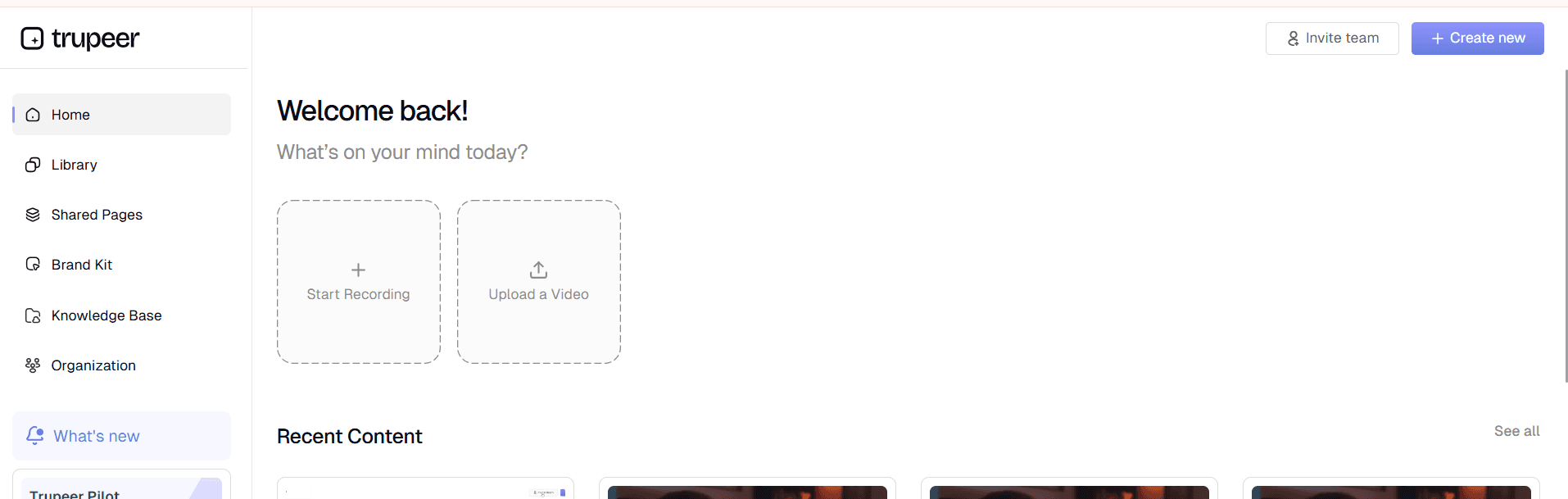
Stap 1: Neem je content op of upload deze
Begin door je scherm rechtstreeks via Trupeer's interface op te nemen of bestaande opnames te uploaden. Onze schermrecorder legt materiaal van hoge kwaliteit vast terwijl het wordt voorbereid op AI-verwerking. Je kunt productrondleidingen, softwaretutorials of elk ander proces opnemen dat documentatie nodig heeft.
Stap 2: AI-verbetering en verwerking
Zodra je opname compleet is, verbetert onze AI automatisch de videokwaliteit. Dit omvat ruisverwijdering, het elimineren van opvulwoorden en intelligente zoomeffecten die belangrijke interface-elementen benadrukken. De AI analyseert elk frame om de workflow te begrijpen en zich voor te bereiden op het genereren van documentatie.

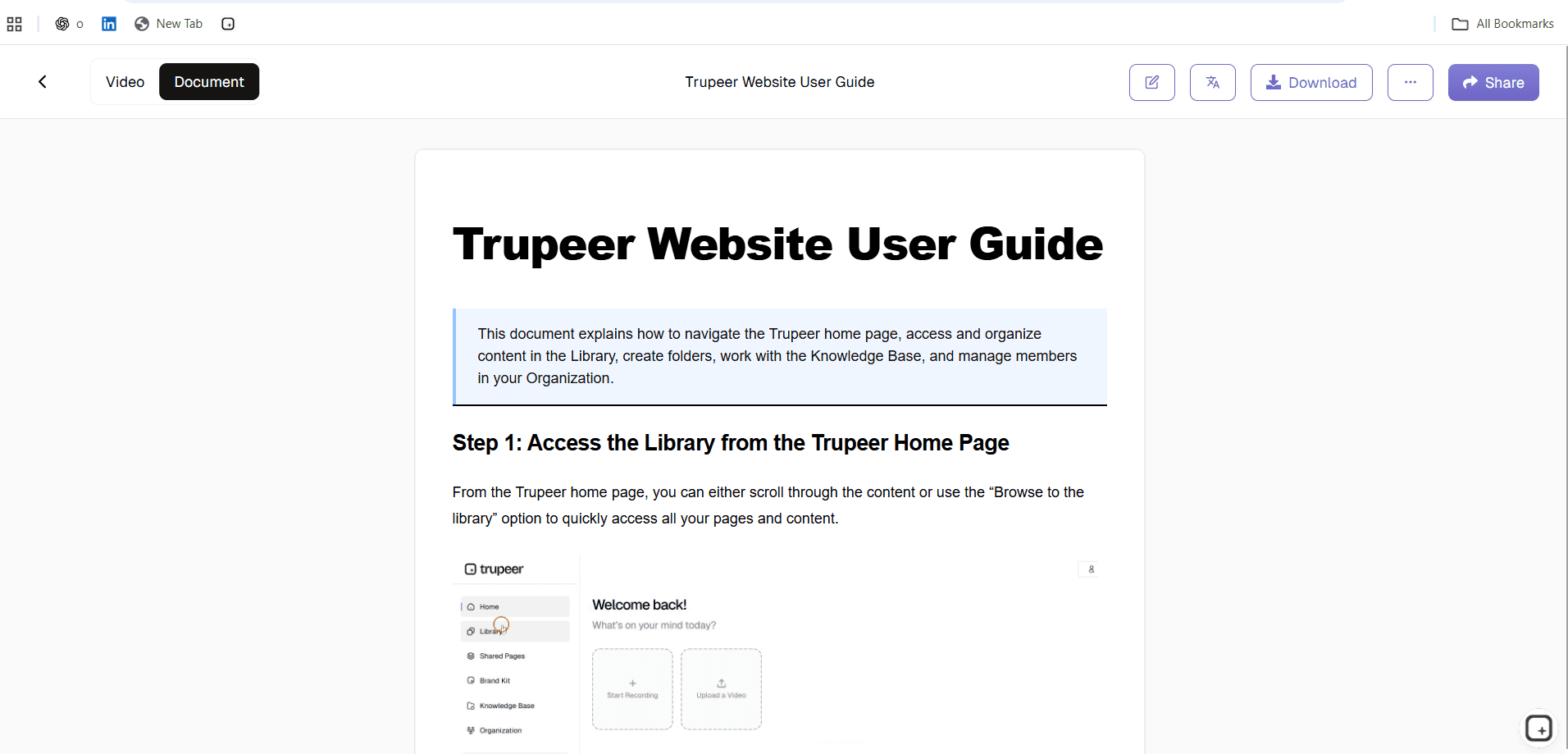
Stap 3: Geautomatiseerde documentatiegeneratie
De AI zet je schermopname om in gestructureerde schriftelijke inhoud. Het identificeert belangrijke stappen, maakt relevante screenshots en creëert uitgebreide instructies. Het systeem begrijpt UI-elementen, klikbewegingen op knoppen en workflowreeksen om nauwkeurige, gedetailleerde handleidingen te genereren.
Stap 4: Sjabloontoepassing en aanpassing
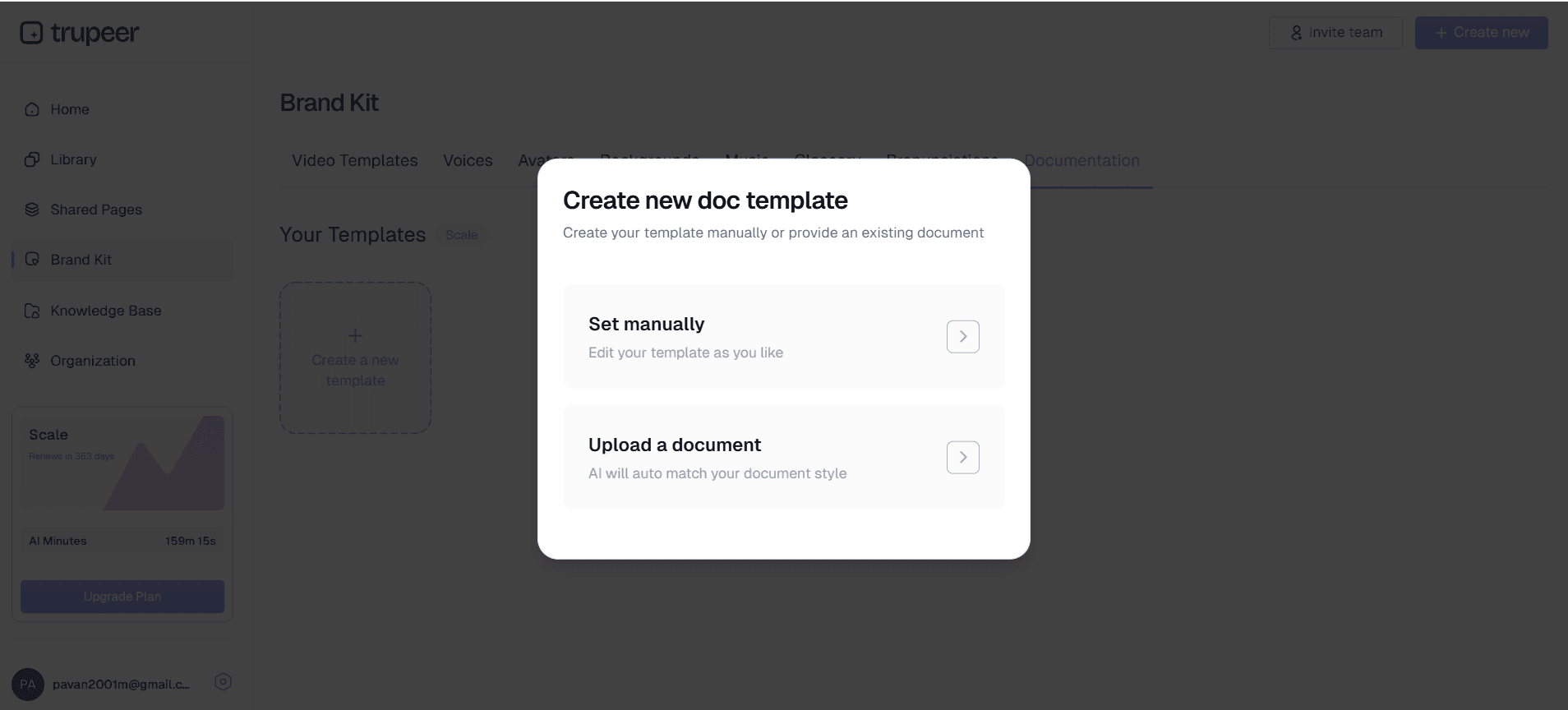
Pas je favoriete documentatiesjablonen toe om consistente opmaak over alle handleidingen te garanderen. Ons sjabloonsysteem stelt je in staat aangepaste stijlen op te slaan, waaronder lettertypen, kleuren, lay-outs en organisatorische structuren. Zo volgt elke handleiding automatisch je merkrichtlijnen.
Stap 5: Merkintegratie en export
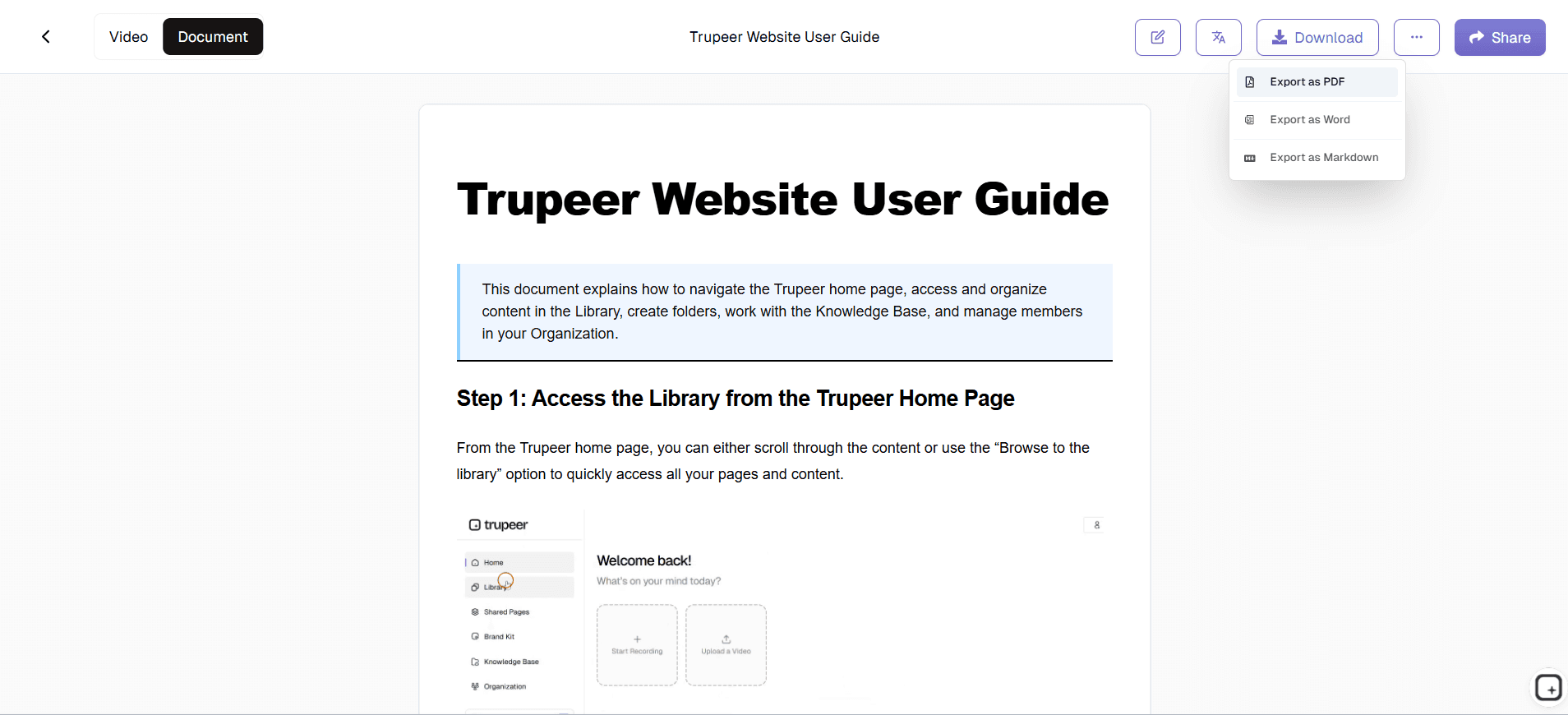
Pas de elementen van je brandkit toe, waaronder logo's, kleuren en aangepaste styling. Exporteer je voltooide gebruikershandleiding als schriftelijk document, verzorgde video of beide. Deel via directe links of embed de content op je website voor eenvoudige toegang.
Belangrijkste functies en mogelijkheden van de gratis handleidingmaker
Onze handleidingmaker biedt uitgebreide functies die zijn ontworpen om je documentatieworkflow te stroomlijnen terwijl professionele kwaliteitsnormen behouden blijven.
Generatie van dubbele uitvoer: Maak zowel video- als schriftelijke documentatie vanuit één enkele opname. Deze aanpak zorgt voor consistentie tussen visueel en tekstueel materiaal en bespaart aanzienlijk veel tijd. De AI-videobewerking-mogelijkheden verbeteren je opnames automatisch.
Slimme screenshotintegratie: De AI maakt tijdens het documentatieproces automatisch relevante screenshots en voegt deze op passende plekken in je schriftelijke handleiding in. Deze screenshots zijn correct opgemaakt en geannoteerd om het begrip te verbeteren.
Sjabloonsysteem: Sla documentatiesjablonen op en hergebruik ze die passen bij de stijlgidsen van je organisatie. Deze functie zorgt voor consistentie in alle gebruikershandleidingen en verkort de opzettijd voor nieuwe projecten. Sjablonen kunnen aangepaste opmaak, sectiestructuren en merkelementen bevatten.
Meertalige ondersteuning: Gebruik onze vertaling-mogelijkheden om gebruikershandleidingen in meerdere talen te maken. Deze functie is vooral waardevol voor internationale teams of producten met een wereldwijd gebruikersbestand.
Interactieve elementen: Genereer handleidingen met interactieve elementen zoals klikbare links, navigatiemenu's en kruisverwijzingen tussen secties. Deze functies verbeteren de gebruikerservaring en maken je documentatie aantrekkelijker en nuttiger.
Versiebeheer: Volg wijzigingen en beheer meerdere versies van je gebruikershandleidingen. Deze mogelijkheid is essentieel voor producten die vaak worden bijgewerkt of voor het bijhouden van historische documentatierecords.
Waarom zou je Trupeer's handleidingmaker gebruiken?
De voordelen van Trupeer's handleidingmaker gaan veel verder dan alleen tijdwinst en veranderen fundamenteel hoe organisaties documentatie benaderen.
Drastische tijdsbesparing: Traditionele creatie van gebruikershandleidingen kan weken aan schrijven, bewerken en opmaken kosten. Onze AI-gedreven aanpak reduceert dit tot uren of zelfs minuten. Neem één keer op en genereer automatisch uitgebreide documentatie, waardoor afzonderlijke schrijf- en videoproductieprocessen overbodig worden.
Consistentie over alle materialen: Behoud perfecte afstemming tussen je videocontent en schriftelijke documentatie, omdat beide uit dezelfde bronopname voortkomen. Dit elimineert afwijkingen die vaak ontstaan wanneer verschillende teamleden afzonderlijke materialen maken. Onze integratie met AI Screen Recorder zorgt voor educatieve consistentie.
Professionele kwaliteitsoutput: Elke gegenereerde handleiding voldoet aan professionele normen met correcte opmaak, duidelijke instructies en passende visuele elementen. De AI begrijpt best practices voor documentatie en past deze consequent toe op alle gegenereerde content.
Schaalbaarheid voor groeiende teams: Naarmate je product of dienst evolueert, wordt het bijwerken van gebruikershandleidingen moeiteloos. Neem gewoon het nieuwe proces op en genereer direct bijgewerkte documentatie. Deze schaalbaarheid is vooral waardevol voor SOP Generator-teams die meerdere productlijnen beheren.
Kosteneffectieve oplossing: Verminder de afhankelijkheid van technische schrijvers en documentspecialisten terwijl je toch hoogwaardige output behoudt. Het platform verdient zichzelf snel terug door lagere arbeidskosten en verbeterde efficiëntie.
Wie kan Trupeer's handleidingmaker gebruiken?
Trupeer's handleidingmaker voorziet in uiteenlopende professionele behoeften binnen verschillende sectoren en organisatiegroottes.
Contentmakers en cursusontwikkelaars: Stroomlijn het maken van educatief materiaal en cursusdocumentatie. Genereer uitgebreide gidsen die videolessen begeleiden, zodat studenten zowel visuele als schriftelijke middelen hebben. De integratie met onze Documentatiegenerator helpt gestructureerde, professionele content te creëren.
Marketingteams en productmanagers: Maak overtuigende productdocumentatie voor AI Video Editor en klantonboarding. Genereer gebruikershandleidingen die productlanceringen, aankondigingen van functies en klantsuccesinitiatieven ondersteunen. Marketingteams profiteren vooral van de functies voor merkconsistentie.
Docenten en bedrijfstrainers: Ontwikkel uitgebreide trainingsmaterialen die videodemo's combineren met gedetailleerde schriftelijke procedures. Maak gestandaardiseerde trainingsdocumentatie die zorgt voor consistente kennisoverdracht tussen verschillende leersessies en trainingsstijlen.
Productteams en technische schrijvers: Versnel documentatiecycli voor softwareproducten, API's en technische systemen. Genereer gebruikershandleidingen die gelijke tred houden met productontwikkelingscycli zonder technische schrijfcapaciteit te overbelasten. Het platform integreert naadloos met technische documentatie-workflows en ook AI-tools voor het maken van gebruikersgidsen.
Verkoopprofessionals en customer-successteams: Maak gepersonaliseerde gebruikersgidsen voor specifieke klantimplementaties of use-cases. Ondersteun AI Screen Recorder-initiatieven met uitgebreide onboardingmaterialen die het aantal supporttickets verlagen en de acceptatiegraad door gebruikers verbeteren.
Kleine ondernemers en zzp'ers: Genereer professionele documentatie zonder gespecialiseerde schrijvers of videoproducenten in te huren. Maak gebruikershandleidingen voor producten, diensten of interne processen die kunnen concurreren met de documentatiekwaliteit van grotere organisaties, terwijl je budget efficiënt blijft.
Best practices voor het gebruik van de handleidingmaker
Maximaliseer de effectiviteit van het maken van je handleidingen door bewezen strategieën te volgen en veelvoorkomende valkuilen te vermijden.
Plan de structuur van je opname: Voordat je opneemt, schets de belangrijkste stappen en processen die je moet documenteren. Deze voorbereiding zorgt voor volledige dekking en een logische opbouw in je uiteindelijke handleiding. Overweeg onze gidsen voor strategieën voor documentatieplanning.
Spreek duidelijk en bewust: Omdat de AI je gesproken tekst omzet in schriftelijke instructies, verbetert duidelijke spraak de nauwkeurigheid en vermindert het nabewerking. Pauzeer tussen grote stappen om de AI te helpen natuurlijke breekpunten voor documentatiesecties te herkennen.
Gebruik meerdere opnamesessies: Splits bij complexe processen de content op in logische segmenten in plaats van één lange opname te maken. Deze aanpak maakt bewerken eenvoudiger en creëert beter hanteerbare handleidingsecties voor eindgebruikers.
Maak gebruik van sjabloonfuncties: Investeer tijd in het maken van uitgebreide sjablonen die overeenkomen met de stijlgidsen van je organisatie. Goed ontworpen sjablonen verbeteren de consistentie van alle gegenereerde handleidingen enorm en verkorten de opzettijd per project.
Profiteer van merkintegratie: Pas je brandkits consequent toe om ervoor te zorgen dat alle gebruikershandleidingen het professionele imago van je organisatie versterken en visuele consistentie behouden met ander marketingmateriaal.
Verken gerelateerde tools
Waarom kiezen voor Trupeer's gebruikershandleidingmaker
Directe documentatiegeneratie
Zet schermopnames automatisch om in uitgebreide gebruikershandleidingen met geavanceerde AI-verwerking.
Professioneel sjabloonsysteem
Zorg voor consistente branding en opmaak in alle documentatie met aanpasbare sjablonen.
Exportopties voor meerdere formaten
Exporteer als gepolijste video's, geschreven handleidingen of beide formaten voor maximale veelzijdigheid.
Maak gebruikershandleidingen in 3 eenvoudige stappen
Stap 1
Neem uw schermworkflow op
Stap 2
AI genereert schriftelijke documentatie
Stap 3
Pas sjablonen toe en exporteer
Veelgestelde vragen
Welke soorten opnames werken het best voor het maken van een gebruikershandleiding?
Elke schermopname die een duidelijk proces laat zien, werkt goed. Softwarehandleidingen, productdemo's en stapsgewijze procedures leveren de meest uitgebreide handleidingen op. Zowel live-opnamen als bestaande geüploade beelden werken even goed.
Hoe nauwkeurig is de door AI gegenereerde documentatie?
Onze AI behaalt een hoge nauwkeurigheid door zowel visuele elementen als gesproken narratie te analyseren. Het systeem identificeert UI-componenten, workflowsequenties en gesproken instructies om gedetailleerde, nauwkeurige handleidingen te maken. U kunt de gegenereerde inhoud bekijken en bewerken voordat u deze definitief maakt.
Kan ik het formaat en de stijl van gegenereerde handleidingen aanpassen?
Ja, ons sjabloonsysteem biedt volledige aanpasbaarheid van opmaak, styling en organisatorische structuur. Sla uw favoriete sjablonen op voor consistent hergebruik in verschillende projecten. Merkpakketten zorgen ervoor dat alle handleidingen overeenkomen met de visuele identiteit van uw संगठनisatie.
Hoe lang duurt het om een gebruikershandleiding op basis van een opname te genereren?
De meeste gebruikershandleidingen worden binnen enkele minuten gegenereerd nadat een opname is geüpload of voltooid. De verwerkingstijd hangt af van de lengte en complexiteit van de opname, maar onze AI werkt efficiënt om snel resultaten te leveren zonder in te boeten aan kwaliteit.
Kan ik de gegenereerde documentatie bewerken voordat ik deze publiceer?
Absoluut. Alle gegenereerde inhoud kan worden beoordeeld, bewerkt en aangepast vóór de definitieve export. Breng indien nodig aanpassingen aan in de tekst, opmaak of structuur, terwijl u het door de AI geleverde basiswerk behoudt om tijd te besparen.
Meer tools


