4.8/5
Gratis softwareprocesgenerator
Stroomlijn het maken van je softwareprocesdocumentatie
Genereer nu procesdocumenten

De softwareprocesgenerator van Trupeer zorgt voor een revolutie in hoe teams softwareprocesdocumentatie maken en onderhouden. In tegenstelling tot traditionele documentatietools die vereisen dat je handmatig vanaf nul schrijft, zet ons AI-gestuurde platform schermopnames om in uitgebreide, professionele procesgidsen. Of je nu softwareworkflows documenteert, standaardwerkwijzen (SOP’s) opstelt of trainingsmateriaal bouwt: Trupeer neemt het tijdrovende handwerk weg van het schrijven van procesdocumentatie. De kernuitdaging waar de meeste organisaties mee te maken hebben, is het actueel en volledig houden van softwareprocesdocumentatie.
De softwareprocesgenerator van Trupeer lost dit probleem op door je daadwerkelijke workflow vast te leggen via een schermopname en automatisch zowel video-demonstraties als schriftelijke documentatie te genereren. Onze AI-schermrecorder legt elke klik, toetsaanslag en navigatiestap vast terwijl je het proces op een natuurlijke manier uitvoert. De AI verwerkt vervolgens deze opname om gepolijste videobeelden en gedetailleerde schriftelijke handleidingen te maken die je exacte workflow weerspiegelen. Wat Trupeer onderscheidt van andere documentatietools, is onze aanpak met dubbele output en intelligente verwerking. Waar andere platforms zich uitsluitend richten op videocreation of documentgeneratie, leveren wij beide formaten vanuit één opnamesessie.
Hoe werkt de softwareprocesgenerator?
De softwareprocesgenerator van Trupeer werkt via een gestroomlijnde workflow met vijf stappen die ruwe schermopnames omzet in professionele documentatie met minimale handmatige tussenkomst.
Stap 1: Neem je proces op
Begin door gebruik te maken van Trupeer’s ingebouwde schermrecorder of door een bestaande opname van je softwareproces te uploaden. Met onze opnametool leg je video van hoge kwaliteit vast terwijl je het proces op een natuurlijke manier uitvoert, zonder je zorgen te maken over een perfecte uitvoering. De AI verwerkt onvolkomenheden tijdens het verwerken. Je kunt volledige workflows opnemen, specifieke functiedemonstraties of probleemoplossingsprocedures, afhankelijk van je documentatiebehoeften.

Stap 2: AI-verwerking en -verbetering
Zodra je opname is voltooid, verwerkt de AI van Trupeer de inhoud automatisch via meerdere lagen van verbetering. Het systeem verwijdert achtergrondruis, elimineert stopwoorden en lange pauzes, voegt intelligente zoom-effecten toe om belangrijke UI-elementen te benadrukken en optimaliseert de videokwaliteit. Dankzij deze geautomatiseerde verwerking ziet je eindvideo er professioneel uit zonder dat je expertise nodig hebt op het gebied van videobewerking.

Stap 3: Generatie van documentatie
Gelijktijdig met de videoverwerking analyseert onze AI de schermopname om uitgebreide schriftelijke documentatie te genereren. Het systeem identificeert elke actie, legt relevante UI-tekst vast, herkent beslismomenten in de workflow en maakt stapsgewijze instructies die je opgenomen proces weerspiegelen. Deze documentatie bevat screenshots, gedetailleerde uitleg en contextuele informatie die het proces eenvoudig te volgen maakt.

Stap 4: Toepassing van sjablonen en aanpassing
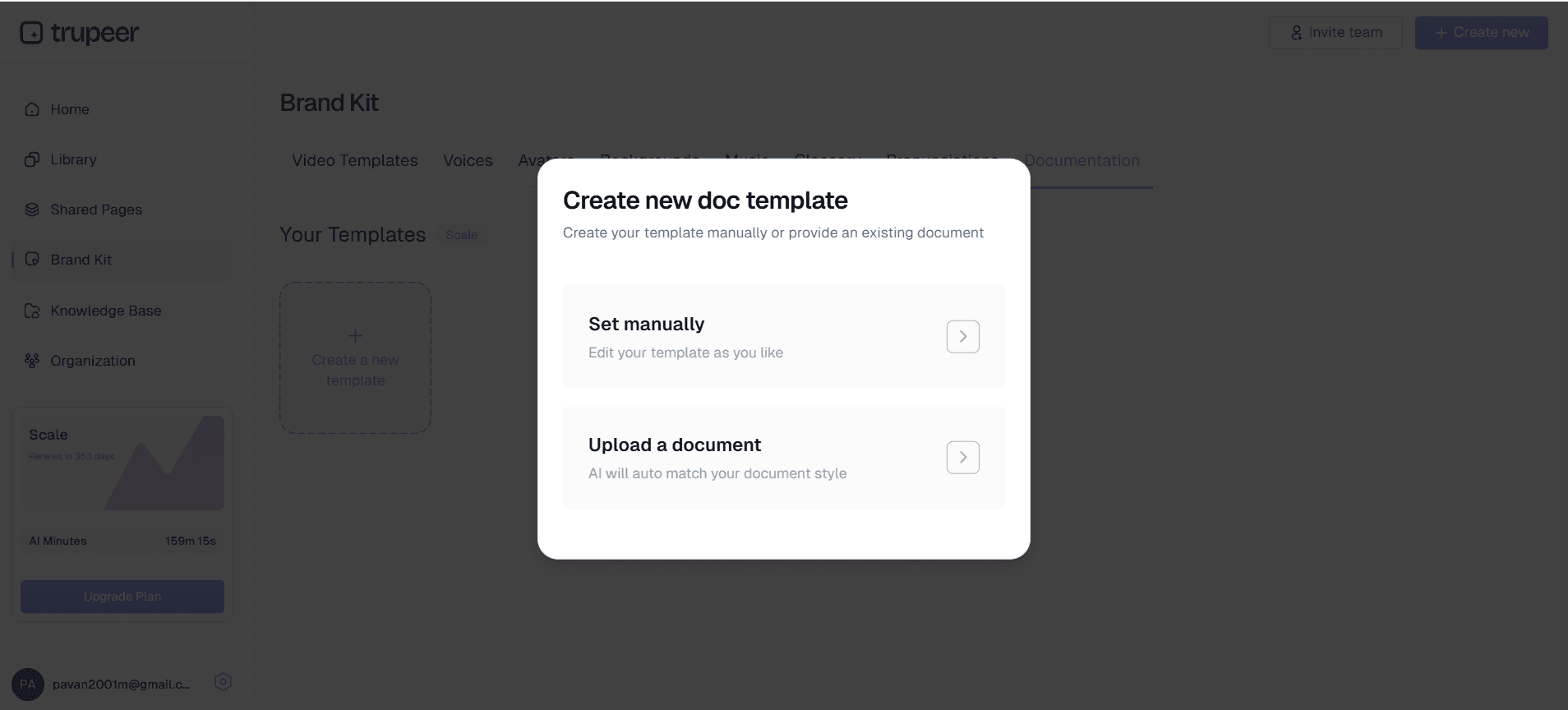
Pas je opgeslagen documentatiesjablonen toe om een consistente opmaak te garanderen in al je procesgidsen. Trupeer stelt je in staat om aangepaste sjablonen te maken en op te slaan met je gewenste styling, structuur en opmaakvoorkeuren. Deze functie zorgt voor merkconsistentie en bespaart tijd bij toekomstige documentatieprojecten.
Stap 5: Merktoepassing en distributie
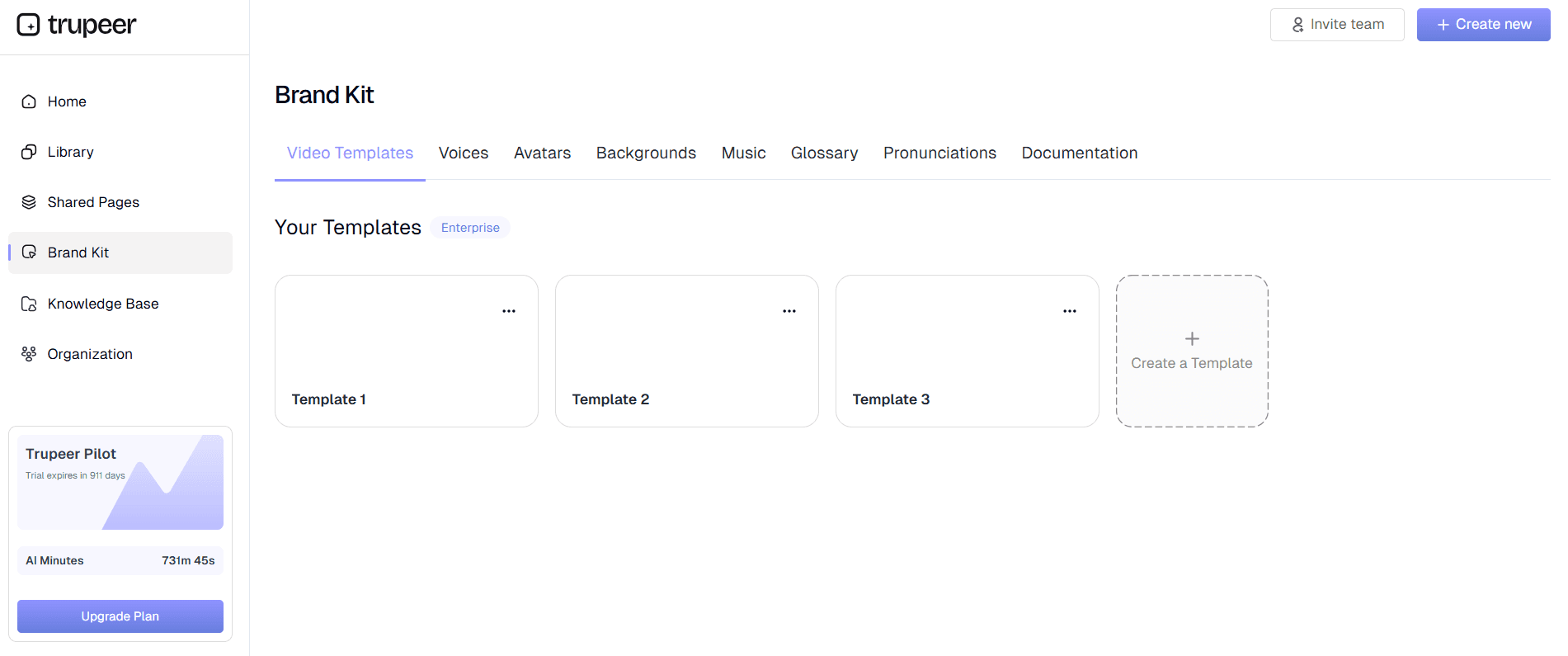
Pas je brand kit toe om visuele consistentie te behouden in al je documentatie. Voeg je bedrijfslogo, kleuren, intro-sequenties en outro’s toe om professioneel ogende materialen te maken die aansluiten op je merkidentiteit. Zodra alles klaar is, deel je je documentatie via directe links, insluitcodes voor websites of exporteer je in meerdere formaten voor verschillende distributiekanalen.
Belangrijkste functies en mogelijkheden
De softwareprocesgenerator van Trupeer biedt uitgebreide functies die zijn ontworpen om het maken van documentatie te stroomlijnen, met behoud van professionele kwaliteit en merkconsistentie.
Dubbele opname-opties: Kies tussen Trupeer’s ingebouwde schermopnametool of upload bestaande opnames voor AI-verwerking. Deze flexibiliteit ondersteunt verschillende workflowvoorkeuren en stelt teams in staat om eerder opgenomen content te verbeteren. Onze AI-schermrecorder legt een scherpe video vast terwijl jij softwareprocessen op een natuurlijke manier demonstreert, zonder prestatiedruk.
Intelligente videobewerking: Onze AI verbetert de videokwaliteit automatisch door ruisverwijdering, het elimineren van stopwoorden en strategische zoom-effecten die belangrijke elementen van de interface benadrukken. Deze geautomatiseerde verbetering zet ruwe opnames om in gepolijste trainingsvideo’s die geschikt zijn voor professionele distributie en training van teams.
Geautomatiseerde generatie van documentatie: Genereer automatisch uitgebreide schriftelijke handleidingen op basis van schermopnames, zodat je niet langer handmatig hoeft te schrijven. De AI legt elke stap, UI-interactie en variatie in het proces vast om gedetailleerde instructies te maken die aansluiten op je videobeelden. Deze functie is vooral waardevol voor SOP-creation en het consistent bijhouden van procesdocumentatie.
Aanpasbare documentatiesjablonen: Maak en sla sjablonen op met je gewenste opmaak, styling en structurele elementen. Deze functie zorgt voor consistentie in alle documentatieprojecten en vermindert de opstarttijd voor nieuwe procesgidsen aanzienlijk. Sjablonen kunnen aangepaste headers, footers, stylingvoorkeuren en organisatorische structuren bevatten die aansluiten op je bedrijfsstandaarden.
Ondersteuning voor meerdere talen: Breid je bereik uit met automatische videavertaling. Zet je softwareprocesdocumentatie om naar meerdere talen om wereldwijde teams en internationale gebruikers te ondersteunen. Deze functie behoudt context en nauwkeurigheid terwijl je processen toegankelijk worden voor diverse doelgroepen.
Merkintegratie: Behoud visuele consistentie in al je documentatie met uitgebreide brand kit-functies. Pas aangepaste kleuren, logo’s, intro-sequenties en outro’s toe om professioneel ogende materialen te maken die je bedrijfsidentiteit versterken en merkstandaarden bewaken in alle procesdocumentatie.
Waarom zou je de softwareprocesgenerator van Trupeer gebruiken?
De softwareprocesgenerator van Trupeer biedt aanzienlijke voordelen ten opzichte van traditionele documentatiemethoden: meer efficiëntie, betere consistentie en verbeterde toegankelijkheid voor teams van elke omvang.
Grote tijdswinst: Verminder de tijd die nodig is om documentatie te maken met tot wel 90% vergeleken met handmatige methoden. In plaats van uren te besteden aan het schrijven, opmaken en bijwerken van procesgidsen, neem je eenvoudig je workflow op en laat je AI het zware werk doen. Deze efficiëntieverbetering stelt teams in staat zich te richten op kernactiviteiten van het bedrijf, terwijl ze voldoen aan uitgebreide documentatiestandaarden.
Consistente kwaliteit en opmaak: Elimineer variaties in documentatiekwaliteit en -opmaak tussen verschillende teamleden en projecten. De geautomatiseerde verwerking van Trupeer zorgt ervoor dat elk stuk documentatie voldoet aan professionele standaarden, ongeacht de schrijf- of ontwerpkunsten van de maker. Deze consistentie is vooral waardevol voor teams van de AI-schermrecorder die meerdere procesgidsen beheren.
Altijd actuele documentatie: Houd procesdocumentatie actueel met minimale inspanning door bijgewerkte workflows opnieuw op te nemen. Wanneer softwareinterfaces veranderen of processen evolueren, maak je eenvoudig een nieuwe opname en genereer je automatisch bijgewerkte documentatie. Deze aanpak voorkomt het veelvoorkomende probleem van verouderde documentatie die gebruikers in verwarring brengt in plaats van helpt.
Output in meerdere formaten: Ontvang zowel video- als schriftelijke documentatie uit één opnamesessie, zodat je de waarde van content maximaliseert en verschillende leervoorkeuren ondersteunt. Sommige teamleden geven de voorkeur aan videodemonstraties, terwijl anderen stapsgewijze schriftelijke gidsen nodig hebben. Trupeer levert beide formaten tegelijk, zodat alle gebruikers volledig worden ondersteund.
Verbeterde toegankelijkheid: Maak je softwareprocessen toegankelijk voor een wereldwijd publiek via automatische vertaling en meerdere opties voor weergave. Deze toegankelijkheid vergroot de waarde van je documentatie en zorgt ervoor dat alle teamleden kritieke processen kunnen openen en begrijpen, ongeacht taalvoorkeuren of leerstijlen.
Professionele presentatie: Maak documentatie die positief reflecteert op je organisatie dankzij geautomatiseerde verbetering en merkintegratie. Professioneel ogende procesgidsen vergroten het vertrouwen van gebruikers, ondersteunen de geloofwaardigheid van je bedrijf en zorgen ervoor dat je documentatie je organisatie effectief vertegenwoordigt in zowel interne als externe contexten.
Wie kan de softwareprocesgenerator van Trupeer gebruiken?
De softwareprocesgenerator van Trupeer is bedoeld voor diverse professionals en organisaties die hun documentatie-efficiëntie en -kwaliteit willen verbeteren in uiteenlopende use cases en sectoren.
Productteams en softwareontwikkelaars: Maak uitgebreide documentatie voor softwarefuncties, ontwikkelprocessen en technische workflows. Productteams gebruiken Trupeer om Documentation Generator en bijbehorende schriftelijke handleidingen te genereren die nieuwe functies en functionaliteit laten zien. Ontwikkelteams documenteren codeerprocessen, procedures voor deployment en probleemoplossingsworkflows om kennisdeling en onboarding te ondersteunen.
Training- en HR-teams: Ontwikkel aantrekkelijke trainingsmaterialen voor software-onboarding en programma’s voor vaardigheidsontwikkeling. HR-teams gebruiken Trupeer om consistente trainingsvideo’s te maken die de onboardingstijd verkorten en het vertrouwen van nieuwe medewerkers vergroten. Het formaat met dubbele output ondersteunt verschillende leerstijlen en zorgt tegelijkertijd voor een volledige dekking van essentiële softwareprocessen.
Customer success- en supportteams: Bouw uitgebreide helpbronnen en probleemoplossingsgidsen die het aantal supporttickets verminderen terwijl de klanttevredenheid toeneemt. Customer success-teams gebruiken Trupeer om veelvoorkomende workflows te documenteren en selfservicebronnen te creëren waarmee klanten problemen zelfstandig kunnen oplossen. De professionele kwaliteit en duidelijke presentatie vergroten het vertrouwen van klanten en verminderen de belasting voor support.
Sales- en marketingprofessionals: Maak overtuigende AI Video Editor-materialen en productdemonstraties die inspanningen voor omzetgeneratie ondersteunen. Sales-teams gebruiken Trupeer om softwaredemonstraties te documenteren en herbruikbare presentatiematerialen te maken. Marketingteams gebruiken het platform om AI Screen Recorder-content te maken die softwaremogelijkheden effectief laat zien.
Consultants en serviceproviders: Documenteer klantprocessen en maak opleverbare materialen die waarde toevoegen aan adviestrajecten. Consultants gebruiken Trupeer om bestaande klantworkflows vast te leggen en verbeterdocumentatie te maken die change management-initiatieven ondersteunt. De professionele outputkwaliteit vergroot de geloofwaardigheid van consultants en de tevredenheid van klanten.
Eigenaren van kleine bedrijven en operations-teams: Standaardiseer bedrijfsprocessen en maak operationele documentatie die groei van het bedrijf en consistentie binnen teams ondersteunt. Kleine bedrijven gebruiken Trupeer om essentiële softwareworkflows te documenteren en trainingsmateriaal te maken dat de afhankelijkheid van individuele kennis vermindert en duurzame groei ondersteunt.
Best practices voor het gebruik van de softwareprocesgenerator van Trupeer
Maximaliseer de effectiviteit van je softwareprocesdocumentatie door bewezen strategieën te volgen die de kwaliteit van content en betrokkenheid van gebruikers verbeteren.
Plan je opnamesessies: Schets vóór het opnemen de processtappen en bereid je softwareomgeving voor om soepele demonstraties te garanderen. Sluit onnodige applicaties, ruim bureaubladrommel op en zorg dat alle benodigde data of accounts klaarstaan. Deze voorbereiding resulteert in schonere opnames die minder nabewerking vereisen en leiden tot professionelere einddocumentatie.
Praat natuurlijk tijdens de opname: Geef duidelijke mondelinge uitleg terwijl je processen demonstreert, omdat de AI deze informatie gebruikt om schriftelijke documentatie te verbeteren. Maak je geen zorgen over een perfecte uitvoering, want de AI van Trupeer verwijdert automatisch stopwoorden en pauzes. Natuurlijke uitleg verbetert de kwaliteit van de gegenereerde schriftelijke gidsen en biedt betere context voor processtappen.
Gebruik documentatiesjablonen: Maak en sla sjablonen op die aansluiten op de stijl en structuurvoorkeuren van je organisatie. Consistente sjablonen in alle documentatieprojecten verbeteren de bekendheid van gebruikers en verminderen de cognitieve belasting bij het volgen van processen. Bezoek onze technische documentatie voor best practices en voorbeelden voor sjablonen.
Werk documentatie regelmatig bij: Stel een vast reviewschema in om ervoor te zorgen dat procesdocumentatie actueel blijft met software-updates en proceswijzigingen. Gebruik het efficiënte proces van Trupeer om snel opnieuw op te nemen en documentatie bij te werken wanneer interfaces of procedures veranderen, zodat nauwkeurigheid en vertrouwen van gebruikers behouden blijven.
Optimaliseer voor je doelgroep: Houd bij het opnemen van processen rekening met het technische niveau van je doelgroep en hun bekendheid met de software. Voeg passende context en uitleg toe die aansluiten op de kennisniveaus van gebruikers, zodat de documentatie effectief dient voor het beoogde doel binnen verschillende gebruikersgroepen en ervaringsniveaus.
Ontdek gerelateerde tools
Waarom kiezen voor de softwareprocesgenerator van Trupeer
Opnemen of uploaden
Begin met de ingebouwde recorder of upload bestaande opnames voor directe AI-verwerking
Automatische documentatiegeneratie
AI maakt automatisch uitgebreide geschreven handleidingen van uw schermopnamen
Professionele merkintegratie
Pas aangepaste branding en sjablonen toe voor consistente, professioneel ogende documentatie
Maak softwareprocesdocumentatie in 3 stappen
Stap 1
Leg uw softwareworkflow vast
Stap 2
AI verwerkt en verrijkt content
Stap 3
Deel professionele documentatie direct
Veelgestelde vragen
Wat is een softwareprocesgenerator en hoe werkt het?
Een softwareprocesgenerator maakt automatisch documentatie op basis van schermopnamen. U neemt uw softwareworkflow op en AI genereert zowel gepolijste video's als geschreven stapsgewijze handleidingen, waardoor handmatig documenteren overbodig wordt.
Kan ik bestaande schermopnamen gebruiken met Trupeer's softwareprocesgenerator?
Ja, u kunt bestaande schermopnames uploaden en Trupeer's AI deze automatisch laten verwerken. Het systeem verbetert de videokwaliteit, verwijdert ruis en genereert uitgebreide schriftelijke documentatie van elke geüploade opname.
Hoe verhoudt door AI gegenereerde procesdocumentatie zich tot handmatig geschreven handleidingen?
Door AI gegenereerde documentatie is nauwkeuriger en vollediger, omdat deze elke actie vastlegt uit echte schermopnames. Het is ook sneller te maken en eenvoudiger up-to-date te houden dan handmatig documenteren.
In welke bestandsindelingen kan ik exporteren vanuit de softwareprocesgenerator?
Trupeer ondersteunt meerdere exportformaten, waaronder MP4-video's, PDF-documenten en verschillende documentatieformaten. U kunt ook deelbare links en insluitcodes genereren voor website-integratie.
Is de softwareprocesgenerator geschikt voor technische softwaredocumentatie?
Zeker. De generator blinkt uit in technische documentatie door exacte UI-interacties, systeemreacties en processtromen vast te leggen. Het is perfect voor softwarehandleidingen, API-demonstraties en complexe documentatie van workflows.
Meer tools


