4,8/5
Créateur de manuel en ligne gratuit - Créez des manuels utilisateur avec l’IA
Création de manuels professionnels simplifiée grâce à l’IA

Créez des manuels d’utilisation professionnels sans avoir à les rédiger de zéro. La plupart des équipes savent que la documentation compte. Le problème, c’est que personne n’a envie de passer trois jours à l’écrire. Un workflow change. Quelqu’un promet de « le documenter plus tard ». Les semaines passent. Les tickets d’assistance s’accumulent. La formation devient incohérente. Les nouveaux arrivants posent encore les mêmes questions, parce que le manuel est obsolète, incomplet ou enfoui dans le dossier de quelqu’un.
Trupeer change la donne. Le créateur de manuel en ligne de Trupeer transforme vos enregistrements d’écran en manuels d’utilisation et guides professionnels automatiquement.
Enregistrez une seule fois un workflow et transformez-le automatiquement en manuel d’utilisation soigné, guide pédagogique et vidéo de support. Que vous enregistriez de nouvelles séquences ou que vous importiez des enregistrements existants, l’IA de Trupeer analyse votre workflow et crée des manuels détaillés, étape par étape, que votre équipe et vos clients peuvent suivre facilement. Le créateur de manuel répond à un problème crucial pour les entreprises modernes : les heures interminables consacrées à la documentation des processus, à la création des supports de formation et à la mise à jour des guides.
Créez automatiquement des manuels d’utilisation à partir d’enregistrements d’écran
Trupeer est un créateur de manuels d’utilisation alimenté par l’IA qui convertit des enregistrements d’écran en documentation étape par étape que votre équipe et vos clients peuvent réellement suivre.
Au lieu d’écrire des manuels ligne par ligne, enregistrez simplement le processus.
Trupeer transforme automatiquement l’enregistrement en :
Un manuel d’utilisation détaillé
Des instructions étape par étape rédigées
Des vidéos de visite guidée en support
Un support de formation pour l’onboarding
Une documentation interne structurée
Des guides produit et processus
Le résultat ?
Une documentation qui reste utile au lieu de devenir obsolète après deux mises à jour produit.
Ce qui distingue le créateur de manuel de Trupeer, c’est sa capacité à produire deux formats. Vous n’avez plus à choisir entre le contenu vidéo et la documentation écrite. Notre IA traite votre enregistrement pour créer simultanément les deux formats, afin que votre audience puisse consommer l’information dans le format qui lui convient. C’est particulièrement précieux pour les vidéos de formation, où certains apprenants préfèrent le contenu visuel tandis que d’autres ont besoin de références écrites. Nous savons que créer une documentation technique complète ne devrait pas nécessiter une équipe de rédaction dédiée ni des mois d’efforts.
Qu’est-ce qui fait un bon manuel d’utilisation ?
Créer un manuel d’utilisation de qualité semble simple jusqu’au moment où vous essayez réellement de le faire. En général, ça ressemble à ceci :
Quelqu’un enregistre un workflow. Une autre personne rédige les instructions de mémoire. Les captures d’écran sont obsolètes deux semaines plus tard. La moitié des étapes manque. Puis l’assistance passe des mois à expliquer encore et encore la même chose.
La création du manuel devient alors un problème de maintenance. Notamment pour les équipes SaaS, l’onboarding client, les opérations internes et les produits qui évoluent rapidement. Trupeer supprime ce goulot d’étranglement.
Au lieu d’écrire la documentation une fois le travail terminé, l’IA crée votre manuel d’utilisation à partir de la vidéo elle-même.
Comment créer des manuels d’utilisation avec Trupeer ?
Le processus de création de manuel avec Trupeer est conçu pour une efficacité maximale et une complexité minimale. Vous commencez soit par enregistrer votre écran directement via notre enregistreur d’écran IA, soit par importer un enregistrement existant que vous avez déjà capturé. Cette flexibilité signifie que vous n’êtes pas limité à un outil d’enregistrement spécifique et que vous pouvez travailler avec des séquences déjà créées.
Étape 1 : Enregistrez ou importez votre workflow
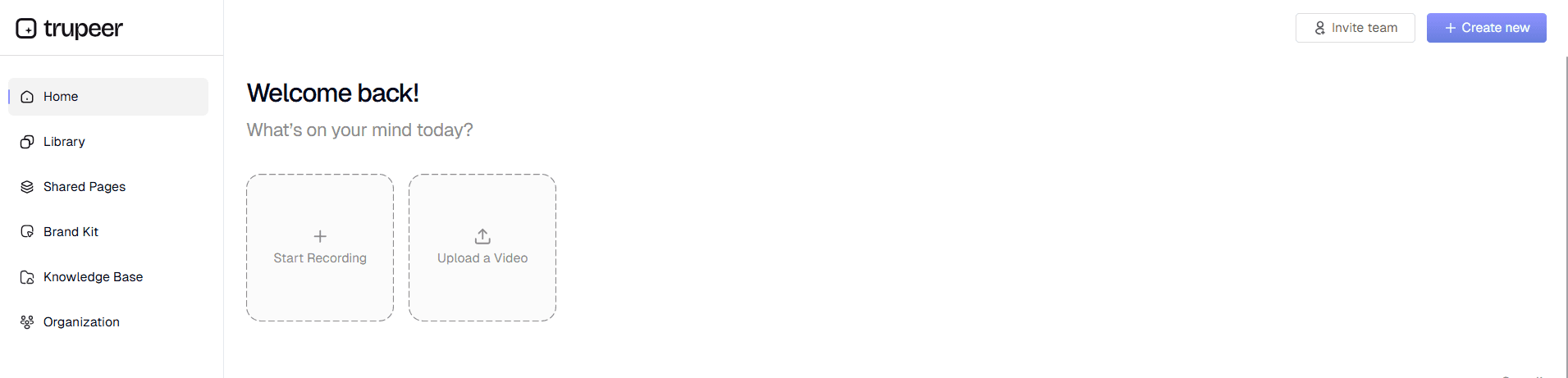
Commencez par capturer l’activité de votre écran à l’aide de l’enregistreur intégré de Trupeer ou importez vos enregistrements bruts existants. Notre système prend en charge différents formats vidéo, ce qui facilite le travail avec du contenu provenant de sources variées. L’enregistrement doit montrer l’ensemble du processus que vous souhaitez documenter, du début à la fin.
Étape 2 : L’IA comprend votre workflow
Une fois importé, l’IA de Trupeer traite automatiquement votre enregistrement : elle supprime le bruit de fond, élimine les mots de remplissage et ajoute des effets de zoom intelligents pour mettre en évidence les zones importantes. L’IA identifie les actions clés, les clics et les schémas de navigation qui serviront de base à votre manuel.

Étape 3 : Générer automatiquement un manuel d’utilisation structuré
L’IA convertit votre enregistrement d’écran en documentation écrite structurée, en décomposant votre workflow en étapes claires et logiques. Chaque action de votre enregistrement devient une instruction détaillée dans le manuel, avec le contexte et un texte explicatif.

Étape 4 : Application de modèles et personnalisation
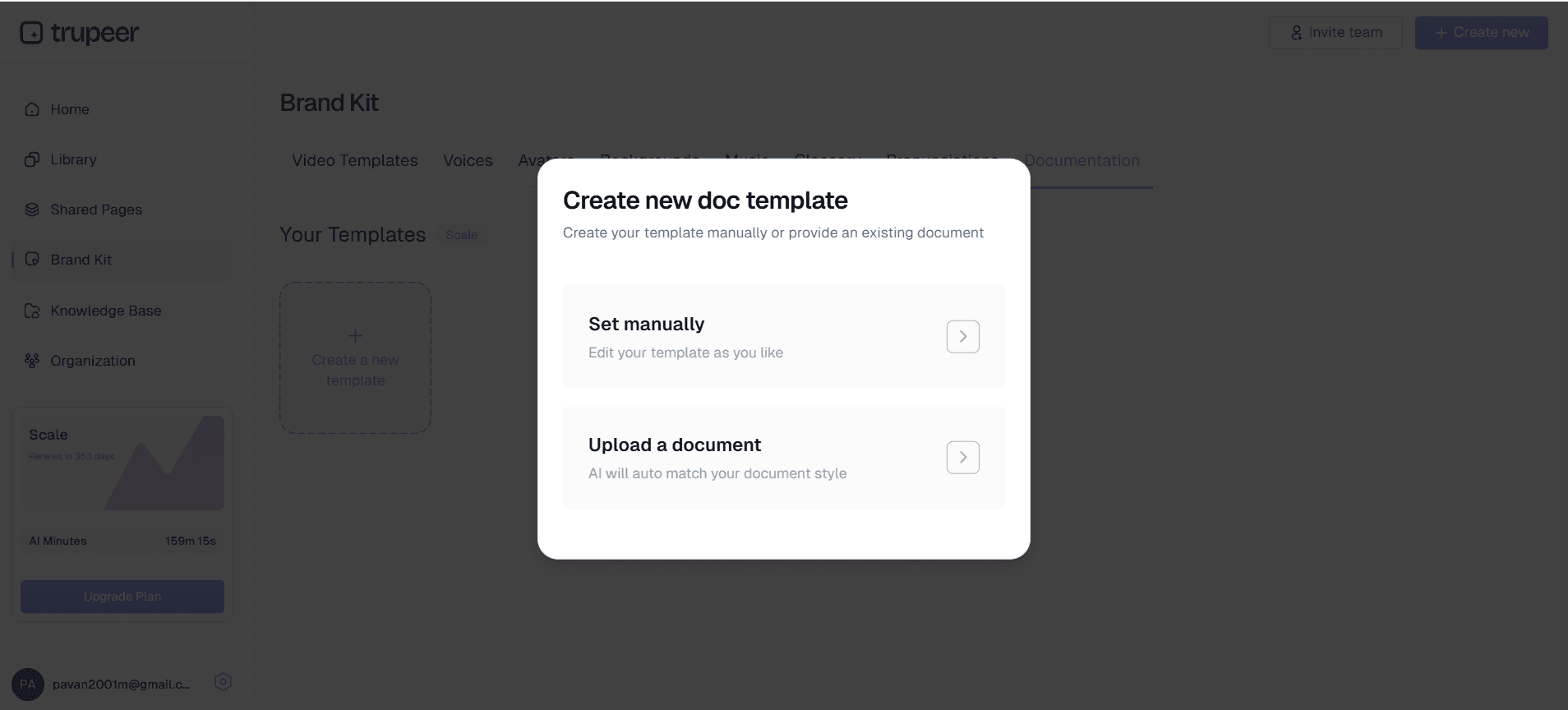
Appliquez vos modèles de documentation préférés pour garantir un formatage et un style cohérents dans l’ensemble de vos manuels. Vous pouvez personnaliser les en-têtes, les polices, les couleurs et la structure afin de respecter vos recommandations de marque et vos standards organisationnels.
Étape 5 : Intégration à la marque et rendu final
Ajoutez les éléments de votre brand kit (logos, couleurs et style) pour créer une documentation au rendu professionnel, alignée sur l’identité visuelle de votre entreprise. Exportez votre manuel final dans plusieurs formats pour faciliter le partage et la diffusion.
Pourquoi un créateur de manuel est meilleur que la rédaction manuelle de la documentation de processus
Le créateur de manuel de Trupeer propose des fonctionnalités complètes conçues pour rationaliser votre processus de documentation et garantir des résultats professionnels à chaque fois. Notre système à double entrée accepte à la fois les enregistrements en direct et le contenu importé, vous offrant une flexibilité maximale sur la manière dont vous créez votre contenu source.
Génération de contenu alimentée par l’IA : La force principale de notre créateur de manuel technique réside dans sa capacité à comprendre et interpréter intelligemment les enregistrements d’écran. L’IA reconnaît les éléments d’interface, les actions des utilisateurs et les schémas de workflow pour générer des instructions précises et détaillées correspondant exactement à votre processus démontré.
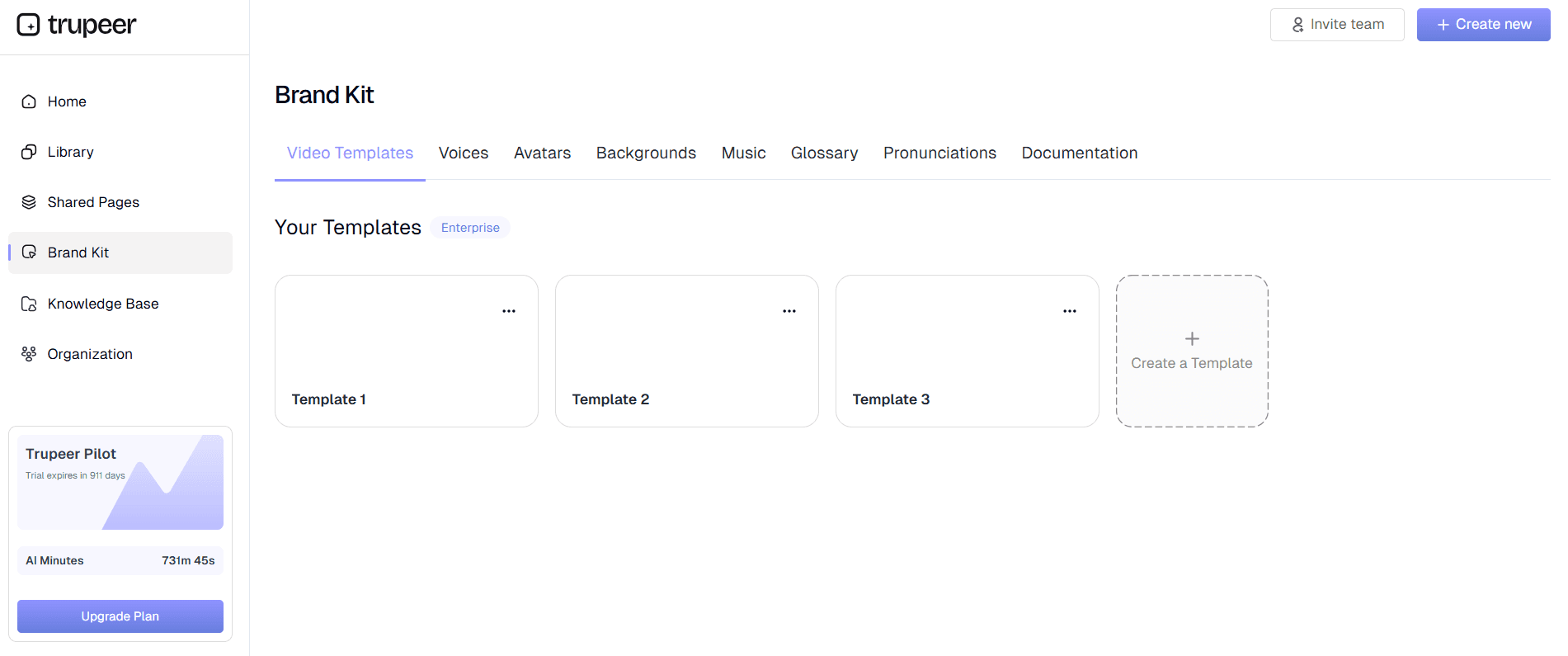
Modèles de documentation personnalisables : Gagnez du temps et assurez la cohérence grâce à des modèles réutilisables qui conservent votre formatage, votre style et votre structure préférés. Ces modèles peuvent être adaptés à différents types de manuels : que vous créiez des guides utilisateurs, des procédures opérationnelles standard ou des supports de formation.
Amélioration vidéo automatique : Au-delà de la génération de documentation, notre système améliore automatiquement vos enregistrements sources : suppression du bruit, élimination des mots de remplissage et effets de zoom intelligents. Résultat : la vidéo associée à votre manuel conserve des standards de qualité professionnels, sans nécessiter d’expertise en montage vidéo.
Traduction multilingue : Étendez la portée de votre manuel grâce à des capacités automatiques de traduction vidéo. Créez de la documentation dans plusieurs langues pour servir des équipes et des clients à l’échelle mondiale, sans les coûts liés à des services de traduction professionnels.
Intégration au brand kit : Conservez une identité visuelle cohérente dans l’ensemble de votre documentation en appliquant des brand kits personnalisés incluant vos logos, vos palettes de couleurs, vos polices et vos préférences de style. Cela garantit que chaque manuel reflète vos standards de marque professionnels.
Formats d’export multiples : Générez à la fois la documentation vidéo et écrite à partir d’un seul enregistrement, puis exportez dans différents formats adaptés à divers canaux de diffusion. Que vous ayez besoin de PDF pour un accès hors ligne, de formats adaptés au web pour des bases de connaissances en ligne, ou de contenu intégré pour des plateformes de formation, Trupeer gère automatiquement le formatage.
Pourquoi les équipes utilisent Trupeer AI Manual Creator plutôt que d’écrire manuellement la documentation de manuel ?
L’avantage principal de l’utilisation du créateur de manuel de Trupeer est la réduction drastique du temps et des efforts nécessaires pour produire une documentation professionnelle. La création traditionnelle d’un manuel peut prendre des jours ou des semaines de rédaction, de relecture et de mise en forme. Avec notre outil, vous pouvez produire une documentation complète en quelques minutes, et non en heures.
Gains de temps considérables : Au lieu de passer des heures à rédiger et formater la documentation, vous pouvez créer des manuels complets en le temps nécessaire pour effectuer la tâche une seule fois. Ce gain d’efficacité permet à votre équipe de se concentrer sur les activités essentielles de l’entreprise plutôt que de s’enliser dans des tâches de documentation. Le processus automatisé supprime l’aller-retour traditionnel entre les experts du sujet et les rédacteurs techniques.
Qualité et exactitude constantes : La documentation rédigée par des humains souffre souvent d’incohérences, d’étapes manquantes et d’informations obsolètes. Notre IA garantit que chaque manuel suit la même structure et inclut toutes les étapes nécessaires exactement comme démontré dans votre enregistrement. Cette cohérence est particulièrement précieuse pour les équipes d’enregistreur d’écran IA qui ont besoin d’une documentation fiable et exacte.
Sortie en double format : Créez simultanément la documentation vidéo et écrite, afin de laisser à votre audience le choix sur la manière dont elle consomme l’information. Certaines personnes apprennent mieux grâce à des démonstrations visuelles, tandis que d’autres préfèrent des instructions écrites étape par étape. Avoir les deux formats améliore la compréhension et réduit le volume des demandes d’assistance.
Mises à jour et maintenance faciles : Lorsque les processus changent, enregistrez simplement le workflow mis à jour et générez instantanément une nouvelle documentation. Cela élimine la difficulté liée à la maintenance de manuels obsolètes et garantit que votre documentation reste à jour avec l’évolution des procédures et des mises à jour logicielles.
Présentation professionnelle : Chaque manuel conserve un rendu professionnel grâce au formatage automatisé et à l’intégration à la marque. Vous n’avez pas besoin de compétences en design ni d’un travail de retouche approfondi pour créer une documentation qui valorise votre organisation et offre une expérience utilisateur positive.
Qui peut utiliser le créateur de manuel ?
Le créateur de manuel de Trupeer s’adresse à un large éventail de professionnels et d’organisations qui doivent produire une documentation claire et complète efficacement. La polyvalence de l’outil le rend utile dans de nombreux secteurs et cas d’usage.
Créateurs de contenu et concepteurs de cours : Les créateurs de contenu éducatif peuvent transformer leur Documentation Generator en supports écrits complémentaires qui enrichissent l’expérience d’apprentissage. Cette approche à double contenu augmente la valeur du cours et s’adapte à différentes préférences d’apprentissage, sans doubler le temps de création.
Équipes marketing et chefs de produit : Les professionnels du marketing peuvent créer des supports d’AI Video Editor convaincants qui combinent des démonstrations visuelles et des explications écrites détaillées. Cette approche complète aide les clients potentiels à comprendre plus efficacement la valeur et les fonctionnalités du produit que la vidéo ou le texte seuls.
Formateurs et responsables de formation en entreprise : Les équipes formation peuvent augmenter leur capacité de création de contenu en convertissant des sessions de formation enregistrées en documentation durable. Cette approche garantit que les supports de formation restent accessibles pour référence future et permet un apprentissage asynchrone pour les membres d’équipes à distance.
Équipes produit et rédacteurs techniques : Les équipes de développement peuvent créer des guides utilisateur, de la documentation API et des spécifications techniques en démontrant une fonctionnalité plutôt qu’en rédigeant de zéro. Notre instruction manual creator aide à combler l’écart entre la connaissance technique et une documentation facile à utiliser.
Professionnels de la vente et équipes Customer Success : Les équipes commerciales peuvent créer des supports de démonstration personnalisés et une documentation d’accompagnement pour les prospects, tandis que les équipes Customer Success peuvent construire des bibliothèques d’aide complètes qui réduisent le volume des tickets d’assistance. La capacité à créer rapidement des supports d’enregistreur d’écran IA donne aux équipes commerciales un avantage concurrentiel.
Chefs de petites entreprises et consultants : Les organisations disposant de ressources limitées peuvent créer une documentation professionnelle sans recruter des rédacteurs ou des designers spécialisés. Cette démocratisation de la création de documentation professionnelle met tout le monde sur un pied d’égalité pour les petites entreprises qui rivalisent avec des organisations plus grandes.
Bonnes pratiques pour utiliser le créateur de manuel
Pour maximiser l’efficacité de votre processus de création de manuel, suivez ces stratégies éprouvées qui garantissent des résultats de haute qualité et un workflow efficace.
Planifiez votre enregistrement : Avant de commencer votre enregistrement d’écran, décrivez l’ensemble du processus que vous souhaitez documenter. Cette préparation vous aide à capturer toutes les étapes nécessaires et réduit le besoin de multiplier les sessions d’enregistrement. Tenez compte du niveau de compétence de votre audience et ajustez votre rythme de démonstration en conséquence.
Maintenez un rythme cohérent : Enregistrez à un rythme régulier qui permet à l’IA d’identifier correctement chaque action et chaque transition. Évitez de vous précipiter sur les étapes ou de rester trop longtemps sur une action unique, car cela peut affecter la qualité de la documentation générée.
Utilisez des actions claires et descriptives : Lorsque vous démontrez un logiciel ou un processus, effectuez des actions délibérées et faciles à suivre. Cliquez précisément sur les boutons et les éléments de menu, et faites une pause brève entre les étapes majeures pour aider l’IA à identifier les points de rupture logiques dans votre workflow.
Tirez parti de la personnalisation des modèles : Profitez des modèles du training manual generator de Trupeer pour créer un formatage cohérent dans l’ensemble de votre documentation. Investissez du temps pour configurer des modèles qui correspondent à votre marque et à vos standards organisationnels, puis réutilisez-les pour gagner en efficacité.
Relisez et affinez : Même si l’IA génère une documentation très précise, vérifiez toujours le résultat pour vous assurer qu’il correspond à votre intention et qu’il inclut tout contexte ou avertissement nécessaire qui ne serait pas forcément évident uniquement à partir de l’enregistrement.
Découvrez des outils associés
Pourquoi choisir le créateur de manuels de Trupeer
Sortie à double format
Générez à la fois des vidéos professionnelles et une documentation écrite à partir d'un enregistrement unique
Traitement intelligent par IA
Crée automatiquement des instructions structurées, étape par étape, à partir de l’activité de votre écran
Cohérence de la marque
Appliquez des modèles personnalisés et des kits de marque pour une documentation professionnelle et cohérente
Commencez avec le créateur manuel de Trupeer
Étape 1
Enregistrez ou téléversez votre écran
Étape 2
Laissez l’IA générer la documentation
Étape 3
Personnalisez et partagez votre manuel
Foire aux questions
Quels types de manuels puis-je créer avec Trupeer ?
Vous pouvez créer des guides utilisateur, des manuels techniques, de la documentation de formation, des procédures opératoires normalisées et des guides d’instruction à partir de n’importe quel enregistrement d’écran. L’outil fonctionne avec n’importe quel logiciel ou application web que vous pouvez présenter à l’écran.
Ai-je besoin de compétences en montage vidéo pour utiliser le créateur manuel ?
Aucune compétence en montage vidéo n’est requise. L’IA de Trupeer améliore automatiquement vos enregistrements grâce à la suppression du bruit, à des effets de zoom et à un formatage professionnel. Vous n’avez qu’à enregistrer votre écran et l’IA se charge de tout le traitement et de la génération de la documentation.
Puis-je mettre à jour les manuels existants lorsque les processus changent ?
Oui, il suffit d’enregistrer le processus mis à jour et de générer une nouvelle documentation. Vous pouvez également utiliser vos modèles enregistrés pour conserver une mise en forme cohérente entre les versions mises à jour, ce qui rend la maintenance rapide et efficace.
Quelle est la précision de la documentation générée par l’IA ?
L’IA est très précise pour identifier les actions à l’écran et générer les instructions correspondantes. Elle reconnaît les clics, la navigation, la saisie de texte et d’autres interactions courantes de l’interface afin de créer une documentation détaillée, étape par étape, qui correspond à votre flux de travail démontré.
Puis-je personnaliser l'apparence de mes manuels ?
Absolument. Vous pouvez créer des modèles personnalisés avec la mise en forme de votre choix, appliquer des kits de marque avec des logos et des couleurs, et ajuster le style pour l’harmoniser avec les normes de votre organisation. Ces personnalisations peuvent être enregistrées et réutilisées dans plusieurs manuels.
Plus d’outils


