
Utilisez ce modèle
The days after go-live decide how people remember a new system. If users can't log in, transactions fail and nobody answers questions, confidence drops fast and workarounds appear within a week. If problems are spotted early, fixed quickly and explained clearly, the system settles and adoption follows. Hypercare is the period of intensive support that makes the difference, and a hypercare plan template makes sure it's organised before go-live, not improvised on the day.
This free hypercare plan template and checklist covers scope and duration, the support model, the war room, issue priorities and response times, daily routines, communication, knowledge content, metrics and exit criteria, with a filled-in example. Use the hypercare plan generator on this page to draft a plan in two minutes, then sign up for the full results, or copy the structure below.
What is a hypercare plan template?
A hypercare plan template is a ready-made plan for the period of heightened support immediately after a new system, process or service goes live. It defines how long hypercare lasts, who provides support and how, how issues are logged, prioritised and resolved, how the team monitors the system and the business, how users are kept informed and what must be true before support returns to business as usual.
Hypercare sits between cutover and steady state. For the cutover itself, use the S/4HANA cutover plan template.
Why do you need a hypercare plan?
Issues peak in the first days after go-live, and they need faster attention than normal support can give.
Users need answers quickly, or they find workarounds that undermine the new process.
Experts are scarce. The plan decides who's available, when and for what.
Business-critical processes, such as payments, orders and payroll, must keep running.
Leaders need visibility of stability and adoption, every day.
Hypercare must end. Without exit criteria, it drags on and project experts never move on.
Who uses a hypercare plan template?
Programme and project managers responsible for go-live.
Hypercare and support leads who run the war room and support teams.
IT service management teams taking over support after hypercare.
Process owners and super users who support their teams and confirm business stability.
Change and training leads who provide guidance and quick fixes for users.
System integrators and vendors supporting the go-live.
Generate your hypercare plan in two minutes
Use the hypercare plan generator on this page. Choose the type of go-live, the number of users and locations, and how critical the processes are. You'll get a suggested hypercare length, support structure and exit criteria straight away, and you can sign up to get the full plan: the complete template pre-filled with your answers, a daily checklist and priority definitions.
Preview the hypercare plan template
The template opens with a hypercare summary: scope, go-live date, duration and decision makers. The support model follows, with tiers, roles, hours and contact channels, then the war room set-up. Issue management sets out priority definitions, response and resolution targets and the triage process. A daily checklist, communication plan and knowledge plan come next, followed by metrics, exit criteria and the handover to business-as-usual support. Every section is editable, so you can adjust tiers, hours or targets to your go-live.
How to customize this template in Trupeer
Step 1: Open the Templates Section
Go to the Templates section from the main navigation.

Step 2: Select and Open a Template
Click on any template you want to work with to open it.
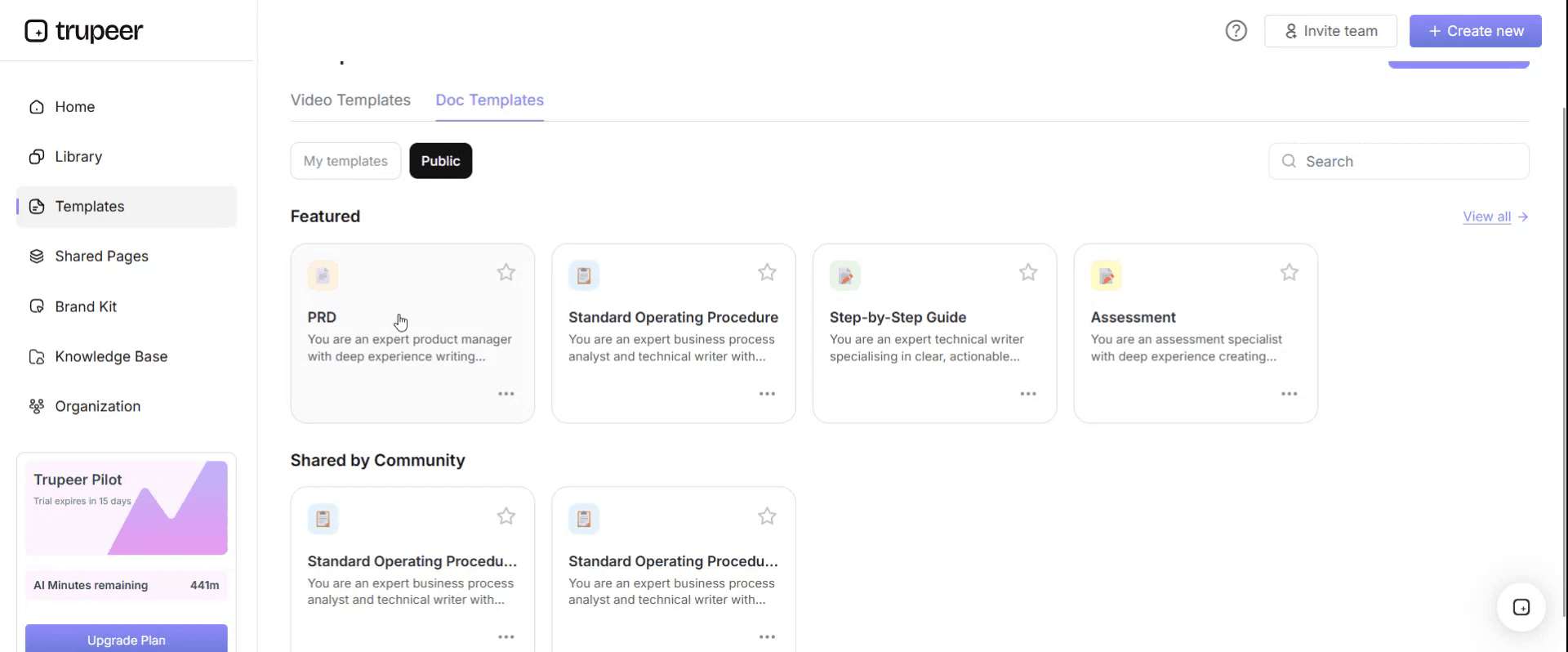
Step 3: Expand the Template View
If needed, expand the template view to see the full layout and details clearly.

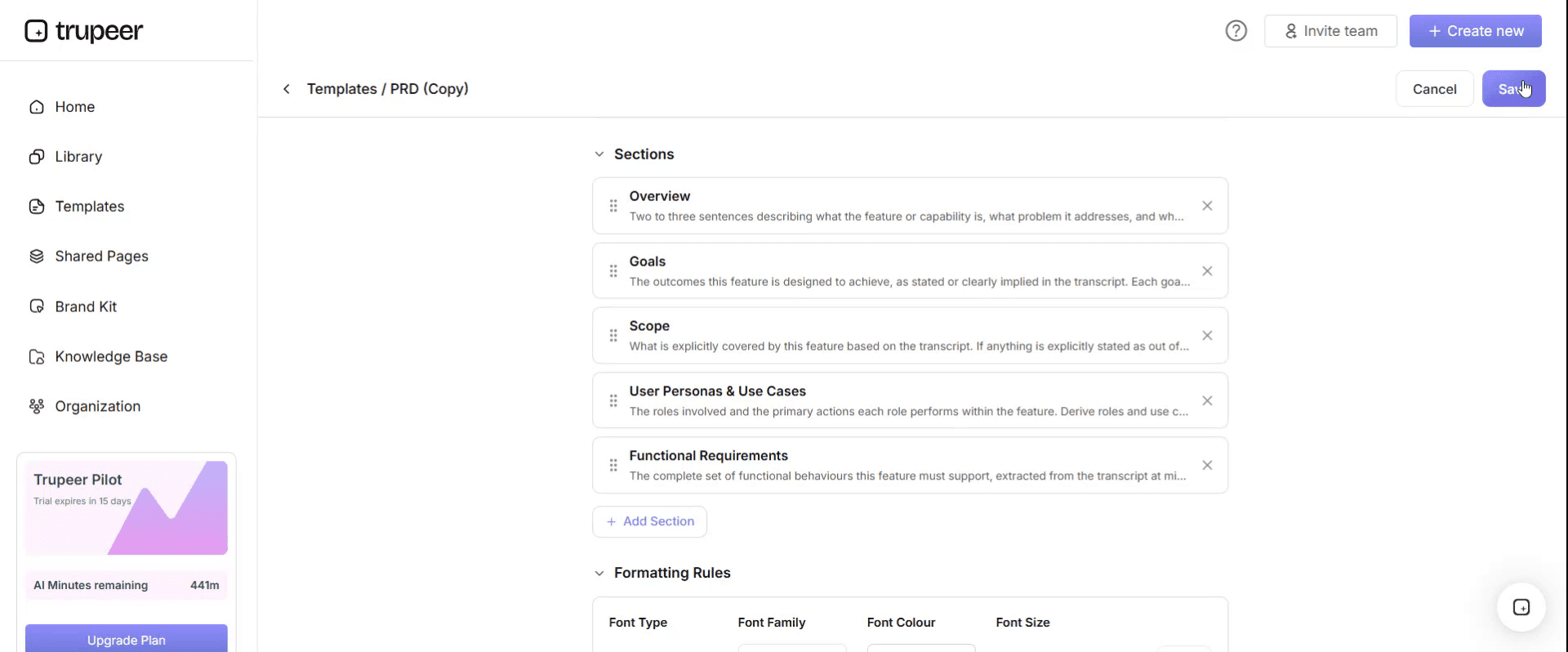
Step 4: Edit the Template
Click on Edit to start modifying the selected template.

Within the editor, you can:
Add new sections
Define or update formatting rules
Add a logo and adjust its position and related settings
Step 5: Save Your Customized Template
After making all necessary changes, click Save to store the updated template as your own.
Step 6: Preview and Fine-Tune the Template
When you want to see how your customized template looks, open the Preview.

From the preview screen, you can continue to make adjustments directly if needed, ensuring the template appears exactly as you want.
With a hypercare plan template you can:
Prepare support before go-live, not on the day.
Resolve critical issues fast with clear priorities and owners.
Keep users informed about known issues, fixes and where to get help.
Give leaders a daily view of stability and adoption.
Exit hypercare on evidence, with agreed criteria.
What a hypercare plan template must contain
Section | What it covers |
|---|---|
Hypercare summary | Scope, go-live date, duration, decision makers |
Support model | Support tiers, roles, hours, channels and escalation |
War room | Location or virtual set-up, attendees, hours and daily stand-ups |
Issue management | Logging, triage, priority definitions, response and resolution targets |
Monitoring | System, interface, job and business process checks |
Daily routine | Stand-ups, issue reviews, status reports and leadership updates |
Communication | Known issues, fixes, tips and support channels for users |
Knowledge and training | Quick guides, short videos and FAQs for common questions |
Metrics | Tickets, resolution times, backlog, adoption and business KPIs |
Exit criteria | Conditions to end hypercare and who approves |
Handover | Transfer of open issues, knowledge and ownership to steady-state support |
Free hypercare plan template: the structure to copy
Copy the structure below into your own document, or open it in Trupeer and customize it.
1. Hypercare summary. System or change: [name]. Scope: [processes, sites, users]. Go-live date: [date]. Hypercare period: [start and planned end]. Hypercare lead: [name]. Exit approved by: [steering committee or sponsor].
2. Support model.
Tier | Who | Handles | Hours | Channel |
|---|---|---|---|---|
Tier 0 | Self-service | How-to questions, known issues | 24/7 | Knowledge base, videos |
Tier 1 | Super users and service desk | Questions, simple fixes, logging tickets | [Hours] | Chat, phone, floor walking |
Tier 2 | Functional experts | Process and configuration issues | [Hours] | Ticket queue |
Tier 3 | Technical team and vendors | System, interface and code issues | [Hours, on-call] | Ticket queue, on-call |
3. War room. Location: [room or virtual channel]. Hours: [hours]. Attendees: [hypercare lead, functional and technical leads, business representatives]. Stand-ups: [times].
4. Issue priorities.
Priority | Definition | Response target | Resolution target |
|---|---|---|---|
P1 Critical | Business stopped or major financial, legal or customer impact | [Minutes] | [Hours] |
P2 High | Key process degraded, workaround available | [Hours] | [1 business day] |
P3 Medium | Limited impact, workaround available | [1 business day] | [Days] |
P4 Low | Question or minor issue | [Days] | [Planned] |
5. Monitoring. System availability and performance, interfaces, batch jobs, error logs, and business checks such as orders, invoices and payments processed.
6. Daily routine. Morning stand-up: [time]. Issue triage: [times]. Status report: [time, recipients]. Leadership update: [time].
7. Communication. Daily user update: known issues, fixes and tips. Channels: [email, chat, intranet]. Owner: [name].
8. Knowledge and training. Quick guides and short videos for the top questions, published within [timeframe] of a repeated question.
9. Metrics. Tickets opened and closed by priority, backlog, resolution times, repeat questions, adoption measures and business KPIs.
10. Exit criteria. See the checklist below. Exit review: [date]. Approved by: [names].
11. Handover. Open issues, known errors, workarounds, guides and contacts handed to [steady-state support team], with a handover meeting on [date].
Hypercare daily checklist
Review system, interface and job monitoring from overnight.
Hold the morning stand-up and review P1 and P2 issues.
Confirm critical business processes ran correctly, such as orders, invoices and payments.
Triage new tickets and assign owners.
Publish the daily user update with known issues and fixes.
Turn repeated questions into a guide or short video.
Update metrics and send the status report.
Brief leadership on stability, risks and decisions needed.
Hypercare exit criteria checklist
Area | Exit criterion |
|---|---|
Stability | No open P1 issues; P2 issues have agreed workarounds and owners |
Volume | Ticket volumes stable or falling for an agreed period |
Business processes | Critical cycles completed successfully, such as the first month-end close or payroll run |
Users | Adoption and usage at agreed levels; repeat questions falling |
Knowledge | Guides and videos published for common questions and known issues |
Support readiness | Steady-state support team trained, with access and runbooks |
Handover | Open issues and known errors transferred with owners |
Approval | Steering committee or sponsor approves exit |
Hypercare plan example: ERP go-live
Here's a summary of a hypercare plan for a finance and procurement ERP go-live. The details are illustrative.
Element | Summary |
|---|---|
Duration | Four weeks planned, with a review at week two and exit after the first month-end close |
Support model | Super users on every floor in week one, functional experts in the war room, technical team on call |
War room | Daily from 08:00 to 18:00 in week one, then reduced hours |
Stand-ups | 08:30 and 16:30 in week one, once daily afterwards |
Communication | Daily email and chat update with known issues, fixes and a tip of the day |
Knowledge | Short how-to videos for the top questions, published the same day they first repeat |
Exit | No P1 issues for two weeks, month-end close completed, ticket volumes falling, sponsor sign-off |
How long should hypercare last?
It depends on the size and risk of the change, but most hypercare periods run for a few weeks. Tie the end to events rather than dates: for finance systems, through the first month-end close; for payroll, through the first payroll runs; for supply chain, through a full order cycle. Use the exit criteria to decide, and extend only with a reason.
How to reduce hypercare tickets
Many hypercare tickets are the same how-to questions asked many times. Reduce them by:
Publishing short videos for the first tasks each role will perform, before go-live.
Turning every repeated question into a guide within a day.
Putting help links where people work, in the system, chat and intranet.
Using super users to answer simple questions on the spot.
Sharing a daily update so people know about known issues before they log tickets.
For a full approach, see post-go-live support video strategy: reducing hypercare tickets.
For building the content before go-live, use the ERP end user training plan template.
Hypercare metrics to track
Tickets opened and closed by priority and process.
Backlog of open tickets and their age.
Response and resolution times against targets.
Repeat questions, a signal of missing guidance.
Adoption, such as active users and transactions in the new system.
Business KPIs, such as invoices processed, orders shipped or close timeline.
For adoption measures, see end user adoption metrics that matter.
Common hypercare mistakes
Planning hypercare after go-live, so roles and processes are improvised.
No priority definitions, so everything is treated as urgent.
Too few super users, pushing simple questions to experts.
No daily communication, so users log the same known issue many times.
No exit criteria, so hypercare drags on.
A weak handover, leaving steady-state support without knowledge or runbooks.
Hypercare plan checklist
Scope, duration and decision makers are agreed.
The support model, tiers, hours and channels are defined.
The war room, attendees and stand-ups are set up.
Priority definitions and targets are agreed.
Monitoring and daily checks are planned.
Daily communication has an owner.
Guides and videos are ready for the first tasks and common questions.
Metrics and exit criteria are agreed.
The handover to steady-state support is planned.
How Trupeer helps you run hypercare
Hypercare challenge | How Trupeer helps |
|---|---|
The same how-to questions flood the service desk | Record the answer once, and Trupeer turns it into a short video and step-by-step guide you can share the same day |
Users need guidance before go-live | Record the first tasks each role will perform and publish them before go-live |
Known issues need clear workarounds | Publish workaround guides and update them as fixes land |
Users work in many languages | Translate guides and videos into 65+ languages from one source |
Steady-state support needs the knowledge | Hand over a searchable library of guides, videos and runbooks; Trupeer's AI runbook generator turns recordings of support tasks into runbooks |
Genpact used Trupeer's recording-first approach for a company-wide Workday rollout, turning recorded process sessions into more than 500 training collaterals across 20 workstreams in five languages, for 140,000 employees in 40 countries, in 3 months instead of 12. Read the Genpact customer story.
Download the free hypercare plan template
Sign up to get your generated plan and the editable hypercare plan template, add your support model and exit criteria, and share it with your go-live team. Get the free hypercare plan template.
Related templates
Frequently Asked Questions
What is a hypercare plan template?
It's a ready-made plan for the period of intensive support after go-live, covering scope and duration, the support model, war room, issue priorities, monitoring, daily routines, communication, knowledge, metrics, exit criteria and handover.
What is hypercare?
Hypercare is the period immediately after a system, process or service goes live, when extra support is in place to resolve issues quickly and help users adopt the change.
How long should hypercare last?
Usually a few weeks, tied to events such as the first month-end close or payroll run, and ended when agreed exit criteria are met.
What should a hypercare checklist include?
Daily monitoring reviews, stand-ups, checks on critical business processes, ticket triage, a user update, new guides for repeated questions, metrics, a status report and a leadership briefing.
What are typical hypercare exit criteria?
No open critical issues, stable or falling ticket volumes, critical business cycles completed, adoption at agreed levels, guidance published, steady-state support ready, handover complete and sponsor approval.
Who runs hypercare?
A hypercare lead runs it, with super users, functional experts, technical teams and vendors in a tiered support model, and a steering committee or sponsor approving exit.
How does the hypercare plan generator work?
You choose the type of go-live, the number of users and locations, and how critical the processes are. It suggests a hypercare length, support structure and exit criteria, and you can sign up to get the full plan pre-filled with your answers.
Is the hypercare plan template free?
Yes. Use the generator on this page for free, and sign up to get the full results and the editable template in Word, Excel or PDF.
What's the difference between hypercare and steady-state support?
Hypercare is temporary, intensive support with experts on hand and faster response targets. Steady-state support is the normal service desk and support model that takes over once hypercare exit criteria are met.
How do you reduce hypercare tickets?
Publish short videos for each role's first tasks before go-live, turn repeated questions into guides within a day, put help links where people work, use super users and share a daily update on known issues.
Is there a hypercare plan template in Excel?
Yes. The issue log, priority targets and daily checklist work well in Excel. Sign up to get the editable template, or copy the structure above into Excel.
Is there a hypercare checklist in Word or PDF?
Yes. Keep the plan, support model and exit criteria in Word, and export a PDF of the approved plan and the daily checklist for the war room.


