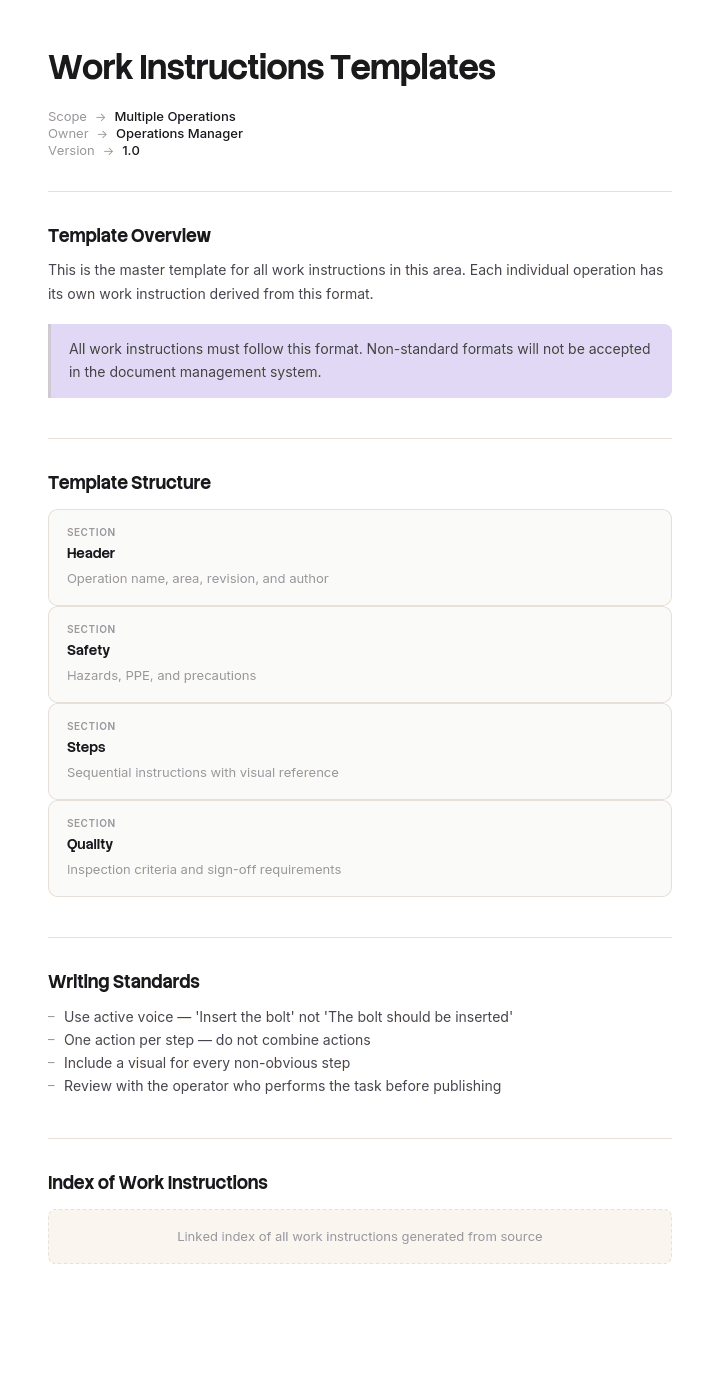
Use this template
Different tasks need different work instructions formats. With Trupeer, you can save hours on creating work instructions by starting with free templates, customizing them with your brand guidelines, and turning written instructions into video walkthroughs workers can watch right at the workstation.
These work instructions templates cover assembly, manufacturing, construction, inspection, safety and machine operation tasks - useful for any task-driven environment. Pair with our AI SOP creator for procedural depth, generate AI video walkthroughs, and translate into 65+ languages for multilingual workforces.
How to customize this template in Trupeer
Step 1: Open the Templates Section
Go to the Templates section from the main navigation.

Step 2: Select and Open a Template
Click on any template you want to work with to open it.

Step 3: Expand the Template View
If needed, expand the template view to see the full layout and details clearly.

Step 4: Edit the Template
Click on Edit to start modifying the selected template.

Within the editor, you can:
Add new sections
Define or update formatting rules
Add a logo and adjust its position and related settings
Step 5: Save Your Customized Template
After making all necessary changes, click Save to store the updated template as your own.

Step 6: Preview and Fine-Tune the Template
When you want to see how your customized template looks, open the Preview.

From the preview screen, you can continue to make adjustments directly if needed, ensuring the template appears exactly as you want.
With these work instructions templates you can:
Save hours on writing: Skip the blank page with proven structures for every task type.
Cover every use case: Templates for assembly, inspection, safety, machine operation and more.
Stay on-brand: Apply your logo, fonts and colors using Trupeer's brand kit.
Reduce errors: Visual instructions cut mistakes and rework on every shift.
Train workers faster: Pair instructions with video walkthroughs at the work area.
Reach global teams: Translate work instructions into 65+ languages with one click.
The right work instruction template depends on the task. Use this collection to capture every type of task clearly and consistently.
Frequently Asked Questions
What types of work instructions templates do I need?
Most operations need a mix: assembly work instructions for build tasks, manufacturing work instructions for line operations, safety work instructions for high-risk tasks, inspection work instructions for quality, machine operation instructions for equipment use and maintenance work instructions for ongoing care.
What should every work instructions template include?
Every template should capture the task name and purpose, required tools and PPE, materials, step-by-step procedure, quality checkpoints, safety requirements, common errors and acceptance criteria. The specific structure can be tailored to the type of task.
How do you choose the right work instructions format?
Match the format to the task. Sequential tasks (assembly, machine operation) work well with numbered steps and photos. Decision-heavy tasks work better as flowcharts. Quality tasks may need detailed checklists. Hazardous tasks need prominent safety sections and visual cues for PPE.
How do you create work instructions for multilingual workforces?
Lean heavily on visuals - photos, diagrams and video that don't depend on text. Use simple, plain language wherever text is needed. Translate into the languages workers actually speak. Trupeer's translation supports 65+ languages with one click - making multilingual deployment fast.
How often should work instructions be updated?
Review work instructions at least annually. Update immediately whenever there's a process change, equipment upgrade, safety incident or worker feedback indicating issues. Outdated work instructions are a leading cause of defects, safety incidents and training problems - keep them current.

