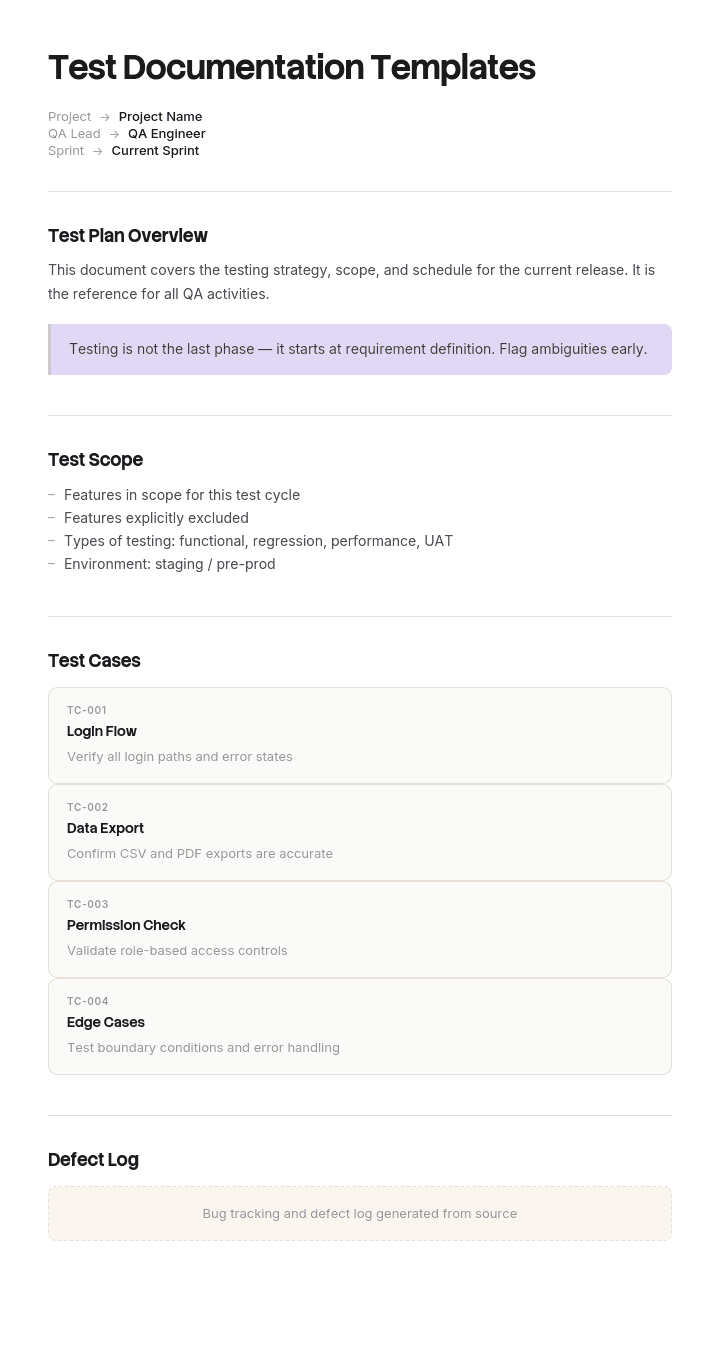
Use this template
Strong test documentation is the foundation of any quality engineering practice. With Trupeer, you can save hours on writing test docs by starting with free test documentation templates, customizing them with your brand guidelines, and turning test plans into video walkthroughs that align engineering, product and QA.
What are free test documentation templates?
Free test documentation templates are reusable structures for the documents a testing effort produces: the strategy, the plan, the test cases, the data, the results and the defect reports.
Most searches for them are really searches for one document. Test cases are what testers spend their time writing, and a test case template is a table with steps in it, which is not difficult.
The templates are not the problem. Every published test case template has the same columns: identifier, title, preconditions, steps, expected result, actual result, status. That structure is correct and it has been stable for decades.
What is wrong in most test suites is the balance of effort inside that structure, and it produces test cases that can pass while the system is broken.
Format follows use. A test cases template Excel free download is the most common working format and suits the case table well. A test case template Word file suits test plans and strategies, which are prose. A test document sample PDF is what gets attached to a release record as evidence.
The documents in a test set
Six documents, each answering a different question, and it is worth knowing which you actually need before adopting anything.
Test strategy. How this organisation tests, in general. Written once, revised rarely, applying across projects.
Test plan. What will be tested on this release or project, in which environments, by whom, with what entry and exit criteria and what schedule.
Test cases. The individual checks. Steps and, crucially, expected results.
Test scripts. The automated equivalent, where a case has been coded rather than performed by a person.
Test data. What data the cases run against, which is documentation in its own right and is frequently the least controlled part of the whole set.
Test results and defect reports. What happened, and what was raised. This is what a test case document sample PDF usually turns out to be when you find one published, since results are the part organisations retain.
Any software testing documentation template pack should cover all six, and most cover two. Most organisations have the third and sixth and improvise the rest. That is survivable. What is not survivable is the third being written badly, because everything downstream depends on it.
How to customize this template in Trupeer
Step 1: Open the Templates Section
Go to the Templates section from the main navigation.

Step 2: Select and Open a Template
Click on any template you want to work with to open it.

Step 3: Expand the Template View
If needed, expand the template view to see the full layout and details clearly.

Step 4: Edit the Template
Click on Edit to start modifying the selected template.

Within the editor, you can:
Add new sections
Define or update formatting rules
Add a logo and adjust its position and related settings
Step 5: Save Your Customized Template
After making all necessary changes, click Save to store the updated template as your own.

Step 6: Preview and Fine-Tune the Template
When you want to see how your customized template looks, open the Preview.

From the preview screen, you can continue to make adjustments directly if needed, ensuring the template appears exactly as you want.
With test documentation templates you can:
Save hours on writing: Skip the blank page with structures used by experienced QA teams.
Improve test coverage: Built-in sections ensure nothing important gets missed.
Stay on-brand: Apply your logo, fonts and colors using Trupeer's brand kit.
Standardize across products: Use the same templates for every release and team.
Stay audit-ready: Aligned with IEEE 829, ISO 29119 and similar standards.
Reach global teams: Translate test documentation into 65+ languages with one click.
The expected result is the test case
Read any test suite and look at where the words are.
The steps will be detailed. Open the application. Navigate to the payments screen. Select the transaction. Click Refund. Enter the amount. Confirm. Seven precise instructions, each unambiguous.
Then look at the expected result. It will say something like: the refund is processed successfully.
That line is the entire test. Everything above it is setup. And it is the line that received the least thought, because writing precise steps is easy and defining what correct means is hard.
The consequence is that a tester follows seven exact instructions, sees something that looks like success, and ticks pass. They have not done anything wrong. The document asked whether the refund processed successfully, they saw a success message, and it did.
What the document never asked was whether exactly one refund had been created, whether the ledger moved by exactly the right amount, or whether anything downstream had received a duplicate.
A test case whose expected result can be satisfied by an optimistic reading of the interface is a test case that will pass whenever the tester is in a hurry, which is most of the time near a release.
Writing an expected result that can fail
Three properties, and they are easy to check across an existing suite.
It names a state, not an impression. Not "the record saves correctly" but "the record appears in the list with status Active and a modified timestamp within the last minute".
It is checkable outside the thing that performed the action. This is the property that catches the expensive defects. If the action happened in the user interface, the strongest expected result is one verified somewhere else: in the database, on a report, in the downstream system, on a statement. Interfaces are good at reporting success and bad at reporting what actually happened underneath.
It could fail without the system looking broken. If the only way to fail the test is a visible error, the test only detects errors that announce themselves. Silent wrongness is what test cases exist to catch and what vague expected results reliably miss.
A practical audit, which takes an afternoon on a suite of a few hundred. Read the expected results only, ignoring the steps. Count how many could be satisfied by watching the screen alone, and how many use words like correctly, successfully, as expected or without error, which are not results at all. In most suites both counts are high.
What a test case template must contain
Nine fields. The template is not the issue and the guidance against two of these fields is.
Field | What it does |
|---|---|
Identifier | Stable, never reused, so cases can be referenced in defect reports and coverage discussions. |
Title | What is being tested, in a sentence somebody could search for. |
Priority | Because nobody ever runs the whole suite, and if you do not choose, whoever is under pressure will. |
Preconditions | State, data and access required before step one. |
Steps | One action each. The easy part. |
Expected result | What must be true, where to check it, and stated so it could fail. The whole test. |
Actual result | What was observed, filled during execution, not a tick. |
Status | Pass, fail, blocked, not run. Blocked and not run are different and collapsing them hides coverage gaps. |
Evidence | Screenshot, query output, reference. Whatever shows the actual result rather than asserting it. |
The distinction between blocked and not run matters more than it appears. A suite reporting ninety percent pass may have run sixty percent of its cases, and the difference is invisible if everything not passed is recorded the same way.
Free test documentation templates: the structure to copy
Filled with a real example rather than placeholders. The system is a payment processing platform.
Copy from here.
Test plan, in outline. Scope: refund processing for the 4.9 release. In scope: full refunds, partial refunds, refunds against settled and unsettled transactions. Out of scope: chargebacks, which are unchanged. Environments: staging with production-like data volumes. Entry criteria: build deployed, smoke test passed, test data loaded. Exit criteria: all priority one cases passed, no open priority one or two defects, ledger reconciliation clean across the full run.
Test case.
Identifier: TC-118. Title: Full refund against a settled transaction creates exactly one refund entry.
Priority: One.
Preconditions: Merchant account M-4471 exists with a settled transaction T-88210 of 240.00. Ledger balance for M-4471 recorded before starting. Tester has refund permission.
Steps.
Open the payments screen and search for T-88210.
Select the transaction and choose Refund.
Enter 240.00 and confirm.
Expected result. Four conditions, all of which must hold.
One refund record exists against T-88210, and only one. Checked in the refunds table, not the interface.
The merchant ledger balance for M-4471 has decreased by exactly 240.00 from the recorded starting value. Checked on the ledger report.
The merchant statement for the period shows a single refund line of 240.00.
The transaction status shows Refunded in the interface.
Note that the interface check is last and is the weakest of the four. It is included because users see it, not because it verifies anything.
Actual result: recorded at execution, with the ledger figures observed rather than assumed.
Status: pass, fail, blocked or not run.
Evidence: query output from the refunds table and a copy of the ledger report line.
Defect report, if it fails. Case identifier, what was expected, what was observed, environment, build, data used, steps to reproduce, severity. The data used field is the one most often omitted and the one that most often prevents reproduction.
Copy to here.
Test documentation example: three hundred and thirty eight passes
Brayford Payments processes card payments for small merchants and employs about two hundred people. It released a revised refund flow.
The payments module had three hundred and forty test cases. User acceptance testing ran the full suite. Three hundred and thirty eight passed. Two failed, were fixed, and were retested.
In production, refunds above a certain value were applied twice under a particular timing condition. It ran for nine days before anybody noticed, producing about fourteen hundred duplicate refunds worth four hundred and twelve thousand pounds. Recovering money already paid to merchants was slow and awkward, and roughly sixty percent came back.
Case TC-118 covered refunds. It had seven detailed steps and an expected result reading: refund is processed successfully.
The tester followed all seven steps, saw a confirmation message and a status of Refunded, and recorded a pass. That was a correct application of the document in front of them.
Nobody looked at the ledger. Nothing in the case asked them to. A single refund and a double refund look identical on the confirmation screen, which is exactly why the check needed to happen somewhere else.
The audit afterwards read all three hundred and forty expected results, ignoring the steps.
Two hundred and eleven could be satisfied by observing the user interface alone. Forty seven contained no checkable statement at all, using phrases like works as expected, behaves correctly, or completes without error.
The remedy was three weeks of rewriting, not of new testing. Every expected result had to name a state, say where it was checked, and be capable of failing without a visible error. Where the natural check was outside the interface, that is where it went. Some cases merged and the suite came down to two hundred and ninety.
Two releases later, defects found during user acceptance testing had gone from an average of four per release to nineteen.
That number rising is the result. Production defects over the following six months went from eleven to two.
The suite had not been too small. It had been asking three hundred and forty questions that the system could answer optimistically.
How to write test cases in six steps
Write the expected result before the steps. It inverts the usual order and it forces you to decide what correct means before you describe how to get there. Steps written afterwards are shorter and more relevant.
Say where the result is checked. Interface, database, report, downstream system. Naming the location is what makes a result verifiable by somebody else.
Ask how this could pass while being wrong. If you can answer, the expected result needs another condition.
Then write the steps, one action each. They are the easy part and should take the least time.
Record preconditions including data. Most failures to reproduce a defect come down to different data rather than different steps.
Prioritise honestly. Nobody runs the full suite before a release. Deciding in advance which cases matter is better than deciding at nine in the evening on the day before.
Step one is the whole method. Steps two and three are what catch the defects that reach production.
Test cases versus test scenarios
The two get used interchangeably and the difference is level.
A test scenario is what to test, described at a level anybody can understand. Verify that refunds work correctly for settled transactions. It is a coverage statement.
A test case is how to test it, with specific data, specific steps and a specific expected result. One scenario usually produces several cases.
The useful discipline is writing scenarios first, agreeing coverage against them with people who understand the business, and then writing cases underneath. Doing it the other way round produces a suite that covers whatever the person writing it happened to think of.
A scenario that produces only one case is usually a scenario that has not been thought about properly. Refunds for settled transactions should produce cases for the full amount, a partial amount, an amount exceeding the original, a second refund attempt on the same transaction, and a refund on a transaction already refunded. Four of those five are where the defects live.
Test strategy, test plan and QA plan
Three documents above the test cases, and the distinctions carry practical weight.
A test strategy is organisational and long lived. How we test, what types of testing we use, what our standards are. It applies across projects and is revised rarely.
A test plan is specific to a release or project. Scope, environments, entry and exit criteria, schedule, resources, risks. A test plan template Excel free download will give you a schedule and a matrix, and the prose sections belong in a document.
A QA plan is broader than both, because quality assurance includes everything done to prevent defects rather than to find them: requirements review, definition of done, code review standards, environment parity. The QA plan template covers that distinction, and it matters here because a document titled QA plan that contains only test phases has quietly become a test plan.
The practical test is timing. Activities happening before the work is done are assurance. Activities happening after it are control, and testing is control.
What free test documentation templates cannot fix
Requirements nobody agreed. A test case verifies behaviour against an expectation, and where the expectation was never settled, testers write cases against their own assumption of it.
A suite too large to run. Every organisation reaches the point where the full regression suite does not fit in the window. Prioritising deliberately beats prioritising under pressure, and no test cases template Excel free download will do it for you.
A vague expected result. No test case template: free download and no simple test case template Excel layout will write it for you, and it is the only field that decides whether the case works.
Test data that does not represent production. Brayford's defect required a particular timing condition and a realistic data volume. Neither existed in the test environment, and no template addresses that.
Testers with no authority to block. Exit criteria that can be waived by whoever wants to ship are not criteria.
Show the test rather than describing it
Two problems in this area are the same problem, and both are about evidence.
Test evidence is normally a tick in a status column. Somebody ran the case and says it passed. If a defect later appears in that area, there is no way to establish what was actually observed, so the question of whether the case was run properly cannot be answered and usually turns into an argument.
The second problem is that a new tester joining a team learns what checking properly means by watching somebody, and if nobody has time, they learn it from the documents, which is where the optimistic reading comes from.
Trupeer AI addresses both. Recording a test execution produces a written walkthrough with screenshots already captured and placed, alongside the video, in your own branding. What was actually observed at each step is captured rather than asserted, which is the evidence a release record needs and the material a new tester learns from.
Record it. Brand it. Translate it. Trupeer it.
Two points follow. Recording an experienced tester running a complex case shows the checks they make outside the interface, which is exactly the habit that written cases fail to transmit. And where testing is performed across sites or by an outsourced team, the same recording defines the same standard of checking rather than leaving it to interpretation.
The material sits in your knowledge base and doubles as training for new testers. Whether the release can ship at all is a separate question, covered in the release requirements template. Consistency across your documents is a matter of setting the brand kit once, and setup is covered in the document template setup guide.
Frequently Asked Questions
Is there a test cases template Excel free download?
Excel is the standard working format for test cases and suits them well, because a suite is a table you filter by module, priority and status. A test cases template Excel free download will give you the standard columns and is genuinely fine as a starting point.
Two additions are worth making. A column recording where the expected result is checked, meaning interface, database, report or downstream. And separate status values for blocked and not run, since collapsing them hides how much of the suite was actually executed.
Is there a simple test case template Excel version?
Yes, and simple is usually right. A simple test case template Excel layout with identifier, title, priority, preconditions, steps, expected result, actual result and status covers almost everything.
Resist adding columns. Test case templates accumulate fields that seem useful at design time and get left blank in practice, and a suite with eight populated columns is more useful than one with twenty of which twelve are empty.
Is there a test case template Word version?
Word suits the surrounding documents rather than the cases. A test case template Word file works for a test plan, a test strategy or a summary report, all of which are prose.
For the cases themselves, a document is a poor fit. You cannot filter it, you cannot sort by priority, and updating status across two hundred cases in a Word table during a test run is slow enough that people stop doing it accurately.
Is there a test case template: free download worth using?
The columns have been stable for decades, so a test case template: free download saves you very little and every published version is broadly the same.
Judge any of them on one question. Does the expected result column have any guidance attached, or is it just a blank cell? The blank cell is where most test suites go wrong, and no template solves it, but a template prompting for where the result is checked will improve what gets written into it.
Is there a test plan template Excel free download?
Excel suits the schedule, the coverage matrix and the resource plan within a test plan. A test plan template Excel free download will typically give you those.
The narrative half belongs in a document: scope, entry and exit criteria, environments, assumptions and risks. Those get read and negotiated, and negotiating in spreadsheet cells goes badly. Keep both, and reference one from the other.
Where can I find a test document sample PDF?
Public sector procurement records, university projects and some standards bodies publish real test documentation, and a test document sample PDF from one of those sources is more instructive than a commercial template because it was produced under real constraints.
Read a test case document sample PDF for its expected results rather than its structure. Structure transfers from anywhere. How a real team phrased what correct looks like, and whether their checks sat outside the interface, is the part worth learning.
Where can I find a test case document sample PDF?
The same sources apply, and regulated industries are the richest, since test evidence there has to survive audit and tends to be more precisely written as a result.
When reading a test case document sample PDF, look at whether the actual result column contains observations or ticks. Ticks tell you the suite was run. Observations tell you what was seen, and only the second is evidence.
Is there a software testing documentation template set?
Yes, and the set is six documents: strategy, plan, cases, scripts, data and results with defect reports. A software testing documentation template pack will usually cover the plan and the cases and leave the rest.
Test data is the one most commonly missing and the one that most often prevents a defect being reproduced. Documenting what data the suite runs against, and how it is refreshed, is worth as much as another fifty test cases.

