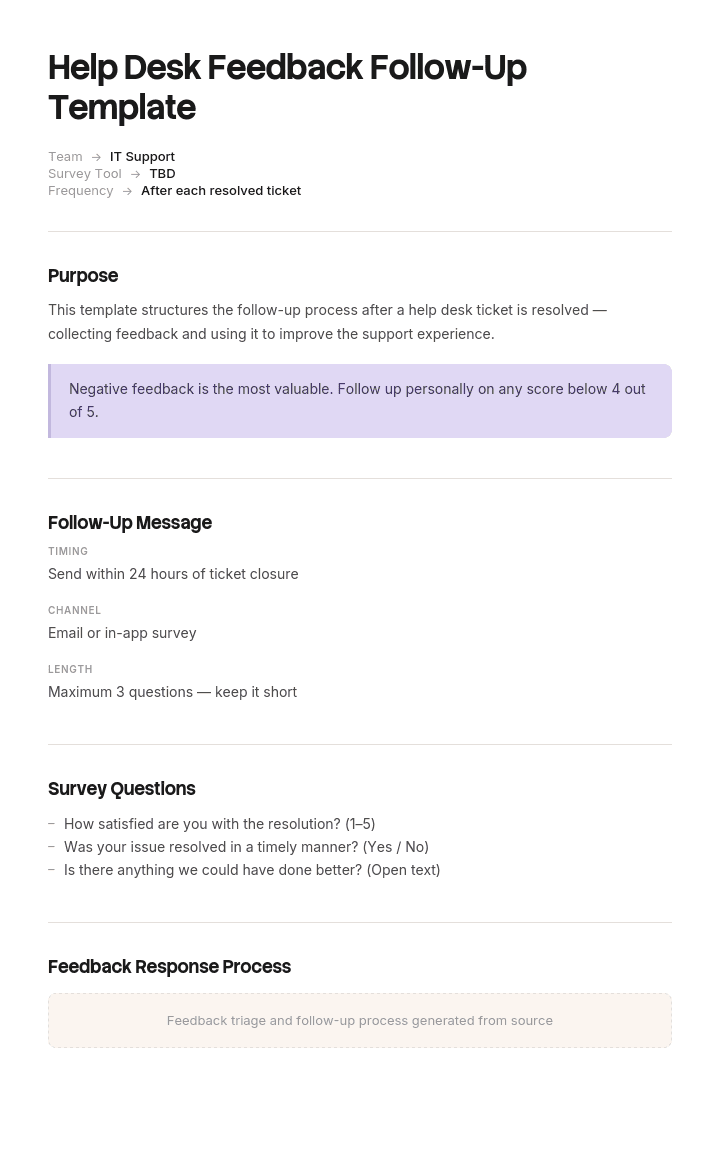
Use this template
The best support teams don't just close tickets - they follow up. With Trupeer, you can save hours on follow-up communications by starting with a free help desk feedback follow-up template, customizing it with your brand guidelines, and turning follow-ups into video messages that strengthen customer relationships.
Most support teams send a satisfaction survey and then do one of two things with the answers. Nothing, or a generic thank-you that makes it obvious nobody read the comment.
Both teach customers that feedback goes nowhere, and the response rate falls until the data is worthless. Closing the loop properly takes four steps, and the reply is only the first.
Download the feedback follow-up templates
Format | Best for |
|---|---|
Word (.docx) | The response templates, ready to adapt into canned replies |
The triage rules and escalation matrix, printable for the desk | |
Excel (.xlsx) | Feedback log, theme tagging and the action tracker |
Google Docs | Drafting the responses with the support team |
.doc | Older systems |
Free, editable, no watermark.
How to customize this template in Trupeer
Step 1: Open the Templates Section
Go to the Templates section from the main navigation.

Step 2: Select and Open a Template
Click on any template you want to work with to open it.

Step 3: Expand the Template View
If needed, expand the template view to see the full layout and details clearly.

Step 4: Edit the Template
Click on Edit to start modifying the selected template.

Within the editor, you can:
Add new sections
Define or update formatting rules
Add a logo and adjust its position and related settings
Step 5: Save Your Customized Template
After making all necessary changes, click Save to store the updated template as your own.

Step 6: Preview and Fine-Tune the Template
When you want to see how your customized template looks, open the Preview.

From the preview screen, you can continue to make adjustments directly if needed, ensuring the template appears exactly as you want.
With a help desk feedback follow-up template you can:
Save hours on writing: Skip the blank page with a structure built for ticket follow-ups.
Capture customer voice: Built-in feedback prompts turn tickets into insights.
Stay on-brand: Apply your logo, tone and colors using Trupeer's brand kit.
Improve CSAT: Following up signals you care - and lifts customer satisfaction.
Drive continuous improvement: Feedback identifies what to fix in support and product.
Reach global customers: Translate follow-ups into 65+ languages with one click.
What closing the loop actually means
Four stages. Most teams do the first and stop.
Stage | What happens | Who owns it | Usually done? |
|---|---|---|---|
1. Respond | Reply to the individual | Agent or team lead | Sometimes |
2. Resolve | Fix the specific problem they raised | Agent or lead | Sometimes |
3. Aggregate | Tag by theme, count, find the pattern | Support manager | Rarely |
4. Report back | Tell customers what changed | Support or marketing | Almost never |
Stage one is courtesy. Stage two is service recovery. Stage three is where the value is, because one complaint is an anecdote and forty of the same complaint is a roadmap. Stage four is what keeps your response rate alive, and it is the single most neglected step in customer feedback.
Stage one: respond
Within one working day for anything negative, and only where the person is identifiable and has not opted out.
The response has three jobs: acknowledge specifically, do something, and make the next step clear. A reply that only thanks them for the feedback is worse than silence, because it proves someone read it and chose not to act.
Stage two: resolve
If they told you something was broken, fix it or tell them why you cannot.
The distinction that matters: recovering the individual and fixing the cause are different actions with different owners. Refunding one customer resolves stage two for them and changes nothing systemically. Both are needed and the second is easy to skip once the complaint stops.
Stage three: aggregate
Tag every comment by theme, weekly. Count them. Three or four themes will account for most of the volume.
Themes are the output, not scores. A CSAT of 78% tells you nothing you can act on. "Forty-one people mentioned the returns process is confusing" tells you exactly what to do next.
Tag negative and positive comments both. What people praise tells you what to protect when you change things.
Stage four: report back
Tell customers what changed as a result of feedback. In the next survey invitation, in a release note, in a newsletter, anywhere they will see it.
This is the highest-return action in the whole loop and almost nobody does it. It is the difference between a survey people ignore and a survey they answer, because it proves the previous one mattered.
One sentence is enough. "You told us the returns process was confusing, so we rewrote it and cut it from six steps to three."
Triage: which feedback gets which response
Not every response deserves the same treatment. Sort on arrival.
Feedback | Response | Owner | Timing |
|---|---|---|---|
Negative, specific problem, identifiable customer | Personal reply plus fix | Team lead | Within 1 working day |
Negative, vague or emotional | Personal reply asking what happened | Team lead | Within 1 working day |
Negative, about a named agent | Reply from a lead, not the agent | Support manager | Within 1 working day |
Negative, high-value or at-risk account | Reply plus account manager informed | Support manager | Same day |
Negative, abusive | Log, do not reply | Support manager | No response |
Neutral with a comment | Short reply if actionable | Agent | Within 2 days |
Neutral, no comment | No reply. Count it | ||
Positive with detail | Short thank-you, pass the praise to the agent | Agent or lead | Within 2 days |
Positive, no detail | No reply. Count it | ||
Positive, high-value account | Thank-you plus consider asking for a review | Account manager | Within 2 days |
Two rules worth holding. Anything negative about a specific agent is answered by a lead, never by the agent concerned. And silence is a legitimate response to a neutral score with no comment, because a reply to someone who had nothing to say is noise.
Responding to negative feedback
The template that matters most. Four variants depending on what they said.
They reported a specific problem that you can fix
Thanks for telling us, and I'm sorry [specific thing] happened. Looking at your ticket, [what went wrong]. I've [specific action taken], and you should see [outcome] by [when]. I've also [what stops it happening again], so this shouldn't come up for you a second time. If anything is still outstanding, reply to this and it comes straight back to me.
Name the cause. A resolution with no explanation reads as a workaround.
They reported a problem you cannot fix
Thanks for being straight with us. You're right that [acknowledge the specific issue], and I want to be honest rather than vague about it: [why it is the way it is, briefly]. What I can do is [alternative or workaround]. I've logged this with [team], and it's on the list of things we're weighing up. That's not the answer you wanted, and I understand if it's frustrating.
Never promise a fix you do not control. A vague "we'll look into it" that leads nowhere costs more than an honest no.
The feedback is negative but vague
Thanks for the rating. It's clear we didn't get this right and I'd like to understand what happened, because the ticket doesn't tell me the whole story. Could you tell me briefly what would have made it better? If it's easier, reply with a time and I'll call you.
Ask one question. Two produces zero answers.
They complained about an agent
Thank you for telling us, and I'm sorry your experience with us wasn't what it should have been. I've read the full conversation and [acknowledge what was wrong, without blaming the agent to the customer]. I'm dealing with this internally. On your actual issue, [resolution or next step]. If you'd prefer someone else handles your tickets going forward, that's absolutely fine, just say.
Do not criticise your agent to the customer. Handle it internally, and offer them a different contact.
Responding to positive feedback
Shorter, and easy to overdo.
Positive with a specific comment
Thanks, that's good to hear. I've passed this to [agent name] directly, and they'll appreciate it. If anything else comes up, you know where we are.
Actually pass it on. Praise that stops at the manager is a wasted opportunity, and support teams hear disproportionately from unhappy people.
Positive, and the customer is a good fit for a review or case study
Thanks, that's really good to hear. If you have two minutes, would you be willing to leave a short review at [link]? No pressure at all, and either way I'm glad it went well.
Ask once, make it easy, and do not follow up if they ignore it. Asking every happy customer for a review is how you become the company that always wants something.
Positive, generic
No reply needed. Count it and move on.
Responding to neutral feedback
The most overlooked group, and often the most informative.
A middling score with a comment usually means something specific went slightly wrong: it took too long, they had to explain twice, the answer was right but hard to follow. Those are the fixable operational problems, and the people reporting them are not angry enough to be dismissed as outliers.
Reply briefly where there is something actionable. Otherwise tag it and count it.
When not to respond
Abusive feedback. Log it, tell the agent it has been seen, do not engage.
Anonymous responses. Obviously, but worth stating so nobody spends time trying.
Neutral or positive with no comment. Nothing to respond to.
Anyone who has opted out of contact. Check before replying, especially in regulated markets.
The same complaint from the same person for the fourth time, where it has already been answered and escalated. Move it to the account manager rather than repeating the loop.
A response rate near 100% is usually a sign that generic replies are being sent, which is worse than replying selectively and meaning it.
Timing
Feedback type | Respond within |
|---|---|
Negative, high-value account | Same day |
Negative, general | 1 working day |
Neutral with actionable comment | 2 working days |
Positive with detail | 2 working days |
Theme aggregation | Weekly |
Report back to customers | Quarterly, or with the next survey |
Speed matters most on negative feedback, where the gap between complaint and response is itself part of the experience. A thoughtful reply on day five is less effective than a decent one on day one.
Who responds
Positive feedback: the agent who handled it, or their lead.
Negative feedback: a team lead, not the agent involved. This protects the agent and gives the customer someone with authority.
Feedback about an agent: the support manager.
Feedback from a high-value or at-risk account: support manager, with the account manager informed before the reply goes out.
Theme aggregation and reporting: the support manager, monthly.
Never route negative feedback back to the person it is about. It is unfair to them and it rarely produces a good reply.
Escalating from feedback
Some feedback is not a response problem, it is a signal.
Escalate immediately when the customer mentions leaving or cancelling, when there is a legal or regulatory implication, when the same issue has now been reported by the same customer more than twice, when it concerns a data or security incident, or when it involves alleged discrimination or harassment by anyone.
Have a named person and a route for each. A satisfaction survey is a common place for serious issues to surface, because it is the first time anyone has asked, and the process must be able to recognise that rather than treating everything as a rating.
Turning feedback into action
Stage three, and the reason the whole loop exists.
Tag weekly, not monthly. Fresh tagging is more accurate and the volume is manageable.
Use a fixed theme list, five to eight, so counts are comparable over time. Add themes deliberately, not ad hoc.
Count, then rank. The top two themes are your work for the quarter.
Assign an owner per theme. A theme with no owner is a finding, not an action.
Report themes, not scores, to leadership. A number invites a conversation about the number.
Check whether it moved. Same theme, next quarter, lower count.
If your themes are the same four quarters running with the same counts, the loop is collecting feedback and not closing it.
Measuring the loop
Response rate to negative feedback. Should be near 100% for identifiable, non-abusive negatives.
Time to respond, by category.
Recovery rate. Of customers who gave negative feedback and were contacted, how many subsequently rate positively or stay.
Survey response rate over time. Falling means people have concluded it goes nowhere.
Theme volume, quarter on quarter. The measure that says whether anything is being fixed.
Actions closed per theme.
The recovery rate is the interesting one. Customers whose complaint was handled well often become more loyal than those who never complained, and that is only visible if you track them.
How to set this up
Agree the triage rules and who owns each category.
Write the response templates and adapt the wording to sound like your team.
Load them as canned replies so the reply takes two minutes rather than ten.
Set the timing targets and make them visible.
Define the escalation triggers and the named owner for each.
Set up the theme list and the weekly tagging habit.
Assign owners to themes, not just to responses.
Schedule the quarterly report back to customers before you forget.
Track recovery rate so you know whether the loop works.
Review the theme list annually, since what people complain about changes.
Best practices
Reply to every identifiable negative within one working day.
Name the cause in the reply, not just the fix.
Negative feedback answered by a lead, never the agent involved.
Pass praise to the agent, genuinely.
Ask one question when chasing vague feedback.
Never promise a fix you do not control.
Tag themes weekly against a fixed list.
Assign an owner per theme.
Report back to customers at least quarterly.
Track recovery rate, not just response rate.
Common mistakes
Generic thank-you replies that prove nobody read the comment.
Responding to everything, including neutral scores with no comment.
Negative feedback routed back to the agent it concerns.
Vague reassurance instead of a named cause.
Promising fixes that depend on another team's roadmap.
Two or three questions in a follow-up, producing no answers.
Individual replies with no theme tagging behind them.
Themes identified and never assigned an owner.
Scores reported to leadership instead of themes.
Never telling customers what changed, so response rates decline.
Serious issues treated as ratings because the process only handles scores.
Asking every positive respondent for a review.
Fix the thing they complained about, once
Open the templates in Trupeer AI, apply your brand kit so customer-facing responses match your other materials, and edit any section directly. Setup is in the template guide.
Look at what the themes usually turn out to be. The process was confusing. I had to explain it twice. The instructions did not match what I saw on screen. Those are documentation problems arriving as feedback, and they are the ones that recur quarter after quarter because fixing them means someone writing something.
When a theme resolves to a process people cannot follow, record it once. Trupeer AI produces the written guide and a narrated video walkthrough together, so the follow-up reply can link to something the customer can watch rather than a paragraph of instructions. Translate it into 65+ languages, and keep the set in your knowledge base so the next person with the same problem finds it before they need to contact you.
Record it. Brand it. Translate it. Trupeer it.
Frequently Asked Questions
Is there a free help desk feedback follow-up template in Word?
Yes. The Word file contains all the response templates: negative with a fixable problem, negative with no fix available, negative and vague, complaints about an agent, positive, and neutral. Free download, no sign-up, no watermark.
Is there a free help desk feedback follow-up template in PDF?
Yes, as a printable triage sheet showing which feedback gets which response, who owns it and the timing target. It is the version worth having on the desk.
Is there a help desk feedback follow-up template in .doc format?
Yes, included alongside .docx for older systems.
Is there a help desk ticket template in Word?
Yes, though that is a different document. Ticket forms, fields and general response templates are on the customer ticket and resolution template. This page covers what you send after someone gives feedback on a ticket.
Is there a free ticketing system template?
Yes, on the customer ticket and resolution template page, including an Excel ticket log with categories, priority and resolution codes for teams without a helpdesk tool.
Is there a service ticket template in Word or Excel?
Both are on the customer ticket and resolution template page: a printable service ticket in Word and the ticket log with reporting tabs in Excel.
Is there a support ticket system HTML or Bootstrap template?
No, and that query is looking for front-end code to build a ticketing interface rather than a document. A Bootstrap admin dashboard theme or an existing helpdesk platform will serve you better, since building ticketing from scratch means authentication, email routing and SLA logic before you have anything usable.
What is a feedback follow-up in a help desk?
The reply sent after a customer rates a support interaction or leaves a comment on a satisfaction survey. Done properly it acknowledges specifically what they said, does something about it, and tells them what happens next.
How do you respond to negative customer feedback?
Within one working day, from a team lead rather than the agent involved. Acknowledge the specific thing that went wrong, name the cause, say what you have done and what prevents recurrence, and make the route back to you obvious. If you cannot fix it, say so honestly rather than offering vague reassurance.
Should you respond to all customer feedback?
No. Respond to every identifiable negative that is not abusive, to neutral feedback with an actionable comment, and to positive feedback with specific detail. Neutral and positive responses with no comment need counting, not replying to. A near-100% response rate usually means generic replies are being sent.
What is closing the feedback loop?
Four stages: replying to the individual, resolving their specific problem, aggregating comments by theme to find patterns, and telling customers what changed as a result. Most teams do the first and skip the rest, which is why feedback programmes stop producing anything.
How quickly should you follow up on help desk feedback?
Same day for negative feedback from a high-value or at-risk account, one working day for other negatives, two working days for actionable neutral or detailed positive feedback. Speed matters most on negatives, where the delay is itself part of the experience.
Who should respond to negative feedback?
A team lead or support manager, never the agent the feedback is about. It protects the agent from an unfair exchange and gives the customer someone with the authority to actually do something.
What do you do with feedback themes?
Tag weekly against a fixed list of five to eight themes, count them, and rank. The top two are your work for the quarter. Assign an owner to each theme rather than only to the individual responses, and report themes rather than scores to leadership, since a score invites a conversation about the score.
Why do survey response rates fall over time?
Because people conclude that nothing happens with their answers. The fix is stage four: telling customers what changed as a result of previous feedback. One sentence in the next survey invitation does more for response rates than any incentive.
Can I customise these feedback follow-up templates?
Yes, all versions are fully editable, and you should adapt the wording so it sounds like your team rather than a template. The triage rules and the ownership assignments are the parts worth keeping. In Trupeer AI you can also apply your brand kit so customer-facing responses match.


