Trupeer Blog
Summarise

Every business buys things: software, raw materials, office supplies, consultants. The procure to pay process flow is the path each purchase takes, from the moment someone needs something to the moment the supplier is paid and the books are updated. When the procure to pay process flow works, purchases are approved, goods arrive, invoices match and suppliers are paid on time. When it doesn't, you get maverick spending, duplicate payments, unhappy suppliers and month-end surprises.
This guide explains the procure to pay process flow step by step, who is involved at each stage, the documents that move through it, how it compares with source to pay and order to cash, the KPIs to track and how to map and document your own P2P process. You can also download a free process flow template to map it for your organisation.
What is the procure to pay process flow?
The procure to pay process flow, often shortened to P2P or purchase to pay, is the end-to-end sequence of steps an organisation follows to request, approve, order, receive, record and pay for goods and services. It connects procurement, which buys, with accounts payable, which pays, and usually runs inside an ERP or procurement system.
P2P is one of the standard end-to-end processes in finance and shared services, alongside order to cash (O2C) and hire to retire (H2R). A well-documented P2P process gives you control over spending, accurate financial records and good supplier relationships.
The procure to pay process flow in 9 steps
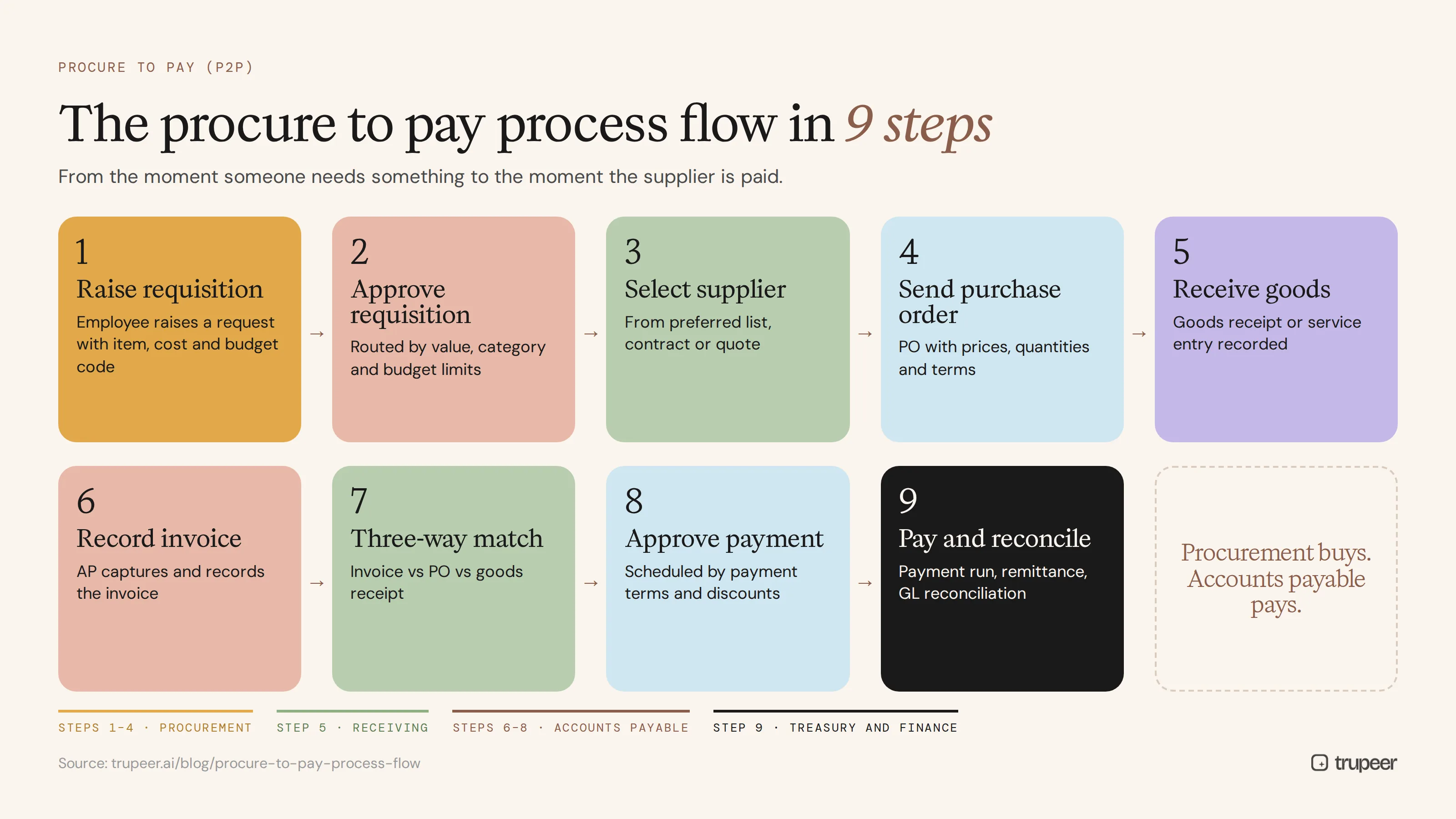
Most P2P processes follow these nine steps:
Identify the need and raise a purchase requisition.
Approve the requisition.
Select the supplier.
Create and send the purchase order.
Receive goods or services.
Receive and record the supplier invoice.
Match the invoice: three-way match.
Approve and schedule payment.
Pay the supplier and reconcile.
Step 1: Identify the need and raise a purchase requisition
An employee or department identifies something it needs and raises a purchase requisition in the procurement or ERP system, with the item, quantity, cost estimate, budget code and reason.
Step 2: Approve the requisition
The requisition is routed for approval based on value, category and budget. Approval limits make sure the right people sign off before money is committed.
Step 3: Select the supplier
Procurement chooses a supplier, either from a preferred supplier list, an existing contract or a quote or tender process. For ongoing spend, this step often sits in a separate sourcing process.
Step 4: Create and send the purchase order
Procurement creates a purchase order (PO) with the agreed items, prices, quantities, delivery terms and payment terms, and sends it to the supplier. The PO is a legal commitment to buy.
Step 5: Receive goods or services
When goods arrive or services are delivered, the receiving team checks them against the PO and records a goods receipt (or service entry) in the system.
Step 6: Receive and record the supplier invoice
The supplier sends an invoice. Accounts payable captures it, either manually, by scanning or through e-invoicing, and records it in the system. See the invoice processing SOP guide for a standard way to handle this step.
Step 7: Match the invoice: three-way match
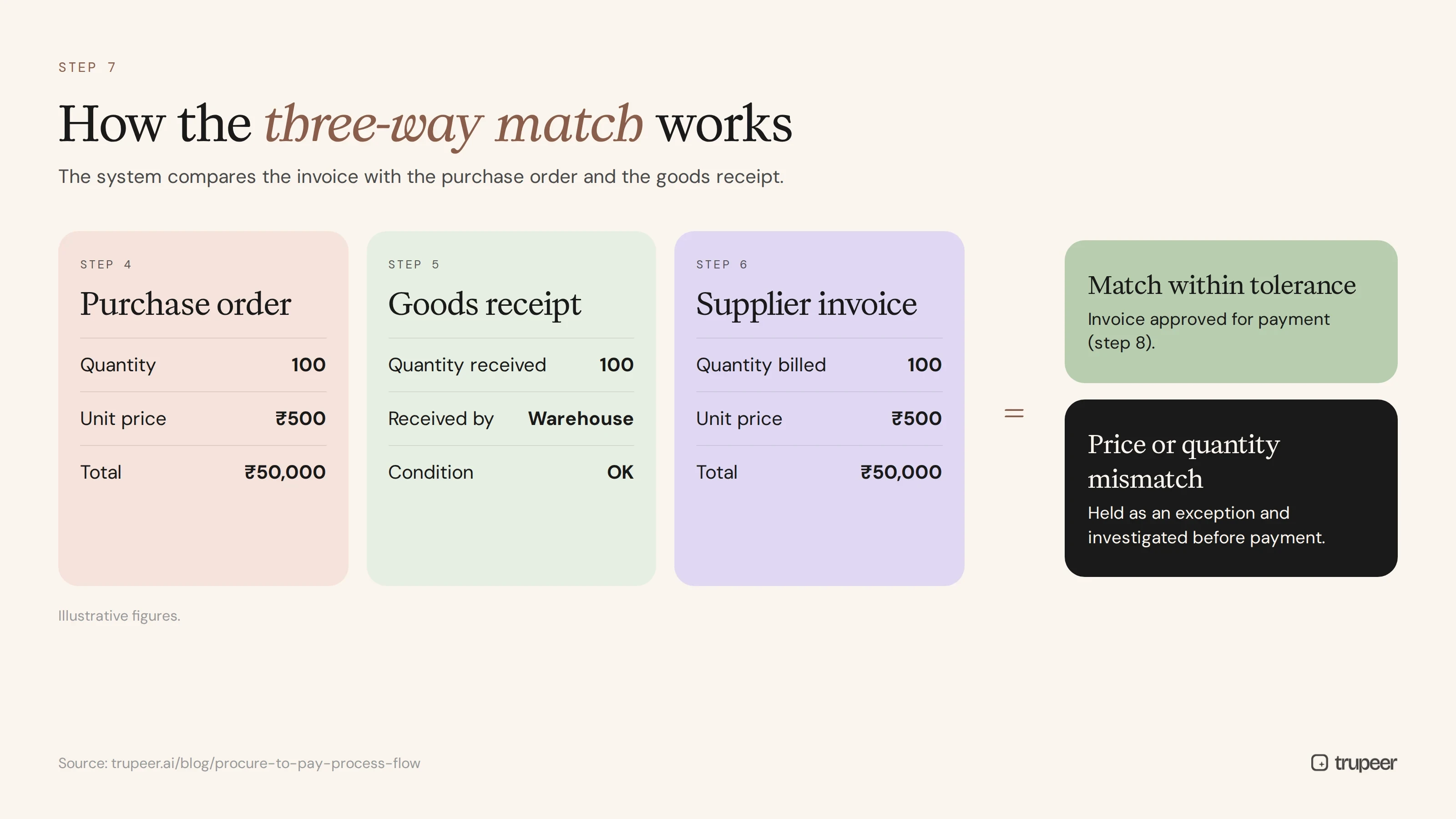
The system compares the invoice with the purchase order and the goods receipt. If quantities and prices match within tolerance, the invoice is approved for payment. If not, it's held as an exception for investigation.
Step 8: Approve and schedule payment
Approved invoices are scheduled for payment according to payment terms, taking early payment discounts and cash flow into account. Non-PO invoices go through a separate approval route.
Step 9: Pay the supplier and reconcile
Payments are released in a payment run, remittance advice is sent to suppliers, and the payments are posted and reconciled in the general ledger. At month-end, AP accrues for goods received but not yet invoiced.
Who is involved in the procure to pay process flow?
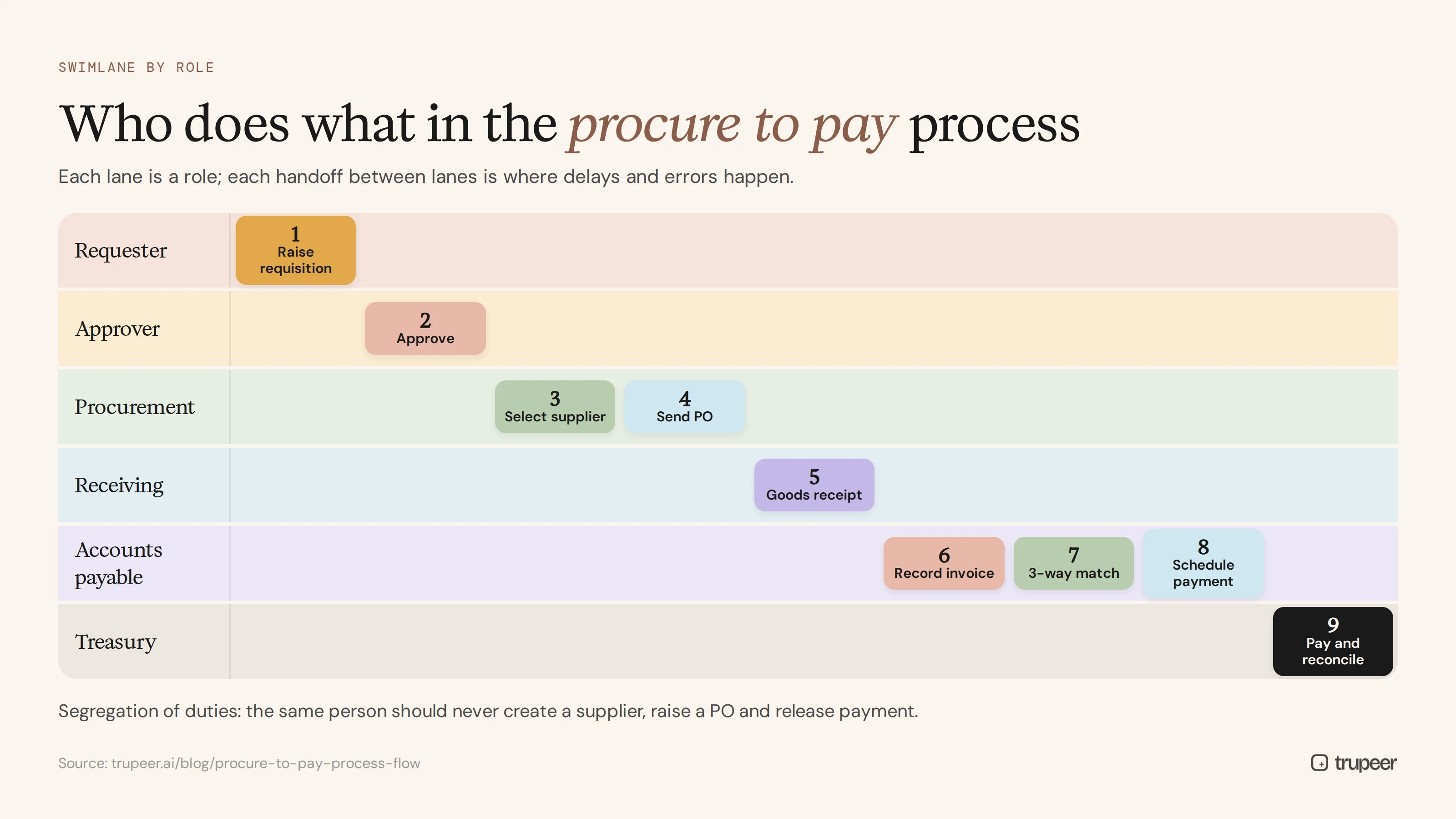
Role | Responsibility in P2P |
|---|---|
Requester | Identifies the need and raises the requisition |
Budget holder or approver | Approves requisitions and non-PO invoices within limits |
Procurement or buyer | Selects suppliers, negotiates and issues purchase orders |
Receiving or warehouse team | Confirms goods or services received |
Accounts payable | Records invoices, runs matching, resolves exceptions and processes payments |
Treasury | Manages cash and releases payments |
Supplier | Delivers goods or services and submits invoices |
Finance and controllers | Own controls, accruals and reconciliations |
Clear roles and segregation of duties, so the same person can't create a supplier, raise a PO and release payment, are central to a controlled P2P process. A RACI makes them explicit; see the RACI matrix template.
Key documents in the procure to pay process flow
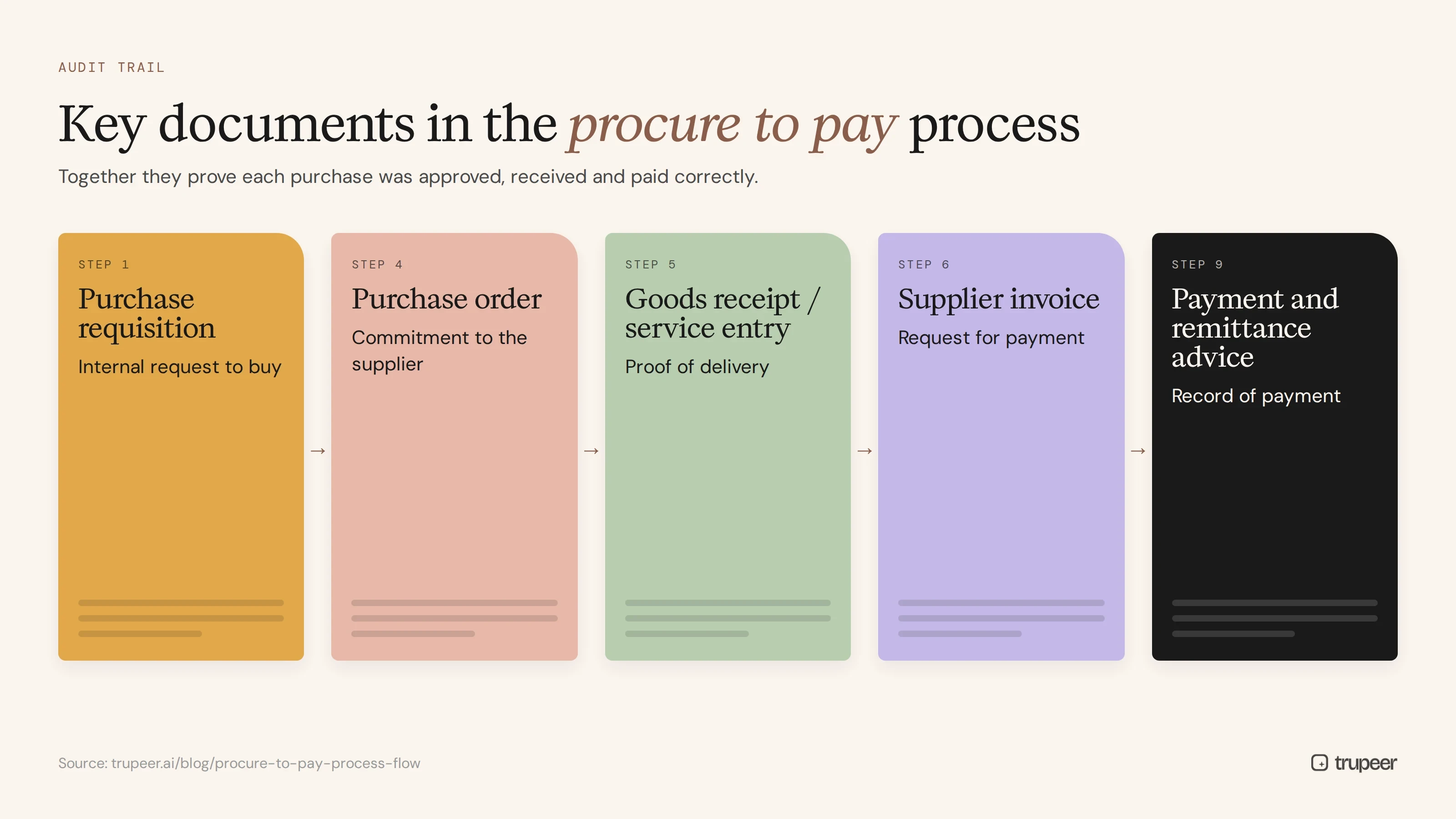
Document | Created at | Purpose |
|---|---|---|
Purchase requisition | Step 1 | Internal request to buy |
Purchase order | Step 4 | Commitment to the supplier |
Goods receipt or service entry | Step 5 | Proof of delivery |
Supplier invoice | Step 6 | Request for payment |
Payment and remittance advice | Step 9 | Record of payment |
These documents create the audit trail that shows each purchase was approved, received and paid correctly.
Procure to pay vs source to pay vs order to cash
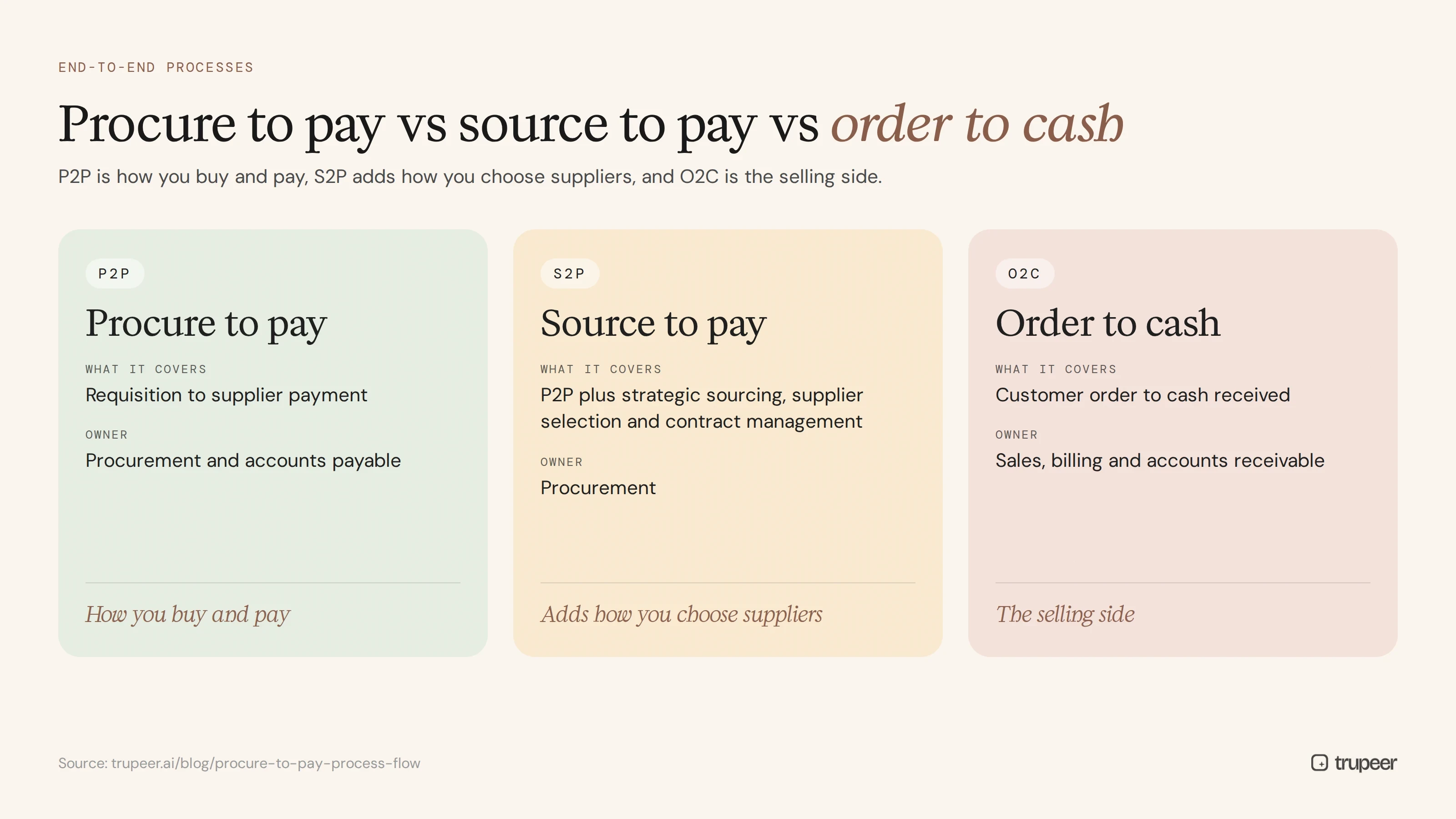
Process | What it covers | Owner |
|---|---|---|
Procure to pay (P2P) | Requisition to supplier payment | Procurement and accounts payable |
Source to pay (S2P) | P2P plus strategic sourcing, supplier selection and contract management | Procurement |
Order to cash (O2C) | Customer order to cash received | Sales, billing and accounts receivable |
In short, P2P is how you buy and pay, S2P adds how you choose suppliers, and O2C is the mirror image on the selling side.
Common problems in the procure to pay process flow
Maverick spending: purchases made outside the process, without a PO or approval.
Invoice exceptions: price or quantity mismatches that stall payment.
Duplicate payments: the same invoice paid twice, often through different channels.
Late payments: missed due dates, lost discounts and strained supplier relationships.
Bank detail fraud: fake requests to change supplier bank details.
Manual handoffs: emails and spreadsheets between procurement and AP that slow everything down.
Undocumented exceptions: the workarounds only experienced staff know, which new hires and auditors can't see.
The last problem underlies many of the others. If the P2P process only lives in people's heads, it can't be trained, audited or improved.
Procure to pay KPIs to track
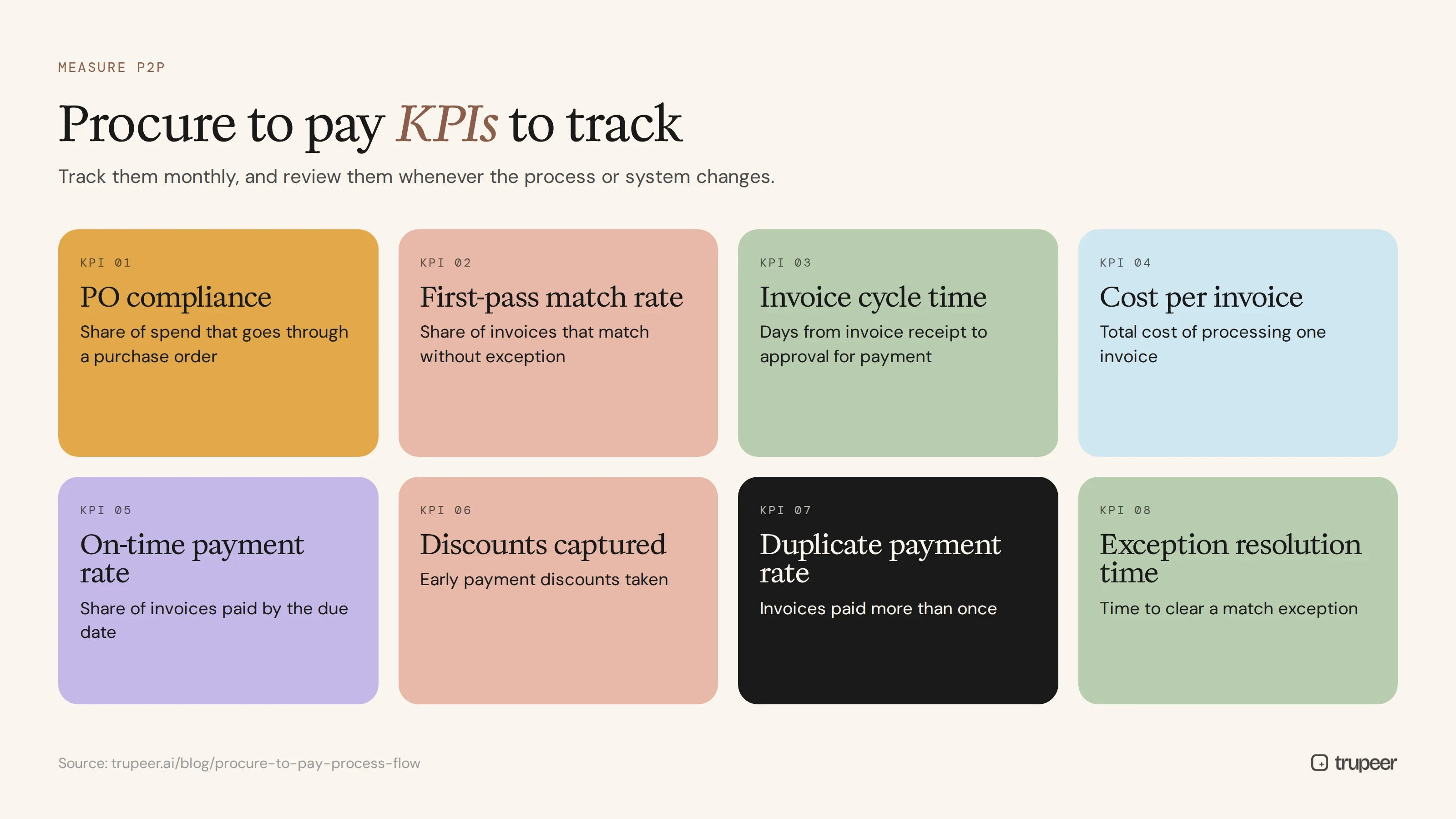
PO compliance: the share of spend that goes through a purchase order.
First-pass match rate: the share of invoices that match without exception.
Invoice cycle time: days from invoice receipt to approval for payment.
Cost per invoice: the total cost of processing one invoice.
On-time payment rate: the share of invoices paid by the due date.
Early payment discounts captured.
Duplicate payment rate.
Exception resolution time.
Track them monthly, and review them whenever the process or system changes.
How do you map and document your procure to pay process flow?
Step 1: Map the as-is process
Start with how your P2P process actually works today, not how it's supposed to work. Interview the people involved and walk through real purchases, and capture the exceptions as well as the standard path; the process documentation template gives a structure.
Step 2: Draw the process flow
Draw the end-to-end flow as a swimlane diagram, with a lane for each role and every handoff, decision and exception marked. The free process flow template gives you a starting structure.
Step 3: Plan the procurement side
Document how purchasing decisions, approvals and supplier management work in a procurement management plan template, and set purchasing rules for technology spend with the IT procurement policy template.
Step 4: Record each step as an SOP
For every task in the flow, such as raising a requisition, posting a goods receipt or resolving a match exception, record an experienced user doing it in the system with Trupeer's AI screen recorder. Trupeer turns each recording into a step-by-step SOP with screenshots and a video with the SOP creator.

Step 5: Publish and keep it current
Publish the flow and SOPs in one searchable knowledge base, break long SOPs into task-level articles, and update them through SOP version control whenever the process changes.
Best practices to improve the procure to pay process flow
Enforce "no PO, no pay" for all but defined exceptions.
Set clear approval limits and route approvals automatically.
Use three-way matching with sensible tolerances.
Verify every supplier bank detail change through an independent channel.
Standardise exception handling with documented steps for each exception type.
Train every role on the documented flow; see accounts payable training for new hires, and give each AP role a desk manual.
Use the right tools: process documentation software and an accounting manual generator turn your flow into usable guides.
Review KPIs monthly and fix the biggest bottleneck first.
Document before you automate or outsource. P2P is one of the most commonly outsourced processes, so document it before it moves to a provider or shared services centre.
Get the free procure to pay process flow template
Map your own procure to pay process flow with the free process flow template, plan the purchasing side with the procurement management plan template, and capture each step as an SOP. To turn every step into a recorded SOP and training video your team can follow, try Trupeer AI.
Frequently asked questions
What is the procure to pay process flow?
It's the end-to-end sequence of steps an organisation follows to request, approve, order, receive, record and pay for goods and services, connecting procurement and accounts payable.
What are the steps in the procure to pay process?
Raise a purchase requisition, approve it, select the supplier, create and send the purchase order, receive goods or services, receive and record the invoice, match the invoice to the PO and goods receipt, approve and schedule payment, and pay the supplier and reconcile.
What is three-way matching in P2P?
Three-way matching compares the supplier invoice with the purchase order and the goods receipt. If they match within tolerance, the invoice is approved for payment; if not, it's held as an exception.
What is the difference between procure to pay and source to pay?
Procure to pay runs from requisition to payment. Source to pay adds the upstream steps of strategic sourcing, supplier selection and contract management.
What is the difference between procure to pay and order to cash?
Procure to pay is the buying side: how you purchase and pay suppliers. Order to cash is the selling side: how you take customer orders, invoice and collect payment.
Who owns the procure to pay process?
Ownership is usually shared between procurement and finance, with a named process owner accountable for the end-to-end flow, controls and KPIs.
What KPIs measure procure to pay performance?
Common KPIs include PO compliance, first-pass match rate, invoice cycle time, cost per invoice, on-time payment rate, discounts captured and duplicate payment rate.
How do you document a procure to pay process flow?
Map the as-is process, draw it as a swimlane flow with a process flow template, record each step as an SOP, and publish everything in one searchable knowledge base that's kept up to date.



