Trupeer Blog
Summarise

Imagine a scenario where users of your SaaS product struggle to find the right help content. They get frustrated, support tickets pile up, and user satisfaction plummets. Embedding a video knowledge base directly within your product can be the solution. By providing in-context guidance, you reduce friction and enhance the user experience. Embedding isn't just about linking videos; it's about contextually delivering the right help at the right time. When implemented effectively, companies have seen a
30% reduction in support tickets within the first three months
. This approach is ideal for SaaS businesses looking to simplify customer support and improve user adoption. Whether you're a product manager seeking to improve user engagement or a customer success leader aiming to enhance onboarding experiences, embedding a video knowledge base can be a big shift. For insights into product video creation, explore how video content can transform user assistance.
Why does embedding a video knowledge base inside your SaaS product matter?
Embedding a video knowledge base in your SaaS product matters because it directly impacts how users interact with your software. When users encounter problems or have questions, they often need immediate assistance. A traditional text-based knowledge base might not provide the instant clarity they require, leading to frustration and increased support queries. In fact, customer success use cases show that users prefer visual aids over text, as videos can explain complex processes more effectively. This not only keeps users engaged but also reduces the learning curve associated with new software.
Also, a video knowledge base embedded within the product reduces the cognitive load on users. Instead of handling away from the interface to search for help, users can access instructional videos right where they need them. This smooth integration ensures that users stay focused on their tasks, improving overall productivity. Product teams benefit too, as they can track which videos are most accessed, gaining insights into common user challenges. This data helps refine the product and support content, creating a feedback loop that enhances the user experience over time. On security, this is where data residency video knowledge base matters: Trupeer offers data-residency controls, so regulated teams can adopt it with confidence.
What are the benefits of embedding a video knowledge base?
Embedding a video knowledge base offers several advantages that can transform both user experience and support operations.
Increased user engagement. Videos are more engaging than text, capturing user attention and making complex information easier to digest. The best knowledge base examples demonstrate increased user interaction with embedded video content.
Reduced support tickets. By providing immediate video guidance, users can solve their own issues without needing to contact support, leading to a noticeable drop in support requests.
Enhanced onboarding. New users can watch step-by-step video tutorials directly within the app, improving their onboarding experience and speeding up their time to value.
Better retention rates. Users who can easily access help are less likely to churn. An AI-powered video tool ensures users have the resources they need to succeed with your product.
Data-driven insights. Track which videos users watch most to identify common pain points. This data helps prioritize product improvements.
Consistent messaging. Videos ensure that all users receive the same information, reducing the risk of miscommunication that can happen with text-based instructions.
Which Trupeer features help you embed a video knowledge base in your product?
Trupeer offers a suite of features tailored to help you effectively embed a video knowledge base in your product, enhancing user support and engagement.
AI screen recording with auto-zoom and click detection
This feature allows you to create precise, high-quality recordings that automatically focus on the relevant parts of the screen. Auto-zoom and click detection ensure users can see exactly what they need without distractions. This capability is essential for capturing detailed walkthroughs, making it easy to show users how to navigate complex software interfaces. By highlighting necessary actions, users learn through clear visual cues, enhancing their understanding and reducing the need for repeated explanations.
Automatic SOP generation from any recording
Trupeer's ability to generate Standard Operating Procedures (SOPs) from recordings is a big shift for documentation. Once you record a video, Trupeer automatically converts it into an SOP that can be edited and exported in various formats. This feature ensures that your knowledge base remains up-to-date and aligned with video content. It also simplifies the process of creating comprehensive guides, saving time and ensuring consistency across your documentation. Explore how the AI documentation platform can enhance your content strategy.
AI-searchable knowledge base with timestamp deep-links
Trupeer's AI-searchable knowledge base allows users to find specific content quickly through timestamped links. This feature makes handling long videos much easier, as users can jump directly to the segment they need. It enhances the user experience by providing quick access to precise information, reducing the frustration of having to search through entire videos. This capability is invaluable for complex products where users may need to reference different sections frequently.
AI avatars / talking-head video
Using AI avatars in your knowledge base videos adds a personalized touch, making content more engaging. Trupeer offers a variety of stock avatars and the ability to create custom ones through HeyGen integration. These talking-head videos humanize the instructional content, making it more relatable and easier for users to connect with. This feature is particularly beneficial for SaaS products targeting diverse audiences, as it allows for customization that resonates with different user segments.
Viewer engagement analytics, drop-off, and heatmaps
Understanding how users interact with your video content is crucial for improving your knowledge base. Trupeer provides detailed analytics, including engagement metrics, drop-off points, and heatmaps. These insights help you identify which content resonates with users and which parts may need refinement. By analyzing this data, you can continuously optimize your knowledge base, ensuring it effectively supports user needs and contributes to product success. Discover how the product demo video maker tool can smoothly integrate with your strategy.
How do you embed a video knowledge base step by step with Trupeer?
Step 1: Record Your Video
Begin by using Trupeer's AI screen recording with auto-zoom and click detection. Open the Trupeer browser-based recorder, which requires no installation, and select the screen area to capture. As the recording starts, Trupeer automatically zooms in on relevant sections and highlights clicks, ensuring clarity. This feature is particularly useful for detailed software walkthroughs where users need to see exactly what's happening. The recording process is smooth and typically takes the same amount of time as the task being demonstrated. Once finished, the video is automatically saved to your Trupeer library, ready for further editing or immediate use.

Step 2: Enhance Your Video
Next, enhance your video using Trupeer's AI-powered editing tools. Remove filler words and long pauses automatically; this makes the video concise and professional. To add a personal touch, use AI voice cloning from a short sample to create a custom voiceover. This step requires minimal manual intervention as Trupeer's AI handles most enhancements. If you prefer a talking-head format, select an AI avatar from the stock library or create a custom one with HeyGen integration. Enhancements are typically completed within a few minutes, dependent on the video length and complexity.
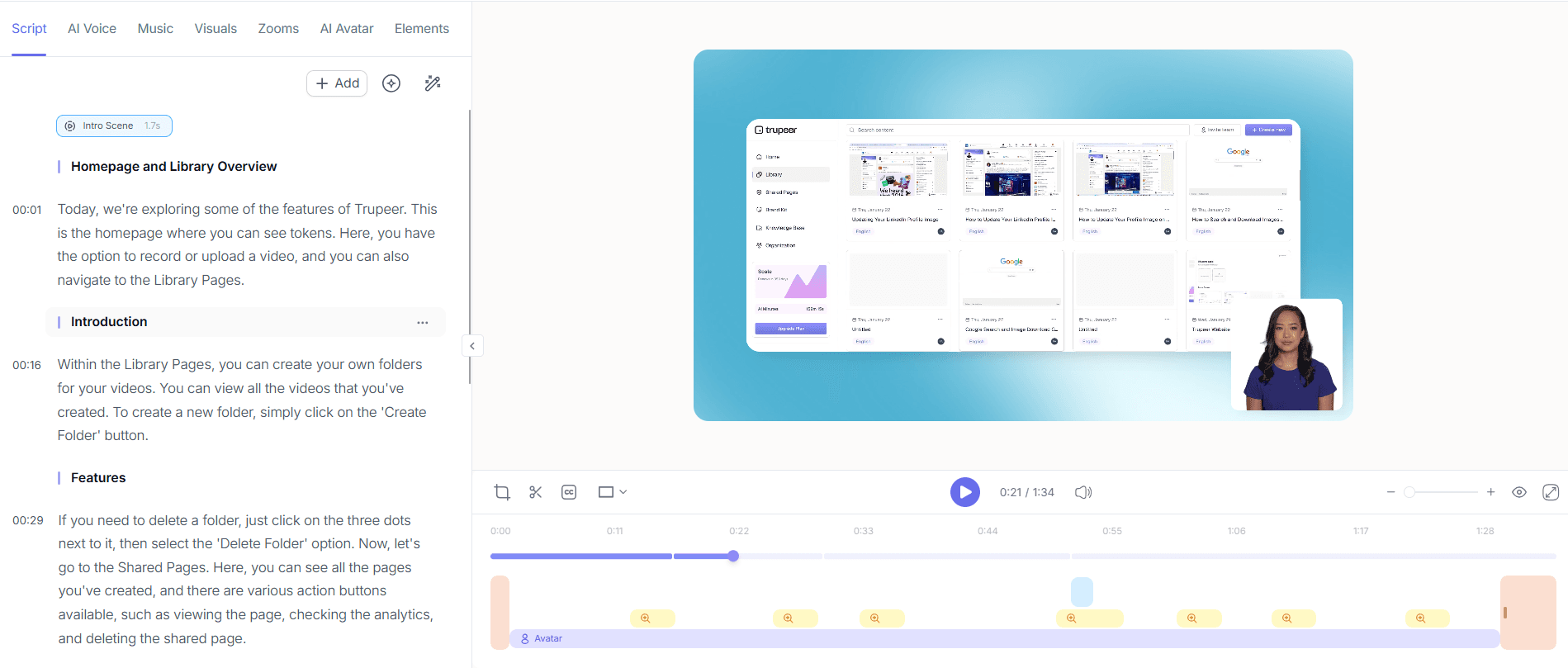
Step 3: Generate Documentation
Once your video is polished, use Trupeer's automatic SOP generation to create accompanying documentation. Navigate to your video in the Trupeer dashboard and select the 'Generate SOP' option. Trupeer analyzes the video content and converts it into a structured SOP, which is edit-ready and exportable in formats like HTML, PDF, and SCORM. This ensures that your video and documentation are always synchronized, providing consistent user guidance. The process is fast, often taking just a few seconds to a couple of minutes, depending on the video's length.

Step 4: Export and Localize
Export your video in multiple formats, including MP4 and HTML, for flexible distribution. Trupeer also offers AI translation into 40+ languages with lip-sync capabilities, broadening your video's reach. Simply select the desired languages and let the AI handle the rest. This feature is particularly beneficial for products with a global user base, ensuring non-English speaking users receive the same quality guidance. The translation process is efficient and typically completes within a few minutes, depending on the number of languages selected.

Step 5: Embed in Product
With your video and associated materials ready, use Trupeer's embeddable video widgets to integrate the knowledge base directly into your SaaS product. Access the Trupeer platform, select your video, and choose the 'Embed' option to generate a widget code. Insert this code into your product's interface at the points where users most frequently require assistance. This smooth integration keeps users within the product environment, reducing context-switching and improving the overall user experience. The embedding process is straightforward and can be completed in minutes.

Step 6: Monitor and Analyze
Finally, use Trupeer's viewer engagement analytics to monitor how users interact with your embedded video content. Access detailed metrics such as drop-off points and heatmaps through the Trupeer dashboard. This data helps identify which parts of your videos are most effective and where users might struggle. Use these insights to refine your content strategy and improve future knowledge base videos. Regular analysis is key to maintaining high user engagement and satisfaction, and it enables continuous improvement of your support materials. Teams weighing tools often start with a Loom alternatives comparison before standardizing on a workflow.

What tips help you embed a video knowledge base?
Successfully embedding a video knowledge base requires strategic planning and thoughtful execution. Here are practical tips to ensure a smooth integration and maximize the effectiveness of your video content.
Prioritize key content. Focus on common user issues and create videos that address these areas first. This ensures that your most critical content is readily available.
Standardize your video format. Consistency is key. Use a product demo video maker to maintain a uniform style across all videos.
Test embedding locations. Experiment with different placement points within your product to find where videos add the most value.
Update content regularly. Keep your knowledge base relevant by updating videos and documentation as your product evolves.
Solicit user feedback. Encourage users to provide feedback on the video content to identify areas for improvement.
use analytics. Use engagement analytics to understand user behavior and refine your content strategy.
Explore alternatives. If current solutions aren't meeting your needs, consider a Scribe alternative comparison to find better options.
Frequently asked questions
How do you embed a video knowledge base in a SaaS product?
To embed a video knowledge base, use Trupeer's embeddable video widgets. After enhancing your video, select the embed option to generate a widget code. Insert this code into your product's interface at strategic points where users need guidance. This process keeps users within the app, providing in-context assistance. The ease of generating and using these widgets makes it a preferred choice for many product teams.
What are the best practices for video knowledge bases?
Best practices include focusing on high-impact content, maintaining video consistency, and regularly updating materials. Use analytics to track user engagement and identify content that requires improvement. Soliciting user feedback is also crucial for continuous enhancement. also, testing different embedding locations can help determine best spots for user engagement. Consistent application of these practices ensures your knowledge base remains effective and user-friendly.
Can video knowledge bases reduce support tickets?
Yes, video knowledge bases can significantly reduce support tickets. By providing immediate, visual guidance within the product, users can resolve issues independently, decreasing the need to contact support. A well-implemented video knowledge base can reduce support tickets by up to 30%, as users are enabled with the tools to solve their own problems. This not only improves user satisfaction but also frees up resources for more complex issues.
Does Trupeer support multilingual video knowledge bases?
Trupeer supports multilingual video knowledge bases through its AI translation features. With the ability to translate content into over 40 languages, Trupeer ensures that your videos are accessible to a global audience. This feature includes lip-sync capabilities, making the translations natural and user-friendly. For more on AI video translation, explore how it can enhance your knowledge base's reach.
Why choose Trupeer for embedding video knowledge bases?
Trupeer offers comprehensive tools for creating, enhancing, and embedding video knowledge bases. Its features, such as AI screen recording, SOP generation, and engagement analytics, simplify the entire process. The platform's ease of use and powerful capabilities make it suitable for SaaS products of all sizes. also, its ability to provide in-depth insights into user interactions helps refine and improve the knowledge base continuously, ensuring it meets evolving user needs.
How should SOPs live inside a knowledge base to stay usable?
Guides stay usable when they are searchable, current, and indexed inside a knowledge base rather than scattered as files. With Trupeer's knowledge base guide, staff self-serve answers, which cuts repeat questions to the team.
Related Blogs


