Trupeer Blog
Summarise

Imagine you're part of an enterprise sales team, tasked with demonstrating a complex ERP system to potential clients across various industries. Each vertical has unique requirements, and every sales rep needs tailored demos to highlight specific features. Creating a new demo for each scenario is time-consuming and inefficient. Enter the scalable ERP demo video library. By capturing and organizing your demos, you can quickly adapt and deliver the right content to the right audience. According to research,
companies using a structured demo library see a 30% increase in sales efficiency
. This guide will help you build a solid library using screen recordings that can scale across verticals and sales reps, ensuring your team is always prepared. Teams weighing tools often start with a Loom alternatives comparison before standardizing on a workflow.
Why does creating a scalable ERP demo library matter?
In the competitive landscape of enterprise software sales, quickly showcasing your product's capabilities is crucial. Prospects need to see how your ERP system can solve their unique challenges, and they need to see it in action. Custom demos tailored to individual client needs can make a significant difference in winning deals. However, creating these demos from scratch every time is not feasible. A scalable demo library allows you to efficiently repurpose content, ensuring each sales interaction is as impactful as possible.
Sales teams are often pressed for time, and creating on-demand demos can lead to inconsistencies in the messaging and quality of presentations. Using pre-recorded demos ensures that every sales rep delivers a consistent, high-quality experience. By having a well-organized library, sales teams can access and customize demos rapidly, reducing the time to close deals and increasing overall effectiveness. using technology like Trupeer's pre sales workflow can simplify this process, making it easier to align your team with the best practices and resources available.
What are the benefits of a scalable ERP demo video library?
Building a scalable ERP demo video library offers several advantages that can significantly impact your sales process and outcomes.
Consistency in presentations. With a library, every demo maintains the same high standard, ensuring that your messaging is consistent, no matter who presents. This consistency enhances client trust and brand credibility.
Time efficiency. Sales reps can quickly access relevant demos without creating new content from scratch. This efficiency means they spend more time engaging with prospects rather than preparing materials.
Scalability across verticals. By creating a library, you can tailor demos to different industries without reinventing the wheel each time. Demos are easily customized, enabling you to address specific client needs effectively.
Reduced production costs. A one-time investment in creating high-quality demos saves money long-term. There's no need to repeatedly invest in production resources, as existing materials can be repurposed.
Improved sales outcomes. Consistent and efficient demo delivery leads to higher engagement and conversion rates. Sales teams equipped with a make product demo video tool are more likely to close deals successfully.
Enhanced training and onboarding. New sales reps can learn from existing demos, reducing the time and resources needed for training. This resource accelerates their readiness to engage with prospects.
When SOPs come into the same conversation, a Scribe alternatives comparison helps clarify the scope.
Which Trupeer features help you build a scalable ERP demo video library?
Trupeer offers a suite of features specifically designed to help you capture, edit, and distribute your ERP demos effectively. Here are key capabilities that make Trupeer an invaluable tool for creating a scalable demo library.
AI screen recording with auto-zoom and click detection
This feature simplifies the process of capturing high-quality demos. Trupeer's AI automatically focuses on key interactions, ensuring that your recordings highlight the most relevant parts of your ERP system. This automation reduces the need for manual editing, saving time and ensuring consistency. When you record a session, the AI automatically detects clicks and zooms in on areas of interest, providing a professional and polished result every time.
Silent screen recording with automatic AI narration
Trupeer's silent recording capability allows you to capture demos without worrying about background noise or interruptions. The AI-generated narration then adds a professional voiceover to your recordings, ensuring clear and coherent messaging. This feature is particularly useful for creating demos that require a focused narrative without the distractions of live recording. With over 65+ natural voice options, you can tailor the tone and pace to fit your audience, creating engaging content effortlessly.
Automatic filler-word removal
Say goodbye to "um," "ah," and awkward pauses. Trupeer's AI editing tools automatically clean up your recordings by removing filler words and long pauses. This feature enhances the clarity and professionalism of your demos, ensuring that your presentations are sharp and to the point. By simplifying your content, you ensure that viewers stay engaged and receive the most pertinent information without distractions.
AI voice cloning and avatars
Personalize your demos with Trupeer's AI voice cloning and avatar capabilities. By creating a custom voice and avatar, you can deliver a familiar and branded experience in every demo. The integration with HeyGen allows you to use custom avatars, adding a level of personal touch that resonates with your audience. This personalized approach can significantly enhance viewer engagement and retention, making your demos more memorable.
AI-searchable knowledge base with timestamp deep-links
Organize your demo library with Trupeer's AI-searchable knowledge base. This feature makes it easy for sales reps to find the exact segment they need, thanks to timestamped deep-links. By enabling precise searches, your team can navigate the library efficiently, accessing relevant content quickly. This capability not only saves time but also ensures that prospects receive timely and accurate information during their interactions.
How do you create a scalable ERP demo video library step by step with Trupeer?
Step 1: Capture the Demo
Start by using Trupeer's AI screen recording with auto-zoom and click detection. Open the Trupeer recorder, accessible via both a browser-based interface and a desktop app. Begin by clicking "Record" and navigate through your ERP system. The AI automatically focuses on key screen areas, ensuring the recording highlights critical features. This intelligent auto-zoom feature reduces the need for extensive post-capture editing, capturing all necessary interactions in real time. Allocate around 30 minutes for a comprehensive walkthrough. This step ensures you capture a polished, professional-looking demo ready for further enhancement.

Step 2: Enhance the Recording
Next, use Trupeer's automatic filler-word removal to refine the audio quality of your demo. After the recording, select the "Edit" option and activate the filler-word removal feature. This tool scans the audio, eliminating "um," "ah," and other unnecessary pauses, resulting in a more concise and engaging demo. This process takes a few minutes but significantly enhances clarity. also, apply AI-generated narration for parts of the demo that require extra explanation. Choose from over 65+ natural voice styles to match your audience's preferences. For a deeper look, our guide on create instructional video covers the adjacent playbook.

Step 3: Personalize with AI Avatars
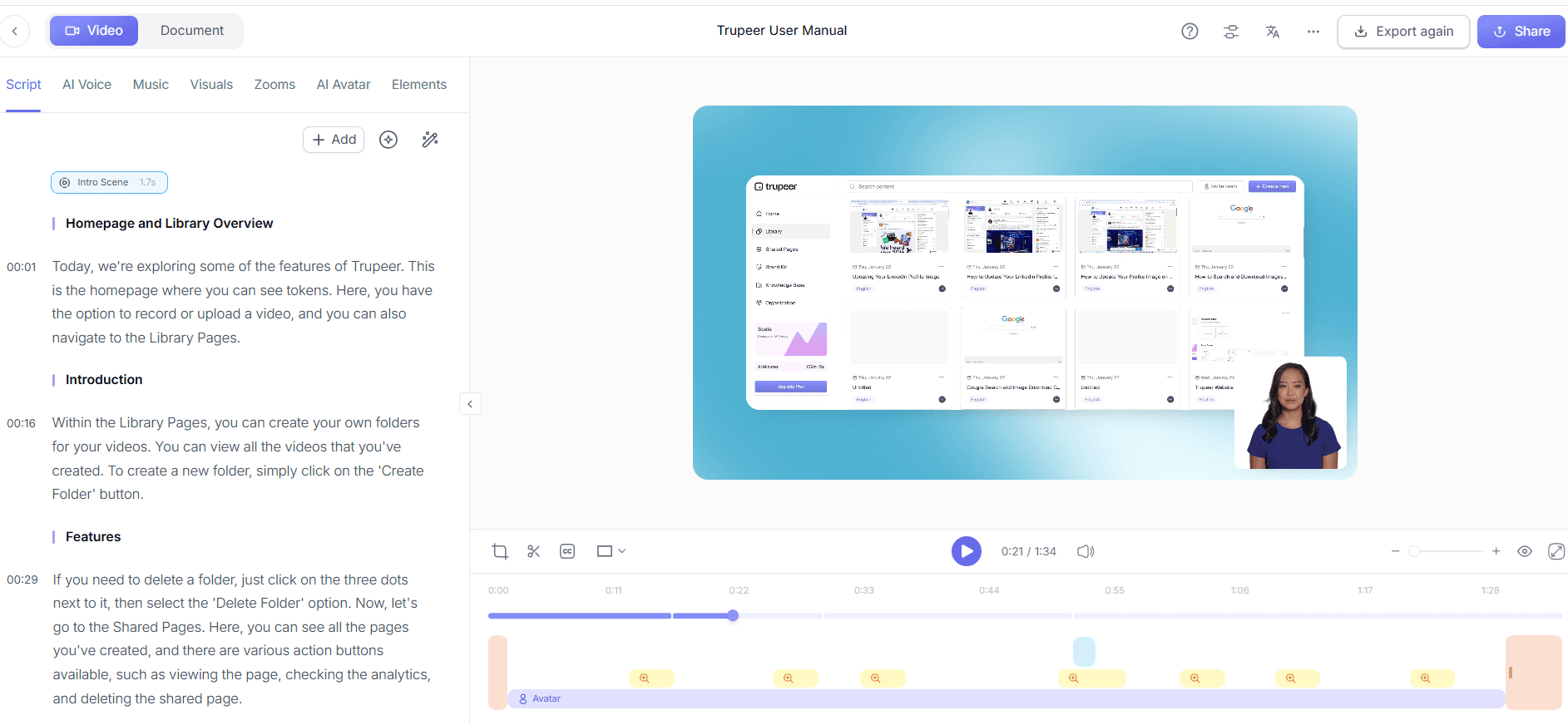
To add a personalized touch, incorporate AI avatars using Trupeer's integration with HeyGen. In the editing interface, click on "Add Avatar" and select a stock or custom avatar that aligns with your brand. This feature allows you to create an engaging talking-head video that introduces or summarizes key sections of your demo. Customize the avatar's appearance and sync it with your script using AI voice cloning for continuity. This step transforms a static screen recording into a dynamic presentation that captivates viewers.

Step 4: Organize with Automatic Chapters
Use Trupeer's auto chapters and segment detection to structure your demo efficiently. After enhancing your video, initiate the "Auto Chapters" feature. The AI analyzes the content and automatically segments it into chapters, making navigation easier for your audience. This organization aids in highlighting specific ERP features relevant to different verticals. It also allows sales reps to jump to particular sections during presentations. This feature optimizes viewer engagement by ensuring that clients can quickly find the information most pertinent to their needs.
Step 5: Create Documentation
Generate supporting materials using Trupeer's documentation generator. After finalizing your demo, access the "Documentation" tab and choose "Generate SOP." The tool automatically creates an exportable document in multiple formats, such as PDF or HTML. This document includes detailed instructions and screenshots from your demo, providing a comprehensive guide for prospects. By offering both video and text-based resources, you cater to diverse learning preferences and ensure that all client questions are addressed thoroughly.

Step 6: Distribute and Monitor
Finally, host your demo videos on Trupeer's AI-searchable knowledge base. After uploading, configure custom-domain hosting with SSO for secure access. This platform allows for easy navigation with timestamped deep-links, enabling prospects to find specific content quickly. Use viewer engagement analytics to track interactions, identifying which sections receive the most attention. This data helps refine future demos, making them even more effective. Regularly update the library to include new features or client-specific scenarios, ensuring your sales team always has the most relevant content.

What tips help you create a scalable ERP demo video library?
Building a scalable ERP demo library requires strategic planning and execution. Here are some practical tips to optimize your process and ensure success.
Standardize your capture style. Use consistent settings and branding templates across all recordings to ensure a uniform look and feel. This approach reinforces brand identity and enhances professionalism.
use AI voiceovers. Opt for Trupeer's AI voiceover capabilities to maintain a professional tone across all demos. This tool ensures clear and engaging narration, tailored to your audience.
use segment detection. Implement auto chapters to break down demos into digestible segments. This feature facilitates easier navigation for both sales reps and prospects.
Monitor viewer analytics. Regularly analyze engagement data to identify popular demo sections. Use these insights to refine content and focus on high-impact areas.
Update regularly. Keep your demo library current by adding new features and client-specific scenarios. Continuous updates ensure relevance and increase the library's value over time.
Facilitate easy access. Ensure your library is easily accessible via Trupeer's product demo video recording editing tool with secure SSO. Simplified access encourages frequent use by sales teams.
Seek feedback. Regularly solicit feedback from sales reps and clients to identify improvement areas. This feedback loop helps refine your library and align it with user needs.
Teams ship this workflow end-to-end using Trupeer's AI video platform, which turns raw recordings into polished output without an editor.
Frequently asked questions
How can I ensure my ERP demo videos are engaging?
To make your ERP demo videos engaging, focus on clarity and relevancy. Use Trupeer's AI voiceover and avatar features to add a human touch, making the content more relatable. Incorporate auto chapters to help viewers navigate easily to the sections most relevant to them. Engagement also improves when demos address specific client needs, so customize content for different industries or use cases. By consistently updating your library with fresh, relevant content, you keep the material engaging and useful.
What makes Trupeer a good choice for demo automation?
Trupeer excels in demo automation by offering features like AI screen recording, auto-zoom, and click detection, which simplify the capture process. Its automatic filler-word removal and AI-generated narration enhance video clarity. The AI-searchable knowledge base ensures easy access and distribution of content. also, the ability to generate AI video translation allows you to reach a wider audience with localized content. These capabilities make it a versatile tool for creating a scalable, efficient demo library.
Why is it important to keep demo libraries updated?
Updating demo libraries is crucial to maintain relevance and effectiveness. As your ERP system evolves, new features must be showcased to potential clients. Regular updates ensure that your sales team always presents the latest capabilities, keeping your offerings competitive. also, an updated library reflects your commitment to innovation and customer satisfaction. By continuously reviewing and refreshing content, you ensure that your demos align with current market needs and client expectations.
Can Trupeer's tools be used for industries beyond ERP?
Yes, Trupeer's versatile tools are applicable across various industries beyond ERP. Its features, such as AI screen recording and AI voiceovers, are ideal for creating demos in fields like healthcare, education, and finance. The platform's ability to generate create your own custom ai avatar video allows for industry-specific customization, making it valuable for any sector needing dynamic and engaging presentations. This flexibility ensures that Trupeer meets diverse business needs effectively.
Does Trupeer support multilingual demos?
Yes, Trupeer supports multilingual demos through its AI translation and dubbing features. This functionality allows you to translate your demo content into over 40 languages, complete with lip-sync capabilities. Such features are invaluable for companies operating in global markets, ensuring that your demos are accessible and engaging to non-English speaking audiences. By using Trupeer's AI documentation platform, you can also offer translated documentation, broadening your reach and impact.
Related Blogs


