Trupeer Blog
Summarise

Imagine your channel partners and resellers equipped with a library of concise, engaging video content that makes them experts on your products. They'd sell more confidently and consistently, representing your brand with accuracy. But without structured and accessible training video resources, partners may miss critical updates, leading to inconsistent messaging and lost sales opportunities. With the right tools, you can build a comprehensive video library that enables your partners. Consider this: a well-organized video library can reduce training time by up to 50%, enhancing product knowledge and boosting sales effectiveness.
Building a partner enablement video library isn't just about creating content; it's about maintaining brand consistency and ensuring that updates are made without rework. This approach helps maintain a unified brand message and keeps your partners informed and competitive. If your partners are struggling to effectively communicate your product's value, it's time to rethink your training strategy. For more insights, explore training video production to understand how to optimize your content strategy for maximum impact.
Why does building a partner enablement video library matter?
A partner enablement video library is crucial in aligning your channel partners with your business goals. Without it, partners may lack the knowledge needed to highlight key product features effectively. This gap can lead to inconsistent product messaging and missed sales opportunities. When partners are well-trained, they're more likely to convey the product's value accurately, leading to increased sales and stronger relationships.
For example, a well-crafted video library can simplify the pre sales workflow, allowing partners to quickly understand product updates and sales strategies. This reduces the time spent on individual training sessions and ensures that everyone receives the same high-quality information. also, a video library that partners can access at any time ensures they have the resources needed to address customer queries promptly, enhancing customer satisfaction and loyalty.
What are the benefits of building a partner enablement video library?
Creating a video library for your partners offers numerous advantages that directly impact sales and brand consistency.
Consistent Messaging. A video library ensures that all partners receive the same information, reducing the risk of miscommunication and maintaining brand integrity. A single AI video platform can facilitate this consistency.
Time Efficiency. Videos can be accessed anytime, reducing the need for repeated live training sessions and allowing partners to learn at their own pace. This flexibility can lead to a 50% reduction in training time.
Scalability. As your partner network grows, a video library can easily scale to accommodate more users without significant increases in cost or effort. This scalability is crucial for expanding businesses.
Engagement. Videos are more engaging than text-based materials, which can lead to higher retention rates and better product understanding among partners.
Cost Reduction. By minimizing the need for in-person training sessions, a video library can significantly cut down on training expenses, potentially saving thousands of dollars annually.
Adaptability. With the best training video software, updates and new content can be quickly integrated, ensuring partners always have the most current information.
Which Trupeer features help you build a partner enablement video library?
Trupeer offers a suite of features designed to simplify the creation and management of a partner enablement video library. These capabilities ensure that your video library is effective, scalable, and easy to update.
AI screen recording with auto-zoom and click detection
This feature allows you to capture video content that automatically highlights important areas of the screen, such as clicks and navigation paths. It's particularly useful for creating step-by-step tutorials or demonstrations, ensuring that partners understand key interactions within your software. The auto-zoom feature means you don't have to manually adjust focus, which saves time in AI training video production and ensures consistency across all recordings.
Automatic filler-word removal
Trupeer's AI can automatically remove filler words like "um" and "ah" from your recordings. This capability enhances the professionalism of your videos, making them more engaging and easier to follow. Removing these distractions keeps your partners focused on the core message, which is crucial when you're trying to convey complex product details efficiently. It also saves editing time, allowing you to produce high-quality content faster.
AI voiceover in 65+ natural voices
With AI-generated voiceovers, you can add narration to your videos without needing to record audio separately. Trupeer offers over 65+ natural voice options, allowing you to match the tone and style to your brand. This feature is ideal for creating a diverse range of content that can appeal to different audience segments. Whether you need a calm, instructional tone or a more energetic delivery, Trupeer's AI training video tool can accommodate your needs.
AI avatars / talking-head video
Trupeer's AI avatars allow you to add a human touch to your videos without the need for on-camera talent. You can choose from a library of stock avatars or create custom ones that reflect your brand's personality. This feature is particularly useful for maintaining engagement in longer videos or when demonstrating products that benefit from a personal touch. Plus, with the documentation generator, you can create matching written content to accompany your video guides.
AI-searchable knowledge base
The AI-searchable knowledge base enables partners to quickly find the specific information they need within your video library. By indexing all content with timestamp-level deep links, Trupeer ensures that partners can navigate directly to the relevant sections. This feature enhances the usability of your library and reduces the time partners spend searching for answers, so increasing their productivity and ability to close deals effectively. Explore more about this feature in our video knowledge base resource.
How do you build a partner enablement video library step by step with Trupeer?
Step 1: Record your video
Begin by launching the Trupeer browser-based recorder, which requires no installation, making it easy to start capturing immediately. Use the AI screen recording with auto-zoom and click detection to highlight key interactions on your screen. This feature automatically focuses on important areas, ensuring clarity for your viewers. Once you start recording, Trupeer's AI will detect clicks and zoom in accordingly, providing a professional-looking video without needing manual adjustments. The recording process is smooth, and you can capture multiple sessions in one go if needed. After finishing your recording, Trupeer saves the file directly to your library, ready for editing.

Step 2: Enhance the video
After recording, use Trupeer's editing capabilities to polish your video. The platform automatically removes filler words and long pauses, ensuring your content is concise and engaging. With AI voiceover, you can select from 65+ natural voices to add narration, adjusting the pace and tone to fit your brand's style. This voiceover option is perfect for creating a consistent audio experience across multiple videos. also, if your video involves complex topics, consider using AI avatars to add a talking-head element, making the content more relatable and engaging for your audience.
Step 3: Create supporting documentation
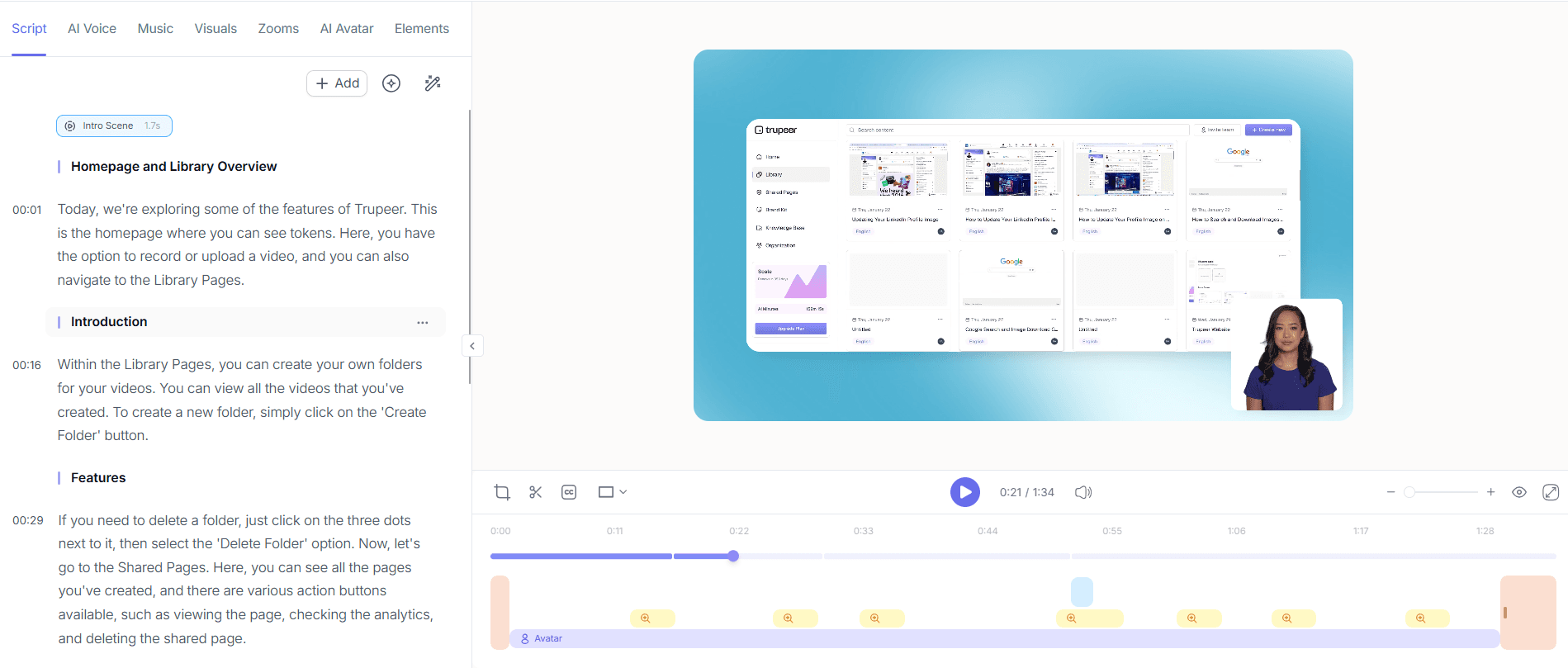
Use Trupeer's automatic SOP generation to create supporting documents for your video. This feature generates an edit-ready SOP from any recording, which you can export in multiple formats, including PDF and HTML. For teams that frequently update processes, the auto-updating documentation feature ties the SOP to the underlying recording, ensuring that any changes are automatically reflected. This step is crucial for maintaining up-to-date training materials without additional manual effort. It ensures that your partners always have access to the latest procedural information.

Step 4: Localize your content
If your partners operate in different regions, use Trupeer's AI translation into 40+ languages to make your videos accessible globally. The platform supports AI dubbing and lip-sync, which allows you to produce videos in multiple languages without re-recording. This feature is essential for companies with an international presence, ensuring that all partners receive consistent training. By localizing your content, you can remove language barriers and improve the effectiveness of your training materials across diverse markets, enabling partners to communicate effectively with local customers.

Step 5: Distribute your video library
Once your videos and documentation are ready, distribute them through Trupeer's AI-searchable knowledge base. This platform allows users to search for specific content and access it via timestamp deep-links, enhancing usability. You can also host the videos on a custom domain with SSO, ensuring secure access for your partners. For client-facing needs, shared pages or embeddable video widgets provide an additional layer of flexibility. By centralizing your training materials, partners can quickly find and use the resources they need, improving their readiness to sell your products effectively. Teams weighing tools often start with a Loom alternatives comparison before standardizing on a workflow.

Step 6: Measure engagement and gather feedback
Finally, use Trupeer's viewer engagement analytics to measure how partners interact with your content. This feature provides insights into viewer drop-off rates and heatmaps, allowing you to understand which parts of your videos are most effective. Collaborative review and approval workflows enable you to gather feedback from partners, ensuring that the content meets their needs. This data-driven approach allows you to refine your training materials continuously, ensuring ongoing improvement and effectiveness. By analyzing engagement, you can identify areas for enhancement and ensure your video library remains a valuable resource.

What tips help you build a partner enablement video library?
Creating an effective partner enablement video library involves a strategic approach to ensure the content is engaging, accessible, and useful. Here are some practical tips to help you build a solid library that meets your partners' needs.
Standardize video formats. Use consistent templates and brand elements to maintain a cohesive look across all videos, ensuring that partners recognize your brand instantly.
Keep content concise. Focus on delivering clear and direct messages without unnecessary filler. This helps maintain engagement and ensures partners retain the key information.
Incorporate interactive elements. Use features like clickable chapters to allow partners to navigate videos easily, enhancing the learning experience.
Update regularly. Set a schedule for reviewing and updating content to keep information current, especially when new products or features are released.
Facilitate feedback. Encourage partners to provide feedback on the videos, which can help you identify areas for improvement and ensure the content meets their needs.
use analytics. Use engagement data to refine your content strategy, focusing on what resonates most with your audience.
use training video editing software. Enhance your videos with editing tools that allow for easy updates and professional-looking results.
When SOPs come into the same conversation, a Scribe alternatives comparison helps clarify the scope.
Frequently asked questions
How can I ensure my partner video library stays up-to-date?
To keep your video library current, use Trupeer's auto-updating documentation feature. This capability ties documentation to the underlying recordings, ensuring that any updates made to the video content are automatically reflected in the associated documents. Regularly review your content to align with new product releases or updates. By using a video localization tool, you can also ensure that your materials are updated across all languages, maintaining consistency worldwide.
What types of videos should be included in a partner enablement library?
A comprehensive partner enablement library should include product demos, onboarding tutorials, troubleshooting guides, and strategy presentations. Each type of video serves a different purpose, from educating partners on product features to guiding them through common customer issues. Include case studies or success stories to inspire and motivate your partners. By offering a variety of content tailored to different stages of the partner journey, you'll ensure that your library is a valuable resource for all partners.
Can Trupeer help with video accessibility for non-English speakers?
Yes, Trupeer's AI translation and dubbing capabilities make your video content accessible to non-English speakers. With translation into over 40 languages and accurate lip-sync dubbing, you can localize your content without needing to re-record. This feature ensures that all partners, regardless of language, can access and understand your training materials. also, localized content can help partners better serve diverse customer bases, enhancing their ability to sell and support your products.
How do I measure the effectiveness of my partner enablement video library?
Trupeer provides detailed viewer engagement analytics, including drop-off rates and heatmaps, to evaluate how partners interact with your videos. These metrics reveal which parts of your content are most engaging and where viewers lose interest. Gather feedback through collaborative review workflows to understand partner perceptions and identify areas for improvement. By combining quantitative data with qualitative insights, you can continuously refine your video library to better serve your partners' needs.
Does Trupeer support team collaboration on video projects?
Yes, Trupeer includes collaborative review and approval workflows that facilitate team collaboration on video projects. These workflows allow multiple stakeholders to provide feedback and approve content before it's finalized, ensuring that videos meet your brand's standards and partners' needs. This feature simplifies the content creation process, reduces the time to production, and enhances the quality of your video library. By involving your team in the creation process, you ensure that all perspectives are considered, resulting in more comprehensive and effective training materials.
Related Blogs


