Trupeer Blog

Imagine your company just signed a big client. Excitement is high, but so are the stakes. To keep this client satisfied, you need a smooth onboarding process that doesn't demand an army of customer success reps. This is where video-led onboarding becomes crucial. It offers a scalable solution to engage clients without expanding your customer service headcount. In fact,
companies using video in onboarding have seen a 32% increase in user retention within the first three months.
This approach not only helps in retaining clients but also reduces the workload on your team. In 2026, as businesses are increasingly adopting digital-first strategies, video-led onboarding is becoming the standard. If you’re looking to optimize your customer engagement strategies, ai/blog/customer-onboarding-video-software">customer onboarding video software. This article will guide you on how to build an effective video-led onboarding process that scales with your business.
Why does digital customer engagement through video-led onboarding matter?
In the competitive business landscape of 2026, customer engagement is crucial. Companies that fail to engage customers effectively risk losing them to competitors. Traditional methods like emails or PDFs often fall short in maintaining customer interest. Video-led onboarding, however, provides an interactive experience that can significantly enhance user engagement. It matters because it addresses the challenge of retaining customer attention in a world where distractions are rampant.
For stakeholders like customer success managers and onboarding specialists, video-led onboarding offers a strategic advantage. It allows them to deliver consistent and personalized content at scale. This method also reduces the need for repetitive explanations, freeing up time for high-impact activities. With the rising importance of customer success, companies are increasingly focusing on optimizing their customer success workflow. Video-led onboarding fits perfectly into this strategy by offering a more engaging and efficient way to onboard new clients. It matters not just for the immediate benefits, but for the long-term value it adds to customer relationships.
What are the benefits of video-led onboarding?
Video-led onboarding is not just a trend; it's a transformative approach with tangible benefits. Here are some key advantages:
Increased Engagement. Videos are inherently more engaging than text. They capture attention and convey information in a more digestible format, leading to higher retention rates.
Scalability. Once a video is created, it can be used to onboard multiple clients without additional effort. This makes it a cost-effective solution for growing businesses.
Consistency. A single customer onboarding video ensures that every new user receives the same high-quality information, reducing variability in the onboarding experience.
Accessibility. Videos can be easily accessed at any time, allowing users to learn at their own pace. This flexibility is crucial in accommodating diverse learning styles.
Improved Understanding. Visual and auditory elements help in better comprehension of complex topics, reducing the need for follow-up support.
Reduced Support Load. By providing comprehensive information upfront, video-led onboarding decreases the volume of support queries, allowing customer success teams to focus on AI-powered video tools for more strategic tasks.
Which Trupeer features help you implement video-led onboarding?
Trupeer offers a solid suite of features designed to facilitate video-led onboarding. These tools are engineered to simplify the process from creation to distribution.
AI Screen Recording with Auto-Zoom and Click Detection
This feature is essential for creating engaging video content. It automatically focuses on relevant areas of the screen, ensuring important details are highlighted. This capability reduces the need for manual editing, saving time and effort. By capturing every click and interaction, it provides a clear and thorough walkthrough for the viewer. The auto-zoom functionality enhances the viewer's focus on specific actions, making the content more intuitive and easy to follow.
Silent Screen Recording with Automatic AI Narration
Sometimes recording audio isn't feasible. Trupeer's silent screen recording feature allows you to capture your screen without sound. Later, you can add AI-generated narration in 65+ natural voices. This feature is particularly useful for international teams as it supports multiple languages. The AI narration can be adjusted for pace and tone, ensuring the final product aligns with your brand's voice.
Automatic Filler-Word Removal
Filler words like "um" and "ah" can distract viewers and affect the professionalism of a video. Trupeer's automatic filler-word removal ensures your videos are polished and clear. This feature is part of Trupeer's video trimmer tool, which also helps in shortening long pauses, resulting in a concise and engaging video. This automated editing process saves time and enhances the viewer's experience.
AI Voice Cloning and AI Avatars
Personalization is key in customer engagement. Trupeer's AI voice cloning allows you to create a custom voiceover that sounds just like you or any team member. This feature, combined with AI avatars, adds a personal touch to your videos. You can choose from a stock library or create custom avatars, providing a face to your brand. The integration with HeyGen further extends these capabilities, offering more customization options.
Automatic SOP Generation from Any Recording
With Trupeer, every video can automatically generate a Standard Operating Procedure (SOP). This feature is invaluable for maintaining consistency across training materials. The generated SOPs are exportable in multiple formats, including MP4, HTML, and PDF, ensuring they are accessible to all team members. The AI documentation platform ensures that these documents stay up-to-date with any changes made to the video content.
How do you implement video-led onboarding step by step with Trupeer?
Step 1: Record Your Screen
To begin creating a video-led onboarding experience, start with Trupeer's AI screen recording with auto-zoom and click detection. Open the Trupeer browser-based recorder, and select the screen area you want to capture. Click 'Start Recording' and perform the actions you want to demonstrate. The auto-zoom feature will intelligently focus on key areas, and click detection ensures every important interaction is highlighted. Once finished, click 'Stop Recording'. The process is intuitive and typically takes about 30 minutes to set up and record a 10-minute session. If any errors occur, you can easily re-record specific sections without starting over.

Step 2: Edit Your Recording
Once your screen recording is complete, it's time to refine it using Trupeer's automatic filler-word removal and video trimmer tool. Upload your recording to the Trupeer dashboard, and the system will automatically remove filler words like "um" and "ah". You can manually trim sections by dragging the timeline markers or let the AI suggest cuts for smoother transitions. This step usually takes 15-20 minutes for a 10-minute video. If needed, you can revert changes to ensure you only remove content that doesn't add value to the viewer.
Step 3: Add AI Narration
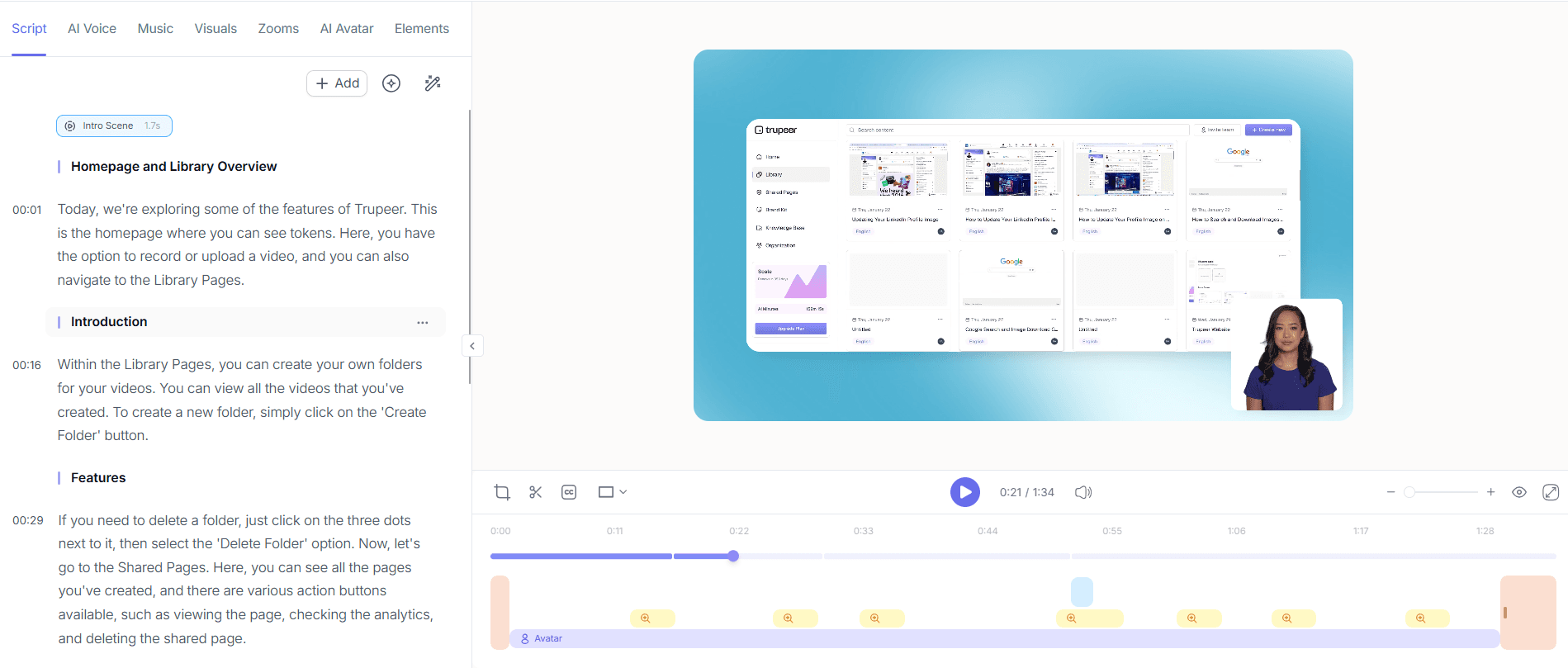
Enhance your video with Trupeer's silent screen recording with automatic AI narration. Choose from over 65+ natural voices in different languages, and adjust the pace and tone to match your brand voice. Simply click 'Add Narration', select your preferred voice, and the AI will generate a voiceover that complements your video. This feature is particularly useful for global teams. The process is quick, usually taking about 10 minutes to apply and review. Make sure to verify the accuracy of the narration, especially if using technical jargon or specific company terms. When SOPs come into the same conversation, a Scribe alternatives comparison helps clarify the scope.

Step 4: Personalize with AI Avatars
To give your onboarding videos a personal touch, use Trupeer's AI avatars, available through HeyGen integration. Access the avatar library from the Trupeer dashboard, or create a custom avatar that represents your brand. Click 'Add Avatar' and select the desired avatar to appear alongside or within your video. This step can take around 15 minutes, and the avatars can be placed at key points to engage viewers. Ensure that the avatar's actions align with the voiceover for a cohesive presentation. Test different placements to see what resonates best with your audience.

Step 5: Generate Documentation
After finalizing your video, use Trupeer’s automatic SOP generation feature to create supporting documentation. Click 'Generate SOP' from the video dashboard, and Trupeer will produce an edit-ready SOP document. This document can be exported in formats like HTML, PDF, or MP4. The AI documentation platform keeps these documents updated in sync with any future video edits. Generating an SOP typically takes around 5 minutes, providing a fast way to ensure all onboarding material is consistent and comprehensive.

Step 6: Distribute and Measure Engagement
Finally, distribute your video using Trupeer's AI-searchable knowledge base and custom-domain hosting. Upload your video to the knowledge base, where it becomes indexed with timestamp deep-links for easy navigation. Set up a client-facing portal or embed the video directly into your application. Use viewer engagement analytics to track performance, such as drop-off points and heatmaps, to refine future content. This distribution setup can be done in 20 minutes, and ongoing analytics help you adapt to audience preferences over time.

What tips help you implement video-led onboarding?
To get the most out of video-led onboarding, consider these practical tips. They can enhance your strategy and ensure a smoother implementation.
Plan Your Content. Outline the key points before recording. This keeps your video focused and ensures you cover all necessary information.
Use Consistent Branding. Apply brand kits and templates to maintain a uniform look. This strengthens brand recognition and trust.
Keep Videos Concise. Aim for videos under 10 minutes to maintain viewer attention. Break longer content into chapters for easier navigation.
Test Different Formats. Experiment with different video styles and avatars to see what resonates best with your audience. A/B testing can provide valuable insights.
Optimize for Mobile. Ensure your videos are easily viewable on mobile devices, as many users prefer accessing content on the go.
Gather Feedback. Use surveys or direct feedback from users to improve your videos. This can lead to more engaging and effective content.
Keep Content Updated. Regularly review and update your videos to reflect any changes in processes or products. This ensures accuracy and relevance.
Teams weighing tools often start with a Loom alternatives comparison before standardizing on a workflow.
Frequently asked questions
How do you create an effective onboarding video?
To create an effective onboarding video, start with a clear outline of your objectives and key points. Use Trupeer's screen recording feature to capture essential processes and add AI narration for clarity. Keep the video concise, ideally under 10 minutes. Incorporate branding elements to maintain consistency. Use engagement analytics to refine the content based on viewer feedback. Regular updates ensure the video remains relevant.
What are the best practices for video-led onboarding?
Best practices include planning your content in advance, using consistent branding, and keeping videos short. Employ AI features like narration and avatars to personalize the experience. Measure engagement with analytics to understand viewer behavior. Always test videos for mobile compatibility and gather user feedback for continuous improvement. These practices help create engaging and effective onboarding experiences.
Why is video-led onboarding more effective than traditional methods?
Video-led onboarding is more effective because it engages multiple senses, making it easier for viewers to retain information. It provides a visual and auditory experience that traditional text-based methods cannot match. Videos are also easily accessible and can be replayed as needed, catering to different learning styles. This method reduces the need for repetitive explanations and frees up customer support resources.
Can Trupeer handle multi-language onboarding videos?
Yes, Trupeer supports multi-language onboarding videos through its AI translation and dubbing features. You can translate videos into over 40 languages with lip-sync accuracy. This ensures that your onboarding content is accessible to a global audience. The video localization tool simplifies this process, allowing you to efficiently manage and distribute content across different regions.
Does video-led onboarding reduce customer support queries?
Yes, video-led onboarding significantly reduces customer support queries. By providing comprehensive and clear information upfront, users often find answers without needing additional help. This reduces the volume of support tickets and allows your team to focus on more complex issues. Trupeer's analytics can help identify common questions and further tailor content to address them effectively.


