Trupeer Blog
Summarise

Imagine you're a new user, logging into a SaaS product for the first time. You're excited yet slightly anxious, hoping the tool will solve your problems without a steep learning curve. In this scenario, the first five minutes are critical. They determine whether you'll find value and stick around or abandon the product altogether. Research shows that
68% of users will return if they find value within the first five minutes
. This is where a well-crafted dashboard onboarding video strategy becomes essential. It's not just about showing features; it's about setting the right tone and providing a smooth entry point for new users. Companies need a precise strategy that guides users effectively in these crucial moments. Whether you're a product manager tasked with increasing activation rates or a customer success leader focused on reducing churn, your onboarding video is your first handshake with the user. Making it count is imperative for long-term success. Check out strategies for effective product video creation that could transform your onboarding process.
Why does dashboard onboarding matter?
The initial interaction a user has with your product sets the tone for their entire experience. It's not just about showing them around; it's about making them feel confident and enabled. A dashboard onboarding video serves as a critical touchpoint in this journey. The stakes are high: if users can't navigate your product easily, they’re likely to churn. In the SaaS industry, where competition is fierce, this can lead to significant losses in revenue and reputation.
For product managers and customer success teams, effective onboarding is vital. When users understand and engage with the product features quickly, it reduces the burden on support teams and enhances customer satisfaction. The first five minutes are a make-or-break period during which users decide whether to invest further time and effort into exploring your product. A simplified onboarding process can transform hesitant trial users into loyal customers, improving your customer education workflow and ultimately boosting your bottom line.
What are the benefits of a dashboard onboarding video strategy?
Implementing a strong dashboard onboarding video strategy offers multiple advantages. Here are some of the key benefits:
Increased User Activation. A well-crafted video can guide users through initial setup, leading to quicker engagement and higher activation rates. By demonstrating value fast, you retain users more effectively.
Reduced Support Overhead. When users understand the product better, they make fewer support requests. This allows your team to focus on more complex issues rather than answering basic queries.
Enhanced User Satisfaction. A clear and engaging onboarding video makes users feel supported. They are more likely to have a positive experience and recommend the product to others.
Faster Time to Value. Users grasp the product’s benefits quickly, decreasing the time it takes for them to integrate it into their workflows. This is especially important for SaaS tools that promise efficiency and productivity.
Consistent Messaging. Videos ensure a uniform message across all users. Unlike textual documentation, which can be misinterpreted, videos provide a consistent narrative.
Improved Conversion Rates. Effective onboarding can turn trial users into paying customers. By showcasing your product’s value early, you're more likely to convert users at the end of their trial period. Check out ways to make product demo video content that enhances this conversion.
Teams ship this workflow end-to-end using Trupeer's AI video platform, which turns raw recordings into polished output without an editor.
Which Trupeer features help you create a dashboard onboarding video strategy?
Trupeer offers several capabilities that support the creation of effective dashboard onboarding videos. These tools ensure your videos are not only informative but also engaging and easy to produce.
AI screen recording with auto-zoom and click detection
Trupeer's AI screen recording capability is perfect for capturing high-quality video demonstrations. The auto-zoom feature highlights important areas of the dashboard, making it easier for users to follow along. Click detection automatically emphasizes actions taken during the recording, ensuring that users don't miss critical steps. This feature is essential for creating videos that are both informative and visually engaging. When you need a product demo video maker tool that simplifies the user journey, this feature delivers.
Silent screen recording with automatic AI narration
This feature allows you to record your screen without background noise, then add a polished AI-generated narration. The AI narration can be customized in terms of pace and tone, ensuring that it matches the brand's voice. This capability is especially useful for creating onboarding videos that need to be concise and clear, enhancing the user’s understanding without overwhelming them.
AI voiceover in 65+ natural voices
With Trupeer, you can choose from over 65+ natural voices for your video narrations. This variety allows you to select a voice that best fits your brand's tone and the message you want to convey. Whether you're targeting a local audience or a global one, the AI voiceover feature ensures your video sounds professional and relatable. Pair this with auto-generated documentation for a smooth user experience.
Auto chapters and segment detection
Trupeer's auto chaptering feature segments your video into easily navigable parts, which is particularly beneficial for complex products. Users can jump to the section that interests them the most, enhancing their learning efficiency. This feature not only improves the viewer's experience but also increases the video's overall engagement rates. It’s an ideal solution for products that require detailed explanations.
AI-searchable knowledge base
Trupeer's searchable knowledge base allows users to find the exact information they need from your onboarding videos. By indexing videos with timestamp-level deep links, users can quickly access specific content without having to watch the entire video. This feature is a big shift for user support and customer success teams, making it easier to guide users through the product. Integrating with an AI-searchable knowledge base ensures users always have the resources they need at their fingertips.
How do you create a dashboard onboarding video step by step with Trupeer?
Step 1: Start with AI Screen Recording
Begin by launching Trupeer's browser-based recorder. There's no need for installation, which saves time and gets you started quickly. Navigate to the dashboard you want to capture and click "Record." Trupeer’s AI screen recording automatically focuses on key areas of the screen using auto-zoom and click detection. This ensures important interactions are highlighted, making it easier for new users to follow. The recording process is smooth and efficient, taking just a few minutes to capture the essentials of your dashboard. If you face any disruptions, you can pause and resume without starting over, which is a real time-saver.

Step 2: Add AI Narration
Next, after completing your screen capture, select "Add Narration" in Trupeer. This feature allows you to overlay AI-generated voiceovers. You can choose from over 65+ natural voices, adjusting the pace and tone to fit your brand's style. The AI voiceover is added automatically, providing clear, concise explanations for each part of the video. This step typically takes under ten minutes, and you can preview the narration to ensure it aligns with your objectives. This is particularly useful for creating consistent and professional-sounding videos, even if you're not a voiceover expert.

Step 3: Fine-tune with AI Editing
Use Trupeer’s editing features to polish your video. The automatic filler-word removal is especially beneficial for maintaining a clean, professional narration. You can also enable auto chapters, which segments the video into logical parts, allowing users to skip to sections of interest easily. This process is automated, so it requires minimal manual input. However, you have full control to make adjustments if needed. This step ensures your video is not only informative but also concise, enhancing user engagement and retention.

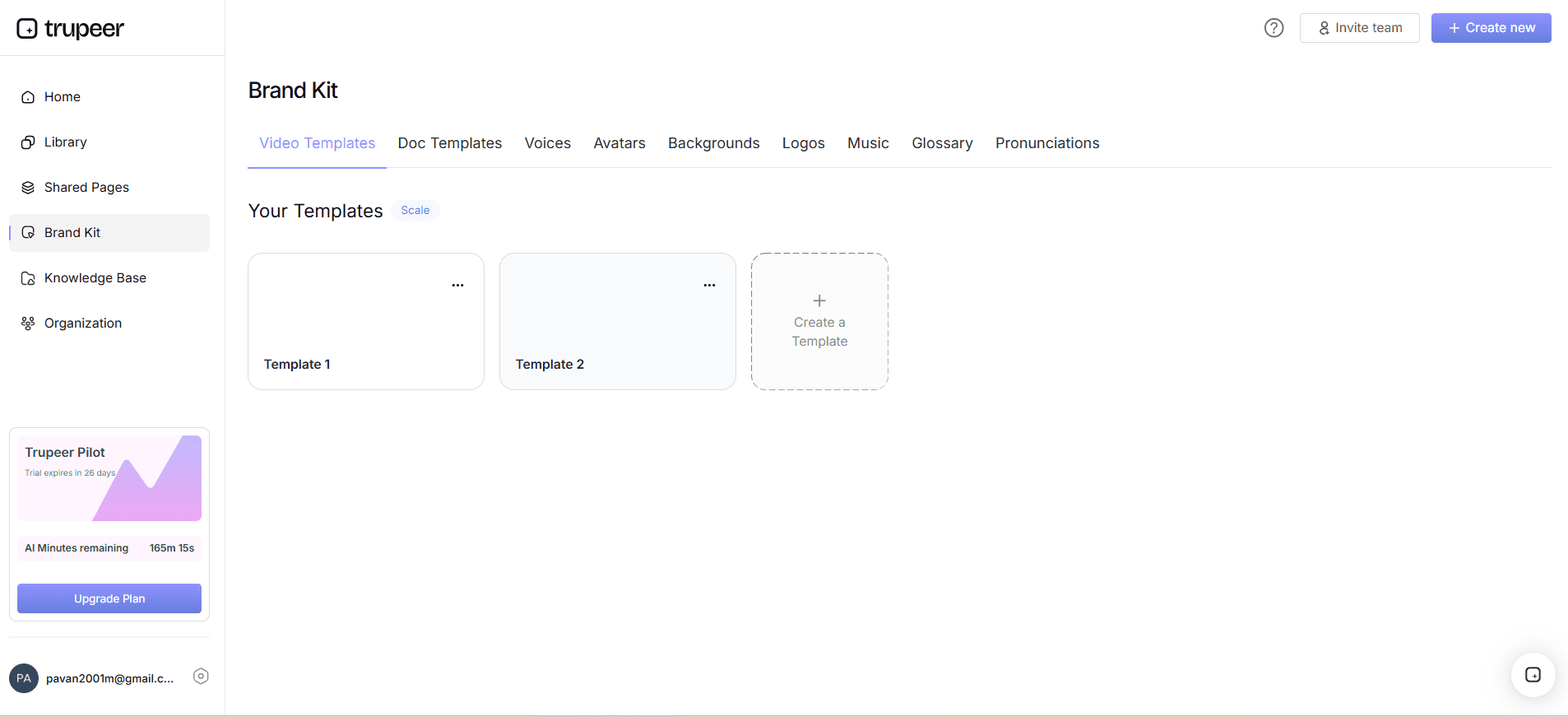
Step 4: Customize with Brand Kits
To ensure your onboarding video aligns with your branding, use Trupeer’s brand kits. Access this feature under the "Branding" tab. Here, you can apply branded templates and visual styles, ensuring consistency with your company's aesthetic. Customizing visuals typically takes less than 15 minutes. You can integrate your logo, brand colors, and fonts to maintain a cohesive look. This step is crucial for reinforcing brand identity and ensuring the video looks polished and professional, helping to build trust with new users.
Step 5: Export and Localize
Once your video is finalized, export it using Trupeer's multi-format options, such as MP4, HTML, or PDF. For global audiences, use Trupeer’s AI translation to convert your video into over 40 languages. This feature also includes AI dubbing, which ensures that the narration lip-syncs accurately in each language. Localization is smooth and can be completed in under 30 minutes, making your content accessible to a diverse user base. This enhances your global reach and ensures all users have a tailored onboarding experience.

Step 6: Distribute Through Custom Portals
Finally, use Trupeer’s distribution capabilities to share your onboarding video. Host it on a custom domain with SSO for easy access. You can also embed the video within your application or share it through client-facing portals. Trupeer’s AI-searchable knowledge base allows users to find specific parts of the video with timestamp deep-links, enhancing the user experience. This step ensures your video is readily available and easily accessible, increasing its impact and effectiveness in onboarding new users. For those considering alternatives, a Loom alternative comparison provides insights into how Trupeer stands out.

What tips help you create a dashboard onboarding video strategy?
Creating an effective dashboard onboarding video involves strategic planning and execution. Here are key tips to enhance your strategy and ensure success:
Understand Your Audience. Tailor the content to meet the specific needs of your target users. Knowing their pain points and expectations helps create more relevant and engaging videos.
Keep It Concise. Aim for clarity by keeping your video under five minutes. This ensures that users stay engaged without feeling overwhelmed. Short, focused content often resonates better.
Use Visual Cues. Incorporate highlights and annotations to emphasize key features. This makes it easier for users to follow along and understand complex processes.
Iterate Based on Feedback. Regularly update your video based on user feedback and analytics. This ensures it remains relevant and effective over time.
Standardize Capture Style. Use a product demo video recording editing tool with auto-zoom so every recording looks on-brand.
Test Across Devices. Ensure compatibility by testing your video on different devices and browsers. This guarantees a smooth viewing experience for all users.
Benchmark Against Competitors. Reviewing a Scribe alternative comparison can provide insights into industry standards and help refine your approach.
Frequently asked questions
How do I ensure my onboarding video is engaging?
To make your onboarding video engaging, focus on clarity and relevance. Use visual aids like highlights and annotations to emphasize key points. Keep the video concise, ideally under five minutes, to maintain user interest. Employ AI-generated narrations for a professional tone and consistent messaging. Regularly update content based on user feedback and analytics to ensure it remains effective. Testing the video on various devices also helps in delivering a smooth experience. Incorporate feedback loops to continually refine and improve your video, keeping it aligned with user needs.
What is the best length for an onboarding video?
For maximum impact, keep your onboarding video between three to five minutes. This length is sufficient to cover essential features without overwhelming the viewer. Shorter videos help maintain attention and ensure users absorb crucial information. If your content is extensive, consider breaking it into segments or chapters. Trupeer's auto chaptering can facilitate this by allowing users to navigate through the video easily. This method ensures both depth and engagement, making your onboarding process more effective.
Can I localize my onboarding video for different languages?
Yes, localizing your onboarding video is straightforward with Trupeer's AI translation and dubbing capabilities. You can translate your video into over 40 languages, complete with lip-sync accuracy. This feature ensures that your content is accessible to a global audience. Localization not only broadens your reach but also enhances user experience by providing information in a familiar language. ai/translation">video localization tool to make your onboarding process inclusive and effective.
Does Trupeer offer analytics on video performance?
Trupeer provides comprehensive viewer engagement analytics, including drop-off rates and heatmaps. These insights help you understand how users interact with your video, identifying which parts are most engaging or where they lose interest. With this data, you can refine your content to better meet user needs. Analytics also allow you to measure the effectiveness of your onboarding strategy, ensuring continuous improvement and adaptation. This data-driven approach optimizes the onboarding process, enhancing user retention and satisfaction.
Is it possible to embed onboarding videos directly into my app?
Yes, Trupeer allows you to embed onboarding videos directly into your app using embeddable video widgets. This integration provides users with immediate access to guidance as they navigate your product, enhancing their overall experience. Embedding videos within the app ensures that users have the resources they need at their fingertips without needing to exit the application. This convenience boosts engagement and helps users understand the product more intuitively, leading to higher satisfaction and reduced churn.
Related Blogs


