4.8/5
SOP Management Software
Keep procedures current, versioned, and findable. Version history with one-click restore, staleness alerts, role-based access, and 65+ languages.
Manage Your SOPs Free

Софтуерът за управление на SOP помага на екипите да поддържат стандартните оперативни процедури актуални, контролирани, лесно откриваеми и достъпни след като бъдат създадени. Той дава на всяка процедура ясен отговорник, текуща версия, правила за достъп, статус на преглед и място, където хората могат надеждно да я намират.
Trupeer добавя създаване на базата на запис към този работен процес, като поема частта, която се чупи след като писането приключи. Запишете процеса веднъж, публикувайте го в търсаема база знания, възстановете всяка по-ранна версия с един клик и вижте кои процедури са остарели, преди одитор или нов служител да разбере вместо вас.
Какво е софтуер за управление на SOP?
Софтуерът за управление на SOP, продаван също като софтуер за управление на стандартни оперативни процедури или като SOP management system, е системата, която държи вашите процедури след като вече съществуват: къде живеят, коя версия е текуща, кой може да ги променя, как хората ги намират и как разбирате кога дадена процедура е излязла от актуалност.
Това е по-тясна задача, отколкото звучи, и различна от писането на процедури. Повечето организации нямат недостиг на SOP. Те имат по четиридесет от тях в три споделени диска, два от които си противоречат, и нито един не може да бъде датиран с увереност. Писането на още не решава проблема. Управлението на тези, които вече имате, го решава.
Какво е управление на SOP?
SOP, или стандартна оперативна процедура, е документиран метод за изпълнение на повтаряща се задача по един и същи начин всеки път. В контекст на управление целта е премахване на вариациите: една и съща работа дава един и същ резултат независимо от това кой я изпълнява, на коя смяна е и колко време е във вашата организация.
Управлението на SOP е дисциплината да държите това обещание вярно във времето. Процедура, написана през март и никога повече неразглеждана, не е управление до септември, защото инструментът се е променил, екипът се е променил и реалният метод тихо е изпреварил документа. Разликата между написания процес и реалния е мястото, от което идват проблеми с качеството, констатации от одит и нееднакво въвеждане на нови служители.
Съхраняване на SOP срещу управление на SOP: Каква е разликата?
Това разграничение определя дали вашата инвестиция променя нещо, и повечето екипи купуват съхранение, вярвайки, че са купили управление.
Съхраняването означава, че файлът съществува някъде:
папка, уики страница, прикачен файл. По принцип може да се извлече, ако знаете, че съществува и къде е отишълУправлението означава, че текущата версия е тази, до която хората стигат:
има един авторитетен екземпляр, той е датиран, по-ранните версии могат да бъдат възстановени, достъпът е умишлено зададен и някой знае кои процедури са с изтекъл срок за преглед
Съхраняване на SOP | Управление на SOP |
|---|---|
Файлът съществува | Текущата версия е идентифицируема |
Местоположението има значение | Търсенето има значение |
Актуализациите се случват ръчно, ако някой се сети | Има процес за преглед |
Копията се умножават | Една авторитетна версия |
Малко или никаква отговорност | Определен отговорник за всяка процедура |
Основен достъп на ниво файл | Контролиран, базиран на роли достъп |
Историческите копия стоят редом с текущите | История на версиите, като текущата версия е недвусмислена |
Система за управление на документи за SOP, която само съхранява, ще натрупа противоречия с точно същата скорост, с която се променя вашата организация. Провалът рядко е драматичен. Никой не изтрива процедурата. Тя просто става грешна бавно, всички се научават да не ѝ вярват и реалният процес се премества в главите на онези, които са били най-дълго там — точно ситуацията, която SOP трябваше да предотврати.
Софтуер за SOP срещу софтуер за управление на SOP
Двата термина се използват взаимозаменяемо и не става дума за една и съща покупка.
Софтуерът за SOP създава процедури:
заснема, структурира, прави скрийншотове, форматира, брандира. Мярката за успех е колко процедури ще получите и колко бързоСофтуерът за управление на SOP ги управлява след това:
коя версия е текуща, кой я притежава, кой може да я променя, кога е бил последният преглед и как читателят я намира. Мярката за успех е дали библиотеката остава надеждна и след две години
Почти всеки екип усеща първия проблем преди втория, затова повечето купуват създаване и откриват пропастта в управлението едва осемнадесет месеца по-късно, когато вече има достатъчно процедури и никой не е сигурен кои са правилните. Ако все още нямате документация, започнете с софтуер за SOP и развийте нататък. Ако вече имате библиотека, на която сте спрели да вярвате, това е страницата, на която сте с правилната причина.
Защо управлението на SOP става хаотично?
Моделът е достатъчно постоянен, за да е предвидим, и нито една от причините не е мързел.
Разходите за ревизия са по-големи от стойността на самата ревизия:
ако актуализирането на процедура означава повторно отваряне на документ, правене на нови скрийншотове и повторно експортиране, малките промени се отлагат, докато целият документ стане грешенНикой не носи отговорност за прегледа:
процедурите се пишат от този, който е ръководил проекта, и после не принадлежат на никого. Документи без отговорник не се поддържатНяма начин да се различи текущото от историческото:
без история на версиите единственото доказателство е име на файл и имената на файловете подвеждатДокументът е написан по спомен:
така че никога не е съвпадал достатъчно близо с реалния процес, за да може да се вярва, и разликата само се увеличаваХората не могат да намерят правилната:
затова питат колега — работи, което означава, че документът вече е декоративенЕзикът е невидима бариера:
процедура на втори език се следва по-бавно и по-малко точно, а никой не го отчита като проблем
Как работи софтуерът за управление на SOP?
Какъвто и инструмент да използвате, управлението на процедурите преминава през пет етапа. Разликите между продуктите най-често са в това колко от всеки етап системата поема вместо вас, а не в това, че ви напомня да се справяте сами.
1. Създаване или импортиране
Процедурите влизат в системата — или са създадени вътре в нея, или са импортирани от мястото, където се намират в момента. Тук се задава и първоначалната точност: процедура, заснета от реалния метод, започва точна, докато написаната по спомен започва с пропуск, който само се разширява.
2. Преглед
Някой, който познава процеса, го проверява, преди да стане публично достъпен, и се назначава отговорник. Отговорността на този етап определя дали процедурата изобщо ще бъде поддържана. Някои организации изискват официално одобрение тук; повечето — не, и добавянето на бариера, която не ви е нужна, забавя публикуването без полза.
3. Публикуване
Одобрената процедура става достъпна за хората, които имат нужда от нея, с умишлено ограничен достъп. Публикуването е етапът, който екипите най-често правят грешно — обикновено като поставят процедурите някъде технически правилно, но никой не ги отваря.
4. Мониторинг
Системата отчита библиотеката, вместо да чака някой да забележи проблем: какво се чете, за какво са търсили хората и какво не са намерили, и какво не е било докосвано от дълго време. Без мониторинг единственият сигнал, че процедурата е грешна, е някой да я следва и да получи лош резултат.
5. Актуализиране или архивиране
Процедурите се ревизират, когато процесът се променя, като по-ранните версии се запазват, или се премахват, когато процесът вече не съществува. Разходът за ревизия управлява всичко тук. Ако актуализирането е скъпо, актуализациите се отлагат и библиотеката се влошава независимо колко добър е останалият софтуер.
Управление на ревизиите на SOP без загуба на контрол
Контролът на версиите е мястото, където се разпадат повечето библиотеки за SOP — обикновено заради имена на файлове, които вършат работа, за която никога не са били проектирани. Всеки, който е отварял папка с три файла, завършващи на final, final-v2 и final-USE-THIS, знае режима на отказ.
Trupeer пази история на версиите с времеви печати за всеки документ. Можете да разглеждате предишни версии, да ги сравнявате с текущата и да възстановявате която и да е от тях с един клик, след което възстановената версия просто става текуща. Няма паралелна конвенция за подреждане, която да поддържате, и няма двусмислие коя копия е в действие.
Цикли на преглед и предотвратяване на остаряване на SOP
Остарялата процедура е по-лоша от липсващата, защото липсващата процедура изпраща някого да пита човек, докато остарялата уверено му казва грешното.
Trupeer проследява дните от последната актуализация на всяка статия и маркира всичко, което не е пипано повече от 90 дни, като остаряло, заедно със средна стойност за свежестта на съдържанието в цялата библиотека. Така прегледът престава да е напомняне от календар, което никой не спазва, и става видим списък с това, което се нуждае от внимание, подреден по пренебрегване. Прагът от 90 дни е това, което системата маркира, а не индустриален стандарт: вашият собствен интервал за преглед трябва да следва колко често реално се променят процесите ви и какво очаква вашият регулатор или клиент.
Практичен ритъм за преглед, когато системата ви маркира остаряло съдържание:
Назовете отговорник за всяка процедура преди публикуване:
документите без отговорник са тези, които остаряват. Това е най-стойностният навик на тази страницаРаботете със списъка с остарели процедури ежемесечно, а не ежегодно:
кратък редовен преглед е по-добър от годишен одит, който никой не довършваПриемайте неуспешните търсения като тригери за ревизия:
Unresolved Rate показва въпроси, на които вашата библиотека не може да отговори — това е вашият беклог, написан от хората, които я използватЗаписвайте наново, вместо да лепите поправки:
когато процесът се е променил съществено, повторното му заснемане е по-бързо от редактиране около разликата и създава документ, който отговаря на реалносттаАрхивирайте умишлено:
процедура за процес, който вече не изпълнявате, трябва да бъде премахната, а не оставена да бъде открита от нов служител
Контрол на достъпа за библиотеки с SOP
Читателите и редакторите не трябва непременно да имат еднакви права. Кой може да чете процедура и кой може да я променя са отделни въпроси и смесването им е начин библиотеките да се окажат или безполезно заключени, или редактирани от всички. Общият принцип: достъпът за четене трябва да е възможно най-широк според това, което процедурата позволява, достъпът за редакция трябва да е ограничен и умишлено зададен, а възможността да се управляват хората — още по-ограничена.
Как Trupeer управлява достъпа
Администратор на работно пространство:
управлява настройките на потребителите и контролира достъпа до активите на работното пространство. Това е вашият собственик на библиотеката и трябва да има малко такива хораРедактор на работно пространство:
създава и редактира съдържание, но не може да управлява потребители. Това е правилното ниво за ръководителите и старшите оператори, които държат знанието за процесаЧленство на ниво организация:
администраторите канят членове през таблото на организацията и задават роли, така че достъпът следва присъединяването и напускането, вместо да се обработва ad hocМножество членства в работни пространства:
един човек може да принадлежи към няколко работни пространства, така че ръководител, който обхваща два обекта, няма нужда от дублирани акаунтиВидимост на публикациите, четири нива:
база знания може да бъде публикувана публично, ограничена до вашата организация, ограничена до избрани имейл домейни или направена само с покана. Ограничението по домейн е полезната средна настройка: клиентски или партньорски екип чете процедурите, без да бъде добавян като потребител
Софтуер за управление на SOP срещу SharePoint и споделени дискове
Повечето екипи стигат до тази сравнителна таблица, защото вече имат SharePoint, Google Drive или уики и се питат дали специализиран софтуер е оправдан.
Възможност | Споделен диск | SharePoint | Софтуер за управление на SOP |
|---|---|---|---|
Съхраняване на файлове | Да | Да | Да |
Търсене | Да | Да | Да |
История на версиите | Да | Да | Да |
Специфична структура за SOP | Ограничена | Конфигурируема | Създадена за целта |
Отговорност за процедурите | Ръчна конвенция | Конфигурируема | Изградена около процедурите |
Мониторинг за остаряване | Ограничена | Конфигурируема | Специализирано отчитане |
Специфичен за процедурата работен процес | Ограничена | Изисква конфигурация | Основен сценарий |
Създаване на SOP с AI | Не | Зависи от настройката | Налична в някои инструменти |
Многоезични процедури | Ръчен превод | Зависи от настройката | Налична в някои инструменти |
SharePoint и споделените дискове могат да съхраняват и управляват документи за SOP, а организациите наистина изпълняват съвместима документация върху тях. Разликата е, че специализираният софтуер за SOP е създаден специално около жизнения цикъл на оперативните процедури, вместо да изисква екипите сами да конфигурират този работен процес и след това да поддържат конфигурацията.
Коя посока е подходяща зависи от вашата ситуация. Ако процедурите ви са стабилни и рядко се променят, споделеният диск често е достатъчен и не трябва да купувате софтуер, за да се чувствате организирани. Ако се променят заедно с инструментите ви и екипа ви, разходът се натрупва в ревизиите — и това е това, което адресира специализираният софтуер. Excel и папка остават напълно разумни за малък, статичен набор.
Софтуер за управление на SOP срещу софтуер за управление на документи
Софтуерът за управление на документи е създаден около файла. Той съхранява, организира, защитава и извлича документи от всякакъв тип, включително договори, фактури, политики и чертежи, с надеждни разрешения, правила за запазване и често e-signature и управление на записи. Единицата на работа е документът и до голяма степен е безразличен към това какво има вътре.
Софтуерът за управление на SOP е създаден около процедурата. Той се интересува от съдържанието: подредени стъпки, скрийншотове за всяка стъпка, обхват, отговорник за процеса, интервали за преглед и дали стъпките все още съответстват на реалността. Система за управление на документи може да ви каже, че файлът е версия 4 и кой го е изтеглил. Не може да ви каже, че процесът се е променил през март и че стъпка 6 вече е грешна.
По-големите организации често използват и двете: управление на документи за по-широкото портфолио от записи и софтуер за управление на SOP за оперативните процедури, след което ги свързват така, че публикуваните процедури да се запазват там, където изискванията за съответствие го налагат.
Готовност за одит за библиотеки с SOP
Излагането на одит рядко е, че процедурите не съществуват. По-често е, че никой не може да докаже коя версия е била в сила, когато е извършена работата, или че библиотеката е преглеждана, а не просто съхранявана.
Какво ви дава системата в тази посока:
Следа на датирани версии:
версии с времеви печати за всеки документ, които могат да се разглеждат и сравняват, така че „коя процедура беше в действие през април“ да има отговор, който не е нечие спомнянеДоказателство за преглед, не само за съществуване:
отчет за свежестта на съдържанието маркира всичко, което не е пипано повече от 90 дни, и дава средна стойност за библиотеката — разликата между твърдението, че процедурите се поддържат, и показването муКонтролирани файлове при поискване:
експортирайте процедура в PDF или Word от таба Documentation, за системи за качество и одитни файлове, които все още очакват документРазделени права:
отделни роли Администратор на работно пространство и Редактор на работно пространство, така че достъпът за редакция да може умишлено да бъде ограничен
Какво Trupeer не замества
Три ограничения, които да установите, преди да разчитате на това, защото те определят дали пасва на вашия режим.
Подписани одитни следи:
историята на версиите записва времеви печати, а не приписване на всяка отделна промяна по потребител. Ако ви трябва подписан запис за това кой е променил коя линия, проверете го спрямо конкретното ви изискванеОфициални работни процеси за одобрение:
няма опашка, в която мениджър по качеството одобрява проект, преди да бъде публикуван. Trupeer предоставя разделение на роли и контроли за видимост на публикациите, а не задължително предварително одобрение преди публикуванеВалидирана QMS функционалност:
Trupeer може да подкрепи управлението на документацията, но не е заместител на пълна система за управление на качеството, когато вашата организация изисква валидирани работни процеси, официални одобрения или подписани одитни следи. В тази настройка Trupeer стои до QMS като слой за създаване и публикуване
За регулирана документация конкретно, страницата на GxP compliant documentation tool покрива това правилно.
Управление на SOP в мащаб
Управлението на SOP е различна задача при различни размери и начините на провал се променят според броя.
Библиотека от 30 процедури обикновено може да се управлява ръчно: един човек знае какво съществува и приблизително кога е било последно проверено. При 300 отговорността, търсенето, прегледът и разрешенията стават оперативни проблеми, които никой не може да държи в главата си. При няколко хиляди покритието по езици, ограничаването на достъпа, анализите и автоматизираните проверки за свежест спират да са „приятно да ги има“ и стават единственият начин библиотеката да остане използваема изобщо.
Администрирайте хората централизирано:
секцията Organization е мястото, където администраторите виждат и управляват членове, настройват местата и канят нови хора, така че присъединяващите се и напускащите да не се превръщат по-късно в упражнение по одит на достъпаРазделяйте, без да дублирате:
използвайте работни пространства, за да държите екипите, обектите или клиентските акаунти отделени, и добавяйте хора към повече от едно, когато ролята им обхваща и дветеОпределяйте обхвата на всяка база знания умишлено:
публична, за цялата организация, ограничена до избрани домейни или само с покана. В мащаб това позволява вътрешните процедури, насоките за партньори и помощта за клиенти да живеят в една система, без да се смесватПревеждайте, вместо да разклонявате:
публикувайте една и съща процедура на 65+ езика, до пет цели наведнъж. Алтернативата — поддържан документ за всеки език — е начин големите библиотеки да се разминаватОставете библиотеката да ви показва къде се проваля:
изгледи, уникални зрители, търсения и Unresolved Rate. При няколкостотин процедури не можете да прегледате всичко, така че подреден списък с пренебрегване и неизяснени въпроси е единственото работещо триажиранеИзнасяйте създаването навън:
ако само централен екип може да пише процедури, беклогът расте с броя на хората. Заснемането на базата на запис означава, че ръководителят, който притежава процеса, може да произведе процедурата, като прегледът остава централен
Как да изберете софтуер за управление на SOP
Сравненията в тази категория обикновено претеглят броя на функциите. Ако искате да сравните доставчици на софтуер за управление на SOP по смислен начин, задайте тези въпроси:
Колко време отнема ревизирането на една процедура?:
покажете това в демото. То предсказва дали библиотеката ви ще остане точна по-добре от всяко друго измеримо нещоМога ли да видя и възстановя предишни версии?:
и потвърдете какво точно се записва, тъй като одитните изисквания варират и доставчиците описват това твърде общоИзисква ли официално одобрение преди публикуване?:
някои организации трябва да го имат, а други се забавят сериозно от него. Разберете кое е вашето, преди да съкратите списъкаЩе ми показва ли какво е остаряло?:
система, която не може да извади пренебрегването на повърхността, ви оставя да правите ръчни одити завинагиКой може да създава без обучение?:
знанието за процеса е при хората, които вършат работата, а не в функция за техническо писанеМога ли да получа контролирания файл?:
ако вашата система за качество очаква PDF, потвърдете експорта, преди да се ангажиратеКакво вижда читателят на телефон?:
проверете на устройство, защото много от четенето на процедури се случва извън бюро
Кой използва софтуер за управление на SOP?
Отговорността варира според организацията, но едни и същи няколко функции постоянно се появяват.
Екипи Операции:
държат процедурите, на които бизнесът работи, често създадени с AI SOP generator и след това поддържани тукКачество и съответствие:
превръщане на коригиращи действия в ревизирани процедури вместо разпространен меморандум и доказване, че процедурите съществуват и са актуалниЕкипи за onboarding и обучение:
където учебните материали и библиотеката с процедури на практика са един и същ активИТ и вътрешна поддръжка:
документиране на задачи на системата и runbooks, от които дежурният персонал се нуждае в три сутринтаПроизводство и производствена дейност:
където стандартните процедури и работните инструкции стоят една до друга и и двете се нуждаят от контрол на версиитеФинанси и споделени услуги:
процеси за край на месеца, съгласуване и одобрение, при които да се прави по различен начин е реален риск и текучеството на персонал е нормално
Как Trupeer управлява SOP
Стъпка 1: Заснемете процедурата така, както реално се изпълнява
Кликнете Start Recording, изберете таб, прозорец или целия си екран и изпълнете задачата така, както наистина се прави. Съществуващо видео може да се качи вместо това, включително старо екранно записване, което искате да конвертирате в SOP. Заснемането вместо писането е важно конкретно за управлението: процедура, извлечена от реалния метод, започва точна, така че задачата по поддръжката е да наваксва промените, а не да затваря пропуск, съществувал още от ден първи.
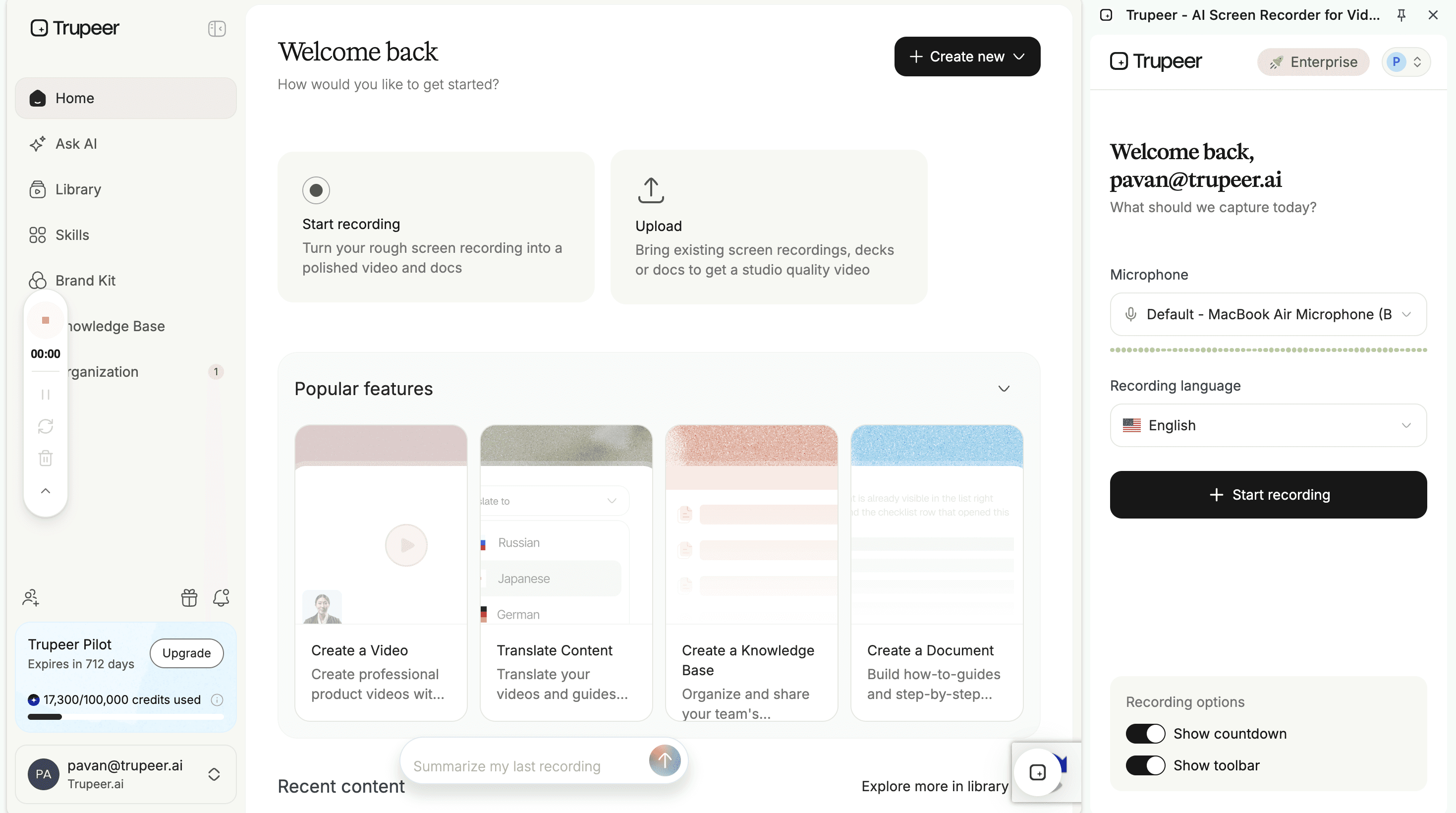
Стъпка 2: Генерирайте процедурата и нейното видео заедно
Кликнете Generate AI Content и използвайте Configure Output Options, за да създадете документ, видео или и двете. Наличието на един източник и за двата формата премахва най-честия провал при версионирането — когато написаното SOP се ревизира, а обучителното видео тихо продължава да учи стария метод.
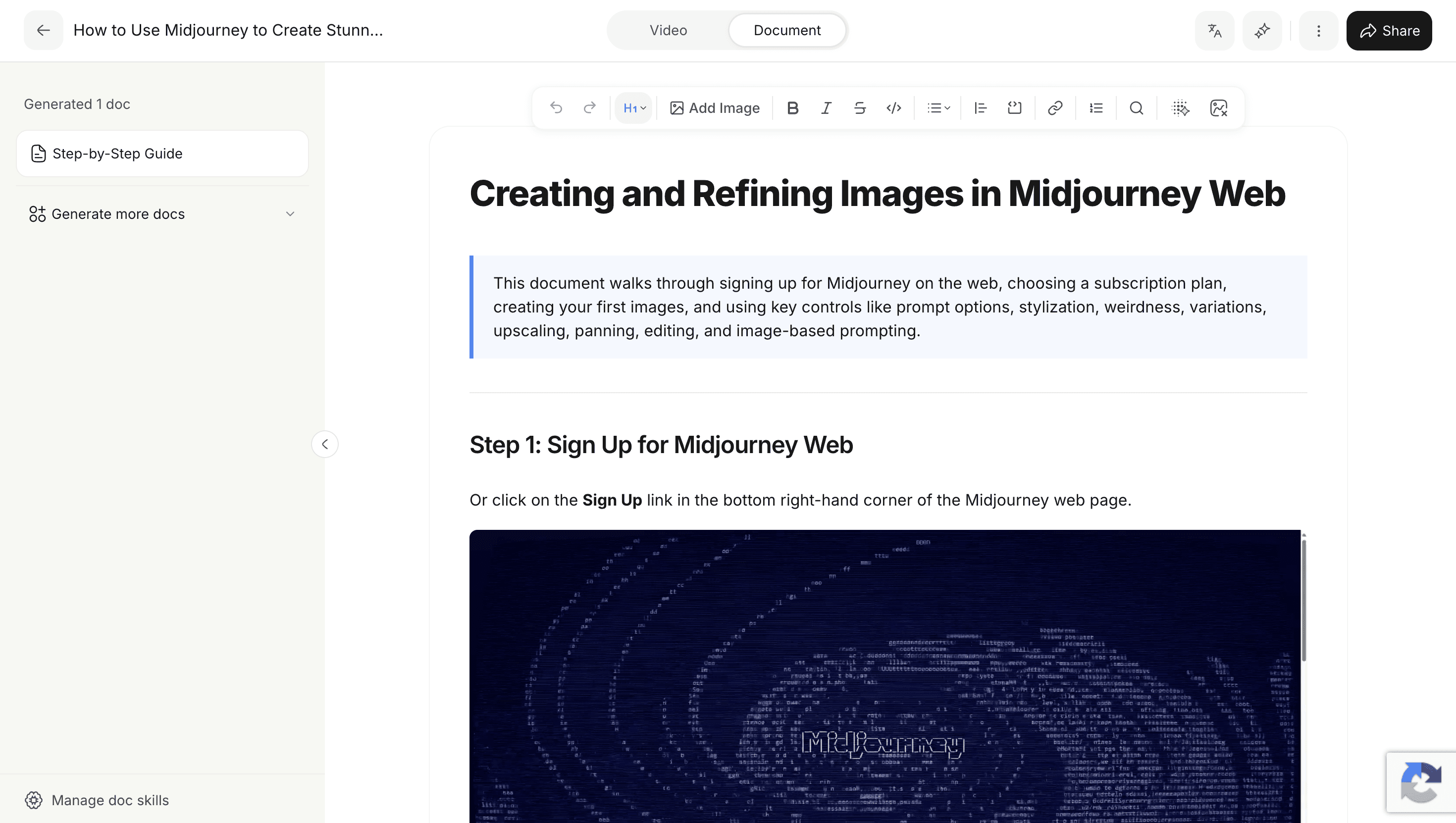
Стъпка 3: Преглед, корекция и задаване на достъп
Отворете Edit, за да поправите всичко, което е прочетено погрешно, пренапишете формулировките, за да съответстват на вашата терминология, и маркирайте точния контрол във всяка стъпка. След това задайте роли на ниво организация, като разделите кой може да управлява хората от този, който може да редактира съдържание.
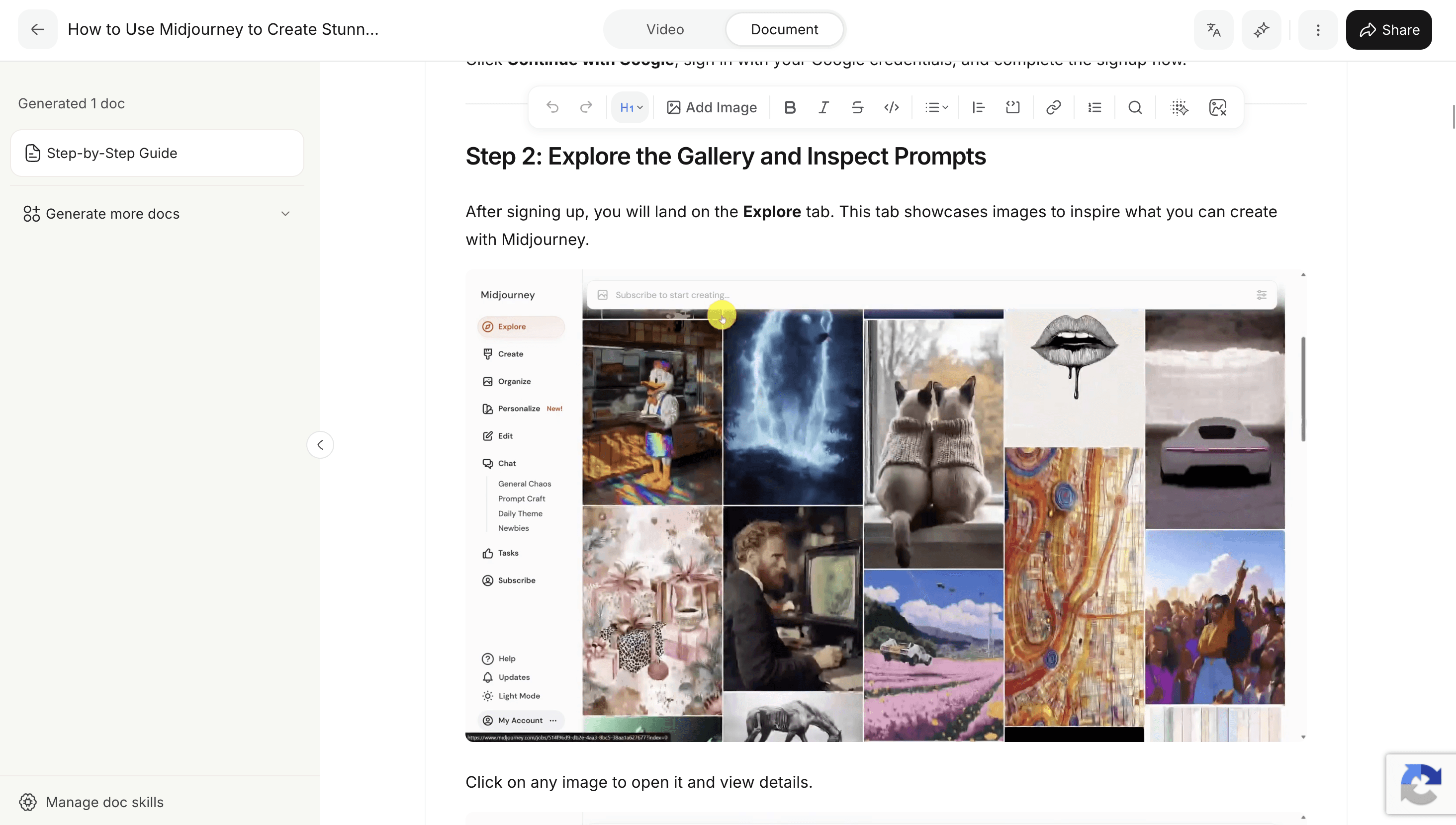
Стъпка 4: Публикувайте там, където хората реално ще търсят
Създайте база знания, организирайте процедурите в секции и глави, задайте видимост и оставете хората да използват Ask AI, за да задават въпрос на прост език, вместо да гадаят заглавието на документ. Преведете за езиците на вашите екипи и експортирайте в PDF или Word, когато е необходим контролираният файл.
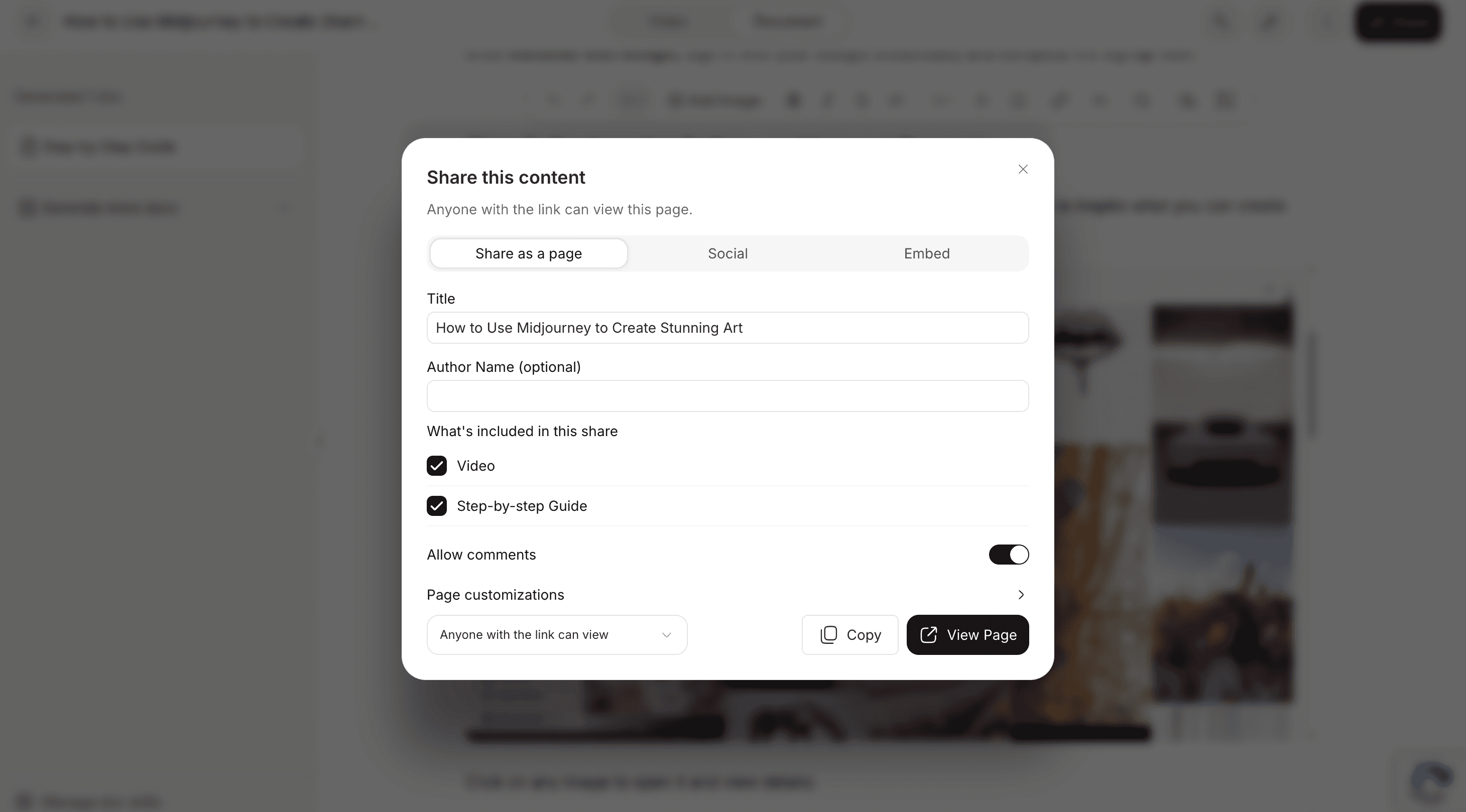
Стъпка 5: Версиониране, мониторинг и ревизия
Кликнете Version History, за да разглеждате версии с времеви печати, да ги сравнявате и да възстановявате която и да е по-ранна с един-единствен клик, след което възстановената версия става текуща. След това използвайте анализи на база знания за изгледи, уникални зрители, търсения и Unresolved Rate, плюс отчети за свежестта на съдържанието, които маркират всяка статия, която не е пипана повече от 90 дни.
Последната стъпка е целият аргумент. Ревизията е евтина, защото процедурата се генерира от нов запис, а системата ви казва кои процедури се нуждаят от внимание, вместо да чакате някой да забележи.
Защо да използвате Trupeer за управление на SOP?
Създавайте от реалността:
записвайте процеса, вместо да го документирате по спомен, така че процедурата да започне точна, а не приблизително правилнаУправлявайте от един източник:
написаното SOP и неговото видео идват от един и същ запис, така че ревизирането на едното не може да остави другото да продължава да учи стар методДръжте процедурите актуални:
история на версиите с възстановяване с един клик и отчети за остаряло съдържание правят поддръжката видима, вместо да разчитате някой да се сещаРазпространявайте в мащаб:
търсаема база знания с Ask AI, контроли за роли и работни пространства, четири нива на видимост на публикациите, анализи на използването и публикуване на 65+ езика
Разгледайте свързани инструменти
Why Use Trupeer's SOP Management Software?
Revision Is Cheap, So Procedures Stay True
Because a procedure regenerates from a new recording rather than being edited by hand, keeping it accurate stays a small job. Revision cost is what quietly determines whether an SOP library is trusted or ignored.
Version History With One-Click Restore
Browse timestamped versions of any procedure, compare them against the current one, and restore an earlier version in a single click, so there is never ambiguity about which copy is live.
The System Tells You What Has Gone Stale
Articles untouched for more than 90 days are flagged as stale, with an average freshness figure across the library, which turns review from a reminder nobody honours into a visible, ranked list.
How to Manage SOPs Using Trupeer
Стъпка 1
Capture the Procedure
Стъпка 2
Publish to a Searchable Library
Стъпка 3
Version, Monitor, and Revise
Често задавани въпроси
What is SOP management software?
SOP management software is the system that holds your procedures after they exist: where they live, which version is current, who can change them, how people find them, and how you know when one has drifted out of date. It is a narrower job than writing procedures and a different purchase. Most organisations do not lack SOPs; they lack confidence about which of the ones they have is right.
What is the difference between SOP software and SOP management software?
SOP software creates procedures: capture, structure, screenshots, formatting. SOP management software governs them afterwards: version control, ownership, access, review cycles, and search. Teams usually feel the creation problem first and discover the management gap once there are enough procedures that nobody is certain which are current. If you have no documentation yet, start with SOP software.
How do you keep SOPs up to date?
Three habits do most of the work. Give every procedure a named owner before it publishes, because unowned documents are the ones that go stale. Work from a stale list monthly rather than running an annual audit nobody finishes. And treat failed searches as revision triggers, since questions your library could not answer are a backlog written by the people using it. Beyond that, keeping revision cheap matters more than any policy: if updating a procedure is slow, updates get postponed until the whole document is wrong.
How often should SOPs be reviewed?
There is no universal interval. Set it by how fast the underlying process changes and what your regulator, client, or quality system requires: a procedure tied to software that ships monthly needs looking at far more often than one covering a stable physical process. A system that reports on staleness is more useful than a fixed calendar rule, because it tells you which specific procedures have been neglected. Trupeer flags anything untouched for more than 90 days, which is a reporting threshold rather than a recommended review cycle.
Can SOP management software replace SharePoint?
Sometimes, and often it should sit alongside it instead. SharePoint and shared drives can store and govern SOP documents, and plenty of organisations run compliant documentation on them. The difference is that dedicated SOP software is built around the lifecycle of operational procedures rather than requiring you to configure that workflow and then maintain the configuration. If your procedures are stable, a shared drive is frequently enough. If they change with your tooling, revision cost is the deciding factor.
Още инструменти



