
Bu şablonu kullanın
When someone is out, the work shouldn't stop. With Trupeer, you can save hours on documentation by starting with a free desk manual template, customizing it with your brand guidelines, and generating the procedures from a single screen recording of the role's real work.
What is a desk manual template?
A desk manual template is a ready-made structure for documenting everything one role does: its daily, weekly and monthly tasks, the step-by-step procedures for each, the systems and contacts it relies on, and what to do when something goes wrong. It's sometimes called a desk procedures manual, a desk guide or desktop procedures.
The difference from an SOP is scope. An SOP documents one process, often performed by many people. A desk manual documents one position, covering every process that person performs. It answers a simple question: if the person in this seat were away tomorrow, could someone else do the job?
When do you need a desk manual?
Desk manuals are most valuable wherever knowledge sits with one person:
Cover and backup: a colleague steps in during leave, sickness or peak periods.
New hires: a replacement or new team member learns the role faster.
Succession and retirement: long-serving staff leave with years of undocumented know-how.
Transitions and outsourcing: a role's work moves to a new team, location or provider.
Audits and controls: auditors want to see how key tasks and controls are performed.
Single points of failure: any role where only one person knows how something is done.
Finance, HR, payroll, procurement, operations and public sector teams use desk manuals heavily, because their roles combine routine cycles with rules and deadlines that are easy to forget.
Preview the desk manual template
The template opens with a role overview and key contacts, followed by a task calendar showing what happens daily, weekly, monthly, quarterly and annually. Each task links to a step-by-step procedure. The template then covers systems and access, recurring reports, exceptions and escalations, file locations, tips and revision history. Every section is editable, so you can add tasks, remove sections or rename them to match the role.
How to customize this template in Trupeer
Step 1: Open the Templates Section
Go to the Templates section from the main navigation.

Step 2: Select and Open a Template
Click on any template you want to work with to open it.
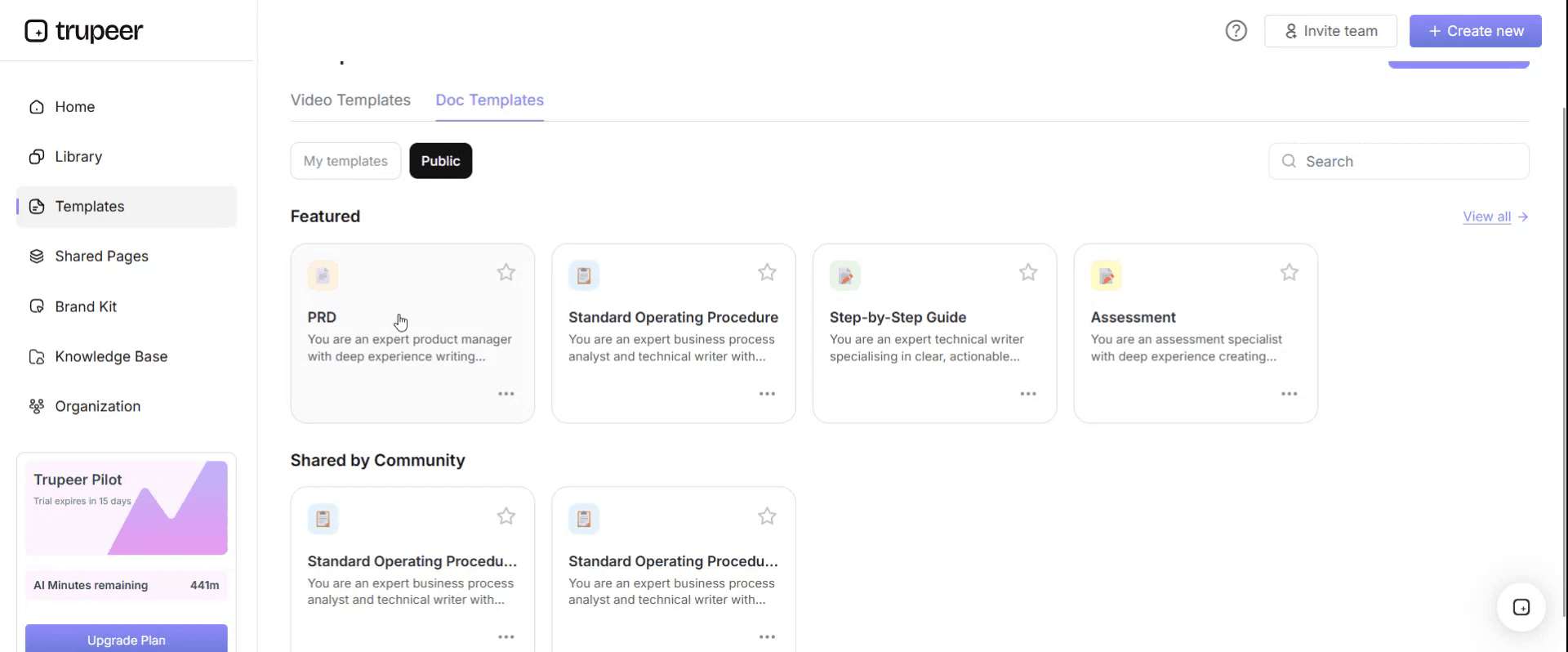
Step 3: Expand the Template View
If needed, expand the template view to see the full layout and details clearly.

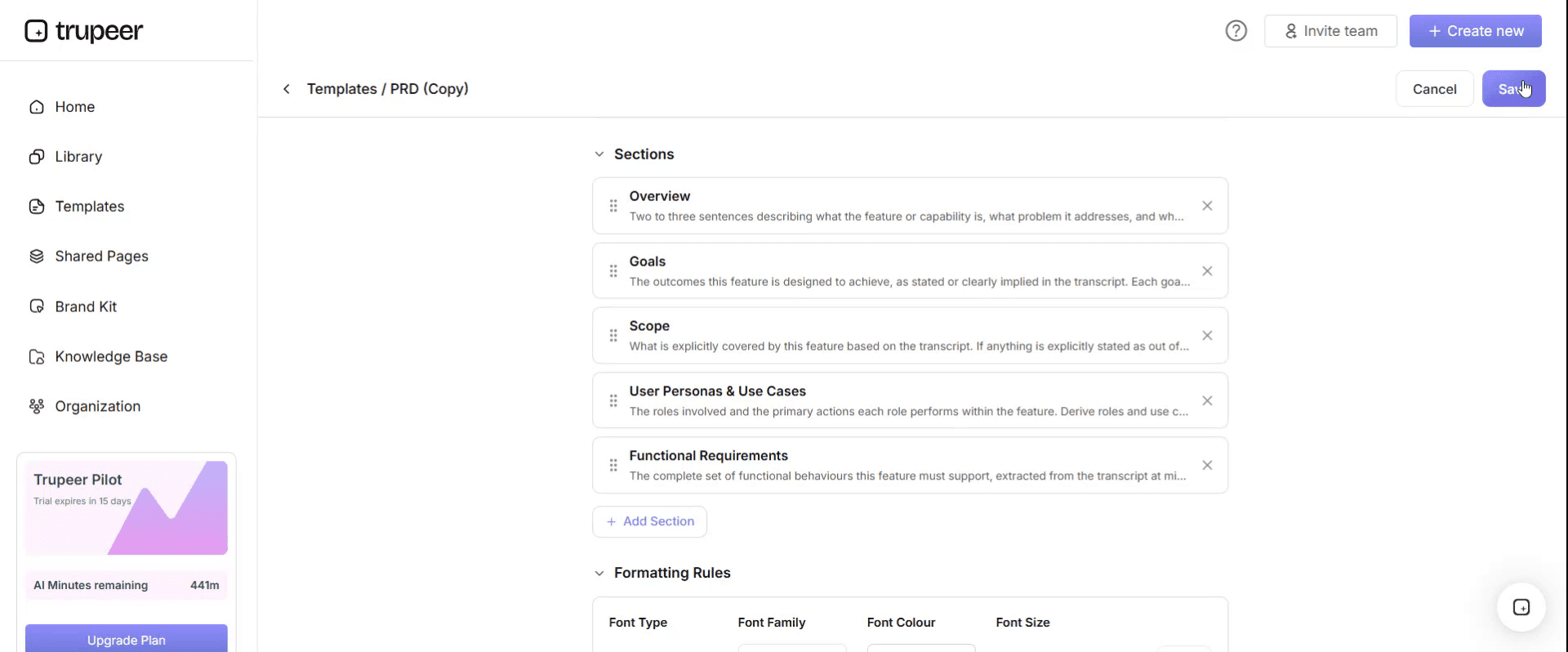
Step 4: Edit the Template
Click on Edit to start modifying the selected template.

Within the editor, you can:
Add new sections
Define or update formatting rules
Add a logo and adjust its position and related settings
Step 5: Save Your Customized Template
After making all necessary changes, click Save to store the updated template as your own.
Step 6: Preview and Fine-Tune the Template
When you want to see how your customized template looks, open the Preview.

From the preview screen, you can continue to make adjustments directly if needed, ensuring the template appears exactly as you want.
With a desk manual template you can:
Keep work moving when someone is away: Anyone covering the role has the steps in front of them.
Onboard replacements faster: New hires learn from the real procedures, not from memory.
Reduce key-person risk: Knowledge held by one person becomes something the team owns.
Stay on-brand: Apply your logo, fonts and colors with Trupeer's brand kit.
Generate procedures from a recording: Record the work once and let Trupeer write the steps.
Support audits: Show exactly how each task and control is performed.
What a desk manual template must contain
A complete desk manual covers these sections. The template below follows the same order.
Role overview: purpose of the role, who it reports to and what it's accountable for.
Key contacts: internal and external contacts, with what to contact them about.
Task calendar: every task by frequency, from daily to annual, with deadlines.
Task procedures: step-by-step instructions for each task, with screenshots.
Systems and access: applications, logins, permissions and who grants access.
Recurring reports: what's produced, when, for whom and from which data.
Exceptions and escalations: what to do when something goes wrong, and who decides.
Controls and approvals: checks the role performs or depends on.
Files and locations: where documents, templates and records are kept.
Tips and known issues: workarounds and things a new person would get wrong.
Revision history: who updated the manual, when and what changed.
Free desk manual template: the structure to copy
Copy the structure below into your own document, or open it in Trupeer and customize it.
1. Role overview. Role: [title]. Team: [team]. Reports to: [manager]. Purpose: [one or two sentences on what the role delivers]. Backup: [name of the person who covers this role].
2. Key contacts.
Contact | Role or organization | Contact them about | How |
|---|---|---|---|
[Name] | [Role] | [Topic] | [Email, phone or channel] |
[Name] | [Supplier or partner] | [Topic] | [Email, phone or channel] |
3. Task calendar.
Frequency | Task | Deadline | Procedure |
|---|---|---|---|
Daily | [Task] | [Time] | [Link to procedure] |
Weekly | [Task] | [Day] | [Link to procedure] |
Monthly | [Task] | [Working day] | [Link to procedure] |
Quarterly | [Task] | [Date] | [Link to procedure] |
Annual | [Task] | [Date] | [Link to procedure] |
4. Task procedures. One procedure per task, each with: purpose, trigger, inputs, step-by-step instructions with screenshots or a video, checks before completion, outputs and common exceptions.
5. Systems and access.
System | Used for | Access level | Who grants access |
|---|---|---|---|
[System] | [Tasks] | [Role or permission] | [Team or person] |
6. Recurring reports. Report name, frequency, recipients, data source and the procedure used to produce it.
7. Exceptions and escalations. Common problems, what to do about each, and who to escalate to if it can't be resolved.
8. Controls and approvals. Each control the role performs or relies on, with approval limits and the evidence kept.
9. Files and locations. Shared drives, folders, templates and record retention.
10. Tips and known issues. Workarounds, quirks and things that catch new people out.
11. Revision history. Version, date, author, summary of change.
Desk manual example: accounts payable specialist
Here's the template filled in for an illustrative example. An accounts payable specialist at a regional healthcare group, Northfield Health, processes supplier invoices and runs the weekly payment cycle. She's the only person who knows the full role.
Role overview. Role: AP specialist. Reports to: finance operations manager. Purpose: makes sure approved supplier invoices are recorded accurately and paid on time. Backup: AP assistant.
Task calendar.
Frequency | Task | Deadline |
|---|---|---|
Daily | Process invoices from the AP inbox and match to purchase orders | End of day |
Daily | Resolve matching exceptions or route to budget holders | Within 2 working days |
Weekly | Prepare and submit the payment run for approval | Tuesday, 12:00 |
Weekly | Send remittance advices after the run is released | Wednesday |
Monthly | Reconcile the supplier ledger to the general ledger | Working day 3 |
Monthly | Accruals for goods received but not invoiced | Working day 2 |
Annual | Supplier statement review and year-end cut-off | Year-end close |
Procedure: prepare the weekly payment run. Purpose: pay all approved invoices due before the next run. Trigger: Tuesday morning. Steps: run the due-invoices report in the ERP, exclude invoices on hold, check new or changed supplier bank details against the verification log, create the payment proposal, export the summary and send it to the finance operations manager for approval by 12:00. Exceptions: if bank details changed in the last 30 days and haven't been verified by phone, hold the invoice and escalate.
Systems and access. ERP (AP module, payment proposal rights), banking portal (upload only, approval sits with the manager), AP shared inbox, supplier verification log.
What the desk manual changed. When the specialist took two weeks of leave, the AP assistant ran the payment cycle from the manual without escalating once, and the year-end cut-off steps were already documented before anyone had to remember them. The details in this example are illustrative; replace them with your own role.
Desk manual examples by role
The structure stays the same across roles, but what goes in each section changes. A few common examples:
Payroll administrator desk manual
Focus the task calendar on the pay cycle: timesheet cut-off, variance checks, approval, submission and payslip release. Document the controls in detail, including who approves the payroll, how changes to bank details are verified and what to do when a payment fails. Year-end tasks, such as tax filings and statutory reporting, belong in the annual section.
HR coordinator desk manual
Cover the employee lifecycle tasks the role handles: offer letters, onboarding paperwork, system set-up requests, leave records and leavers. List the HR systems, the policies each task depends on and who signs off exceptions, such as non-standard contracts or extended leave.
Executive assistant desk manual
Here the contacts, preferences and recurring meetings matter more than systems. Document calendar rules, travel and expense procedures, board or leadership meeting preparation, and who has delegated access to what. A good executive assistant desk manual lets a temporary cover run the week without asking the executive anything basic.
Procurement or purchasing desk manual
Document how purchase requests are raised, checked and approved, supplier onboarding steps, approval limits, contract renewal dates and how to handle urgent or off-contract purchases. Supplier contacts and the escalation route for disputes are essential.
IT service desk analyst desk manual
Focus on ticket handling: categories, priorities, first-line fixes, escalation to second line and the knowledge articles behind each. List the tools, access levels and on-call rota, and record known recurring issues with their workarounds.
Government and public sector desk manual
Public sector roles often carry statutory deadlines, strict approval chains and records rules, so desk manuals are common in government agencies. Document the legislation or policy each task depends on, delegated authorities and approval limits, records retention and freedom-of-information requirements, and the reporting cycles tied to budgets or the fiscal year. Because public sector staff often move between roles, a current desk manual is also the easiest way to keep a service running through reorganizations and rotations.
How to generate a desk manual from one recording
Writing a desk manual by hand takes days, and most of that time goes on screenshots and step-by-step text. With Trupeer you can generate the procedures from a recording of the person doing the work.
Pick the role's core cycle. Choose the tasks that matter most, such as the daily processing routine or the weekly run.
Record the work as it happens. The role holder records their screen with Trupeer's AI screen recorder while doing the real task, explaining each step, the checks they make and what they do when something doesn't match.
Let Trupeer generate the procedure. Upload the recording, and Trupeer turns it into a step-by-step document with screenshots and written instructions, plus a narrated video, using the SOP creator.
Drop it into the desk manual. Place each generated procedure under its task in the template, and link it from the task calendar.
Add the role-level sections. Fill in the overview, contacts, calendar, systems and escalations, which take minutes once the procedures exist.
Review with the backup. Ask the person who covers the role to try a task using only the manual, and fix anything unclear.
Publish and keep it current. Store the desk manual in a searchable knowledge base. When a step changes, re-record that step instead of rewriting the procedure.
One recording of a full task cycle can produce most of the procedure content a desk manual needs, and the role holder spends their time reviewing rather than writing. For teams in other locations, use translation to create versions in their language.
The same recording-first approach works at scale. Genpact recorded existing MS Teams process sessions and SME walkthroughs, uploaded them to Trupeer and got back SOPs and demo videos in five languages: more than 500 training collaterals for 140,000 employees in 40 countries, delivered in 3 months instead of 12. Read the Genpact customer story.
Desk manual vs SOP vs job aid vs handover document
Document | Scope | Best for |
|---|---|---|
Desk manual | Everything one role does | Cover, onboarding, succession |
SOP | One process, often across many people | Consistency and compliance |
Job aid | One task, at a glance | Quick reference while working |
Handover document | What's handed over at one point in time | Role changes and departures |
A desk manual often contains SOPs and job aids, and a good one makes the handover document short. See the SOP manual template, job aid template and handover document template.
Desk manual vs desk procedures
The two terms are often used interchangeably, but there's a useful distinction. Desk procedures are the individual step-by-step instructions for each task a role performs. A desk manual is the complete document that holds those procedures together with the role overview, task calendar, contacts, systems, escalations and revision history.
In practice, the desk procedures are the hardest part to write and the part that goes out of date fastest. That's why generating them from recordings saves the most time: the procedures are captured from the real work, and the surrounding sections of the desk manual change much less often. If you're searching for a desk procedures template, use the task procedure format in section 4 of the template above for each task, and keep them all in one desk manual.
Desk manuals in transitions and outsourcing
When a role's work moves to a new team, location or outsourcing provider, the desk manual becomes the core of knowledge transfer. It shows the receiving team every task, deadline and exception in one place, and it's the first thing to check before asking the original team.
Build desk manuals for the highest-risk roles first, ideally before the transition is announced, while the people who hold the knowledge are still available. For more, see our guides to knowledge retention before SME attrition, knowledge transfer when SMEs have no time and process documentation for outsourcing.
How to write a desk manual in six steps
List every task the role performs, by frequency, with deadlines.
Rank them by risk, starting with tasks nobody else can do and tasks with hard deadlines.
Record or write each procedure, step by step, including checks and exceptions.
Fill in the role sections: overview, contacts, systems, reports, escalations and files.
Test it with the backup by having them perform a task from the manual alone.
Schedule reviews, at least quarterly and whenever a system or process changes.
Desk manual checklist
Every task the role performs is in the task calendar.
Each task has a step-by-step procedure with screenshots or video.
Exceptions and escalation routes are documented.
Systems, access and who grants access are listed.
Key contacts are current.
Periodic tasks such as month-end and year-end are covered.
The backup has tested the manual on at least one real task.
The manual has an owner and a review date.
Common mistakes to avoid
Documenting the job description instead of the job. A desk manual needs steps, not responsibilities.
Skipping rare tasks. Quarter-end and year-end tasks are the ones people forget.
Leaving out exceptions. The standard path is rarely where the backup gets stuck.
Writing it once and never updating it. An out-of-date manual can be worse than none.
Waiting until someone resigns. By then, there may not be time to capture everything.
Download the free desk manual template
Open the template in Trupeer, apply your brand kit, generate procedures from your recordings and share the manual with everyone who covers the role. Get the free desk manual template.
Frequently Asked Questions
What is a desk manual?
A desk manual is a document that describes everything one role does, including its tasks, step-by-step procedures, systems, contacts and deadlines, so that someone else can perform the role when the usual person is away or leaves.
What should a desk manual include?
A role overview, key contacts, a task calendar by frequency, step-by-step procedures for each task, systems and access, recurring reports, exceptions and escalations, controls, file locations, tips and known issues, and revision history.
What is the difference between a desk manual and an SOP?
An SOP documents one process, often performed by many people. A desk manual documents one role and usually contains the procedures for every task that role performs.
How do I create a desk manual from a recording?
Record the role holder doing the real work while they explain each step, upload the recording to Trupeer to generate a step-by-step procedure with screenshots and a video, then place it in the desk manual template and add the role-level sections.
What are desk procedures?
Desk procedures are the step-by-step instructions for each task a specific role performs. They usually sit inside a desk manual, alongside the role overview, task calendar, contacts and systems.
Who should write a desk manual?
The person who currently does the job, because they know the real steps and exceptions. Their manager and backup should review it. Recording the work reduces the time the role holder spends writing.
How often should a desk manual be updated?
At least quarterly, and whenever a system, process or contact changes. Give the manual an owner and a review date.
Is there a desk manual template in Word?
Word suits a desk manual because it mixes tables, such as the task calendar, with step-by-step procedures. Open this template in Trupeer and export it, or copy the structure above into Word.
Is there a desk manual template in Excel?
Excel works well for the task calendar, contacts and systems lists. Keep the step-by-step procedures in a document or video.
Is there a desk manual template in PDF?
PDF suits the approved copy you share with backups, auditors or a new team. Keep an editable version for updates, and export a new PDF after each review.
Is there a desk manual template in Google Docs?
Yes. Copy the structure above into Google Docs, or open the template in Trupeer and export it. Google Docs is useful when the role holder, backup and manager all need to edit the manual.
Can I use one desk manual for a whole team?
It's better to write one per role. A team-level manual tends to describe processes rather than jobs, which makes it harder for someone covering a specific role to see everything they need to do. Shared procedures can be linked from several desk manuals.
What is a desk manual example?
A desk manual example is the template filled in for a real or illustrative role. The accounts payable specialist example on this page shows the role overview, task calendar, one full procedure and the systems list.

