
이 템플릿 사용
User acceptance testing is the last chance to find out whether a new system actually works for the people who'll use it. Too often it's run from vague scripts, such as "test the invoice process", by busy business users who aren't sure what to check, with screenshots pasted into email as evidence. Defects slip through, test results can't be trusted and sign-off becomes a matter of opinion. A UAT test script template fixes that by giving every test the same clear structure: what to test, how, with what data, what should happen and what actually did.
This free UAT test script template covers the test details, preconditions, test data, numbered steps with expected and actual results, pass or fail status, evidence, defects and sign-off. It includes a filled-in example, guidance on writing steps business users can follow, and a way to capture evidence by recording the test instead of pasting screenshots. Copy the structure below, or open it in Trupeer and customize it for your project.
What is a UAT test script template?
A UAT test script template is a ready-made format for the step-by-step instructions business users follow during user acceptance testing. Each script tests one business scenario end to end, such as creating a purchase order and posting the invoice. It lists the preconditions and test data, the steps to perform, the expected result of each step, the actual result, the pass or fail status, the evidence captured and any defects raised, so the business can decide whether the system is ready to go live.
UAT test scripts sit inside your wider testing approach. For the overall plan, see the test plan template.
Why use a UAT test script template?
Business users aren't professional testers. Clear, numbered steps let them test confidently.
Consistent scripts give consistent results, so you can compare and trust them.
Expected results remove guesswork about what "correct" looks like.
Evidence supports sign-off and audit, showing exactly what was tested and what happened.
Defects are easier to fix when they're linked to the exact step and evidence.
Scripts become training material, because they describe real tasks in the new system.
Who uses a UAT test script template?
Test managers and UAT leads who plan and coordinate user acceptance testing.
Business users and process owners who run the tests and sign off.
Business analysts who write scripts from requirements.
ERP, CRM and HCM implementation teams testing configured systems.
QA teams who manage defects and retesting.
Auditors and compliance teams who need evidence of testing.
Preview the UAT test script template
The template opens with the test script header: ID, title, business scenario, requirement reference, tester, environment and date. Preconditions and test data follow. The main table lists each step with the action, the expected result, the actual result, a pass or fail status and an evidence link. The script closes with an overall result, defects raised, retest results and sign-off. Every section is editable, so you can add columns, change status values or link the script to your test management tool.
How to customize this template in Trupeer
Step 1: Open the Templates Section
Go to the Templates section from the main navigation.

Step 2: Select and Open a Template
Click on any template you want to work with to open it.
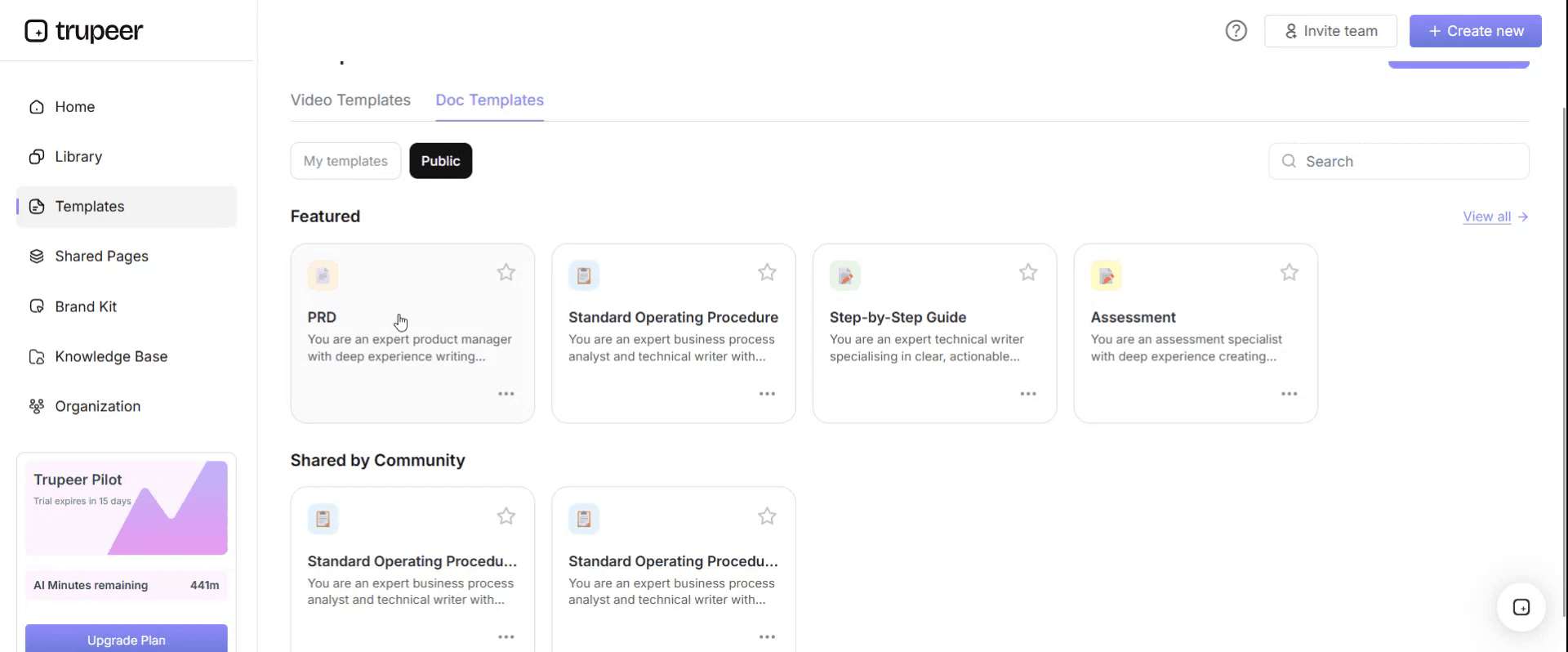
Step 3: Expand the Template View
If needed, expand the template view to see the full layout and details clearly.

Step 4: Edit the Template
Click on Edit to start modifying the selected template.

Within the editor, you can:
Add new sections
Define or update formatting rules
Add a logo and adjust its position and related settings
Step 5: Save Your Customized Template
After making all necessary changes, click Save to store the updated template as your own.
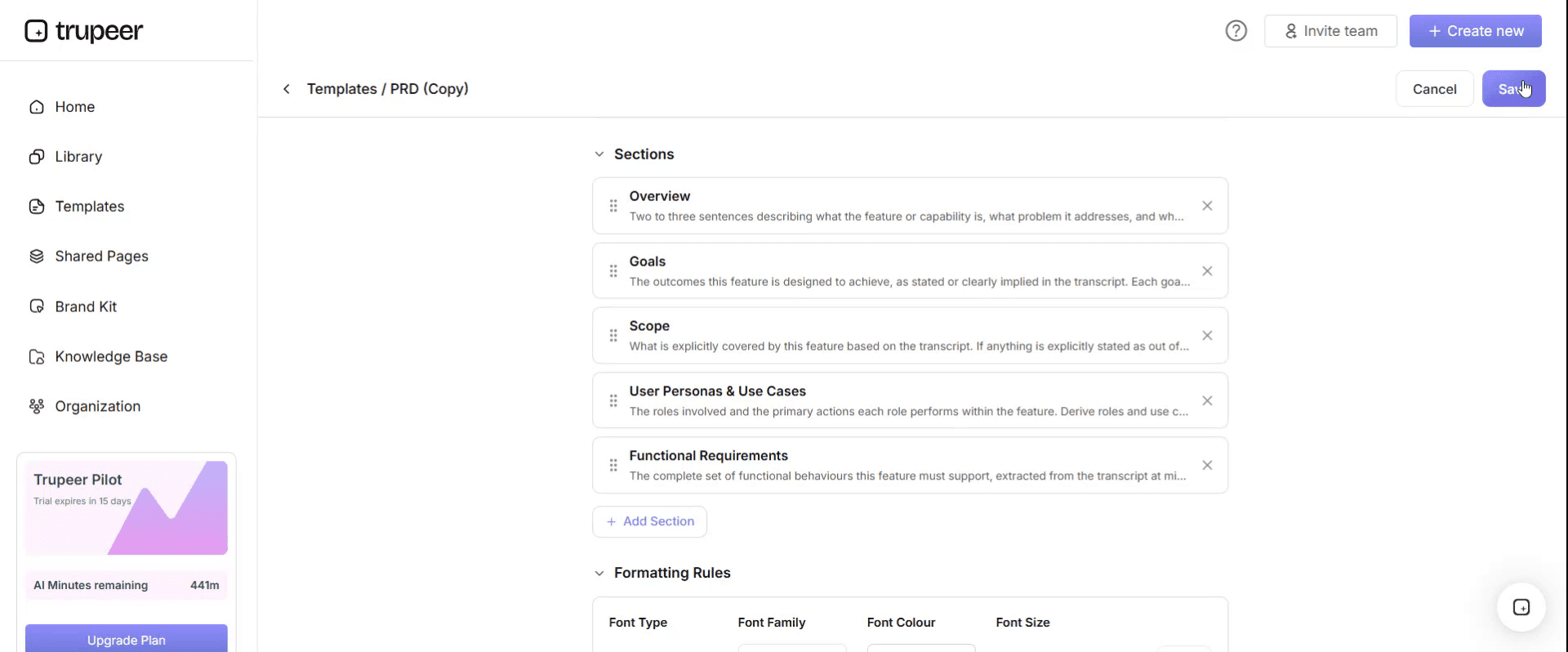
Step 6: Preview and Fine-Tune the Template
When you want to see how your customized template looks, open the Preview.

From the preview screen, you can continue to make adjustments directly if needed, ensuring the template appears exactly as you want.
With a UAT test script template you can:
Give business users clear steps they can follow without training.
Define what correct looks like with expected results for every step.
Capture evidence consistently, ideally as a recording of the test.
Link defects to the exact step where they happened.
Support go-live decisions with signed-off, evidenced results.
What a UAT test script template must contain
Section | What it covers |
|---|---|
Script header | ID, title, business scenario, requirement reference, priority |
Test details | Tester, environment, test cycle, date |
Preconditions | What must be true before testing, such as user access and setup |
Test data | The data to use, such as supplier, material and amounts |
Test steps | Numbered actions the tester performs |
Expected results | What should happen at each step |
Actual results | What did happen |
Status | Pass, fail, blocked or not run, per step and overall |
Evidence | Recording or screenshots of the test |
Defects | Defect ID, description and severity for any failure |
Retest | Retest date, result and evidence |
Sign-off | Tester and business owner approval |
Free UAT test script template: the structure to copy
Copy the structure below into your own document or spreadsheet, or open it in Trupeer and customize it.
1. Script header. Script ID: [UAT-P2P-001]. Title: [Create a purchase order and post the supplier invoice]. Business scenario: [Standard purchase of goods with three-way match]. Requirement reference: [REQ-ID or fit-gap ID]. Priority: [High, medium or low].
2. Test details. Tester: [name and role]. Environment: [UAT system]. Test cycle: [cycle 1, 2 or regression]. Date: [date].
3. Preconditions. [Tester has the buyer and AP clerk roles in the UAT system. Supplier and material exist. Tolerances are configured.]
4. Test data. Supplier: [supplier ID]. Material: [material ID]. Quantity: [quantity]. Price: [price]. Cost centre: [cost centre].
5. Test steps.
Step | Action | Expected result | Actual result | Status | Evidence |
|---|---|---|---|---|---|
1 | [Action] | [Expected result] | [Actual result] | [Pass / fail / blocked] | [Recording timestamp or screenshot] |
2 | [Action] | [Expected result] | [Actual result] | [Status] | [Evidence] |
3 | [Action] | [Expected result] | [Actual result] | [Status] | [Evidence] |
6. Overall result. [Pass, fail or blocked], with a short comment.
7. Defects. Defect ID: [ID]. Step: [step number]. Description: [what happened]. Severity: [critical, high, medium or low].
8. Retest. Date: [date]. Result: [pass or fail]. Evidence: [link].
9. Sign-off. Tester: [name, date]. Business owner: [name, date].
UAT test script example: purchase order to invoice
Here's a filled-in UAT test script for a procure to pay scenario. The details are illustrative.
UAT-P2P-001 · Create a purchase order and post the supplier invoice · High priority
Preconditions. Tester has buyer and AP clerk roles in UAT. Supplier and material exist. Price tolerance is configured.
Test data. Supplier: test supplier A. Material: office chairs. Quantity: 10. Price: as per contract.
Step | Action | Expected result | Actual result | Status |
|---|---|---|---|---|
1 | Create a purchase order for 10 office chairs from supplier A | PO is created and a PO number is displayed | PO created with a number | Pass |
2 | Release the PO for approval | PO routes to the approver and is approved | Approved | Pass |
3 | Post the goods receipt for 10 chairs | Goods receipt is posted against the PO | Posted | Pass |
4 | Post the supplier invoice with the contract price | Invoice matches PO and receipt and is posted without a block | Posted without block | Pass |
5 | Post a second invoice with a price above tolerance | Invoice is posted with a payment block for price variance | Posted without a block | Fail |
Overall result. Fail. Defect. DEF-112, step 5: price variance above tolerance didn't trigger a payment block. Severity: high.
Retest. After the tolerance configuration was corrected, step 5 was retested and passed, with the recording attached as evidence.
How to write UAT test steps business users can follow
One action per step, written as an instruction: "Enter the supplier ID", not "Supplier entry".
Use real screen and field names from your system.
Write a specific expected result for every step, such as "Invoice is posted with payment block R", not "It works".
Include the test data in the script, so testers don't invent their own.
Test exceptions as well as the happy path, such as variances, missing approvals and rejections.
Keep each script to one business scenario, usually 5 to 20 steps.
Trace every script to a requirement or fit-gap row.
For what to capture across the whole testing phase, see the UAT documentation checklist.
UAT test script examples for ERP implementations
Most ERP UAT cycles cover the core end-to-end processes. Use these as a starting list and add scripts for your own exceptions and local requirements.
Process | Example UAT test scripts |
|---|---|
Procure to pay | Create and approve a PO, post goods receipt, post invoice within and above tolerance, run payment proposal |
Order to cash | Create a sales order, release a credit block, deliver and bill, apply incoming payment, issue a credit note |
Record to report | Post and approve a manual journal, run depreciation, post accruals, run period close and reports |
Hire to retire | Hire an employee, change job and pay, process a leaver, run a payroll test cycle |
Master data | Create a supplier with bank verification, create a customer with a credit limit, create a material |
Reporting | Run key operational and financial reports and compare to expected totals |
Prioritise scripts by business risk: processes that move money, affect customers or are legally required come first, followed by high-volume daily tasks.
UAT entry and exit criteria
Agree these before UAT starts, so the go-live decision is based on evidence rather than opinion.
Criteria | Examples |
|---|---|
Entry criteria | System testing complete, UAT environment stable, test data loaded, user access set up, scripts approved, testers briefed |
Exit criteria | All high-priority scripts run, no open critical or high defects, agreed workarounds documented for medium defects, business owners have signed off |
Track progress daily during UAT: scripts run, passed, failed and blocked, and defects by severity. A short daily stand-up with testers and the fix team keeps retests moving.
How to capture UAT evidence
Screenshots pasted into email or spreadsheets are hard to review, easy to lose and miss what happened between screens. Recording the test is faster and more complete:
Record the tester's screen while they run the script, narrating each step.
Link the recording in the evidence column, with timestamps for key steps.
Use the recording for defects, so developers can see exactly what happened.
Keep the recording as audit evidence for sign-off.
Reuse passed recordings to build training for the new system.
UAT test script, test case or test plan?
Document | What it is |
|---|---|
Test plan | The overall approach: scope, schedule, environments, roles and entry and exit criteria |
Test case | A single condition to verify, often written by testers or QA |
UAT test script | Step-by-step instructions for business users to test a real business scenario end to end |
Test summary report | The results of a test cycle and the recommendation on go-live |
For the full set of testing documents, see the test documentation templates.
How to run UAT with test scripts
Agree scope and entry criteria, such as completed system testing and a stable UAT environment.
Write scripts from requirements and business scenarios, including exceptions.
Prepare test data and user access before testing starts.
Brief testers on the scripts, evidence and defect process.
Run scripts and capture evidence, logging defects against the exact step.
Fix and retest defects, recording retest evidence.
Review results against exit criteria and get business sign-off.
For using video across implementation documentation and UAT, see how to create IT project implementation documentation and UAT guides with video.
Formats for UAT test scripts
Spreadsheet suits large numbers of scripts, with filtering by status, tester and priority.
Document suits detailed scenarios with screenshots and sign-off.
Test management tool suits large programmes that need traceability, dashboards and defect integration.
Recording suits evidence, defects and reuse as training.
Best practices for UAT test scripts
Write scripts from business scenarios, not system menus.
Involve the people who'll use the system in writing and running scripts.
Make expected results specific and testable.
Test the exceptions that cause problems in real life.
Capture evidence for every script, not just failures.
Get sign-off from the business owner, not only the tester.
Common mistakes to avoid
Vague steps, such as "process the invoice".
No expected results, so testers can't tell pass from fail.
Testing only the happy path.
Testers making up their own test data.
Evidence scattered across email and chat.
No traceability between scripts, requirements and defects.
UAT test script checklist
Each script has an ID, title, scenario and requirement reference.
Preconditions and test data are defined.
Every step has one action and a specific expected result.
Exceptions are tested, not just the happy path.
Actual results, status and evidence are recorded for every step.
Defects are linked to the exact step and retested.
The tester and business owner have signed off.
How Trupeer helps you run UAT with evidence
UAT challenge | How Trupeer helps |
|---|---|
Screenshots in email are hard to review | Record each test run, and Trupeer turns it into a step-by-step document with screenshots and a video |
Defects are hard to reproduce | Developers see exactly what the tester did in the recording |
Test evidence is scattered | Keep every test document and video in one searchable place |
Writing scripts takes time | Record a key user doing the scenario, and use the generated steps as the script draft |
Training starts late | Passed test recordings become training content for the new system |
See how Trupeer's UAT documentation automation turns test recordings into evidence and documentation.
Genpact used this recording-first approach for a company-wide Workday rollout, turning recorded process sessions into more than 500 training collaterals across 20 workstreams in five languages, for 140,000 employees in 40 countries, in 3 months instead of 12. Read the Genpact customer story.
Download the free UAT test script template
Open the template in Trupeer, add your scenarios, test data and steps, and share it with your testers. Get the free UAT test script template.
Related templates
Fit-gap analysis template
ERP end user training plan template
Frequently Asked Questions
What is a UAT test script template?
It's a ready-made format for the step-by-step instructions business users follow in user acceptance testing, covering the scenario, preconditions, test data, steps, expected and actual results, status, evidence, defects and sign-off.
What should a UAT test script include?
A header with ID, title, scenario and requirement reference, test details, preconditions, test data, numbered steps with expected and actual results, status, evidence, defects, retest results and sign-off.
What's the difference between a UAT test script and a test case?
A test case verifies a single condition and is often written by QA. A UAT test script guides business users through a real business scenario end to end, often covering several conditions.
How many steps should a UAT test script have?
Usually 5 to 20, covering one business scenario. Split longer scenarios into several scripts.
Who writes UAT test scripts?
Business analysts or test leads usually draft them from requirements, with process owners and key users reviewing them so they reflect real work.
How do you capture UAT evidence?
Record the tester's screen while they run the script, link the recording in the evidence column with timestamps, and keep it with the results for sign-off and audit.
Should UAT test scripts include negative tests?
Yes. Test exceptions such as variances, missing approvals and invalid data, because they're where real problems appear after go-live.
Is there a UAT test script template in Excel?
Yes. A spreadsheet works well for many scripts, with filters for status, tester and priority. Open the template in Trupeer, customize it and export it, or copy the structure into Excel.
Is there a UAT test script template in Word or PDF?
Yes. Use Word for detailed scenarios and sign-off, and export a PDF of signed-off scripts for audit records.
Is the UAT test script template free?
Yes. Sign up free to open the template in Trupeer, customize it and export it.
Can UAT test scripts be reused for training?
Yes. Scripts and recordings of passed tests describe real tasks in the configured system, so they make a strong starting point for training.
What happens after UAT sign-off?
The test summary goes to the go-live decision, open low-severity defects are tracked, and passed scenarios are reused for regression testing and training.


