このテンプレートを使用してください
明確な製造作業手順書が、品質の一貫性と手戻りの反復を分けます。Trupeerなら、無料の製造作業手順書テンプレートから始めて、ブランドガイドラインでカスタマイズし、文章の手順をライン上でオペレーターがすぐに視聴できる動画ウォークスルーへ変換することで、現場のドキュメント作成にかかる時間を何時間も節約できます。
製造作業手順書テンプレートは何のため?
作業手順書とは、1人が1つのステーションで1つの作業(オペレーション)を行う方法を、2人のオペレーターが同じ結果を出せるだけの十分な詳細で示す文書です。プロシージャ(プロセスを説明する文書)の下に位置し、作業そのものの前にある最後の文書であるため、何も挟まずその上に何も置かれません。
製造では、他の領域の同等物にはない重みがあります。通常、品質システムのもとで管理文書であり、新しく入った担当者がそれを基に教育され、監査人が使用時点で確認しようとする文書でもあります。
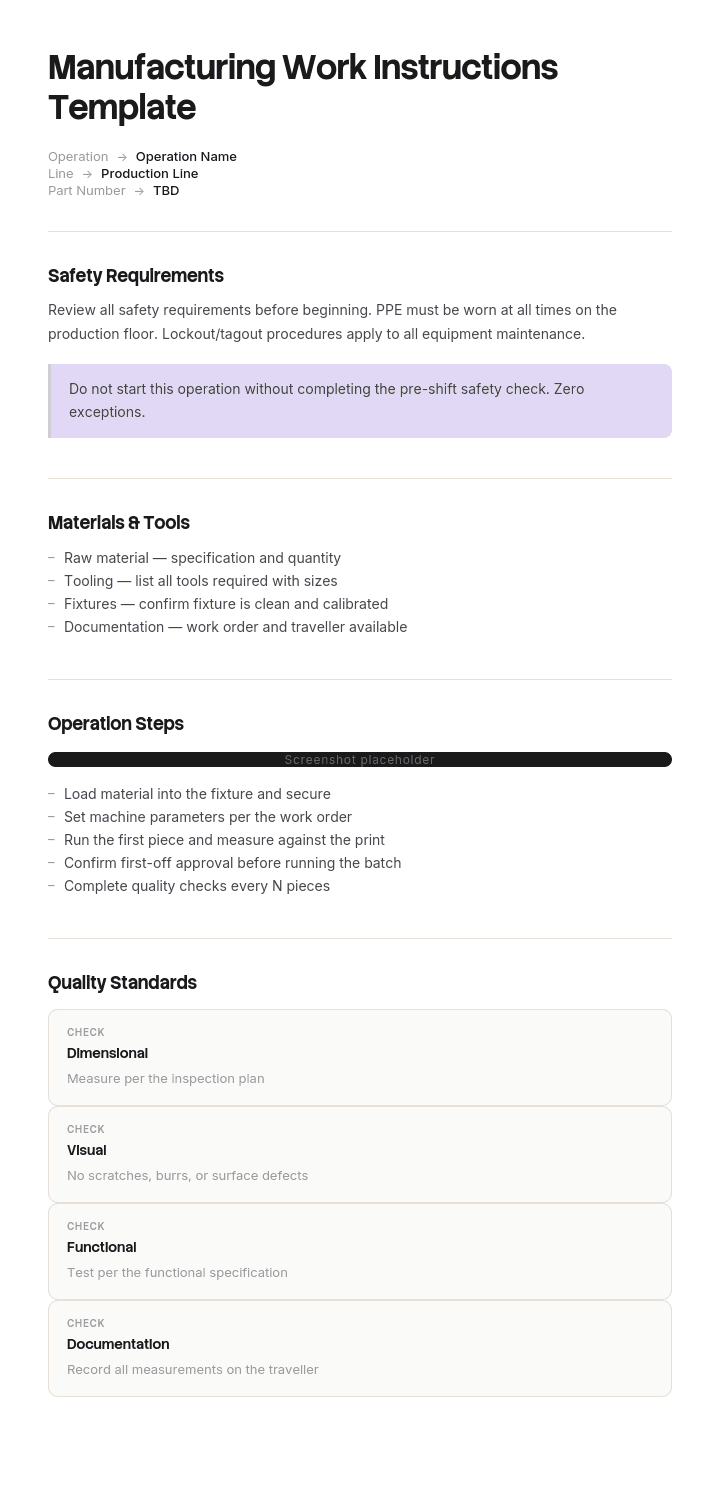
製造作業手順書テンプレートは、再利用できるひな形です。ヘッダー項目、ステップ形式、画像の取り決め、改訂ブロックが含まれます。テンプレート自体は簡単な部分です。文書が現実とまだ一致しているかどうかが難しい部分であり、このページの多くはそこについて説明します。
なぜ作業手順書が仕事に合わなくなるのか
作業手順書は、署名された当日は正確です。そこから、ゆっくりと3つのことが起こります。
プロセスが変わります。工具がリファービッシュされ、設定値が調整され、材料の挙動が変わり、治具が交換されます。変更は適切に行われますが、そのうち一部だけが文書に反映されます。
オペレーターが改善します。週に400回もセルを回す人たちは、より良い手順の組み合わせを見つけ、改訂ではなく実演によってその改善が広がります。1年もすると、最良のオペレーターは文書に書かれていることを実行していません。
そして文書は「チェック」ではなく「レビュー」されます。レビューとは、エンジニアが机上で読み、署名することです。チェックとは、誰かがステーションに立って、実際に起きていることと文書を照合することです。何かを見つけられるのは、そのうちのどちらか一方だけです。
結果として、形式上は管理されているのに静かに間違っているライブラリができます。経験豊富なオペレーターは文書が古いことを知っており、記憶に基づいて作業します。困るのは、新人、派遣スタッフ、そしてシフトをカバーする誰かです。彼らは実際に文書をそのまま追っている唯一の人たちだからです。そのため、欠陥率はしばしば見慣れない作業者で急に跳ね上がり、教育のせいだと片付けられがちです。
Trupeerでこのテンプレートをカスタマイズする方法
ステップ1:テンプレートセクションを開く
メインナビゲーションからテンプレートセクションへ移動します。

ステップ2:テンプレートを選択して開く
作業したいテンプレートをクリックして開きます。

ステップ3:テンプレート表示を展開する
必要に応じて、テンプレート表示を展開し、レイアウトと詳細をはっきり確認します。

ステップ4:テンプレートを編集する
編集をクリックして、選択したテンプレートの変更を開始します。

エディター内で、次のことができます:
新しいセクションを追加
書式ルールを定義または更新
ロゴを追加し、位置や関連設定を調整
ステップ5:カスタマイズしたテンプレートを保存する
必要な変更をすべて行ったら、保存をクリックして更新済みテンプレートを自分のものとして保存します。

ステップ6:プレビューしてテンプレートを微調整する
カスタマイズしたテンプレートがどのように表示されるか確認したいときは、プレビューを開きます。

プレビュー画面から、必要に応じて直接調整を続けることができ、テンプレートが希望どおりに表示されることを確認できます。
製造作業手順書テンプレートを使うと、次のことができます:
ドキュメント作成の時間を節約: 製造向けに構成された空白ページをスキップできます。
不良を減らす: 明確な視覚的手順により、ライン上のミスや手戻りを削減します。
ブランドに合わせる: Trupeerのブランドキットでロゴ、フォント、カラーを適用します。
オペレーターをより速く教育: 作業ステーションで動画ウォークスルーと手順を組み合わせます。
工場間で標準化: すべてのラインとシフトで同じテンプレートを使用します。
グローバルチームに対応: 1クリックで作業手順書を65以上の言語に翻訳できます。
単一セルで偏差ウォークを実施する方法
30〜40分、1つのステーション、1人の品質またはプロセスエンジニア。オペレーターに「何をしているのか」「なぜそうするのか」を伝える以外の告知は不要です。
現在の管理済み作業手順書を印刷します。共有ドライブのコピーではなく、ステーションにあるはずのものを使い、そこにあるかどうか、そしてそれが現在の改訂版かどうかを確認します。
邪魔にならない場所で作業が見える位置に立ち、何も言わずに3連続のサイクルを観察します。
文書と実際に見える内容の違いをすべて書き留めます。手順の順番が違う、手順が省略されている、文書に書かれていないのに実施されている手順、設定が異なる、工具やチェックが異なるなどです。安全上の問題でない限り、まだ判断もしないし、修正もしません。その場合は作業を止めます。
次に、オペレーターと話します。偏差を1つずつ取り上げ、なぜそうなっているのかを尋ねます。この会話こそがこの取り組みの価値であり、明らかに懲戒目的ではないことが条件です。
偏差の数を数えます。誰も疑っていなかったその数字が、経営チームに「工場全体でやろう」と納得させるのです。
見つけた偏差ごとの3つの判定
Verdict | What it means | What you do | Typical share |
|---|---|---|---|
Revise | The document is wrong. The process changed and the paperwork did not | Raise a document change immediately, it is a live nonconformity | Around a third |
Adopt | The operator's way is better and safe | Capture it, verify it, standardise it, then revise the document | Often the largest group |
Retrain | The operator is not following a step that matters | Retrain and record it, and ask why the step was skippable | The rest |
合計数よりも割合が重要です。ほとんどが「Revise」のセルは、現場に届かないエンジニアリング変更プロセスがあります。ほとんどが「Adopt」のセルは、良いオペレーターがいて改善のルートがない状態であり、そうした改善を適切に取り込む仕組みは、当社のカイゼン手法テンプレートでカバーしています。ほとんどが「Retrain」のセルは、ドキュメントの問題というより教育または監督の問題です。
「Adopt」として扱ってはいけないものが2つあります。機械のガード、隔離とロックアウト、個人用保護具、緊急停止に関わるものはすべてです。そして、顧客が指定する特性、規制当局が指定するもの、またはバリデート済みプロセスに影響するものもすべてです。そこにおける偏差は、提案ではなく、既存のルートを通じて報告すべき不適合です。これらは観察ではなく「停止してエスカレーション」です。
無料の製造作業手順書テンプレート:1ページでコピーできるもの
1つの作業、1ページ。収まらないなら2つの作業です。
ヘッダー。 品番と改訂。作業(オペレーション)番号と名称。セルまたはステーション。文書番号と改訂。発効日。作成者と承認者。サイクルタイム。改訂履歴を1行で。
材料、工具、設備。 開始前にステーションにあるべきもの(ゲージとその校正ステータスを含む)。
安全。 この作業に存在する危険のみを、必要な保護とともにここに記載し、危険が発生するステップ内でインラインで繰り返します。
セットアップと設定。 オペレーターが本来覚えておく必要があるすべての値を、許容差とともに記載します。温度、圧力、速度、トルク、保持時間。ここが現実から最も頻繁にズレるセクションです。
ステップ。 番号付きで、1アクションずつ。期待される結果と、画像(画像が文章よりも多くの仕事をするもの)を添えます。12未満を目標にします。重要なステップは明確にマークします。つまり、エラーが顧客に届く可能性があるステップです。
チェック。 何を、どのくらいの頻度で、何と照合して検査するか、そして失敗した場合に何をするか。
もし何かが間違っていたら。 誰に連絡するか、そしてオペレーターが続行ではなく停止するポイント。
ここまでをコピー。使える状態を保つための2つのルールがあります。文書は、オペレーターが実際に立って見る距離で読める必要があり、通常は作成者が想像するよりも遠いことが多いからです。そして、1サイクルに照らしてチェックできる必要があり、これが偏差ウォークを可能にします。
作業手順書テンプレートに含めるべきものは?
上記のヘッダー項目に加えて、特に改訂ブロックと承認者です。改訂が追跡できない作業手順書は、内容がどれほど良くても管理文書になりません。
それ以外は、2日目のオペレーターがこの1枚だけで作業を正しく完了できるかどうかがテストです。それに役立たないものは、教育用資料かエンジニアリング上の根拠のどちらかであり、どちらも別の場所に置くべきです。
最もよく欠ける項目は、各ステップの横にある期待される結果です。これがないと、オペレーターはそのステップがうまくいったかどうか判断できません。つまり、エラーはステーションではなく検査で見つかることになります。
製造作業手順書を書く方法(ステップバイステップ)
まずは、熟練者が通常速度で行う作業を最初に観察します。中断せずに見てください。可能なら記録します。そうしないと見落とします。
エンジニアリング上の意図からではなく、見た内容からステップを書きます。意図と実際は異なり、実際に行われるバージョンこそが文書化して改善すべきものです。
判断や実行ではなく、ナビゲーションや取り扱いに関する各ステップを削ります。部品を拾い上げることはステップではありません。特定の向きにするのは、それが1通りにしか合わないからです。
残りの各ステップに期待される結果を追加し、写真で1段落分が不要になる箇所には画像を追加します。実際のステーションの写真は図面より優れ、どちらも説明文より優れます。
セットアップ値は、前の文書のバージョンではなく、現在のエンジニアリング記録から取得した許容差付きの値で設定します。ここが、改訂間でエラーが伝播する場所です。
次に、あなたが見て何も言わない状態で、まだその作業をしていない人に、このシートから作業を実行してもらいます。ためらいはすべて、文書の欠陥です。
視覚的な作業手順書と、画像が文章に勝つ場面
製造は、特定の理由により、視覚的な手順が文章を本当に上回る唯一の領域です。読み手はページではなく部品を見ています。手袋をしているかもしれません。サイトの主要言語を流暢に読めない可能性があります。そして、文章を吸収するのではなく、状態を確認する必要があります。
画像は、方向付け(正しい/誤った側を並べて示すこと)、部品がどこに配置されるか、ゲージの読み取りに最適です。条件、分岐する手順の流れ、許容差のある数値の説明では最も不利になります。
成り立つ4つのルールがあります。CADレンダリングではなく実際のステーションを撮影します。オペレーターは自分のベンチを見分けられるからです。組み立て全体を見せるのではなく、注目点をマークします。画像だけでは何に気づくべきかが曖昧になるため、すべての画像に短いテキスト行を添えます。そして、頻繁に変わるものは撮影しないようにします。
サイトで複数の言語を運用している場合は、画像+短い標準化フレーズのほうが、長文の完全翻訳よりも優れており、引き継ぎにも耐えやすくなります。
1サイクルで9つの偏差を見つけた工場
Wexbridge Polymersは、自動車顧客向けに3拠点で射出成形を行っており、約500名のスタッフがIATF 16949の認証を受けています。その作業手順書ライブラリには、約1,240件の管理文書がありました。
ある部品ファミリーでは、目標が0.6%(nought point six)なのに対し、約2.1%(two point one percent)のスクラップが18か月間続いていました。複数の8D調査が提起されました。是正措置は毎回数週間は有効でしたが、その後率は元に戻りました。
品質マネージャーは、現在の管理済み作業手順書をセルに持ち込み、3サイクルを観察しました。14ステップの文書で、彼女は9つの偏差を記録しました。
4つは、オペレーターがより良い方法で行っていたケースでした。主に、日勤側が見つけていたパージシーケンスで、初回不良(first-off reject)を減らしていました。
3つは、文書が間違っていたケースでした。最も重要なのは金型温度です。シートには68度と記載されていました。工具は2022年にリファービッシュされており、その当時そこにいた全員が74度で運転していました。
2つは、オペレーターが重要なチェックを省略していたケースでした。
温度が欠陥の原因でした。経験豊富なオペレーターは74度に設定して良品を作っていました。新人、派遣のカバー担当、そしてシートをきちんと守るだけの良識ある人たちは68度に設定してスクラップを作っていました。シフトデータは、誰もやっていなかった「作業者の在籍期間別にスクラップを見る」という観点で確認すると、はっきりと示されました。文書化された原因はプロセスのばらつきだと想定されていたためです。
その作業手順書は、18か月の間に3回レビューされていました。どのレビューも、エンジニアが机上で読み、署名するだけでした。
彼らは偏差ウォークを14セルに展開しました。合計で約8時間のエンジニアリング工数です。偏差は126件:38件の文書エラー、採用価値のある51件のオペレーター改善、再教育が必要な37件の項目です。
元の部品ファミリーのスクラップは、セットポイントが修正された四半期のうちに0.7%(nought point seven percent)まで下がりました。
ライブラリは、全期間を通じて完全に準拠していました。すべての文書は管理され、最新の改訂版で、署名済みでした。それでも、38か所では間違っていました。
作業手順書かSOPか:あなたはどちらを書いていますか?
プロシージャは、役割や判断をまたぐプロセスを説明します。適合しない材料をどう扱うか、段取り替えをどう承認するか、といった内容です。作業手順書は、1人が1つの場所で行う1つの作業(オペレーション)を説明します。
実務的なテストは、判断を要する形で文書内に「or」という語が含まれているかどうかです。読み手が状況に応じて分岐のどちらかを選ばなければならないなら、あなたはプロシージャを書いています。毎回同じシーケンスを実行するなら、それは作業手順書です。
どちらの方向でも間違えるとコストがかかります。作業手順書として書かれたプロシージャは巨大になり、使えなくなります。プロシージャとして書かれた作業手順書は曖昧になり、オペレーターに細部を「考えて作らせる」ことになります。
当社のSOPテンプレートはプロシージャのレベルをカバーしており、必要が「短い参照」であって「完全な指示」ではない場合は、ジョブエイドのほうが適切な成果物になることが多いです。製造以外の作業手順書については、作業手順書テンプレートが一般的なケースをカバーし、建設現場版が現場作業をカバーします。
改訂管理、ISO 9001、IATF 16949の要件
品質基準では、文書化された情報を管理し、使用時点で利用可能にし、古い版の意図しない使用から保護することが求められます。これには4つの実務上の結果があります。
すべての指示には文書番号、改訂、発効日があり、ステーションでの改訂はシステム内の改訂と一致している必要があります。
旧版は削除します。機械に貼り付けられた管理されていない印刷物は、この領域で最もよく見つかる監査指摘の1つであり、通常は「管理版が間違っている」か「到達できない」ことが原因です。
変更は、発効前に指定された権限者によって承認され、変更記録には何が変わり、なぜ変わったのかが示されます。
そして、変更が顧客指定の特性、バリデート済みプロセス、安全管理に影響する場合は、その上に顧客への通知および変更承認の要件が適用されます。自動車、航空宇宙、医療機器、製薬の顧客は、それぞれ独自のルールを課しています。
このページはコンプライアンスの助言ではなく、要件は規格、業界、顧客によって異なります。文書の管理方法を変える前に、適用される内容を品質機能と確認してください。
紙、デジタル、ステーションの画面?
紙は、まだ多くの場所で正解です。粉塵、クーラント、落下した工具にも耐え、コストはかからず、ログインも不要です。弱点は改訂管理で、印刷されたコピーでは「古くなっている」ことを伝えられないからです。
ステーションに画面を置けばそれが解決し、さらに動画、ズーム、1つのソースからの複数言語にも対応できます。コストは高くなり、床側にない可能性のあるインフラが必要で、加えて独自の故障モードも導入します。それは、誰も見ない壁紙のようになりつつあります。
フォーマットは、内容が正しいかどうかよりもはるかに小さな変数です。仕事からズレたデジタル作業手順書は、紙と同じくらい役に立たず、しかも「間違っている状態で持つ」ためのコストがより高くなります。何かを買う前に偏差ウォークを実施してください。結果として、通常はビジネスケースの見方が組み替えられるからです。
もしデジタルにするなら、「ペーパーレス」という主張が通るわけではありません。重要なのは、変更した同じ週に改訂できる文書は、真実であり続ける文書だということです。
WordまたはExcelで作業手順書テンプレートを入手できますか?
Wordは手順そのものに適しています。画像、表、ヘッダーブロックを扱え、印刷も予測可能です。ロックしたヘッダーを維持し、作成者が本文だけを編集できるようにすれば、改訂ブロックが文書間でズレるのを防げます。
Excelは2つの用途に向いています。文書台帳(register)で、すべての指示を部品、作業(オペレーション)、改訂、発効日、承認者、最終確認日とともに一覧にすること。そして偏差ウォーク記録で、セル、日付、ステップ番号、観察内容、判定、アクション、クローズ日を記録することです。2枚目のシートが、上記の例にある数値を生み出します。
PDFは、床(現場)に発行する管理版の正しい出力形式です。内容を固定し、改訂をスタンプできるからです。PowerPointは、レイアウトが文章よりも重要で、画像が多い視覚的手順書の作成ツールとしては妥当ですが、セットアップ値が多いものには不向きです。
変更した同じ週に作業手順書を更新する方法
上記のすべては、「ある1つのことが安く済む」ことに依存しています。作業手順書の改訂にエンジニアの注意が2週間も必要なら、偏差ウォークは誰も実際に追いかけないリストを生み、ズレはすぐにまた始まります。
Trupeer AIなら、改訂そのものが速くなります。オペレーターまたはエンジニアが、修正した手順をカメラで1回実行し、出力は、ステップと画像がすでに配置された整形済みの指示になります。最初から作り直すのではなく、チェックして承認するだけの状態で準備できます。38項目のバックログが、プロジェクトではなく2週間の作業になります。
記録する。ブランド化する。翻訳する。Trupeerする。
翻訳は、単なる機能ではなく、ここで実際の仕事をします。複数の第一言語を運用する現場では、1つの記録でそれぞれの言語の指示が作られます。そうでなければ、多言語サイトは静かにそこで諦めてしまうからです。manual creatorは長い運用文書をカバーし、documentationは台帳と指示を一緒に保ちます。セットアップ手順は、document template setup guideにあります。
よくある質問
Wordで無料の製造作業手順書テンプレートはありますか?
上記のヘッダー項目とセクション構造は、そのままWordに貼り付けられ、管理文書のひな形として機能します。ヘッダーと改訂ブロックをロックし、作成者がそれらを変更できないようにしてください。これが、ライブラリ全体の一貫性を最も改善する単一の変更です。ゲート付きのダウンロードもフォームもありません。
Excelで無料の製造作業手順書テンプレートはありますか?
Excelは、指示そのものよりも、文書台帳や偏差ウォーク記録に使うのがより適しています。Excelで作成する場合(セットアップ値が多い作業で一部の工場が好むことがあります)は、1シートにつき1つの作業にし、ヘッダー行をロックしてください。印刷設定がよく問題になるため、文書ごとではなくテンプレート側で直すのがよいでしょう。
PDFで無料の製造作業手順書テンプレートはありますか?
PDFは、作成ではなく発行に適した形式です。元の文書からエクスポートし、すべてのページに改訂と発効日をスタンプし、現場の版が台帳と照合できることを確認してください。PDFは、何かが「それが現在版かどうか」を読み手に伝えられる場合にのみ管理されます。
PowerPointで作業手順書テンプレートはありますか?
PowerPointは、画像が意味の大部分を担い、各スライドが1ステップである視覚的な作業手順書に適しています。その特定のケースでは良い作成ツールですが、セットアップ値や許容差が多い作業には不向きです。表のほうが適しています。
作業手順書はどれくらいの長さにすべきですか?
1ページで、単一の作業なら約12ステップ未満です。長くなる場合は、通常2つの作業がまとめられているか、取り扱いとナビゲーションのステップが含まれているかのどちらかです。実務的なテストは、ステーションで1サイクルに照らして文書全体を確認できるかどうかです。
誰が製造作業手順書を書くべきですか?
プロセスまたは製造エンジニアが、作業を観察して下書きを作成し、承認前に経験豊富なオペレーターがレビューします。エンジニアリング上の意図だけから完全に書かれた指示は、実際に行われる姿ではなく設計されたプロセスとして記述されます。そして、そのギャップこそが偏差ウォークで見つけるために存在します。
作業手順書はどれくらいの頻度でレビューすべきですか?
カレンダーではなくトリガーに基づきます。プロセス、工具、材料、設定値が変わったとき。欠陥や8Dがその作業を指しているとき。セルが見慣れない作業者を受け入れ、パフォーマンスが動き始めたとき。そして工場全体で偏差ウォークをローリングで実施し、月に数セル程度にすることで、すべての指示が概ね年1回程度の頻度で現実に照らしてチェックされます。
作業手順書とジョブエイドの違いは何ですか?
作業手順書は、作業(オペレーション)に対する完全な管理済み手順です。ジョブエイドは、作業者が間違えやすい部品に関する短い参照情報で、作業が行われる場所に置かれ、通常は管理文書ではありません。多くのステーションでは両方が必要です。教育と監査のための指示、そして誰もが忘れてしまう1つの設定のためのジョブエイドです。

