Trupeer Blog

Demo Script Version Control: Managing Updates as Your Product Changes

Demo Script Version Control: Managing Updates as Your Product Changes

要約

目次

AIで魅力的な製品動画とドキュメントを作成

無料で始める

Imagine this: your sales team is set to demo a new feature to a potential client, but the script they have is outdated. The feature has changed, and the script no longer aligns with the product. This misalignment can lead to confusion, wasted time, and possibly losing the prospect. With frequent updates in SaaS products, keeping demo scripts current is a challenge. According to a 2025 survey, 70% of SaaS companies release updates weekly.

70% of SaaS companies release updates weekly.

With such frequent changes, managing demo script versions becomes crucial. Sales teams need accurate, up-to-date scripts to effectively communicate the product's value. Without a solid version control system, teams risk using outdated scripts, leading to potential revenue loss. This guide is for product managers, sales enablement teams, and anyone responsible for maintaining demo content. We'll explore why managing demo script updates matters, its benefits, and how Trupeer can help simplify this process.

Why does demo script versioning matter?

Demo script versioning is vital for maintaining consistency and accuracy in your sales presentations. As products evolve, scripts need to reflect the latest features and updates. Without version control, you risk presenting outdated information, confusing prospects, and potentially losing deals. Accurate demo scripts ensure that your sales team communicates the right message, which is crucial for closing sales.

In a pre-sales workflow, demo scripts serve as a bridge between product development and sales. They ensure that sales teams understand new features and can effectively communicate their value to prospects. Versioning helps manage these updates efficiently, reducing the risk of errors. Teams can track changes, make necessary adjustments, and ensure that everyone is on the same page. This process is essential for maintaining a competitive edge, as it allows you to respond quickly to market changes and customer needs.

What are the benefits of demo script versioning?

Demo script versioning offers several benefits that enhance your sales and product marketing efforts.

  • Consistency Across Teams. By maintaining a single source of truth for demo scripts, you ensure that all team members present the product with the same information. This consistency is crucial for building trust with prospects.

  • Reduced Errors. Version control minimizes the likelihood of using outdated scripts, which can lead to miscommunication. Accurate scripts mean fewer mistakes during presentations, improving the overall demo experience.

  • Improved Collaboration. With versioning, teams can collaborate more effectively. Changes can be tracked and reviewed, ensuring that all stakeholders are aligned. This leads to better decision-making and faster implementation of updates.

  • Faster Update Implementation. Version control systems simplify the process of updating demo scripts. This allows teams to quickly adapt to product changes, ensuring that demos always reflect the latest features.

  • Enhanced Training. New sales team members can access the most recent scripts, speeding up their onboarding process. This ensures that even new hires can deliver effective demos from day one.

  • Increased Sales Effectiveness. A well-maintained and updated demo script helps sales teams clearly communicate the product's value, leading to higher conversion rates. Consistent messaging is key to persuading prospects to purchase.

  • For a deeper look, our guide on make product demo video covers the adjacent playbook.

  • Teams ship this workflow end-to-end using Trupeer's AI video platform, which turns raw recordings into polished output without an editor.

Which Trupeer features help you manage demo script versioning?

Trupeer offers several features that simplify demo script versioning, ensuring your sales team has accurate, up-to-date content.

AI screen recording with auto-zoom and click detection

This feature captures every detail of your product demo, automatically focusing on interactions like clicks and important interface elements. By providing a polished recording with minimal effort, it ensures your demo scripts are detailed and synchronized with the product interface. This smooth capture process is ideal for creating scripts that accurately represent your product's current state.

Automatic SOP generation from any recording

Trupeer's AI documentation platform automatically generates standard operating procedures from your demo recordings. This feature keeps your demo scripts aligned with the latest product updates by converting recordings into editable, exportable documents. This capability is particularly useful for maintaining accurate scripts without manual intervention.

AI voiceover in 65+ natural voices, adjustable pace and tone

The voiceover feature lets you create engaging demos with professional narration. It supports over 65+ natural voices, allowing you to match the tone and style of your brand. This flexibility ensures that your demos sound polished and professional, enhancing the delivery of your demo scripts. The ability to adjust pace and tone ensures that your presentations resonate with your audience.

AI avatars / talking-head video

Trupeer's integration with AI avatars brings a personal touch to your demos. By incorporating talking-head videos, you can add context and clarity to your scripts, making them more relatable to your audience. This feature is particularly beneficial when you need to deliver complex information in an engaging way.

AI-searchable knowledge base with timestamp deep-links

Trupeer provides a video knowledge base that makes your demo content easily searchable. This feature allows teams to quickly find specific sections of a demo, ensuring that scripts are always aligned with the latest product updates. The timestamp deep-links provide quick access to relevant content, making it easier for teams to stay updated.

How do you manage demo script versioning step by step with Trupeer?

Step 1: Record Your Demo

Start by using Trupeer's browser-based recorder to capture your product demo. This feature requires no installation, making it easy to access from any device. Once you hit "record," Trupeer will automatically zoom in on key interactions and detect clicks, ensuring that every important detail is highlighted. This precise capture is essential for creating an accurate script. The recording process typically takes as long as your demo, but the auto-zoom feature saves time on post-editing by focusing on what's important.

Record Your Demo

Step 2: Edit with AI Enhancements

After capturing your demo, take advantage of Trupeer's editing capabilities. Use the AI-powered filler-word removal to clean up your audio, eliminating unnecessary "ums" and "ahs." This feature automatically refines your script, making it more professional. You can also adjust the pacing and tone of your AI voiceover to match your brand's style. This editing process is quick, often taking less than 15 minutes, allowing you to produce polished scripts efficiently.

Edit with AI Enhancements

Step 3: Generate Documentation

With the recording complete, use Trupeer’s automatic SOP generation to create a detailed script from your video. This feature converts your demo into an edit-ready document, which you can export in formats like MP4, HTML, or PDF. This ensures your script is always aligned with the latest product version. The generation process is almost instant, providing a smooth way to produce scripts without manual transcription.

Generate Documentation

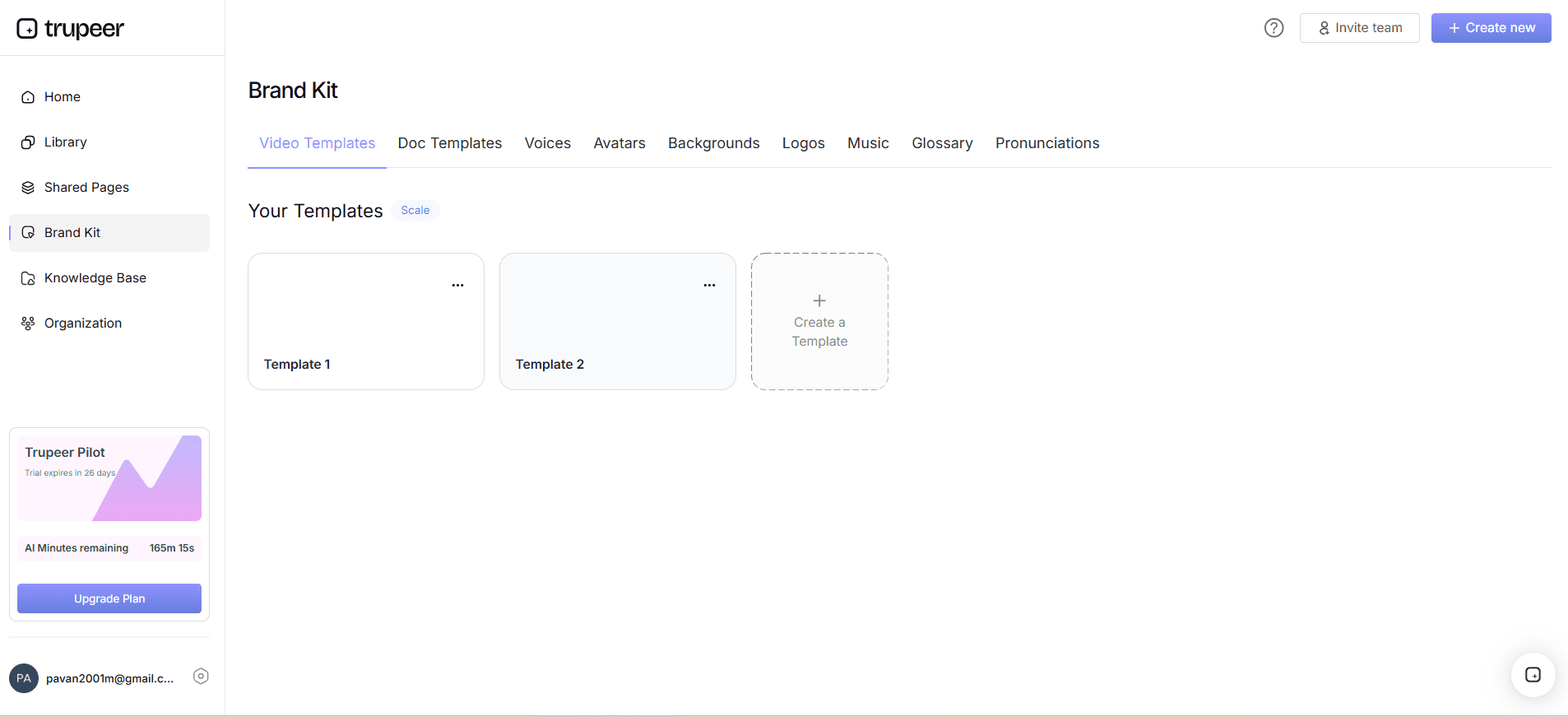
Step 4: Customize with Brand Kits

Consistency in branding is crucial. Use Trupeer to apply brand kits and templates to your scripts and demos. This feature guarantees that every piece of content reflects your visual style, maintaining brand integrity across all presentations. Customizing your scripts with these kits is straightforward, taking only a few clicks to apply your chosen template, which saves time and ensures a consistent look and feel. Teams weighing tools often start with a Loom alternatives comparison before standardizing on a workflow.

Customize with Brand Kits

Step 5: Translate and Localize

If your product targets international markets, use Trupeer’s AI translation feature to convert your scripts into over 40 languages. This includes lip-sync and dubbing options, making your demos accessible to a wider audience. The translation process is automated and typically completes within minutes, depending on the script’s length. This ensures that your message is correctly conveyed, regardless of the language barrier.

Translate and Localize

Step 6: Distribute and Track Engagement

Finally, distribute your updated demo scripts using Trupeer’s AI-searchable knowledge base. This platform allows you to host content on a custom domain with SSO, making it easily accessible to your team. use the viewer engagement analytics to track how prospects interact with your demos. This insight helps refine future scripts based on real audience feedback. The distribution is immediate, and tracking begins as soon as the content is live.

Distribute and Track Engagement

What tips help you manage demo script versioning?

Managing demo script versioning effectively requires strategic planning and the right tools. Here are some tips to help simplify your process and ensure your scripts are always up to date.

  • Standardize Your Process. Create a standardized process for updating scripts. This includes setting regular review intervals and assigning responsibilities to team members.

  • Use Version Control Software. Implement version control software to track changes and manage updates efficiently. This reduces the risk of errors and ensures everyone is working from the latest version.

  • use AI Tools. use AI tools to automate mundane tasks like transcription and translation. This saves time and allows your team to focus on more strategic tasks.

  • Collaborate with Stakeholders. Involve all relevant stakeholders in the script update process. This ensures that all perspectives are considered, resulting in a more comprehensive script.

  • Keep Scripts Concise. Avoid overloading your scripts with unnecessary details. Focus on key features and benefits to maintain the audience's attention.

  • Regularly Audit Scripts. Conduct regular audits of your scripts to ensure they reflect the current product features and branding guidelines.

  • use a Scribe alternative comparison. Evaluate options to find tools that best fit your needs, like Trupeer for SOP management.

  • For global audiences, adding AI video translation extends the same workflow across 40+ languages with lip-sync.

Frequently asked questions

How often should demo scripts be updated?

Demo scripts should be updated as frequently as your product changes. For many SaaS companies, this means weekly updates. Regular updates ensure your sales team has the latest information, aligning with current product features. Establish a routine update schedule to review and revise scripts alongside product release cycles. This practice helps prevent outdated scripts from being used in client presentations, reducing the risk of miscommunication and enhancing the effectiveness of your sales efforts.

What tools are best for script versioning?

Tools that integrate version control, collaboration, and automation are ideal for script versioning. Trupeer offers comprehensive features like AI screen recording, automatic SOP generation, and a AI tool create update product documentation for smooth management. Other tools like Git and Confluence can be used for version tracking and collaboration. Choose tools that align with your team’s workflow and provide the necessary functionality to keep scripts current and accessible.

Can Trupeer handle multilingual demo scripts?

Yes, Trupeer can handle multilingual demo scripts through its AI translation feature. It supports translations into over 40 languages with lip-sync and dubbing options, ensuring your demos are accessible to a global audience. This capability allows you to expand your reach without the need for additional translation resources, saving time and ensuring consistency across different languages. The process is automated, providing quick and accurate translations.

Why is it important to customize demo scripts with branding?

Customizing demo scripts with branding is crucial for maintaining brand consistency and enhancing professionalism. Trupeer allows you to apply brand kits and templates, ensuring that your demos reflect your brand’s visual identity. Consistent branding across all customer touchpoints reinforces brand recognition and credibility, which can influence prospects' perception positively. It also helps differentiate your product in competitive markets, making your demos more memorable.

How does Trupeer's knowledge base aid in demo script management?

Trupeer's AI-searchable knowledge base aids in demo script management by making content easily accessible and searchable. This platform allows you to host scripts on a custom domain with SSO, providing a centralized location for all your demo materials. It also includes features like timestamp deep-links, which make finding specific script sections straightforward. This accessibility ensures your sales team always has the latest scripts at their fingertips, reducing time spent searching for updates and enhancing productivity.

動画編集者、翻訳者、脚本家が必要ですか?

Trupeerを無料でお試しください

デモを予約する

動画編集者、翻訳者、脚本家が必要ですか?

Trupeerを無料でお試しください

デモを予約する

動画編集者、翻訳者、脚本家が必要ですか?

Trupeerを無料でお試しください

デモを予約する