Trupeer Blog

Imagine you've just launched a new self-serve customer hub. You've invested countless hours in resources, hoping it becomes a vital part of your customer success strategy. But how do you know if it's working effectively? Traditional metrics like page views and session duration might not give you the full picture. You need to track how customers engage and progress through their journey. According to a recent study,
70% of customers prefer self-service over speaking to a company representative
, but only if the experience meets their needs. This means your hub must not only attract but also retain and guide users towards achieving their goals. With the right analytics, you can ensure your hub does just that, making it an indispensable tool for both you and your customers. Self-serve hub analytics are crucial for understanding and optimizing customer journeys. By looking into metrics like engagement and progression, you can make data-driven decisions to improve user experience and ultimately drive growth. Teams weighing tools often start with a Loom alternatives comparison before standardizing on a workflow.
Why does self-serve hub analytics matter?
Self-serve hub analytics are critical because they provide insights that go beyond simple usage statistics. For businesses, understanding how customers engage with a self-serve hub can reveal whether it's truly helping users solve their problems and progress through their journey. If the hub's analytics show that users are frequently getting stuck or dropping off at certain points, it's a clear signal that the content or functionality needs improvement. This is where the customer education use case comes into play, helping ensure the hub remains an effective support tool.
On a larger scale, these analytics can impact customer satisfaction and retention rates significantly. For instance, if a company's self-serve hub is simplified and efficient, it can reduce the need for direct customer support, saving both time and resources. Conversely, a hub that's difficult to navigate or understand can frustrate customers, leading to a decline in satisfaction and potentially driving them to competitors. By closely monitoring self-serve hub analytics, businesses can continuously refine their offerings to meet evolving customer needs and expectations, ultimately building a more loyal customer base. Stakeholders such as customer success managers, product teams, and support staff all benefit from these insights, enabling them to deliver a more personalized and effective customer education workflow.
What are the benefits of self-serve hub analytics?
Tracking self-serve hub analytics offers several concrete benefits that can transform both user experience and business outcomes.
Improved customer satisfaction. By analyzing data on how users interact with the hub, businesses can identify pain points and areas for improvement, leading to a smoother customer experience.
Increased efficiency. With insights from customer onboarding videos, companies can simplify their support processes, reducing the need for direct intervention and freeing up resources for other priorities.
Data-driven decision making. Self-serve hub analytics provide actionable data that can guide strategy and inform decisions about content updates and feature enhancements.
Enhanced personalization. By understanding customer behavior, companies can tailor the hub's content and functionality to better meet individual user needs, increasing engagement.
Cost savings. A well-optimized self-serve hub reduces the burden on live support teams, lowering overall support costs and improving efficiency.
Scalable support. With an AI-powered video tool, businesses can offer scalable support options, enabling them to handle larger volumes of customer interactions without a proportional increase in costs.
Which Trupeer features help you track self-serve hub analytics?
Trupeer offers a suite of features that can significantly enhance your ability to track and analyze self-serve hub engagement.
Viewer engagement analytics, drop-off, and heatmaps
Trupeer's viewer engagement analytics provide detailed insights into how users interact with your content. This feature tracks where users spend the most time, where they drop off, and what segments keep them engaged. By using heatmaps, you can visualize this data, making it easier to identify patterns and areas for improvement. Understanding these metrics helps you refine your content to maintain user interest and boost progression through the hub.
AI-searchable knowledge base with timestamp deep-links
With an AI-searchable knowledge base, users can quickly find the information they need without sifting through irrelevant content. Each recording is indexed with timestamp-level deep links, allowing users to jump straight to the most relevant sections. This feature helps reduce user frustration and improve engagement by ensuring users can easily access the information they seek, thus enhancing the overall self-serve experience.
Custom-domain hosting with SSO
Trupeer's custom-domain hosting with Single Sign-On (SSO) integration ensures a smooth user experience. By hosting your self-serve hub on a custom domain, users enjoy a branded experience that builds trust and continuity. SSO simplifies the login process, reducing barriers to entry and encouraging more frequent use of the hub. This leads to increased engagement and supports a cohesive customer journey.
Collaborative review and approval workflows
The collaborative review and approval workflows feature simplifies the process of content creation and management within your self-serve hub. Team members can easily review, comment on, and approve content, ensuring it meets quality standards before going live. This not only improves content accuracy but also accelerates the update cycle, making your hub more agile in responding to user feedback and changing needs.
Automatic SOP generation from any recording
Trupeer's ability to automatically generate Standard Operating Procedures (SOPs) from recordings is a big shift for maintaining up-to-date documentation. As processes and product features evolve, this auto-generated documentation ensures that your self-serve hub is always current, providing users with the most accurate information possible. This feature minimizes the manual effort required to keep documentation aligned with the latest practices and products.
How do you track customer engagement and progression step by step with Trupeer?
Step 1: Set up AI screen recording
Begin by launching the Trupeer browser-based recorder, which requires no installation. Choose the screen recording option with AI screen recording enabled. This feature automatically detects clicks and zooms in on areas of user interaction, providing a comprehensive view of how users engage with your content. This setup captures detailed user interactions without intruding on their experience. Typically, setting this up takes about five minutes. The AI will then continuously record interactions, allowing you to gather valuable data over time.

Step 2: Analyze viewer engagement analytics
Once recordings are collected, navigate to the analytics dashboard. Here, you can access viewer engagement metrics, including drop-off rates and heatmaps. These tools show you where users spend the most time and where they disengage. By examining these metrics, you can pinpoint exactly which parts of your content are effective and which need improvement. This analysis usually takes around ten minutes per session, offering insights that are crucial for optimizing user experience.

Step 3: use AI voiceover and translation
To enhance accessibility, use Trupeer's AI voiceover feature. It offers over 65+ natural voices, allowing you to provide audio content in multiple languages. This feature is particularly useful for international audiences, increasing engagement by breaking language barriers. also, AI translation capabilities, which cover 40+ languages, ensure that your content is inclusive and understandable to a broader audience. Implementing these features can take around 15 minutes per video, depending on the length and complexity of the content.

Step 4: Implement auto chapters and segment detection
For longer content, Trupeer's auto chapters and segment detection automatically break down recordings into manageable sections. This makes it easier for users to navigate directly to the parts of the video that interest them most. Simply upload your recording, and the AI will identify logical breaks based on the content's structure. This process generally takes about five minutes per video and greatly enhances user navigation and engagement.
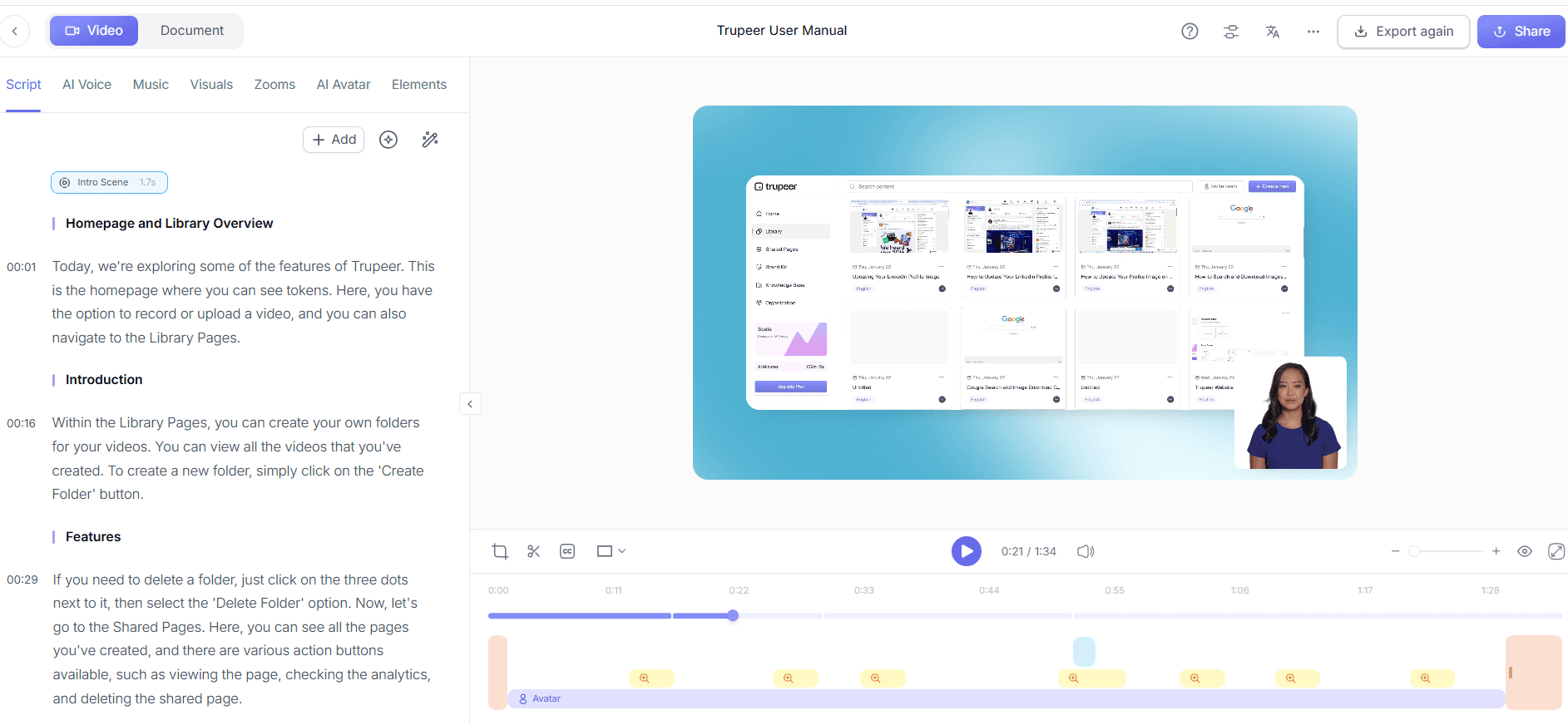
Step 5: Create an AI-searchable knowledge base
Integrate your recordings into an interactive video platform with analytics to build a comprehensive knowledge base. This feature allows users to search through content using AI, finding specific information quickly. Each piece of content is indexed with timestamp deep-links, making it easy for users to jump to relevant sections. Setting up a searchable knowledge base can take 30 minutes to an hour, depending on the volume of content you have.

Step 6: Monitor engagement through collaborative workflows
Finally, use Trupeer’s collaborative review and approval workflows to continuously monitor and update your content. This system allows team members to provide feedback and approve changes, ensuring the self-serve hub remains up-to-date and effective. Regularly reviewing content through these workflows, typically a 10-15 minute process per update, ensures that your hub evolves with user needs and maintains high engagement levels.
What tips help you track customer engagement and progression?
Tracking customer engagement and progression effectively requires strategic approaches. Here are some tactical tips to maximize the impact of your self-serve hub analytics.
Use detailed heatmaps. Heatmaps show where users click most often, providing insights into user behavior and content effectiveness.
Regularly update content. Keep your hub fresh by adding new content based on user feedback and analytics data.
Incorporate feedback loops. Use analytics to identify common user issues and incorporate feedback to improve content.
use AI translations. An training video generator with AI translation can help reach a global audience effectively.
Segment your audience. Tailor analytics reports to different user segments for more targeted insights.
Automate routine updates. Use automated tools to manage and update regular content, saving time and resources.
Standardize analytics reporting. Create standardized reports to ensure consistent analysis and decision-making across teams.
For global audiences, adding AI video translation extends the same workflow across 40+ languages with lip-sync.
Frequently asked questions
How do you measure customer engagement in a self-serve hub?
Customer engagement in a self-serve hub is measured using analytics tools that track user interactions, such as time spent on pages, click-through rates, and completion of specific tasks. These metrics help identify how effectively the hub guides users through their journey. By focusing on specific engagement points, you can adjust the content and layout to better meet user needs, enhancing the hub's overall effectiveness. When SOPs come into the same conversation, a Scribe alternatives comparison helps clarify the scope.
What metrics are most important for tracking progression?
The most important metrics for tracking progression include task completion rates, time to completion, and drop-off points in the user journey. These metrics provide insights into how effectively users can move through the hub to achieve their goals. Monitoring these data points allows you to refine the hub's structure and content to facilitate smoother progression, ultimately improving user satisfaction and goal achievement.
Can Trupeer help in creating multilingual content for self-serve hubs?
Yes, Trupeer can significantly aid in creating multilingual content through its AI translation and dubbing features. These tools support translation into over 40 languages, allowing you to localize content for a global audience efficiently. Using these features ensures that language is not a barrier to user engagement, broadening your hub's accessibility and appeal to diverse user groups.
Why is it important to track drop-off points in self-serve hubs?
Tracking drop-off points is crucial because it highlights where users disengage from the hub, indicating potential problems or areas of confusion. By identifying these points, you can analyze why users are leaving and make necessary adjustments to improve the flow and accessibility of information. This proactive approach helps maintain user engagement and ensures that the hub supports users in completing their desired tasks.
Does Trupeer offer tools for creating SOPs in self-serve hubs?
Yes, Trupeer offers automatic SOP generation from recordings, making it easy to create and update SOPs in your self-serve hub. This feature simplifies the process of documenting procedures and ensures that your hub's information remains current and accurate. Using Trupeer’s SOP tools reduces the manual effort required to maintain detailed documentation, allowing you to focus on enhancing user experience and engagement.
Related Blogs


