Trupeer Blog

Summarise with:
Claude
ChatGPT
Gemini
Perplexity
Grok
Imagine your team has just completed a 60-minute training session brimming with valuable insights. As the Learning and Development manager, you're tasked with ensuring this information is easily accessible and digestible for future reference. But manually segmenting the video into chapters is time-consuming and prone to human error. Enter AI technology, capable of auto-generating chapter markers smoothly from video transcripts. In fact,
teams using AI solutions report up to a 40% reduction in time spent managing video content.
This advancement isn't just a time-saver; it enhances the learning experience by allowing viewers to navigate content quickly. This guide will walk you through the process, explain why it's crucial, and showcase Trupeer's unique capabilities to support your needs in training video production.
Why does auto-generating chapters from video transcripts matter?
In the area of corporate training, information overload is a common challenge. Employees are often faced with long training sessions that can be difficult to digest, especially when they need to revisit specific sections for more detail. Auto-generating chapters from video transcripts directly addresses this issue by breaking down content into manageable segments. This not only improves comprehension but also enhances retention, as learners can easily access and focus on the parts of the training most relevant to them. When SOPs come into the same conversation, a Scribe alternatives comparison helps clarify the scope.
The ability to auto-generate chapters also significantly impacts the efficiency of training programs. Training managers often struggle to keep content updated and relevant, particularly in fast-evolving fields. By automating the chapter creation process, organizations can quickly adapt their training videos to reflect new information without overhauling entire recordings. This agility allows companies to maintain a dynamic training videos workflow, ensuring content remains current and valuable. The result is a more engaged workforce, better equipped to meet the demands of their roles.
What are the benefits of auto-generating chapters from video transcripts?
Automating chapter generation from video transcripts offers several advantages that enhance both learning and operational efficiency.
Improved navigation. With auto-generated chapters, viewers can quickly find and jump to specific sections, enhancing their learning experience. This is especially useful for complex topics where learners may need to revisit certain points.
Time savings. By automating the chapter creation process, teams save valuable time that would otherwise be spent manually segmenting videos. This allows them to focus on more strategic initiatives.
Consistency in training materials. Automated chapters ensure a standardized approach across all training videos, which is crucial for maintaining quality and coherence in learning materials. This consistency is highlighted in the best training video software.
Enhanced learner engagement. Viewers are more likely to engage with content that is easy to navigate and digest. Auto-generated chapters help keep learners focused and interested, reducing drop-off rates.
Scalability. As organizations grow, the demand for training materials increases. Automated chaptering supports scalability by simplifying the video production process, making it easier to produce more content without sacrificing quality. Platforms like AI video platform are critical in this automation.
Data-driven insights. By segmenting videos into chapters, organizations can gather more granular data on viewer behavior, allowing them to refine content based on what sections are most watched or replayed.
Which Trupeer features help you auto-generate chapters from a training video transcript?
Trupeer offers a suite of features designed to simplify the process of auto-generating chapters from video transcripts, making it a versatile tool for enhancing training videos.
Auto chapters and segment detection
Trupeer's auto chapters and segment detection capability is at the heart of its ability to enhance video content. This feature uses advanced AI algorithms to analyze video transcripts and identify natural breaks in the content. By doing so, it automatically generates chapter markers, making it easier for viewers to navigate through the video. The process is both accurate and efficient, reducing the need for manual intervention. This feature is especially beneficial in long training sessions where pinpointing key sections can transform the learning experience.
Browser-based recorder (no install) and desktop app
The flexibility offered by Trupeer's browser-based recorder and desktop app ensures that users can capture video content without the hassle of installations. This feature enables teams to quickly record training sessions and immediately integrate them with AI-driven tools for chapter generation. Whether you're in the office or working remotely, you can capture and process training videos smoothly, allowing for rapid deployment and use of the auto video editor tool.
AI voiceover in 65+ natural voices, adjustable pace and tone
Trupeer's AI voiceover feature enhances training videos by providing clear and engaging narration. With over 65+ natural voices to choose from, users can adjust the pace and tone to match the training material. This not only improves the viewer's experience but also complements the auto-generated chapters by providing a professional touch to each segmented section. This ensures that the content is both informative and easy to follow, keeping learners engaged throughout the session.
Automatic SOP generation from any recording
Trupeer takes documentation to the next level with its automatic SOP generation feature. From any recorded session, Trupeer can generate detailed, edit-ready Standard Operating Procedures (SOPs). This is particularly useful for training managers who need to provide comprehensive documentation alongside video content. By linking the SOPs directly to auto-generated chapters, Trupeer ensures that learners have all the necessary resources at their fingertips, enhancing the overall training videos use case.
AI-searchable knowledge base
The AI-searchable knowledge base feature is a powerful tool for organizations looking to maximize the utility of their training videos. By indexing every recording with timestamp-level deep links, Trupeer enables users to search and access specific content quickly. This functionality, combined with auto-generated chapters, makes it easier for employees to find the information they need, when they need it. It also supports ongoing learning and development by facilitating easy access to a wealth of knowledge, as illustrated in the video knowledge base.
How do you auto-generate chapters from a training video transcript step by step with Trupeer?
Step 1: Record the Training Session
Begin by capturing your training session using Trupeer's browser-based recorder or desktop app. This flexibility ensures you can record from anywhere without needing installations. Click on the "Record" button, and choose either to record your screen, webcam, or both. Trupeer’s AI screen recording with auto-zoom and click detection will automatically adjust to focus on important actions, ensuring a professional recording. This process typically takes as long as the session itself. In case of network interruptions, the desktop app provides a more stable recording environment.

Step 2: Upload and Process the Video
Once your recording is complete, upload the video to Trupeer’s platform. Click "Upload" and select your file. The AI-powered backend starts processing immediately. Here, Trupeer’s automatic filler-word removal comes into play, cleaning up unnecessary pauses and words like "um" and "ah" for a smoother viewing experience. The processing is quick, with most videos being ready to edit within a few minutes, depending on file size and length.

Step 3: Apply AI Voiceover
If needed, enhance your video with Trupeer’s AI voiceover feature. Navigate to the voiceover section and select from over 65+ natural voices. Adjust the pace and tone to match your training content. This step is crucial if the original audio quality is poor or if you need to cater to a multilingual audience. The voiceover application is swift, usually taking less than 10 minutes per hour of video, allowing you to maintain a consistent and engaging narrative throughout the training material.

Step 4: Generate Auto Chapters
With the video uploaded and enhanced, proceed to the chapter generation feature. Click "Auto Chapters" and let Trupeer’s AI analyze the transcript. This tool detects logical breaks and topics within the video, automatically creating chapters for easy navigation. The AI completes this step in minutes, flagging potential chapters for your review. Be sure to check these chapters for accuracy, especially in complex training materials, to ensure they align with your learning objectives.
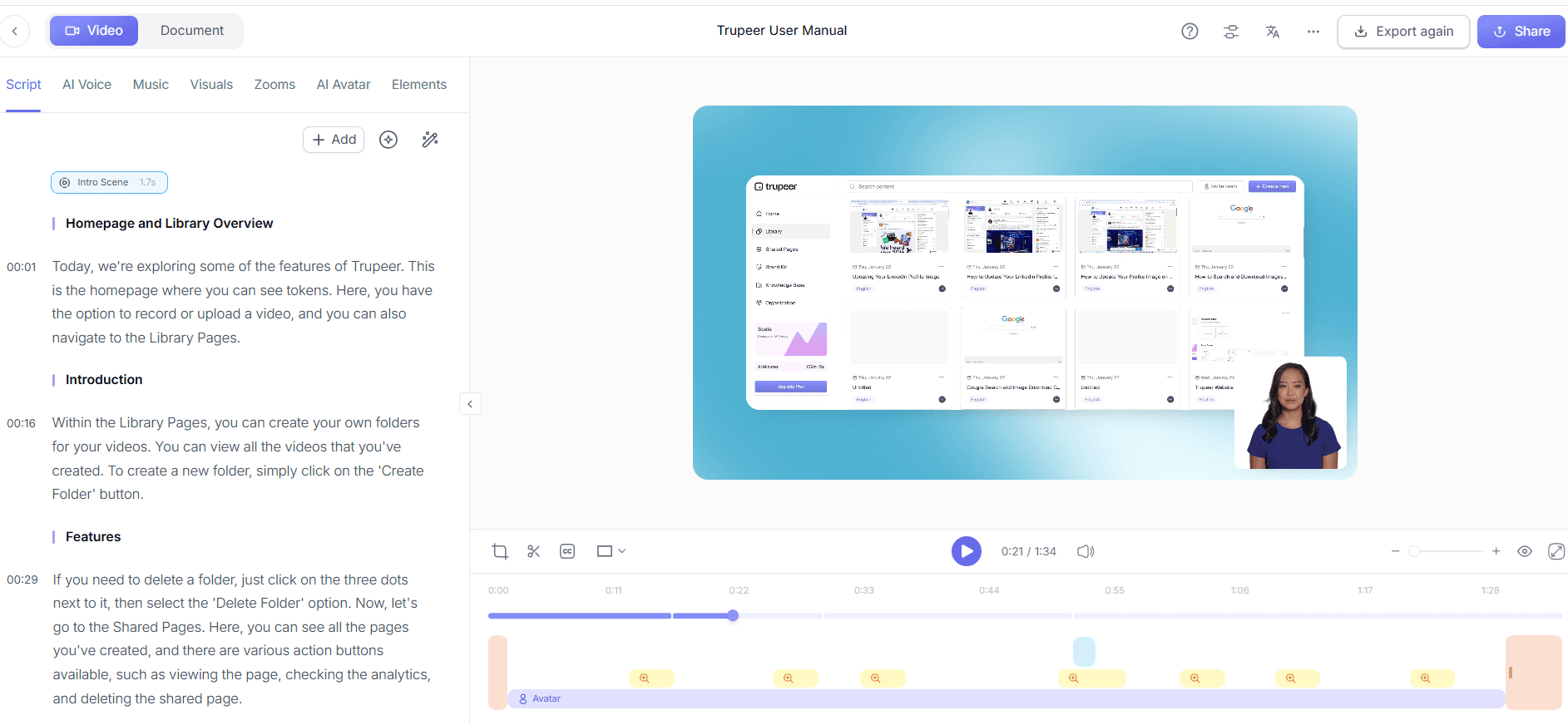
Step 5: Review and Edit Chapters
After chapters are generated, review them in the Trupeer editor. Here, you can rename chapters and adjust their time stamps if needed. The editor provides a user-friendly interface for making these changes quickly. If any segments appear misplaced, use Trupeer's auto video editor tool to fine-tune them. This step ensures that the final video product meets your standards and provides a smooth experience for the learner. Teams weighing tools often start with a Loom alternatives comparison before standardizing on a workflow.
Step 6: Export and Share
Once satisfied with the chaptering and overall video, export the content. Trupeer supports multi-format exports, including MP4, HTML, and SCORM, allowing integration with various LMS platforms. Click "Export," choose your desired format, and your video is ready for distribution. Share the video via Trupeer's AI-searchable knowledge base, ensuring that your team can access the content with ease. This final step takes only a few minutes, after which your training video is complete and ready to be used across your organization.

What tips help you auto-generate chapters from a training video transcript?
Successfully auto-generating chapters from video transcripts can greatly enhance your training materials. Here are some tips to improve the process and outcome.
Ensure clear audio quality. Good audio quality helps AI accurately transcribe speech, leading to better chapter generation.
Structure your video content. Clearly outline your session in advance. This helps AI detect logical breaks for chaptering.
use AI dubbing for non-English audiences. Use Trupeer's capabilities to cater to a diverse workforce, enhancing understanding.
Regularly update your training materials. Keep content fresh by revisiting your auto-chaptered videos quarterly.
use branded templates. Maintain consistency across videos using brand kits and templates available in Trupeer's training video generator tool.
Collaborate on chapter edits. Use Trupeer's collaborative review workflows to gather feedback on chapter accuracy and relevance.
Test video navigation. Ensure that chapters are easily navigable by testing the video on multiple devices and platforms.
Frequently asked questions
How does Trupeer's AI detect chapters in training videos?
Trupeer's AI uses natural language processing algorithms to analyze video transcripts, identifying logical breaks and topic shifts to suggest chapters. The system detects changes in topics or speaker tone, which often indicate a new segment. This process ensures that the chapters created reflect the content's natural flow, making it easier for viewers to find specific information. However, it's important to review AI-generated chapters for accuracy, especially in highly technical or subtle materials, to ensure they meet your training objectives.
What file formats can I export auto-chaptered videos into?
Trupeer supports exporting auto-chaptered videos into multiple formats, including MP4, HTML, PDF, and SCORM. This versatility allows you to integrate your videos with various learning management systems or share them as standalone resources. The choice of format depends on your distribution needs: MP4 for general video players, SCORM for LMS integration, and HTML for web-based applications. This flexibility ensures your training materials can be accessed in the most convenient way for your audience.
Can Trupeer translate video content for international teams?
Yes, Trupeer offers AI translation into over 40 languages, complete with lip-sync and dubbing features. This capability allows you to make your training videos accessible to a global workforce without sacrificing engagement. The AI video translation tool ensures that the translated content retains the nuance and intent of the original material, which is crucial for effective learning. It's especially beneficial in multilingual organizations where consistent training across regions is necessary.
Why should I use auto-chapters for training videos?
Auto-chapters enhance the learning experience by breaking down long videos into digestible segments, improving navigation and retention. They save time for both creators and viewers, as learners can easily access specific sections without sifting through the entire video. This feature is particularly useful in corporate training environments where time is limited and efficiency is paramount. By using auto-chapters, organizations can ensure their training materials are not only informative but also engaging and user-friendly.
Does Trupeer support collaboration on video projects?
Yes, Trupeer supports collaborative workflows, allowing multiple stakeholders to review and approve video content before final release. This feature is crucial for ensuring quality and alignment with organizational standards. Teams can provide feedback on auto-generated chapters and suggest edits directly within the platform, simplifying the review process. This collaborative approach ensures that all relevant inputs are considered, resulting in a more polished and effective training video. It's especially valuable for large organizations or projects that require input from multiple departments.
Related Blogs


