Trupeer Blog

ERP go-live is a critical juncture for any organization transitioning to a new enterprise resource planning system. At this stage, training and documentation play critical roles in ensuring success. Consider a mid-sized manufacturing firm implementing SAP. They're on the cusp of a go-live, and the team is scrambling to finalize training materials and documentation. Incomplete or unclear documentation can lead to operational disruptions, costing the company tens of thousands of dollars in productivity losses. Teams weighing tools often start with a Loom alternatives comparison before standardizing on a workflow.
Studies show that 70% of ERP projects fail due to inadequate training and documentation.
Creating comprehensive training resources and detailed documentation is no small feat, especially under the pressure of a looming go-live date. This challenge is compounded by the need to cater to diverse user groups, from C-level executives to warehouse staff. Each group has unique requirements and learning curves. Effective training videos can bridge these gaps by providing accessible, engaging content tailored to various stakeholders. For ERP implementation teams, choosing the right tools and strategies is essential to delivering successful training and documentation during go-live.
Why does ERP go-live training and documentation matter?
ERP go-live training and documentation are crucial for smooth transitions and operational continuity. At the heart of this need is the complexity of ERP systems like SAP, which require users to adapt to new processes and interfaces quickly. Without adequate training and documentation, users can become overwhelmed, leading to errors and inefficiencies. For instance, a finance team might struggle with new reporting tools, resulting in delayed financial statements and missed regulatory deadlines.
Stakeholders across the organization, from IT managers to end-users, rely on these resources to understand and navigate the new system. Inadequate training can result in a decrease in user adoption rates, which directly impacts the return on investment in the ERP system. also, effective training videos can reduce the number of support tickets and calls, freeing up IT resources to focus on strategic initiatives rather than troubleshooting basic user issues. Investing in comprehensive training and documentation is not just about preventing problems; it's about enabling users to use the ERP system to its full potential.
What are the benefits of ERP go-live training and documentation?
Creating effective ERP go-live training and documentation offers several significant benefits:
Smooth Transition. Comprehensive training ensures that employees are well-prepared for the new system, resulting in a smoother transition with fewer disruptions.
Increased Adoption. Well-structured training materials can significantly boost user adoption rates, making sure the organization fully benefits from its ERP investment.
Enhanced Productivity. With clear instructions and accessible training material, employees can perform their tasks more efficiently, reducing downtime and errors.
Cost Savings. Effective training reduces the need for costly support interventions by minimizing user errors and misunderstandings.
Scalable Knowledge Base. An AI-powered video tool can create a scalable repository of knowledge that can be easily updated and accessed by all employees.
Regulatory Compliance. Detailed documentation helps ensure that all users adhere to necessary compliance standards, avoiding potential fines and legal issues.
Which Trupeer features help you create ERP go-live training and documentation?
Trupeer offers several capabilities specifically designed to aid in the creation of ERP go-live training and documentation. These features simplify the process and enhance the quality of the materials produced.
AI screen recording with auto-zoom and click detection
This feature is invaluable for capturing detailed on-screen actions during ERP training sessions. The auto-zoom ensures that critical details are highlighted, while click detection provides clear visual cues for users. It's especially useful in illustrating complex SAP workflows, where step-by-step guidance can prevent user errors. By integrating AI technology, the recording process is both efficient and precise, resulting in high-quality training videos that require minimal editing.
Silent screen recording with automatic AI narration
Trupeer's silent screen recording feature allows you to capture ERP processes without background noise, while the AI narration automatically provides context. This is ideal for creating professional-grade training videos that are easy to understand and follow. The automatic narration can be customized to suit different training needs, ensuring consistency in the messaging provided to various user groups.
Automatic SOP generation from any recording
Generating standard operating procedures (SOPs) from screen recordings can save significant time and effort. Trupeer's AI documentation platform automates this process, transforming recorded sessions into edit-ready SOPs. This feature is a big shift for ERP teams, as it allows them to quickly produce detailed documentation that can be distributed organization-wide. The ability to export in multiple formats, such as MP4 and HTML, further enhances the utility of the generated SOPs.
AI translation into 40+ languages with lip-sync
Global organizations often face the challenge of providing training materials in multiple languages. Trupeer's translation feature ensures that all employees, regardless of their language preference, have access to the same high-quality training content. The lip-sync capability maintains the natural flow of the videos, making them more engaging and effective. This feature is especially useful for multinational companies implementing ERP systems across different regions.
AI-searchable knowledge base with timestamp deep-links
Trupeer's AI-searchable knowledge base allows for easy retrieval of specific training content. Users can quickly find relevant information by searching for keywords or phrases, with results linked directly to precise points in the videos. This capability is crucial for ERP go-live, as it enables users to access targeted training materials without sifting through entire videos. It enhances the overall training experience, ensuring that users have the information they need at their fingertips.
How do you create ERP go-live training and documentation step by step with Trupeer?
Step 1: Record Your Screen
Begin by using Trupeer's AI screen recording with auto-zoom and click detection. Navigate to the ERP module you want to train users on and click "Record." The system automatically detects clicks and zooms in on areas of interest, ensuring clarity. This feature is particularly helpful when demonstrating complex SAP processes. A typical recording session takes about 15-30 minutes, depending on the complexity of the procedure. Once finished, click "Stop," and Trupeer will save your recording to your project library, ready for the next steps.

Step 2: Enhance Your Recording
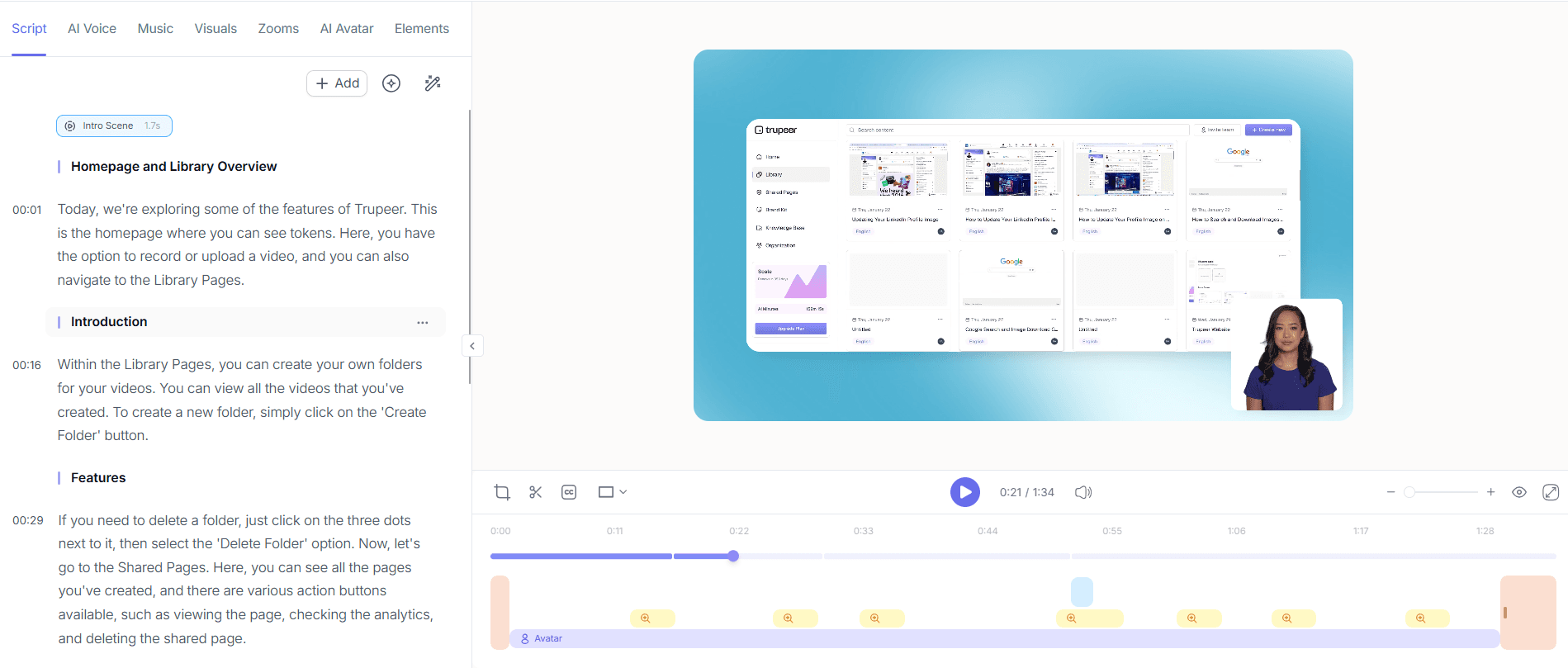
Next, enhance your screen recording with Trupeer's AI voiceover in 65+ natural voices. Select "Add Voiceover" and choose a voice that suits your audience. Adjust the pace and tone to match the instructional style you wish to convey. This step transforms your silent recording into an engaging training video. The AI voiceover process takes minutes, providing a professional narration that aligns with the visual content. You can also clone a voice from a short sample if consistency with previous materials is necessary.
Step 3: Generate Documentation
With the recording ready, use Trupeer's automatic SOP generation feature to create detailed documentation. Simply click "Generate SOP" from your project dashboard, and Trupeer will automatically convert the visual content into text-based instructions. This process usually takes less than five minutes and produces an editable document that can be exported in formats like PDF or HTML. This step ensures you have a text-based resource complementing your training video.

Step 4: Translate for Global Teams
If you're working with international teams, use Trupeer's AI translation into 40+ languages. Select "Translate" and choose the languages needed. Trupeer not only translates the text but also lip-syncs the voiceover, maintaining the video's natural flow. This feature is vital for ensuring that non-native speakers receive the same quality training as their English-speaking counterparts. Translation and dubbing typically take 10-15 minutes per language, making it a swift process for global ERP rollouts.

Step 5: Distribute via Knowledge Base
After preparing your materials, distribute them using Trupeer's AI-searchable knowledge base. Upload your training videos and documentation, ensuring they're tagged with relevant keywords for easy access. Users can search for specific modules or terms, with results linking to precise timestamps in the videos. This setup allows employees to find answers quickly, reducing the need for direct support. Uploading and tagging can be done in under an hour, depending on the volume of content.

Step 6: Monitor Engagement and Feedback
Finally, use Trupeer's viewer engagement analytics to monitor how effectively your training materials are being used. Access the analytics dashboard and review metrics like video completion rates and drop-off points. These insights help you understand user engagement and identify areas needing improvement. For instance, if a large number of users drop off at a certain point, you might need to clarify that section. Monitoring engagement allows for continuous improvement, ensuring the training is as effective as possible.

What tips help you create ERP go-live training and documentation?
Effective ERP go-live training and documentation require strategic planning and execution. Here are some tips to enhance the process:
Prioritize Clarity. Ensure your training materials are straightforward and easy to understand. Use simple language and clear visuals to convey complex concepts.
Test Content Early. Conduct pilot sessions with a small group of users to gather feedback on your materials. This helps identify areas for improvement before the full rollout.
Include Interactive Elements. Use interactive elements like quizzes or practice exercises to reinforce learning and assess user understanding.
Update Regularly. Keep your documentation and training materials up to date with the latest system changes. Use an AI tool to create and update product documentation efficiently.
use Feedback. Encourage users to provide feedback on the training materials and use it to make necessary adjustments. Continuous improvement is key to effective training.
Standardize Formats. Consistent formatting across all materials helps users navigate and understand content more easily.
Consider Alternatives. Explore options like Scribe alternative comparisons for tools that might better meet specific documentation needs.
Frequently asked questions
How can I ensure my training videos are effective?
To ensure your training videos are effective, focus on clarity, engagement, and accessibility. Begin by scripting your content to deliver concise and relevant information. Use Trupeer’s features like AI voiceover and auto-zoom to enhance viewer engagement. also, make your videos accessible in multiple languages using the video localization tool. Regularly update content based on user feedback and engagement analytics to continually improve its effectiveness.
What are the common challenges during ERP go-live?
Common challenges during ERP go-live include user resistance, data migration issues, and insufficient training. User resistance can stem from a lack of understanding or fear of change. Data migration challenges often arise due to incomplete or inaccurate data mapping. Insufficient training can lead to low adoption rates and increased errors. Address these challenges by providing comprehensive training, involving key stakeholders in planning, and conducting thorough data validation.
Why is documentation crucial in ERP implementation?
Documentation is crucial in ERP implementation because it serves as a reference point for users, ensuring consistency and accuracy in processes. It helps new employees get up to speed quickly and supports compliance with industry regulations. Detailed documentation also reduces dependency on key personnel, as knowledge is codified and accessible. In case of system updates or changes, existing documentation can be quickly modified, maintaining operational continuity.
Can Trupeer integrate with existing ERP systems?
Yes, Trupeer can integrate with existing ERP systems through its AI capabilities and flexible APIs. This integration allows for real-time updates of training materials and documentation as ERP systems evolve. By integrating, you ensure that all training resources reflect the latest processes and functionalities, minimizing disruptions and enhancing user experience. Check compatibility with your specific ERP version to ensure smooth integration.
Does effective go-live training reduce support costs?
Effective go-live training significantly reduces support costs by enabling users to resolve issues independently. With comprehensive training materials, employees are less likely to make errors or require assistance. This reduction in support needs frees up IT resources for more strategic tasks. also, using analytics to refine training content further decreases the likelihood of post-implementation issues, sustaining lower support costs over time.


