
Использовать этот шаблон
Order to cash is where revenue becomes money in the bank, and it crosses more teams than almost any other process: sales, order management, credit, the warehouse, billing, accounts receivable and customer service. When each team works its own way, orders sit on credit hold, invoices go out wrong, customers dispute charges and cash arrives late. An order to cash SOP template gives every team one documented procedure, from the customer's order to the cash being applied.
This free order to cash SOP template covers the full O2C cycle in eight stages, with roles, controls, KPIs and an exception-handling table for the cases that slow cash down. Copy the structure below, see a filled-in example, or open it in Trupeer and customize it for your business.
What is an order to cash SOP template?
An order to cash SOP template is a ready-made standard operating procedure for the order to cash (O2C) process. It sets out who does what, in what order and under which controls, from setting up customers and checking credit to entering orders, fulfilling them, billing, collecting payment, applying cash and resolving disputes. A good order to cash SOP template also covers the exceptions, such as credit holds, pricing errors, short payments and disputes, and the controls auditors expect to see.
The policy sets the rules, such as credit limits and payment terms; the SOP shows how each team applies them, step by step. For a general SOP format you can adapt to any process, see the free SOP template.
Why does order to cash need an SOP?
O2C drives cash flow. Delays at any stage push back when customers pay.
It crosses many teams. Handoffs between sales, credit, fulfilment, billing and collections are where orders stall and errors creep in.
Billing errors cause disputes. Wrong prices, quantities or terms lead to short payments and slow collections.
Credit decisions carry risk. Releasing orders without the right checks increases bad debt.
Auditors test revenue and receivables controls. Credit approvals, credit notes and write-offs need documented, consistent procedures.
O2C is a common automation target. You can only automate steps that are clearly defined.
Who uses an order to cash SOP template?
Order management and sales operations teams who enter and manage customer orders.
Credit teams who set limits and release orders on hold.
Billing teams who create and send invoices.
Accounts receivable, collections and cash application teams who chase and apply payments.
Customer service teams who handle order queries and disputes.
Finance controllers and CFOs who own revenue, receivables and cash flow.
Shared services, BPO and ERP implementation teams documenting O2C across entities or in a new system.
Preview the order to cash SOP template
The template opens with document control, purpose and scope, then a roles table for order management, credit, fulfilment, billing, collections, cash application and customer service. Policies and reference data follow, such as credit limits, payment terms and approval limits for credit notes and write-offs. The procedure covers the O2C cycle in eight stages, each with numbered steps, owners and expected results. An exception-handling table sets out what to do when an order, invoice or payment doesn't follow the standard path. The template closes with controls, KPIs, records and revision history. Every section is editable, so you can add your ERP's transaction names, adjust limits or split stages into separate SOPs.
How to customize this template in Trupeer
Step 1: Open the Templates Section
Go to the Templates section from the main navigation.

Step 2: Select and Open a Template
Click on any template you want to work with to open it.
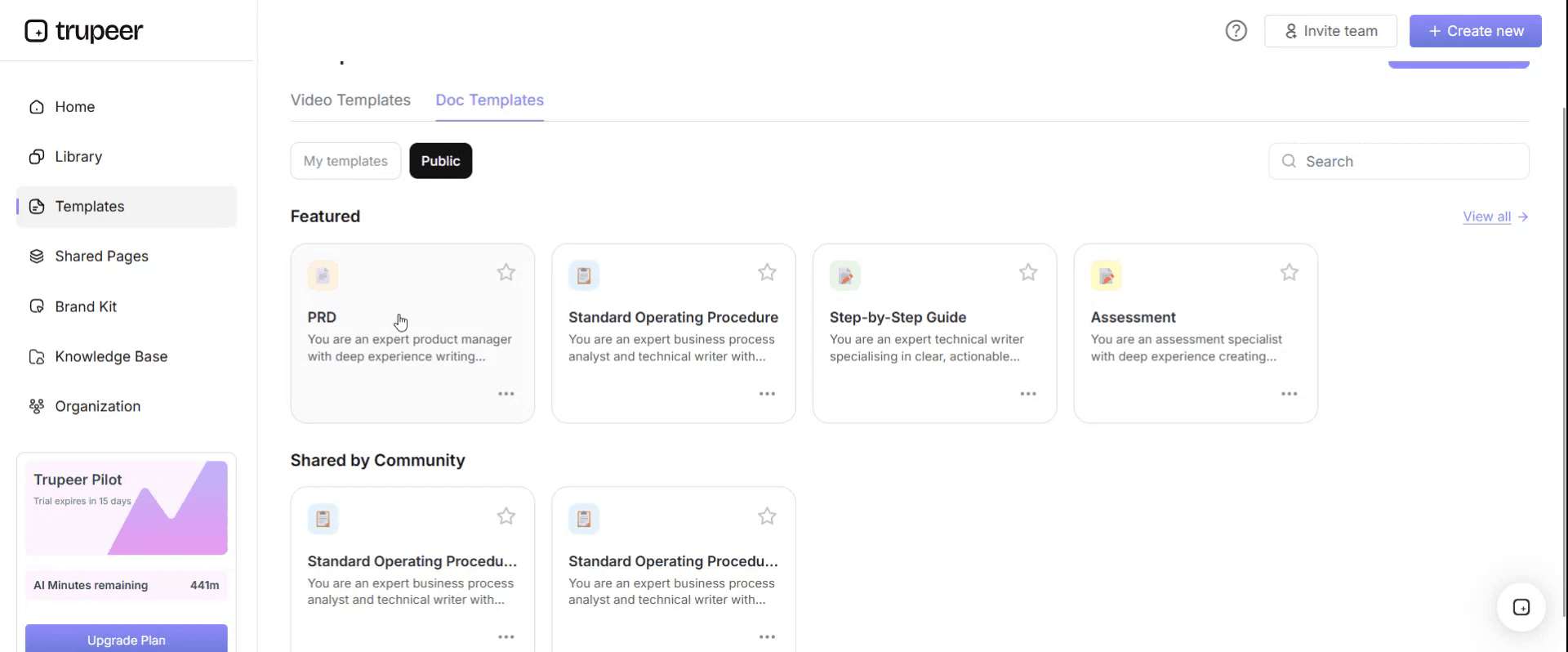
Step 3: Expand the Template View
If needed, expand the template view to see the full layout and details clearly.

Step 4: Edit the Template
Click on Edit to start modifying the selected template.

Within the editor, you can:
Add new sections
Define or update formatting rules
Add a logo and adjust its position and related settings
Step 5: Save Your Customized Template
After making all necessary changes, click Save to store the updated template as your own.
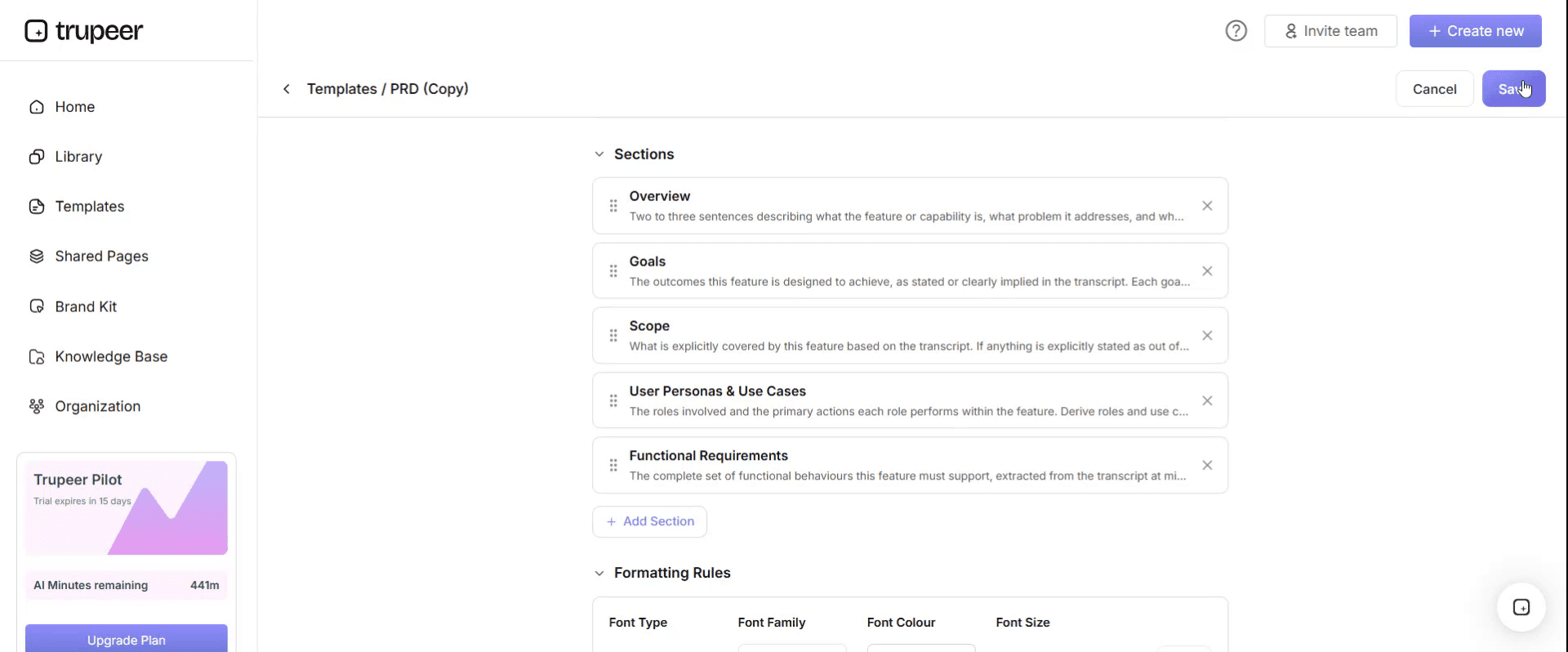
Step 6: Preview and Fine-Tune the Template
When you want to see how your customized template looks, open the Preview.

From the preview screen, you can continue to make adjustments directly if needed, ensuring the template appears exactly as you want.
With an order to cash SOP template you can:
Move orders through every team the same way: One procedure for every handoff from order to cash.
Release orders faster and safer: Clear credit rules mean fewer orders stuck on hold and fewer bad debts.
Bill accurately the first time: Fewer pricing and quantity errors mean fewer disputes.
Collect and apply cash consistently: Clear steps for reminders, cash application and unapplied payments.
Pass audits with less effort: Show documented approvals for credit, credit notes and write-offs.
What an order to cash SOP template must contain
Section | What it covers |
|---|---|
Document control | SOP ID, version, owner, approver, effective and review dates |
Purpose and scope | Entities, systems, customer types, order channels and payment methods covered |
Roles and responsibilities | Order management, credit, fulfilment, billing, collections, cash application, customer service |
Policies and reference data | Credit limits, payment terms, pricing rules, approval limits for credit notes and write-offs |
Customer setup and credit | New customer records, credit assessment and limits |
Order entry and validation | Order capture, pricing, terms and completeness checks |
Credit check and release | Automatic checks, holds and release approvals |
Fulfilment and delivery | Picking, shipping or service delivery and proof of delivery |
Billing | Invoice creation, accuracy checks and delivery to the customer |
Collections | Reminders, follow-up and escalation for overdue accounts |
Cash application | Matching payments to invoices and handling unapplied cash |
Disputes, credit notes and write-offs | Investigation, approval and correction |
Controls, KPIs and records | Segregation of duties, metrics and documentation retained |
Free order to cash SOP template: the structure to copy
Copy the structure below into your own document, or open it in Trupeer and customize it.
1. Document control. SOP ID: [O2C-001]. Version: [x.x]. Owner: [O2C process owner]. Approver: [Finance controller]. Effective date: [date]. Next review: [date].
2. Purpose. This SOP defines how [Company] takes customer orders through to cash received and applied, so orders are fulfilled and billed accurately, customers pay on time and financial controls are applied consistently.
3. Scope. Applies to all customer orders for [entities, product lines or services] processed in [ERP or CRM]. Excludes [intercompany sales and e-commerce orders, covered by separate SOPs].
4. Roles and responsibilities.
Role | Responsibility |
|---|---|
Order management | Enters and validates customer orders; resolves order queries |
Credit team | Sets credit limits; reviews and releases orders on credit hold |
Fulfilment or service delivery | Ships goods or delivers services; records proof of delivery |
Billing | Creates, checks and sends invoices |
Collections | Follows up overdue invoices and escalates where needed |
Cash application | Matches payments to invoices; resolves unapplied cash |
Customer service | Handles customer queries and logs disputes |
Finance controller | Owns O2C controls; approves credit notes and write-offs above the team limit |
5. Policies and reference data. Credit limits: [by customer segment]. Payment terms: [standard terms]. Pricing: [price lists and discount authority]. Approval limits: [credit notes and write-offs per delegation of authority]. Dunning schedule: [reminder days].
6. Procedure.
Stage 1: Set up the customer and credit limit. Create the customer record with verified legal, billing and tax details. Assess creditworthiness and set the credit limit and payment terms within your authority, or route for approval.
Stage 2: Enter and validate the order. Capture the order from [approved channels]. Check customer, products or services, quantities, prices, discounts, delivery details and terms against the customer record and price list. Return incomplete orders to sales or the customer.
Stage 3: Check credit and release the order. Let the system run the credit check. If the order passes, release it for fulfilment. If it's blocked, follow the exception table.
Stage 4: Fulfil and deliver. Pick, pack and ship the goods, or deliver the service. Record the delivery and proof of delivery in [ERP].
Stage 5: Bill the customer. Create the invoice from the delivery or order, check prices, quantities, tax and terms, and send it to the customer through [channel] within [timeframe].
Stage 6: Collect payment. Send reminders according to the dunning schedule, follow up overdue invoices with the customer and escalate accounts that pass [days overdue].
Stage 7: Apply cash. Match incoming payments to open invoices using remittance details. Investigate and clear unapplied or unidentified payments within [timeframe].
Stage 8: Resolve disputes and close the period. Log every dispute, investigate it with the relevant team and issue approved credit notes where justified. At period-end, review receivables ageing, record bad debt provisions and reconcile the AR sub-ledger to the general ledger.
7. Exception handling.
Exception | How to recognise it | Action | Decision owner | Time limit | Escalate to |
|---|---|---|---|---|---|
Credit limit exceeded | Order blocked by the credit check | Review account and payment history; release, request payment or reject | Credit team | [Same day] | Credit manager |
Pricing mismatch | Order price differs from price list or contract | Hold the order; confirm price with sales | Sales or pricing team | [1 working day] | Sales manager |
Incomplete order | Missing PO number, delivery address or required details | Return to sales or customer for completion | Order management | [1 working day] | Order management lead |
Partial shipment | Not all items available | Ship available items and backorder the rest, or hold per customer instruction | Fulfilment | [Same day] | Supply chain lead |
Billing error found | Invoice price, quantity or tax is wrong | Issue an approved credit note and corrected invoice | Billing | [2 working days] | AR lead |
Short payment or deduction | Payment is less than the invoice amount | Log as a dispute; investigate the reason with the customer | Collections | [5 working days] | AR lead |
Unapplied cash | Payment can't be matched to an invoice | Contact the customer for remittance details | Cash application | [3 working days] | AR lead |
Write-off request | Balance judged uncollectable | Prepare evidence and route for approval | Collections | [Per policy] | Finance controller |
Not covered above | Case doesn't match any row | Stop and escalate; do not improvise | O2C process owner | [4 hours] | Finance controller |
8. Controls. The person who enters orders can't release credit holds. Credit notes and write-offs need approval within delegated limits. Customer master and price changes are approved by someone independent of order entry. The AR sub-ledger is reconciled to the general ledger every period.
9. KPIs. Order to cash cycle time, days sales outstanding, orders on credit hold, billing accuracy, dispute resolution time, unapplied cash and bad debt.
10. Records. Orders, credit approvals, proofs of delivery, invoices, dispute logs, credit notes, write-off approvals and reconciliations, retained for [period].
11. Revision history. Version, date, change summary, author and approver.
Which order to cash procedures need their own SOP?
The template above covers the full cycle. Larger finance and operations teams often split it into separate SOPs:
O2C procedure | What it covers |
|---|---|
Customer onboarding and credit assessment | Customer records, credit checks, limits and terms |
Order entry | Capture, validation and order changes |
Credit hold management | Reviewing and releasing blocked orders |
Billing and invoicing | Invoice creation, checks and delivery |
Collections and dunning | Reminders, follow-up and escalation |
Cash application | Matching payments and clearing unapplied cash |
Disputes and deductions | Logging, investigating and resolving customer disputes |
Credit notes and write-offs | Approval and posting of credits and bad debt |
Month-end AR close | Ageing review, provisions and reconciliation |
Order to cash has a counterpart on the supplier side; see the procure to pay process flow.
For the payables procedure, use the accounts payable SOP template.
Order to cash controls to build into the SOP
Control | Why it matters |
|---|---|
Segregation of duties | Stops one person from entering an order, releasing credit and applying cash |
Credit limits and approvals | Limits exposure to customers who may not pay |
Price list and discount authority | Prevents unauthorised discounts and pricing errors |
Invoice accuracy checks | Reduces disputes and short payments |
Credit note and write-off approvals | Prevents revenue being reduced without authority |
Cash application review | Ensures payments are applied to the right customer and invoice |
AR reconciliation | Confirms the receivables ledger is complete and accurate |
Order to cash SOP KPIs
Track a small set of measures to see whether the SOP is working:
Order to cash cycle time: from order receipt to cash applied.
Days sales outstanding (DSO): how quickly customers pay on average.
Orders on credit hold: number and age of blocked orders.
Billing accuracy: invoices issued without errors or credit notes.
Dispute resolution time: from dispute logged to resolved.
Unapplied cash: value and age of payments not yet matched to invoices.
Bad debt: write-offs as a share of revenue.
Set your own targets, baseline them before changing the process, and compare across teams or sites; see process benchmarking with SAP Activate and Six Sigma.
How to create your order to cash SOP from recordings
Choose a stage, such as order entry, credit release or cash application.
Record an experienced team member doing the task in your ERP or CRM, narrating each check and decision, including at least one exception.
Generate the SOP and video with Trupeer, then review the steps and add your limits, terms and approval rules.
Fill in the exception table from the recordings, your hold and dispute reasons and audit findings.
Get approval from the O2C process owner and finance controller.
Publish and train, linking each step to its video, and update the SOP whenever the system or policy changes; see SOP version control.
Formats for an order to cash SOP
Step-by-step with an exception table suits most O2C procedures, such as order entry, billing and cash application. This is the format the template above uses.
Swimlane flowchart suits the end-to-end view, showing how orders pass between sales, credit, fulfilment, billing and AR.
Checklist suits review tasks, such as the month-end AR close or a credit review.
Spreadsheet suits the dispute log, unapplied cash tracking and KPIs, kept alongside the SOP.
Best practices for order to cash SOPs
Write the SOP around handoffs, since most delays happen between teams, not within them.
Use your system's real screen and transaction names, so people can follow the steps exactly.
Put limits, terms and approval rules in one reference table.
Log every dispute, so recurring causes, such as pricing errors, can be fixed at the source.
Pair every SOP with short videos of the steps in your system.
Review the SOP after every system change, policy change and audit.
Common mistakes to avoid
Documenting each team separately, so nobody owns the end-to-end process.
Leaving out exceptions, so credit holds, short payments and disputes are handled inconsistently.
Weak credit note controls, which let revenue be reduced without approval.
Ignoring unapplied cash, which hides overdue balances and distorts DSO.
Never updating the SOP after a system or policy change.
Order to cash SOP checklist
Document control is complete, with owner and review date.
Roles cover order management, credit, fulfilment, billing, collections, cash application and customer service.
Credit limits, terms, pricing and approval limits are documented.
Every stage from customer setup to period-end has numbered steps.
The exception table covers credit holds, pricing, billing errors, short payments, unapplied cash and write-offs.
Segregation of duties and approvals are defined.
KPIs and records are specified.
Videos are linked for key steps.
How Trupeer helps you build and maintain your order to cash SOP
O2C SOP challenge | How Trupeer helps |
|---|---|
O2C knowledge is spread across many teams | Record each team doing its part, and Trupeer's SOP creator turns each recording into a step-by-step SOP and video |
SOPs take weeks to write | One recording becomes a reviewable SOP draft with screenshots in minutes |
Teams in different countries need their own language | Translate SOPs and videos from one source into 65+ languages |
The ERP or CRM changes and SOPs go out of date | Update videos by editing the script, and replace a single step instead of re-recording |
New hires need training fast | Publish SOPs and short videos in one searchable knowledge base |
Genpact used this recording-first approach for a company-wide Workday rollout, turning recorded process sessions into more than 500 training collaterals across 20 workstreams in five languages, for 140,000 employees in 40 countries, in 3 months instead of 12. Read the Genpact customer story.
If O2C is part of a wider finance programme, see the finance transformation roadmap.
Download the free order to cash SOP template
Open the template in Trupeer, apply your brand kit, add your system steps, limits and terms, and share it with every team in the O2C process. Get the free order to cash SOP template.
Related templates
Frequently Asked Questions
What is an order to cash SOP template?
It's a ready-made standard operating procedure for the O2C process, covering roles, policies, customer setup and credit, order entry, credit release, fulfilment, billing, collections, cash application, disputes, period-end tasks, exceptions and controls.
What are the steps in the order to cash process?
Set up the customer and credit limit, enter and validate the order, check credit and release it, fulfil and deliver, bill the customer, collect payment, apply cash, and resolve disputes and close the period.
What should an order to cash SOP include?
Document control, purpose and scope, roles, policies and reference data, step-by-step procedures for each O2C stage, an exception-handling table, controls, KPIs, records and revision history.
What's the difference between order to cash and accounts receivable?
Accounts receivable covers billing, collections and cash application. Order to cash is the wider end-to-end process, starting with the customer and the order and including credit, fulfilment and disputes.
How do you handle exceptions in an O2C SOP?
Use an exception table that lists each exception, how to recognise it, the action, the decision owner, a time limit and where to escalate, plus a catch-all row for anything not listed.
What KPIs measure order to cash performance?
Common KPIs include order to cash cycle time, days sales outstanding, orders on credit hold, billing accuracy, dispute resolution time, unapplied cash and bad debt.
Is there an order to cash SOP template in Word?
Yes. Word suits the O2C SOP because it combines tables, such as roles and exceptions, with step-by-step procedures. Open the template in Trupeer, customize it and export it in the format you need.
Is there an order to cash SOP template in Excel?
The SOP itself works best as a document, but many teams keep the dispute log, credit hold list and KPIs in Excel alongside it.
Is there an order to cash SOP template PDF?
Yes. Export the customized SOP as a PDF for read-only distribution, and keep the editable version as the master.
Is the order to cash SOP template free?
Yes. Sign up free to open the template in Trupeer, customize it and export it.
How often should an O2C SOP be reviewed?
At least annually, and whenever your ERP or CRM, credit policy, payment terms or approval limits change, or after an audit finding.
Can I create an O2C SOP from a screen recording?
Yes. Record team members doing each O2C task in your system, and Trupeer turns the recordings into step-by-step SOPs and videos you can review, approve and publish.

Understand how work happens.
Carry it into your next transition.
Start Free Trial
Book a Demo
Варианты использования
конкуренты

