Training Video Editing Software for Non-Designers

Training Video Editing Software for Non-Designers

Training Video Editing Software for Non-Designers

Create polished training videos without any design skills. Record your screen and let AI handle the editing.

Create polished training videos without any design skills. Record your screen and let AI handle the editing.

Create polished training videos without any design skills. Record your screen and let AI handle the editing.

Edit Without Design Skills

無料で始める

クレジットカードは必要ありません

クレジットカードは必要ありません

Training Video Editing Software for Non-Designers TL;DR

Training Video Editing Software for Non-Designers TL;DR

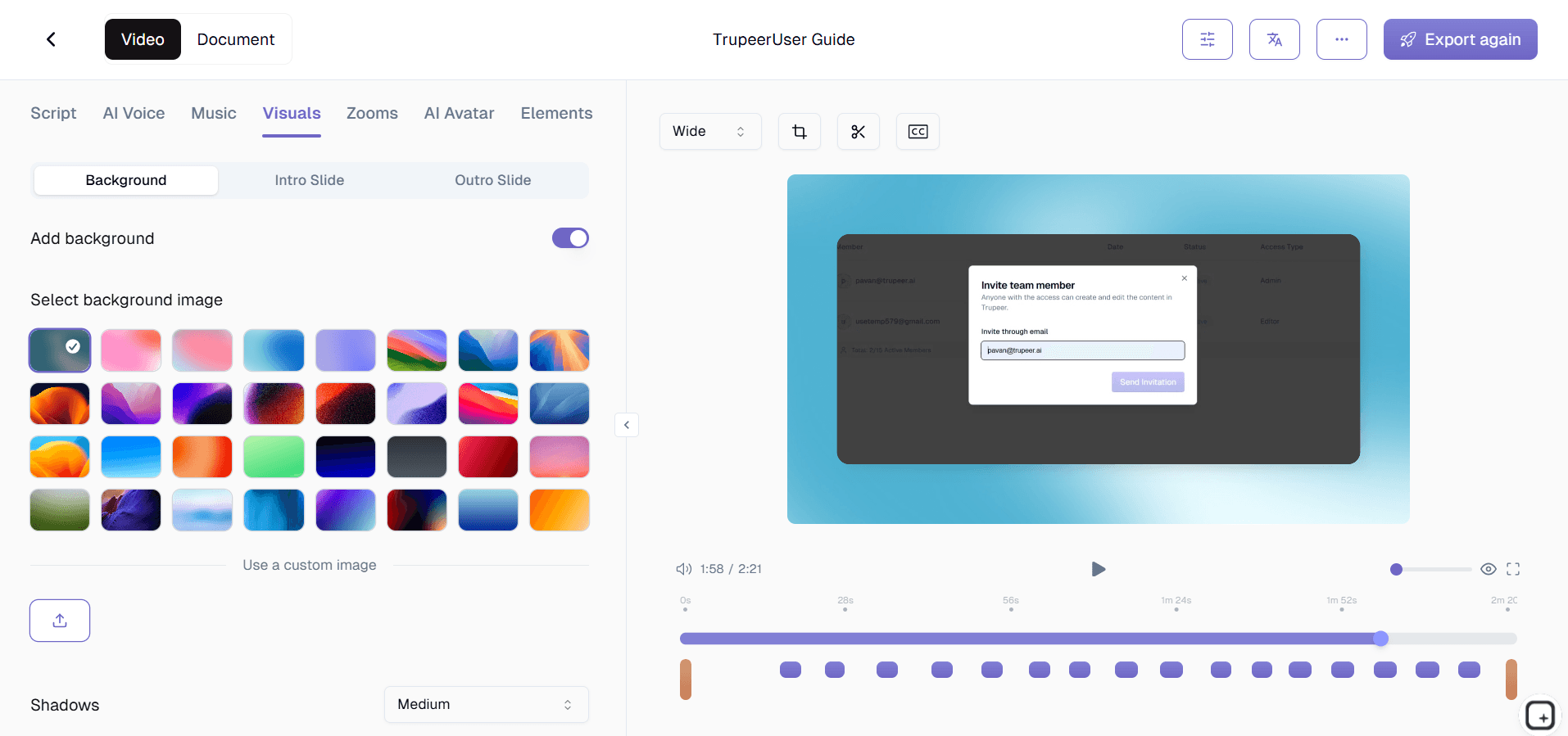
Trupeer's Training Video Editing Software for Non-Designers helps anyone create professional-quality training videos without graphic design or video editing experience. Using AI-powered screen recording and automatic editing, you can produce polished training content in minutes instead of hours.

  • Record your screen and let AI automatically edit your training video.

  • No design skills or video editing experience required.

  • Add professional zoom effects, transitions, and annotations automatically.

  • Generate step-by-step process guides alongside your videos.

  • Export and share branded training videos with one click.

What Is Trupeer's Training Video Editing Software?

Trupeer's training video editing software is built specifically for people who are not designers. Subject matter experts, managers, HR professionals, and trainers can record their screen and let the AI handle trimming, zoom effects, filler word removal, and professional polish. You focus on teaching; Trupeer handles the production quality.

How Does Training Video Editing Software for Non-Designers Work?

Getting started with Training Video Editing Software for Non-Designers takes just a few minutes.


Step 1: Record or Upload

Start a screen recording directly in your browser, or upload an existing video file you want to transform.


Step 2: AI Processing

The AI analyzes your recording, removes filler words, adds zoom effects, and generates video automatically.


Step 3: Customize and Share

Edit the output, apply your brand kit, and share via link or embed on your website. Updates are just as easy.


Key Features of Trupeer's Training Video Editing Software for Non-Designers

  • AI-Powered Auto-Editing: Trupeer's intelligent editing engine automatically trims dead air, removes filler words like "um" and "uh," and smooths transitions between segments. Non-designers get broadcast-quality output without touching a timeline editor or learning complex keyframe animations. The AI understands training video pacing and keeps content engaging throughout.

  • Smart Zoom and Click Tracking: Every mouse click and important action gets automatically highlighted with smooth zoom effects. Viewers see exactly where to click and what to look for, eliminating confusion that static screenshots or unmarked screen recordings create. This feature alone replaces hours of manual annotation work.

  • Automatic Captions and Subtitles: AI generates accurate captions for every training video, making content accessible for hearing-impaired viewers and those who watch without sound. Captions are editable and can be styled to match your branding, ensuring professional presentation without manual transcription.

  • One-Click Export to Multiple Formats: Export training videos in formats optimized for LMS platforms, internal wikis, social sharing, or website embedding. Non-designers do not need to understand video codecs, resolution settings, or file compression. Trupeer handles all technical details and delivers the right format for your destination.

Why Choose Trupeer's Training Video Editing Software for Non-Designers?

  • Zero Learning Curve: Most video editors require weeks of practice. Trupeer produces professional results from your first recording because the AI handles the technical complexity you would normally need to learn.

  • Faster Than Traditional Editing: What takes hours in Camtasia or Premiere takes minutes with Trupeer. Record once, and the AI delivers an edited training video ready to share.

  • Consistent Quality Every Time: Non-designers often produce inconsistent results across videos. Trupeer's automated editing and brand kits ensure every training video looks polished and professional regardless of who created it.

  • Cost-Effective: Eliminate the need to hire video editors or designers for routine training content. Subject matter experts create their own videos, freeing creative teams for higher-value projects.

Training Video Editing Software for Internal Teams

1. Empower subject matter experts to create their own training videos. When the people who know the processes best can produce videos directly, content is more accurate and gets published faster than routing everything through a design team.

2. Reduce the backlog on your design and video production teams. Internal teams often wait weeks for training videos because creative resources are stretched thin. Let non-designers handle routine training content independently.

3. Maintain visual consistency across departments without design oversight. Brand kits ensure every team produces training videos that look professional and match company standards, even without a designer reviewing each one.

4. Update training materials instantly when processes change. Non-designers can re-record and re-edit videos themselves instead of submitting requests and waiting in a production queue.

Training Video Editing Software for SaaS Teams

1. Let product managers create feature walkthrough videos without depending on marketing. When a new feature ships, the PM who built it can record and publish a polished training video the same day.

2. Build a self-service video library that reduces customer support tickets. Non-designer support leads can create how-to videos for common questions, deflecting repetitive tickets without waiting for video production resources.

3. Keep customer-facing training content current with every release. When product updates happen weekly, only teams that can produce videos quickly keep documentation in sync. Trupeer makes that possible for anyone.

4. Create onboarding video sequences that scale with your user base. Instead of live demos for every new customer, build a library of polished training videos that any team member can produce and maintain.

Training Video Editing Software for Startups

1. Produce professional training videos on a startup budget. Early-stage companies cannot afford dedicated video editors, but they still need polished training content for customers and team members.

2. Let founders and early employees document processes before scaling. The people who built your workflows can record them directly without learning complex editing software or waiting for help.

3. Create investor-ready product demos without hiring a production team. Founders can record polished walkthroughs that showcase their product professionally using AI editing.

4. Build training infrastructure that grows with your team. Start creating videos now with non-designers, and your library scales as you hire, without needing to rebuild from scratch later.

Training Video Editing Software for Enterprises

1. Scale training video production across thousands of employees without proportionally scaling your creative team. When anyone can produce quality training content, the bottleneck disappears.

2. Standardize training video quality across global offices. Brand kits and AI editing ensure consistent output whether the creator is in New York, London, or Singapore.

3. Meet compliance training deadlines without expensive production cycles. Compliance officers and legal teams can create required training videos themselves, on schedule, every time.

4. Reduce training video production costs significantly. Enterprise video production budgets shrink when subject matter experts create their own content using AI-assisted editing tools.

Training Video Editing Software for Remote Teams

1. Enable asynchronous training video creation across time zones. Remote team members record and edit training videos on their own schedule without coordinating with designers in different regions.

2. Replace live training sessions with polished recorded content. Instead of repeating the same training call for different time zones, record once and let AI produce a professional version everyone can watch.

3. Maintain training quality when your team is distributed. Centralized brand kits and automated editing ensure remote contributors produce videos that match headquarters quality standards.

4. Reduce dependency on synchronous communication for knowledge transfer. Well-edited training videos let remote employees learn at their own pace without scheduling calls or waiting for responses.

Training Video Editing Software for Developers

1. Create technical training videos without leaving your workflow. Developers can record coding walkthroughs, deployment processes, and debugging sessions, then let AI handle the editing and polish.

2. Document APIs and developer tools with visual tutorials. Technical writers and developer advocates produce polished video documentation without needing video editing skills.

3. Build internal engineering onboarding videos that stay current. When codebases change, developers re-record and re-edit training videos themselves rather than waiting for a production team.

4. Share technical knowledge asynchronously with polished video content. Code reviews, architecture decisions, and technical deep-dives become reusable training resources with professional AI editing.

Training Video Editing Software for Onboarding & Support Teams

1. Create onboarding video libraries without a dedicated video team. HR and training managers record processes themselves and get professional results through AI-powered editing.

2. Build customer support video guides that reduce ticket volume. Support leads can create polished how-to videos for common issues without design skills or production experience.

3. Update onboarding materials instantly when policies or tools change. Non-designers re-record and publish updated training videos in minutes instead of weeks.

4. Personalize training content for different roles and departments. Individual managers create role-specific training videos without competing for shared design resources.

Why Non-Designers Choose Trupeer for Training Videos

Why Non-Designers Choose Trupeer for Training Videos

Edit Without Design Skills

無料で始める

Zero Learning Curve

Create professional training videos with no design experience needed

AI Auto-Editing

Smart trimming and zoom effects applied automatically

Brand Consistency

Every video matches your company style with one-click brand kits

How to Edit Training Videos Without Design Skills

How to Edit Training Videos Without Design Skills

Edit Without Design Skills

無料で始める

ステップ1

Install the Chrome extension and hit record

ステップ2

Walk through the process you want to teach

ステップ3

Let AI edit and polish your training video

よくある質問

Do I need design skills to edit training videos with Trupeer?

Do I need design skills to edit training videos with Trupeer?

No. Trupeer is built specifically for non-designers. The AI handles editing, zoom effects, trimming, and polish automatically. You just record your screen and the software produces a professional training video.

No. Trupeer is built specifically for non-designers. The AI handles editing, zoom effects, trimming, and polish automatically. You just record your screen and the software produces a professional training video.

How long does it take to create a training video?

How long does it take to create a training video?

Most training videos can be recorded and auto-edited in under 10 minutes. The AI processes your recording in seconds, so you spend your time teaching rather than editing.

Most training videos can be recorded and auto-edited in under 10 minutes. The AI processes your recording in seconds, so you spend your time teaching rather than editing.

Can I add my company branding to training videos?

Can I add my company branding to training videos?

Yes. Trupeer's brand kit feature lets you apply your company logo, colors, and fonts to every training video automatically. Set it up once and all future videos match your brand.

Yes. Trupeer's brand kit feature lets you apply your company logo, colors, and fonts to every training video automatically. Set it up once and all future videos match your brand.

What formats can I export training videos in?

What formats can I export training videos in?

Trupeer supports multiple export formats optimized for LMS platforms, websites, internal wikis, and social media. The software handles all technical settings so you do not need to understand video codecs.

Trupeer supports multiple export formats optimized for LMS platforms, websites, internal wikis, and social media. The software handles all technical settings so you do not need to understand video codecs.

Can non-technical team members use this software?

Can non-technical team members use this software?

Absolutely. Trupeer is designed for subject matter experts, managers, HR professionals, and anyone who needs to create training content. If you can record your screen, you can produce professional training videos.

Experience the new & faster way of creating product videos.

Instant AI Product Videos and Docs from Rough Screen Recordings.

Get started for free

無料で始める

Experience the new & faster way of creating product videos.

Instant AI Product Videos and Docs from Rough Screen Recordings.

Get started for free

無料で始める

Experience the new & faster way of creating product videos.

Instant AI Product Videos and Docs from Rough Screen Recordings.

Get started for free

無料で始める