4.8/5
無料のソフトウェアチュートリアル動画作成
画面を録画して、わかりやすいソフトウェアチュートリアル動画を作成しましょう。AIがあなたの操作手順を、洗練されたステップごとのガイドに変換します。
無料でお試しください

Trupeerのソフトウェアチュートリアル動画作成ツールは、AI搭載の画面録画と自動編集で、わかりやすく効果的なソフトウェアチュートリアルを作成できるようにします。あらゆるソフトウェアの作業手順を録画すると、TrupeerがUIを認識したズーム効果、すっきりしたナレーション、構造化された手順で、プロフェッショナルなチュートリアル動画を生成します。
あらゆるソフトウェアの作業手順を録画して、チュートリアル動画を自動で作成します。
AIがUI要素を検出し、ボタン、メニュー、入力欄にスマートなズーム効果を追加します。
同じ録画から注釈付きのスクリーンショットを使って、記述式のソフトウェアガイドを生成します。
ロゴ、カラー、イントロを統一して、ソフトウェアチュートリアルにブランド感を持たせます。
ソフトウェアチュートリアル動画を、ユーザーが必要とする場所に書き出して埋め込めます。
Trupeerのソフトウェアチュートリアル動画作成ツールとは?
Trupeerのソフトウェアチュートリアル動画作成ツールは、ソフトウェア製品やアプリケーションに関するチュートリアル動画を作るための専用ツールです。ソフトウェアのインターフェースを理解します。AIが、画面録画内でボタンクリック、メニューの移動、フォーム入力、ページ遷移を検出し、狙いを定めたズーム効果やハイライトを適用して、ユーザーをソフトウェアの手順に沿って段階的に導きます。結果として、単に画面録画を再生するだけではなく、ソフトウェアを効果的に教えるチュートリアル動画が完成します。
ソフトウェアチュートリアル動画作成ツールはどのように機能しますか?
ソフトウェアチュートリアル動画作成ツールの導入は、数分で完了します。
ステップ1:録画またはアップロード
ブラウザ上で直接画面録画を開始するか、既存の動画をアップロードします。

ステップ2:AI処理
AIが録画を分析し、つなぎ言葉を削除し、ズーム効果を追加して、動画を自動生成します。
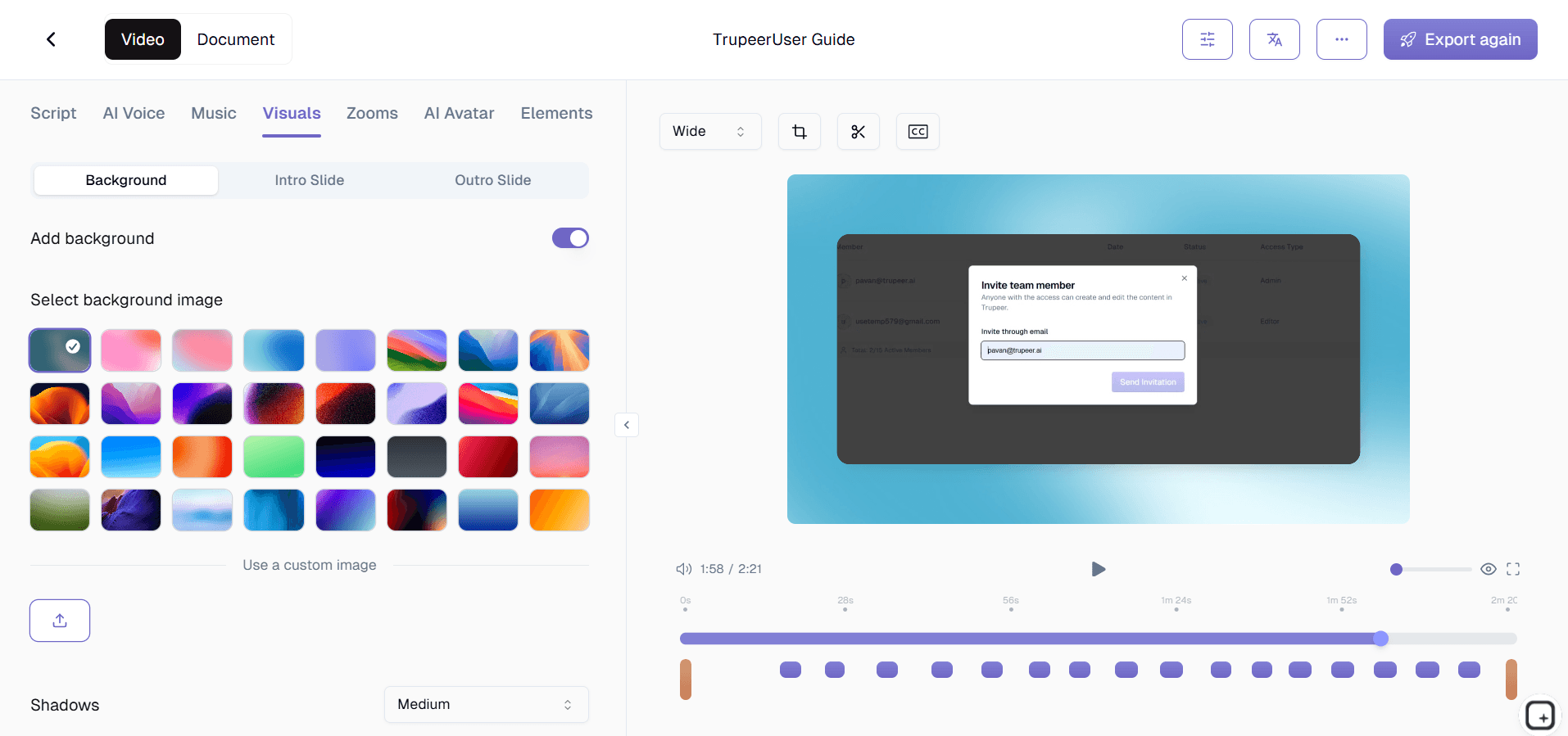
ステップ3:カスタマイズして共有
出力を編集し、ブランドキットを適用して、リンクまたはWebサイトへの埋め込みで共有します。更新も同様に簡単です。

Trupeerのソフトウェアチュートリアル動画作成ツールの主な機能
UIを認識したクリック検出:TrupeerのAIは、ソフトウェアのインターフェース操作を特に正確に認識します。ボタンクリック、ドロップダウンの選択、メニューのナビゲーション、フォーム入力欄、ダイアログボックスの操作などです。各UIアクションはインテリジェントなズーム効果をトリガーし、ユーザーがどこをクリックすべきか、何が起こるのかを正確に示します。
ソフトウェアの作業手順ステップのセグメント化:AIがソフトウェアのウォークスルーにおける自然な区切りを特定し、明確なチュートリアルステップを作成します。ページ遷移、主要なアクション、または作業フェーズごとに、はっきりと区分されたセグメントが作られます。ユーザーはステップ番号を確認でき、任意のステップへ直接移動でき、チュートリアル内の現在地も常に理解できます。
複数アプリケーションのチュートリアル対応:多くのソフトウェアチュートリアルでは、複数のアプリケーション、ブラウザタブ、またはシステムウィンドウの切り替えが発生します。Trupeerはマルチアプリの作業手順をシームレスに処理し、ツール間を移動しても文脈を明確に保ちます。各アプリの切り替えは、適切なズーム調整と文脈インジケーターとともに丁寧に扱われるため、ユーザーはどのソフトウェアを見ればよいか迷いません。
スクリーンショットに基づく記述式ガイドの生成:すべてのソフトウェアチュートリアル動画は、各UI操作ポイントでキャプチャした注釈付きスクリーンショットとともに、連動する記述式ガイドを自動で生成します。スクリーンショットには、ユーザーが操作すべき正確なボタン、入力欄、メニューを示す視覚的なコールアウトが含まれます。
なぜTrupeerのソフトウェアチュートリアル動画作成ツールを選ぶべきですか?
ソフトウェアチュートリアルのために作られています:Trupeerはソフトウェアのインターフェースを理解します。AIがUI要素を検出し、汎用的な画面録画ではなく、ソフトウェアを効果的に使えるようにユーザーを導くチュートリアルを作成します。
動画+記述式ドキュメント:1つの録画から、ソフトウェアチュートリアル動画と注釈付きスクリーンショットガイドの両方を入手できます。ユーザーは自分に合う形式を選べます。
プロダクト内での提供:チュートリアルをソフトウェアに直接埋め込んで、文脈の中で学べるようにします。タブ切り替えやヘルプセンターのナビゲーションは不要です。
バージョン管理:ソフトウェアの進化に合わせて、チュートリアルを常に最新に保ちます。更新が必要なチュートリアルを追跡し、変更を素早く公開できます。
社内チーム向け:ソフトウェアチュートリアル動画作成ツール
1. チームが使う社内ツールすべてに対して、ソフトウェアチュートリアルを作成します。CRMの作業手順から人事システムまで、チュートリアル動画は、ITに助けを求めることなく、チームメンバーが社内ソフトウェアを正しく使えるようにします。
2. 自己解決型のソフトウェアチュートリアルで、ITのサポート問い合わせチケットを削減します。従業員が、企業向けソフトウェアでタスクを完了する方法を動画で正確に確認できるようになると、基本的な「やり方」への質問でチケットを送る必要がなくなります。
3. 部門間で異なるソフトウェア固有のプロセスを文書化します。営業チームはサポートチームとは異なる形でCRMを使います。部門別のソフトウェアチュートリアルが、それぞれのチーム固有の作業手順に対応します。
4. エンタープライズツールがアップグレードされたときに、ソフトウェアチュートリアルを常に更新します。社内ソフトウェアのアップデートは、既存のドキュメントを壊してしまうことがあります。影響を受けたチュートリアルを素早く録り直して、従業員が常に最新のガイダンスを参照できるようにします。
SaaSチーム向け:ソフトウェアチュートリアル動画作成ツール
1. ユーザーが製品を使いこなせるように、包括的なソフトウェアチュートリアルのライブラリを構築します。すべての機能と作業手順に対するわかりやすいチュートリアル動画は、ユーザーがソフトウェアの価値を最大限に理解できるようにすることで、解約率の低減につながります。
2. 製品のインターフェースに直接埋め込まれたソフトウェアチュートリアルを作成します。ユーザーは必要な場所でそのままヘルプにアクセスできるため、機能の発見が促進され、新しい機能を学ぶ際の摩擦が減ります。
3. よくある質問に答えるソフトウェアチュートリアルで、カスタマーサポートの負荷を軽減します。ユーザーが動画チュートリアルでタスクの達成方法を正確に確認できると、問題を自分で解決できるようになります。
4. ソフトウェアチュートリアルの視聴状況を追跡して、UX改善の機会を特定します。特定の機能に関するチュートリアルを多くのユーザーが視聴している場合、その機能のインターフェースが簡素化を必要としている可能性があります。
スタートアップ向け:ソフトウェアチュートリアル動画作成ツール
1. 製品の信頼性を確立する、プロフェッショナルなソフトウェアチュートリアルを作成します。質の高いチュートリアル動画は、あなたのソフトウェアが成熟しており、サポートされていて、成功のために設計されていることを顧客に伝えます。
2. ソフトウェアチュートリアルのシーケンスで、顧客のオンボーディングをスケールさせます。すべての新規顧客に対する個別のウォークスルーの代わりに、オンボーディングを大規模に対応できるチュートリアル動画ライブラリを構築します。
3. プロダクトチームが直接ソフトウェアチュートリアルを作成できるようにします。ソフトウェアを作る人が最も正確なチュートリアルを作れます。Trupeerは制作品質を自動で担います。
4. 製品の変化に合わせて、チュートリアルを素早く改善します。スタートアップは迅速に出荷し、ソフトウェアチュートリアルもそのペースに追随する必要があります。録画、編集、更新版の公開を数分で行えます。
エンタープライズ向け:ソフトウェアチュートリアル動画作成ツール
1. 組織全体に標準化されたソフトウェアチュートリアルを展開します。何千人もの従業員が同じエンタープライズソフトウェアを使うとき、統一されたチュートリアルがあれば、全員が正しく学べます。
2. 包括的なチュートリアルコンテンツで、エンタープライズソフトウェアの導入を支援します。主要なソフトウェア導入は、従業員が必要なすべての作業手順について、明確なステップバイステップの動画チュートリアルを持っていると成功しやすくなります。
3. 複数のバージョンと構成にまたがって、ソフトウェアチュートリアルを管理します。エンタープライズソフトウェアは、部門ごとに異なる構成になっていることがよくあります。Trupeerのバージョン管理により、適切なチュートリアルが適切な構成に対応します。
4. 再利用可能なチュートリアルコンテンツで、エンタープライズの研修コストを削減します。動画チュートリアルは、高額な講師主導の研修セッションを置き換えつつ、品質を一貫して維持します。
リモートチーム向け:ソフトウェアチュートリアル動画作成ツール
1. リモートの従業員がいつでもアクセスできるソフトウェアチュートリアルを提供します。どのタイムゾーンのチームメンバーでも、ツールの使い方を正確に示すチュートリアルを視聴できるようになれば、ITや同僚がオンラインになるのを待つ必要がなくなります。
2. 動画チュートリアルで、社内ソフトウェアに関するリモート従業員のオンボーディングを行います。新しくリモートで採用された人は、ソフトウェアチュートリアル動画を自分のペースで見ながら、社内ツールをセットアップして学べます。
3. いわゆる「肩越しのヘルプ」がないことを補うソフトウェアチュートリアルを作成します。リモートワーカーは、隣の人に「これはどうやるの?」と身を乗り出して聞くことができません。ソフトウェアチュートリアルが、そのギャップをわかりやすい視覚的ガイダンスで埋めます。
4. 分散したチーム間で、ソフトウェアの習熟度を一貫して維持します。すべてのチームメンバーが同じソフトウェアチュートリアルにアクセスできれば、場所に関係なくスキルレベルは均一に保たれます。
開発者向け:ソフトウェアチュートリアル動画作成ツール
1. 開発者向けツール、IDE、開発環境のためのソフトウェアチュートリアルを作成します。どの設定を構成し、どこを操作するのかを正確に示す動画チュートリアルで、新しい開発者がツールを正しくセットアップできるように支援します。
2. APIおよびSDKの統合チュートリアルを作成し、開発者がそれに沿って進められるようにします。技術的な実装のためのステップバイステップのソフトウェアチュートリアルは、セットアップの不具合をデバッグする時間を開発者が費やすのを減らします。
3. ソフトウェアチュートリアルで、社内の開発者向けツールを文書化します。カスタムのビルドシステム、デプロイメントツール、モニタリングダッシュボードには、あなたのチームだけが正確に作れるチュートリアルが必要です。
4. エンジニアリングチーム向けに、ソフトウェアのテストおよびデバッグのチュートリアルを作成します。ジュニア開発者に、デバッグツールの使い方、テストの作成、複雑なコードベースのナビゲーションを、わかりやすい動画チュートリアルで示します。
オンボーディング&サポートチーム向け:ソフトウェアチュートリアル動画作成ツール
1. 構造化されたチュートリアルシーケンスで、新入社員向けのソフトウェア研修プログラムを構築します。各チュートリアルは1つのツールまたは作業手順を扱い、基本のセットアップから高度な利用までの段階的な学習ルートを作ります。
2. 顧客が最も頻繁に遭遇するソフトウェアの課題に対するカスタマーサポート用チュートリアルを作成します。ステップバイステップの解決策を示すチュートリアル動画は、同時にチケットを減らし、顧客満足度を向上させます。
3. 内部チュートリアルで、サポート担当者をあなたのソフトウェア製品に関する知識でトレーニングします。チケット対応の前にソフトウェアチュートリアルを視聴した担当者は、顧客に対してより迅速で、より正確な支援を提供できます。
4. 製品の変更によって顧客向けの作業手順に影響が出たら、ソフトウェアチュートリアルをすぐに更新します。顧客が混乱する前に更新版のチュートリアルを公開することで、サポートチケットの急増に先回りできます。
ソフトウェアチュートリアルでTrupeerが選ばれる理由
UIを考慮した編集
AIはボタンやメニューを検出し、自動的にハイライトします
書面ガイドも
各動画に加えて、注釈付きスクリーンショットのドキュメントを取得
製品内埋め込み
ソフトウェアアプリケーションにチュートリアルを直接埋め込む
ソフトウェアのチュートリアル動画の作り方
ステップ 1
教えたいソフトウェアを使用しながら画面を録画します
ステップ 2
AIはUIの操作を検出し、構造化されたチュートリアルを作成します
ステップ 3
ブランド化して、ヘルプセンターや製品に公開します
よくある質問
AI は、私がクリックしたボタンやメニューを検出できますか?
はい。TrupeerのAIは、ボタンクリック、ドロップダウンの選択、メニューの操作、フォーム入力を含むソフトウェアのUI操作を特に認識します。各操作に対して的を絞ったズーム効果を適用するため、視聴者はどこをクリックすればよいかを正確に確認できます。
複数のアプリケーションを使うチュートリアルでも使えますか?
はい。Trupeer は複数アプリケーションにまたがるワークフローをシームレスに処理します。チュートリアルでブラウザのタブ、デスクトップアプリケーション、またはシステムウィンドウ間の切り替えが含まれていても、AI は一貫して明確なコンテキストを維持します。
自分の製品の中にソフトウェアのチュートリアルを埋め込むことはできますか?
はい。Trupeer は、ソフトウェアのインターフェースに直接統合できる軽量の埋め込み可能なプレーヤーを提供します。ユーザーは別のヘルプセンターに移動することなく、コンテキストに応じてチュートリアルにアクセスできます。
ソフトウェアが変更されたときに、チュートリアルを最新の状態に保つにはどうすればよいですか?
Trupeerのバージョン管理は、UIが変更されたときに、どのチュートリアルを更新する必要があるかを特定するのに役立ちます。影響を受けたセクションを再録画し、更新をすばやく公開して、チュートリアルが常に現在のソフトウェアバージョンと一致するようにします。
このソフトウェアは書面のドキュメントも作成しますか?
はい。すべてのソフトウェアチュートリアル動画は、どのUI要素を操作すべきかを正確に示した注釈付きスクリーンショットを含む書面ガイドを自動生成します。ユーザーは1回の録画から、動画とテキストの両方のチュートリアル形式を利用できます。


