4.8/5
ChatGPTドキュメントジェネレーター
ChatGPTのワークフローをプロフェッショナルなドキュメントに変革
今すぐドキュメントを作成

Trupeer の ChatGPT ドキュメント生成ツールは、チームが AI ワークフローを記録し共有する方法を一変させます。ゼロから手作業でドキュメントを作成する代わりに、ChatGPT を使って作業しながら画面を録画するだけで、AI がその録画を洗練されたドキュメントやプロフェッショナルな動画へ自動的に変換します。この革新的なアプローチにより、ChatGPT のプロンプト、応答、ワークフローを後から記録するという面倒な作業が不要になります。多くのプロフェッショナルが直面する根本的な課題は、他の人が追従し再現できる形で ChatGPT の知識を記録することです。
Trupeer が一般的なドキュメントツールと異なるのは、画面録画と AI 強化に重点を置いている点です。他のプラットフォームではプロセスを手動で入力する必要がありますが、Trupeer は画面録画を通じて実際の ChatGPT セッションをキャプチャし、AI を使って包括的なドキュメントを自動生成します。私たちのAI スクリプトジェネレーターは、ドキュメントの物語の流れまで強化でき、複雑な ChatGPT ワークフローを理解しやすく、追いやすくします。Trupeer の ChatGPT ドキュメント生成ツールを支える技術は、高度な画面キャプチャとインテリジェントなコンテンツ分析を組み合わせています。AI は ChatGPT のインターフェース、プロンプト、応答を認識し、それらを構造化されたドキュメント形式に自動整理します。つまり、ChatGPT が実際に動作している様子を視覚的に確認できる文脈と、その結果を自力で再現するための文章ガイドの両方をチームが得られるということです。
ChatGPT ドキュメント生成ツールはどのように機能するのですか?
Trupeer を使った ChatGPT ドキュメント作成は非常にシンプルで、AI ワークフローを記録する際の推測をなくします。私たちのシステムは実際の作業をリアルタイムでキャプチャし、その後、チームがすぐに使えるプロフェッショナルなドキュメントへ自動的に処理します。
ステップ 1: ChatGPT セッションを記録する
まず Trupeer の内蔵AI 画面レコーダーを開くか、Chrome 拡張機能を使用して画面のキャプチャを開始します。ChatGPT に移動し、コンテンツ作成、問題解決、分析など、通常どおりのワークフローを始めてください。レコーダーは、プロンプトの工夫やクエリの調整方法、受け取る応答まですべて記録します。

ステップ 2: AI 処理と強化
録画を停止すると、Trupeer の AI はすぐに画面キャプチャの処理を開始します。システムは自動的に背景ノイズを除去し、ナレーション中であれば不要なつなぎ言葉を取り除き、重要な ChatGPT とのやり取りを強調するためにインテリジェントなズーム効果を適用します。これらはすべて手作業なしで行われます。

ステップ 3: ドキュメントの自動生成
動画が強化されている間、AI は同時にあなたの ChatGPT セッションを分析し、包括的な文章ドキュメントを生成します。これにはプロンプト、主要な応答、意思決定ポイント、全体のワークフロー構造が含まれます。作成された技術ドキュメントは、プロフェッショナルな形式で整えられ、すぐに共有できます。

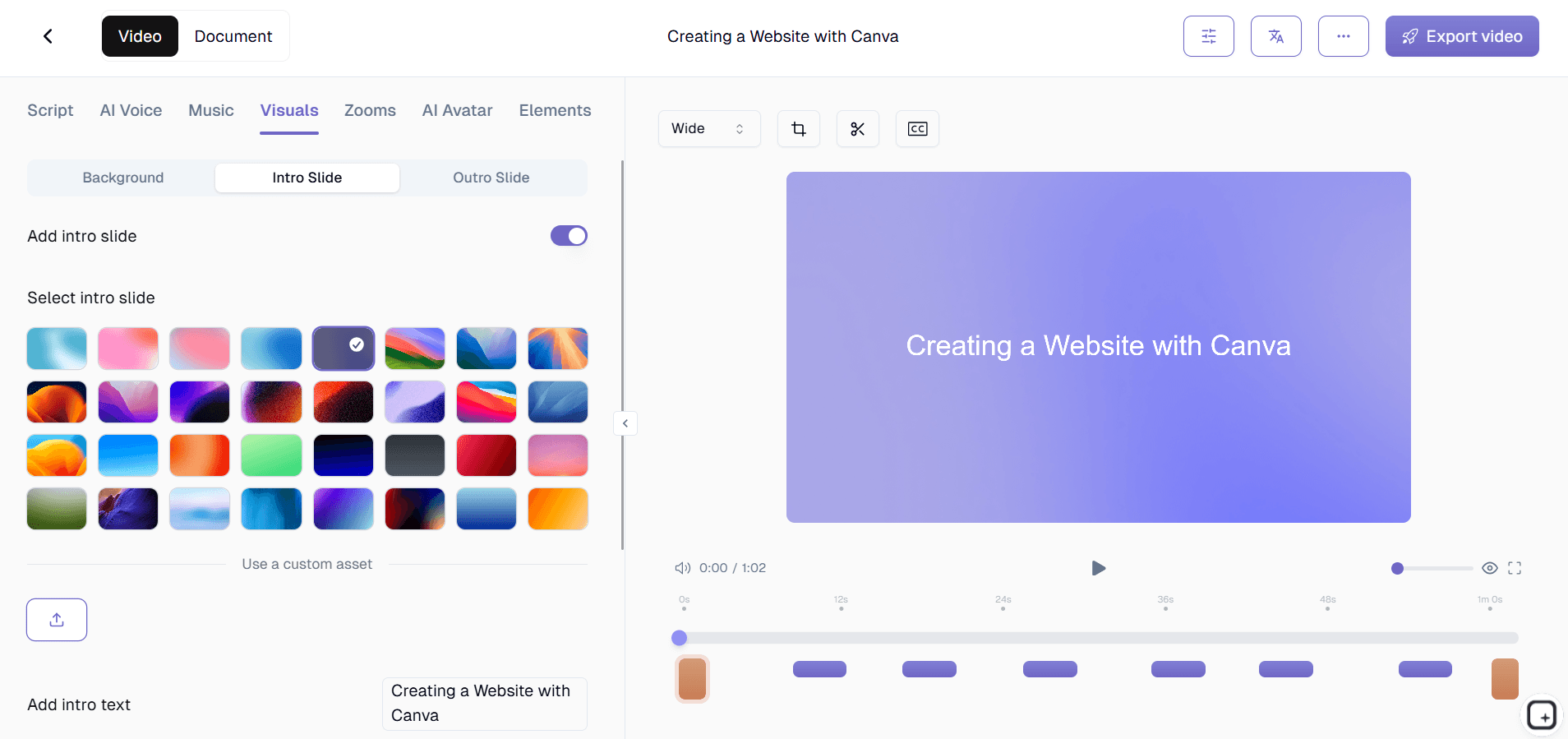
ステップ 4: カスタマイズとブランディング
あなたのブランドキットを適用して、最終的なドキュメントが会社のビジュアルアイデンティティに一致するようにします。色のカスタマイズ、ロゴの追加、標準的なイントロやアウトロの挿入が可能です。ドキュメントテンプレートを使えば、すべての ChatGPT ガイドで一貫した書式を維持できます。
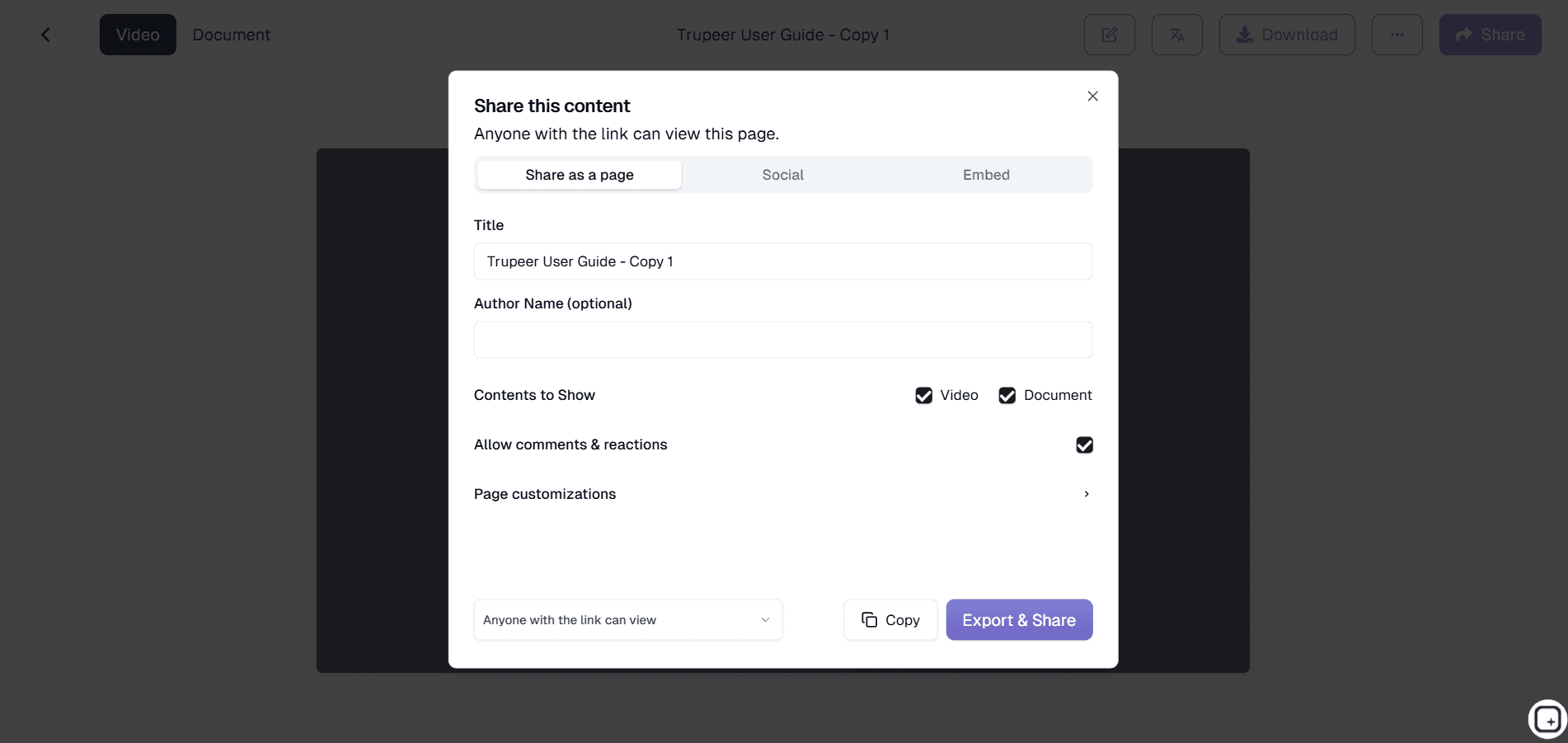
ステップ 5: 共有して配布する
完成したドキュメントは、洗練された動画、文章ガイド、またはその両方として同時にエクスポートできます。直接リンクで共有したり、ウェブサイトに埋め込んだり、ナレッジベースに追加したりできます。この柔軟性により、ChatGPT の知識をチームが好む形式で届けられます。
主な機能と能力
Trupeer の ChatGPT ドキュメント生成ツールには、AI ワークフローの文書化のために特別に設計された強力な機能が含まれています。これらの機能により、ChatGPT の知識を包括的に記録し、組織全体で効果的に共有できます。
リアルタイム画面キャプチャ: ドキュメント作成のために ChatGPT ワークフローを再現する必要があるツールとは異なり、私たちの AI 画面レコーダーは実際の作業セッションをそのまま記録します。この本物志向のアプローチにより、何も失われず、チームは ChatGPT を使ってどのように成果を出しているかを正確に確認できます。
自動コンテンツ認識: 私たちの AI は ChatGPT のインターフェースとやり取りを特に認識し、プロンプト、応答、会話の流れをインテリジェントに構造化されたドキュメントへ整理します。この的を絞った認識により、一般的な画面録画ツールよりも優れた書式と、より論理的な構成が実現します。
二重出力生成: すべての録画から、動画ドキュメントと文章ガイドの両方が同時に生成されます。視覚的に学ぶ人は ChatGPT の動作を見ることができ、他の人は素早い参照や実装の指針として文章の技術ドキュメントを利用できます。
テンプレートのカスタマイズ: 再利用可能なドキュメントテンプレートを使えば、すべての ChatGPT ガイドで一貫した書式を維持でき、時間を節約できます。AI Video Editor を使った ChatGPT コンテンツや社内プロセス文書を作成する場合でも、テンプレートがプロフェッショナルな一貫性を保ちます。
高度な編集機能: 基本的な録画を超えて、私たちの AI はノイズ除去、重要な ChatGPT とのやり取りへの自動ズーム効果、不要なつなぎ言葉の削除でコンテンツを強化します。これらの改善は自動で行われるため、手作業の動画編集に何時間も費やすことなく、プロフェッショナルな仕上がりを得られます。
多言語対応: 自動 AI 画面レコーダー機能で、あなたの ChatGPT の知識を世界中に共有できます。追加の手間をかけずに、国際的なチームメンバーやクライアントに ChatGPT ドキュメントを届けられます。
なぜ ChatGPT ドキュメント生成ツールを使うべきなのですか?
Trupeer の ChatGPT ドキュメント生成ツールを使うメリットは、単なる時間短縮にとどまりません。このツールは、組織が AI の知識をチームや部門をまたいで記録し、共有し、拡大する方法を根本から変えます。
知識のサイロをなくす: ChatGPT の知識が個人の頭の中に閉じ込められるのではなく、私たちのプラットフォームなら効果的なプロンプト戦略を簡単に記録して共有できます。あなたのManual Creatorチームはマーケティングチームの ChatGPT 活用法から学べ、カスタマーサクセスは製品開発から実証済みの手法を取り入れられます。
トレーニング時間を短縮: 新しいチームメンバーは、書面の指示を解釈しようとする代わりに、実際の ChatGPT セッションを視聴できます。視覚学習と文章ドキュメントを組み合わせることで、オンボーディング時間が大幅に短縮され、複雑な AI ワークフローの理解も向上します。
一貫性を維持: チームに ChatGPT プロセスが文書化されていれば、誰もが試行錯誤を繰り返すのではなく、実績のある方法に従えます。この一貫性がより良い結果につながり、AI ツール導入にありがちな試行錯誤のストレスを減らします。
専門知識を効率的に拡大: 優秀な担当者は、自分の ChatGPT 手法をすぐに文書化して組織全体に共有できます。新入社員向けのTraining Manual Generatorを作成する場合でも、包括的な AI ナレッジベースを構築する場合でも、Trupeer なら知識の拡大が簡単です。
コンプライアンスと監査性を向上: 規制の厳しい業界では、文書化された AI プロセスがコンプライアンス上重要になります。Trupeer の自動ドキュメント生成により、タイムスタンプや詳細なプロセスフローを含む、ChatGPT がワークフローでどのように使われているかの明確な記録を保持できます。
コラボレーションを強化: すべてが文書化され、簡単にアクセスできれば、チームはお互いの ChatGPT の発見を基に発展できます。あなたのTraining Manual Generatorチームは顧客調査で見つかったプロンプトを改善し、AI の効果を連鎖的に高められます。
誰が ChatGPT ドキュメント生成ツールを使えますか?
Trupeer の ChatGPT ドキュメント生成ツールは、AI の知識を記録し、共有し、チームや組織全体で効果的に拡大する必要がある多様な профессионals の現場に対応します。
コンテンツ制作者とマーケター: ブログ執筆、SNS コンテンツ、キャンペーン開発のための実績ある ChatGPT プロンプトを記録できます。ChatGPT を使ったアイデア出しやブラッシュアップの方法を示すSOP Generatorを作成しましょう。文書化されたプロセスにより、コンテンツチームは品質と一貫性を保ちながら、効果的なプロンプトをゼロから作る時間を減らせます。
研修・人材開発チーム: 各役割で ChatGPT をどう活用するかを示す包括的なTraining Manual Generatorを構築できます。カスタマーサービス担当者に返信文作成のための ChatGPT 利用を教える場合でも、アナリストにデータ解釈のための AI 活用を教える場合でも、視覚的なドキュメントが学習と導入を加速します。
コンサルタントとフリーランス: 方法論を示すプロフェッショナルなドキュメントを通じて、クライアントにあなたの ChatGPT の専門性を示せます。クライアントが推奨 AI ワークフローを自力で実装できるようにする AI Video Editor 素材を作成し、案件の価値を高めながら継続サポートの要望を減らせます。
プロダクトチームと開発者: API 連携、プロンプト最適化の流れ、統合ワークフローなどを記録し、技術ドキュメントとして残せます。他の開発者が追従し、改善できる形で ChatGPT 連携やプロンプト設計の判断を保存しましょう。
営業・プリセールスチーム: ChatGPT が製品やサービスをどう強化するかを、説得力のあるデモで示せます。Trupeer を使って AI 画面レコーダー素材を作成し、AI 連携が実際にどう機能するかを見込み客に具体的に見せ、理論的な議論から実演へと移行できます。
教育機関: 教授や講師は、ChatGPT の効果的な教え方を記録し、学術的誠実性を保ちながら学生に適切な AI 利用を示せます。適切なプロンプト設計と、AI が生成した応答の批判的評価を示す再利用可能な教育コンテンツを作成しましょう。
人事チーム: 職務記述書の作成、候補者選考、従業員コミュニケーションのための ChatGPT 活用を記録できます。十分な技術研修がなくても、HR メンバーが AI を効果的に使えるようにしながら、一貫した品質を保つ標準化されたプロセスを作成しましょう。
ChatGPT ドキュメント生成ツールを使うためのベストプラクティス
ChatGPT ドキュメントの効果を最大化するには、記録したワークフローを明確で実行可能、かつチームにとって価値あるものにする、実績ある戦略に従ってください。
録画セッションを計画する: 画面録画を始める前に、文書化したい ChatGPT ワークフローを整理しましょう。事前準備により、重要なステップや意思決定ポイントを漏らさずに記録できます。作業中は思考プロセスを音声で説明し、なぜそのプロンプトを選んだのか、ChatGPT の応答をどう評価したのかを明らかにするとよいでしょう。
複数のシナリオを示す: ChatGPT との完璧なやり取りを 1 つだけ見せるのではなく、プロンプトの改善、想定外の応答への対応、理想的でない出力からの立て直しも含めましょう。こうした現実的なアプローチにより、チームは実際の利用シナリオにより適切に備えられます。
ドキュメントテンプレートを活用する: Trupeer のテンプレートシステムを使って、すべての ChatGPT ドキュメントの一貫性を維持しましょう。標準化された書式により、チームメンバーは情報を素早く見つけやすくなり、あなたのナレッジベース全体でプロフェッショナルな見栄えを保てます。
文章ガイドと組み合わせる: 画面録画が「どのように」を示す一方で、「なぜ」を説明する文章要約を組み合わせましょう。私たちのチュートリアルセクションでは、視覚コンテンツと文章コンテンツを組み合わせることで、より包括的な学習リソースが生まれることを紹介しています。
定期的な更新と改訂: ChatGPT は急速に進化するため、ドキュメントも同様に更新する必要があります。記録したプロセスを定期的に見直し、最新かつ有効であることを確認しましょう。Trupeer の簡単な再録画機能を使えば、古いワークフローをゼロから作り直すことなく更新できます。
関連ツールを探す
TrupeerのChatGPTドキュメント生成ツールを選ぶ理由
リアルタイムキャプチャ
作業中に実際のChatGPTセッションを記録し、本物のワークフローを自動的にキャプチャします。
デュアル形式の出力
すべての録画セッションから、プロフェッショナルな動画と書面によるドキュメントの両方を入手できます。
AIの強化
自動ノイズ除去、ズーム効果、そして洗練された仕上がりのためのコンテンツ整理。
TrupeerのChatGPTドキュメント生成ツールの使い方
ステップ 1
ChatGPTのワークフローを記録する
ステップ 2
AIは自動的に処理し、強化します
ステップ 3
ドキュメントをエクスポートして共有する
よくある質問
ChatGPTのドキュメント生成ツールは、画面録画とどのように連携して動作しますか?
Trupeer は画面録画を通じて実際の ChatGPT セッションを記録し、その映像から AI が自動的に動画と文章ドキュメントの両方を生成します。ドキュメント作成のためにワークフローを再現する必要はありません。
すでに完了したChatGPTのワークフローを文書化できますか?
はい。既存のChatGPTセッションの画面録画があれば、Trupeerにアップロードできます。すると、当社のAIがそれらを専門的なドキュメントに変換します。このシステムは、ライブ録画とアップロード済みの動画の両方に対応しています。
ChatGPTのドキュメントはどの形式でエクスポートできますか?
Trupeerは、あなたのChatGPTドキュメントを、洗練された動画、文章ガイド、またはその両方の形式で同時にエクスポートします。直接リンク、埋め込みコード、またはナレッジベース用のファイルをダウンロードして共有できます。
このツールは、私の録音内のChatGPT固有の要素を認識しますか?
はい、TrupeerのAIはChatGPTのインターフェースを特に認識し、プロンプト、応答、会話の流れを適切な書式と論理的な構成を備えた構造化されたドキュメントへと賢く整理します。
ChatGPTのドキュメントの外観をカスタマイズできますか?
もちろんです。ブランドキットを適用して色やロゴを統一し、カスタマイズ可能なテンプレートを使って書式を整え、イントロやアウトロを追加して、すべてのドキュメントで御社のプロフェッショナルな基準に合わせましょう。


