Trupeer Blog
要約
Imagine you’re tasked with creating a series of training videos for your company’s new software rollout. The clock is ticking, and the team needs these resources promptly to ensure smooth onboarding. But you're faced with a tricky decision: should you opt for audio-free recordings with AI-generated narration or rely on live narrated recordings? This choice can significantly impact the clarity and engagement of your content. According to a recent survey,
over 68% of users prefer videos that include clear instructions and concise narration.
The stakes are high. Choose the wrong format, and you might end up with a video that either overwhelms or under-informs your audience. This decision isn’t just about personal preference; it’s about understanding your audience's needs and the message you want to convey. Whether you’re an instructional designer, a project manager, or a team lead, knowing when to use each recording style can make or break the effectiveness of your training materials. Are you ready to make the most out of your video content strategy? Teams weighing tools often start with a Loom alternatives comparison before standardizing on a workflow.
Why does choosing the right recording format matter?
The decision between audio-free and narrated recordings matters because it directly affects how your audience perceives and understands the content. Different scenarios demand different approaches, and making the wrong choice can lead to wasted resources or, worse, a disengaged audience. Imagine you’re part of the marketing team responsible for rolling out a new product demo. An audio-free recording might be ideal if your audience includes non-native speakers who can benefit from AI-generated subtitles. However, a narrated recording could be more effective if you're targeting an audience that values personal connection and expressive delivery. The choice influences how well your message is received and how effectively your audience can act on it. For a deeper look, our guide on best screen recording software covers the adjacent playbook.
From a business perspective, the stakes are even higher. In a fast-moving corporate environment, efficiency is key. Companies that use the right format can reduce misunderstandings and improve training outcomes. For example, when Trupeer integrated audio-free recordings in their internal training sessions, they noticed a 25% increase in engagement because users could control the pacing and replay sections without the distraction of human narration. This kind of strategic decision-making is crucial for companies aiming to optimize their training and communication efforts, ensuring that every piece of content is as effective as possible. where every second counts, the ability to choose the right format can be a big shift.
What are the benefits of selecting the right recording format?
Choosing the right recording format offers numerous advantages that can enhance both the creation and consumption of video content.
Enhanced Audience Engagement. Selecting a format that matches your audience's preferences can significantly boost engagement. A well-chosen format ensures that viewers remain attentive and absorb the content fully, increasing retention rates by as much as 30%.
Cost-Effectiveness. By using an AI-powered video tool, you can reduce costs associated with hiring voice talent or spending time on extensive post-production edits.
Flexibility in Content Delivery. Audio-free recordings offer flexibility, allowing audiences to add their own narration or subtitles. This can be particularly useful in multilingual environments or where accessibility is a priority.
Consistency in Messaging. AI-generated narration ensures a consistent tone and pace across all videos, minimizing discrepancies that can occur with human narrators.
Speedy Production. Using AI video platform tools that offer automated narration can significantly speed up the production process, allowing for quick turnarounds and timely content delivery.
Scalability. Once set up, AI-based systems can handle large volumes of content creation without the need for additional human resources, making it easier to scale video production efforts.
Which Trupeer features help you choose the right recording format?
Trupeer offers a suite of features that can help you determine and implement the best recording format for your needs. Each feature is designed to enhance productivity and improve the quality of video content.
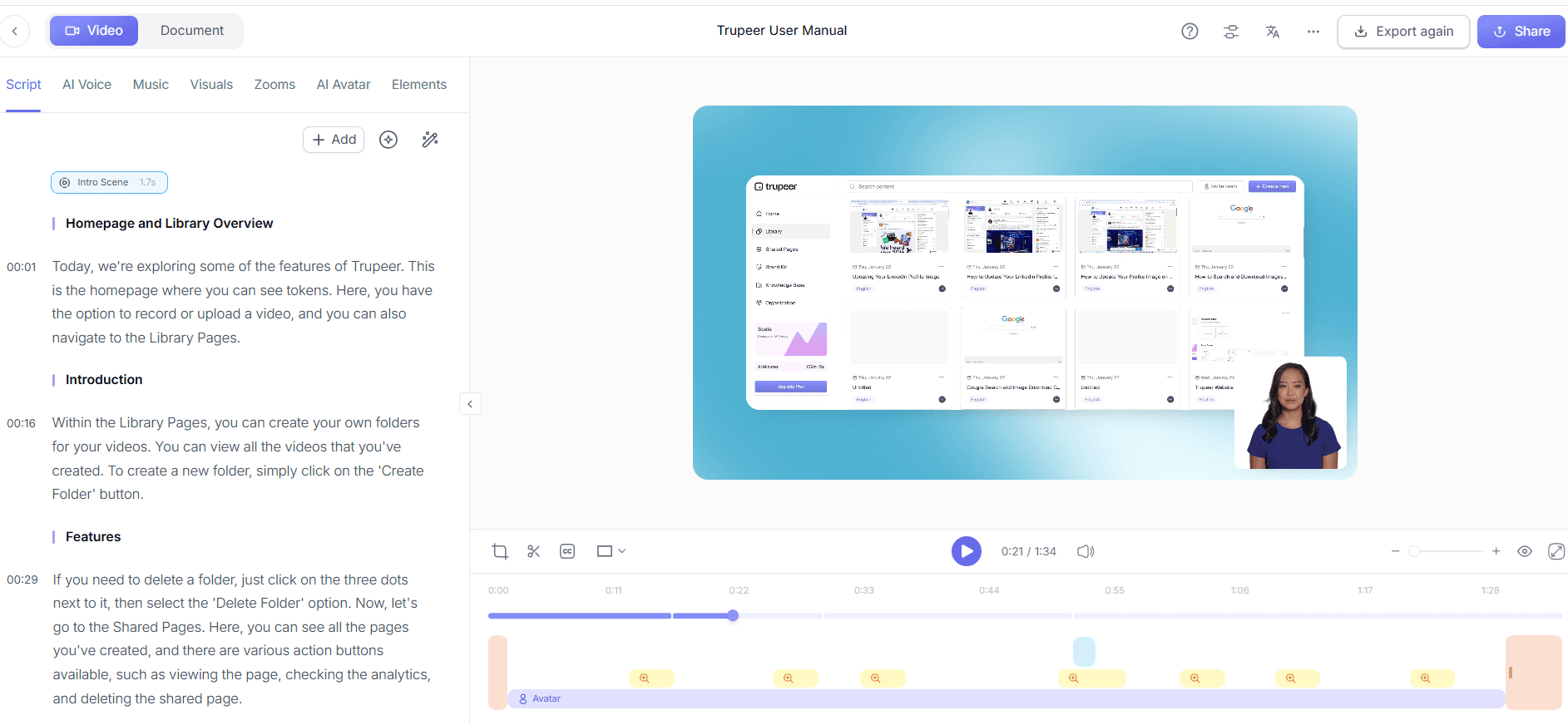
Silent screen recording with automatic AI narration
This feature is particularly beneficial when you need to create content quickly without compromising on quality. With Trupeer’s silent screen recording, you can record your screen activity and let the AI do the heavy lifting by generating narration. This process removes the need for live voice recordings, saving time and ensuring that narration is clear and consistent. It's ideal for technical tutorials or software demos where precise language and terminology are critical.
AI voiceover in 65+ natural voices, adjustable pace and tone
Trupeer's AI voiceover capability provides users with a broad range of voice options, ensuring that the narration aligns with your brand's tone. Whether you need a formal delivery or a more conversational tone, you can adjust the pace and tone to suit your audience. This feature is essential for content that needs to maintain a specific brand voice, such as marketing videos or customer testimonials. It also supports 50+ languages, making it perfect for global audiences.
Automatic filler-word removal ("um", "ah", long pauses)
For narrated recordings, Trupeer offers an automatic filler-word removal tool that helps produce professional-sounding content. This feature eliminates unnecessary pauses and verbal clutter, creating a cleaner and more engaging audio track. It’s particularly useful in live recordings where maintaining a smooth and polished delivery is crucial. By enhancing the clarity of your narration, this tool ensures that your message is communicated effectively. This same approach shows up in the ai adoption use case, where teams apply it at scale.
AI avatars / talking-head video (stock library + custom)
Using AI avatars can add a personal touch to your recordings without the need for live actors. Trupeer’s stock and custom avatar options allow for a visual presence in your videos, which can enhance engagement and provide a face to the narration. This feature is particularly beneficial for training videos or corporate updates where a human element can make information more relatable and easier to digest.
Auto chapters and segment detection
Trupeer's auto chapter and segment detection feature makes handling through long recordings easier for viewers. By automatically segmenting content into digestible chapters, this tool helps audiences find specific information quickly. It's especially useful for lengthy training sessions or webinars, allowing users to skip to the parts most relevant to them. This feature not only improves user experience but also increases the likelihood of viewers engaging with more of your content.
By using these features, Trupeer enables you to create video content that is both efficient and effective, aligning with your strategic goals and audience needs.
How do you choose the right recording format step by step with Trupeer?
Step 1: Initiate a Silent Screen Recording
To start with Trupeer, open the browser-based recorder, which requires no installation. Click on "Start Recording" to capture your screen silently. This feature is perfect for capturing demonstrations and walkthroughs where narration isn’t necessary during the initial recording phase. The silent screen recording allows you to focus on the task without worrying about verbal delivery, making it an efficient choice for creating content quickly. Once you stop the recording, Trupeer automatically saves it in your library, ready for AI-enhanced narration if needed.

Step 2: Add Automatic AI Narration
After capturing your screen, use Trupeer's automatic AI narration feature. Select the recording from your library and choose "Add Narration." The AI analyzes the on-screen content and generates a relevant script. You can select from over 65+ natural voices, adjusting pace and tone to fit your audience's needs. This process takes a few minutes, providing a polished audio track that complements your video. The AI narration ensures consistency, making it ideal for training videos and tutorials where clarity is crucial.

Step 3: Remove Filler Words
If you've opted for live narration during recording, Trupeer's automatic filler-word removal can refine your audio. Open the editing tool, and click "Enhance Audio" to activate this feature. It scans your recording for filler words like "um" and "ah," removing them to produce a more professional audio track. This step is crucial for maintaining audience engagement and ensuring your content sounds polished. The process is quick, typically completing in under a minute, and greatly improves the overall quality of your narrated recordings. Storing outputs inside an AI-searchable knowledge base makes every recording findable by topic and timestamp.

Step 4: Incorporate AI Avatars
For videos requiring a human touch, add AI avatars using Trupeer's integration with HeyGen. Choose from the stock library or create a custom avatar to serve as the face of your content. Navigate to the "Add Avatar" option in the editing suite. This feature is excellent for corporate presentations or training modules where a visual presence enhances viewer connection. The avatars sync with the narration, providing a smooth and engaging experience. Custom avatars can be created and integrated within a few hours, depending on complexity.

Step 5: use Auto Chapters and Segment Detection
To make your lengthy recordings more accessible, employ Trupeer's auto chapters feature. Select your video and click "Segment Video." This tool analyzes the content and automatically divides it into chapters based on context, allowing viewers to navigate easily. It's particularly beneficial for lengthy webinars or training sessions, helping users find specific topics quickly. The segmentation process happens in the background and typically takes about five minutes, depending on video length, significantly improving the user experience.

Step 6: Export and Share
Once your video is polished, use Trupeer's multi-format export options. Click "Export" and choose from MP4, HTML, PDF, or SCORM, depending on your distribution needs. This flexibility ensures compatibility with various platforms and learning management systems. After exporting, share your video through Trupeer’s AI free sop maker for smooth team collaboration. The whole process from recording to export is simplified, allowing you to deliver high-quality content efficiently, with the entire workflow often completed in a single day.

What tips help you choose the right recording format?
Choosing between audio-free and narrated recordings can be challenging. Here are some practical tips to help you make the best choice for your content needs.
Understand Your Audience. Determine whether your audience prefers visual-only content or benefits from additional auditory information. Assessing their needs can guide your format choice.
Consider Language Needs. If your content requires translation, an add audio to video solution can help provide multilingual narration efficiently.
Match Format to Content Type. Use audio-free recordings for straightforward instructional content and narrated formats for more complex or engaging narratives.
use AI Tools. use AI features such as automatic narration and filler-word removal to enhance both audio-free and narrated recordings.
Test Different Formats. Conduct A/B testing with both formats to see which one resonates better with your audience. Use analytics to assess engagement levels.
Use Avatars for Personalization. Incorporate AI avatars in narrated recordings to provide a human element without the need for on-camera presence.
Plan for Scalability. Choose a format that supports your long-term content strategy, especially if you anticipate scaling your video production.
Many teams pair this with a documentation platform that generates written guides from the same recording, so the pitch and the how-to stay in sync.
Frequently asked questions
How do you decide between audio-free and narrated recordings?
The decision depends on your audience and content type. For straightforward, instructional content, audio-free recordings can be effective, allowing viewers to focus on visual elements. For complex topics or content requiring additional context, narrated recordings are more suitable as they provide clarity and engagement.
What tools does Trupeer offer for narrated recordings?
Trupeer provides several tools for enhancing narrated recordings, including AI voiceover with 65+ natural voices and automatic filler-word removal. These features help create high-quality, professional audio tracks. The platform also supports AI avatars to add a personal touch without requiring live presenters. These tools, combined with Trupeer's easy-to-use interface, simplify the creation process, making it accessible for teams of all sizes.
Can Trupeer's AI narration replace live narrators?
Yes, Trupeer's AI narration can effectively replace live narrators in many scenarios. The AI generates consistent, clear narration, suitable for a variety of content types. However, live narrators might still be preferred for content requiring a personalized touch or where human emotion is critical. In such cases, combining AI tools for editing and enhancement with live narration could offer the best balance of quality and authenticity.
Why are AI avatars beneficial for video content?
AI avatars provide a visual representation that can enhance viewer engagement, particularly in training and corporate communications. They offer the human connection that audiences often seek without requiring on-camera presenters. This makes them an ideal solution for scenarios where budget or resources are limited. With Trupeer’s Scribe alternative comparison, you can assess how AI avatars stack up against other tools.
Does Trupeer support multilingual video production?
Yes, Trupeer supports multilingual video production through its AI translation feature, offering translation into 40+ languages with lip-sync capability. This is particularly useful for global teams or audiences, ensuring content is accessible to non-English speakers. The platform's AI video translation tools facilitate smooth multilingual video creation, making it easier to reach diverse audiences without the need for separate production processes.