Използвайте този шаблон
The same incident shouldn't be solved from scratch twice. With Trupeer, you can save hours on support documentation by starting with a free known error database (KEDB) template, customizing it with your brand guidelines, and recording each workaround as a short video your support team can follow.
What is a known error database (KEDB) template?
A known error database (KEDB) template is a ready-made structure for recording known errors: problems whose root cause or workaround has been identified but not yet permanently fixed. Each entry tells the service desk how to recognize the error, how to work around it and what's being done to fix it for good. It's also called a known error log, known error register or known issues database.
The KEDB sits at the heart of problem management in IT service management frameworks such as ITIL. When a new incident comes in, support staff search the KEDB first. If the error is already known, they apply the documented workaround and resolve the incident in minutes instead of investigating it again.
What is a known error?
Three terms get mixed up, so it helps to separate them:
Incident: an unplanned interruption or degradation of a service, such as "users can't post invoices."
Problem: the underlying cause of one or more incidents, which may not be known yet.
Known error: a problem whose root cause, workaround, or both, have been identified and documented.
A known error stays in the KEDB until a permanent fix is deployed, usually through a change. Then it's marked resolved and retired.
When do you need a KEDB?
A KEDB pays off wherever the same issues recur and more than one person handles them:
IT service desks, where first-line staff need fast answers to recurring incidents.
Application management services (AMS), where a provider supports ERP, CRM or custom applications for a client.
AMS transitions, where support for an application moves from one provider or internal team to another.
Product support teams, where known bugs need a consistent workaround until a release fixes them.
Regulated environments, where auditors expect evidence of how recurring problems are managed.
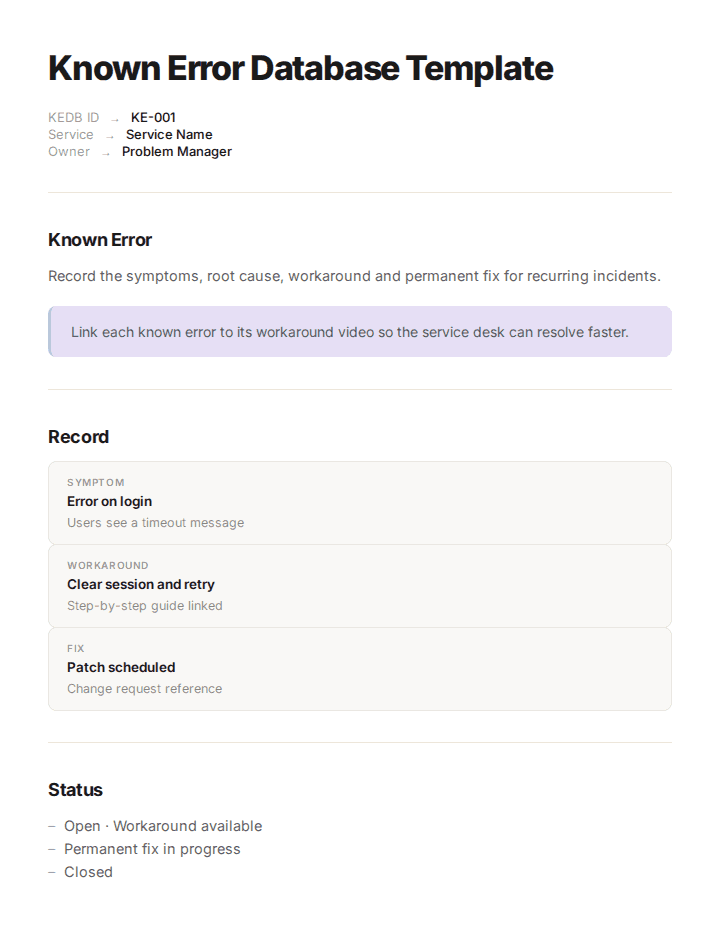
Preview the KEDB template
The template opens with a short governance section: who owns the KEDB, how entries are approved and how often they're reviewed. The main part is the known error record, with fields for ID, title, symptoms, affected service, root cause, workaround, permanent fix and status, plus links to the related problem, incidents and change. A status list and a review log close the template. Every field is editable, so you can match it to your ITSM tool.
How to customize this template in Trupeer
Step 1: Open the Templates Section
Go to the Templates section from the main navigation.

Step 2: Select and Open a Template
Click on any template you want to work with to open it.
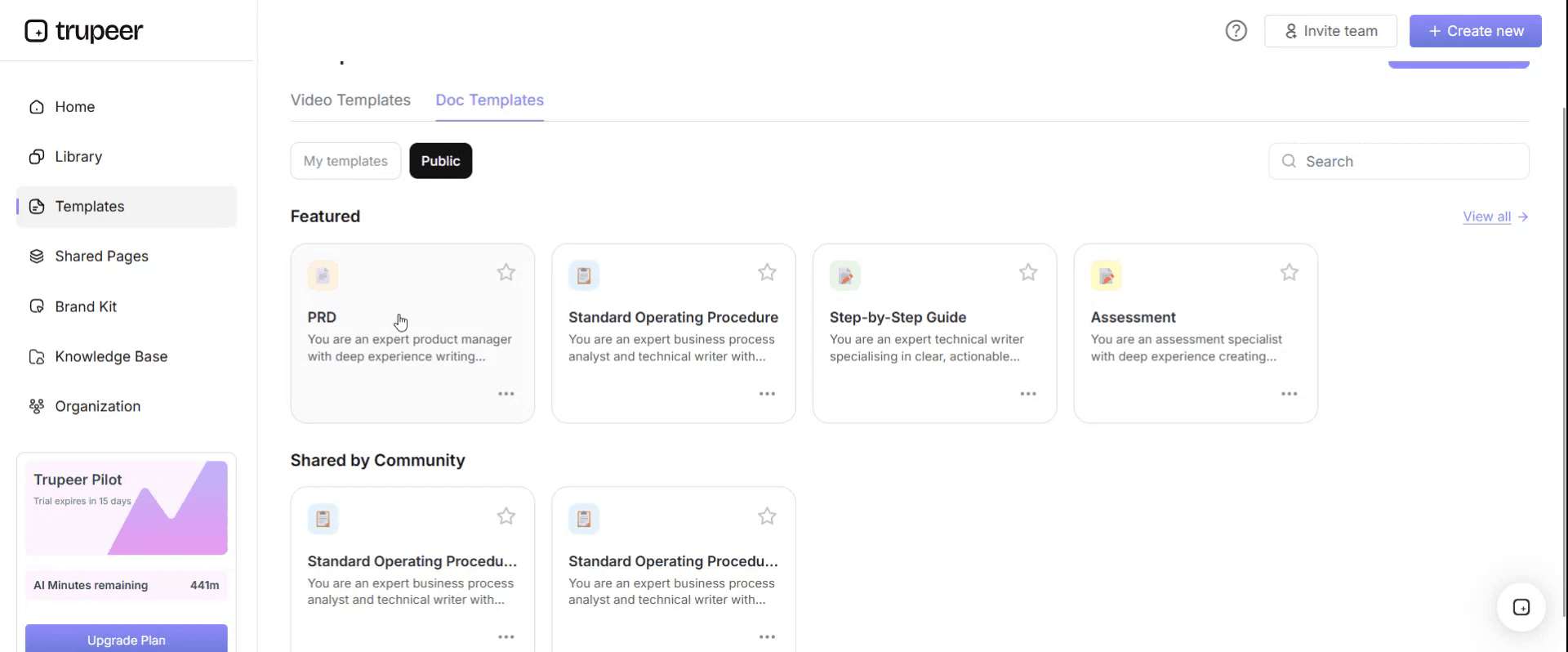
Step 3: Expand the Template View
If needed, expand the template view to see the full layout and details clearly.

Step 4: Edit the Template
Click on Edit to start modifying the selected template.

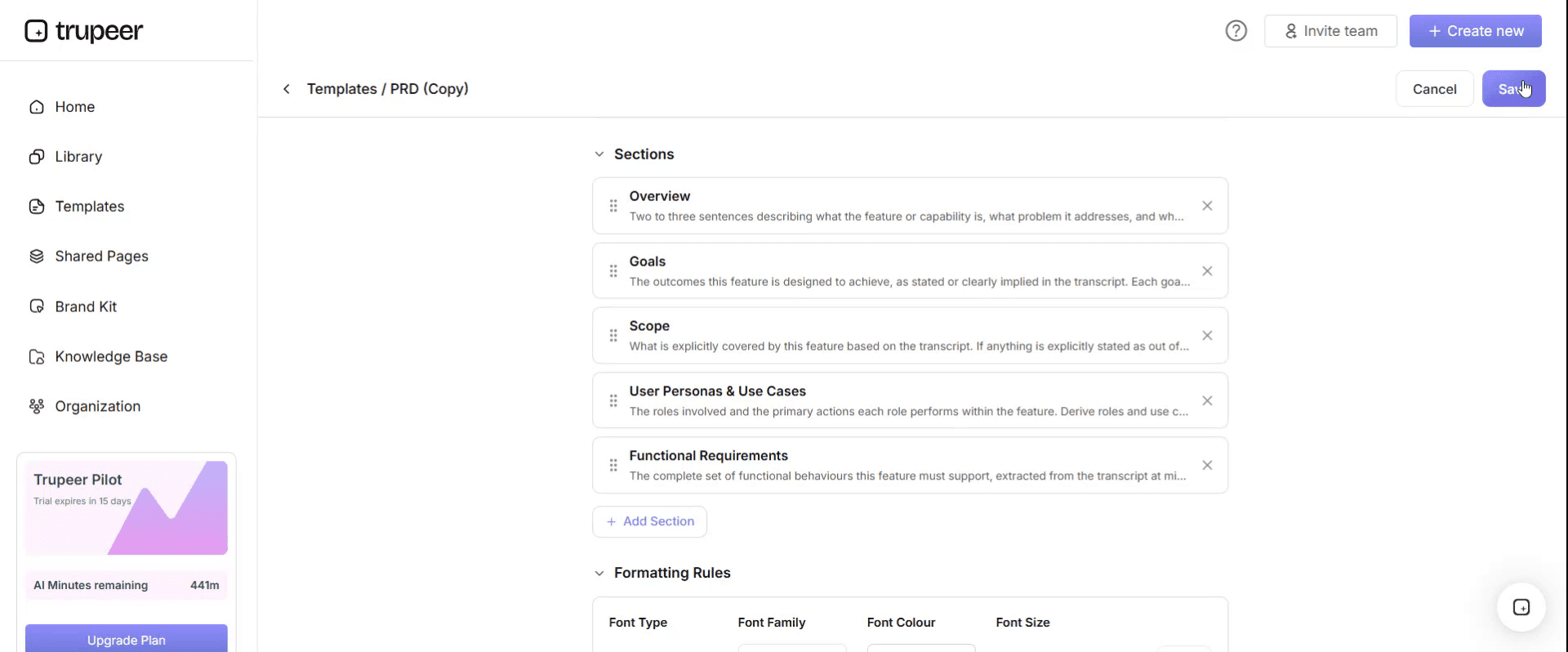
Within the editor, you can:
Add new sections
Define or update formatting rules
Add a logo and adjust its position and related settings
Step 5: Save Your Customized Template
After making all necessary changes, click Save to store the updated template as your own.
Step 6: Preview and Fine-Tune the Template
When you want to see how your customized template looks, open the Preview.

From the preview screen, you can continue to make adjustments directly if needed, ensuring the template appears exactly as you want.
With a KEDB template you can:
Resolve recurring incidents faster: Support staff apply a documented workaround instead of investigating again.
Raise first-time fix rates: First-line agents can handle errors that used to be escalated.
Protect knowledge in transitions: Workarounds held by a few experts become a shared asset.
Stay on-brand: Apply your logo, fonts and colors with Trupeer's brand kit.
Show workarounds, not just describe them: Turn each workaround into a short video walkthrough.
Support audits: Show how recurring problems are identified, tracked and fixed.
What a KEDB template must contain
Each known error record should include these fields. The template below follows the same order.
Known error ID: a unique reference, such as KE-0142.
Title: a short, searchable description of the error.
Symptoms: what users and agents see, including exact error messages.
Affected service or application: the system, module and environment.
Root cause: what causes the error, if known.
Workaround: step-by-step instructions to restore service, with screenshots or a video.
Permanent fix: the planned resolution, the change reference and the target date.
Status: for example, open, workaround available, fix scheduled, resolved, retired.
Related records: problem ID, incident IDs and change ID.
Owner: the person or team responsible for the entry.
Dates: created, last reviewed and resolved.
Search keywords: terms agents are likely to type, including error codes.
Free KEDB template: the structure to copy
Copy the structure below into your own document or ITSM tool, or open it in Trupeer and customize it.
1. Governance. KEDB owner: [problem manager]. Approval: new entries are reviewed by [team] before publication. Review cadence: every entry is reviewed every [X] weeks. Retirement: entries are retired when the permanent fix is deployed and verified.
2. Known error record.
Field | What to enter |
|---|---|
Known error ID | Unique reference, e.g. KE-0142 |
Title | Short, searchable description |
Symptoms | What users see, exact error messages and codes |
Affected service | Application, module, environment |
Root cause | Cause if known, or "under investigation" |
Workaround | Step-by-step steps, with screenshots or a video link |
Permanent fix | Planned resolution, change ID, target date |
Status | Open, workaround available, fix scheduled, resolved, retired |
Related records | Problem ID, incident IDs, change ID |
Owner | Person or team responsible |
Dates | Created, last reviewed, resolved |
Search keywords | Terms and error codes agents will search for |
3. Status definitions.
Status | Meaning |
|---|---|
Open | Error identified, no workaround yet |
Workaround available | Agents can restore service using the documented steps |
Fix scheduled | Permanent fix approved and planned through a change |
Resolved | Fix deployed and verified |
Retired | Entry archived and no longer shown to agents |
4. Review log. Date, reviewer, entries reviewed, entries updated, entries retired.
KEDB example: SAP order-to-cash application support
Here's the template filled in for an illustrative example. An AMS team supports the SAP order-to-cash process for a manufacturing company, Corvane Industrial, and keeps a KEDB for recurring issues.
ID | Title | Workaround | Status |
|---|---|---|---|
KE-0142 | Sales order blocked after credit limit change | Release the order manually in the credit management screen after finance confirms the new limit | Fix scheduled |
KE-0157 | Invoice output not sent to customer email | Re-trigger output from the billing document; check the customer's communication settings | Workaround available |
KE-0163 | Delivery creation fails for split shipments | Create deliveries per shipping point, then merge in the transport | Open |
KE-0142 in full.
Symptoms: sales orders for a customer stay blocked with a credit status message, even after finance has raised the customer's credit limit.
Affected service: SAP SD and FI credit management, production.
Root cause: credit exposure isn't recalculated automatically after a limit change for customers in a specific credit segment.
Workaround: confirm the new limit with finance, open the blocked order in the credit management screen, re-run the credit check and release the order. Video walkthrough linked.
Permanent fix: configuration change to trigger recalculation on limit updates, scheduled for the next release.
Related records: problem PRB-0388, eight incidents in the last month, change CHG-1021.
Owner: AMS order-to-cash lead.
The details in this example are illustrative; replace them with your own applications and records.
How to write a workaround agents can actually follow
The workaround is the field that decides whether a KEDB gets used. A good one lets a first-line agent restore service without escalating:
Start with how to confirm it's this error. List the exact symptoms and error codes, so agents don't apply the wrong workaround.
Write steps, not summaries. One action per step, in order, naming the exact screen, field or command.
Say who can do it. Note any access level, approval or business sign-off needed before the workaround is applied.
State the expected result. Tell the agent what they should see when the workaround has worked.
Include the rollback. If the workaround could make things worse, explain how to undo it.
Add a video. A short recording of the workaround being applied removes most of the ambiguity in written steps.
Say when to escalate. If the workaround doesn't work, tell the agent who to pass it to and what to include.
Where the KEDB fits in problem management
In ITIL-style problem management, the KEDB connects three activities. Problem identification spots recurring incidents and opens a problem record. Problem control analyzes the cause and documents a workaround, at which point the problem becomes a known error and goes into the KEDB. Error control then manages the known error until a permanent fix is deployed through change management, after which the entry is resolved and retired.
That means the KEDB isn't a separate library. It's the visible output of problem management, and the part of it the service desk uses every day.
KEDB for AMS transitions
When application management services move from one provider to another, or from an internal team to a provider, the KEDB is one of the most valuable knowledge transfer artifacts. Most of what makes an experienced AMS team effective is knowing which errors recur, what causes them and which workaround works. If that knowledge isn't captured, the incoming team rediscovers it ticket by ticket, and service levels drop during hypercare.
A transition-ready KEDB is built in four steps:
Harvest from ticket history. Review the last 6 to 12 months of incidents and problems in the ITSM tool to find recurring issues.
Record the workarounds. Ask the incumbent's support engineers to record each workaround on screen while explaining it, so nothing depends on their memory.
Validate during shadowing. When a known error occurs in parallel run, the incoming team applies the documented workaround while the incumbent watches, and the entry is corrected if needed.
Make it an acceptance criterion. Agree that KT for each application isn't complete until its KEDB is reviewed and accepted by the incoming team and the client.
In a vendor-to-vendor AMS transition, the client should own the KEDB, so it survives the next change of provider. For the wider transition method, see our transition SOP template and guides to vendor-to-vendor transition knowledge transfer and the transition hypercare period.
How to build a KEDB from recordings
Writing workarounds by hand is slow, and the result is often a few lines of text that an agent can't follow under pressure. A recording-first approach is faster and clearer.
Record the workaround as it's performed. The engineer who knows the fix records their screen with Trupeer's AI screen recorder while applying it, explaining each step.
Generate the steps automatically. Upload the recording, and Trupeer turns it into a step-by-step document with screenshots, plus a narrated video, using the SOP creator.
Add it to the known error record. Paste the steps into the workaround field and link the video.
Publish it where agents look. Store KEDB entries and videos in a searchable knowledge base, or link them from your ITSM tool.
Translate for global support. Use translation to create workarounds in each support team's language.
Update when the fix changes. Re-record only the step that changed.
The same recording-first approach works at scale. Genpact recorded existing MS Teams process sessions and SME walkthroughs, uploaded them to Trupeer and got back SOPs and demo videos in five languages: more than 500 training collaterals for 140,000 employees in 40 countries, delivered in 3 months instead of 12. Read the Genpact customer story.
KEDB variants by team
The record structure stays the same, but the focus changes:
IT service desk KEDB
Focus on high-volume end-user issues: access, devices, email, VPN and common applications. Keep workarounds short enough for first-line agents, and use search keywords that match how users describe the problem.
SAP and ERP AMS KEDB
Organize entries by module or business process, such as order-to-cash or procure-to-pay. Include transaction codes, configuration references and the business impact, because ERP workarounds often need business approval before they're applied.
Product support known issues database
Link each known issue to a product release and a bug ID. Include customer-facing wording for the workaround, and retire entries when the fixing release ships.
Government and public sector IT KEDB
Public sector IT teams often support legacy systems with long fix cycles and strict change control. Record which approvals a workaround needs, any records or data protection implications, and expected fix dates tied to release windows or budget cycles.
KEDB vs knowledge base vs runbook vs problem record
Document | What it holds | Who uses it |
|---|---|---|
KEDB | Known errors, their workarounds and fix status | Service desk and support engineers |
Knowledge base | All support and how-to articles, not only errors | Agents and end users |
Runbook | Routine operational procedures and responses | Operations and on-call teams |
Problem record | Investigation of a root cause in the ITSM tool | Problem management |
The KEDB is often a section of the wider knowledge base, linked to problem records. See the knowledge base template, runbook template and troubleshooting guide template.
KEDB metrics to track
Metric | Why it matters |
|---|---|
Incidents resolved using a known error | Shows how much the KEDB is actually used |
Time from problem identified to KEDB entry | Shows how quickly knowledge reaches agents |
Open known errors by age | Highlights fixes that are overdue |
Known errors with a permanent fix scheduled | Shows progress on removing root causes |
Entries past their review date | Flags content that may be out of date |
How to set up a KEDB in six steps
Pick an owner, usually the problem manager or support lead.
Agree the record fields and statuses, using the template above.
Seed it from history, starting with the most frequent recurring incidents.
Record each workaround on screen and generate the steps.
Make searching the KEDB part of incident handling, so agents check it before escalating.
Review and retire entries on a fixed cadence and when fixes are deployed.
KEDB checklist
Every recurring incident has a known error record.
Each record has clear symptoms and searchable keywords.
Each workaround has step-by-step instructions, with screenshots or video.
Root cause and permanent fix status are recorded.
Records link to the related problem, incidents and change.
Every entry has an owner and a review date.
Resolved errors are retired so agents don't apply old workarounds.
In a transition, the incoming team has reviewed and accepted the KEDB.
Common mistakes to avoid
Vague workarounds. "Restart the service" isn't enough; agents need the exact steps.
No search keywords. If agents can't find an entry, it doesn't exist for them.
Never retiring entries. Old workarounds applied after a fix can cause new problems.
Keeping the KEDB separate from incident handling. It only works if checking it is part of the process.
Leaving it out of transitions. The KEDB is the knowledge an incoming support team needs most.
Download the free KEDB template
Open the template in Trupeer, apply your brand kit, record your workarounds and share the KEDB with every support team. Get the free KEDB template.
Frequently Asked Questions
What is a known error database (KEDB)?
A KEDB is a repository of known errors: problems whose root cause or workaround has been identified but not yet permanently fixed. It helps support teams resolve recurring incidents quickly by applying documented workarounds.
What is a known error in ITIL?
In ITIL, a known error is a problem that has been analyzed and has a documented root cause, workaround or both, but hasn't yet been permanently resolved.
What fields should a KEDB record include?
Known error ID, title, symptoms, affected service, root cause, workaround, permanent fix, status, related problem, incident and change records, owner, dates and search keywords.
What is the difference between a KEDB and a knowledge base?
A knowledge base holds all support and how-to articles. A KEDB holds only known errors, with their workarounds and fix status, and is often a section of the wider knowledge base.
Who owns the known error database?
Usually the problem manager or support lead. Support engineers create and update entries, and the owner approves them and runs regular reviews.
What is a known error log?
A known error log is another name for a known error database. Some teams use it for a simpler list or spreadsheet of known errors and workarounds.
Why is a KEDB important in an AMS transition?
It captures the recurring issues and workarounds an experienced support team knows. Without it, the incoming AMS team rediscovers each one ticket by ticket, and service levels drop during hypercare.
What is a KEDB example?
A KEDB example is the template filled in with real or illustrative entries. The SAP order-to-cash example on this page shows three records and one full entry, including symptoms, root cause, workaround and fix status.
Is there a KEDB template in Excel?
Excel works well for a simple known error log, with one row per error and columns for each field. For workarounds with many steps, link each row to a document or video.
Is there a KEDB template in Word?
Word suits detailed known error records and the governance section. Open this template in Trupeer and export it, or copy the structure above into Word.
Is there a KEDB template in PDF?
PDF suits a reviewed snapshot of the KEDB shared with a client, auditor or incoming provider. Keep the working KEDB editable so agents always see the latest version.
Is there a KEDB template in Google Docs?
Yes. Copy the structure above into Google Docs or Sheets, or open the template in Trupeer and export it. Google Sheets works well when several support teams update the same log.

