4.8/5
برنامج فيديو للتدريب المؤسسي
انشر بنية تحتية لفيديوهات التدريب عبر مؤسستك بالكامل مع أمان، وقابلية للتوسع، وحوكمة مدمجة.
جرّب مجانًا

تتيح لك برمجيات فيديو التدريب المؤسسي من Trupeer إنشاء مقاطع فيديو تدريب احترافية من تسجيلات شاشة بسيطة باستخدام أتمتة مدعومة بالذكاء الاصطناعي. لا حاجة لمهارات تحرير، ولا لبرامج باهظة الثمن، ولا لتأخيرات الإنتاج.
نشر بنية تحتية لفيديوهات التدريب عبر مؤسستك بالكامل مع ضوابط الحوكمة
تضمن سير عمل الموافقات متعدد المستويات الامتثال ومعايير الجودة قبل النشر
تكامل تسجيل الدخول الموحد (SSO) مع Okta وAzure AD ومزودي الهوية المستندين إلى SAML
تسليم عالمي عبر CDN مع اتفاقية مستوى خدمة SLA لوقت تشغيل بنسبة 99.99% وتعافٍ مؤسسي من الكوارث
تقارير تدقيق شاملة للامتثال التنظيمي والمساءلة عن التدريب
ما هي برمجيات فيديو التدريب المؤسسي؟
برمجيات فيديو التدريب المؤسسي هي برمجيات فيديو تدريب مؤسسية تمكّن الفرق من إنتاج محتوى تدريبي احترافي مباشرةً من تسجيلات الشاشة. وبدلاً من قضاء ساعات في برامج تحرير الفيديو التقليدية، ما عليك سوى تسجيل شاشتك، ويتولى الذكاء الاصطناعي جميع مراحل ما بعد الإنتاج — إضافة تأثيرات التكبير، والتعليقات التوضيحية، والانتقالات، والترجمات، والعلامة التجارية تلقائيًا. والنتيجة هي فيديو تدريبي مصقول وجاهز للمشاركة خلال دقائق.
كيف تعمل برمجيات فيديو التدريب المؤسسي؟
تم تصميم العملية لتكون بسيطة قدر الإمكان حتى يتمكن أي شخص في فريقك من إنشاء مقاطع فيديو تدريب احترافية.
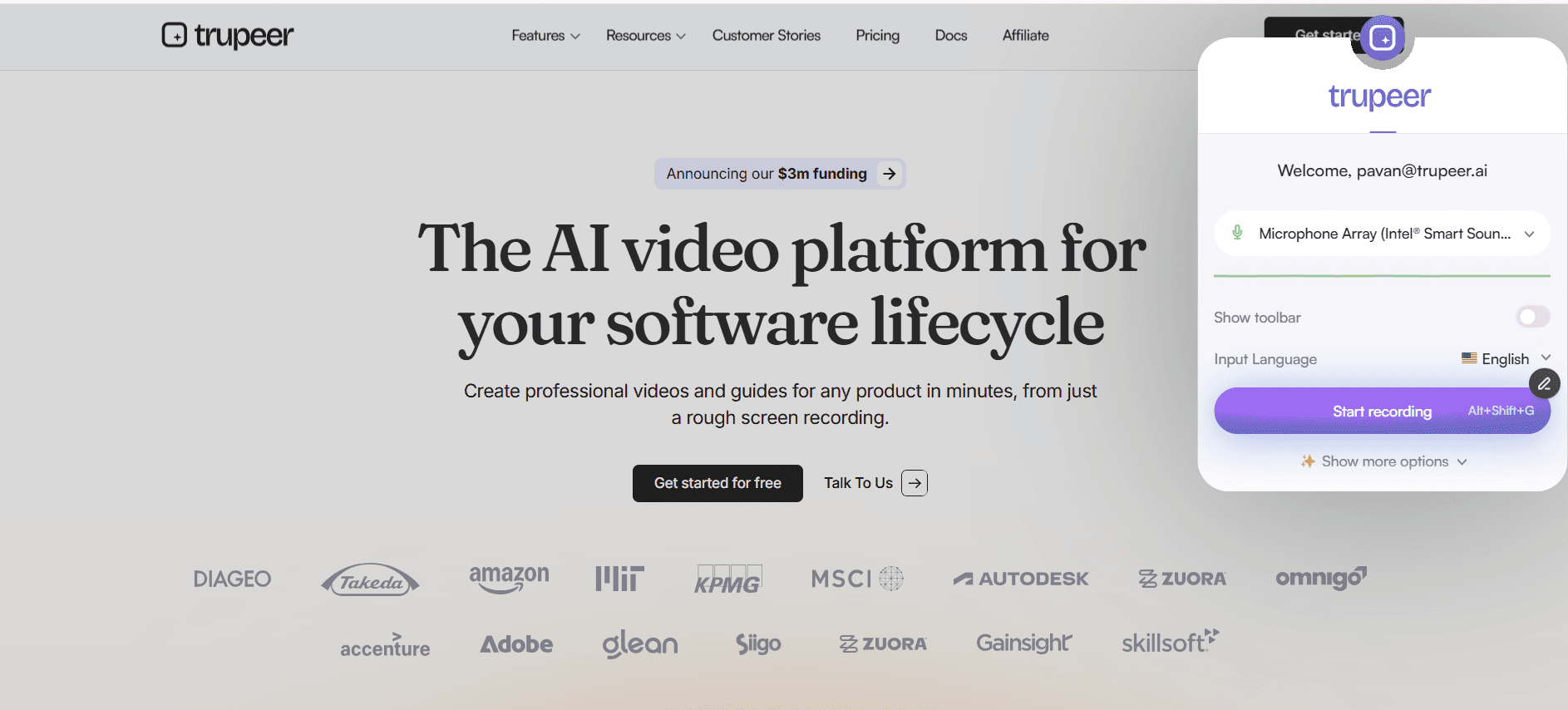
الخطوة 1: سجّل شاشتك
ثبّت إضافة Trupeer لمتصفح Chrome وانقر على تسجيل. التقط أي سير عمل أو عرض توضيحي لعملية أو جولة تعريفية ببرنامج مباشرةً من متصفحك. سجّل شرحك أثناء العمل أو أضف تعليقًا صوتيًا لاحقًا.
الخطوة 2: يعزّز الذكاء الاصطناعي تسجيلك
بمجرد إيقاف التسجيل، تعالج محرك الذكاء الاصطناعي الفيديو تلقائيًا. يطبّق تأثيرات تكبير ذكية، ويضيف تعليقات توضيحية ونداءات، ويولّد فصولًا، وينشئ ترجمات، ويزيل فترات الصمت، ويطبّق تنسيق علامتك التجارية — وكل ذلك من دون أي إدخال يدوي.
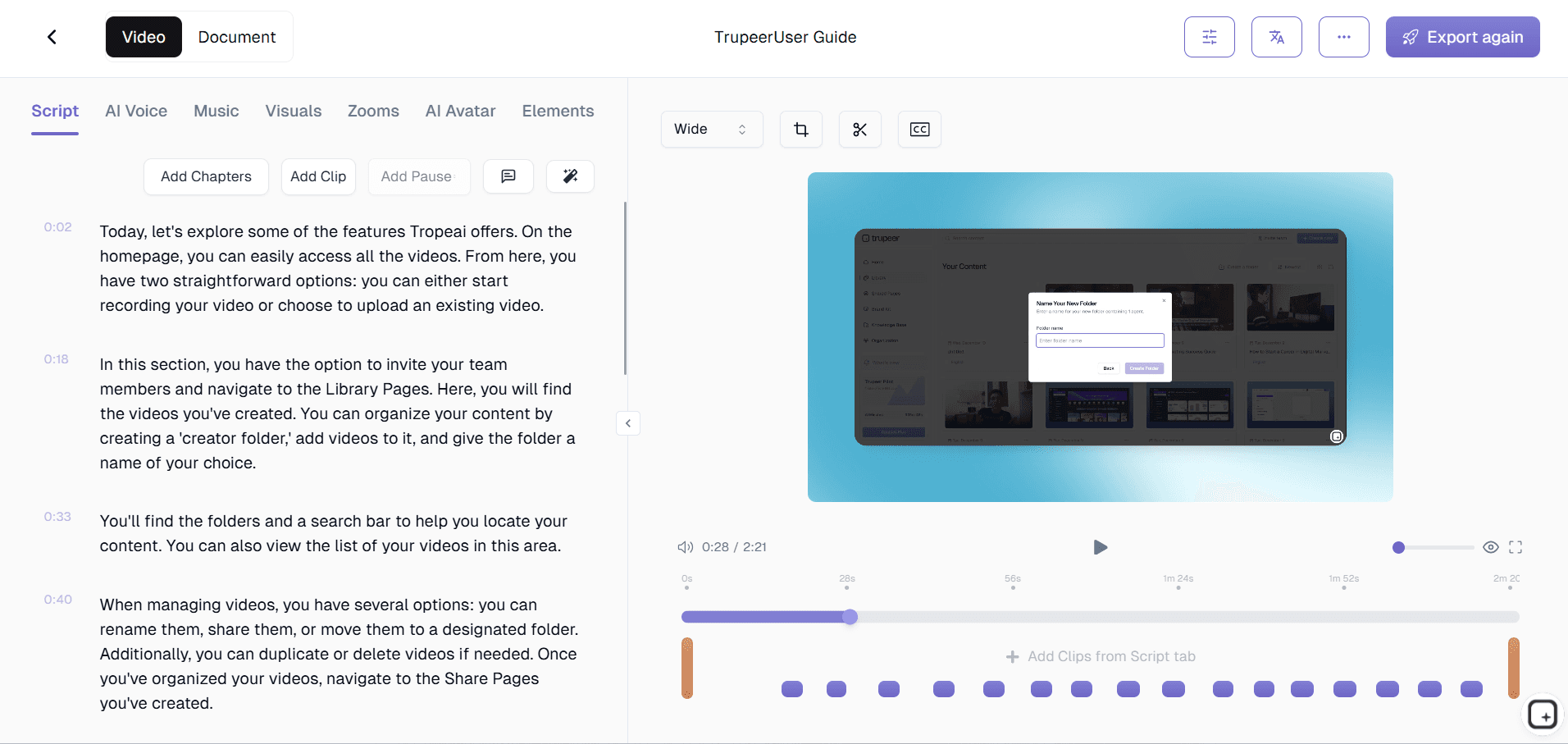
الخطوة 3: انشر وشارك
راجع النتيجة التي صقلها الذكاء الاصطناعي، وأجرِ أي تعديلات اختيارية، وشارك عبر رابط أو رمز التضمين أو التصدير. يمكنك أيضًا استخدام منشئ أدلة العمليات لإنشاء توثيق مكتوب من التسجيل نفسه.

الميزات الرئيسية لبرمجيات فيديو التدريب المؤسسي
إطار عمل حوكمة متعدد المستويات: حدِّد سير عمل الموافقات على مستوى الشركة، والقسم، والإدارة، والفريق. لكل مستوى متطلبات مراجعة خاصة به؛ فقد يتطلب تدريب الامتثال مراجعة قانونية، بينما لا يحتاج توثيق الفريق إلا إلى موافقة المدير. تمنع مسارات التصعيد حدوث الاختناقات، وتسجّل سجلات التدقيق كل إجراء لتحقيق الشفافية والمساءلة.
إدارة الهوية والوصول للمؤسسات: التكامل عبر SAML 2.0 وOAuth 2.0 وLDAP والاتصالات المباشرة مع Okta وAzure AD وPing Identity وGoogle Workspace. تتولى SCIM توفير المستخدمين وإلغاء توفيرهم تلقائيًا. تضمن المصادقة متعددة العوامل والتحكم المخصص في الوصول القائم على الأدوار الأمان من دون عبء إداري إضافي.
النشر العالمي والتوطين: انشر عبر المكاتب العالمية مع تسليم محسّن عبر CDN في أكثر من 190 دولة. يدعم توطين الواجهة أكثر من 40 لغة. تتم ترجمة المحتوى التدريبي تلقائيًا أو عبر سير عمل ترجمة مدمج. تسمح المكتبات الخاصة بكل منطقة للمكاتب بالحفاظ على تدريب محلي بينما تحتفظ الشركة بالمعايير العالمية.
قدرات متقدمة للامتثال والتدقيق: تتبّع الإكمال على مستوى كل فيديو وكل طابع زمني. أنشئ تقارير تدقيق تُظهر من شاهد ماذا ومتى ونتائج التقييم. تنشئ التوقيعات الرقمية على الإقرار سجلات إتمام قابلة للدفاع عنها. تتوافق سير عمل إعادة الاعتماد التلقائية وسياسات الاحتفاظ القابلة للتكوين مع الالتزامات التنظيمية.
لماذا تختار Trupeer لبرمجيات فيديو التدريب المؤسسي؟
السرعة: انتقل من التسجيل إلى فيديو تدريبي مصقول خلال دقائق لا أيام. تلغي أتمتة الذكاء الاصطناعي عنق الزجاجة في الإنتاج الذي يؤخر تسليم محتوى التدريب.
إمكانية الوصول: يمكن لأي شخص في فريقك إنشاء مقاطع فيديو تدريب احترافية بغض النظر عن مهاراته التقنية. لا حاجة إلى خبرة في تحرير الفيديو.
الاتساق: تضمن الأتمتة المدعومة بالذكاء الاصطناعي أن يلبّي كل فيديو تدريبي معايير الجودة والعلامة التجارية نفسها، بغض النظر عمّن أنشأه في فريقك.
الكفاءة من حيث التكلفة: ألغِ الحاجة إلى محرري الفيديو وفرق الإنتاج وتراخيص البرامج الباهظة. أداة واحدة تتولى التسجيل والتحرير والتوزيع.
برمجيات فيديو التدريب المؤسسي للفرق الداخلية
1. تستخدم الفرق الداخلية في المؤسسات هذه البرمجيات لإنشاء محتوى تدريبي ضمن إطار من الحوكمة يضمن الجودة والامتثال واتساق العلامة التجارية في المؤسسة بأكملها.
2. تعمل مبادرات التدريب على مستوى القسم بشكل مستقل داخل المنصة، بينما تحافظ فرق التعلم والتطوير المؤسسية على الإشراف من خلال لوحات معلومات مركزية وتطبيق السياسات.
3. يساهم خبراء الموضوع الداخليين في مكتبة التدريب عبر سير عمل منظّم يمرر محتواهم عبر عمليات المراجعة والموافقة المناسبة قبل النشر.
4. تُسهّل برامج التدريب المشتركة بين الأقسام عبر مكتبات فيديو مشتركة مع عناصر تحكم دقيقة في الوصول تضمن رؤية الموظفين للمحتوى المناسب مع حماية المواد الحساسة.
برمجيات فيديو التدريب المؤسسي لفرق SaaS
1. تستخدم شركات SaaS المؤسسية هذه المنصة لتقديم تدريب احترافي لأكبر عملائها، مع بوابات مخصصة بعلامة تجارية وتكامل SSO لكل حساب مؤسسي.
2. يُنظَّم تدريب المنتجات لمنتجات SaaS المؤسسية المعقدة في مسارات تعلم منظمة ترشد العملاء عبر التنفيذ والتكوين والاستخدام المتقدم بصورة منهجية.
3. تُدار تدريبات فرق SaaS الداخلية على نطاق مؤسسي عبر المنصة مع الوصول القائم على الأدوار وتتبع الامتثال والتكامل مع أنظمة HRIS وأنظمة إدارة الأداء الخاصة بالشركة.
4. يتوقع عملاء SaaS المؤسسي بنية تحتية للتدريب تضاهي احترافية المنتج نفسه وأمانه، وتقدّم هذه المنصة هذا المستوى باستمرار.
برمجيات فيديو التدريب المؤسسي للشركات الناشئة
1. تستخدم الشركات الناشئة في مراحلها المتأخرة والمستعدة للمبيعات المؤسسية هذه البرمجيات لبناء بنية تحتية للتدريب تُظهر نضجًا تنظيميًا واستعدادًا لمتطلبات العملاء المؤسسيين.
2. تعتمد الشركات الناشئة التي تدخل الصناعات الخاضعة للتنظيم برمجيات التدريب المؤسسي مبكرًا لإنشاء أطر تدريب الامتثال التي يطلبها المنظمون والعملاء المؤسسيون.
3. تعني قابلية توسع المنصة أن الشركات الناشئة يمكنها البدء بنشر صغير والتوسع إلى نطاق مؤسسي كامل مع نموها، من دون الاضطراب الناتج عن ترحيل المنصات.
4. توفر ميزات الأمان والامتثال بمستوى المؤسسات لفرق المبيعات الناشئة الثقة عند الرد على استبيانات أمن المشتريات المؤسسية وتقييمات المورّدين.
برمجيات فيديو التدريب المؤسسي للمؤسسات
1. تعد المؤسسات الكبيرة الجمهور الأساسي لهذه البرمجيات، وهي مصممة خصيصًا للتعامل مع متطلبات الحجم والأمان والحوكمة والامتثال لدى المؤسسات التي تضم آلاف الموظفين.
2. تجعل قدرات النشر العالمي مع تسليم المحتوى الإقليمي ودعم اللغات المتعددة وميزات الامتثال الخاصة بكل دولة هذه المنصة مناسبة لأعقد عمليات النشر المؤسسية الدولية.
3. يضمن التكامل مع منظومة تقنيات المؤسسة — بما في ذلك HRIS وLMS وSSO وأدوات BI ومنصات التواصل — أن تتكامل منصة فيديو التدريب بسلاسة في سير العمل الحالية.
4. تقدّر فرق المشتريات المؤسسية شهادة SOC 2 الخاصة بالمنصة، والامتثال لـGDPR، واتفاقيات معالجة البيانات، والقدرة على تلبية متطلبات الأمان المخصصة من خلال اتفاقيات مستوى خدمة SLA بمستوى المؤسسات.
برمجيات فيديو التدريب المؤسسي للفرق عن بُعد
1. تتلقى الفرق المؤسسية العاملة عن بُعد تجربة تدريب منظمة وخاضعة للحوكمة نفسها التي يحصل عليها الموظفون في المكتب، مع ضمان المنصة لتكافؤ الوصول إلى التدريب والتتبع عبر جميع مواقع العمل.
2. يضمن CDN العالمي أن يتمتع الموظفون البعيدون حول العالم بتشغيل فيديو سريع وموثوق بغض النظر عن موقعهم أو جودة اتصالهم بالإنترنت.
3. يتم تتبع تدريب الامتثال للموظفين عن بُعد والإبلاغ عنه بنفس الصرامة المعتمدة للتدريب داخل الموقع، بما يلبّي متطلبات الحوكمة المؤسسية لإدارة القوى العاملة الموزعة.
4. تُوزَّع سياسات العمل عن بُعد المؤسسية وبروتوكولات الأمان وإرشادات التواصل عبر المنصة ويتم تتبعها، مما يضمن فهمًا متسقًا عبر المؤسسة الموزعة.
برمجيات فيديو التدريب المؤسسي للمطورين
1. تستخدم فرق التطوير المؤسسية المنصة لتقديم تدريب تقني آمن وخاضع للحوكمة يلبّي متطلبات أمن المعلومات المؤسسية عند التعامل مع تفاصيل الشيفرة والبنية المعمارية الخاصة.
2. يتم تأهيل المطورين في المؤسسات بشكل منهجي عبر المنصة مع مسارات تعلم منظمة وتتبع التقدم والتكامل مع أدوات إدارة الهندسة.
3. يتم تقديم تدريب الأمان للمطورين، بما في ذلك ممارسات الترميز الآمن وإدارة الثغرات والاستجابة للحوادث، وتتبعُه عبر إطار تدريب الامتثال في المنصة.
4. تُحفظ في المنصة تدريبات مراجعة البنية المعمارية وتوثيق التصميم التقني مع التحكم في الإصدارات وقيود الوصول المناسبة لحماية الملكية الفكرية المؤسسية.
برمجيات فيديو التدريب المؤسسي لفرق الإعداد & الدعم
1. تعالج برامج التأهيل المؤسسي المقدمة عبر هذه المنصة تعقيد التأهيل متعدد الأدوار ومتعدد الأقسام ومتعدد المواقع من خلال مسارات منظمة وتعيينات تلقائية.
2. تستخدم فرق الدعم في المؤسسات المنصة للحفاظ على برامج تدريب الوكلاء المعتمدة مع تتبع الإكمال وإعادة الاعتماد الدورية والتحقق من ضمان الجودة.
3. تضمن قدرات تتبع الامتثال في المنصة أن يكتمل كل متطلب من متطلبات التأهيل — من سياسات الشركة إلى التدريب التنظيمي — ويتم توثيقه لأغراض التدقيق.
4. تستخدم فرق الدعم المؤسسية التي تخدم العملاء العالميين قدرات المنصة متعددة اللغات لتقديم تدريب متسق لوكلاء الدعم في كل منطقة وكل لغة.
الميزات الرئيسية
سير العمل الخاضعة للحوكمة
تضمن سير عمل الموافقة متعدد الخطوات أن تفي مقاطع الفيديو التدريبية بمعايير الجودة والامتثال قبل النشر.
تكامل تسجيل الدخول الموحد
تكامل سلس مع موفري الهوية المؤسسية بما في ذلك Okta وAzure AD وSSO المستند إلى SAML.
تقارير التدقيق
أنشئ تقارير تدقيق جاهزة للامتثال توضح من شاهد ماذا، ومتى، ولفترة كم من الوقت.
انشر مقاطع فيديو التدريب المؤسسية في 3 خطوات
الخطوة 1
سجّل محتوى التدريب الخاص بك
الخطوة 2
مولد فيديو بالذكاء الاصطناعي للتدريب ينتج
الخطوة 3
مشاركة التدريب المهني
الأسئلة الشائعة
ما الشهادات الأمنية التي تمتلكها المنصة؟
المنصة متوافقة مع SOC 2 Type II، وتدعم تشفير البيانات أثناء التخزين وأثناء النقل، وتلبي متطلبات GDPR وHIPAA لحماية بيانات المؤسسات.
هل يمكننا نشر هذا محليًا؟
نعم. يوفر Trupeer كلاً من خيارات النشر السحابي والمحلي للمؤسسات التي لديها متطلبات صارمة بشأن إقامة البيانات أو الأمان.
كيف يمكن توسيع هذا ليشمل آلاف الموظفين؟
تم تصميم المنصة لتناسب نطاق المؤسسات مع تسليم مدعوم بشبكة CDN، وبنية تحتية تتوسع تلقائيًا، ودعم لعدد غير محدود من المشاهدين المتزامنين عبر المكاتب العالمية.
هل يمكن أن تمتلك الأقسام المختلفة مكتبات فيديو منفصلة؟
نعم. يمكنك إنشاء مكتبات أقسام معزولة مع ضوابط وصول مستقلة، وهوية بصرية، وسياسات حوكمة، مع الحفاظ على الإشراف المركزي.
ما نوع الدعم المشمول لعملاء المؤسسات؟
تتضمن خطط المؤسسات إدارة حسابات مخصصة، ودعمًا ذا أولوية على مدار الساعة طوال أيام الأسبوع، وبرامج تهيئة مخصصة، وضمانات توفر مدعومة باتفاقية مستوى الخدمة (SLA).


