Trupeer Blog
Özetle
Jake thought the software implementation was handled. Tool selected, kickoff done, timelines locked. Easy win. By week two, the ops team was still clinging to the old platform, no one had touched the training hub, and every meeting turned into a troubleshooting session.
Welcome to software rollout reality. Software implementation has less to do with the tool and more to do with how people use it. Skip the human side, and even the best platform falls flat.
This guide lays out the software implementation process in eight practical steps, from planning to hypercare, to help you roll out new software without losing momentum, clarity, or your team’s trust.
What Is Software Implementation?
Software implementation is the process of introducing new software into an organisation so that people use it to do their work. It covers planning, configuration, integration, data migration, testing, training, go-live and support until the software is fully adopted.
In an enterprise, implementation is as much an organisational change as a technical one. A new ERP, CRM or HR system changes how hundreds or thousands of people work, which is why most implementations succeed or fail on adoption rather than on the software itself.
Software Implementation vs Deployment vs Rollout
The three terms overlap, but they describe different parts of the work:
Term | What it means | Main focus | Who leads it |
|---|---|---|---|
Implementation | The whole programme of bringing new software into use, from planning to adoption | Business outcomes and adoption | Programme or project manager with business owners |
Deployment | The technical act of installing, configuring and releasing the software into an environment | The system working correctly | IT and the vendor or partner |
Rollout | Making the software available to users, often in phases by team, region or role | Users switching to the new system | Project team with change and training leads |
In short, deployment gets the software running, the rollout gets it to people, and implementation covers everything needed for the business to get value from it.
How MTX Group scaled global training content across 4 regions
MTX Group, a global technology consulting firm, runs projects across the US, Canada, Latin America, Asia-Pacific and Europe. Before Trupeer AI, a single 10–15 minute training video often needed two consultants and multiple takes, a full content set took days, and multilingual versions in Spanish and regional English dialects meant duplicating the effort every time.
Now team members record workflows on their own, with no second person and no retakes, and Trupeer AI handles multilingual output natively. Teams have expanded beyond training to UAT walkthroughs that let clients test independently, delivery lifecycle documentation and partner enablement materials.
In the first month, MTX teams created 100+ videos and 110 documents across 12+ active projects on five continents, reducing live support calls and giving clients self-service materials.
“Trupeer turned what used to take days into minutes. Our teams across every region can now produce consistent, high-quality content independently.”
— Jakub Novak, Co-Founder and Vice President, MTX Group
Read the full MTX Group story →
Step #1: Define Goals and Success Metrics
Most organizations make the same critical mistake when planning their software implementation: they focus on what the software can do instead of what they need it to accomplish. This backwards approach explains why so many expensive tools end up abandoned after a few months of lackluster adoption.
Start with outcomes
Identify the specific business outcomes you want to achieve. Generic goals like ‘improve productivity’ won’t cut it. You must define specific, measurable targets:
Reduce customer support tickets from 500 to 300 monthly
Decrease onboarding time from 14 days to 5 days
Increase sales conversion rates from 15% to 22%
These concrete metrics become your North Star throughout the entire software implementation process. They help you make decisions about features, training and development priorities, and resource allocation. More importantly, they give your team something tangible to work toward and celebrate when achieved.
💡 Pro Tip: Document these goals in a shared format that stakeholders can reference throughout your implementation plan. Hidden objectives buried in forgotten folders don’t drive results.
Track what matters
Your success metrics should span three critical areas that determine long-term adoption success:
User adoption metrics reveal how quickly people embrace the new software through login rates, feature utilization, and time-to-competency measurements
Business impact metrics show whether the technology delivers promised value through revenue growth, cost savings, or customer satisfaction improvements
Operational metrics track efficiency gains like reduced support tickets, shorter training times, and fewer user errors
Step #2: Build Your Implementation Team
Software implementation isn't a solo mission. You need people who understand technology, people who understand your business processes, and people who can bridge the gap between them.
Who should be involved
Your dream team needs three types of people:
Technical experts handle the nuts and bolts. Your IT team knows your infrastructure, security requirements, and integration challenges. They'll tell you if your bright idea will work in your environment
End users are the people who'll live in this software every day. Pick representatives from each department who aren't afraid to speak up about problems. These folks will spot usability issues that technical experts miss
Change managers smooth the human side of software adoption. They create communication plans, address resistance, and help people embrace new ways of working. Don't underestimate this role; great software fails when people refuse to use it
The importance of cross-functional collaboration
Each group speaks a different language. IT talks about APIs and server capacity. Users talk about their daily workflows and pain points. Change managers talk about adoption curves and communication strategies Your job as the implementation leader is to translate between these groups. When IT says ‘the system can handle 1000 concurrent users,’ help them understand what that means for the sales team during their busy season. When users say ‘this takes too many clicks,’ help IT understand the efficiency impact.
Regular cross-functional meetings prevent surprises. Schedule weekly check-ins where each group shares updates, concerns, and blockers. This creates accountability and catches problems early. For eg If you're working with a software development agency in eastern europe, which speaks a different language, make sure they’re also included in these syncs to stay aligned with both technical and business needs.
Step #3: Create an Implementation Plan
A good plan turns overwhelming projects into manageable chunks. Your implementation plan should read like a recipe that anyone on your team can follow.
For an ERP implementation plan, add two things most software plans skip: a data migration workstream and a cutover plan. A SaaS implementation plan is usually lighter, but it still needs owners, milestones and a training date.
Build realistic milestones and timelines
Break your implementation into phases that deliver value along the way. Maybe Phase 1 focuses on basic functionality for your power users, Phase 2 adds advanced features, and Phase 3 includes nice-to-have integrations.
Each milestone should answer three questions:
What specific functionality will be ready?
Which users can start benefiting?
How will we measure success at this stage?
💡 Pro Tip: Add buffer time to your timeline. Software implementation always takes longer than expected because you'll discover requirements you didn't know you had. A good rule of thumb: take your initial estimate and add 25% for unexpected complications.
Create comprehensive training content and documentation
Your training materials need to meet people where they are. Some learn best from videos, others prefer written instructions, and some want hands-on practice sessions.
Plan different types of content for different audiences:
Quick reference guides for experienced users who just need the basics
Detailed video walkthroughs for complex workflows
Interactive tutorials for hands-on learners
FAQ documents that address common confusion points
Modern AI tools can dramatically speed up your planning process. You can generate initial project timelines, create training outlines, or even draft user documentation. These tools won't replace human judgment, but they'll give you solid starting points instead of blank pages.
On ERP projects, ERP implementation documentation does double duty. The same process guides feed testing, training and support after go-live.
🎥 Trupeer Insight: Turn every internal software tutorial into a training resource without the extra work. With Trupeer, all you need is a screen recording. Artificial intelligenceI takes care of the rest, turning it into detailed, easy-to-follow documentation so you’re not stuck building guides for weeks.
Save Time on Documentation Using Trupeer
Step #4: Prepare Your Infrastructure
Your shiny new software needs a solid foundation to run on. Infrastructure preparation often gets rushed because it's not as exciting as exploring features, but skipping this step leads to performance problems and frustrated users.
Hardware and system requirements
Review your software's technical requirements against your current infrastructure. Does your network have enough bandwidth for video calls if you're implementing collaboration software? Do your computers have enough processing power for resource-intensive applications?
🚨 Fact Alert: Many companies use parallel runs during implementation—running the old and new systems side by side to catch problems before fully switching over.
Integration planning and permissions
Most software doesn't exist in isolation. Your new CRM needs to talk to your email system, accounting software, and maybe your website. Map out these integration points early and test them thoroughly.
Permission setup requires careful thought. You want people to access what they need without opening security vulnerabilities. Create user roles that match your organizational structure, then test them to make sure the permissions make sense in practice.
Test environment setup
Set up a sandbox environment that mirrors your production setup. This gives you a safe place to experiment, train users, and work out kinks without affecting your live systems, Your test environment should use realistic data to uncover real-world issues and tools like testRigor can help validate workflows before rollout.
Your test environment should include real data (anonymized, if necessary) so you can spot issues that only surface with actual usage patterns. Clean, perfect test data rarely reveals the messy reality of daily operations.
Step #5: Train Your Team
Training makes or breaks software implementation. You can have the most powerful software in the world, but if people don't know how to use it effectively, you've just created an expensive paperweight.
The problem isn't that people don't want to learn, it's that most training programs are boring, irrelevant, or overwhelming. Long PDF manuals gather digital dust. Generic training videos don't address your specific workflows. One-size-fits-all approaches ignore the fact that different roles need different information.
Video walkthroughs beat lengthy documentation
People learn faster from watching than reading, especially for software training.
Good training videos focus on real scenarios your team faces daily. Instead of explaining every feature, walk through complete workflows from start to finish so people understand not just what to click, but why. To make it richer and more helpful, you can screen record with sound, capturing not only the visuals of the process but also your voice explaining each step.
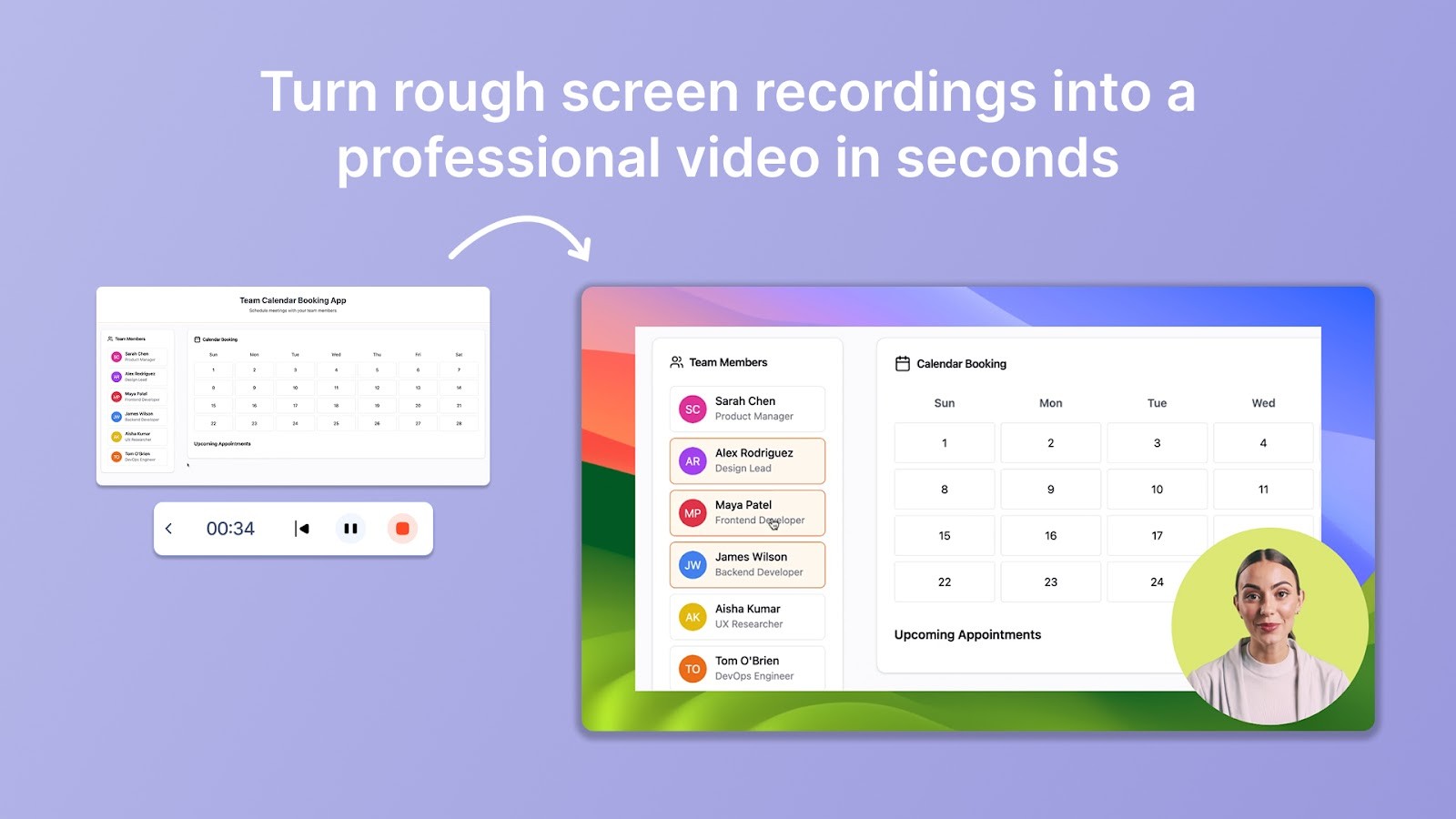
Trupeer transforms screen recordings into polished training materials automatically. You can record yourself walking through processes, then the AI generates professional voiceovers, zooms in on important steps, and adds captions for accessibility.
For example, if you're implementing a new project management tool, record yourself creating a project, assigning tasks, setting deadlines, and generating reports. Trupeer will automatically highlight mouse clicks, zoom in when you're filling out forms, and create smooth transitions between steps.
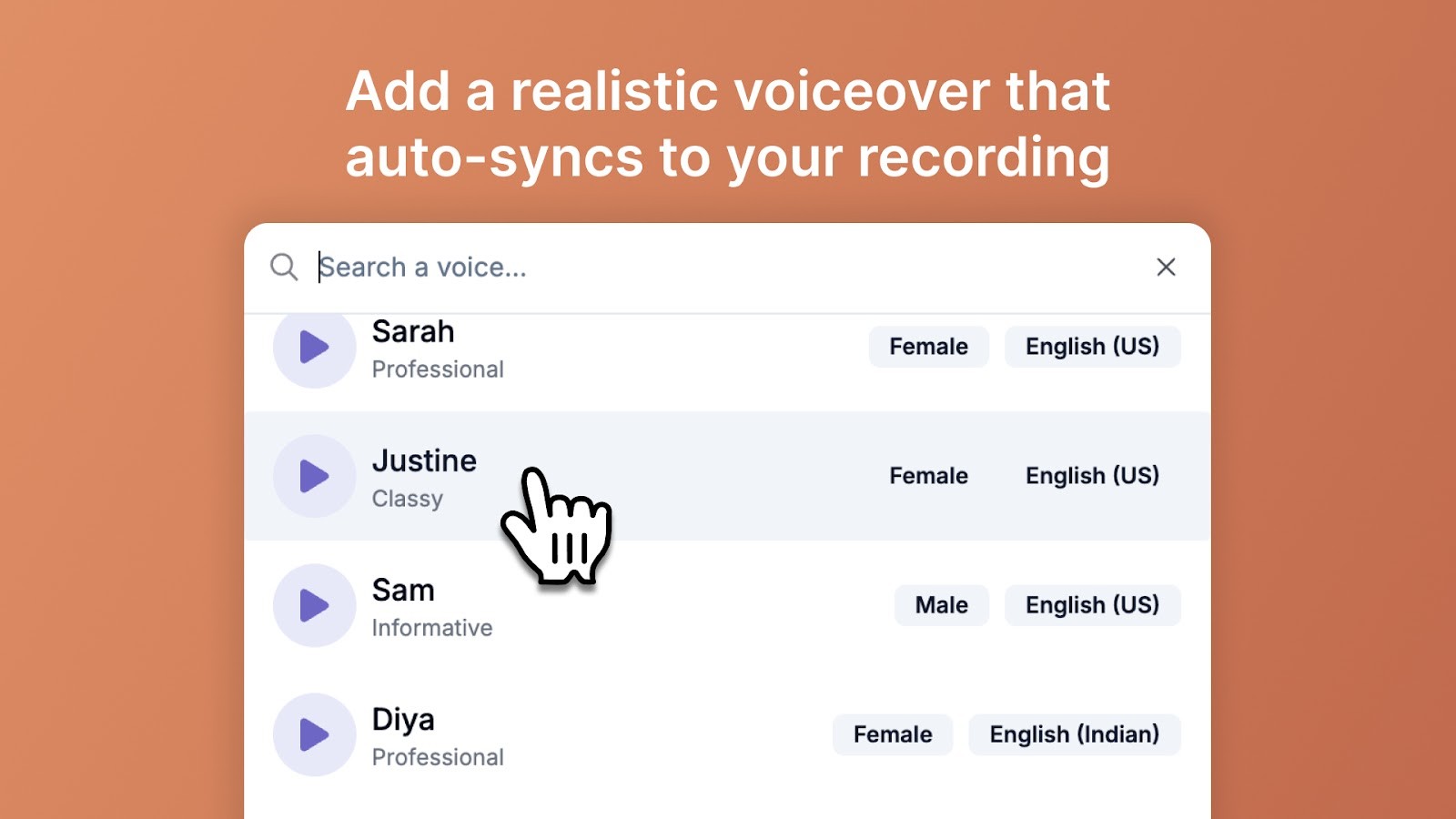
The AI voiceover feature means you don't need recording equipment or narration skills. Just record your screen, and Trupeer creates clear, professional audio that guides viewers through each step.
💡 Pro Tip: Record separate videos for different user roles. Your sales team needs to know different features than your accounting team, and role-specific training feels more relevant and actionable.
Step #6: Run a Pilot Rollout
Pilot programs let you test your implementation plan in the real world without betting everything on untested assumptions.
Choose the right pilot group
Your pilot users should represent your broader user base but be willing to deal with occasional hiccups. Look for people who are influential in their departments but also patient enough to provide constructive feedback.
Avoid choosing only your most tech-savvy users—they'll miss usability issues that average users will encounter. Similarly, don't choose only the people who resist change, or you'll get overly negative feedback that doesn't reflect typical adoption challenges.
Gather feedback and iterate quickly
Create structured feedback channels so you capture specific, actionable information. Generic surveys asking ‘How was your experience?’ generate generic answers that don't help you improve.
Instead, ask targeted questions:
Which tasks took longer than expected and why?
What information did you need that wasn't readily available?
Where did you get stuck or confused?
What workarounds did you create?
💡 Pro Tip: When pilot users encounter problems, ask them to record their screens while explaining the issue with Trupeer’s AI Screen Recorder. This gives you much richer information than written bug reports or phone descriptions. You can then use these recordings to create targeted help content. If three people struggle with the same workflow, that's a sign you need better training or process interface improvements.
Capture Issues Clearly With Trupeer
Step #7: Full Rollout and Communication
Your pilot went well, you've fixed the major issues, and now you're ready for the big reveal. Full rollout is about momentum, communication, and making sure nobody gets left behind.
Launch strategy for wider audiences
Roll out in waves rather than flipping a switch for everyone at once. This gives you manageable support volumes and lets you refine your processes between groups.
Consider grouping rollout waves logically:
Start with departments that were part of your pilot program
Move to departments with similar workflows
Finish with teams that have the most complex requirements
Each wave should feel like a celebration, not a disruption. People are watching to see how their colleagues react, so make sure early adopters have positive experiences to share.
🚨 Fact Alert: The most expensive software implementation failure in history is often credited to the U.S. Air Force’s Expeditionary Combat Support System project. It was scrapped after spending just over $1 billion.
Internal communication and announcements
Your communication strategy needs to reach people through multiple channels and answer the questions they're asking. Explain what’s changing, why it's changing, and what's in it for them.
Create different messages for different audiences. Executives want to know about ROI and strategic benefits. End users want to know how this affects their daily work and when they need to start using the new system.
Provide on-demand training resources
People learn at different paces and need refreshers at different times. Create a library of training resources that people can access when they need help.
Your resource library should include quick start guides, detailed workflow videos for complex processes, troubleshooting user guides for common issues, and feature discovery content for advanced capabilities.
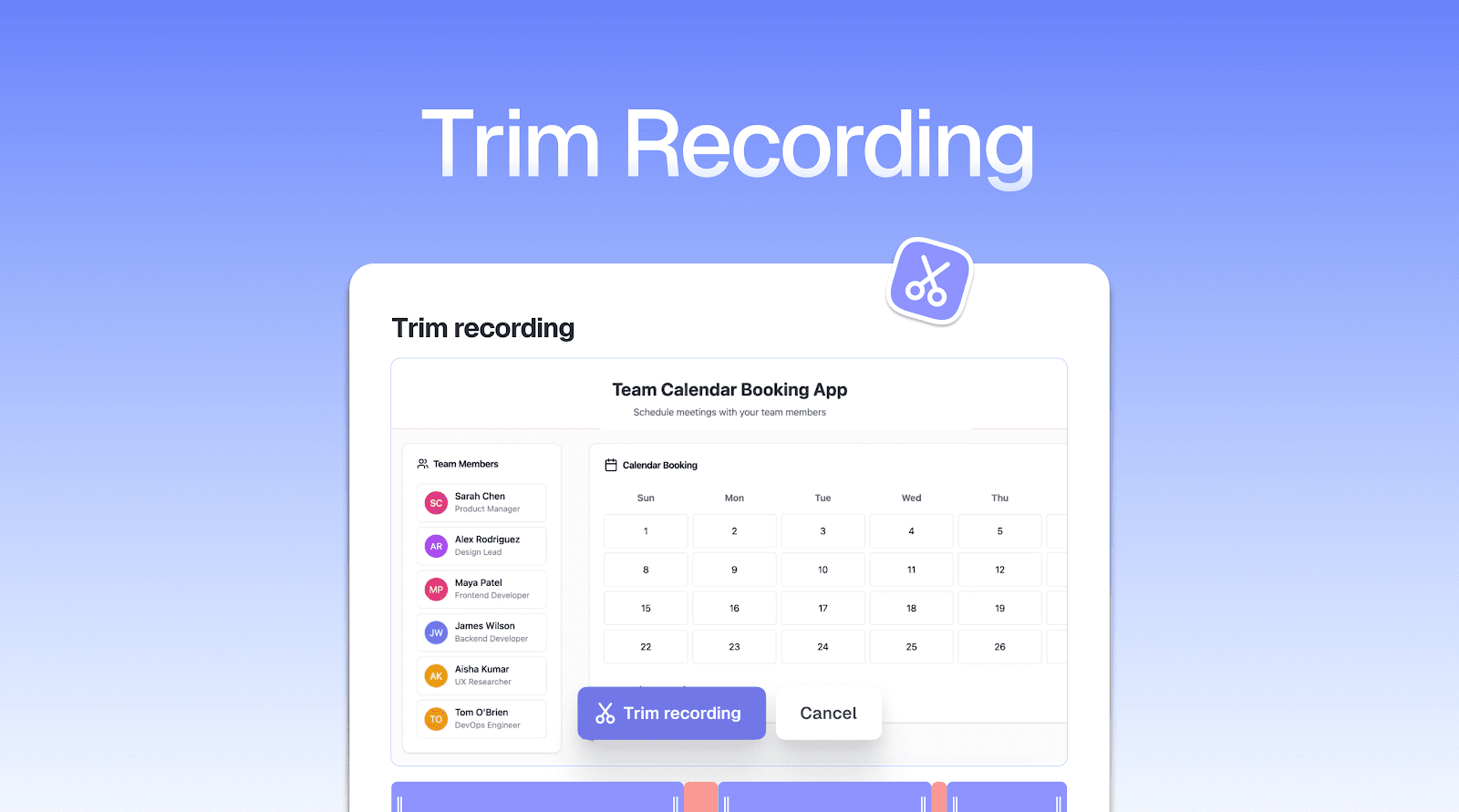
Using Trupeer, you can create this entire library from screen recordings of your actual software setup. Record once, then repurpose the content into different formats for different learning styles.
🚨 Fact Alert: The Y2K software updates in the late 1990s were one of the largest global implementation projects ever, involving millions of systems worldwide.
Step #8: Monitor, Support, and Iterate
Implementation doesn't end when everyone logs in for the first time. The most successful software adoptions include ongoing monitoring, support, and continuous improvement based on real usage patterns.
The first weeks after full rollout are the hypercare period: extra support, daily issue triage and close tracking of usage and errors. Agree up front what has to be true to exit it, such as ticket volumes back to normal and adoption targets met, rather than ending it on a fixed date.
Set up feedback loops and support systems
Create multiple ways for people to get help and share feedback. Some people prefer self-service options, others want to talk to a person, and some will only reach out if you proactively ask for their input.
Your support ecosystem might include:
Self-service help documentation and video libraries
Regular office hours where people can ask questions
Feedback surveys sent at strategic intervals
Usage analytics that reveal adoption patterns and pain points
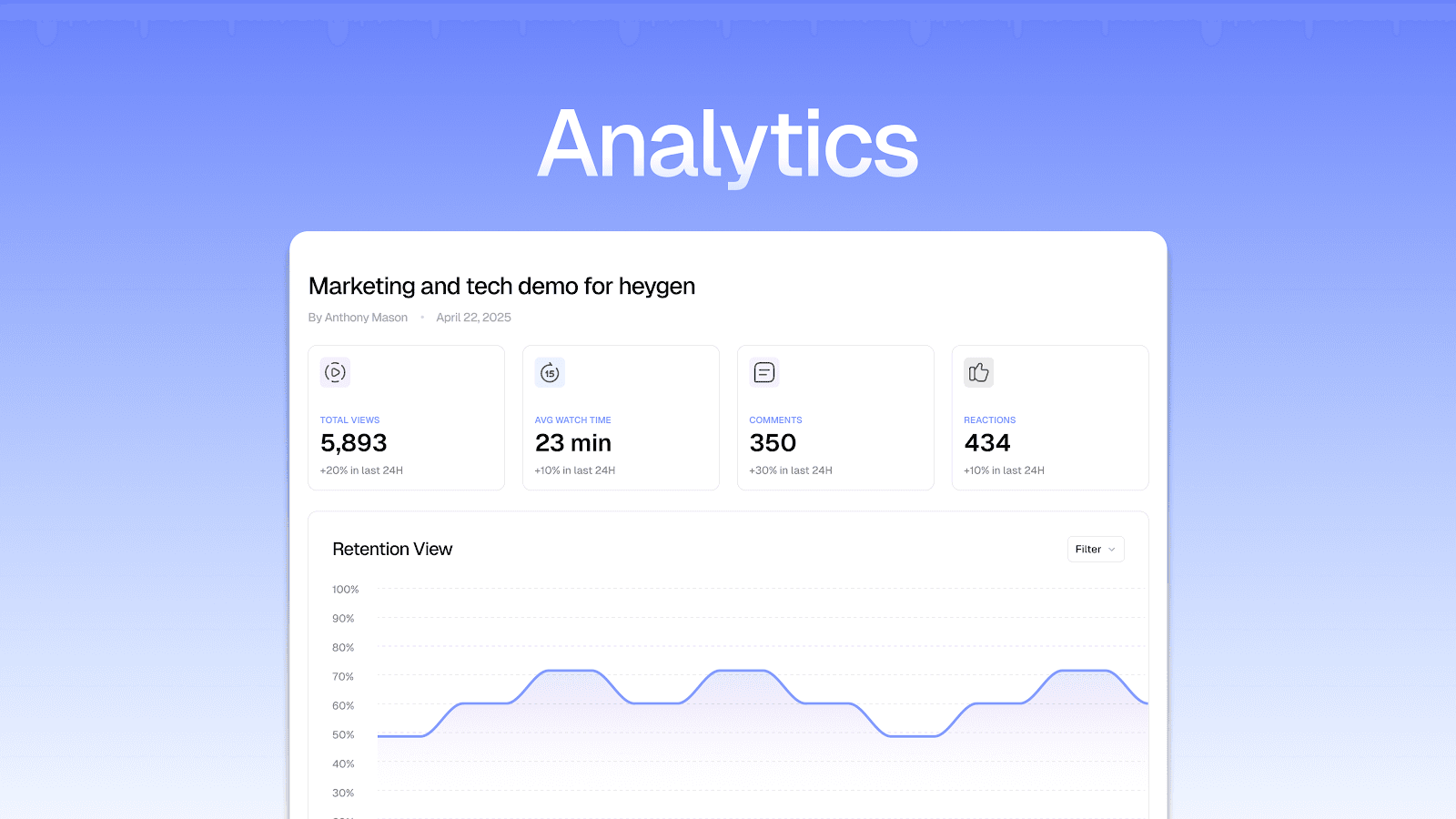
Trupeer’s analytics make this easier. You can see how long people stay on a video, where engagement drops, and which parts get the most reactions. That data helps you improve content, fix gaps, and offer help before someone even reaches out.
Hedrick Gardner, a law firm, successfully migrated 200+ employees across 5 locations from legacy systems to modern cloud applications using Trupeer. Their IT team created 100+ professional training videos in just weeks, saving 500+ hours of content creation time.
Jeremy DeHart, their IT Director, shares: “We had the smoothest IT migration ever in our company, thanks to Trupeer. The videos were consistent and engaging. The best part - we pulled the content off in weeks, without external help.”
Update training materials as software evolves
Software changes, processes improve, and new team members join. Your training materials need to evolve accordingly, or they'll become outdated obstacles that are no longer helpful.
Schedule regular reviews of your training content. Look at support ticket trends to identify areas where people consistently struggle, then create targeted training to address those gaps.
💡 Pro Tip: When you discover better ways to accomplish tasks or when the software interface changes, you can quickly update your training materials using Trupeer. Record the new process, and the AI will help you create updated documentation, voiceovers, and videos.
Refresh Training Materials Faster With Trupeer
Common Software Implementation Pitfalls
Most failed implementations fail for the same few reasons, and none of them are technical:
Treating go-live as the finish line. Value comes from adoption, which starts at go-live and needs support, measurement and follow-up.
Measuring logins instead of usage. People logging in isn’t the same as people using the system the way it was designed.
Training once, then never again. A single training week before launch is forgotten by the time users hit real edge cases.
Letting documentation go stale. When the software updates and the guides don’t, users stop trusting them and go back to asking colleagues.
Skipping the pilot. Rolling out to everyone at once means every problem hits every user at the same time.
Pitfalls specific to enterprise implementations
Underestimating integrations. Enterprise software rarely stands alone; every interface to another system adds design, testing and failure points.
Leaving data clean-up too late. Migrating messy data moves the mess into the new system and delays testing.
Late security and compliance review. Access, data residency and audit requirements discovered near go-live can stop a launch.
One-size-fits-all training across regions. Different roles, languages and local processes need different guidance.
No process owners. Without someone accountable for each process, design decisions stall and documentation goes stale.
Running the old system in parallel indefinitely. If the legacy tool stays available without a switch-off date, people keep using it.
Treating an ERP migration as a data project. Moving to a new ERP changes how people work, so plan ERP migration training alongside the data loads, not after them.
Consolidating too many systems at once. In an ERP consolidation, retiring several systems in one wave multiplies the change for every team. A phased ERP consolidation strategy, one region or business unit at a time, is easier to absorb.
Choosing Adoption Tools: In-App Guidance vs Process Documentation
Most enterprise implementations use one or more adoption tools. They solve different problems:
Tool type | What it does | Best for | Examples |
|---|---|---|---|
Digital adoption platforms (DAPs) | Add walkthroughs, tooltips and checklists inside the application | Guiding clicks in a single web application | WalkMe, Whatfix, Pendo |
Process documentation and training | Turn real workflows into SOPs, videos, process maps and a searchable knowledge base | Explaining end-to-end processes across several systems, in many languages | Trupeer |
Learning management systems (LMS) | Deliver and track formal courses and certifications | Compliance training and structured learning paths | Docebo, 360Learning |
Knowledge bases and wikis | Store written guidance and FAQs | Self-service answers for common questions | Confluence, SharePoint, Notion |
In-app guidance helps people find the right button. It doesn't explain why a process works the way it does, what to do with exceptions, or how a task continues in another system. Most enterprises pair in-app guidance with process documentation and training. For a closer comparison, see our digital adoption platform guide and WalkMe alternatives.
Software Implementation Plan Template
Use this structure as the backbone of your implementation plan. Adjust the timing to the size of the rollout.
Phase | Key tasks | Owner | Deliverable |
|---|---|---|---|
1. Goals and scope | Define outcomes and success metrics; agree scope and budget | Executive sponsor | Business case and success metrics |
2. Team and governance | Name the project team, process owners and super-users; set decision rights | Project manager | Team charter and RACI |
3. Plan | Build milestones, risks, communication and training plans | Project manager | Implementation plan |
4. Configure and integrate | Configure the software, build integrations, migrate data | IT and vendor or partner | Configured, integrated system |
5. Test | Run integration, user acceptance and security testing | Test lead with business users | Signed-off test results |
6. Train and document | Create role-based SOPs, videos and guides; train users and super-users | Training lead | Training library and knowledge base |
7. Pilot | Roll out to one team; gather feedback; fix issues | Project team | Pilot results and go/no-go decision |
8. Rollout and hypercare | Go live in waves; run hypercare; switch off the old system | Project team and support | Live system and hypercare exit |
9. Measure and improve | Track adoption metrics; update documentation after each release | Process owners | Adoption report and update cycle |
For hypercare planning, see what hypercare is and how to plan it.
Make Software Rollouts Less Painful With Trupeer
Software implementation is rarely about the tool itself. It’s about the people using it, the systems they rely on, and the clarity of the process behind it all. Get that part right, and the rollout moves faster, and with fewer surprises.
Trupeer handles the part of implementation that most often slips: the documentation and training people need to adopt the new system. Record a workflow once in the new software, and Trupeer turns it into a polished training video, a step-by-step SOP and a process map, translated into 120+ languages. Everything lives in a searchable knowledge base, and when the software updates, you edit the script or re-record one step instead of rebuilding the guide. Genpact used Trupeer to train 140,000 employees across 40 countries for its Workday rollout, delivering a 12-month programme in about three. See how it works for enterprise software rollouts.
Why wait? Try Trupeer for free today! ✅
Related reading
Frequently Asked Questions
What is software implementation?
Software implementation is the process of deploying a new software tool across a team or company. It includes setup, configuration, onboarding, training, and support to help users start using the software effectively. A good implementation plan focuses on reducing friction, guiding users through key workflows, and making sure the tool becomes part of their day-to-day routine.
What makes a software rollout successful?
A successful rollout happens when users adopt the software quickly and with minimal confusion. When teams know how the software solves their problems and feel confident using it, adoption becomes easier. Tools like Trupeer can speed up this process by helping you create walkthroughs, voice-guided tutorials, and written guides that cover key use cases.
How can AI help with software implementation?
AI speeds up content creation, reduces manual effort, and makes it easier to support different learning styles. With Trupeer, you can record your screen once and automatically generate a polished video, complete with a voiceover. This means you can roll out updates, train users, and support adoption without needing a full production team.
What is the difference between software implementation and deployment?
Deployment is the technical work of installing, configuring and releasing software into an environment. Implementation is the whole programme of bringing software into use, including planning, integration, testing, training, rollout and adoption. Deployment is one part of implementation.
How long does a software implementation take?
It depends on scope, the number of users and integrations, data migration and how much processes change. A simple SaaS tool for one team can go live in weeks, while enterprise systems such as ERP, CRM or HR platforms often take many months and roll out in phases.
How should ITSM and ticket resolution documentation be created during a software implementation?
Creating ITSM and ticket resolution documentation should be a deliberate step within the software implementation plan not an afterthought. As your IT team resolves issues during the pilot and full rollout phases, each resolution should be recorded and documented immediately using a tool like Trupeer. This builds a ready-made ticket resolution library that supports the go-live phase, reduces repeated escalations, and ensures any agent can handle common issues independently even in the earliest weeks of a new software deployment.
What should a software implementation plan include?
Goals and success metrics, scope, the team and governance, milestones, configuration and integration tasks, testing, training and documentation, a pilot, the rollout and hypercare plan, and how adoption will be measured after go-live.
How can SOPs and how-to documentation be generated directly from recorded implementation workflows?
One of the most efficient documentation approaches during software implementation is to record workflows as they happen and automatically generate SOPs from those recordings. With Trupeer, your team simply records the screen while walking through a configuration, onboarding flow, or support process and the AI instantly produces a structured how-to document with steps, screenshots, and narration. This means your implementation documentation builds itself in real time, without requiring a separate documentation team or adding extra effort to an already busy rollout schedule.
İlgili Bloglar